Yes! You can use AI to fill out Schedule D (Form 1040), Capital Gains and Losses

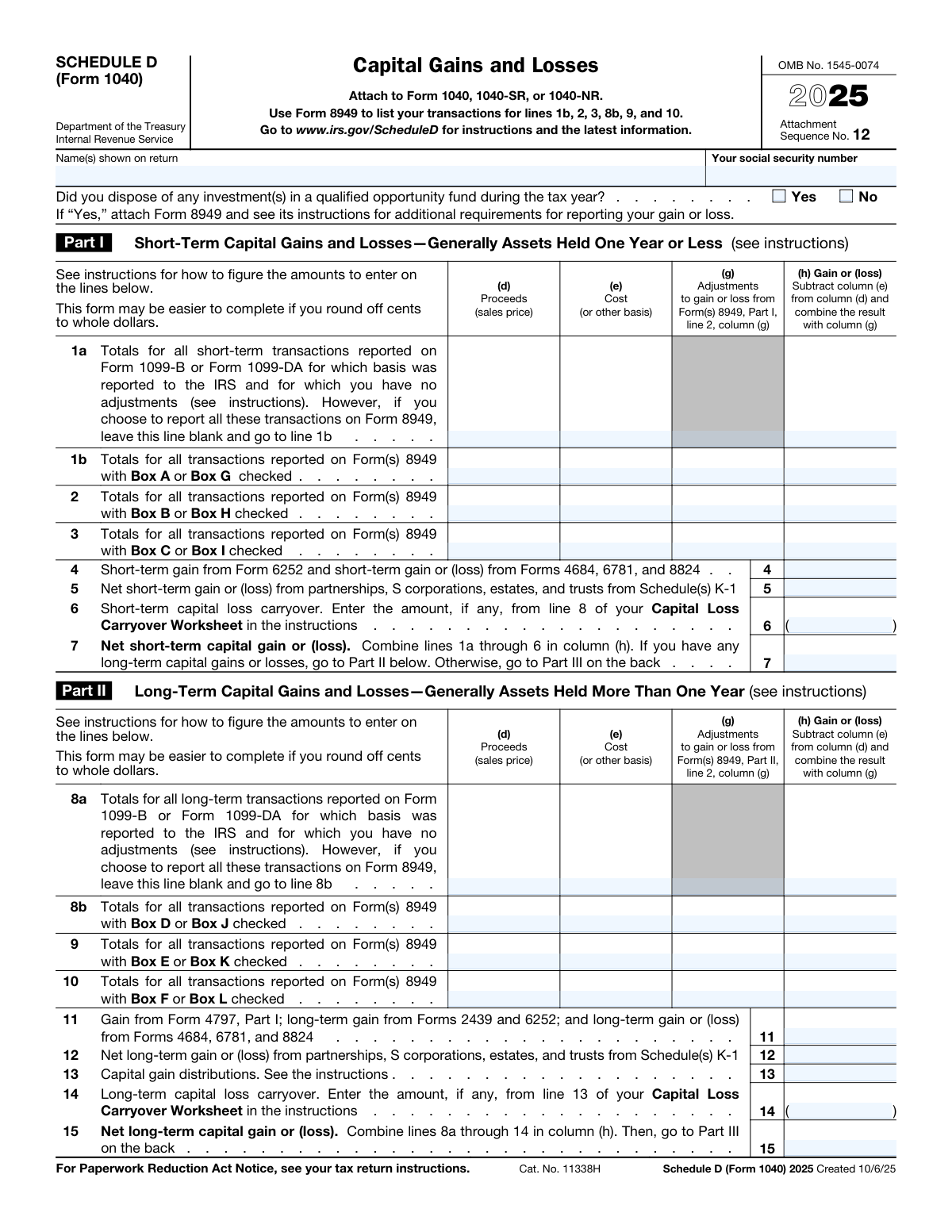
Schedule D (Form 1040) is an Internal Revenue Service (IRS) tax form used to report capital gains and losses from the sale of assets. Taxpayers use this form to reconcile amounts from Form 8949 and calculate the total net gain or loss, which is then transferred to their main tax return, Form 1040. Reporting these transactions accurately is crucial for determining the correct amount of tax owed, and today this form can be filled out quickly and accurately using AI-powered services like Instafill.ai, which can also convert non-fillable PDF versions into interactive fillable forms.
Our AI automatically handles information lookup, data retrieval, formatting, and form filling.
It takes less than a minute to fill out Schedule D (Form 1040) using our AI form filling.
Securely upload your data. Information is encrypted in transit and deleted immediately after the form is filled out.

Form specifications

Form name: Schedule D (Form 1040), Capital Gains and Losses
Number of pages: 2
Language: English
main-image

Instafill Demo: How to fill out PDF forms in seconds with AI

How to Fill Out Schedule D (Form 1040) Online for Free in 2026

Are you looking to fill out a SCHEDULE D (FORM 1040) form online quickly and accurately? Instafill.ai offers the #1 AI-powered PDF filling software of 2026, allowing you to complete your SCHEDULE D (FORM 1040) form in just 37 seconds or less.
Follow these steps to fill out your SCHEDULE D (FORM 1040) form online using Instafill.ai:
  1. 1 Navigate to Instafill.ai and upload or select the Schedule D (Form 1040).
  2. 2 Provide your personal information, such as your name and Social Security Number, as shown on your tax return.
  3. 3 Use the AI assistant to input details for your short-term capital gains and losses in Part I, referencing your Form 8949 and 1099-B.
  4. 4 Enter all long-term capital gains and losses in Part II, including information from partnerships, S corporations, and capital gain distributions.
  5. 5 Allow the system to automatically calculate the net short-term (Line 7) and long-term (Line 15) capital gains or losses based on your entries.
  6. 6 Complete Part III, the summary section, where the AI will help combine totals and guide you through the subsequent worksheets or calculations based on your results.
  7. 7 Review the completed form for accuracy, then download, print, or e-file it as an attachment to your Form 1040.

Our AI-powered system ensures each field is filled out correctly, reducing errors and saving you time.

Why Choose Instafill.ai for Your Fillable Schedule D (Form 1040) Form?

Speed

Complete your Schedule D (Form 1040) in as little as 37 seconds.

Up-to-Date

Always use the latest 2026 Schedule D (Form 1040) form version.

Cost-effective

No need to hire expensive lawyers.

Accuracy

Our AI performs 10 compliance checks to ensure your form is error-free.

Security

Your personal information is protected with bank-level encryption.

Frequently Asked Questions About Form Schedule D (Form 1040)

Schedule D is the tax form used to report gains and losses from the sale or exchange of capital assets, such as stocks, bonds, and real estate. It summarizes your transactions to calculate your net capital gain or loss for the year, which is then reported on your Form 1040.

You generally need to file Schedule D if you sold a capital asset, like stocks or property, during the tax year. You also file it to report capital gain distributions or a capital loss carryover from a previous year.

Part I is for reporting gains and losses on assets you held for one year or less, which are considered short-term. Part II is for assets held for more than one year, which are long-term and often qualify for a lower tax rate.

Yes, in most cases you must first report the details of each capital asset sale on Form 8949, Sales and Other Dispositions of Capital Assets. You then use the summary totals from Form 8949 to fill out the corresponding lines on Schedule D.

You will need any Forms 1099-B, 1099-S, or 1099-DA you received from your broker or other financial institution. You will also need your own records showing the purchase date and cost basis of the assets you sold.

A capital loss carryover is the amount of capital loss that exceeded the allowable deduction limit in a prior year. You can carry this unused loss forward to the current tax year and report it on line 6 (short-term) or line 14 (long-term) of Schedule D.

If your capital losses exceed your capital gains, you can deduct the difference as a loss on your tax return. This loss is limited to $3,000 per year, or $1,500 if you are married and filing a separate return.

Capital gain distributions, which are often paid by mutual funds and reported on Form 1099-DIV, are entered directly on line 13 of Schedule D. You do not need to list these on Form 8949.

Schedule D is not a standalone form; you must attach it, along with Form 8949, to your main tax return (Form 1040, 1040-SR, or 1040-NR). If you file electronically, your tax software will handle the submission process for you.

If you sold an investment in a qualified opportunity fund, you must check the 'Yes' box at the top of Schedule D. You are also required to attach Form 8949 and follow its specific instructions for reporting the transaction.

Yes, services like Instafill.ai use AI to accurately auto-fill form fields, which can save you time and reduce errors. This is especially useful for a complex form like Schedule D that requires information from other forms like Form 8949 and 1099-B.

You can upload the Schedule D PDF to the Instafill.ai platform, which will make it an interactive, fillable form. The AI can help you fill in your name, SSN, and transfer totals from other forms, simplifying the process.

If you have a flat, non-fillable PDF, you can use a service like Instafill.ai to instantly convert it into an interactive form. This allows you to type your information directly into the fields online, saving you from having to print and fill it out by hand.

Compliance Schedule D (Form 1040)
Validation Checks by Instafill.ai

1
Validates Social Security Number Format
This check ensures the 'Social Security number' field contains a valid nine-digit number, which can be formatted as XXX-XX-XXXX or XXXXXXXXX. The SSN is critical for correctly identifying the taxpayer with the IRS and linking the form to the main tax return. A failure in this validation will lead to rejection of the form, as the taxpayer cannot be uniquely identified.
2
Ensures Taxpayer Name is Provided
This validation verifies that the 'Name(s) on tax return' field is not empty. The taxpayer's name is a fundamental requirement for processing any tax form and associating it with the correct individual's tax account. If the name is missing, the form is considered incomplete and cannot be processed by the IRS.
3
Verifies Net Short-Term Capital Gain/Loss Calculation (Line 7)
This check confirms that the value in 'Net short-term capital gain or (loss) — line 7' is the correct sum of the gain/loss amounts from lines 1a, 1b, 2, 3, 4, 5, and 6. Accurate calculation is essential for determining the correct total tax liability. An incorrect sum will result in an erroneous tax assessment and may trigger an audit or require an amended return.
4
Verifies Net Long-Term Capital Gain/Loss Calculation (Line 15)
This validation ensures the value in 'Net long-term capital gain or (loss) - line 15' correctly sums the gain/loss amounts from lines 8a, 8b, 9, 10, 11, 12, 13, and 14. This total is a key component of the overall capital gain or loss calculation. A miscalculation here will lead to an incorrect value on line 16 and an inaccurate tax computation.
5
Verifies Summary Calculation on Line 16
This check validates that the amount on 'Line 16 — Combined total' is the precise sum of 'Net short-term capital gain or (loss) — line 7' and 'Net long-term capital gain or (loss) - line 15'. This line represents the taxpayer's total capital gain or loss for the year and is a critical figure for the main tax return. An error here directly impacts the final tax due or refund amount.
6
Validates Allowable Capital Loss on Line 21
This check performs two functions: it ensures 'Line 21' is only filled if 'Line 16' shows a loss, and it verifies the amount entered is the smaller of the absolute loss on line 16 or the statutory limit ($3,000, or $1,500 if married filing separately). This rule is crucial for correctly applying the annual limit on deductible capital losses. Failure to apply this logic correctly can lead to an improper deduction and an underpayment of tax.
7
Ensures Mutual Exclusivity of Lines 1a and 1b
This validation checks that if line 1b has values, line 1a is left blank, as per the form instructions. Taxpayers choose to either summarize transactions on line 1a or detail them on Form 8949 and report the totals on line 1b, but not both. Reporting on both lines would lead to double-counting short-term transactions and an incorrect tax calculation.
8
Ensures Mutual Exclusivity of Lines 8a and 8b
This validation confirms that if line 8b contains data, line 8a is blank, following the form's instructions for long-term transactions. Similar to the short-term section, this prevents the double-counting of transactions that are either summarized on 8a or detailed via Form 8949 and reported on 8b. An error would inflate or deflate the net long-term gain/loss.
9
Validates Logical Condition for Line 17
This check verifies that the 'Yes' box on 'Line 17' is checked only if both 'Line 15' and 'Line 16' contain positive values (gains). This question directs the taxpayer to the correct subsequent calculation path. An incorrect response will lead the taxpayer to skip necessary lines (18-21) or complete them in error, resulting in a flawed tax calculation.
10
Verifies Gain/Loss Calculation for Transaction Lines
This check ensures the value in each gain/loss column (e.g., 'Line 1a — Gain or (loss)') is correctly calculated by subtracting the 'Cost' column from the 'Proceeds' column and then combining the result with the 'Adjustments' column. This is the fundamental calculation for determining gain or loss on a set of transactions. An arithmetic error will cascade through the form, leading to an incorrect net gain or loss.
11
Validates Format of Capital Loss Carryover Amounts
This check ensures that any amounts entered in 'Line 6 - Short-term capital loss carryover' and 'Line 14 - Long-term capital loss carryover' are entered as negative numbers or in parentheses. These amounts represent losses and must be subtracted in the summary calculations. Incorrectly entering them as positive numbers would lead to a significant overstatement of gains and a substantial tax overpayment.
12
Ensures Qualified Opportunity Fund Question is Answered
This validation verifies that either the 'Yes' or 'No' box is checked for the question 'Did you dispose of any investment(s) in a qualified opportunity fund...'. This is a required question that determines if additional forms, like Form 8949, and specific reporting rules apply. Failing to answer this question makes the submission incomplete and may result in processing delays or IRS inquiries.
13
Validates Conditional Logic for Line 20
This check ensures the correct 'Yes' or 'No' box for Line 20 is selected based on the values of Line 18 and Line 19 and whether Form 4952 is being filed. This question is a critical gateway that directs the filer to either the 'Qualified Dividends and Capital Gain Tax Worksheet' or the 'Schedule D Tax Worksheet'. An incorrect selection leads to using the wrong worksheet, which will almost certainly result in an incorrect tax calculation.
14
Checks for Inconsistent Part III Navigation
This validation cross-references the value of Line 16 with the path taken in Part III. For example, if Line 16 is a loss, it verifies that lines 17-20 are skipped and line 21 is completed. This ensures the filer follows the complex instructions correctly, preventing them from completing irrelevant sections or skipping required ones, which would invalidate the tax calculation.

Common Mistakes in Completing Schedule D (Form 1040)

Misclassifying Short-Term vs. Long-Term Assets

Taxpayers often confuse the holding period, incorrectly reporting an asset held for one year or less as long-term, or vice versa. This mistake typically happens when calculating the holding period around the one-year mark. The consequence is an incorrect tax calculation, as long-term capital gains are taxed at a preferential rate, and misclassification can lead to over or underpayment of tax. To avoid this, meticulously verify the purchase and sale dates for each asset; the holding period is 'more than one year' to qualify as long-term.

Incorrectly Calculating Cost Basis

Filers frequently use the simple purchase price as the cost basis, forgetting to include acquisition costs like commissions or fees. They also often fail to make required adjustments for events like wash sales, stock splits, or inherited property rules, which have specific basis calculations. This leads to an inaccurate gain or loss, resulting in an incorrect tax liability and potential IRS notices. Always start with the original cost and add all transaction fees, then make any necessary adjustments as required by tax law.

Improper Use of Summary Lines 1a and 8a

A common point of confusion is using the summary lines 1a and 8a for transactions that require adjustments or for which the basis was not reported to the IRS on Form 1099-B. These lines are strictly for simple transactions with no adjustments. Using them incorrectly results in an incomplete return because the required details are missing. To prevent this, use lines 1a and 8a only if all your transactions meet the criteria; otherwise, all transactions must be detailed on Form 8949 and summarized on the other lines (1b, 2, 3, 8b, etc.).

Failing to Attach Form 8949

Many filers mistakenly believe they can report all their transactions directly on Schedule D without the supporting Form 8949. Schedule D is a summary form, and the IRS requires the transaction-level detail from Form 8949 for almost all sales and dispositions. Omitting Form 8949 will cause the IRS to consider the capital gains unsubstantiated, likely leading to a tax notice, penalties, and interest. Ensure you complete and attach Form 8949 for all transactions that are not eligible for the summary lines 1a or 8a.

Forgetting or Miscalculating Capital Loss Carryovers

Taxpayers often forget to carry over unused capital losses from a prior tax year. This happens when they misplace the previous year's return or are unaware that losses exceeding the annual $3,000 limit can be used in future years. The consequence is missing a valuable deduction, leading to an overpayment of taxes. To avoid this, review your prior-year Schedule D and Capital Loss Carryover Worksheet to find the correct carryover amounts for lines 6 (short-term) and 14 (long-term).

Exceeding the Annual Capital Loss Deduction Limit

On line 21, filers with a net capital loss sometimes enter their total loss amount, even if it exceeds the annual limit ($3,000 for most filers, or $1,500 if married filing separately). The form's instructions are specific, but this is a frequent error. This results in claiming an improper deduction, which the IRS will automatically correct, leading to a bill for the additional tax, plus interest and penalties. Always enter the smaller of your net loss on line 16 or the applicable annual limit on line 21.

Making Navigational Errors in Part III

Part III contains complex 'if-then' logic that directs the filer to different lines or worksheets based on their answers to a series of questions (e.g., lines 17, 20, 22). It is easy to follow the wrong path, causing you to use the incorrect tax calculation method (e.g., the Schedule D Tax Worksheet vs. the Qualified Dividends and Capital Gain Tax Worksheet). This error can significantly alter your final tax liability. To avoid this, read each step-by-step instruction in Part III carefully before proceeding to the next line or worksheet.

Mismatching Name or SSN with Form 1040

A simple but common mistake is entering a name or Social Security Number on Schedule D that does not exactly match the information on the main Form 1040. This can happen due to a typo or using a nickname. This discrepancy can cause IRS processing delays as their automated systems may fail to link the schedule to the correct tax return. To prevent this, proofread the header information on every attached schedule to ensure it is identical to your Form 1040. AI-powered tools like Instafill.ai can prevent this by populating consistent data across all forms in a return.

Incorrectly Reporting Flow-Through Gains/Losses

Filers often receive capital gain/loss information from partnerships, S-corporations, or trusts via a Schedule K-1 but are unsure where to report it. They may omit it entirely or incorrectly lump it in with their personal stock sales on Form 8949. This leads to an inaccurate tax return because these items have specific reporting lines. To avoid this, carefully transfer the amounts from your K-1s and other forms (like Form 6252 or 4797) to the designated lines on Schedule D (lines 4, 5, 11, and 12).

Mathematical Errors in Totals

With multiple columns and rows to sum, simple arithmetic errors are common when calculating the totals for column (h) or the net amounts on lines 7, 15, and 16. A single miscalculation can throw off the entire return, affecting the final tax due or refund. This often happens during manual data entry and calculation. To avoid this, double-check all your calculations, or use tax software to eliminate manual math errors. AI-powered form fillers like Instafill.ai can also perform these calculations automatically, ensuring accuracy.
Saved over 80 hours a year

“I was never sure if my IRS forms like W-9 were filled correctly. Now, I can complete the forms accurately without any external help.”

Kevin Martin Green

Your data stays secure with advanced protection from Instafill and our subprocessors

Robust compliance program

Transparent business model

You’re not the product. You always know where your data is and what it is processed for.

ISO 27001, HIPAA, and GDPR

Our subprocesses adhere to multiple compliance standards, including but not limited to ISO 27001, HIPAA, and GDPR.

Security & privacy by design

We consider security and privacy from the initial design phase of any new service or functionality. It’s not an afterthought, it’s built-in, including support for two-factor authentication (2FA) to further protect your account.

Fill out Schedule D (Form 1040) with Instafill.ai

Worried about filling PDFs wrong? Instafill securely fills schedule-d-form-1040-capital-gains-and-losses forms, ensuring each field is accurate.