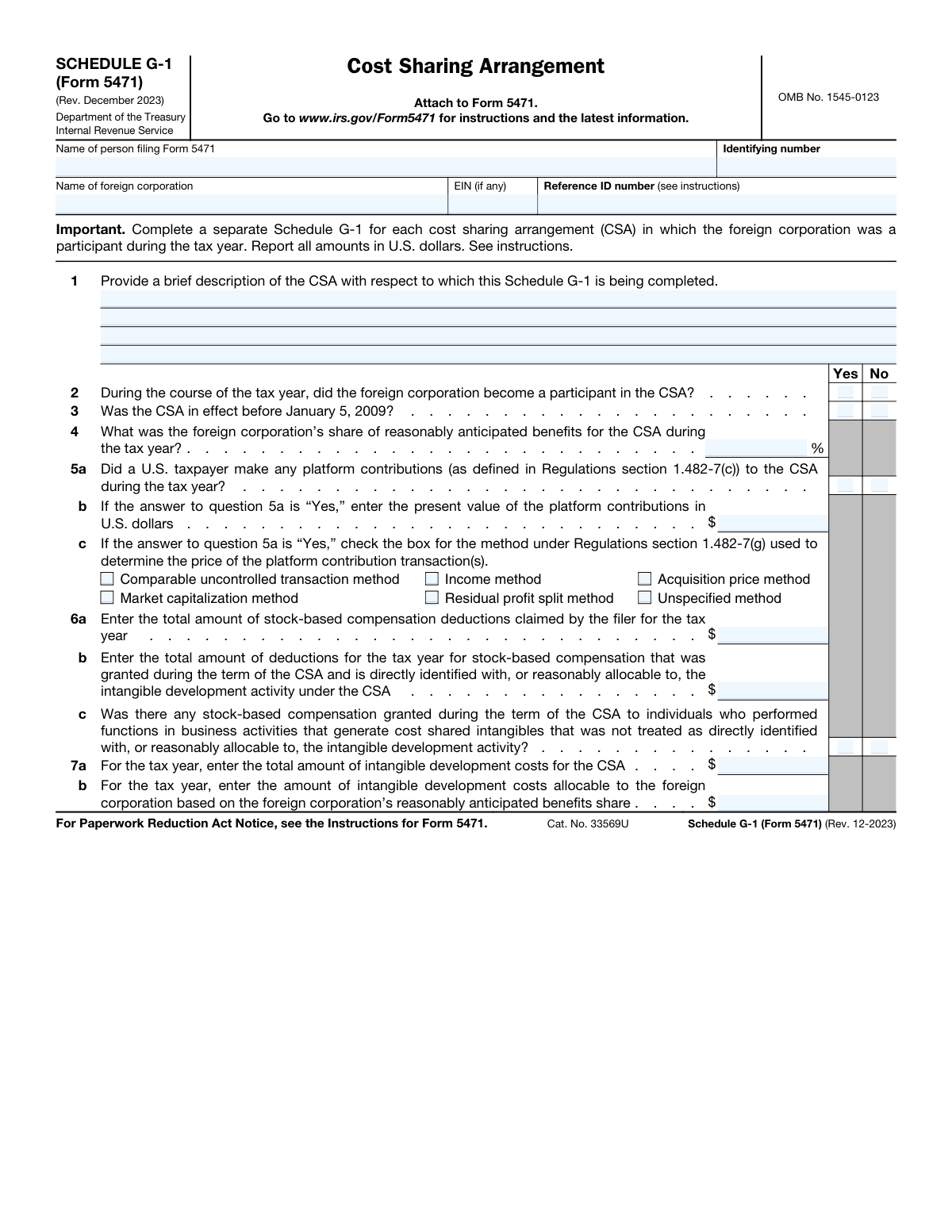
Yes! You can use AI to fill out Schedule G-1 (Form 5471), Cost Sharing Arrangement

Schedule G-1 is a supplement to Form 5471, Information Return of U.S. Persons With Respect to Certain Foreign Corporations, and is used to provide detailed information about a foreign corporation's involvement in a cost sharing arrangement (CSA). It requires reporting on intangible development costs, platform contributions, and the allocation of benefits among participants to ensure compliance with U.S. transfer pricing regulations. Today, this form can be filled out quickly and accurately using AI-powered services like Instafill.ai, which can also convert non-fillable PDF versions into interactive fillable forms.
Our AI automatically handles information lookup, data retrieval, formatting, and form filling.
It takes less than a minute to fill out Schedule G-1 (Form 5471) using our AI form filling.
Securely upload your data. Information is encrypted in transit and deleted immediately after the form is filled out.

Form specifications

Form name: Schedule G-1 (Form 5471), Cost Sharing Arrangement
Number of fields: 30
Number of pages: 1
Language: English
main-image

Instafill Demo: How to fill out PDF forms in seconds with AI

How to Fill Out Schedule G-1 (Form 5471) Online for Free in 2026

Are you looking to fill out a SCHEDULE G-1 (FORM 5471) form online quickly and accurately? Instafill.ai offers the #1 AI-powered PDF filling software of 2026, allowing you to complete your SCHEDULE G-1 (FORM 5471) form in just 37 seconds or less.
Follow these steps to fill out your SCHEDULE G-1 (FORM 5471) form online using Instafill.ai:
  1. 1 Navigate to Instafill.ai and upload or select Schedule G-1 (Form 5471).
  2. 2 Provide the identifying information for the person filing Form 5471 and the foreign corporation, including names, identifying numbers, and any reference ID.
  3. 3 Enter a brief description of the Cost Sharing Arrangement (CSA) and answer the initial questions regarding the corporation's participation and the CSA's effective date.
  4. 4 Input the foreign corporation's share of reasonably anticipated benefits and provide details about any platform contributions made by a U.S. taxpayer.
  5. 5 Fill in the required financial data related to stock-based compensation and intangible development costs for the tax year.
  6. 6 Review all the information auto-populated by the AI to ensure accuracy and completeness across all sections.
  7. 7 Download the completed Schedule G-1 to attach to your main Form 5471 filing.

Our AI-powered system ensures each field is filled out correctly, reducing errors and saving you time.

Why Choose Instafill.ai for Your Fillable Schedule G-1 (Form 5471) Form?

Speed

Complete your Schedule G-1 (Form 5471) in as little as 37 seconds.

Up-to-Date

Always use the latest 2026 Schedule G-1 (Form 5471) form version.

Cost-effective

No need to hire expensive lawyers.

Accuracy

Our AI performs 10 compliance checks to ensure your form is error-free.

Security

Your personal information is protected with bank-level encryption.

Frequently Asked Questions About Form Schedule G-1 (Form 5471)

Schedule G-1 is used to report detailed information about a cost sharing arrangement (CSA) in which a foreign corporation participated. It is an attachment to Form 5471, Information Return of U.S. Persons With Respect to Certain Foreign Corporations.

You must file Schedule G-1 if you are filing Form 5471 for a foreign corporation that was a participant in a cost sharing arrangement (CSA) at any time during the tax year.

You must complete and attach a separate Schedule G-1 for each individual cost sharing arrangement that the foreign corporation participated in during the tax year.

Schedule G-1 is not a standalone form and cannot be filed by itself. It must be attached to your completed Form 5471 and filed along with your main income tax return.

In Question 1, you should provide a brief, plain-language description of the cost sharing arrangement. This includes the nature of the arrangement and the intangible assets being developed.

A platform contribution is any resource, capability, or right that a participant already owns and contributes to the CSA that is expected to be beneficial for the intangible development activity. This is defined in detail under Regulations section 1.482-7(c).

All monetary amounts reported on Schedule G-1 must be in U.S. dollars. Refer to the main Form 5471 instructions for specific rules on currency translation.

This is the foreign corporation's estimated share of the future income or cost savings it expects to gain from the intangible assets developed under the CSA. This is reported as a percentage.

You will need the details of the cost sharing agreement, the foreign corporation's identifying information, financial data on intangible development costs, and records of any platform contributions or stock-based compensation.

Yes, AI-powered services like Instafill.ai can help you complete this form more efficiently. They can auto-fill form fields accurately using your existing data, saving time and reducing the risk of manual errors.

To use Instafill.ai, you would upload the Schedule G-1 PDF to their platform. The AI will make the form fillable online, and you can use its features to quickly and accurately populate the required information.

If you have a non-fillable PDF, you can use a tool like Instafill.ai. It can convert flat, non-interactive PDFs into fillable forms, allowing you to type your answers directly into the document.

The Reference ID number is a unique identifier for the foreign corporation, as specified in the instructions for Form 5471. Refer to the official IRS instructions to determine if you need to provide one and how to format it.

Compliance Schedule G-1 (Form 5471)
Validation Checks by Instafill.ai

1
Filer Identifying Number Format Validation
This check verifies that the 'Identifying number' for the person filing the form is in a valid format, such as a Social Security Number (SSN), Individual Taxpayer Identification Number (ITIN), or Employer Identification Number (EIN). This is crucial for correctly identifying the taxpayer with the IRS. A failure would prevent the form from being correctly associated with the filer's tax account, leading to processing delays or rejection.
2
Foreign Corporation EIN Format Validation
This validation ensures that if a Foreign Corporation EIN is provided, it adheres to the standard XX-XXXXXXX format. While the field is optional, providing an incorrectly formatted number can cause data mismatches and processing errors. This check maintains data integrity for optional but important identifiers.
3
Mandatory Header Information Completeness
This check ensures that the 'Name of person filing Form 5471', 'Identifying number', and 'Name of foreign corporation' fields are all filled out. These fields are fundamental for identifying the filer and the subject corporation of the schedule. An incomplete header would render the entire form unprocessable as it cannot be attributed to the correct entities.
4
CSA Description Presence
Validates that the 'brief description of the CSA' in Question 1 is not empty. This description provides essential context for the financial data reported on the rest of the form. Without this information, a tax examiner cannot properly understand the nature of the arrangement, potentially triggering further inquiries or audits.
5
Exclusive Selection for Yes/No Questions
For each Yes/No question on the form (Questions 2, 3, 5a, and 6c), this check ensures that exactly one option ('Yes' or 'No') is selected. It prevents ambiguous or contradictory answers where both or neither option is chosen. A failure in this validation would make the filer's response to a question unclear and require correction.
6
Question 4 Percentage Value Range
This validation confirms that the value entered for the 'foreign corporation’s share of reasonably anticipated benefits' in Question 4 is a numeric value between 0 and 100, inclusive. A value outside this range is logically impossible for a percentage share. This prevents data entry errors and ensures the mathematical integrity of related calculations on the form.
7
Conditional Requirement for Question 5b
This check enforces a dependency: if the answer to Question 5a is 'Yes' (indicating platform contributions were made), then Question 5b ('present value of the platform contributions') must contain a non-negative dollar amount. Conversely, if 5a is 'No', 5b should be empty or zero. This ensures that financial data is provided if, and only if, it is applicable, preventing incomplete or contradictory submissions.
8
Conditional Requirement for Question 5c
This validation ensures that if the answer to Question 5a is 'Yes', at least one valuation method checkbox in Question 5c must be selected. This is critical for explaining how the platform contribution value in 5b was determined, as required by regulations. Failure to select a method when required would result in an incomplete filing and likely require an amendment.
9
Logical Consistency of Stock-Based Compensation
This check verifies that the amount in Question 6b (deductions allocable to the intangible development activity) is less than or equal to the total amount in Question 6a (total stock-based compensation deductions). Since 6b represents a subset of 6a, it cannot be larger. This validation catches logical errors in financial reporting and ensures the data is coherent.
10
Logical Consistency of Intangible Development Costs
This validation ensures that the amount in Question 7b (costs allocable to the foreign corporation) is less than or equal to the total costs reported in Question 7a. The allocable portion cannot exceed the total. This check prevents basic mathematical and logical errors in reporting cost allocations.
11
Cross-Field Calculation for Allocable Costs
This is a high-precision check that verifies the value in Question 7b is the correct calculated amount based on other fields. It confirms that the 'intangible development costs allocable to the foreign corporation' (7b) equals the 'total amount of intangible development costs' (7a) multiplied by the 'foreign corporation’s share of reasonably anticipated benefits' percentage (Question 4). A mismatch indicates a significant calculation error that misrepresents the cost sharing arrangement.
12
Non-Negative Dollar Amounts
This check ensures that all fields representing U.S. dollar amounts (Questions 5b, 6a, 6b, 7a, and 7b) contain non-negative values. It is not possible to have negative costs, deductions, or contributions in this context. This rule prevents invalid data entry that would corrupt financial calculations and reporting.

Common Mistakes in Completing Schedule G-1 (Form 5471)

Incomplete or Inconsistent Conditional Answers

This error occurs when a filer answers a primary question (e.g., 5a) but fails to provide the required follow-up information (5b and 5c), or provides it when not required. For instance, checking 'Yes' to platform contributions in 5a but leaving the value in 5b and method in 5c blank creates an incomplete record. This leads to an incomplete filing, triggering IRS notices and processing delays. To avoid this, carefully review all dependent questions; AI-powered tools like Instafill.ai can automatically enforce these rules, ensuring all necessary fields are completed based on your answers.

Reporting Amounts in Foreign Currency

The form explicitly requires all monetary amounts to be reported in U.S. dollars. Filers dealing with international transactions may forget to perform the necessary currency conversion, leading to inaccurate financial data and significant reporting errors. This can result in compliance issues and penalties. Always convert all financial figures to U.S. dollars using the appropriate exchange rate for the tax year before entering them on the form.

Calculation Errors Between Related Fields

The form contains related financial data where one field is a function of others, such as the relationship between total intangible development costs (Q7a), the benefit share percentage (Q4), and the allocable costs (Q7b). Manual calculation errors are common and create logical inconsistencies that are easily flagged by the IRS. These errors suggest a lack of diligence and can trigger further scrutiny. Use a calculator and double-check your math, or use a tool that can perform these calculations automatically to ensure accuracy.

Incorrectly Consolidating Multiple CSAs

The instructions state that a separate Schedule G-1 must be completed for each distinct Cost Sharing Arrangement (CSA). Filers sometimes mistakenly consolidate information from multiple CSAs onto a single form to save time. This is a significant procedural error that violates filing requirements and can lead to the rejection of the form and penalties for non-compliance. Ensure you identify each separate CSA and prepare a dedicated Schedule G-1 for each one.

Providing a Vague or Non-Descriptive CSA Summary

Question 1 asks for a 'brief description' of the CSA, but filers may provide a response that is too generic, uses internal jargon, or is otherwise uninformative. The purpose of this field is to give the IRS a clear, plain-language understanding of the arrangement. A poor description can raise questions and potentially trigger an audit. To avoid this, clearly state the nature of the intangible development and the parties involved without being overly technical.

Improperly Formatting the Benefits Share Percentage

Question 4 asks for the foreign corporation's share of benefits as a percentage. A common mistake is entering the value as a decimal (e.g., entering '0.25' for 25%) or omitting the value entirely. This simple formatting error can drastically misrepresent the cost-sharing allocation and lead to incorrect tax calculations. Always enter the number as a whole percentage value (e.g., '25') as indicated by the '%' symbol on the form.

Confusing Total vs. Allocable Stock Compensation

Questions 6a and 6b ask for two distinct figures: the total stock-based compensation deductions and the portion of that compensation allocable to the CSA's intangible development activity. Filers often get these confused, entering the same number in both fields or transposing them. This indicates a misunderstanding of cost allocation principles and results in an inaccurate filing. Carefully review the definitions for each field and ensure the amount in 6b is a correctly calculated subset of the costs relevant to the CSA.

Omitting or Using Incorrect Identifying Numbers

The header section requires several identifiers, including the filer's identifying number, the foreign corporation's name, and a Reference ID number. People may make typos, use an outdated EIN, or assume the Reference ID is optional when it's required for tracking by the IRS. These errors can cause the form to be processed incorrectly or rejected, leading to correspondence and delays. Always verify all names and numbers against source documents before submission.

Misinterpreting the Question on Unallocated Compensation

Question 6c is a complex, negatively phrased question about stock-based compensation that was *not* treated as allocable to the intangible development activity. Filers can easily misread the phrasing or the specific conditions, leading them to check the wrong box. An incorrect answer here could misrepresent the company's compensation practices and attract unwanted IRS attention. Carefully break down the question sentence by sentence to ensure you understand what is being asked before selecting 'Yes' or 'No'.

Submitting a Poorly Filled or Handwritten PDF

This form is often available as a non-fillable PDF, leading people to print it and fill it out by hand. This can result in illegible handwriting, misaligned entries, and calculation errors, increasing the risk of processing delays or rejection by the IRS. To avoid this, use a tool like Instafill.ai, which can convert a flat PDF into an interactive, fillable form. This ensures all entries are neat, legible, and correctly placed, and allows for automated validation to prevent common mistakes.
Saved over 80 hours a year

“I was never sure if my IRS forms like W-9 were filled correctly. Now, I can complete the forms accurately without any external help.”

Kevin Martin Green

Your data stays secure with advanced protection from Instafill and our subprocessors

Robust compliance program

Transparent business model

You’re not the product. You always know where your data is and what it is processed for.

ISO 27001, HIPAA, and GDPR

Our subprocesses adhere to multiple compliance standards, including but not limited to ISO 27001, HIPAA, and GDPR.

Security & privacy by design

We consider security and privacy from the initial design phase of any new service or functionality. It’s not an afterthought, it’s built-in, including support for two-factor authentication (2FA) to further protect your account.

Fill out Schedule G-1 (Form 5471) with Instafill.ai

Worried about filling PDFs wrong? Instafill securely fills schedule-g-1-form-5471-cost-sharing-arrangement forms, ensuring each field is accurate.