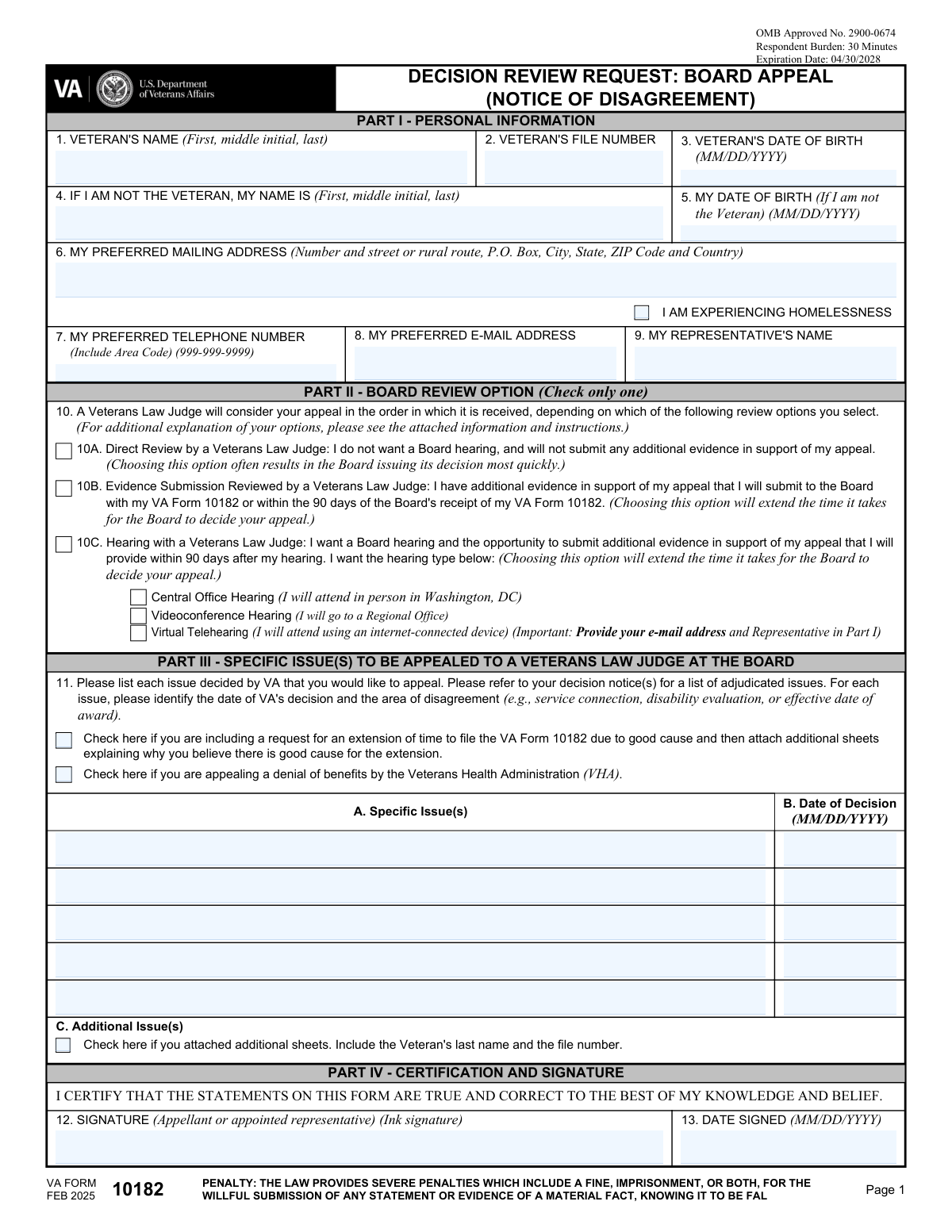
Yes! You can use AI to fill out VA Form 10182, Decision Review Request: Board Appeal (Notice of Disagreement)

VA Form 10182, also known as the Decision Review Request: Board Appeal (Notice of Disagreement), is a crucial document for veterans who wish to appeal a VA decision directly to the Board of Veterans' Appeals. By filing this form, a veteran or their representative can choose one of three review lanes: Direct Review, Evidence Submission, or a Hearing with a Veterans Law Judge. This form is the official way to initiate the Board Appeal process, ensuring a veteran's case is re-examined at a higher level. Today, this form can be filled out quickly and accurately using AI-powered services like Instafill.ai, which can also convert non-fillable PDF versions into interactive fillable forms.
Our AI automatically handles information lookup, data retrieval, formatting, and form filling.
It takes less than a minute to fill out VA Form 10182 using our AI form filling.
Securely upload your data. Information is encrypted in transit and deleted immediately after the form is filled out.

Form specifications

Form name: VA Form 10182, Decision Review Request: Board Appeal (Notice of Disagreement)
Number of fields: 31
Number of pages: 3
Language: English
main-image

Instafill Demo: How to fill out PDF forms in seconds with AI

How to Fill Out VA Form 10182 Online for Free in 2026

Are you looking to fill out a VA FORM 10182 form online quickly and accurately? Instafill.ai offers the #1 AI-powered PDF filling software of 2026, allowing you to complete your VA FORM 10182 form in just 37 seconds or less.
Follow these steps to fill out your VA FORM 10182 form online using Instafill.ai:
  1. 1 Navigate to Instafill.ai and upload or select VA Form 10182.
  2. 2 Provide the veteran's identifying information, including full name, VA file number, and date of birth. If you are the appellant but not the veteran, enter your details as well.
  3. 3 Enter your current contact information, including mailing address, phone number, and email. Indicate if you are experiencing homelessness.
  4. 4 Select your desired Board Review lane: Direct Review (10A), Evidence Submission (10B), or a Hearing (10C). If you choose a hearing, specify the type (Central Office, Videoconference, or Virtual Telehearing).
  5. 5 Clearly list each specific issue from the VA's decision that you are appealing. For each issue, provide the date of the decision you are disagreeing with.
  6. 6 Carefully review all the information you've entered for accuracy. Use the AI-powered review tools to check for completeness, then electronically sign and date the form.
  7. 7 Download the completed VA Form 10182 and submit it to the VA according to the official instructions, ensuring it is filed within the required timeframe.

Our AI-powered system ensures each field is filled out correctly, reducing errors and saving you time.

Why Choose Instafill.ai for Your Fillable VA Form 10182 Form?

Speed

Complete your VA Form 10182 in as little as 37 seconds.

Up-to-Date

Always use the latest 2026 VA Form 10182 form version.

Cost-effective

No need to hire expensive lawyers.

Accuracy

Our AI performs 10 compliance checks to ensure your form is error-free.

Security

Your personal information is protected with bank-level encryption.

Frequently Asked Questions About Form VA Form 10182

This form, VA Form 10182, is used to appeal a VA decision you disagree with directly to the Board of Veterans' Appeals. It is the official way to start the Board review process for your claim.

Any veteran or claimant (appellant) who has received a VA decision and wishes to appeal it to a Veterans Law Judge at the Board of Veterans' Appeals should use this form.

Option 10A (Direct Review) is for a judge to decide based only on the existing record. Option 10B (Evidence Submission) lets you submit new evidence for the judge to review. Option 10C (Hearing) allows you to have a hearing with the judge and submit new evidence.

You can choose a 'Central Office Hearing' in person in Washington, D.C., a 'Videoconference Hearing' at a local VA regional office, or a 'Virtual Telehearing' from your own computer or mobile device.

Briefly identify the issue, such as 'service connection for back condition' or 'disability rating for hearing loss,' and provide the date of the VA decision letter you are appealing for that specific issue.

You can attach additional sheets with the other issues. Be sure to check the box in Section C (Field 13) and write the veteran's name and file number on every extra page you attach.

This is your unique identification number assigned by the VA, which you can find on any previous correspondence or decision letters you have received from the VA.

You must enter the veteran's full name and file number in the first section. Then, enter your own name and date of birth in the section titled 'Appellant (If not Veteran)'.

You should check the box labeled 'I AM EXPERIENCING HOMELESSNESS' in the Contact Information section. This can help the VA prioritize the processing of your appeal.

Yes, you can request an extension by checking the 'Request extension' box. You must attach a separate page explaining the 'good cause' or valid reason why you need more time to file.

Yes, services like Instafill.ai use AI to accurately auto-fill form fields from your saved profile, which can save time, reduce errors, and make the process faster.

Simply upload the form to the Instafill.ai platform. You can then use your saved profile to instantly populate your personal information, contact details, and other required fields, then review and complete the rest of the form.

If you have a non-fillable or 'flat' PDF, you can upload it to a service like Instafill.ai. The platform can convert it into an interactive, fillable form that you can easily complete on your computer.

The form must be signed and dated by the appellant (the person appealing) or their accredited representative. An electronic signature may be acceptable depending on the submission method.

Compliance VA Form 10182
Validation Checks by Instafill.ai

1
Exclusive Board Review Option Selection
Validates that the user has selected exactly one option from the Board Review section (10A, 10B, or 10C). These options are mutually exclusive, and selecting zero or more than one creates ambiguity about the desired appeal path. A failed validation should prevent submission and prompt the user to choose one and only one option.
2
Conditional Board Hearing Type Selection
This validation enforces the rule that a hearing type (Central Office, Videoconference, or Virtual Telehearing) can only be selected if option '10C. Hearing with a Veterans Law Judge' is checked. If 10A or 10B is selected, these sub-options must be disabled or cleared. This prevents contradictory requests and ensures the form's internal logic is sound.
3
At Least One Appealable Issue Required
This validation ensures that at least one of the 'Specific Issue(s) to Appeal' fields has been filled out, along with its corresponding decision date. An appeal form without any specified issues is incomplete and cannot be processed. The system should prevent submission and alert the user that they must list at least one issue they are appealing.
4
Paired Entry for Appeal Issue and Decision Date
This check ensures that for each row in the 'Specific Issue(s) to Appeal' section, if an issue description is provided, the corresponding 'Date of Decision' field must also be completed. The date of the decision is essential for determining the timeliness of the appeal. The validation should apply to all issue rows and prevent submission if an issue is listed without its decision date.
5
Signature and Date Signed Are Mandatory
Verifies that the 'Signature' and 'Date Signed' fields are both completed before submission. The signature legally certifies the information on the form, and the date establishes the official filing date of the appeal. An unsigned or undated form is legally invalid and would be rejected by the VA.
6
Valid and Plausible Veteran's Date of Birth
Ensures the 'Veteran's Date of Birth' is a valid date in a recognized format (e.g., MM/DD/YYYY). The validation should also check that the date is in the past and represents a plausible age for a veteran (e.g., the person is over 17 years old). An invalid or implausible date could lead to processing delays or rejection.
7
Logical and Valid Signature Date
This check validates that the 'Date Signed' is a valid date, is not in the future, and is logically consistent. It should be on or after the latest 'Date of Decision' listed in the issues section, as one cannot sign an appeal for a decision that has not yet been made. This prevents logical impossibilities and ensures the timeline of events is correct.
8
Email Required for Virtual Telehearing
Checks that if the 'Virtual Telehearing' option is selected, the 'Preferred E-mail Address' field is not empty and contains a validly formatted email address. A virtual hearing requires an email address to send the connection link and other communications. Failure to provide an email would make the chosen hearing type impossible to facilitate.
9
Conditional Requirement for Appellant Information
This check ensures that if the 'Appellant's Name (if not Veteran)' field is filled, the 'Appellant's Date of Birth (if not Veteran)' field is also completed. This is crucial for properly identifying the appellant when they are not the veteran. A failure would prompt the user to either complete the appellant's DOB or clear both fields if the appellant is the veteran.
10
Core Veteran Identifiers Presence
Validates that the 'Veteran's Full Name' and 'Veteran's File Number' fields are not empty. These are primary identifiers for the claim, and without them, the form cannot be correctly associated with the veteran's records. A failed validation would prevent submission and prompt the user to enter the required information.
11
Valid Decision Date Format
Validates that any entered 'Date of Decision' is a real date in a valid format (e.g., MM/DD/YYYY). It also confirms that the date is not in the future, as a decision cannot be appealed before it has been made. This prevents data entry errors and ensures the integrity of the appeal's timeline.
12
Standard US Phone Number Format
Ensures the 'Preferred Telephone Number' field, if filled, follows a standard 10-digit format (e.g., 999-999-9999). While not strictly required, if a number is provided it must be valid to be useful. This ensures the VA has a usable phone number for communication if needed.
13
Exclusive Hearing Type Sub-option Selection
If option 10C is selected, this check ensures that the user selects only one of the available hearing types (Central Office, Videoconference, or Virtual Telehearing). Allowing multiple selections would create ambiguity about the user's preference. The form should enforce a single choice among these options to ensure the hearing is scheduled correctly.

Common Mistakes in Completing VA Form 10182

Incorrect or Incomplete Veteran Identifiers

Applicants often enter an incorrect VA file number, transpose digits, or use their Social Security Number instead. This mistake, along with typos in the veteran's name or date of birth, can cause significant processing delays or even rejection of the form. The VA systems rely on the exact file number to locate the veteran's records, and a mismatch will halt the process. To avoid this, carefully copy the file number exactly as it appears on previous VA correspondence and double-check all personal information for accuracy.

Selecting Conflicting Board Review Options

A frequent error is selecting more than one option in Section 10 (10A, 10B, or 10C) or selecting an option that doesn't match the applicant's intent. For example, selecting 'Direct Review' (10A) and then attempting to submit new evidence will cause confusion and delays. These options are mutually exclusive and define the entire path of the appeal. It is crucial to understand that you can only choose one lane; selecting the wrong one can prevent you from submitting evidence or having a hearing. Read the description for each option carefully before making a selection.

Vague or Incomplete Description of Appealed Issues

Many filers write generic statements like 'denial of benefits' in the 'Specific Issue(s) to Appeal' section. This is insufficient and can lead to the Board not reviewing the intended issue. The description must be specific, such as 'denial of service connection for left knee condition' or 'disagreement with the 30% disability rating for PTSD'. To avoid this, reference the original VA decision letter and list each specific issue and the date of that decision exactly as stated.

Mismatching Issues with Decision Dates

Applicants often list a specific issue but enter the wrong corresponding decision date, or use the same date for all issues listed. Each issue being appealed may come from a decision made on a different date. An incorrect date can lead the Board to believe the appeal is untimely or that it pertains to a different, non-appealable decision, potentially resulting in the dismissal of that part of the appeal. Carefully cross-reference each specific issue with its unique decision date from the VA's notification letter.

Forgetting to Sign or Date the Form

An unsigned or undated form is the most common reason for immediate rejection. The signature legally certifies the information provided, and without it, the VA cannot process the appeal. This simple oversight can cause you to miss a critical filing deadline, forcing you to start the process over. Always perform a final review of the form before submission, paying special attention to the signature and date fields in Part IV. Ensure the date signed is the actual date of signing.

Confusion Between Veteran and Appellant Fields

When the veteran is the one appealing, they sometimes mistakenly fill out the 'Appellant (if not Veteran)' section. Conversely, a non-veteran appellant (like a surviving spouse) might forget to fill it out, causing confusion. These fields should only be completed if the person filing the appeal is not the veteran themselves. Leaving it blank when you are the veteran is correct; filling it out incorrectly creates unnecessary administrative hurdles and delays while the VA clarifies who is filing the appeal.

Incorrectly Selecting a Hearing Option

Filers may select a hearing type (e.g., Videoconference) without first selecting option 10C, 'Hearing with a Veterans Law Judge'. The hearing type sub-options are dependent on selecting 10C. This error leads to an invalid request, and the Board will likely default the appeal to a different review lane, causing the applicant to lose their chance for a hearing. To prevent this, ensure you first check box 10C if you want a hearing, and only then select your preferred hearing format.

Mishandling of Attachments and Additional Sheets

Applicants may check the box indicating that additional sheets are attached but then forget to include them, or vice-versa. Furthermore, when sheets are attached, they often lack the required veteran's name and file number on each page. This can result in the Board not considering the additional information or being unable to associate it with the correct file. Always double-check that attachments are included if indicated and that every single attached page is properly labeled.

Providing Outdated or Incorrect Contact Information

Entering an old mailing address, a mistyped email, or an incorrect phone number is a common mistake with serious consequences. All official correspondence, scheduling notifications, and decisions will be sent to the address on file. Incorrect information can lead to missed deadlines, missed hearings, and failure to receive the final decision on your appeal. Always verify that your mailing address, email, and phone number are current and entered without typos.

Overlooking the 'Homelessness' Status Checkbox

Veterans who are experiencing homelessness, at risk of homelessness, or facing extreme financial hardship are entitled to have their appeal processing expedited. However, the checkbox 'I AM EXPERIENCING HOMELESSNESS' is often overlooked. Failing to check this box when eligible means losing the opportunity for prioritized handling, potentially adding many months or even years to the appeal timeline. Carefully review all checkboxes to ensure you are claiming any special status for which you are eligible.
Saved over 80 hours a year

“I was never sure if my IRS forms like W-9 were filled correctly. Now, I can complete the forms accurately without any external help.”

Kevin Martin Green

Your data stays secure with advanced protection from Instafill and our subprocessors

Robust compliance program

Transparent business model

You’re not the product. You always know where your data is and what it is processed for.

ISO 27001, HIPAA, and GDPR

Our subprocesses adhere to multiple compliance standards, including but not limited to ISO 27001, HIPAA, and GDPR.

Security & privacy by design

We consider security and privacy from the initial design phase of any new service or functionality. It’s not an afterthought, it’s built-in, including support for two-factor authentication (2FA) to further protect your account.

Fill out VA Form 10182 with Instafill.ai

Worried about filling PDFs wrong? Instafill securely fills va-form-10182-decision-review-request-board-appeal-notice-of-disagreement forms, ensuring each field is accurate.