Yes! You can use AI to fill out Anthem Blue Cross Member Claim Form (114027NYMENABC)

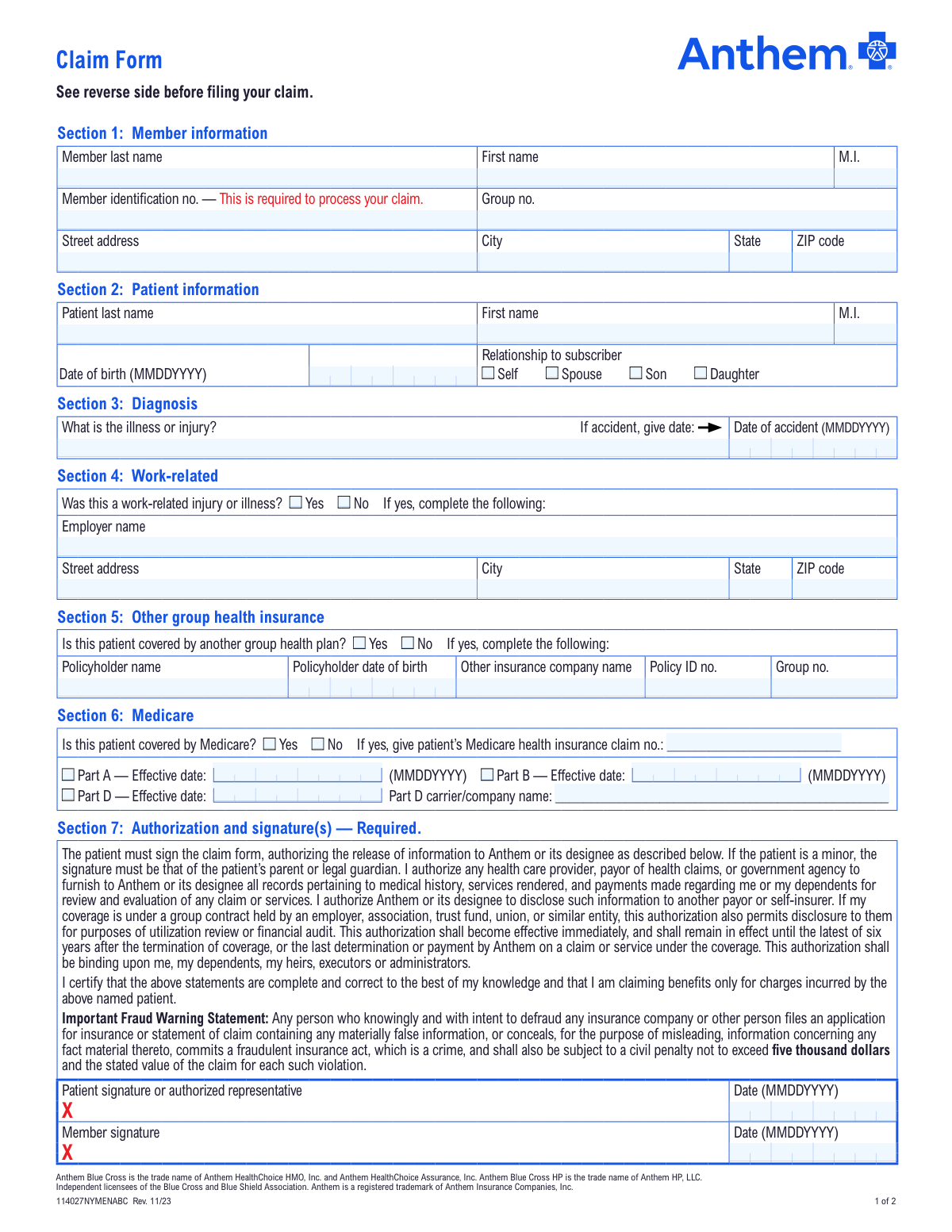
This is a claim form for members of Anthem Blue Cross to submit requests for benefits when a healthcare provider does not file the claim on their behalf. It requires detailed information about the member, patient, diagnosis, and any other insurance coverage, and must be submitted with an itemized bill. Today, this form can be filled out quickly and accurately using AI-powered services like Instafill.ai, which can also convert non-fillable PDF versions into interactive fillable forms.
114027NYMENABC has a moderate Form Complexity Index of 53/100 — 47 fillable fields across 1 page. Instafill’s AI completes it accurately in under a minute.

Form specifications

Form name: Anthem Blue Cross Member Claim Form (114027NYMENABC)
Number of fields: 47
Number of pages: 2
FCI: Moderate (53/100)
Language: English
Our AI automatically handles information lookup, data retrieval, formatting, and form filling.
It takes less than a minute to fill out 114027NYMENABC using our AI form filling.
Securely upload your data. Information is encrypted in transit and deleted immediately after the form is filled out.
main-image

Instafill Demo: How to fill out PDF forms in seconds with AI

How to Fill Out 114027NYMENABC Online for Free in 2026

Are you looking to fill out a 114027NYMENABC form online quickly and accurately? Instafill.ai offers the #1 AI-powered PDF filling software of 2026, allowing you to complete your 114027NYMENABC form in just 37 seconds or less.
Follow these steps to fill out your 114027NYMENABC form online using Instafill.ai:
  1. 1 Navigate to Instafill.ai and upload or select the Anthem Blue Cross Member Claim Form.
  2. 2 Provide your personal details for Section 1 (Member Information) and Section 2 (Patient Information), including names, member ID, and relationship to the subscriber.
  3. 3 Complete Section 3 by describing the illness or injury and providing the date if it was an accident.
  4. 4 Answer the questions in Sections 4, 5, and 6 regarding work-related incidents, other health insurance, and Medicare coverage.
  5. 5 Carefully review all the information auto-filled by the AI for accuracy and completeness.
  6. 6 Digitally sign and date the form in Section 7 to authorize the release of information and certify the claim's accuracy.
  7. 7 Download the completed form, attach copies of your itemized medical bills, and submit it to the Anthem Blue Cross address provided.

Our AI-powered system ensures each field is filled out correctly, reducing errors and saving you time.

Why Choose Instafill.ai for Your Fillable 114027NYMENABC Form?

Speed

Complete your 114027NYMENABC in as little as 37 seconds.

Up-to-Date

Always use the latest 2026 114027NYMENABC form version.

Cost-effective

No need to hire expensive lawyers.

Accuracy

Our AI performs 10 compliance checks to ensure your form is error-free.

Security

Your personal information is protected with bank-level encryption.

Frequently Asked Questions About 114027NYMENABC

114027NYMENABC has a Form Complexity Index of 53 out of 100, placing it in the moderate complexity tier. This score is calculated deterministically from the form’s own structure using Instafill’s published Form Complexity Index methodology, so it can be reproduced and independently verified — it is not a subjective estimate.

For 114027NYMENABC specifically, the score reflects 47 fillable fields across 1 page, grouped into 7 sections, and 18 conditional fields that only apply depending on earlier answers, plus 1 page of printed instructions. The number of fields is the largest factor in the base score (weighted 36%), followed by how difficult those fields are to complete based on their type, where free-text and signature fields count for more than simple checkboxes (26%). The number of pages that actually contain fields (15%), the amount of conditional “fill-only-if” logic (16%), and how many sections the form is divided into (7%) account for the rest of the base. On top of that base, the index adds points for tables and repeating lists, bundled instruction pages, and dense page layouts — capturing difficulty the base alone can miss.

In practical terms, a moderate score means the form takes real effort: there are enough fields, pages and rules that errors are easy to make by hand. Instafill removes that effort entirely: our AI reads your information, maps each value to the correct field — including the conditional ones — and completes 114027NYMENABC accurately in under a minute, with every field available for you to review before you download. See exactly how the Form Complexity Index is calculated.

You should use this form to request reimbursement for medical services when your doctor or healthcare provider does not file the claim directly with Anthem on your behalf.

You must attach a complete, itemized bill from your provider. The bill needs to include the provider's name and tax ID, patient's name, date and type of service, diagnosis, and the amount charged.

Member information refers to the primary subscriber of the insurance plan. Patient information is for the person who actually received the medical care, who could be the member, their spouse, or a dependent.

Mail the signed form and your itemized bill to Anthem Blue Cross, P.O. Box 1407, Church Street Station, New York, New York 10008–1407.

No, you must complete and submit a separate claim form for each family member who received services.

If the patient is a minor, their parent or legal guardian must sign the form in the 'Patient signature' field in Section 7.

You must complete Section 5 with details about the other insurance policy. This is necessary for the coordination of benefits between the two insurance companies.

This information helps determine if workers' compensation should be the primary payer for the claim. If it was work-related, you must provide your employer's details in Section 4.

Your Member Identification Number is printed on your Anthem Blue Cross ID card. This number is required to process your claim, so ensure it is entered correctly in Section 1.

Yes, you should submit the claim as soon as possible after receiving care. Check your specific certificate of coverage for the exact deadlines for claim submission.

Yes, services like Instafill.ai use AI to accurately auto-fill form fields from your saved information, which can save you time and help reduce errors.

Simply upload the claim form to the Instafill.ai platform. The AI will identify the fields, allowing you to use your saved profile to fill in your information with a single click.

You can use a service like Instafill.ai, which can convert flat, non-fillable PDFs into interactive, fillable forms online. This allows you to type your information directly into the fields before printing.

If you are covered by Medicare, Anthem needs this information to correctly coordinate benefits between the two plans. You must provide your Medicare claim number and the effective dates for any parts you are enrolled in.

Compliance 114027NYMENABC
Validation Checks by Instafill.ai

1
Required Member Identification Number
This check ensures the 'Member identification no.' field in Section 1 is not empty. This number is the primary identifier for the member's policy and is essential for accessing their coverage and benefits information. A missing Member ID will result in an immediate rejection of the claim, as it cannot be associated with any policy in the system.
2
Standard Date Format (MMDDYYYY)
This validation verifies that all date fields on the form, such as 'Patient Date of Birth' and 'Date of accident', strictly follow the MMDDYYYY format. Enforcing a standard format is crucial for data consistency and prevents system errors during date-based calculations like age verification or timely filing checks. Submissions with incorrectly formatted dates will fail processing and must be corrected.
3
Logical Patient Date of Birth
This check validates that the 'Patient Date of Birth' in Section 2 is a real, historical date and not a date in the future. This is a fundamental check to prevent obvious data entry errors and confirm the patient's age for eligibility purposes. A claim with an invalid or future date of birth cannot be processed and will be flagged for immediate correction.
4
Exclusive Relationship to Subscriber Selection
This validation ensures that one and only one checkbox ('Self', 'Spouse', 'Son', 'Daughter') is selected in the 'Relationship to subscriber' part of Section 2. A patient can only have one primary relationship to the subscriber for a given policy. If zero or more than one option is selected, the claim will be rejected due to ambiguity.
5
Patient and Member Name Consistency for 'Self' Relationship
This check verifies that if 'Self' is selected as the 'Relationship to subscriber', the patient's first and last names in Section 2 match the member's first and last names in Section 1. This cross-field validation confirms that the member is the patient, preventing processing errors due to mismatched identities. A discrepancy would trigger a review or rejection pending clarification.
6
Logical Accident Date
This validation ensures that if a 'Date of accident' is provided in Section 3, it is a valid date that occurs on or before the signature date. This check prevents claims for future events, which are logically impossible. An accident date that is in the future or after the form was signed would invalidate the claim and require correction.
7
Conditional Requirement for Work-Related Details
This check ensures that if 'Yes' is selected for 'Was this a work-related injury or illness?', then the employer's name and address fields in Section 4 are completed. This information is mandatory for coordinating benefits with workers' compensation insurance, which is typically the primary payer in such cases. Failure to provide these details will halt claim processing until the required information is supplied.
8
Conditional Requirement for Other Insurance Details
This validation confirms that if 'Yes' is checked for 'Is this patient covered by another group health plan?', then all fields in Section 5, such as 'Policyholder name' and 'Other insurance company name', are filled out. This information is critical for the Coordination of Benefits (COB) process to determine the primary and secondary payers. Incomplete COB information will delay payment as financial responsibility cannot be determined.
9
Conditional Requirement for Medicare Details
This check verifies that if 'Yes' is selected for 'Is this patient covered by Medicare?', the 'Medicare health insurance claim no.' in Section 6 is provided. This number is essential for coordinating benefits with Medicare, which has specific rules about being the primary or secondary payer. A claim indicating Medicare coverage without the claim number cannot be processed correctly and will be returned.
10
Medicare Part Effective Date Validation
This check ensures that if a Medicare Part (A, B, or D) is indicated, its corresponding 'Effective date' is provided and is a valid past date. This date confirms when the specific Medicare coverage began, which is critical for determining which insurer is primary for the services rendered. Missing or invalid effective dates will prevent proper benefit coordination and lead to claim processing delays.
11
Required Signature and Date
This validation confirms that the 'Patient signature' and 'Date' fields in Section 7 are completed. The signature and date legally authorize the release of information and certify the correctness of the claim. A missing signature or date invalidates the authorization and attestation, making the claim legally un-processable and requiring resubmission.
12
Logical Signature Date Chronology
This check validates that the signature date in Section 7 is on or after the 'Patient Date of Birth' and any 'Date of accident'. This ensures the form was signed after the patient was born and after the claimed event occurred. A signature date that precedes these key dates is a logical impossibility that would invalidate the claim and require correction.
13
Valid State Abbreviation Format
This check ensures that all 'State' fields contain a valid two-letter postal abbreviation. Using a standardized format is crucial for address verification, mail delivery, and maintaining data integrity within the system. An invalid entry could lead to returned mail and communication breakdowns, delaying claim resolution and payment.
14
Valid 5-Digit ZIP Code Format
This validation verifies that the 'ZIP code' fields in the member and employer address sections contain exactly five digits. A valid ZIP code is essential for correct mail routing and for linking the address to a specific geographical area for reporting. An incorrectly formatted ZIP code will be flagged for correction to ensure proper communication and record-keeping.

Common Mistakes in Completing 114027NYMENABC

Missing or Incorrect Member Identification Number

This is the most critical piece of information for processing a claim, but it's often long and easily mistyped. People may also confuse it with the Group Number. Without the correct Member ID, the system cannot locate the policy, leading to an immediate rejection or significant processing delays. Always double-check this number against the insurance card before submitting. AI-powered tools like Instafill.ai can securely store and accurately auto-fill this number to prevent transcription errors.

Failing to Attach a Proper Itemized Bill

Many people mistakenly submit a credit card receipt or a simple 'balance due' statement, which are not sufficient. The form instructions explicitly state that a detailed, itemized bill is required, including the provider's tax ID, diagnosis codes, and procedure codes. Submitting the wrong document will cause the claim to be rejected, as the processor has no way to verify the services rendered. Always request the 'itemized bill' from your provider for insurance submission purposes.

Missing Required Signatures in Section 7

The form requires signatures from both the patient (or representative) and the member, which can be confusing if they are the same person. People often sign only one line, rendering the form legally incomplete. A missing signature invalidates the authorization to release information, causing the claim to be returned unprocessed. To avoid this, ensure both signature lines are signed and dated, even if the same person is signing twice.

Confusing 'Member' and 'Patient' Information

Users sometimes fill in the patient's information in the 'Member' section (Section 1), especially when the patient is a dependent. The 'Member' is always the primary subscriber on the insurance plan. This mistake can cause record-matching failures and processing delays. To prevent this, always complete Section 1 with the subscriber's information from the ID card, and Section 2 with the details of the person who actually received the medical care.

Using Incorrect Date Formats

The form specifies the MMDDYYYY format for all dates, but people frequently add slashes (MM/DD/YYYY) or use a different order out of habit. While it seems minor, this can cause data entry errors on the processor's end or be flagged by automated systems, delaying the claim. Pay close attention to the format instructions next to each date field. Using a tool like Instafill.ai can help by automatically formatting dates correctly as you type.

Incomplete or Inaccurate 'Other Insurance' Information

When a patient is covered by more than one plan, coordination of benefits is required. People may check 'No' in Section 5 to save time or because they are unsure, which can lead to claim denials or even accusations of fraud. If other insurance exists, it must be reported with accurate policyholder and policy number details. This ensures the primary and secondary payers are correctly identified, preventing delays and rejections.

Vague Description of Illness or Injury

In Section 3, a patient might write a generic description like 'stomach pain' or 'check-up.' This lacks the specificity needed for a claims adjuster to process the claim, which relies on matching the diagnosis to the services provided. This ambiguity forces the insurer to request more information, causing significant delays. It is best to use the specific diagnosis provided by your doctor, which can be found on the itemized bill or patient summary.

Using Nicknames or Incorrect Legal Names

A person may enter 'Mike' instead of 'Michael' or forget to include a suffix like 'Jr.' This creates a mismatch between the name on the claim and the name in the insurer's database. This discrepancy can cause the claim to be flagged for identity verification, delaying payment. Always use the full, legal name of the member and patient exactly as it appears on the insurance ID card.

Incorrectly Filling Out Work-Related Injury Section

People may be unsure if an injury qualifies as work-related and mark 'No' in Section 4 to avoid complexity. However, if an injury occurred at work, workers' compensation is typically the primary payer, not health insurance. Incorrectly routing the claim can lead to it being denied and requiring resubmission through the correct channels, causing major delays and potential billing issues for the member. If an injury is even possibly work-related, it should be marked 'Yes' and the employer details provided.

Submitting a Scanned, Non-Fillable PDF

Often, these forms are available only as flat PDFs, which users print, fill by hand, and then scan. Handwritten information can be illegible, leading to data entry errors and processing delays. Furthermore, the user has no way to save a digital copy easily. Tools like Instafill.ai can convert non-fillable PDFs into interactive, fillable forms, ensuring all entries are clear, legible, and can be saved digitally, which helps prevent many of the other common errors.
Saved over 80 hours a year

“I was never sure if my IRS forms like W-9 were filled correctly. Now, I can complete the forms accurately without any external help.”

Kevin Martin Green

Your data stays secure with advanced protection from Instafill and our subprocessors

Robust compliance program

Transparent business model

You’re not the product. You always know where your data is and what it is processed for.

ISO 27001, HIPAA, and GDPR

Our subprocesses adhere to multiple compliance standards, including but not limited to ISO 27001, HIPAA, and GDPR.

Security & privacy by design

We consider security and privacy from the initial design phase of any new service or functionality. It’s not an afterthought, it’s built-in, including support for two-factor authentication (2FA) to further protect your account.

Fill out 114027NYMENABC with Instafill.ai

Worried about filling PDFs wrong? Instafill securely fills anthem-blue-cross-member-claim-form-114027nymenabc forms, ensuring each field is accurate.