Yes! You can use AI to fill out Application and Notice of Hearing for Order to Terminate, Modify, or Vacate Temporary Protective Order
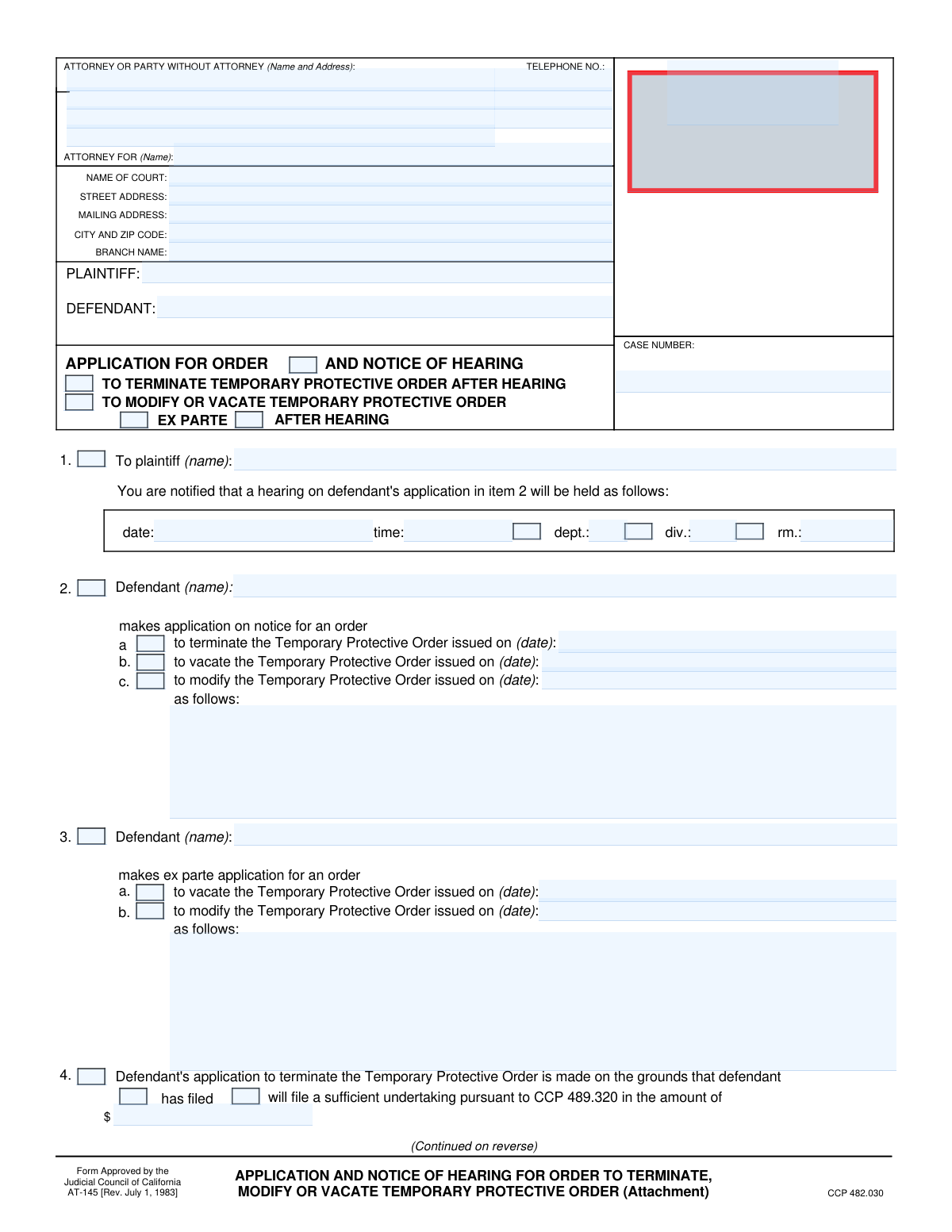
Form AT-145 is a legal document filed in California courts by a defendant who is subject to a Temporary Protective Order (TPO). It serves as a formal application to the court, requesting a hearing to either terminate, modify, or completely vacate the TPO, allowing the defendant to present arguments for why the order should be changed or removed. Today, this form can be filled out quickly and accurately using AI-powered services like Instafill.ai, which can also convert non-fillable PDF versions into interactive fillable forms.
Our AI automatically handles information lookup, data retrieval, formatting, and form filling.
It takes less than a minute to fill out AT-145 using our AI form filling.
Securely upload your data. Information is encrypted in transit and deleted immediately after the form is filled out.
Form specifications
| Form name: | Application and Notice of Hearing for Order to Terminate, Modify, or Vacate Temporary Protective Order |
| Number of fields: | 74 |
| Number of pages: | 2 |
| Language: | English |
Instafill Demo: How to fill out PDF forms in seconds with AI
How to Fill Out AT-145 Online for Free in 2026
Are you looking to fill out a AT-145 form online quickly and accurately? Instafill.ai offers the #1 AI-powered PDF filling software of 2026, allowing you to complete your AT-145 form in just 37 seconds or less.
Follow these steps to fill out your AT-145 form online using Instafill.ai:
- 1 Navigate to Instafill.ai and upload your Form AT-145, or select it from their library of official documents.
- 2 Enter the court and case information, including the court's address, plaintiff and defendant names, and the case number.
- 3 Indicate whether you are applying to terminate, modify, or vacate the Temporary Protective Order, and provide the date the original order was issued.
- 4 Detail the legal grounds and specific facts supporting your application, referencing any attached affidavits or points and authorities as required.
- 5 Fill in the notice of hearing section with the scheduled date, time, and department for the court appearance.
- 6 Carefully review all entered information for accuracy, then use the AI tool to securely e-sign the declaration under penalty of perjury.
- 7 Download the completed and signed Form AT-145, ready for filing with the court and serving to the plaintiff.
Our AI-powered system ensures each field is filled out correctly, reducing errors and saving you time.
Why Choose Instafill.ai for Your Fillable AT-145 Form?
Speed
Complete your AT-145 in as little as 37 seconds.
Up-to-Date
Always use the latest 2026 AT-145 form version.
Cost-effective
No need to hire expensive lawyers.
Accuracy
Our AI performs 10 compliance checks to ensure your form is error-free.
Security
Your personal information is protected with bank-level encryption.
Frequently Asked Questions About Form AT-145
This form is used by a defendant to ask the court to terminate (end), modify (change), or vacate (cancel) a Temporary Protective Order (TPO) that has been issued against them.
The defendant in a civil case, or their attorney, who is subject to a Temporary Protective Order and wishes to have it changed or removed.
Terminating usually involves posting a financial bond to end the order, modifying changes specific conditions of the order, and vacating cancels the order entirely based on fairness or justice.
An 'application on notice' (Section 2) is for a regularly scheduled hearing where the other party is given standard notice. An 'ex parte application' (Section 3) is for an urgent or emergency request that may be heard with very short notice to the other party.
You must provide your name and contact information, the court's details, the names of the plaintiff and defendant, and the case number, all of which can be found on previous court documents.
You would check the box in Section 4 and specify the amount of the 'undertaking' (a financial bond) you intend to file with the court as security for the plaintiff.
You must explain the factual or legal reasons why it is in the 'interests of justice and equity' to change or cancel the order. You may need to attach a sworn statement (affidavit) or a legal argument (points and authorities).
Yes, you may need to attach supporting documents such as an affidavit with specific facts or a document outlining your legal arguments (points and authorities), as indicated in Section 5.
The court will hold a hearing on the date and time listed in Section 1. At the hearing, a judge will listen to both sides and decide whether to grant your request to terminate, modify, or vacate the TPO.
You must file the form with the clerk of the court where your case is being heard, as indicated in the top section of the form.
Yes, services like Instafill.ai use AI to accurately auto-fill form fields with your personal and case information, which can save you time and help prevent errors.
You can use a service like Instafill.ai to upload the form, and it will become an interactive, fillable document that you can complete and sign electronically from your computer or mobile device.
If you have a flat or non-fillable PDF, you can upload it to a platform like Instafill.ai. Their technology can convert it into an interactive, fillable form for you to complete online.
Compliance AT-145
Validation Checks by Instafill.ai
1
Case Number Presence and Format
This check ensures the 'CASE NUMBER' field is not empty and conforms to the standard format for the jurisdiction. The case number is critical for associating this application with the correct legal proceeding in the court's records. A missing or malformed case number will result in filing rejection or misdirection of the document.
2
Plaintiff and Defendant Name Completeness
Validates that both the 'PLAINTIFF' and 'DEFENDANT' fields contain names. These fields are fundamental to identifying the parties involved in the legal action. Failure to provide this information makes the form legally insufficient and impossible to process, as the court cannot determine who the application applies to.
3
Mutually Exclusive Application Type
Ensures that checkboxes are selected in either section 2 ('application on notice') or section 3 ('ex parte application'), but not both. These are legally distinct procedures for applying to the court, and selecting both is a logical contradiction. If this validation fails, the form should be flagged for correction to clarify the applicant's intent.
4
Valid Future Hearing Date
Verifies that the hearing 'date' provided in section 1 is a valid date format and is set for a future date. A hearing must be scheduled in the future to provide adequate notice to all parties. An invalid format or a past date would render the notice defective and require re-issuance.
5
Required Application Action
Checks that if either section 2 or section 3 is filled out, at least one corresponding action checkbox ('to terminate', 'to vacate', or 'to modify') is selected. The form is meaningless without a specified action being requested. This validation prevents the submission of an incomplete application that does not state its purpose.
6
Order Issuance Date Requirement
For every action selected in section 2 or 3 (terminate, vacate, modify), this validates that the adjacent 'issued on (date)' field is filled with a valid date. This date identifies the specific Temporary Protective Order being targeted by the application. Without this date, the court cannot identify which order to act upon.
7
Modification Details Requirement
If the 'to modify the Temporary Protective Order' checkbox is selected in either section 2 or 3, this check ensures the subsequent text box explaining the modification is not empty. The court requires specific details on the proposed changes to evaluate the request. An empty field would force the court to deny the request for lack of specificity.
8
Grounds for Termination Completeness
If 'to terminate' is checked in section 2, this validates that section 4 is completed by selecting either 'will file' or 'has filed' an undertaking, and that a monetary amount is provided. This is a statutory requirement for terminating a TPO via an undertaking. An incomplete section 4 makes the grounds for termination invalid.
9
Undertaking Amount Format
Validates that the undertaking amount specified in section 4 is a valid, positive monetary value. The amount must be a number that the system can process and that is legally meaningful. This prevents data entry errors like text or negative numbers in a field designated for currency.
10
Grounds for Vacation or Modification
If 'to vacate' or 'to modify' is checked, this ensures at least one basis in section 5 (e.g., 'attached affidavit', 'following facts') is selected. An application must state the legal or factual grounds on which it is based. This check prevents submissions that fail to provide any justification for the requested court order.
11
Conditional 'Following Facts' Detail
If the 'following facts (specify)' checkbox in section 5 is marked, this validation ensures the associated text area is not empty. The purpose of this option is to provide specific facts directly on the form. Checking the box without providing the facts makes the submission incomplete and the stated grounds unsupported.
12
Signature Date Validity
Ensures the 'Date' field in the declaration section is filled with a valid date that is not in the future. The signature date establishes when the declaration was made under penalty of perjury. A missing or future date would invalidate the declaration and could lead to the rejection of the entire application.
13
Declarant Name Consistency
Verifies that the typed or printed name under the signature line matches the Defendant's name listed in the case caption at the top of the form. This confirms the identity of the person making the application and declaration. A mismatch could indicate an error or that an unauthorized person is signing the form.
14
Attached Pages Count Format
This check validates that the 'Total number of pages attached' field contains a valid non-negative integer (e.g., 0, 1, 5). This information is crucial for the court clerk to ensure the filing is complete and all intended documents have been received. An invalid entry could lead to a filing being considered incomplete.
Common Mistakes in Completing AT-145
Filers often mistype the case number or omit parts of it, as it can be long and complex. This is a critical error because the case number is the primary identifier for the court's filing system, and an incorrect number will cause the document to be rejected or misfiled. To avoid this, carefully copy the number from a recent official court document. AI-powered tools like Instafill.ai can help by saving and accurately auto-filling the correct case number on all related forms.
Applicants sometimes use abbreviations, misspellings, or variations of the official party names listed on the case. Courts require the names to be written exactly as they appear on the initial complaint to ensure documents are correctly indexed to the case file. Any discrepancy can lead to rejection by the court clerk and cause significant processing delays. Always verify the full, correct names from a prior court order before filling out the form.
In sections 2 and 3, the form requires the date the Temporary Protective Order (TPO) was issued. People frequently forget to fill in this date, making it impossible for the court to know which specific order the application is addressing. This omission will likely lead to the application being deemed incomplete and denied, forcing the applicant to start over. Always have a copy of the original TPO on hand and carefully transcribe the issuance date.
When selecting the option to 'modify' the TPO in section 2 or 3, a common mistake is to leave the description field blank or write something vague like 'modify as needed'. A judge cannot act on an unspecified request and will deny the application for lack of clarity. You must explicitly detail the exact changes you want, such as 'Allow the sale of the 2022 Ford F-150, VIN XXXXX, to cover living expenses,' to give the court a clear basis for a decision.
Section 5 is the most important part of the application, yet many filers simply check a box without providing the required support. An application to vacate or modify an order must be supported by facts, an affidavit, or legal points and authorities explaining why it is in the 'interests of justice'. Submitting the form without this detailed justification is the most common reason for it to be denied on its merits.
Applicants often check the boxes in section 5 indicating that an 'affidavit' or 'points and authorities' are attached, but then fail to include these documents with the filing. This makes the application incomplete and unsupported, leading to almost certain denial. Before filing, create a checklist of all documents, ensure every referenced attachment is present, and accurately state the 'Total number of pages attached' in section 6.
The declaration at the end of the form must be signed and dated to be valid, as it is made under penalty of perjury. Forgetting to sign or date the form is a simple but frequent oversight that will cause the court clerk to reject the entire filing. This mistake can force a refiling and cause you to miss important deadlines. Always perform a final review specifically to check for a signature and date before submitting.
Filers often misunderstand the difference between a standard 'on notice' application (Section 2) and an emergency 'ex parte' one (Section 3). An ex parte request has a very high legal standard, requiring proof of immediate and irreparable harm. Choosing this option without sufficient grounds will result in a swift denial, wasting time and filing fees. Unless a true, demonstrable emergency exists, the standard 'on notice' application is the correct procedure.
The second page of the form has a header for the 'SHORT TITLE' and 'CASE NUMBER' that is frequently left blank. If the pages of the document become separated during court processing, the second page will have no identifying information and may be lost or misfiled. This can render the application incomplete. To prevent this, ensure the case number and a short title (e.g., 'Smith v. Jones') are filled in on every page. Tools like Instafill.ai can automatically populate headers and footers across all pages to ensure consistency.
Many court forms are still filled out by hand, and illegible writing is a common problem. If the clerk or judge cannot read the names, dates, or the facts you have written, they may reject the form or misinterpret your request. It is crucial to print clearly and legibly in blue or black ink. If the form is a non-fillable PDF, a service like Instafill.ai can convert it into a fillable version, allowing you to type your responses for maximum clarity and professionalism.
Saved over 80 hours a year
“I was never sure if my IRS forms like W-9 were filled correctly. Now, I can complete the forms accurately without any external help.”
Kevin Martin Green
Your data stays secure with advanced protection from Instafill and our subprocessors
Robust compliance program
Transparent business model
You’re not the product. You always know where your data is and what it is processed for.
ISO 27001, HIPAA, and GDPR
Our subprocesses adhere to multiple compliance standards, including but not limited to ISO 27001, HIPAA, and GDPR.
Security & privacy by design
We consider security and privacy from the initial design phase of any new service or functionality. It’s not an afterthought, it’s built-in, including support for two-factor authentication (2FA) to further protect your account.
Fill out AT-145 with Instafill.ai
Worried about filling PDFs wrong? Instafill securely fills application-and-notice-of-hearing-for-order-to-terminate-modify-or-vacate-temporary-protective-order forms, ensuring each field is accurate.