Yes! You can use AI to fill out Application for Accident Benefits (OCF-1)

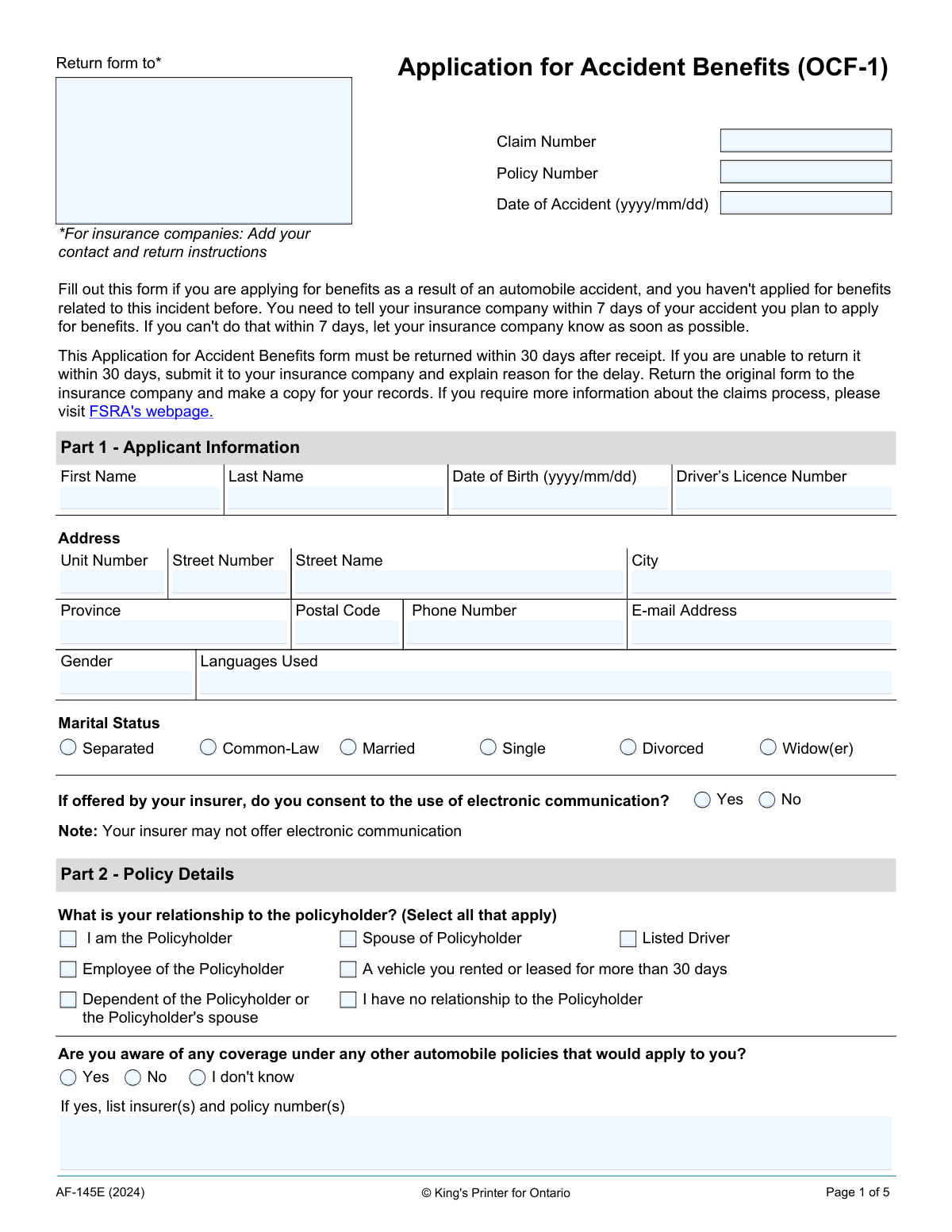
The Application for Accident Benefits (OCF-1) is a mandatory form for individuals in Ontario seeking to claim insurance benefits following an automobile accident. It is the first step in the claims process, used to notify the insurance company of the accident and the intent to claim benefits for medical care, rehabilitation, and potential income replacement. Submitting this form promptly and correctly is crucial for accessing necessary support after an accident. Today, this form can be filled out quickly and accurately using AI-powered services like Instafill.ai, which can also convert non-fillable PDF versions into interactive fillable forms.
Our AI automatically handles information lookup, data retrieval, formatting, and form filling.
It takes less than a minute to fill out OCF-1 using our AI form filling.
Securely upload your data. Information is encrypted in transit and deleted immediately after the form is filled out.

Form specifications

Form name: Application for Accident Benefits (OCF-1)
Number of fields: 105
Number of pages: 5
Language: English
main-image

Instafill Demo: How to fill out PDF forms in seconds with AI

How to Fill Out OCF-1 Online for Free in 2026

Are you looking to fill out a OCF-1 form online quickly and accurately? Instafill.ai offers the #1 AI-powered PDF filling software of 2026, allowing you to complete your OCF-1 form in just 37 seconds or less.
Follow these steps to fill out your OCF-1 form online using Instafill.ai:
  1. 1 Navigate to Instafill.ai and upload or select the OCF-1 form.
  2. 2 Use the AI assistant to fill in your personal information, contact details, and driver's licence number in Part 1.
  3. 3 Provide your insurance policy details and clarify your relationship to the policyholder in Part 2.
  4. 4 Enter the specific details of the accident in Part 3, including the location, date, time, and a description of the incident and your injuries.
  5. 5 Detail your employment status at the time of the accident and report any missed time from work, school, or other activities in Part 4.
  6. 6 Disclose information about any other insurance benefit plans in Part 5 and provide authorization for direct payment to service providers in Part 6.
  7. 7 Review all sections for accuracy, provide your signature and the date where required, and then submit the completed form to your insurance company.

Our AI-powered system ensures each field is filled out correctly, reducing errors and saving you time.

Why Choose Instafill.ai for Your Fillable OCF-1 Form?

Speed

Complete your OCF-1 in as little as 37 seconds.

Up-to-Date

Always use the latest 2026 OCF-1 form version.

Cost-effective

No need to hire expensive lawyers.

Accuracy

Our AI performs 10 compliance checks to ensure your form is error-free.

Security

Your personal information is protected with bank-level encryption.

Frequently Asked Questions About Form OCF-1

This form is used to apply for accident benefits from an insurance company if you have been injured in an automobile accident in Ontario. You should only fill this out if you haven't applied for benefits for this specific accident before.

You must notify your insurance company of your intent to apply for benefits within 7 days of the accident. The completed OCF-1 form must then be returned to the insurer within 30 days after you receive it.

If you cannot return the form within 30 days, you should submit it as soon as possible and include a written explanation for the delay. The insurance company will then review your reason for the late submission.

Return the original, completed form to the insurance company address provided on the first page. It is highly recommended that you make a copy of the entire application for your own records before sending it.

You need to provide the location, date, and time of the accident, a brief description of how it happened, and a list of all injuries you sustained. You should also indicate if police, an ambulance, or a hospital was involved.

Yes, in Part 5 you must disclose any other benefit plans that cover you, your spouse, or anyone you are dependent on. This includes group benefits from an employer, extended health coverage, and disability plans.

By initialing this section, you give your insurer permission to pay your licensed service provider (like a physiotherapist) directly for approved treatments. This applies to costs not covered by any extended health insurance you may have.

You should only apply to the MVACF as a last resort if no other automobile insurance policy is available to cover your claim. You must investigate all other potential insurers before applying to the Fund.

If you have them, you should include copies of any police reports or medical reports related to the accident. If you receive these documents after submitting the form, send them to the insurer as soon as you get them.

Yes, you may need to provide your initials or signature in several sections. This includes Part 6 for direct payment authorization, Part 7 if applying to the MVACF, and the final signature and consent section on page 5.

Yes, services like Instafill.ai use AI to help you accurately auto-fill form fields, which can save you time and reduce errors. This is especially helpful for repetitive information like your name and address.

You can use a service like Instafill.ai to fill out the form online. Simply upload the PDF, and the platform will allow you to type your information directly into the fields and save or print the completed document.

If you have a non-fillable or 'flat' PDF, you can use a tool like Instafill.ai. It can convert the document into an interactive, fillable form, allowing you to easily complete it on your computer.

Compliance OCF-1
Validation Checks by Instafill.ai

1
Accident Date Cannot Be in the Future
This validation checks that the 'Date of Accident' entered in Part 3 is not a future date. It is crucial for ensuring the claim's legitimacy and preventing fraudulent or mistaken entries. If a future date is entered, the system should reject the submission and prompt the user to enter a valid date that is on or before the current day.
2
Applicant's Date of Birth Must Precede Accident Date
This check ensures logical consistency by verifying that the applicant's 'Date of Birth' (Part 1) is before the 'Date of Accident' (Part 3). This prevents impossible scenarios and catches significant data entry errors. A failure would indicate a mistake in one or both date fields, requiring the user to correct the information before proceeding.
3
Conditional Requirement for Other Auto Insurance Details
This validation enforces a rule in Part 2. If the user answers 'Yes' to the question 'Are you aware of any coverage under any other automobile policies that would apply to you?', the text field for 'insurer(s) and policy number(s)' becomes mandatory. This is critical for coordination of benefits and determining primary liability. If the condition is met but the field is left empty, the form cannot be submitted.
4
Canadian Postal Code Format Validation
This check validates that the 'Postal Code' field in Part 1 follows the standard Canadian A1A 1A1 format (letter-number-letter space number-letter-number). Correct formatting is essential for mail delivery and address verification processes used by the insurer. An invalid format would trigger an error message asking the user to correct the postal code.
5
Logical Consistency for Return-to-Activity Dates
This validation ensures that any 'Date returned to...' (work, school, or pre-accident activities) in Part 4 is on or after the 'Date of Accident'. It is logically impossible to return to an activity before the accident that caused the absence. This check prevents data entry errors and maintains the integrity of the claim's timeline.
6
Signature Date Chronology
This check verifies that the 'Date Signed' in the final signature sections is on or after the 'Date of Accident' and not in the future. Signing a form declaring the details of an accident before it has occurred is impossible and indicates a data entry error. The validation ensures the legal and chronological soundness of the application's attestation.
7
Conditional Requirement for 'Charges Laid' Details
In Part 3, if the user selects 'Yes' for the 'Were you charged?' question, this validation makes the 'list charge' text field mandatory. This information is vital for the insurer's investigation and assessment of the accident circumstances. Failure to provide the specific charge would block form submission until the required detail is entered.
8
Exclusive Selection for Marital Status
This validation ensures that the user selects only one option from the 'Marital Status' checkboxes in Part 1 (e.g., Single, Married, Common-Law). Since a person can only have one marital status at a time, this check prevents contradictory or ambiguous data. If more than one box is checked, the system should prompt the user to select only the single most applicable status.
9
Applicant Status and Work Impact Consistency
This logical check cross-references fields in Part 4. If the applicant selects a working status (e.g., 'Full-Time', 'Part-Time', 'Self-Employed'), the response to 'I have missed time from work' cannot be 'N/A'. This ensures the applicant provides relevant information about work impact if they were employed at the time of the accident. An inconsistency would trigger a prompt for the user to review their selections.
10
Completeness of Core Applicant Address
This validation ensures that the core address fields in Part 1 ('Street Number', 'Street Name', 'City', 'Province') are not left blank. A complete and accurate address is fundamental for all communication from the insurer and for verifying policy details. If any of these fields are empty, the submission should be blocked until the required information is provided.
11
Conditional Requirement for Other Benefit Plan Details
This check relates to Part 5. If the applicant answers 'Yes' to having another benefit plan, the 'Name of benefit companies and policy number(s)' field must be filled out. This is crucial for the coordination of benefits between the auto insurer and other health/disability plans. The form submission will be halted if this required information is missing after a 'Yes' response.
12
Valid Email Address Format
This validation checks if the entry in the 'E-mail Address' field conforms to a standard email format (e.g., [email protected]). This is important if the applicant consents to electronic communication, as it ensures the insurer can successfully send documents and correspondence. An invalid format would trigger an error, preventing submission until a correctly formatted email address is provided.
13
Completeness of Signature Blocks
This check ensures that the 'Name of Applicant or Substitute Decision Maker', 'Signature', and 'Date Signed' fields are all completed for the final submission authorization. A missing name, signature, or date invalidates the legal attestation of the form's contents. The system should prevent submission if any part of the signature block is incomplete.
14
Conditional Requirement for Accident Involvement Details
This validation applies to Part 2, 'How were you involved in the accident?'. If the 'Other, please provide details' option is selected, the corresponding text field for details becomes mandatory. This ensures the insurer receives a clear explanation when the applicant's role in the accident does not fit standard categories. The form cannot be submitted until this detail is provided.

Common Mistakes in Completing OCF-1

Missing Critical Reporting and Submission Deadlines

The form states you must notify the insurer within 7 days and return the form within 30 days. In the stressful aftermath of an accident, these deadlines are frequently missed. Missing these timelines can delay or even jeopardize your claim, as the insurer may require a formal explanation for the delay. To avoid this, contact your insurer immediately after the accident and set a calendar reminder for the 30-day form submission deadline.

Providing a Vague or Incomplete Injury Description

In Part 3, applicants often describe injuries with vague terms like 'soreness' or 'whiplash'. This happens when they are in shock or downplay injuries that seem minor at first. This can lead an insurer to underestimate the claim's severity and can make it difficult to get coverage for that injury if it worsens later. Be specific: list every affected body part and describe the exact symptoms, such as 'sharp pain in lower back' or 'numbness in left hand'.

Failing to Disclose Other Benefit Plans

Applicants often mistakenly check 'No' in Part 5 when asked about other benefit plans, forgetting about workplace extended health or disability coverage. They may not realize that auto insurance is often the secondary payer for medical expenses. This omission is a critical error that leads to claim delays and prevents the proper coordination of benefits. Before filling out the form, check with your employer's HR department about any group benefit plans you are enrolled in.

Missing Required Signatures or Initials

The form requires signatures and initials on multiple pages, including Part 6 (Authorization for Direct Payment) and the final pages. It is very common to sign in one spot and miss another, rendering the application invalid. An incomplete form will be returned, causing significant delays in processing your claim and receiving benefits. Before submitting, do a final check of every page specifically for all signature and initial fields.

Using an Incorrect Date Format

The form consistently requires the 'yyyy/mm/dd' date format, but people often default to their regional standard (e.g., mm/dd/yyyy) out of habit. This formatting error can cause data entry mistakes on the insurer's end, requiring clarification and delaying the application process. To prevent this, double-check the required format for every date field. AI-powered tools like Instafill.ai can automatically format dates correctly, preventing these simple but common errors.

Inaccurately Reporting Pre-Accident Employment Status

In Part 4, applicants must select all applicable pre-accident statuses, but the options can be confusing. A person might be both a 'Student' and working 'Part-Time' but only select one. This provides an incomplete picture and can lead to incorrect calculations for income replacement benefits. Carefully review and select all checkboxes that accurately describe your situation at the time of the accident to ensure you are assessed for all potential benefits.

Ignoring Follow-Up Details for Conditional Questions

The form has many questions that require more detail if answered 'Yes' (e.g., 'Were you charged? If yes, list charge:'). Applicants frequently check 'Yes' but then overlook the text box for the required explanation. This makes the submission incomplete and forces the insurer to follow up, delaying the claim. When you answer 'Yes' to a question, immediately look for the subsequent field that asks for more information and fill it out completely.

Entering an Incorrect or Missing Policy Number

Applicants often leave the Policy Number field blank or enter it incorrectly, usually because they don't have their insurance documents handy. An incorrect policy number is a major roadblock, as the insurer cannot locate the correct file, causing the application to be rejected or significantly delayed. Always verify this number from your insurance card or policy documents before starting. Tools like Instafill.ai can securely store and autofill this information to ensure accuracy.

Failing to Keep a Copy of the Completed Form

The instructions advise making a copy for your records, but many people mail the original without doing so. If the application is lost in transit or a dispute arises about the information provided, the applicant has no proof of what was submitted. This can create major problems in proving the claim was filed on time and with accurate information. Always make a digital or physical copy of the entire signed application before sending it.

Submitting a Non-Fillable PDF Without Conversion

Often, insurance forms are provided as flat, non-fillable PDFs, forcing applicants to print them and fill them out by hand. This can lead to illegible handwriting, missed fields, and an unprofessional appearance, all of which can slow down processing. To avoid this, use a tool like Instafill.ai, which can convert any non-fillable PDF into an interactive, fillable form, ensuring all entries are clear, legible, and properly formatted.
Saved over 80 hours a year

“I was never sure if my IRS forms like W-9 were filled correctly. Now, I can complete the forms accurately without any external help.”

Kevin Martin Green

Your data stays secure with advanced protection from Instafill and our subprocessors

Robust compliance program

Transparent business model

You’re not the product. You always know where your data is and what it is processed for.

ISO 27001, HIPAA, and GDPR

Our subprocesses adhere to multiple compliance standards, including but not limited to ISO 27001, HIPAA, and GDPR.

Security & privacy by design

We consider security and privacy from the initial design phase of any new service or functionality. It’s not an afterthought, it’s built-in, including support for two-factor authentication (2FA) to further protect your account.

Fill out OCF-1 with Instafill.ai

Worried about filling PDFs wrong? Instafill securely fills application-for-accident-benefits-ocf-1 forms, ensuring each field is accurate.