Yes! You can use AI to fill out Application for an Assurance of Support

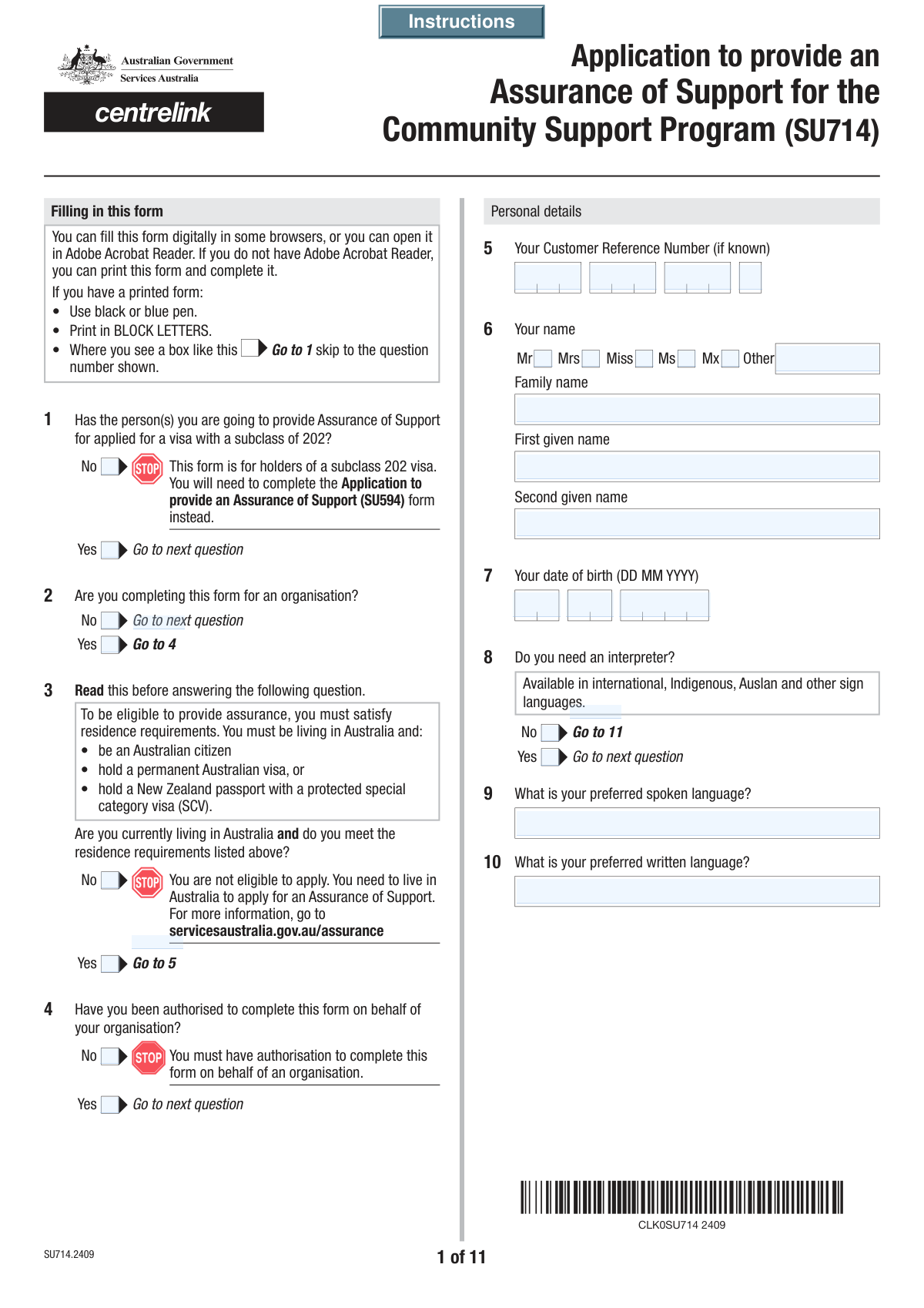
The Application for an Assurance of Support is a formal document submitted to the Australian government where an individual or organization commits to financially supporting a visa applicant for a specified period after they arrive in Australia. This commitment is a legal requirement for certain visa categories, ensuring that the new migrant will not need to rely on social security payments. Today, this form can be filled out quickly and accurately using AI-powered services like Instafill.ai, which can also convert non-fillable PDF versions into interactive fillable forms.
Our AI automatically handles information lookup, data retrieval, formatting, and form filling.
It takes less than a minute to fill out Assurance of Support Application using our AI form filling.
Securely upload your data. Information is encrypted in transit and deleted immediately after the form is filled out.

Form specifications

Form name: Application for an Assurance of Support
Number of fields: 450
Number of pages: 15
Filled form examples: Form Assurance of Support Application Examples
Language: English
main-image

Instafill Demo: How to fill out PDF forms in seconds with AI

How to Fill Out Assurance of Support Application Online for Free in 2026

Are you looking to fill out a ASSURANCE OF SUPPORT APPLICATION form online quickly and accurately? Instafill.ai offers the #1 AI-powered PDF filling software of 2026, allowing you to complete your ASSURANCE OF SUPPORT APPLICATION form in just 37 seconds or less.
Follow these steps to fill out your ASSURANCE OF SUPPORT APPLICATION form online using Instafill.ai:
  1. 1 Navigate to Instafill.ai and upload or select the Application for an Assurance of Support form.
  2. 2 Use the AI assistant to fill in your personal details as the assurer, including your name, address, contact information, and residency status.
  3. 3 Provide your comprehensive financial details, such as employment status, income for the current and previous financial years, and any other relevant financial data, letting the AI guide you through the required fields.
  4. 4 Enter the information for the primary visa applicant and any other family members included in the assurance, such as their names, dates of birth, and addresses.
  5. 5 If applicable, provide details for any other individuals or organizations also providing assurance.
  6. 6 Review all the entered information for accuracy and complete the final checklist, ensuring all required supporting documents are noted.
  7. 7 Electronically sign the declaration and download the completed form, ready for submission to the relevant Australian government department.

Our AI-powered system ensures each field is filled out correctly, reducing errors and saving you time.

Why Choose Instafill.ai for Your Fillable Assurance of Support Application Form?

Speed

Complete your Assurance of Support Application in as little as 37 seconds.

Up-to-Date

Always use the latest 2026 Assurance of Support Application form version.

Cost-effective

No need to hire expensive lawyers.

Accuracy

Our AI performs 10 compliance checks to ensure your form is error-free.

Security

Your personal information is protected with bank-level encryption.

Frequently Asked Questions About Form Assurance of Support Application

This form is used to make a legal commitment to provide financial support to a person applying for certain Australian visas. This ensures the visa applicant will not have to rely on government social security payments after they arrive.

An Australian resident, citizen, or an Australian-based organisation that meets specific criteria and has been asked to provide financial support for a visa applicant must complete this form.

The form has a specific section for self-employment where you must declare your income. You will need to provide details about your business and attach evidence such as profit and loss statements or a letter from your accountant.

You must provide your current annual taxable income and your taxable income for the last financial year. You will be required to submit evidence, such as an Australian Taxation Office (ATO) Notice of Assessment.

Yes, you must provide the full name, date of birth, and other personal details for the primary visa applicant, their partner, and any dependent children you are providing assurance for.

Yes, you can provide a joint assurance with up to two other people. If you are not the sole assurer, you must provide the names, contact details, and other information for the other assurers in the designated section.

The checklist at the end of the form outlines the required documents, which typically include identity documents, proof of your Australian residence status, and evidence of your income for the required periods.

A Customer Reference Number (CRN) is your unique identifier for government services like Centrelink. You can find it on letters, statements, or concession cards you have received from them.

You will need to provide the organisation's full name, Australian Business Number (ABN), address, and financial details for the last two financial years. You must also confirm you are an authorised person to act on the organisation's behalf.

You have an obligation to inform the authorities of any changes to the information you have provided. You should contact the relevant department to update the details as soon as possible.

Yes, services like Instafill.ai use AI to auto-fill form fields accurately with your saved information, which saves time and helps prevent errors on complex forms like this one.

You can use a platform like Instafill.ai to upload the form and fill it out on any device. The service allows you to easily enter your information, sign electronically, and download the completed PDF for submission.

If your PDF is not interactive, you can use a service like Instafill.ai to convert it into a fillable format. Simply upload the flat PDF, and the platform's AI will make the fields editable for you to complete online.

Compliance Assurance of Support Application
Validation Checks by Instafill.ai

1
Conditional Interpreter Details Requirement
This check ensures that if the user indicates they need an interpreter by selecting 'Yes (Language and Interpreter Details)', the 'Preferred Spoken Language' and 'Preferred Written Language' fields are not left empty. This is crucial for ensuring the agency can communicate effectively with the applicant. If the fields are empty despite selecting 'Yes', the form submission will be blocked with a message prompting the user to provide the required language details.
2
Assurer Age Verification
This validation verifies that the date of birth entered for the assurer results in an age of 18 years or older. Providing an Assurance of Support is a significant legal and financial commitment, and the assurer must be a legal adult. If the calculated age is under 18, the submission will fail, and an error message will state that the assurer does not meet the minimum age requirement.
3
Australian Business Number (ABN) Format
This check validates the 'Australian Business Number (ABN)' when provided. It ensures that the combined parts of the ABN consist of exactly 11 digits and pass the official ABN validation algorithm (a weighted checksum). This is critical for correctly identifying the organisation and verifying its status. An invalid ABN will result in a rejection of the organisational information.
4
Relationship Date Logical Consistency
This validation checks for logical consistency between various dates related to relationships. For example, the 'Date Married or Last Reconciled' must be after both the assurer's and their partner's date of birth, and a 'Date of Divorce' must be after the 'Date Married'. This prevents illogical or impossible date entries that would compromise data integrity. A failure would trigger an error asking the user to review and correct the dates entered.
5
Financial Year Coherence
This check ensures that for any financial year period entered, such as in 'Taxable Income for Last Financial Year', the 'Financial Year End' year is exactly one greater than the 'Financial Year Start' year. This enforces the standard definition of a financial year and prevents erroneous data entry. If the years do not form a valid consecutive pair, the user will be prompted to correct the financial year range.
6
Exclusive Relationship Status Selection
This validation ensures that a user can only select one option from the set of relationship statuses (e.g., 'Married', 'De facto', 'Never married', 'Divorced'). This is a fundamental check to prevent contradictory data in a critical data field. If the system detects more than one selection, it will prompt the user to choose only the single most accurate status.
7
Conditional Organisation Section Completion
This check mandates that if 'Yes (Form Completion For Organisation Status)' is selected, all required fields within the organisation section (Q40-Q47), such as 'Organisation Name' and 'Australian Business Number', must be filled out. This ensures that the form is not submitted with incomplete information when the applicant is acting on behalf of an organisation. A failure will highlight the missing mandatory fields in the organisation section.
8
Child Applicant Age Verification
This validation confirms that any individual listed as a child applicant (under 'Assurance of Support for Child Under 18 Question') is actually under 18 years of age based on their provided date of birth. This is essential for correctly categorizing applicants and applying the correct rules and assessments. If an applicant listed as a child is 18 or over, an error will be displayed, indicating they should be listed as an adult applicant.
9
Cross-Question Checklist Dependency (SS313 Form)
This validation enforces a rule between a question and the final checklist. It verifies that the 'Authorising a person or organisation to enquire or act on your behalf (SS313) form' checkbox is ticked if, and only if, the user answered 'Yes' to question 60 ('Permission to Enquire'). This ensures that the user acknowledges the need to provide a required supplementary form based on their earlier input. A mismatch will result in a warning to correct either the answer at Q60 or the checklist item.
10
Travel History Mandatory Fields
This check ensures that if a user selects 'Yes (History of Travel Outside Australia)', the subsequent fields for 'Year of Last Entry', 'Passport Number', and 'Country of Issue' are mandatory. This information is critical for verifying residency and immigration history. If these fields are left blank after selecting 'Yes', the form cannot be submitted, and the user will be directed to provide the missing travel details.
11
Partner Details Requirement Based on Status
This validation ensures that if a relationship status of 'Married', 'Registered relationship', or 'De facto' is selected, the entire partner details section (Q30-Q34) is completed. This is crucial for assessing the household's circumstances, which is a key part of the Assurance of Support assessment. If the status indicates a partner but the details are missing, the submission will be blocked until the partner's information is provided.
12
Signature Date Validity
This check validates that the date entered alongside the signature is a valid calendar date and is not set in the future. It confirms that the declaration was signed on a real date that has already occurred. A future date would invalidate the declaration, so the system will reject it and ask the user to enter the current date.
13
Income Evidence Checklist Logic
This validation links data entry to the checklist by requiring the 'Evidence of your income from the last financial year' box to be checked if the user has filled in the 'Taxable Income for Last Financial Year' section (Q39). This serves as a reminder and confirmation that the user understands they must supply supporting documentation for the income figures they have provided. If the income is provided but the box is unchecked, a warning will appear.
14
Australian Postcode Format
This validation checks all postcode fields throughout the form (e.g., 'Postcode (Permanent Address)', 'Postcode (Employer Details)') to ensure they contain a valid 4-digit Australian postcode. This is essential for address verification, data accuracy, and ensuring any physical correspondence can be successfully delivered. Any entry that is not a 4-digit number will be flagged as an error.
15
Conditional 'Other Title' Field
This check enforces the specific rule that the 'Other Title (Full Name)' field must be filled in if the 'Mx (Full Name)' checkbox is selected. While unusual, this rule is explicitly stated and must be validated to ensure data completeness according to the form's design. If 'Mx' is checked and the 'Other Title' field is empty, the user will be prompted to provide their specific title.

Common Mistakes in Completing Assurance of Support Application

Incorrectly Segmenting Reference and Business Numbers

The form requires multi-part numbers like the Customer Reference Number (CRN) and Australian Business Number (ABN) to be split across several fields. Applicants often miscount digits or transpose parts of the number, leading to data entry errors. This can cause a failure to identify the correct person or entity, resulting in significant processing delays or outright rejection of the application. To avoid this, write the full number down first, then carefully transcribe the correct number of digits into each corresponding box.

Mishandling Conditional Fields and Logic

Many fields are conditional, meaning they should only be filled out if a specific answer was given to a previous question (e.g., 'Fill only if 'Yes' is 'Yes'). People frequently miss these instructions, either leaving required fields blank or filling in sections that don't apply to them. This results in an incomplete application requiring follow-up, or a confusing one that slows down assessment. Carefully reading all instructions is key, and AI-powered form fillers like Instafill.ai excel at this by automatically showing or hiding relevant fields based on your answers.

Confusing Details Between Assurer, Partner, and Applicants

This complex form requests similar personal information (name, DOB, address) for multiple individuals: the assurer, their partner, and the visa applicants. It is very easy to lose track of the current section and enter information for the wrong person. This creates a completely inaccurate record, will fail identity verification, and will almost certainly lead to the application being rejected. To prevent this, double-check the heading of each section before entering data and keep each person's documents separate.

Incorrect Date Formatting, Especially for Split-Year Fields

The form contains unusual date fields that split the year into 'First Two Digits' and 'Last Two Digits' (e.g., for Citizenship Grant Year). This is a non-standard format that is highly prone to error, with users often entering the full four-digit year in one box or reversing the parts. An incorrect date can invalidate timelines and eligibility, causing delays. Be meticulous and for a year like 1999, enter '19' and '99' in their respective fields. Tools like Instafill.ai can handle this complex formatting automatically.

Failing to Disclose All Previous or Other Names

The form asks for all other names for the assurer, their partner, and the visa applicants. People often forget or choose not to include maiden names, names from previous marriages, or legal name changes, assuming they are no longer relevant. However, omitting a name that appears in official records can flag a discrepancy during background checks, leading to delays and accusations of misrepresentation. It is crucial to disclose all names you have ever been legally known by.

Inaccurate Reporting of Financial Information

Applicants often get confused between 'Current Annual Taxable Income' and 'Taxable Income for the Last Financial Year', or make errors when splitting income into separate 'Dollars' and 'Cents' fields. Using incorrect figures or data from the wrong time period can lead to a negative assessment of financial capacity. This may result in the Assurance of Support being denied. Always refer to official documents like an ATO Notice of Assessment for historical data and use recent payslips for current income calculations.

Mixing Up Permanent and Postal Addresses

The form requests both a permanent residential address and a separate postal address. Applicants whose addresses are the same may rush and only fill out one section, or if they are different, may accidentally copy the wrong information. An incorrect postal address means you will not receive critical correspondence, potentially causing you to miss deadlines, while an incorrect permanent address can cause issues with residency verification. You must ensure both address sections are filled out completely and accurately.

Incomplete or Inaccurate Final Checklist

The checklist at the end of the form requires applicants to confirm they have attached all necessary supporting documents, many of which are conditional on answers given earlier in the form. Applicants, experiencing form fatigue, may tick boxes for documents they haven't included or miss a requirement entirely. Missing mandatory evidence is a primary cause of application delays, as the case officer cannot proceed with the assessment. Use the checklist as a final review tool, verifying each required document against your answers before submitting.

Misunderstanding Relationship Status Definitions

The form requires selecting a specific relationship status (e.g., Married, De facto, Separated) and providing a corresponding date. The legal definitions, particularly for 'de facto' and 'separated', can be nuanced and misunderstood by applicants. Choosing the wrong status or date can impact the assessment, especially if a partner's income or details are part of the application, leading to requests for clarification. Carefully read the provided descriptions for each status to ensure you select the correct one.

Answering 'Organisation' Questions as an Individual

The form can be completed by either an individual or an organisation, with initial questions directing the user down the correct path. An individual might mistakenly check 'Yes' to a question like 'Are you completing this form for an organisation?', which triggers a long, irrelevant section of the form. This wastes time and, if submitted, creates a confusing application that will be rejected. Individuals must carefully answer 'No' to these initial questions. If the form is a non-fillable PDF, a tool like Instafill.ai can convert it to a smart, fillable version that hides irrelevant sections based on your answers.
Saved over 80 hours a year

“I was never sure if my IRS forms like W-9 were filled correctly. Now, I can complete the forms accurately without any external help.”

Kevin Martin Green

Your data stays secure with advanced protection from Instafill and our subprocessors

Robust compliance program

Transparent business model

You’re not the product. You always know where your data is and what it is processed for.

ISO 27001, HIPAA, and GDPR

Our subprocesses adhere to multiple compliance standards, including but not limited to ISO 27001, HIPAA, and GDPR.

Security & privacy by design

We consider security and privacy from the initial design phase of any new service or functionality. It’s not an afterthought, it’s built-in, including support for two-factor authentication (2FA) to further protect your account.

Fill out Assurance of Support Application with Instafill.ai

Worried about filling PDFs wrong? Instafill securely fills application-for-an-assurance-of-support forms, ensuring each field is accurate.