Yes! You can use AI to fill out Backflow Prevention Assembly Test and Maintenance Report

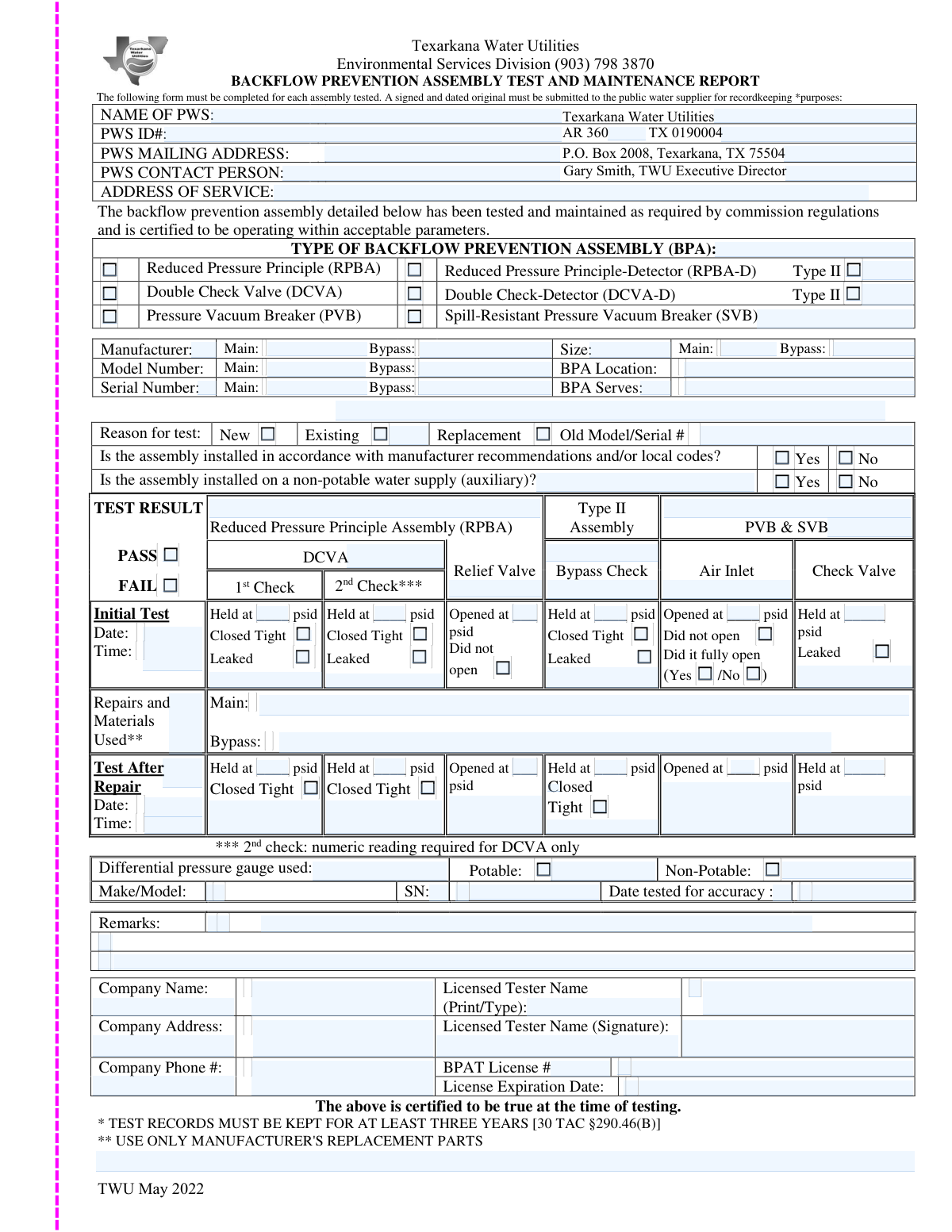
A Backflow Prevention Assembly Test and Maintenance Report is a technical document used by licensed professionals to certify that a backflow prevention device is functioning correctly. This report is vital for public health and regulatory compliance, as it provides water suppliers with proof that the drinking water system is protected from contamination. Today, this form can be filled out quickly and accurately using AI-powered services like Instafill.ai, which can also convert non-fillable PDF versions into interactive fillable forms.
Our AI automatically handles information lookup, data retrieval, formatting, and form filling.
It takes less than a minute to fill out Backflow Test Report using our AI form filling.
Securely upload your data. Information is encrypted in transit and deleted immediately after the form is filled out.

Form specifications

Form name: Backflow Prevention Assembly Test and Maintenance Report
Number of fields: 136
Number of pages: 1
Language: English
main-image

Instafill Demo: How to fill out PDF forms in seconds with AI

How to Fill Out Backflow Test Report Online for Free in 2026

Are you looking to fill out a BACKFLOW TEST REPORT form online quickly and accurately? Instafill.ai offers the #1 AI-powered PDF filling software of 2026, allowing you to complete your BACKFLOW TEST REPORT form in just 37 seconds or less.
Follow these steps to fill out your BACKFLOW TEST REPORT form online using Instafill.ai:
  1. 1 Navigate to Instafill.ai and upload your Backflow Prevention Assembly Test and Maintenance Report or select it from a template library.
  2. 2 Provide details about the Public Water System (PWS), including its name and ID numbers, and the service address where the assembly is located.
  3. 3 Enter the specific information for the backflow prevention assembly, such as the manufacturer, model, size, and serial number for both the main and bypass units.
  4. 4 Input the licensed tester's information, including their name, company, BPAT license number, and license expiration date, along with details of the testing gauge used.
  5. 5 Document the detailed results of the initial test, checking the appropriate boxes for the assembly type (e.g., RPBA, DCVA) and recording all pressure readings (psid) for each check valve and relief valve.
  6. 6 If repairs were necessary, describe the work performed and materials used, then record the 'Test After Repair' results to confirm the assembly now passes inspection.
  7. 7 Review all entered information for accuracy, then have the licensed tester sign and date the form before submitting it to the water purveyor or client.

Our AI-powered system ensures each field is filled out correctly, reducing errors and saving you time.

Why Choose Instafill.ai for Your Fillable Backflow Test Report Form?

Speed

Complete your Backflow Test Report in as little as 37 seconds.

Up-to-Date

Always use the latest 2026 Backflow Test Report form version.

Cost-effective

No need to hire expensive lawyers.

Accuracy

Our AI performs 10 compliance checks to ensure your form is error-free.

Security

Your personal information is protected with bank-level encryption.

Frequently Asked Questions About Form Backflow Test Report

This form is used to officially document the test results, maintenance, and repair of a backflow prevention assembly. It serves as a record to ensure the assembly is functioning correctly and protecting the public water supply from contamination.

Only a licensed Backflow Prevention Assembly Tester (BPAT) with a valid, current license is authorized to perform the tests and complete this report. The tester's license number and expiration date must be provided on the form.

You will need the Public Water System (PWS) information, the service address, complete details of the assembly (manufacturer, model, serial number, size), your BPAT license details, and information about your test gauge, including its serial number and last accuracy test date.

The 'Main' fields are for the primary, full-flow backflow prevention assembly. The 'Bypass' fields are for the smaller, secondary assembly found on detector-type models (RPBA-D or DCVA-D) that monitor for small leaks.

If an assembly fails, you must mark the 'FAIL' box, describe the work done in the 'Repairs and Materials Used' section, and then conduct a 'Test After Repair'. You must record the passing results of this second test to certify the assembly is now compliant.

PSID stands for Pounds per Square Inch Differential. It is the standard unit of measurement for the pressure difference between different points within the assembly, which determines if the valves are working correctly.

Select 'New' for a first-time test on a newly installed assembly. Choose 'Replacement' if you are testing an assembly that has replaced an older one, and select 'Existing' for a routine annual test on an in-service assembly.

In this section, you should provide a concise description of any repairs performed and list all materials or parts used to bring the assembly into compliance. This is required if the assembly initially failed the test.

You must provide the make/model and serial number of the differential pressure gauge used for the test. You also need to enter the date it was last professionally tested for accuracy to ensure the results are valid.

Use the 'Remarks' section to note any additional important information not captured elsewhere on the form. This can include details about non-compliant installations, site conditions, or specific observations made during the test.

Yes, services like Instafill.ai use AI to auto-fill form fields accurately and save time. This can be especially helpful for testers who need to complete many reports, as it helps reduce repetitive data entry and potential errors.

You can upload the form to the Instafill.ai platform, which will make it an interactive, fillable document. This allows you to easily type information into the fields, save your work, and then print or share the completed report digitally.

If you have a flat or non-fillable PDF, you can use a service like Instafill.ai to convert it into an interactive form. The platform automatically identifies the fields, allowing you to type in your information without needing to print and fill by hand.

Compliance Backflow Test Report
Validation Checks by Instafill.ai

1
Mutually Exclusive Overall Test Result
This check ensures that only one of the final test result options, 'PASS' or 'FAIL', is selected. A backflow prevention assembly cannot simultaneously pass and fail a test. Submitting a form with both or neither selected would make the report invalid and ambiguous, so the system should flag this as an error and require the user to select exactly one option.
2
Conditional Requirement for Repair Details
This validation verifies that if the overall 'Test Result' is marked as 'FAIL', then the 'Repairs and Materials Used' and 'Test After Repair' sections are filled out. A failed test necessitates corrective action, and documenting the repairs and subsequent re-test is a critical part of the maintenance record. If 'FAIL' is selected but no repair information is provided, the submission should be rejected until the required details are entered.
3
BPAT License Expiration Verification
This check validates the 'License Expiration Date' field. It ensures the date is in a valid format (e.g., MM/DD/YYYY) and that the date is in the future relative to the 'Initial Test Date'. It is illegal and invalid for a test to be conducted by a technician with an expired license, so this check is crucial for regulatory compliance. If the license is expired, the form submission must be blocked.
4
Logical Date Sequencing
This validation ensures that the 'Test After Repair - Date' is on or after the 'Initial Test Date'. It is logically impossible for a repair and re-test to occur before the initial test that identified the failure. This check prevents data entry errors and maintains a chronological and credible record of events. A submission with an invalid date sequence should be flagged for correction.
5
Assembly-Specific Test Field Relevance
This check ensures that data is entered only into test fields relevant to the selected 'Type of Backflow Prevention Assembly (BPA)'. For example, if 'Pressure Vacuum Breaker (PVB)' is selected, fields like 'DCVA 1st Check' should be disabled or empty. This prevents erroneous or irrelevant data from being recorded, which could cause confusion and compromise the integrity of the test report. The system should guide the user to only fill out the sections applicable to their chosen assembly type.
6
Conditional Old Assembly Information
This validation rule mandates that if 'Replacement' is selected as the 'Reason for Test', the 'Old Model / Serial Number' field must be completed. This is important for maintaining a complete asset history, tracking the lifecycle of equipment, and ensuring proper decommissioning records. A form marked as a replacement without identifying the old unit is incomplete and should be flagged until the information is provided.
7
Mutually Exclusive Individual Check Results
This check verifies that for any given test point, mutually exclusive outcomes are not selected simultaneously. For example, for the 'DCVA 1st Check', a user cannot select both 'Closed Tight' and 'Leaked'. This validation prevents contradictory data entry and ensures a clear, unambiguous result for each step of the test procedure. The system should enforce this by using radio buttons or by flagging an error if conflicting checkboxes are selected.
8
Completeness of Tester Identification
This validation ensures that the 'Licensed Tester Name (Print/Type)', 'BPAT License Number', and 'License Expiration Date' fields are all mandatory and completed. The identity and credentials of the tester are fundamental to the validity and traceability of the report. A report without this information is anonymous and unacceptable for regulatory or safety purposes, so the form cannot be submitted without it.
9
Completeness of Assembly Identification
This check mandates that the 'Manufacturer (Main)', 'Model Number (Main)', and 'Serial Number — Main' fields are filled out. Properly identifying the specific piece of equipment being tested is essential for asset management, tracking test history, and issuing repair or replacement orders. An incomplete identification makes the report ambiguous and of little practical use, so these fields must be required.
10
Gauge Accuracy Date Logic
This validation checks the 'Date Tested for Accuracy' for the differential pressure gauge. It ensures the date is valid and precedes the 'Initial Test Date' of the assembly test. Test gauges must be certified as accurate periodically, and using a gauge with an expired certification invalidates the test results. The system should reject the form if the gauge accuracy test date is after the assembly test date or outside the acceptable certification window (e.g., more than one year old).
11
Conditional Auxiliary Supply Location
This rule ensures that if the checkbox 'Is the assembly installed on a non-potable water supply (auxiliary)? — Yes' is selected, the corresponding 'Auxiliary (Non-potable) Supply Location' text field must be filled. Knowing the location of a non-potable connection is critical for safety and risk assessment. The form should not be accepted if this condition is met but the location description is missing.
12
Logical Consistency of Final PASS/FAIL Result
This validation cross-references the individual test point results (e.g., '1st Check — Leaked') with the final 'Test Result (Pass/Fail)'. If any critical component test is marked as 'Leaked' or fails to meet a required pressure, the overall 'Initial Test' result should logically be 'FAIL'. This check acts as a safeguard against human error, preventing a technician from incorrectly marking a failed assembly as 'PASS'. If a discrepancy is found, the system should warn the user to review the results.
13
Numeric Format for Pressure (PSID) Fields
This check ensures that all fields intended to capture a pressure reading in pounds per square inch differential (psid) contain only valid numeric data. Fields like 'Check Valve Held Pressure (psid)' and 'Relief Valve Reading' must be numbers to be meaningful for analysis and compliance. Entering text like 'N/A' or other non-numeric characters would corrupt the data, so the system must reject any non-numeric input for these fields.
14
Conditional Bypass Check for Type II Assemblies
This validation ensures that if a detector assembly (RPBA-D or DCVA-D) is also designated as 'Type II', the relevant bypass check fields are completed. The 'Type II' designation specifically relates to the bypass assembly, making its test results a required part of the report. If 'Type II' is checked, fields like 'Bypass Check — First Reading' and the 'Closed Tight'/'Leaked' status must be filled, otherwise the report is incomplete for that assembly type.

Common Mistakes in Completing Backflow Test Report

Forgetting to Fill Required Conditional Fields

This form contains many fields that must be filled only if a specific checkbox is selected, such as entering the 'Auxiliary (Non-potable) Supply Location' after checking 'Yes'. Testers often check the box but forget to provide the corresponding detail, leading to an incomplete report. This requires resubmission and causes compliance delays. To avoid this, carefully review each checked box and ensure any dependent text fields are also completed; AI-powered tools like Instafill.ai can automatically highlight these required follow-up fields.

Mismatching Checkbox Selections with Numeric Test Readings

A frequent error is checking a box like '1st Check — Leaked' but then entering a pressure reading in the corresponding field that indicates a pass, or vice-versa. This contradiction, often caused by haste, invalidates the test results and leads to report rejection. Always double-check that the checkbox status (e.g., 'Closed Tight' or 'Leaked') accurately reflects the recorded numeric pressure value to ensure the report is consistent and valid.

Transcribing Incorrect or Incomplete Serial Numbers

Serial numbers for the main and bypass assemblies are critical for tracking but are often entered with typos, transposed digits, or are incomplete. This can happen if the device nameplate is worn or in a hard-to-read location. An incorrect serial number logs the report against the wrong device, creating significant record-keeping problems. It is crucial to transcribe the numbers exactly as they appear on the assembly, and using a form-filling tool can help validate the format.

Omitting Gauge Calibration Date

The validity of the test report depends on using a calibrated differential pressure gauge, yet testers often enter the gauge's serial number but forget the 'Date Tested for Accuracy'. Without this date, the water authority cannot verify that the equipment was compliant, which is grounds for immediate rejection. Always ensure the gauge's most recent calibration date is entered; tools like Instafill.ai can flag this field as mandatory to prevent omission.

Contradictory Final Pass/Fail Status

A user might check the final 'PASS' box, but individual test results within the report (e.g., 'Relief Valve — Did not open') indicate a failure. This contradiction happens when the tester forgets to update the final status after a failed initial test or misreads the overall requirements. A report with conflicting information is invalid and will be returned for correction, so the final 'PASS' or 'FAIL' status must be a logical conclusion of all individual test readings.

Selecting 'Replacement' Without Old Assembly Details

When 'Replacement' is selected as the reason for the test, the 'Old Model / Serial Number' field must be filled out to maintain a clear asset history. Testers frequently check the 'Replacement' box but neglect to enter the old unit's information, leaving a gap in the device's records. This makes it difficult for water purveyors to track assets. Ensure this field is completed to provide a full history of the service location.

Providing a Vague BPA Location Description

The 'BPA Location' field is crucial for finding the assembly for future work, but testers sometimes enter vague descriptions like 'utility room' or 'outside'. A poor description wastes time for future technicians trying to locate the device. The location should be specific, including building names, room numbers, or references to permanent landmarks (e.g., 'NE corner of building, in mechanical room 101').

Documenting Repairs but Omitting 'Test After Repair' Results

If an assembly is repaired after failing, the 'Test After Repair' section must be fully completed with new pressure readings, dates, and times. A common mistake is to describe the repairs but fail to document the successful re-test results. This omission makes it impossible to verify that the repair was successful and the device is now compliant, rendering the report incomplete and leading to rejection.

Improperly Splitting Information Across Fields

The form requires splitting data like the 'BPAT License Number' and 'Company Phone #' into separate fields for different parts (e.g., left/right or area code/main number). Users often put the entire value in one field or split it incorrectly, which can cause data processing failures in automated systems. To prevent this, enter data precisely as guided by the field labels. AI form fillers like Instafill.ai can automatically parse and place this information into the correct separate fields.

Confusing Main vs. Bypass Repair Sections

The form has separate fields for 'Main - Repairs and Materials Used' and 'Bypass — Repairs and Materials Used.' It's easy to document repairs in the wrong section or to list all repairs in one field without specifying which assembly was serviced. This ambiguity creates confusion about the device's maintenance history. To avoid this, clearly separate and detail the repairs for each specific component in its designated field.
Saved over 80 hours a year

“I was never sure if my IRS forms like W-9 were filled correctly. Now, I can complete the forms accurately without any external help.”

Kevin Martin Green

Your data stays secure with advanced protection from Instafill and our subprocessors

Robust compliance program

Transparent business model

You’re not the product. You always know where your data is and what it is processed for.

ISO 27001, HIPAA, and GDPR

Our subprocesses adhere to multiple compliance standards, including but not limited to ISO 27001, HIPAA, and GDPR.

Security & privacy by design

We consider security and privacy from the initial design phase of any new service or functionality. It’s not an afterthought, it’s built-in, including support for two-factor authentication (2FA) to further protect your account.

Fill out Backflow Test Report with Instafill.ai

Worried about filling PDFs wrong? Instafill securely fills backflow-prevention-assembly-test-and-maintenance-report forms, ensuring each field is accurate.