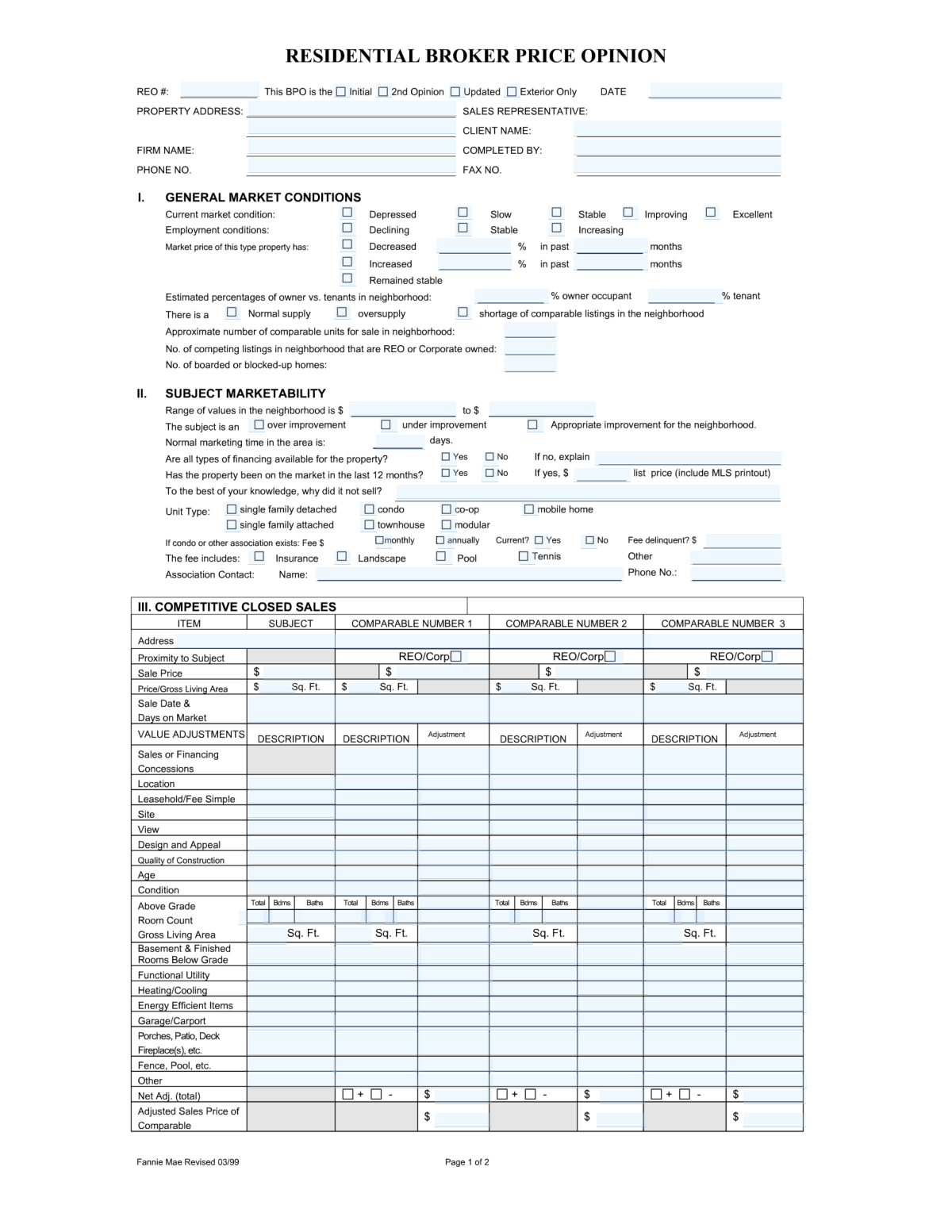
Yes! You can use AI to fill out Broker Price Opinion (BPO) - Quantitative Analysis

A Broker Price Opinion (BPO) - Quantitative Analysis form is a comprehensive document used by real estate professionals to determine a property's likely selling price. It involves a detailed comparison of the subject property against similar properties that have recently sold or are currently on the market, using a grid to make specific dollar adjustments for differences in features, condition, and location. This detailed analysis is crucial for lenders, asset managers, and investors in making informed decisions. Today, this form can be filled out quickly and accurately using AI-powered services like Instafill.ai, which can also convert non-fillable PDF versions into interactive fillable forms.
BPO - Quantitative Analysis has a complex Form Complexity Index of 75/100 — 467 fillable fields across 2 pages. Instafill’s AI completes it accurately in under a minute.

Form specifications

Form name: Broker Price Opinion (BPO) - Quantitative Analysis
Number of fields: 467
Number of pages: 2
FCI: Complex (75/100)
Language: English
Our AI automatically handles information lookup, data retrieval, formatting, and form filling.
It takes less than a minute to fill out BPO - Quantitative Analysis using our AI form filling.
Securely upload your data. Information is encrypted in transit and deleted immediately after the form is filled out.
Preview of Broker Price Opinion (BPO) - Quantitative Analysis

Instafill Demo: How to fill out PDF forms in seconds with AI

How to Fill Out BPO - Quantitative Analysis Online for Free in 2026

Are you looking to fill out a BPO - QUANTITATIVE ANALYSIS form online quickly and accurately? Instafill.ai offers the #1 AI-powered PDF filling software of 2026, allowing you to complete your BPO - QUANTITATIVE ANALYSIS form in just 37 seconds or less.
Follow these steps to fill out your BPO - QUANTITATIVE ANALYSIS form online using Instafill.ai:
  1. 1 Navigate to Instafill.ai and upload your BPO - Quantitative Analysis form, or select it from their template library.
  2. 2 Enter the subject property's address and details, allowing the AI to pre-fill information where possible.
  3. 3 Provide an analysis of the current neighborhood and market conditions, including price trends, employment data, and housing supply.
  4. 4 Input data for at least three comparable sold properties and three comparable active listings, including their addresses, sale/list prices, and key features.
  5. 5 Use the detailed adjustment grid to quantify differences between the subject property and the comparables for features like location, condition, size, and amenities.
  6. 6 List any necessary repairs and their estimated costs to determine an 'as-repaired' value, if applicable.
  7. 7 Review the AI-calculated adjusted sales prices, provide your final opinion of market value and suggested list price, then electronically sign and date the form.

Our AI-powered system ensures each field is filled out correctly, reducing errors and saving you time.

Why Choose Instafill.ai for Your Fillable BPO - Quantitative Analysis Form?

Speed

Complete your BPO - Quantitative Analysis in as little as 37 seconds.

Up-to-Date

Always use the latest 2026 BPO - Quantitative Analysis form version.

Cost-effective

No need to hire expensive lawyers.

Accuracy

Our AI performs 10 compliance checks to ensure your form is error-free.

Security

Your personal information is protected with bank-level encryption.

Frequently Asked Questions About BPO - Quantitative Analysis

BPO - Quantitative Analysis has a Form Complexity Index of 75 out of 100, placing it in the complex complexity tier. This score is calculated deterministically from the form’s own structure using Instafill’s published Form Complexity Index methodology, so it can be reproduced and independently verified — it is not a subjective estimate.

For BPO - Quantitative Analysis specifically, the score reflects 467 fillable fields across 2 pages, grouped into 136 sections, and 19 conditional fields that only apply depending on earlier answers, 2 tables or repeating lists. The number of fields is the largest factor in the base score (weighted 36%), followed by how difficult those fields are to complete based on their type, where free-text and signature fields count for more than simple checkboxes (26%). The number of pages that actually contain fields (15%), the amount of conditional “fill-only-if” logic (16%), and how many sections the form is divided into (7%) account for the rest of the base. On top of that base, the index adds points for tables and repeating lists, bundled instruction pages, and dense page layouts — capturing difficulty the base alone can miss.

In practical terms, a complex score means the form is demanding, with many fields, multiple pages and branching rules that are easy to get wrong. Instafill removes that effort entirely: our AI reads your information, maps each value to the correct field — including the conditional ones — and completes BPO - Quantitative Analysis accurately in under a minute, with every field available for you to review before you download. See exactly how the Form Complexity Index is calculated.

This form is a Broker Price Opinion (BPO), used by real estate professionals to estimate the probable selling price of a property. It analyzes the property, its condition, and the current market using comparable sales and listings.

A licensed real estate broker, agent, or appraiser typically completes this form. They use their professional expertise to analyze the subject property and the local market to provide an informed opinion of value for a client, often a lender or financial institution.

Competitive Closed Sales are similar properties that have recently sold, which helps establish a baseline value. Competitive Listings are similar properties currently for sale, which helps gauge current market competition and pricing.

Adjustments are monetary values you add or subtract from a comparable property's price to account for differences with the subject property. For example, if the comparable has a superior feature, you subtract its value; if it has an inferior feature, you add its value.

You will need the subject property's details, data for at least three recent comparable sales, and information on several current competitive listings. You also need to research local market data like price trends, employment conditions, and average days on market.

List any necessary repairs for the subject property, along with an estimated cost for each. This section is crucial for calculating the property's 'as-is' value versus its potential value after repairs.

If local comparables are scarce, you may need to expand your search radius or use older sales. Be sure to make appropriate adjustments for location and time, and explain your reasoning in the addendum comments section.

This helps define the target market for the property, which influences pricing and marketing strategies. You would select whether the most likely buyer is an owner-occupant or an investor based on the property's condition and local market dynamics.

Start with the comparable property's original sales price, then add or subtract the 'Net Adjustments Total'. This final figure represents what the comparable property might have sold for if it had the exact same features as your subject property.

Use this section for any additional explanations or clarifications that don't fit elsewhere. This is a good place to justify significant value adjustments, comment on unique property features, or describe unusual market conditions.

Yes, services like Instafill.ai use AI to accurately auto-fill form fields, which can save a significant amount of time on data entry. This allows you to focus more on the analysis and valuation aspects of the BPO.

Simply upload your BPO form to the Instafill.ai platform. It will make the document interactive, allowing you to type directly into the fields, use AI to auto-fill information, and add your digital signature before downloading.

You can use a service like Instafill.ai to convert the flat, non-fillable PDF into an interactive form. This allows you to easily complete it on your computer without needing to print it out.

Compliance BPO - Quantitative Analysis
Validation Checks by Instafill.ai

1
BPO Date Chronology
This check validates that the BPO date (fields 0-5) is not in the future and is on or before the signature date (field_460). This ensures the report is dated accurately at the time of its creation and signing. A failure would indicate a data entry error that could question the report's timeliness and validity.
2
Property Address Completeness
This validation ensures that the full property address, including street, city, state, and ZIP code (fields 6-9), is provided. A complete address is critical for uniquely identifying the subject property for valuation and legal purposes. If any part of the address is missing, the form submission will be rejected to prevent ambiguity.
3
Owner vs. Tenant Percentage Sum
This check verifies that the sum of the owner-occupied percentage (field_28) and tenant-occupied percentage (field_29) equals 100%. This data provides insight into the neighborhood's stability, which is a key valuation factor. An incorrect sum indicates a logical error in the data, and the user will be prompted to correct the values.
4
Neighborhood Value Range Logic
This validation ensures that the low-end value of the neighborhood range (field_36) is less than or equal to the high-end value (field_37). This maintains the logical integrity of the value range data point. An inverted range is nonsensical and would be flagged as an error for correction.
5
Market Trend Consistency
This check performs a logical cross-reference between market indicators like 'Current Market Condition' (fields 13-17) and 'Market Price Trend' (fields 21-27). For example, if the market is described as 'Declining', the price trend should not be 'Increasing'. This prevents contradictory assessments and ensures a coherent market analysis.
6
Conditional Association Fee Requirement
This validation ensures that if an association fee amount (field_56) is greater than zero, then the fee frequency (field_57) and association contact information (fields 66-67) must also be provided. This is important for understanding the full cost of ownership and for future verification. Missing conditional information will trigger a validation failure.
7
Comparable Sales Minimum
This check ensures that a minimum number of competitive closed sales (e.g., at least three) are provided in the grid (fields 68-86). A sufficient number of comparables is fundamental to a credible Broker Price Opinion. Submissions with fewer than the required number of comparables will be considered incomplete.
8
Comparable Gross Living Area (GLA) Variance
This validation checks that the Gross Living Area (GLA) of each comparable property (fields 79-82, 370, 377, etc.) is within a standard percentage (e.g., +/- 25%) of the subject property's GLA (field_366). This ensures that the selected properties are genuinely comparable and that the valuation is based on similar assets. A large variance would require justification or replacement of the comparable.
9
Repair Cost Grand Total Calculation
This check verifies that the 'Repair Grand Total' (field_271) is the correct sum of all individual repair item costs listed in the repair grid (fields 241-270). This ensures mathematical accuracy for the total estimated cost of repairs, which directly impacts the 'as-repaired' value. A mismatch will result in a calculation error, requiring the user to review the itemized costs.
10
Net Adjustments Total Calculation
This validation confirms that the 'Net Adjustments Total' for each comparable (e.g., field_444, 462) is the correct arithmetic sum of all individual adjustment values (e.g., fields 295-443) for that comparable. Accurate calculations are crucial for determining the final adjusted price. If the sum does not match the total, the submission will be flagged for mathematical review.
11
Adjusted Sales Price Calculation
This check ensures that the 'Adjusted Sales Price of Comparable' (e.g., field_447, 463) is correctly calculated by adding the 'Net Adjustments Total' to the comparable's original sales price. This is the final step in reconciling a comparable's value to the subject property. An incorrect calculation invalidates the core of the valuation analysis and must be corrected.
12
Final Market Value Consistency
This validation checks that the final 'Market Value' opinion (field_450) falls within the range of the calculated 'Adjusted Sales Price of Comparable' values (fields 447-449, 463, etc.). The final value should be supported by the adjusted comparables. A value outside this range suggests a potential error or requires significant justification in the addendum comments.

Common Mistakes in Completing BPO - Quantitative Analysis

Inconsistent Market Condition Reporting

This occurs when an agent selects contradictory options for market indicators, such as stating the market price trend is 'Increasing' while also indicating an 'Over Supply' of listings. These inconsistencies undermine the credibility of the report and suggest a lack of thorough analysis or a simple oversight. To avoid this, review all market condition checkboxes (fields 13-32) together to ensure they paint a cohesive and logical picture of the current market dynamics.

Poor Comparable Property Selection

Agents sometimes select comparable properties (fields 68-74) that are not truly similar to the subject property, such as being in a different neighborhood, having a significantly different style, or being much older or newer. This leads to large, subjective adjustments and a less accurate valuation. Always choose the most similar properties in terms of location, size, age, and features, and be prepared to justify your choices in the addendum.

Unsubstantiated Value Adjustments

This mistake involves applying significant monetary adjustments for features like 'Condition,' 'Location,' or 'View' (fields 307-362) without providing clear, data-driven justification in the addendum. A large adjustment without explanation can be perceived as arbitrary and may cause the BPO to be rejected. To prevent this, always document the reasoning for each major adjustment, referencing specific market data or paired sales analysis.

Mathematical Errors in Adjustment Calculations

The adjustment grid is complex, and manual calculations often lead to errors in the 'Net Adjustments Total' (e.g., field 444) and the final 'Adjusted Sales Price of Comparable' (e.g., field 447). A single math error can invalidate the entire valuation. If the form is a non-fillable PDF, tools like Instafill.ai can convert it into an interactive version with automated calculations to prevent such errors.

Vague or Incomplete Repair Cost Estimates

When listing required repairs (fields 241-270), agents may use vague descriptions like 'landscaping' or 'paint' with guessed costs. This provides little value and can lead to an inaccurate 'as-repaired' valuation. Be specific about the scope of work (e.g., 'Replace 5 broken windows, cost per window') and use reliable cost estimators to arrive at a defensible 'Repair Grand Total' (field 271).

Incorrect Gross Living Area (GLA) Data

Entering an incorrect Gross Living Area (e.g., field 366, 370) for the subject property or comparables is a frequent data entry error that skews all subsequent adjustments and the final valuation. Always verify the GLA from a reliable source like public records or the MLS listing and double-check your entry. AI tools like Instafill.ai can help by auto-populating this data from verified databases, reducing the risk of manual error.

Mismatch Between Adjusted Values and Final Opinion of Value

A common logical error is providing a 'Suggested List Price' (fields 451-453) that falls outside the range established by the 'Adjusted Sales Price of Comparables' (fields 447-449). For example, if adjusted comps are all between $300k-$310k, a suggested price of $340k is a red flag. The final value should be a logical conclusion based on the data presented; any significant deviation must be thoroughly explained in the comments section.

Omitting Association (HOA) Details

Agents often leave fields related to homeowner's associations, particularly the 'Association Contact' name and phone number (fields 66-67), blank. This information is critical for lenders and buyers to verify fees and rules, and its absence can delay transactions or cause the BPO to be returned. Take the extra time to find this information from the MLS, public records, or by contacting the management company.

Incomplete Property Address

A surprisingly common mistake is providing an incomplete or slightly incorrect property address (fields 6-9), such as omitting a unit number for a condominium. This can cause confusion and issues with data verification and property identification for the client. Always write the full, official address as it appears in public records. AI-powered form fillers like Instafill.ai can prevent this by validating addresses against official databases.

Forgetting the Signature or Date

Failing to sign (field 459) or date (field 460) the form is a simple but critical error that renders the entire Broker Price Opinion invalid. This often happens when rushing to complete the paperwork. Before submitting, always perform a final check to ensure the signature and date fields are properly filled out, as this is your legal attestation to the information provided.
Saved over 80 hours a year

“I was never sure if my IRS forms like W-9 were filled correctly. Now, I can complete the forms accurately without any external help.”

Kevin Martin Green

Your data stays secure with advanced protection from Instafill and our subprocessors

Robust compliance program

Transparent business model

You’re not the product. You always know where your data is and what it is processed for.

ISO 27001, HIPAA, and GDPR

Our subprocesses adhere to multiple compliance standards, including but not limited to ISO 27001, HIPAA, and GDPR.

Security & privacy by design

We consider security and privacy from the initial design phase of any new service or functionality. It’s not an afterthought, it’s built-in, including support for two-factor authentication (2FA) to further protect your account.

Fill out BPO - Quantitative Analysis with Instafill.ai

Worried about filling PDFs wrong? Instafill securely fills broker-price-opinion-bpo-quantitative-analysis forms, ensuring each field is accurate.