Yes! You can use AI to fill out Broker Price Opinion (BPO) Report

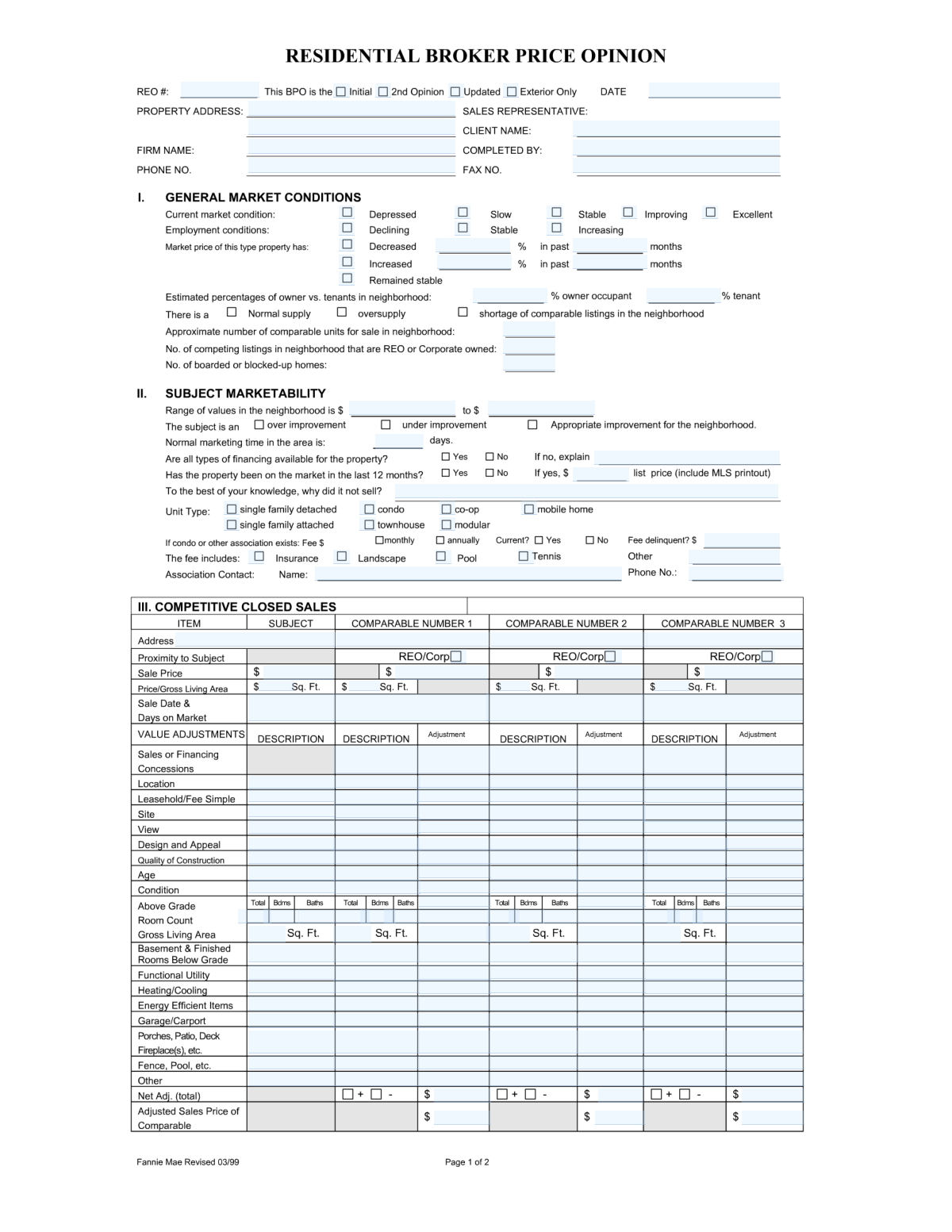
A Broker Price Opinion (BPO) Report is a detailed analysis prepared by a real estate broker to estimate the value of a property, serving as a common alternative to a full appraisal. It's essential for lenders, servicers, and investors to make informed decisions regarding property assets, especially in situations like foreclosures or loan modifications. Today, this comprehensive form can be filled out quickly and accurately using AI-powered services like Instafill.ai, which can also convert non-fillable PDF versions into interactive fillable forms.
BPO Report has a very complex Form Complexity Index of 84/100 — 461 fillable fields across 2 pages. Instafill’s AI completes it accurately in under a minute.

Form specifications

Form name: Broker Price Opinion (BPO) Report
Number of fields: 461
Number of pages: 2
FCI: Very Complex (84/100)
Language: English
Our AI automatically handles information lookup, data retrieval, formatting, and form filling.
It takes less than a minute to fill out BPO Report using our AI form filling.
Securely upload your data. Information is encrypted in transit and deleted immediately after the form is filled out.
Preview of Broker Price Opinion (BPO) Report

Instafill Demo: How to fill out PDF forms in seconds with AI

How to Fill Out BPO Report Online for Free in 2026

Are you looking to fill out a BPO REPORT form online quickly and accurately? Instafill.ai offers the #1 AI-powered PDF filling software of 2026, allowing you to complete your BPO REPORT form in just 37 seconds or less.
Follow these steps to fill out your BPO REPORT form online using Instafill.ai:
  1. 1 Navigate to Instafill.ai and upload or select the Broker Price Opinion (BPO) Report form.
  2. 2 Use the AI assistant to input the subject property's address, type, and your sales representative details.
  3. 3 Complete the neighborhood and market analysis sections, providing data on market conditions, price trends, and inventory.
  4. 4 Enter detailed information for at least three competitive closed sales and three competitive active listings, including their addresses, prices, features, and condition.
  5. 5 Make value adjustments to the comparable properties based on their differences from the subject property, and itemize any necessary repairs with estimated costs.
  6. 6 Review all AI-assisted calculations, provide your final market value opinion and suggested list price, and then add your digital signature and date to certify the report.

Our AI-powered system ensures each field is filled out correctly, reducing errors and saving you time.

Why Choose Instafill.ai for Your Fillable BPO Report Form?

Speed

Complete your BPO Report in as little as 37 seconds.

Up-to-Date

Always use the latest 2026 BPO Report form version.

Cost-effective

No need to hire expensive lawyers.

Accuracy

Our AI performs 10 compliance checks to ensure your form is error-free.

Security

Your personal information is protected with bank-level encryption.

Frequently Asked Questions About BPO Report

BPO Report has a Form Complexity Index of 84 out of 100, placing it in the very complex complexity tier. This score is calculated deterministically from the form’s own structure using Instafill’s published Form Complexity Index methodology, so it can be reproduced and independently verified — it is not a subjective estimate.

For BPO Report specifically, the score reflects 461 fillable fields across 2 pages, grouped into 35 sections, and 226 conditional fields that only apply depending on earlier answers, 3 tables or repeating lists. The number of fields is the largest factor in the base score (weighted 36%), followed by how difficult those fields are to complete based on their type, where free-text and signature fields count for more than simple checkboxes (26%). The number of pages that actually contain fields (15%), the amount of conditional “fill-only-if” logic (16%), and how many sections the form is divided into (7%) account for the rest of the base. On top of that base, the index adds points for tables and repeating lists, bundled instruction pages, and dense page layouts — capturing difficulty the base alone can miss.

In practical terms, a very complex score means the form is exceptionally demanding — a very large number of fields, often combined with tables, dense pages or extensive conditional logic. Instafill removes that effort entirely: our AI reads your information, maps each value to the correct field — including the conditional ones — and completes BPO Report accurately in under a minute, with every field available for you to review before you download. See exactly how the Form Complexity Index is calculated.

This form is a Broker Price Opinion (BPO) report, used by real estate professionals to estimate the probable selling price of a property based on current market conditions, property condition, and comparable properties.

This form should be completed by a licensed real estate broker or sales representative who has expertise in the local property market and is qualified to provide an opinion of value.

Before you begin, you should gather MLS data for at least three comparable closed sales and three competitive active listings, details from a physical inspection of the property, and information on any required repairs.

The 'Competitive Closed Sales' section analyzes properties that have already sold to establish a historical value basis. The 'Competitive Listings' section analyzes properties currently for sale to assess the present competition and market positioning.

Value adjustments are your professional estimates of the monetary difference for features between the subject property and the comparables. Base these figures on your market knowledge of how much buyers will pay for features like a better view, an extra bathroom, or superior condition.

List any specific repairs needed to make the property marketable, along with an estimated cost for each item. This information is crucial for determining the property's 'as-is' value versus its potential 'as-repaired' value.

If ideal comparables are not available, you may need to use older sales, properties from a different neighborhood, or properties with significant differences. It is critical to explain your choices and the adjustments you made in the 'Comments' section.

Use the provided checkboxes and text fields to describe the local real estate environment. Indicate if property values are increasing or decreasing, the typical time a property stays on the market, and whether it is currently a buyer's or seller's market.

This information can typically be found in public records, on the MLS listing for the property or similar units, or by contacting the Homeowners Association (HOA) or Condo Association directly.

Yes, services like Instafill.ai use AI to auto-fill form fields accurately and save time. This is especially helpful for the repetitive data entry required in the comparable property grids.

Simply upload the BPO report PDF to the Instafill.ai platform. Their AI will map the fields, allowing you to connect data from an MLS export or spreadsheet to automatically populate the comparable sales and listings sections in seconds.

Instafill.ai can convert flat, non-fillable PDFs into interactive forms. Upload your file, and the platform will make all the fields, including checkboxes and text areas, fillable online.

After completing the adjustments for all comparable properties, analyze the resulting 'Adjusted Sales Prices'. Give the most weight to the best comparables to arrive at a final, single-point estimate of market value.

Compliance BPO Report
Validation Checks by Instafill.ai

1
BPO Report Date and Signature Date Logical Consistency
This validation ensures that the Signature Date (Date_2) is on or after the BPO Report Date (Date_1). A signature date preceding the report date is logically impossible and indicates a data entry error. This check is crucial for maintaining the chronological integrity and legal validity of the report, as it confirms the report was completed before being signed. If this validation fails, the user should be prompted to correct one or both dates.
2
Property Address Completeness
Verifies that the core property address fields (e.g., Text_2 for street, Text_3 for city, Text_4 for state, Text_5 for ZIP) are all populated. A complete and valid address is the most fundamental piece of information for a property report, as all subsequent analysis depends on it. Failure to provide a full address would render the report useless and should prevent submission.
3
Owner vs. Tenant Percentage Summation
This check confirms that the values entered for Owner Occupancy Percentage (Text_13) and Tenant Occupancy Percentage (Text_14) sum to exactly 100%. These two fields represent a whole, and their sum must equal 100% for the data to be logical. This prevents nonsensical data, like 80% owner-occupied and 30% tenant-occupied, from being submitted.
4
Neighborhood Value Range Order
Ensures the 'low' value in the Neighborhood Value Range (Text_18) is less than or equal to the 'high' value (Text_19). This is a basic logical check to prevent data entry errors where the values might be accidentally transposed. An inverted range is nonsensical and would confuse any automated systems or individuals reviewing the report.
5
Conditional Marketing History Explanation
If the checkbox indicating the property was marketed in the last 12 months (c2_Checkmark_24) is selected, this validation ensures that the 'Reason Property Did Not Sell' (Text_23) field is not empty. This rule enforces the collection of critical context when a prior marketing attempt is noted. A failure would prompt the user to provide the required explanation.
6
Conditional Association Fee Details Requirement
This validation checks that if the 'Association Fee - Yes' checkbox (c3_Checkmark_33) is selected, then the fee amount (Text_24) and association contact information (Text_25, Text_26) must be provided. This ensures that acknowledging the existence of an HOA is followed up with the necessary details for proper valuation and disclosure. An error would be flagged if the 'Yes' box is checked but the corresponding details are missing.
7
Itemized Repair Costs Grand Total Calculation
Verifies that the 'Grand Total' for repairs (Text_201) correctly equals the sum of all individual itemized repair costs (e.g., Text_182, Text_184, etc.). This automated check prevents mathematical errors by the user and ensures the total cost accurately reflects the itemized list. If the sum does not match the total, the system should flag the discrepancy and may offer to auto-correct the total.
8
Competitive Closed Sale Data Integrity
For each competitive closed sale entered (e.g., Comp 1, Comp 2, Comp 3), this check ensures that if an address (e.g., Text_28) is provided, then the corresponding Sale Price (Text_32) and Sale Date (part of Text_40) must also be filled out. This prevents incomplete comparable entries, which are unusable for analysis. The validation enforces that each comparable listed is a complete and useful data point.
9
Price per Gross Living Area Calculation Verification
This check validates the calculation for 'Price per Living Area' (e.g., Text_36) by dividing the 'Sale Price' (Text_32) by the 'Gross Living Area' (Number_7). This ensures data accuracy and consistency within the competitive sales grid, catching potential typos or miscalculations. If the user-entered value does not match the calculated value within a small tolerance, a warning should be issued.
10
Adjusted Sales Price Calculation Verification
Ensures the 'Adjusted Sales Price' of a comparable (e.g., Text_178) is the correct sum of its 'Sale Price' (Text_32) and its 'Net Adjustments' (Text_175). This is a critical validation as the adjusted prices are the primary basis for the final value conclusion. An incorrect calculation here would invalidate the entire analysis, so the system must confirm this math is correct.
11
Exclusive Checkbox Selection for Market Condition
Validates that only one checkbox is selected within the 'Current Market Condition' group (Checkmark_5, Checkmark_6, Checkmark_7). This section is intended to function like a radio button group where only one state (e.g., 'Improving', 'Stable', 'Declining') can be true. The check prevents ambiguous or contradictory data from being submitted.
12
Typical Marketing Time Format
This validation ensures that the value entered for 'Typical Marketing Time (Days)' (Text_20) is a positive integer. The field represents a number of days and should not contain text, decimals, or negative numbers. This maintains data quality and ensures the field can be used for numerical analysis and reporting.
13
Final Market Value Presence
Verifies that the final 'Market Value' fields (e.g., Text_365, Text_366) are populated with valid currency values. These fields represent the ultimate conclusion of the entire report and are arguably the most important outputs. The form submission should be blocked if these critical fields are left empty, as the report would be incomplete without a value conclusion.

Common Mistakes in Completing BPO Report

Misaligned Data in Comparable Grids

The form contains large grids for 'Competitive Closed Sales' and 'Competitive Listings' with numerous columns. A frequent error is entering data for one property into the column of another, such as putting Comp 2's sale price in the Comp 3 field. This mistake compromises all subsequent adjustments and calculations, leading to a fundamentally flawed valuation. To prevent this, meticulously cross-reference each data point with its source; AI-powered tools like Instafill.ai can also help by structuring the data entry process to reduce the risk of misalignment.

Manual Calculation Errors in Value Adjustments

This form requires manual calculation of 'Net Adjustments' and 'Adjusted Sales Price' for each comparable property. Users often make simple arithmetic errors during these calculations, which directly invalidates the final opinion of value. A single miscalculation can significantly skew the report's conclusion, potentially causing financial loss. Always double-check your math, or better yet, use a tool that automates these calculations to ensure accuracy.

Incomplete or Vague Repair Itemization

In the 'Repairs - Itemized Costs' section, agents sometimes list a required repair (e.g., 'New Carpet') but forget to include the cost, or vice-versa. Descriptions can also be too vague, like 'General Wear & Tear,' which provides no actionable information. This ambiguity prevents the client from understanding the true 'as-is' condition and the costs required to get to the 'as-repaired' value. Each repair must have a specific description and a justifiable cost estimate.

Contradictory Market Condition Selections

The form has several sections with checkboxes to describe market dynamics, such as 'Current Market Condition' and 'Market Price Trend'. A common mistake is selecting contradictory options, like stating the market is 'Improving' but the price trend is 'Decreasing', without providing an explanation. This inconsistency undermines the credibility of the analysis. Ensure your selections create a logical and consistent picture of the market, or use the comments section to clarify any nuances.

Missing or Incomplete Association (HOA) Information

Forgetting to fill out the 'Association Fee Information' section is a critical omission for properties within an HOA or condo association. Users may not know the fee amount, payment frequency, or contact details and leave the fields blank. This information is essential for assessing holding costs and understanding property restrictions, and its absence can cause significant delays and require the report to be redone. If the form is a non-fillable PDF, a tool like Instafill.ai can convert it to a fillable version, making these fields easier to complete.

Selection of Poorly Matched Comparable Properties

The accuracy of the entire BPO report depends on the quality of the selected comparable properties. A primary mistake is using comps that are not recent (over 6-12 months old), not in close proximity, or substantially different in key features like GLA, age, or condition. Using poor comps leads to large, subjective adjustments and an unreliable valuation. It is vital to select the most relevant, recent, and proximate properties to support a credible opinion of value.

Inconsistent Gross Living Area (GLA) Reporting

Gross Living Area is a key valuation metric, but it's often reported inconsistently across the subject and comparable properties. For instance, an agent might include a finished basement in the GLA for one property but not another, or pull conflicting data from tax records versus MLS listings. This invalidates all price-per-square-foot calculations and adjustments. Ensure a consistent standard for calculating GLA is applied to all properties in the report.

Vague or Unsupported Comments and Justifications

The 'Comments' section is intended to explain the rationale behind value adjustments and the final conclusion. A frequent error is providing generic comments like 'Adjusted for condition' without detailing why the condition is superior or inferior and how the adjustment value was derived. This lack of specific justification makes the report appear subjective and less credible. Every significant adjustment requires a clear, logical explanation.

Improperly Formatted Property Address

The property address is broken into multiple text fields (Text_2, Text_3, etc.), but users often enter the entire address onto the first line or split it incorrectly. This creates data entry that is messy and can cause errors in automated systems used for location mapping and data aggregation. To avoid this, carefully enter the street address, city, state, and ZIP code into their respective, designated fields. AI form-filling tools like Instafill.ai can automatically parse and place address components into the correct fields.

Missing Signature or Signature Date

A simple but critical error is failing to complete the 'Signature_1' and 'Date_2' fields at the end of the form. An unsigned or undated BPO is legally invalid and will be rejected by the client, forcing the agent to correct and resubmit the report. Always perform a final check to ensure the form is properly signed and dated before submission to avoid unnecessary delays and rework.
Saved over 80 hours a year

“I was never sure if my IRS forms like W-9 were filled correctly. Now, I can complete the forms accurately without any external help.”

Kevin Martin Green

Your data stays secure with advanced protection from Instafill and our subprocessors

Robust compliance program

Transparent business model

You’re not the product. You always know where your data is and what it is processed for.

ISO 27001, HIPAA, and GDPR

Our subprocesses adhere to multiple compliance standards, including but not limited to ISO 27001, HIPAA, and GDPR.

Security & privacy by design

We consider security and privacy from the initial design phase of any new service or functionality. It’s not an afterthought, it’s built-in, including support for two-factor authentication (2FA) to further protect your account.

Fill out BPO Report with Instafill.ai

Worried about filling PDFs wrong? Instafill securely fills broker-price-opinion-bpo-report forms, ensuring each field is accurate.