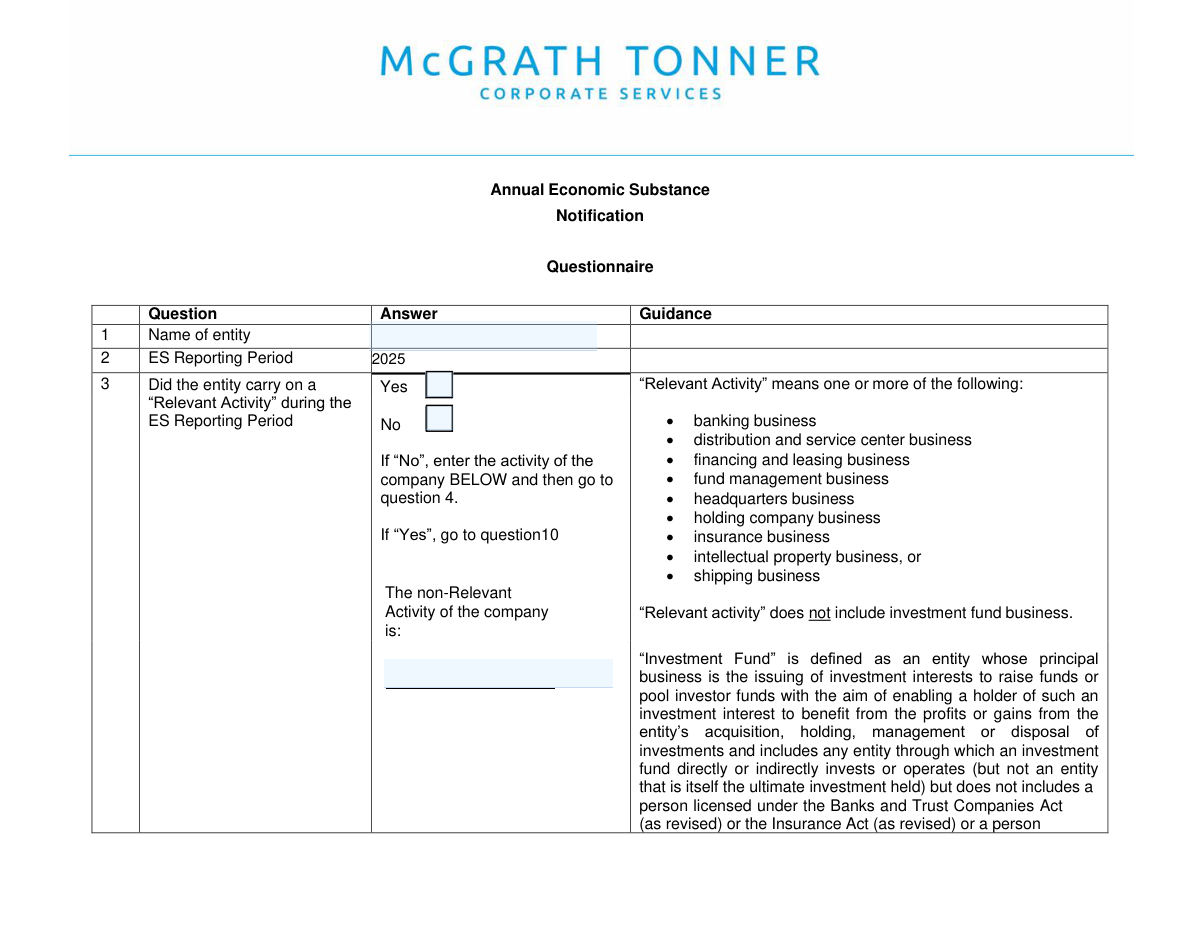
Yes! You can use AI to fill out Cayman Islands Economic Substance Notification Form
The Cayman Islands Economic Substance (ES) Notification Form is a mandatory filing for entities registered in the Cayman Islands to declare their business activities for a specific reporting period. This declaration helps the Department for International Tax Cooperation (DITC) assess whether the entity is conducting a 'Relevant Activity' and must meet economic substance requirements. Today, this form can be filled out quickly and accurately using AI-powered services like Instafill.ai, which can also convert non-fillable PDF versions into interactive fillable forms.
Our AI automatically handles information lookup, data retrieval, formatting, and form filling.
It takes less than a minute to fill out Cayman ES Form using our AI form filling.
Securely upload your data. Information is encrypted in transit and deleted immediately after the form is filled out.
Form specifications
| Form name: | Cayman Islands Economic Substance Notification Form |
| Number of fields: | 71 |
| Number of pages: | 9 |
| Language: | English |
Instafill Demo: How to fill out PDF forms in seconds with AI
How to Fill Out Cayman ES Form Online for Free in 2026
Are you looking to fill out a CAYMAN ES FORM form online quickly and accurately? Instafill.ai offers the #1 AI-powered PDF filling software of 2026, allowing you to complete your CAYMAN ES FORM form in just 37 seconds or less.
Follow these steps to fill out your CAYMAN ES FORM form online using Instafill.ai:
- 1 Navigate to Instafill.ai and upload your Cayman Islands Economic Substance Notification Form or select it from our template library.
- 2 Provide the entity's full legal name and specify whether it conducted a 'Relevant Activity' during the reporting period.
- 3 Answer the questions regarding the entity's status as an 'investment fund' and provide any CIMA, FI, or GIIN numbers if applicable.
- 4 Follow the form's logic, guided by the AI, to complete sections relevant to your entity's specific activities and classifications.
- 5 Carefully review all the information entered by the AI for accuracy, making any necessary corrections to ensure compliance.
- 6 Electronically sign the form in the designated signature field to certify the information provided.
- 7 Download the completed and signed ES form, ready for submission to the Cayman Islands DITC portal.
Our AI-powered system ensures each field is filled out correctly, reducing errors and saving you time.
Why Choose Instafill.ai for Your Fillable Cayman ES Form Form?
Speed
Complete your Cayman ES Form in as little as 37 seconds.
Up-to-Date
Always use the latest 2026 Cayman ES Form form version.
Cost-effective
No need to hire expensive lawyers.
Accuracy
Our AI performs 10 compliance checks to ensure your form is error-free.
Security
Your personal information is protected with bank-level encryption.
Frequently Asked Questions About Form Cayman ES Form
This form is used to report an entity's activities for a specific period, primarily to determine if it conducted a 'Relevant Activity' under economic substance regulations. It also gathers key details for entities operating as 'investment funds' for regulatory compliance with authorities like CIMA.
This form must be completed by entities subject to the jurisdiction's economic substance reporting requirements. It is mandatory for determining your entity's classification and compliance obligations for the reporting period.
A 'Relevant Activity' refers to specific business categories defined by law, such as banking, insurance, fund management, or holding company business. You must consult the official economic substance guidelines to see if your entity's operations qualify.
If your entity did not conduct a 'Relevant Activity', check the 'No' box on page 1. You will then be required to provide a brief description of your company's primary business in the 'Non-Relevant Activity Description' field.
If your entity is an 'investment fund', you must indicate this and provide any CIMA, FI, or GIIN registration numbers you have. You also need to clarify if these numbers belong to your entity directly or to another fund that invests through your entity.
If your entity is an investment fund but does not have any of these specific registration numbers, you should check the corresponding 'No' box. The form indicates you may then be able to skip to the final question.
Your CIMA reference number is issued by the Cayman Islands Monetary Authority upon registration. This number can be found on official registration documents, certificates, or correspondence from CIMA.
You must enter the full legal name of the entity exactly as it appears on its official certificate of incorporation or registration documents. Do not use abbreviations or trade names unless they are part of the legal name.
Yes, services like Instafill.ai use AI to auto-fill form fields accurately from your saved profiles, which saves time and helps prevent errors. This is particularly useful for forms that require repetitive company or personal information.
To fill this form online, upload the PDF to Instafill.ai. The platform will make the fields interactive, and you can use your saved profile to populate your entity's information with a single click before signing and downloading.
If your form is a non-fillable or 'flat' PDF, you can use a service like Instafill.ai. Simply upload the file, and the tool will automatically convert it into an interactive, fillable form that you can complete on your computer.
This question is for situations where your entity (e.g., a feeder fund) operates under the registration number of another entity (e.g., a master fund). You should answer 'Yes' if the CIMA, FI, or GIIN number you provided belongs to a separate fund that invests through yours.
Submission instructions are typically provided by the regulatory authority that requires the form. Check the authority's official website or portal for details on how to submit the form, deadlines, and any associated fees.
Compliance Cayman ES Form
Validation Checks by Instafill.ai
1
Exclusive 'Relevant Activity' Selection
This check ensures that the user has selected either 'Yes' or 'No' for the question 'Did the entity carry on a 'Relevant Activity'', but not both. This is a critical initial question that dictates the logic for the rest of the form. If validation fails, the user should be prompted to make a single, valid selection to proceed.
2
Mandatory Entity Name
Validates that the 'Entity Name' field is not empty. The full legal name is a primary identifier for the entity being reported on and is essential for record-keeping and regulatory matching. A submission with a missing entity name would be unusable and should be rejected.
3
Conditional 'Non-Relevant Activity Description' Logic
This validation enforces a dependency rule: the 'NonāRelevant Activity Description' field must be populated if and only if the user selected 'No' for carrying on a 'Relevant Activity'. This ensures that entities not engaged in relevant activities properly describe their primary business. If 'Relevant Activity' is 'Yes', this description field must be empty to avoid contradictory information.
4
Exclusive 'Investment Fund' Status Selection
This check ensures that the user has selected either 'Yes' or 'No' for the question 'Is the entity an āinvestment fundā?', but not both. This selection determines a major logical path through the form, including whether several subsequent sections are applicable. An invalid or missing selection prevents the form from being processed correctly.
5
Required Registration Numbers for Investment Funds
If the user indicates that an investment fund has a CIMA, FI, or GIIN number by selecting 'Yes', this validation ensures the corresponding 'Investment fund registration numbers' text field is not empty. This is crucial for uniquely identifying the fund within regulatory systems. Failure to provide the number after indicating its existence would result in an incomplete and potentially non-compliant filing.
6
Empty Registration Numbers Field for Funds Without Them
This check is the inverse of the previous one. If the user indicates that an investment fund does not have a CIMA, FI, or GIIN number by selecting 'No', this validation ensures the 'Investment fund registration numbers' text field is left empty. This prevents stray data entry and confusion, confirming the explicit 'No' response.
7
Conditional Logic for 'Relates to Another Fund' Question
This validation ensures the question 'Do these numbers relate to another investment fund?' is only answered if the user has first indicated that the entity *has* CIMA/FI/GIIN numbers. Answering this question without providing any numbers is a logical contradiction. The system should prevent or flag this state to maintain data integrity.
8
Exclusive 'Known to CIMA' Selection
This check ensures that the user has selected either 'Yes' or 'No' for the question 'Is the entity known to CIMA?', but not both. This is a required data point for understanding the entity's regulatory status. An invalid or missing selection would leave the entity's relationship with CIMA ambiguous.
9
Conditional Requirement for CIMA Details
If the user selects 'Yes' for 'Is the entity known to CIMA?', this validation ensures that both the 'CIMA Type' and 'CIMA reference number' fields are filled out. This information is essential for verifying the entity's status with the Cayman Islands Monetary Authority. A failure would mean critical identifying data is missing despite being declared available.
10
Empty CIMA Details for Entities Not Known to CIMA
If the user selects 'No' for 'Is the entity known to CIMA?', this validation ensures that the 'CIMA Type' and 'CIMA reference number' fields are empty. This prevents the submission of contradictory information where an entity is declared not known to CIMA but CIMA details are provided. This check enforces logical consistency.
11
Logical Skip for Non-Investment Funds
This validation enforces the form's skip logic. If the user selects 'No' to 'Is the entity an āinvestment fundā?', all subsequent fields until the final section (Q.24) must be empty. This prevents users from accidentally filling out sections that are not applicable to them, reducing errors and improving data quality.
12
Mandatory Signature
This check validates that the signature field, 'Signature71', has been completed. A signature is typically required to attest to the accuracy of the information provided and to make the submission legally valid. A form submitted without a signature is incomplete and should be rejected until signed.
Common Mistakes in Completing Cayman ES Form
Users often misinterpret the legal definition of a 'Relevant Activity', leading them to check the wrong box at the very beginning of the form. This initial error causes a cascade effect, prompting them to fill out incorrect sections or omit required information entirely. To avoid this, carefully review the form's accompanying guidance notes to understand the precise definition of each 'Relevant Activity' before making a selection.
Many applicants enter a trading name, an abbreviation, or a common name instead of the full, official legal name of the entity. This creates a mismatch with regulatory databases, leading to processing delays, rejections, or failure to identify the entity. Always refer to the entity's certificate of incorporation or other official registration documents to ensure the name is entered exactly as it appears on record.
The form contains numerous instructions like 'if No, go to question 24' or 'Fill only if Yes'. A frequent mistake is ignoring these directions, resulting in either skipping mandatory sections or filling out sections that are not applicable. This creates a contradictory and confusing submission that is likely to be rejected. If the form is a non-fillable PDF, which makes this error more likely, tools like Instafill.ai can convert it into a smart, fillable version that can help guide the user through the correct logical path.
The term 'investment fund' has a specific legal definition for regulatory purposes that may differ from its common usage. Users may incorrectly self-identify as a fund (or not) based on a general understanding, leading them down the wrong path in the form. This can result in an entirely incorrect filing. It is crucial to consult the form's specific definitions or seek legal advice to confirm the entity's status before answering this critical question.
When entering multiple registration numbers, users often fail to follow the specified format, such as using spaces or semicolons instead of the required commas. They may also provide incomplete numbers by omitting prefixes or suffixes. This prevents automated systems from parsing the data and requires manual correction, causing significant delays. To prevent this, copy the numbers exactly from source documents and adhere strictly to the formatting rules, or use an AI-powered tool like Instafill.ai which can help validate and format such data correctly.
Applicants sometimes provide answers that conflict with each other, such as checking 'No' to 'Is the entity known to CIMA?' but then entering a CIMA reference number in a later field. These inconsistencies immediately flag the submission as erroneous and demonstrate a lack of diligence. A final review of the entire completed form is essential to catch and resolve any contradictions before submission.
When an entity does not conduct a 'Relevant Activity', a description of its primary activity is required. A common mistake is to provide a generic or unhelpful description like 'business' or 'holding company activities'. This forces the reviewer to seek clarification, delaying the process. The description should be brief but specific enough for the regulator to understand the entity's primary purpose without follow-up.
Questions like 'Do these numbers relate to another investment fund?' are complex and often misunderstood. Users may mistakenly provide information about the primary entity again, rather than the separate, related fund the question is asking about. This misrepresents the entity's structure and can trigger further scrutiny. Carefully read the wording of each question to distinguish when it refers to 'the entity' versus 'another' entity or fund.
For entities known to CIMA, it is a mistake to leave the 'CIMA Type' field blank or enter a generic value instead of the specific class (e.g., 'Banking Class A'). Furthermore, transcription errors when entering the CIMA reference number are common. An incorrect number is useless for verification and will lead to processing delays. Always cross-reference this information with official CIMA documentation for accuracy.
This form's structure suggests it may exist as a flat, non-fillable PDF, which users might print and fill by hand or edit with basic software. This often leads to illegible handwriting, text that is misaligned with the fields, and a generally unprofessional submission that can be rejected. To ensure clarity and proper formatting, use a service like Instafill.ai to convert the non-fillable PDF into a clean, interactive form that ensures all data is placed correctly and legibly.
Saved over 80 hours a year
āI was never sure if my IRS forms like W-9 were filled correctly. Now, I can complete the forms accurately without any external help.ā
Kevin Martin Green
Your data stays secure with advanced protection from Instafill and our subprocessors

Robust compliance program
Transparent business model
Youāre not the product. You always know where your data is and what it is processed for.
ISO 27001, HIPAA, and GDPR
Our subprocesses adhere to multiple compliance standards, including but not limited to ISO 27001, HIPAA, and GDPR.
Security & privacy by design
We consider security and privacy from the initial design phase of any new service or functionality. Itās not an afterthought, itās built-in, including support for two-factor authentication (2FA) to further protect your account.
Fill out Cayman ES Form with Instafill.ai
Worried about filling PDFs wrong? Instafill securely fills cayman-islands-economic-substance-notification-form forms, ensuring each field is accurate.