Yes! You can use AI to fill out CRT-Expu-110 Notice of Expunction Hearing

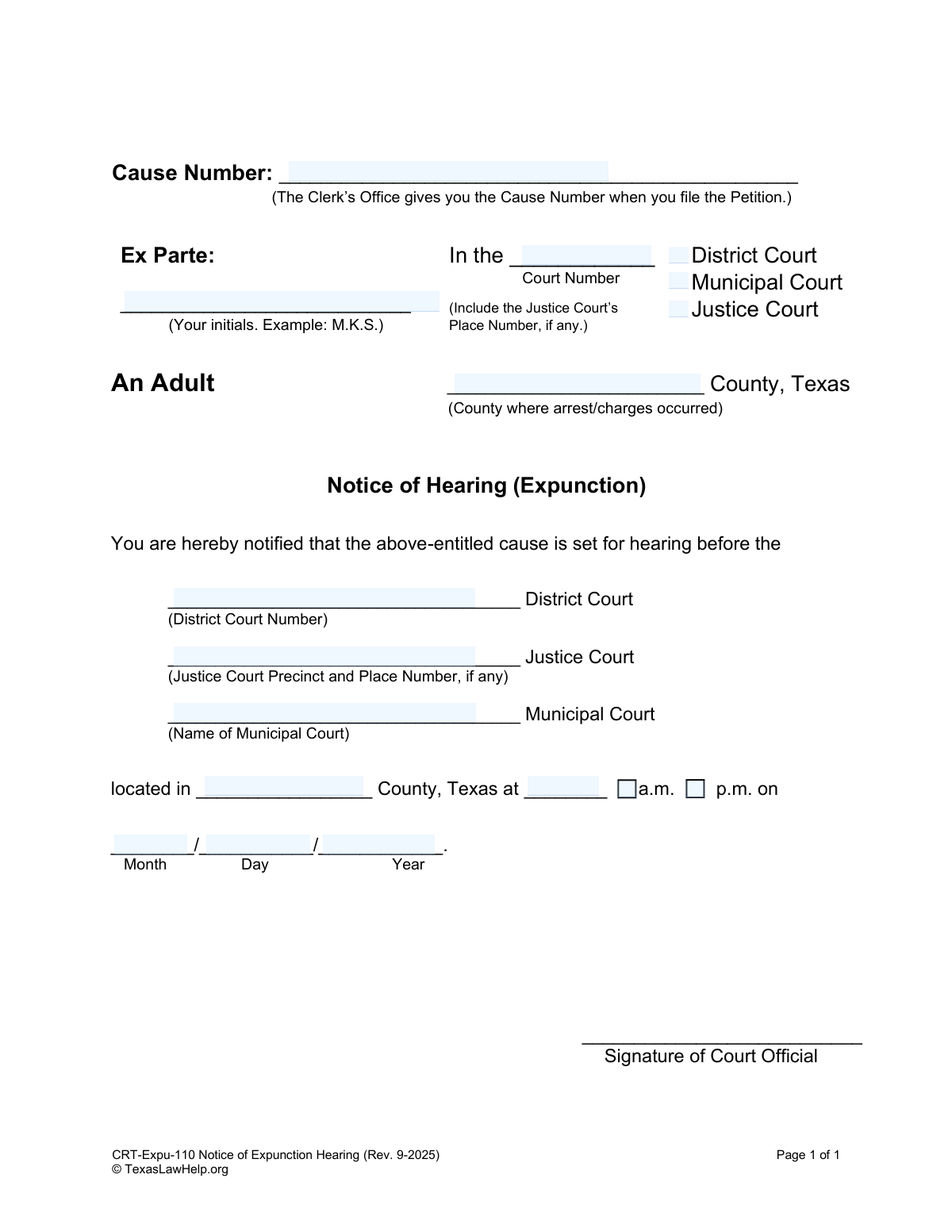
The CRT-Expu-110, Notice of Expunction Hearing, is a crucial legal document in Texas used by the court to formally announce the date, time, and location of a hearing regarding a petition to expunge a criminal record. This notice ensures that all relevant government agencies and parties involved are properly informed and have the opportunity to attend the hearing. Today, this form can be filled out quickly and accurately using AI-powered services like Instafill.ai, which can also convert non-fillable PDF versions into interactive fillable forms.
Our AI automatically handles information lookup, data retrieval, formatting, and form filling.
It takes less than a minute to fill out CRT-Expu-110 using our AI form filling.
Securely upload your data. Information is encrypted in transit and deleted immediately after the form is filled out.

Form specifications

Form name: CRT-Expu-110 Notice of Expunction Hearing
Number of fields: 17
Number of pages: 1
Language: English
main-image

Instafill Demo: How to fill out PDF forms in seconds with AI

How to Fill Out CRT-Expu-110 Online for Free in 2026

Are you looking to fill out a CRT-EXPU-110 form online quickly and accurately? Instafill.ai offers the #1 AI-powered PDF filling software of 2026, allowing you to complete your CRT-EXPU-110 form in just 37 seconds or less.
Follow these steps to fill out your CRT-EXPU-110 form online using Instafill.ai:
  1. 1 Navigate to Instafill.ai and upload or select the 'Notice of Expunction Hearing' form.
  2. 2 Use the AI assistant to automatically populate the Cause Number and your initials in the 'Ex Parte' field.
  3. 3 Select the appropriate court type (District, Municipal, or Justice) and specify the county where the arrest or charges occurred.
  4. 4 Enter the specific court details, such as the court number, precinct, or name, as prompted by the system.
  5. 5 Input the scheduled hearing date and time into the designated fields.
  6. 6 Thoroughly review all the information pre-filled by the AI for accuracy, making any necessary edits before finalizing.
  7. 7 Download the completed notice, which is then ready to be signed by a court official and distributed as required.

Our AI-powered system ensures each field is filled out correctly, reducing errors and saving you time.

Why Choose Instafill.ai for Your Fillable CRT-Expu-110 Form?

Speed

Complete your CRT-Expu-110 in as little as 37 seconds.

Up-to-Date

Always use the latest 2026 CRT-Expu-110 form version.

Cost-effective

No need to hire expensive lawyers.

Accuracy

Our AI performs 10 compliance checks to ensure your form is error-free.

Security

Your personal information is protected with bank-level encryption.

Frequently Asked Questions About Form CRT-Expu-110

This form is an official court document used to schedule and announce the date, time, and location of a hearing for an expunction case. It serves to formally notify all involved parties of the upcoming court proceeding.

While a court official ultimately signs and finalizes the form, you (the petitioner) are often required to fill in your case information, such as the cause number and court details. The court clerk will then add the specific hearing date and time.

The Cause Number is assigned by the court clerk's office when you initially file your Petition for Expunction. You can find this number on the stamped copy of your filed petition.

In the 'Ex Parte' field, you should enter your own initials. For example, if your name is Jane Marie Doe, you would write 'J.M.D.'

You must select the court type (District, Municipal, or Justice) where you filed your expunction petition. Ensure the court number and county match the details of your specific case.

These fields are intentionally left blank for the court clerk or coordinator to complete. They will assign a hearing date and time based on the court's schedule after you file the form.

You should file this Notice of Hearing form with the court clerk, typically at the same time you file your Petition for Expunction. The clerk will then process it to get a hearing date scheduled.

No, you should not sign this form. The signature line is reserved for a 'Court Official,' like the judge or clerk, who signs it to make the notice official.

Once the court sets a hearing date, this notice must be sent to all government agencies you listed in your original petition. You are responsible for ensuring all parties are properly served with the notice.

Yes, services like Instafill.ai use AI to auto-fill form fields accurately and save time. This can help ensure your case information is entered consistently across all your legal documents.

You can use Instafill.ai to easily complete the form online. Simply upload the PDF, and the platform will allow you to type your information directly into the fields before saving or printing.

If you have a non-fillable or 'flat' PDF, you can upload it to a service like Instafill.ai. Their technology can convert the document into an interactive, fillable form that you can complete on your computer.

Compliance CRT-Expu-110
Validation Checks by Instafill.ai

1
Cause Number Presence
Verifies that the 'Cause Number' field is not empty. This number is the primary identifier for the legal case in the court's system, and its absence makes the notice impossible to file or associate with the correct case. If the field is empty, the user will be prompted to enter the Cause Number provided by the Clerk's Office.
2
Exclusive Court Type Selection
Ensures that exactly one court type (District, Municipal, or Justice) is selected at the top of the form. A case can only originate in one type of court, so selecting none or multiple types is a logical error. If this validation fails, the user will be required to select a single, appropriate court type for the case.
3
Conditional Court Number Requirement
Checks that the 'Court Number' field is filled if 'District Court' or 'Justice Court' is selected. These court types are identified by a specific number or precinct, which is essential for routing the document correctly. This validation prevents incomplete filings by ensuring the specific court is identified when necessary.
4
Valid County Name
Validates that the text entered in the 'County where arrest/charges occurred' field corresponds to an official Texas county name. Using an incorrect or misspelled county name can lead to the notice being filed in the wrong jurisdiction, causing significant delays or dismissal. The system should check the entry against a predefined list of Texas counties and flag any mismatches.
5
Initials Format
Validates that the 'Ex Parte' field contains only 2-4 alphabetic characters, optionally separated by periods, to represent the filer's initials. This field is used for brief identification on the case documents. This check prevents the entry of a full name or other incorrect data, maintaining the standardized format of the legal document.
6
Hearing Court Consistency
Confirms that the court type selected in the main 'Notice of Hearing' section matches the court type selected at the top of the form. For example, if 'District Court' was checked initially, the hearing details must also specify a District Court. This check prevents logical contradictions within the document that could lead to confusion or rejection by the court clerk.
7
Exclusive Hearing Court Identifier
Ensures that only one of the hearing court detail fields ('District Court Number', 'Justice Court Precinct and Place Number', or 'Name of Municipal Court') is filled, corresponding to the selected hearing court type. Filling in multiple or incorrect fields creates ambiguity about where the hearing will be held. The system will flag an error if the wrong field is used or if more than one is filled.
8
Hearing Location County Consistency
Verifies that the county specified for the hearing location matches the county where the case was filed (at the top of the form). While there can be exceptions, hearings are typically held in the same county where the charges occurred. A mismatch could indicate a data entry error and should be flagged for user review to prevent logistical issues.
9
Hearing Time Format and AM/PM Selection
Checks that the hearing time is entered in a valid format, such as HH:MM, and that an 'a.m.' or 'p.m.' designation is provided. An improperly formatted or ambiguous time can cause the recipient to miss the hearing, so this validation is critical for ensuring all parties have the correct information.
10
Valid and Future Hearing Date
Validates that the month, day, and year fields combine to form a real calendar date and that this date is in the future. For example, it would reject 'April 31' or a date that has already passed. This ensures the notice is for an upcoming event and prevents scheduling impossible or nonsensical hearing dates.
11
Form Revision Date Check
Verifies that the form being submitted is the current version by checking its revision date (Rev. 9-2025). Courts frequently update their forms, and submitting an outdated version can result in automatic rejection of the filing. This check helps ensure compliance by flagging forms that are past their designated revision date.
12
Cause Number Format
Validates the format of the 'Cause Number' against patterns typical for the selected county and court type. Many jurisdictions use a standardized format (e.g., YYYY-######-CR-##) for case numbers. This check helps catch typos and ensures the number is plausible for the given jurisdiction, reducing the risk of misfiling.
13
Completeness of Hearing Details
Performs a comprehensive check to ensure all parts of the hearing information block are filled out: the court identifier (number/name), the county, the time (with a.m./p.m.), and the full date. A notice with incomplete information is invalid and will be rejected. This validation acts as a final safeguard to confirm all critical logistical details are present before submission.
14
Logical Court Number for Justice Court
Specifically validates the 'Justice Court' number field to ensure it contains both a precinct and, if applicable, a place number as indicated by the form's prompt. Justice Courts are organized by precinct, so this information is not optional. The check ensures the specific court location is unambiguously identified.

Common Mistakes in Completing CRT-Expu-110

Incorrectly Filling the Cause Number

People often fill this field out themselves, not realizing it is assigned by the Court Clerk upon filing the petition. Entering a random number or leaving it blank when it's required later can cause rejection or processing delays. To avoid this, read the instructions carefully and wait for the clerk to provide the official Cause Number before completing this part of the form.

Using a Full Name Instead of Initials

The form specifically requests the petitioner's initials in the 'Ex Parte' field, providing an example like 'M.K.S.'. Applicants may overlook this instruction and write their full name out of habit. While a minor error, it shows a lack of attention to detail and may require correction, slowing down the process.

Entering the Wrong County

A frequent mistake is listing the county of current residence instead of the county where the arrest or charges occurred. This form must be filed in the jurisdiction that handled the original case. Filing in the wrong county will lead to the court rejecting the petition for lack of jurisdiction, forcing you to start the process over.

Inconsistent Court Information

The form requires the court information to be entered in two separate places. People sometimes check one court type at the top (e.g., 'District Court') but then write a different court's details in the main hearing notice section. This inconsistency creates confusion, can invalidate the notice, and may lead to the hearing being scheduled or filed incorrectly.

Omitting the Specific Court Number or Precinct

Simply checking 'Justice Court' or 'District Court' is not enough; the form requires the specific court number or precinct. Large counties have dozens of courts, and omitting this detail is like sending mail without a street number. This error can cause the notice to be lost or filed in the wrong court, leading to significant delays or dismissal.

Leaving Critical Hearing Details Blank

Applicants may incorrectly assume the court clerk will fill in the hearing date and time. However, the filer is responsible for obtaining this information from the court and including it on the notice before it is served. Submitting a notice with a blank date or time defeats its purpose and will result in it being rejected.

Forgetting to Specify a.m. or p.m.

After writing the hearing time, it is easy to forget to circle or otherwise indicate whether it is in the morning (a.m.) or afternoon (p.m.). This ambiguity can cause the petitioner or other involved parties to miss the hearing entirely. Missing a court date will likely result in the expunction request being denied, forcing a refiling.

Signing in the Field for the Court Official

In an attempt to be thorough, a petitioner might sign every line that looks like a signature block. However, the signature line at the bottom is explicitly for a 'Court Official' to execute the notice. Signing here yourself will invalidate the document, requiring you to submit a corrected version and potentially delaying your hearing.

Illegible Handwriting

When filling out a paper form by hand, poor handwriting can make critical information like names, numbers, and dates unreadable. If a clerk cannot decipher the information, they may enter it incorrectly into the system or reject the form outright. To prevent this, it is best to type the information. AI tools like Instafill.ai can convert non-fillable PDFs into fillable versions, ensuring all your entries are perfectly legible.

Using an Incorrect Date Format

The form clearly separates the date into 'Month', 'Day', and 'Year' fields, indicating a MM/DD/YYYY format. Using a different format, such as DD/MM/YYYY, can cause confusion and potential data entry errors by court staff. Adhering to the specified format ensures clarity and smooth processing. AI-powered form filling tools like Instafill.ai can help by automatically formatting dates correctly according to the form's requirements.
Saved over 80 hours a year

“I was never sure if my IRS forms like W-9 were filled correctly. Now, I can complete the forms accurately without any external help.”

Kevin Martin Green

Your data stays secure with advanced protection from Instafill and our subprocessors

Robust compliance program

Transparent business model

You’re not the product. You always know where your data is and what it is processed for.

ISO 27001, HIPAA, and GDPR

Our subprocesses adhere to multiple compliance standards, including but not limited to ISO 27001, HIPAA, and GDPR.

Security & privacy by design

We consider security and privacy from the initial design phase of any new service or functionality. It’s not an afterthought, it’s built-in, including support for two-factor authentication (2FA) to further protect your account.

Fill out CRT-Expu-110 with Instafill.ai

Worried about filling PDFs wrong? Instafill securely fills crt-expu-110-notice-of-expunction-hearing forms, ensuring each field is accurate.