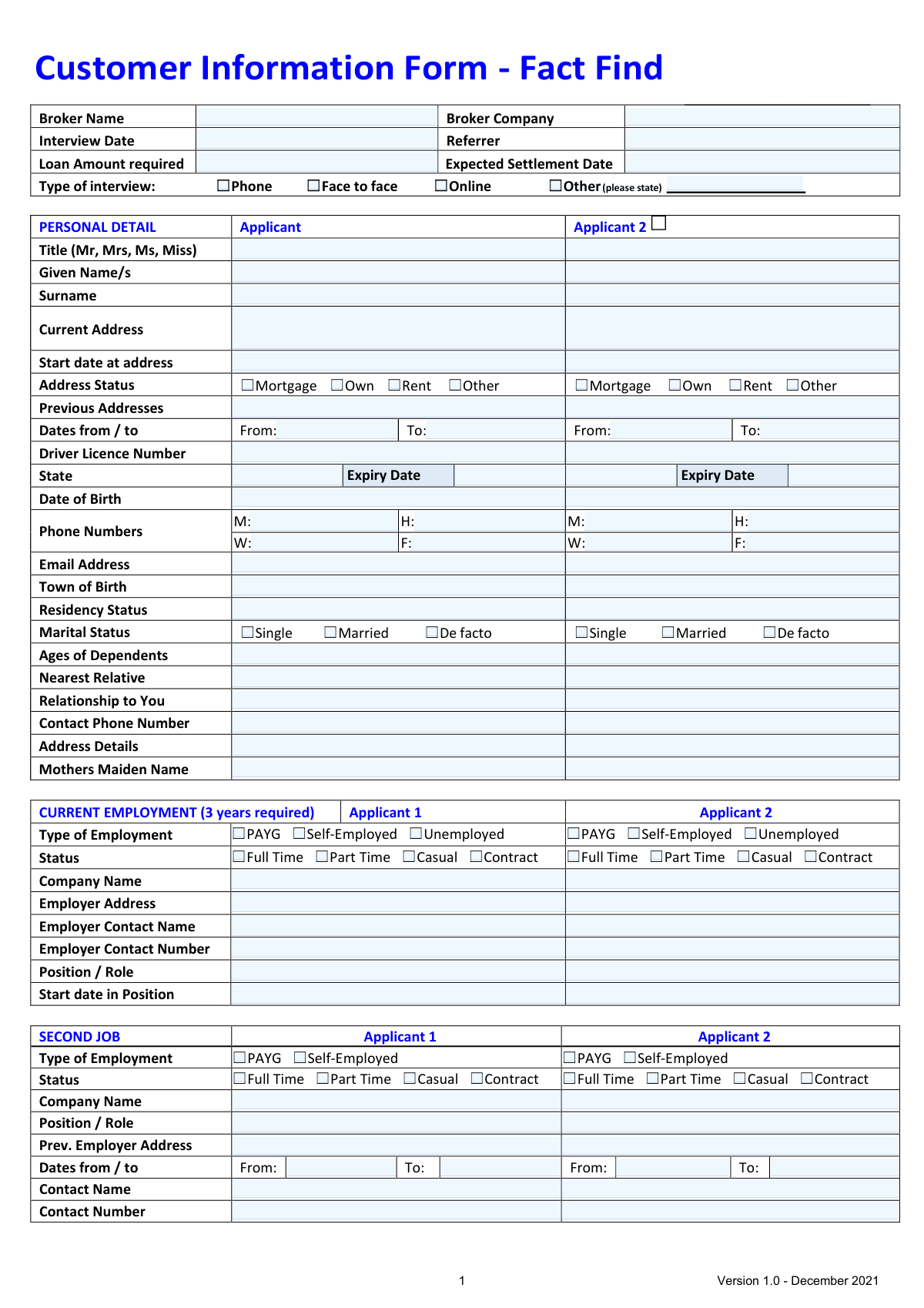
Yes! You can use AI to fill out Customer Information Form - Fact Find

This form, also known as a Fact Find, is a detailed questionnaire used by mortgage brokers and financial advisors to collect essential information about a loan applicant's financial situation. It covers personal details, employment history, income, assets, liabilities, and credit history to assess loan eligibility and suitability. Today, this form can be filled out quickly and accurately using AI-powered services like Instafill.ai, which can also convert non-fillable PDF versions into interactive fillable forms.
Our AI automatically handles information lookup, data retrieval, formatting, and form filling.
It takes less than a minute to fill out Fact Find using our AI form filling.
Securely upload your data. Information is encrypted in transit and deleted immediately after the form is filled out.

Form specifications

Form name: Customer Information Form - Fact Find
Number of fields: 535
Number of pages: 6
Language: English
main-image

Instafill Demo: How to fill out PDF forms in seconds with AI

How to Fill Out Fact Find Online for Free in 2026

Are you looking to fill out a FACT FIND form online quickly and accurately? Instafill.ai offers the #1 AI-powered PDF filling software of 2026, allowing you to complete your FACT FIND form in just 37 seconds or less.
Follow these steps to fill out your FACT FIND form online using Instafill.ai:
  1. 1 Navigate to Instafill.ai and upload or select the Customer Information Form - Fact Find.
  2. 2 Use the AI assistant to accurately fill in the personal details for all applicants, including contact information, address history, and dependents.
  3. 3 Provide comprehensive details of current and previous employment for the last three years, including employer information and job roles.
  4. 4 Enter all income sources for each applicant, such as base salary, overtime, allowances, rental income, and government payments.
  5. 5 List all current assets (e.g., property, vehicles, bank accounts, superannuation) and liabilities (e.g., mortgages, loans, credit cards).
  6. 6 Specify your loan objectives, requirements, and answer the questions regarding your credit history and any expected changes to your financial circumstances.
  7. 7 Carefully review all entered information for accuracy, read the privacy disclosure statement, and provide your digital signature to finalize the application.

Our AI-powered system ensures each field is filled out correctly, reducing errors and saving you time.

Why Choose Instafill.ai for Your Fillable Fact Find Form?

Speed

Complete your Fact Find in as little as 37 seconds.

Up-to-Date

Always use the latest 2026 Fact Find form version.

Cost-effective

No need to hire expensive lawyers.

Accuracy

Our AI performs 10 compliance checks to ensure your form is error-free.

Security

Your personal information is protected with bank-level encryption.

Frequently Asked Questions About Form Fact Find

This form, also known as a 'Fact Find', is used by your broker to collect essential personal and financial information. It helps them understand your situation to find a suitable loan product that meets your objectives and requirements.

No, if you are applying as a single applicant, you only need to complete the fields and columns designated for 'Applicant 1'. You can leave the sections for 'Applicant 2' blank.

Lenders require a comprehensive employment history to assess your income stability and ability to repay the loan. Provide as much detail as you can, and discuss any recent job changes or gaps with your broker.

Use this section to explain your financial goals in your own words. For example, mention if you're a first home buyer, looking to build an investment portfolio, or want to consolidate debt to help your broker find the best loan for you.

You should be as accurate as possible, as this information is crucial for determining your borrowing capacity. Reviewing your recent bank statements can help you provide realistic figures for categories like groceries, transport, and entertainment.

Your superannuation balance is part of your overall financial position. Lenders consider it an asset, and it helps them build a complete picture of your financial health, even though it's generally not accessible for the loan transaction.

After you submit the form, your broker will review your information, discuss potential loan options with you, and then use the data to prepare and submit your loan application to the chosen lender.

As outlined in the 'Privacy Disclosure Statement', your information is collected to arrange your finance and may be shared with potential lenders, credit reporting bodies, and other related parties. By signing, you consent to this use of your data.

Yes, services like Instafill.ai use AI to accurately auto-fill form fields from your saved profile, which can save you significant time and reduce errors. This is especially helpful for long, detailed forms like this one.

Simply upload the form to the Instafill.ai platform. The AI will automatically identify all the fields, allowing you to click and type your answers, select checkboxes, and sign electronically, making the process quick and easy.

If you have a flat, non-fillable PDF, you can use a service like Instafill.ai to make it interactive. The platform converts the static form into a fillable one, so you can complete it on your computer without needing to print it.

This information is often collected as a secondary point of contact or for identity verification purposes. It is a standard requirement on many financial application forms.

Assets are items of value that you own, such as property, vehicles, savings, and investments. Liabilities are debts or financial obligations you owe, such as mortgages, personal loans, and credit card balances.

If you are self-employed, you will need to complete the 'SELF EMPLOYED APPLICANTS' section in addition to the standard personal and financial details. This includes providing your business name, ABN, and financial details like net profit for the last two years.

Compliance Fact Find
Validation Checks by Instafill.ai

1
Validates Applicant's Age is Over 18
This check verifies that the applicant's 'Date of Birth' indicates they are at least 18 years of age at the time of the interview. This is a fundamental legal requirement for entering into a credit contract in Australia. If validation fails, the application cannot proceed and must be rejected or flagged for manual review.
2
Ensures 3-Year Continuous Employment History
This validation checks that the dates provided for 'Current Employment' and 'Previous Employment' sections collectively cover a continuous period of at least the last three years. Lenders require this history to assess income stability and the applicant's ability to service the loan. Gaps in the employment history will trigger a request for more information or clarification.
3
Verifies Chronological Order of Key Dates
This check ensures that key dates are logically ordered, for example, the 'Expected Settlement Date' must be after the 'Interview Date'. It also validates that an employment 'Start date' is not before the applicant's date of birth or that a 'Previous Address To Date' is before the 'From Date'. This prevents data entry errors and ensures the timeline of events is accurate for processing.
4
Requires Specification for 'Other' Selections
This validation ensures that if an 'Other' checkbox is selected in any section (e.g., 'Type of interview', 'Address Status'), the corresponding text field to provide details is not left empty. This is crucial for compliance and record-keeping to capture complete and accurate information. Failure to provide details will result in a validation error, prompting the user to specify the required information.
5
Validates ABN/ACN Format for Self-Employed Applicants
If an applicant's 'Type of Employment' is 'Self-Employed', this check validates that the provided 'ABN/ACN' follows the correct Australian government format (11 digits for ABN, 9 digits for ACN). This is essential for verifying the business's legal status and financial records via official registers. An invalid number would prevent the verification process and require correction.
6
Validates Liability Balance Does Not Exceed Limit
For each liability listed in the 'CURRENT LIABILITIES' section (e.g., Credit Card, Personal Loan), this check ensures the 'Balance' amount is less than or equal to the 'Limit' amount. A balance exceeding the limit is a logical impossibility for most credit products and indicates a data entry error. Correcting this ensures an accurate representation of the applicant's financial position.
7
Ensures Driver's Licence is Not Expired
This validation checks that the 'Driver Licence Expiry Date' for each applicant is a date in the future relative to the 'Interview Date'. An expired licence is not a valid form of identification for verification purposes. The system should flag this as an error, requiring the applicant to provide an updated licence or an alternative form of ID.
8
Mandates Completion of Loan Objectives Narrative
This check ensures the 'LOAN OBJECTIVES NARRATIVE' text box is not empty, as the form explicitly states it 'Must be completed'. This narrative is critical for meeting responsible lending obligations, as it documents the applicant's goals and requirements in their own words. An empty field would halt the submission and prompt the user to provide the necessary details.
9
Enforces Completion of Self-Employed Details
This validation rule ensures that if an applicant's 'Type of Employment' is 'Self-Employed', then required fields in the 'SELF EMPLOYED APPLICANTS' section (like Business Name, ABN/ACN, Net Profit) are filled out. This information is fundamental for assessing the income and viability of a self-employed applicant. The form cannot be submitted without these details if the condition is met.
10
Requires Reason for Refinancing
If 'Refinance' is selected as a 'LOAN OBJECTIVE', this check ensures that at least one reason for refinancing is selected or details are provided in the corresponding text box. This is a compliance requirement to understand the customer's needs and ensure the new product is not unsuitable for their circumstances. The form should prompt the user to provide a reason if none is given.
11
Ensures at Least One Owner is Selected for Each Asset/Liability
For every asset or liability listed that has ownership checkboxes (e.g., Property 1, Mortgage 1), this validation ensures that at least one ownership checkbox ('App 1' or 'App 2') is ticked. This is crucial for accurately calculating each applicant's net worth and financial obligations. An item without an owner would be flagged as an incomplete entry.
12
Verifies Signature and Date Presence
This check confirms that the 'Signature' and 'Date' fields in the 'APPLICANT(S) EXECUTION' section are completed for each applicant listed on the form. The signature and date are legally required to confirm the applicant's declaration, acknowledgement, and consent to the privacy terms. An unsigned or undated form is invalid and cannot be processed.

Common Mistakes in Completing Fact Find

Entering Net (Take-Home) Pay Instead of Gross Income

Applicants often enter their net (take-home) pay in the 'Base Salary' field because it's the figure they are most familiar with. However, lenders require the gross (pre-tax) income to assess borrowing capacity accurately. This mistake understates the applicant's true income, potentially leading to an incorrect serviceability assessment and a lower loan offer or even a rejection. To avoid this, always refer to your official employment contract or the year-to-date gross earnings on your payslip. AI-powered form filling tools like Instafill.ai can also help by providing clear guidance on such fields to ensure correct data entry.

Underestimating Monthly Living Expenses

In the 'MONTHLY EXPENSES' section, people tend to significantly underestimate their spending on categories like 'Groceries' and 'Recreation and Entertainment'. They often input idealized figures rather than actual costs, which lenders can easily disprove by checking bank statements. A major discrepancy between declared expenses and actual spending is a significant red flag that can lead to the application being denied. To avoid this, analyze at least three months of bank and credit card statements to calculate a realistic average for each category before filling out the form.

Providing an Incomplete Employment History

The form requires a three-year employment history, but applicants often forget short-term jobs or provide inaccurate start/end dates, creating unexplained gaps. Lenders require a continuous history to verify stable income, and any gaps will halt the application process until they are clarified and documented. This can cause significant delays and frustration. Before starting, gather old payslips, tax returns, or resumes to piece together an accurate timeline of your employment for the last three years.

Forgetting to Disclose All Liabilities

Applicants frequently omit smaller debts like store cards, buy-now-pay-later services (e.g., Afterpay), or their HECS/HELP student loan, even though it's explicitly listed. This is often an oversight rather than intentional deception. However, all debts will be revealed during a credit check, and undisclosed liabilities can lead to an immediate loss of trust with the lender, application delays, or outright rejection. To prevent this, compile a complete list of all debts, including their limits and balances, before you begin.

Mismatching Income Amounts with Income Frequency

A common data entry error is entering a weekly or fortnightly income amount (e.g., for overtime or commission) but selecting 'Monthly' as the 'Income Frequency'. This simple mistake drastically inflates the applicant's income on paper, leading to an incorrect serviceability calculation. The error will be caught during income verification, forcing the application to be reworked and causing significant delays. Always double-check that the income amount you enter corresponds to the frequency period you select for that income type.

Leaving the Loan Objectives Narrative Blank

The form explicitly states the 'LOAN OBJECTIVES NARRATIVE' section 'MUST be completed'. Despite this, applicants often leave it blank or provide a vague, one-word answer. This section is critical for the broker to understand your needs and recommend a suitable loan product, which is a legal requirement. An incomplete narrative will cause the form to be returned for more information, delaying the entire process. Be specific about your goals, for example, 'Refinancing to a lower fixed rate to reduce monthly repayments and save on interest over the life of the loan'.

Failing to Assign Ownership for Assets and Liabilities

For each item in the 'CURRENT ASSETS' and 'CURRENT LIABILITIES' tables, the applicant must tick a box to assign ownership to 'App 1' or 'App 2'. It is very easy to fill in the financial details and forget to tick these boxes. This missing information is critical for the lender to understand the financial position of each applicant, and the broker will have to follow up to get it, delaying the submission. To avoid this, carefully review each row and ensure an ownership box is ticked for every single asset and liability.

Incorrectly Filling Out 'Current' vs. 'Post Settlement' Expenses

Applicants often copy the same figures from the 'Current' expenses column to the 'Post Settlement' column without making adjustments. This provides an inaccurate picture of their future financial situation, as major expenses like rent will cease once they purchase a property. Lenders need to see that you have considered how your budget will change. Failing to adjust these figures can lead to questions about your understanding of the financial commitment. Carefully consider and update the 'Post Settlement' column to reflect your new financial reality.

Providing Incomplete Residential Address History

The form requires previous addresses with 'From' and 'To' dates, but people often struggle to recall exact dates, leading to gaps or overlaps in their residency timeline. Lenders use this information for identity verification and credit checks, so an incomplete or inconsistent history can be a red flag that causes delays. Before filling out the form, use old utility bills, rental agreements, or bank statements to confirm your address history. If the form is a non-fillable PDF, tools like Instafill.ai can convert it into an interactive version, making it easier to input and review this detailed information.

Confusing Credit Card 'Limit' with 'Balance'

In the 'CURRENT LIABILITIES' section for credit cards, applicants sometimes enter the current 'Balance' owing in the 'Limit' column, or vice-versa. Lenders assess risk based on the total credit limit available, not just the current balance, as the applicant could max out the card at any time. Confusing these two figures provides an inaccurate financial snapshot and will require correction, delaying the application. Always ensure you enter the total approved card limit in the 'Limit' column and the current amount owing in the 'Balance' column.
Saved over 80 hours a year

“I was never sure if my IRS forms like W-9 were filled correctly. Now, I can complete the forms accurately without any external help.”

Kevin Martin Green

Your data stays secure with advanced protection from Instafill and our subprocessors

Robust compliance program

Transparent business model

You’re not the product. You always know where your data is and what it is processed for.

ISO 27001, HIPAA, and GDPR

Our subprocesses adhere to multiple compliance standards, including but not limited to ISO 27001, HIPAA, and GDPR.

Security & privacy by design

We consider security and privacy from the initial design phase of any new service or functionality. It’s not an afterthought, it’s built-in, including support for two-factor authentication (2FA) to further protect your account.

Fill out Fact Find with Instafill.ai

Worried about filling PDFs wrong? Instafill securely fills customer-information-form-fact-find forms, ensuring each field is accurate.