Yes! You can use AI to fill out DCFS Request for Disbursement
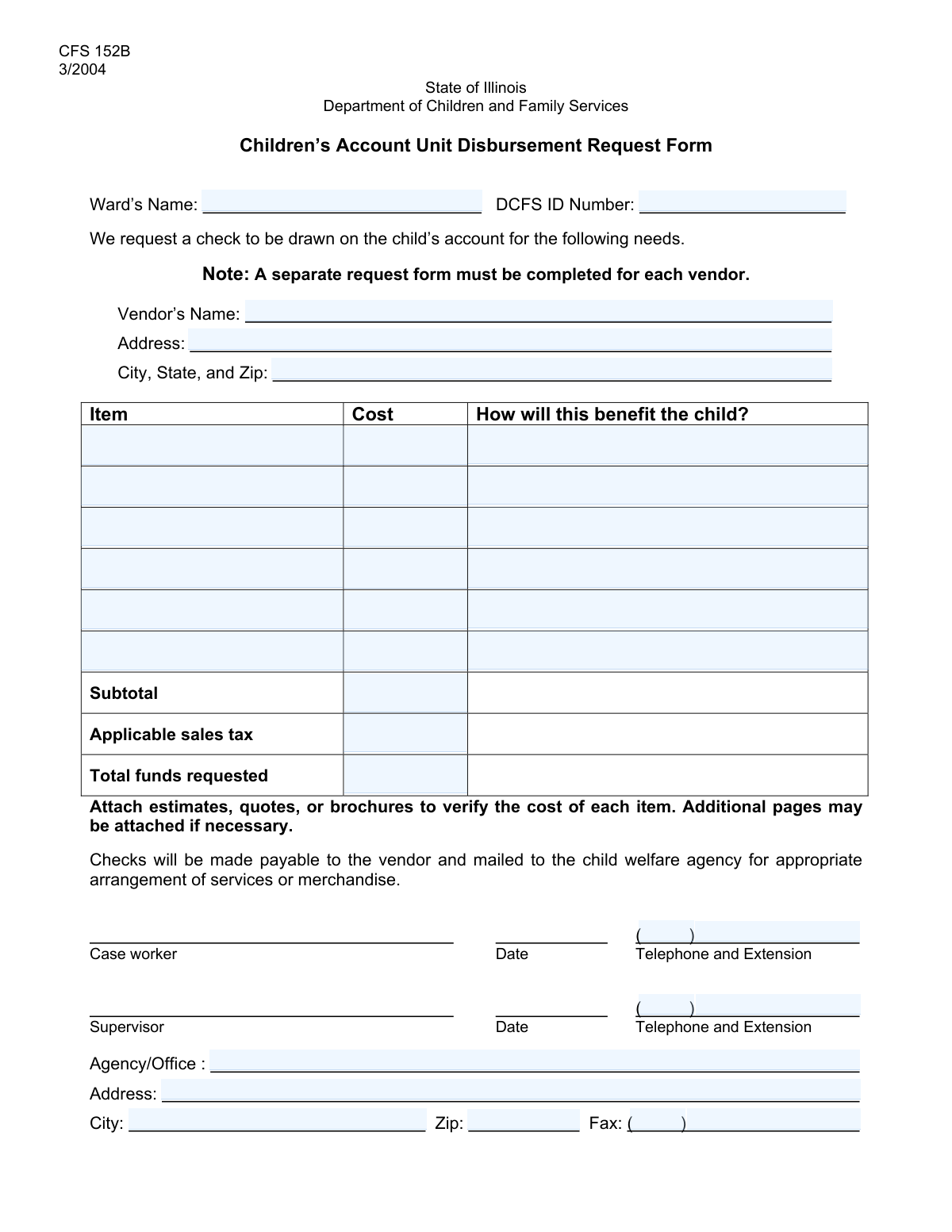
The DCFS Request for Disbursement is a crucial document used by child welfare agencies, such as the Department of Children and Family Services, to secure funding for a child's needs. It formalizes the request to pay a vendor for specific items or services that will directly benefit a ward, ensuring proper allocation and tracking of resources. Today, this form can be filled out quickly and accurately using AI-powered services like Instafill.ai, which can also convert non-fillable PDF versions into interactive fillable forms.
Our AI automatically handles information lookup, data retrieval, formatting, and form filling.
It takes less than a minute to fill out DCFS Request for Disbursement using our AI form filling.
Securely upload your data. Information is encrypted in transit and deleted immediately after the form is filled out.
Form specifications
| Form name: | DCFS Request for Disbursement |
| Number of fields: | 36 |
| Number of pages: | 1 |
| Filled form examples: | Form DCFS Request for Disbursement Examples |
| Language: | English |
Instafill Demo: How to fill out PDF forms in seconds with AI
How to Fill Out DCFS Request for Disbursement Online for Free in 2026
Are you looking to fill out a DCFS REQUEST FOR DISBURSEMENT form online quickly and accurately? Instafill.ai offers the #1 AI-powered PDF filling software of 2026, allowing you to complete your DCFS REQUEST FOR DISBURSEMENT form in just 37 seconds or less.
Follow these steps to fill out your DCFS REQUEST FOR DISBURSEMENT form online using Instafill.ai:
- 1 Navigate to Instafill.ai and upload or select the DCFS Request for Disbursement form.
- 2 Use the AI assistant to accurately fill in the Ward's Information, including their full name and DCFS ID number.
- 3 Provide the complete Vendor Information, such as the name and address of the service or goods provider.
- 4 Detail each requested item or service, including a description, cost, and a clear explanation of how it will benefit the child.
- 5 Enter the information for the requesting agency, caseworker, and supervisor, including names, addresses, and contact numbers.
- 6 Review all the entered information for accuracy, especially the item costs and totals, and then finalize the document for submission.
Our AI-powered system ensures each field is filled out correctly, reducing errors and saving you time.
Why Choose Instafill.ai for Your Fillable DCFS Request for Disbursement Form?
Speed
Complete your DCFS Request for Disbursement in as little as 37 seconds.
Up-to-Date
Always use the latest 2026 DCFS Request for Disbursement form version.
Cost-effective
No need to hire expensive lawyers.
Accuracy
Our AI performs 10 compliance checks to ensure your form is error-free.
Security
Your personal information is protected with bank-level encryption.
Frequently Asked Questions About Form DCFS Request for Disbursement
This form is used to request funds for specific items or services that will benefit a child (ward) under the care of an agency like the Department of Children and Family Services (DCFS).
A 'ward' is the child or minor under the care and protection of a social services agency for whom the items or services are being requested.
The vendor is the store, company, or individual providing the requested item or service. Their information is required so that payment can be made directly to them once the request is approved.
No, you only need to complete the sections for the items you are requesting. If you are only requesting one item, for example, you only need to fill out the 'First Item' section.
This form has a limit of six items. If you need to request more, you will need to complete and submit a second copy of the form for the additional items.
You should provide a clear and concise explanation of how the item or service will directly support the child's well-being, development, safety, or other specific needs. Focus on the positive impact the item will have on the child.
These fields are for calculating the total cost of all requested items. You should add up the costs from each item section you've filled out and enter the final sum here.
The DCFS ID number is a unique identifier assigned to the child. This number should be available in the child's official case file or within your agency's electronic records system.
It is best to provide an accurate cost, which may require getting a quote from the vendor. If an estimate is all that is available, make a note of it or check with your supervisor for guidance on how to proceed.
You should list the primary case worker assigned to the ward and their direct supervisor. Ensure their contact information is current and accurate to facilitate any necessary follow-up.
Yes, services like Instafill.ai use AI to auto-fill form fields accurately from your existing data, which can save you time and help prevent errors.
You can use a service like Instafill.ai to upload the form and fill it out directly on your computer. The platform allows you to easily type into the fields and then save or print your completed document.
Tools like Instafill.ai can convert flat, non-fillable PDFs into interactive, fillable forms. Simply upload your PDF, and the service will make the fields editable online.
Compliance DCFS Request for Disbursement
Validation Checks by Instafill.ai
1
Validates DCFS ID Number Format
This check ensures the DCFS ID Number is entered in the correct format, which might be a specific number of digits or an alphanumeric pattern. Correct formatting is crucial for accurately identifying the ward in the system and linking the request to the correct case file. An invalid ID will prevent the form from being processed and associated with the right child.
2
Ensures Ward's Name and DCFS ID are Provided
This validation confirms that both the 'Ward's Name' and 'DCFS ID Number' fields are not empty. These fields are fundamental for identifying the child for whom the disbursement is requested. Failure to provide this information makes the entire request ambiguous and will result in an immediate rejection of the form.
3
Verifies Completeness of Each Requested Item
This check validates that for any item where a description is provided, the corresponding 'Cost' and 'Benefit' fields are also filled out. This ensures that every requested item has a justification and a cost associated with it, which is necessary for the approval process. Incomplete item entries will be flagged, and the user will be required to provide the missing cost or benefit information before submission.
4
Validates Monetary Format for Item Costs
This validation ensures that all 'Cost' fields contain only valid, positive numerical values, formatted as currency (e.g., 123.45). This is critical for accurate financial processing and calculating the total disbursement amount. Submitting non-numeric or negative values would cause calculation errors and prevent the request from being processed correctly.
5
Cross-Validates Sum of Item Costs Against Total
This check calculates the sum of all individual item costs and compares it to the value entered in the total cost field (e.g., 'Text24'). This is a critical integrity check to prevent mathematical errors and ensure the requested total disbursement is accurate. A mismatch will trigger an error, requiring the user to correct the individual costs or the total before the form can be submitted.
6
Ensures Complete Vendor Address Information
This validation verifies that the 'Vendor Name', 'Vendor Address', and 'Vendor City, State, and Zip' fields are all filled out completely. A complete address is essential for verifying the vendor and processing payment correctly. Missing address components could lead to payment delays or misdirected funds, so the form will be rejected until the full address is provided.
7
Validates Vendor's State and Zip Code Format
This check parses the 'Vendor City, State, and Zip' field to ensure the state is a valid two-letter abbreviation and the zip code is a 5-digit or 9-digit (ZIP+4) number. Correct formatting is essential for mail delivery and vendor verification systems. An invalid state or zip code will cause the form to be rejected, prompting the user to correct the information.
8
Validates Case Worker's Full Telephone Number
This check combines the 'Case Worker Telephone Area Code' and 'Case Worker Telephone Number' fields to form a complete 10-digit phone number. It then validates that the combined number is in a valid format. A correct phone number is crucial for contacting the case worker with questions about the request, and an invalid number will halt the review process.
9
Validates Supervisor's Full Telephone Number
This validation combines the 'Supervisor Telephone Area Code' and 'Supervisor Telephone Number' to ensure they form a valid 10-digit phone number. Having accurate contact information for the supervisor is a critical part of the escalation and approval process. If the number is invalid, it can cause significant delays if the supervisor needs to be contacted for verification.
10
Ensures All Required Agency/Office Fields are Complete
This validation confirms that the 'Agency/Office Name', 'Agency/Office Address', 'Agency/Office City', and 'Agency/Office Zip Code' fields are all filled in. This information identifies the responsible entity submitting the request and is used for record-keeping and communication. An incomplete agency profile will result in the form being returned for correction.
11
Validates Agency/Office Zip Code Format
This check ensures the 'Agency/Office Zip Code' is a valid 5-digit or 9-digit (ZIP+4) number. An accurate zip code is essential for any physical correspondence sent to the agency or office. An invalid format will prevent submission until a valid zip code is entered.
12
Validates Agency/Office Full Fax Number
This check combines the 'Agency/Office Fax Area Code' and 'Agency/Office Fax Number' to verify they form a valid 10-digit number. While less common, a valid fax number is necessary if this is the designated method for sending documents or approvals. An invalid number would cause communication failures, so the system flags it for correction.
13
Ensures At Least One Item is Requested for Disbursement
This validation checks that at least one of the six item sections has been filled out with a description, cost, and benefit. A disbursement request form with no items is an empty submission and serves no purpose. The system will prevent submission and prompt the user to add at least one item to proceed.
Common Mistakes in Completing DCFS Request for Disbursement
The DCFS ID is a critical unique identifier used to link the request to the correct child's case file. Manual entry often leads to transposition errors (e.g., entering '12435' instead of '12345') or missing digits. An incorrect ID will cause the request to be rejected or, worse, applied to the wrong case, leading to significant processing delays and potential privacy breaches. Always double-check this number against the official case file before submitting.
Submitters often use generic terms like 'clothing' or 'school activity' instead of providing specific details. This ambiguity prevents reviewers from assessing the necessity and appropriateness of the expense, almost always resulting in the form being returned for clarification. To avoid this, be highly specific, such as 'One pair of winter boots, size 5' or 'Registration fee for the Spring Youth Soccer league'.
This is the most critical part of the request and the most common point of failure. A weak justification like 'it will help the child' or 'for their well-being' is insufficient and will likely lead to denial. The explanation must create a clear, compelling link between the requested item and a specific developmental, educational, social, or physical need of the child. For example, instead of 'for school,' write 'This graphing calculator is required for the student's advanced algebra class and will allow them to complete homework and participate in lessons'.
Users often make errors in calculating the sum of all items, especially since the 'Total Costs' fields are not clearly labeled. Simple data entry mistakes, like omitting decimal points or using commas incorrectly, can also cause issues. An incorrect total guarantees the form will be rejected for correction, delaying the disbursement. AI-powered form-filling tools like Instafill.ai can prevent this by automatically calculating totals and formatting currency fields correctly.
A frequent mistake is filling in a description for an item but forgetting to enter its corresponding cost and benefit explanation, or vice-versa. The form's structure implies that for every item requested, all three pieces of information are mandatory. An incomplete entry for any single item can invalidate the entire request, forcing it to be returned and corrected, which delays approval for all items.
People often enter a shortened or abbreviated name for the vendor (e.g., 'Target' instead of 'Target Corporation'). This can cause problems with payment processing systems, which require the full, official business name to issue a check or electronic payment. Using an incorrect name can lead to returned payments and significant delays in the child receiving the item or service.
The form requires separating the area code from the main phone number and extension, a common source of errors. Users may enter the full 10-digit number in one field, forget the area code entirely, or omit a necessary extension. This makes it difficult or impossible for the processing office to contact the caseworker for clarifications, often leaving the request stalled without notice.
The vendor's address is crucial for payment delivery. Common mistakes include omitting a P.O. Box number when that is the required mailing address, leaving out a suite or building number, or entering an incorrect ZIP code. Any error in the mailing address will result in a returned payment, requiring the entire request and payment process to be initiated again from the beginning.
The form's instructions state that the 'Cost' and 'Benefit' fields must be filled out if the corresponding 'Description' field is used. Users frequently describe an item but then forget to input the cost or the justification, rendering that line item invalid. This forces a rejection and requires the user to find, correct, and resubmit the form. Smart tools like Instafill.ai can help by validating the form and ensuring that all related fields for an item are completed before submission.
If this form is printed and filled out by hand, illegible handwriting is a major cause of errors. Critical data like the DCFS ID, costs, and names can be easily misread by the person entering the data, leading to processing errors, delays, and rejections. To prevent this, the form should always be filled out electronically. If the agency only provides a non-fillable PDF, a tool like Instafill.ai can convert it into a fillable version, ensuring all entries are typed and perfectly legible.
Saved over 80 hours a year
“I was never sure if my IRS forms like W-9 were filled correctly. Now, I can complete the forms accurately without any external help.”
Kevin Martin Green
Your data stays secure with advanced protection from Instafill and our subprocessors
Robust compliance program
Transparent business model
You’re not the product. You always know where your data is and what it is processed for.
ISO 27001, HIPAA, and GDPR
Our subprocesses adhere to multiple compliance standards, including but not limited to ISO 27001, HIPAA, and GDPR.
Security & privacy by design
We consider security and privacy from the initial design phase of any new service or functionality. It’s not an afterthought, it’s built-in, including support for two-factor authentication (2FA) to further protect your account.
Fill out DCFS Request for Disbursement with Instafill.ai
Worried about filling PDFs wrong? Instafill securely fills dcfs-request-for-disbursement forms, ensuring each field is accurate.