Yes! You can use AI to fill out DCFS Youth Recovery Assistance Checklist (RAC)

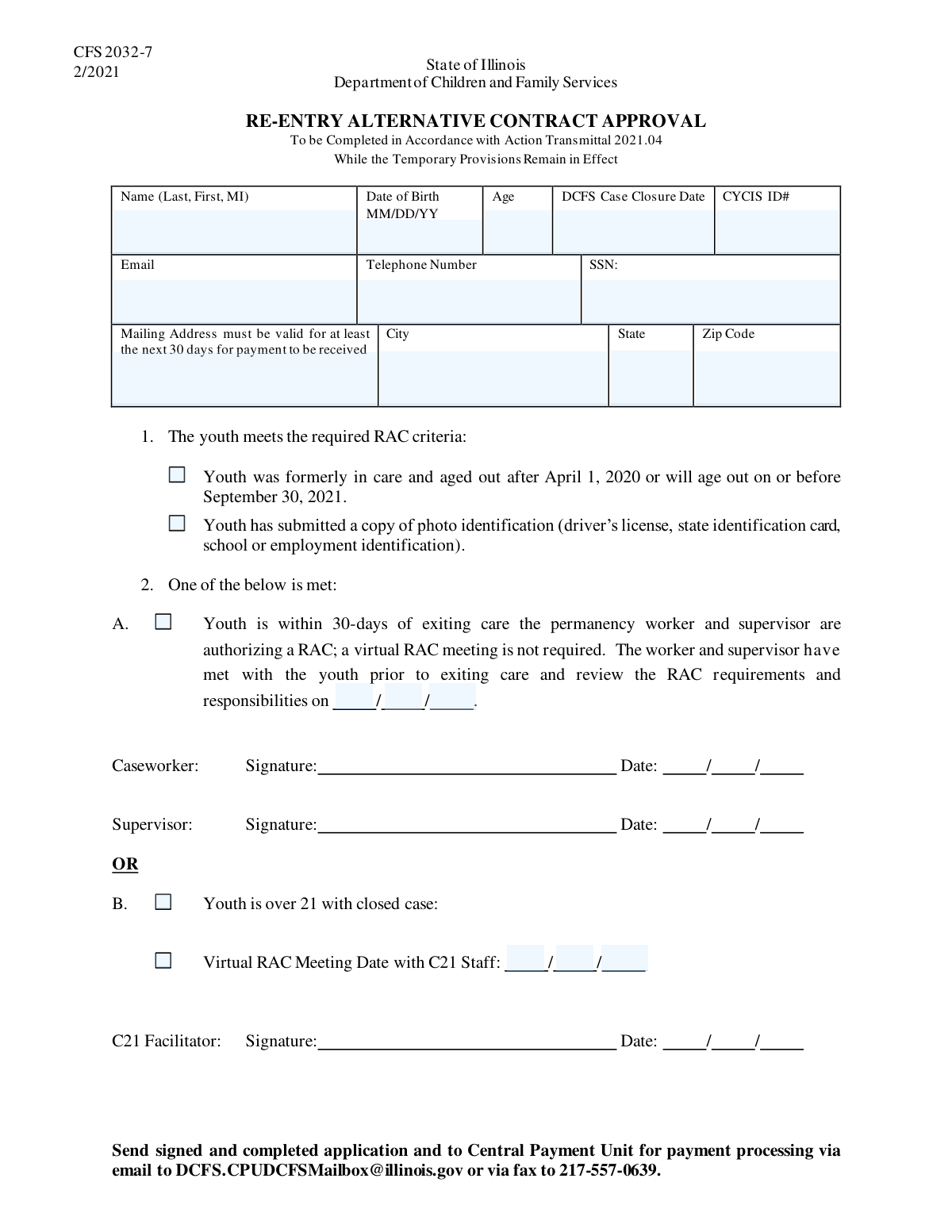
The DCFS Youth Recovery Assistance Checklist (RAC) is a document used by the Department of Children and Family Services to verify a youth's eligibility for assistance after aging out of the foster care system. It confirms that the individual meets specific criteria, such as age and the date they exited care, to qualify for support programs. Today, this form can be filled out quickly and accurately using AI-powered services like Instafill.ai, which can also convert non-fillable PDF versions into interactive fillable forms.
Our AI automatically handles information lookup, data retrieval, formatting, and form filling.
It takes less than a minute to fill out DCFS RAC Checklist using our AI form filling.
Securely upload your data. Information is encrypted in transit and deleted immediately after the form is filled out.

Form specifications

Form name: DCFS Youth Recovery Assistance Checklist (RAC)
Number of fields: 23
Number of pages: 1
Filled form examples: Form DCFS RAC Checklist Examples
Language: English
main-image

Instafill Demo: How to fill out PDF forms in seconds with AI

How to Fill Out DCFS RAC Checklist Online for Free in 2026

Are you looking to fill out a DCFS RAC CHECKLIST form online quickly and accurately? Instafill.ai offers the #1 AI-powered PDF filling software of 2026, allowing you to complete your DCFS RAC CHECKLIST form in just 37 seconds or less.
Follow these steps to fill out your DCFS RAC CHECKLIST form online using Instafill.ai:
  1. 1 Navigate to Instafill.ai and upload or select the DCFS RAC Checklist form.
  2. 2 Use the AI assistant to automatically fill in the applicant's personal and case information, such as name, date of birth, and CYCIS ID number.
  3. 3 Provide the applicant's current contact information and mailing address in the designated sections.
  4. 4 Review the RAC criteria section and check the boxes to confirm the youth meets the age-out requirements and has submitted a photo ID.
  5. 5 If applicable, complete the 'Youth Exiting Care Authorization' and 'Youth Over 21 Condition' sections, including any required meeting dates.
  6. 6 Carefully review all entered information for accuracy before finalizing the form.
  7. 7 Securely download, print, or share the completed checklist as required by the DCFS agency.

Our AI-powered system ensures each field is filled out correctly, reducing errors and saving you time.

Why Choose Instafill.ai for Your Fillable DCFS RAC Checklist Form?

Speed

Complete your DCFS RAC Checklist in as little as 37 seconds.

Up-to-Date

Always use the latest 2026 DCFS RAC Checklist form version.

Cost-effective

No need to hire expensive lawyers.

Accuracy

Our AI performs 10 compliance checks to ensure your form is error-free.

Security

Your personal information is protected with bank-level encryption.

Frequently Asked Questions About Form DCFS RAC Checklist

This form is used to gather information for youth who were formerly in the care of the Department of Children and Family Services (DCFS) to determine their eligibility for the RAC program.

This form should be completed by youth who were formerly in DCFS care and meet specific criteria, such as aging out of the system after April 1, 2020, or being over 21 with a closed case.

The CYCIS ID is your unique identification number from the Child and Youth Centered Information System. You can typically find this number on official documents from DCFS or by contacting your former caseworker.

Yes, you must submit a copy of a valid photo ID, such as a driver's license, state ID, school ID, or employment ID. You need to check the box on the form to confirm you have submitted it.

This means you were formerly in DCFS care and either aged out after April 1, 2020, or will age out on or before September 30, 2021. You must check the box if this applies to you.

This section is to confirm and record the date you met with a worker to go over the RAC program's requirements and responsibilities. Only fill in the date if you have had this meeting.

If you are over 21 with a closed case, you must check the designated box and provide the date of your Virtual RAC Meeting with C21 Staff.

It is important to provide an accurate date. If you are unsure, you should contact your former caseworker or the DCFS office to obtain the correct case closure date.

The form itself does not provide submission instructions. Please check with the agency or caseworker who gave you the form for details on how to submit it correctly.

Yes, services like Instafill.ai use AI to auto-fill form fields accurately with your saved information, which can save you time and reduce errors.

You can use a service like Instafill.ai to easily complete this form online. Simply upload the document, and the platform will make it an interactive form you can fill and sign electronically.

If your PDF is not fillable, you can use a tool like Instafill.ai to convert it into an interactive, fillable form. This allows you to type your answers directly into the fields online.

The form requests both for verification and quick reference. The age field is typically calculated from your date of birth to ensure consistency and accuracy.

Compliance DCFS RAC Checklist
Validation Checks by Instafill.ai

1
Age and Date of Birth Consistency
This validation cross-references the 'Date of Birth' field with the 'Age' field. It calculates the age based on the date of birth provided and flags a discrepancy if it does not match the age entered by the user. This check is crucial for preventing data entry errors and ensuring the applicant's eligibility is assessed correctly. If validation fails, the user should be prompted to correct either the date of birth or the age.
2
Social Security Number Format
This check ensures the 'Social Security Number' is entered in the standard XXX-XX-XXXX format and contains only digits and hyphens. Validating the SSN format is critical for data integrity, processing federal benefits, and correctly identifying the individual in other systems. A failure would prevent form submission until the number is corrected to match the required structure.
3
Logical Check for 'Youth over 21' Condition
This validation verifies that if the 'Youth is over 21 with closed case' box is checked, the applicant's age (calculated from 'Date of Birth') is actually 21 or greater and that the 'DCFS Case Closure Date' field is not empty. This check enforces the internal logic of the form, ensuring that this specific condition is only selected when supported by other data points. If the conditions are not met, an error should instruct the user to either uncheck the box or correct the related date fields.
4
Conditional Authorization Date Requirement
This check ensures that the 'Authorization Month', 'Day', and 'Year' fields are filled out if, and only if, 'Checkbox15 (Youth Exiting Care Authorization)' is checked. This enforces dependency rules within the form, preventing incomplete or orphaned data. If 'Checkbox15' is checked but the date fields are empty, the user must be prompted to provide the full date.
5
Valid Authorization Date Construction
This validation confirms that the values entered into 'Authorization Month', 'Day', and 'Year' combine to form a valid calendar date (e.g., it prevents entries like February 30). It also ensures the date is not in the future. This is important for creating a legitimate record of authorization. If the date is invalid, the system should reject the entry and ask the user to provide a real calendar date.
6
Conditional Virtual RAC Meeting Date
This validation ensures that the 'Meeting Date Month', 'Day', and 'Year' fields are only enabled and required if the 'Virtual RAC Meeting Date with C21 Staff' checkbox is selected. This rule maintains form integrity by linking conditional fields to their trigger. If the parent checkbox is checked, these date fields must be completed to proceed.
7
Date of Birth Must Be in the Past
This is a fundamental sanity check to validate that the entered 'Date of Birth' is a date prior to the current date. It is impossible for an applicant to have a birthdate in the future, so this check prevents nonsensical data entry. If a future date is entered, the form should display an error and require the user to enter a valid past date.
8
DCFS Case Closure Date Chronology
This check validates that the 'DCFS Case Closure Date' is not a date in the future. It also can be used to ensure the closure date is logically after the applicant's date of birth. This maintains a logical timeline of events and ensures the data is plausible. An invalid entry would trigger an error message asking for a date that is on or before the current day.
9
Email Address Format Validation
This check verifies that the 'Email Address' field contains a value that is formatted like a valid email, typically by checking for the presence of an '@' symbol and a period in the domain part. While it doesn't verify the email exists, it ensures the entry is structurally sound for future communication. If the format is incorrect, the user should be notified to correct the entry before submission.
10
Mailing Address Completeness
This validation ensures that if any one part of the mailing address ('Mailing Street Address', 'Mailing City', 'Mailing State', 'Mailing Zip Code') is filled, all other parts are also required. This prevents the submission of partial, unusable addresses, which would hinder mail-based communication. A failure would prompt the user to either complete the address or clear all address fields.
11
Mailing Zip Code Format
This check ensures the 'Mailing Zip Code' consists of exactly 5 digits, or 9 digits in the case of a ZIP+4 format (e.g., 12345 or 12345-6789). Correctly formatted zip codes are essential for mail delivery and address verification services. An invalid format should trigger an error message requiring the user to enter a valid US zip code.
12
CYCIS ID Number Format
This validation checks that the 'CYCIS ID Number' conforms to a specific, predefined format (e.g., a certain number of alphanumeric characters). This is crucial for ensuring the ID can be used to accurately look up the applicant's case file in the CYCIS system. If the entered ID does not match the expected format, the system should reject it and inform the user of the required structure.
13
Age Out Criteria Plausibility Check
This validation checks if the applicant's 'Date of Birth' and 'DCFS Case Closure Date' are plausible for the 'Youth meets age out criteria' checkbox. The criteria state the youth aged out after April 1, 2020, or will age out before September 30, 2021. The system can check if the applicant's age at the time of case closure falls within the expected range for aging out, flagging a potential inconsistency. This helps ensure the applicant's eligibility is declared correctly.
14
Applicant Name Completeness
This check ensures the 'Applicant Name' field is not empty and contains at least two separate words, representing a first and last name. Since the form asks for a full name, this validation helps ensure a complete name is captured for proper identification and record-keeping. If the validation fails, the user should be prompted to enter their full legal name.

Common Mistakes in Completing DCFS RAC Checklist

Inconsistent Date of Birth and Age

Applicants often enter their date of birth correctly but then miscalculate their current age, or vice versa. This discrepancy between the 'Date of Birth' and 'Age' fields creates confusion and requires manual verification, delaying the application process. To avoid this, carefully calculate your age based on the date of birth before filling out the form, or leave the age field blank if it's meant to be auto-calculated. AI-powered tools like Instafill.ai can prevent this by automatically calculating and populating the age based on the date of birth, ensuring consistency.

Transposing Digits in Identification Numbers

It is very common for applicants to accidentally transpose digits when entering long numbers like the 'Social Security Number' or 'CYCIS ID Number'. This simple mistake can lead to a failed identity verification, mismatched records, and immediate rejection of the form. Always double-check these numbers digit by digit against your source document. Using a tool that can save and securely autofill this information can reduce the risk of manual entry errors.

Misinterpreting Eligibility Criteria Checkboxes

The form contains checkboxes with very specific eligibility rules, such as the 'Youth meets age out criteria' which depends on exact date ranges. Applicants may check the box based on a general understanding without reading the fine print, leading to an incorrect assessment of their eligibility. This can result in the application being denied after initial processing. To prevent this, read the full description next to every checkbox and ensure you meet all stated conditions before marking it.

Ignoring Conditional Field Logic

Several sections, like the 'Youth Exiting Care Authorization' and 'Virtual RAC Meeting Date', contain fields that should only be filled out if a preceding checkbox is marked 'Yes'. Applicants often miss this instruction and either fill in dates when they shouldn't, or they check the box but forget to provide the required date information. Both errors can halt processing. Pay close attention to instructions like 'Fill only if...' to ensure you complete the form correctly. Modern form-filling tools can help by automatically showing or hiding these conditional fields based on your answers.

Providing an Incomplete or Unverifiable Mailing Address

Applicants frequently omit crucial parts of their address, such as an apartment or suite number, or make typos in the street name or zip code. An incomplete or incorrect address will result in important documents being returned as undeliverable, causing significant delays and potential loss of benefits. Always include your full address and verify the zip code. AI tools like Instafill.ai can help by autocompleting addresses from a verified database, ensuring accuracy and completeness.

Incorrectly Entering Segmented Dates

Fields like 'Authorization Date' and 'Meeting Date' are broken into separate inputs for Month, Day, and Year. People often make mistakes by entering the data in the wrong box (e.g., putting the day in the month field) or using inconsistent formats (e.g., 'Jan' vs '01'). This can cause data entry failures and requires manual correction. To avoid this, carefully match the information to the corresponding field label (Month, Day, Year). Using a form filler that automatically formats dates can prevent these errors.

Typographical Errors in Contact Information

Simple typos in the 'Email Address' (e.g., '[email protected]') or 'Telephone Number' are extremely common and have serious consequences. If the contact information is incorrect, the agency cannot reach the applicant for follow-up questions or notifications, potentially leading to the case being closed due to non-communication. Carefully proofread your email and phone number before submitting. If the form is a non-fillable PDF, a tool like Instafill.ai can convert it to a fillable version, making it easier to type and review information clearly.

Using an Informal or Incomplete Name

Applicants sometimes enter a nickname, a shortened version of their name, or omit their middle initial when the form asks for their full legal name. This can cause a mismatch with official records like a photo ID or Social Security card, triggering a verification failure and delaying the application. Always enter your full legal name exactly as it appears on your official identification documents to ensure a smooth process.

Incorrectly Marking Document Submission Checkboxes

The form asks applicants to check a box confirming submission of a 'photo ID'. A common mistake is checking this box without actually attaching or submitting the required document, or conversely, submitting the document but forgetting to check the box. This discrepancy forces reviewers to halt the process and request clarification. To avoid this, use the checkboxes as a final checklist to ensure all required documents are included with your submission before sending it.

Guessing or Omitting Critical Dates

Applicants who are unsure of a specific date, like the 'DCFS Case Closure Date', may be tempted to leave it blank or enter an estimate. Because this date is likely critical for determining eligibility, leaving it blank or providing an incorrect one can lead to processing delays or an outright rejection. If you do not know a required date, you should contact the relevant agency to obtain the correct information before completing the form.
Saved over 80 hours a year

“I was never sure if my IRS forms like W-9 were filled correctly. Now, I can complete the forms accurately without any external help.”

Kevin Martin Green

Your data stays secure with advanced protection from Instafill and our subprocessors

Robust compliance program

Transparent business model

You’re not the product. You always know where your data is and what it is processed for.

ISO 27001, HIPAA, and GDPR

Our subprocesses adhere to multiple compliance standards, including but not limited to ISO 27001, HIPAA, and GDPR.

Security & privacy by design

We consider security and privacy from the initial design phase of any new service or functionality. It’s not an afterthought, it’s built-in, including support for two-factor authentication (2FA) to further protect your account.

Fill out DCFS RAC Checklist with Instafill.ai

Worried about filling PDFs wrong? Instafill securely fills dcfs-youth-recovery-assistance-checklist-rac forms, ensuring each field is accurate.