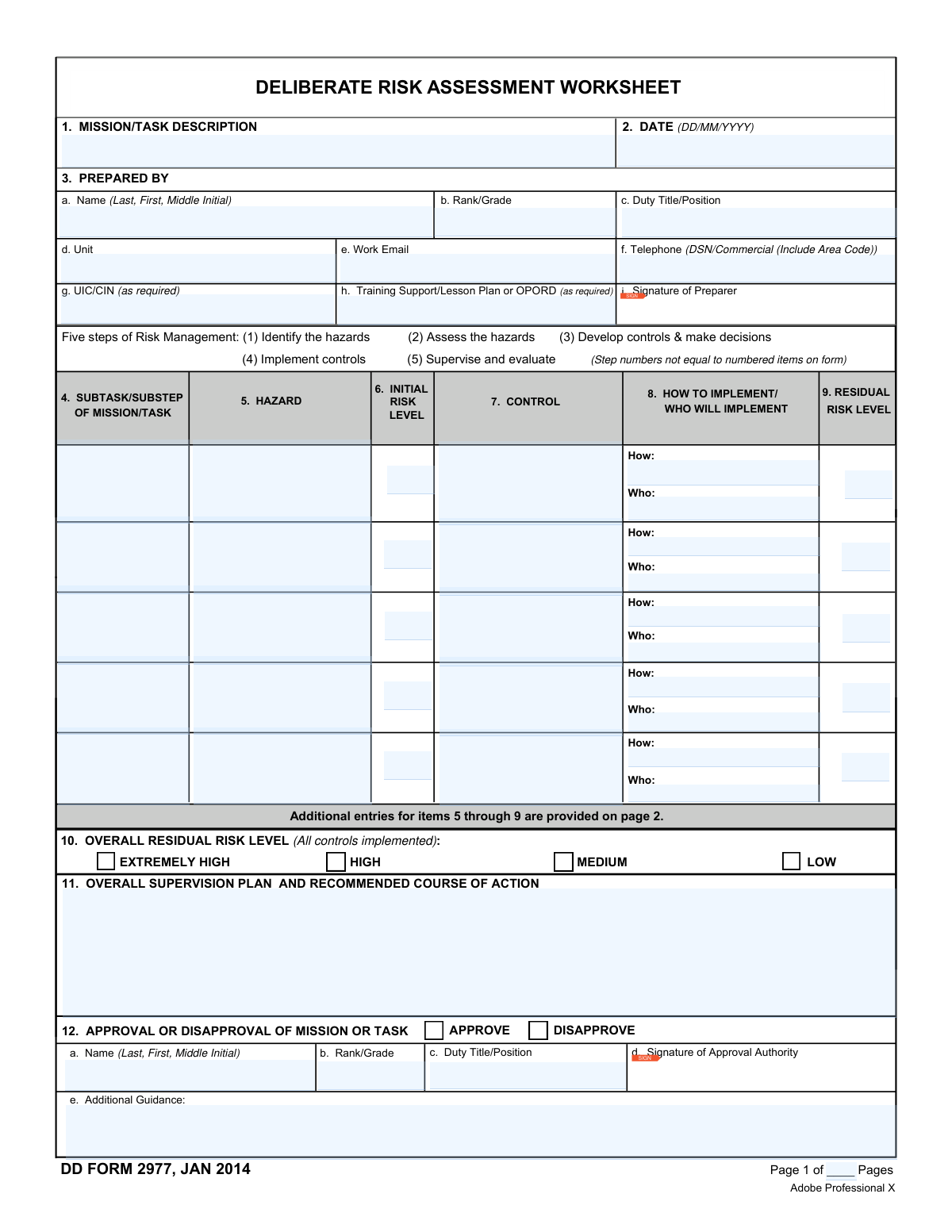
Yes! You can use AI to fill out DD Form 2977, Deliberate Risk Assessment Worksheet
DD Form 2977 is a crucial Department of Defense document for conducting a deliberate risk assessment. It provides a structured format for personnel to identify potential hazards in a mission or task, assess the initial risk level, develop and implement control measures, and determine the final residual risk. This process ensures that all potential dangers are considered and mitigated to an acceptable level before an operation begins. Today, this form can be filled out quickly and accurately using AI-powered services like Instafill.ai, which can also convert non-fillable PDF versions into interactive fillable forms.
Our AI automatically handles information lookup, data retrieval, formatting, and form filling.
It takes less than a minute to fill out DD 2977 using our AI form filling.
Securely upload your data. Information is encrypted in transit and deleted immediately after the form is filled out.
Form specifications
| Form name: | DD Form 2977, Deliberate Risk Assessment Worksheet |
| Number of fields: | 177 |
| Number of pages: | 3 |
| Filled form examples: | Form DD 2977 Examples |
| Language: | English |
Instafill Demo: How to fill out PDF forms in seconds with AI
How to Fill Out DD 2977 Online for Free in 2026
Are you looking to fill out a DD 2977 form online quickly and accurately? Instafill.ai offers the #1 AI-powered PDF filling software of 2026, allowing you to complete your DD 2977 form in just 37 seconds or less.
Follow these steps to fill out your DD 2977 form online using Instafill.ai:
- 1 Navigate to Instafill.ai and upload or select the DD Form 2977.
- 2 Use the AI assistant to automatically populate your personal details, such as name, rank, and unit information in the 'Prepared By' section.
- 3 Systematically enter each mission subtask and its identified hazards into the worksheet grid, allowing the AI to guide you through the required fields.
- 4 For each hazard, input the initial risk level, define the control measures, and specify how and by whom the controls will be implemented.
- 5 Determine the residual risk level for each hazard after controls are applied, and then select the overall residual risk level for the entire mission.
- 6 Complete the supervision plan, recommended course of action, and any additional comments before digitally signing the form as the preparer.
- 7 Securely route the completed form to the designated approval authority for their review, additional guidance, and final signature.
Our AI-powered system ensures each field is filled out correctly, reducing errors and saving you time.
Why Choose Instafill.ai for Your Fillable DD 2977 Form?
Speed
Complete your DD 2977 in as little as 37 seconds.
Up-to-Date
Always use the latest 2026 DD 2977 form version.
Cost-effective
No need to hire expensive lawyers.
Accuracy
Our AI performs 10 compliance checks to ensure your form is error-free.
Security
Your personal information is protected with bank-level encryption.
Frequently Asked Questions About Form DD 2977
The DD Form 2977, or Deliberate Risk Assessment Worksheet, is used to systematically identify, assess, and mitigate risks associated with a specific military mission or task. It is a key tool in the Risk Management process to ensure safety and mission success.
The individual conducting the risk assessment for the operation or training is responsible for preparing the form. This is typically a leader, planner, or safety officer directly involved with the mission.
To determine the Initial Risk Level, you must first assess the hazard's probability and severity, then use the Risk Assessment Matrix provided on the form. The intersection of the probability (A-E) and severity (I-IV) on the matrix gives you the corresponding risk level (EH, H, M, or L).
The 'Initial Risk Level' (Block 6) is the risk a hazard poses before any control measures are applied. The 'Residual Risk Level' (Block 9) is the lower level of risk that remains after you have implemented the controls listed in Block 7.
This section should outline who will supervise the implementation of controls and how they will do it. It should also include a recommended course of action (e.g., approve, disapprove) for the final approval authority based on the overall risk.
The form includes a continuation page (Page 2) with additional rows for items 4 through 9. You can reproduce this page as many times as needed to document all subtasks and associated hazards for the mission.
The Approval Authority is the leader with the appropriate authority to accept the level of residual risk for the mission. This individual reviews the entire assessment and makes the final decision to approve or disapprove the mission.
This section is used to document periodic reviews of the risk assessment during the mission. It ensures controls remain effective and allows for adjustments if conditions change or new hazards are identified.
The Overall Residual Risk Level is the highest single residual risk level identified in Block 9 for any of the subtasks. For example, if you have multiple 'Low' risks but one 'Medium' risk, the overall residual risk is 'Medium'.
After the mission, use this block to record the effectiveness of your controls, note any unexpected events or hazards, and suggest improvements for future operations. This feedback is vital for refining safety procedures and operational planning.
Yes, services like Instafill.ai use AI to help you fill out forms more efficiently. It can auto-fill your personal information in Section 3 and help structure data, saving you time and improving accuracy.
You can use a service like Instafill.ai, which can convert flat, non-fillable PDFs into interactive, fillable forms. This allows you to easily type your information directly into the fields instead of printing and handwriting.
Simply upload the DD Form 2977 to the Instafill.ai platform. The AI will make the form fillable and can assist by auto-filling your recurring information like name, rank, and unit, allowing you to focus on the critical risk assessment details.
Compliance DD 2977
Validation Checks by Instafill.ai
1
Validate Date Format
This check ensures that the date entered in Block 2, 'DATE', follows the specified DD/MM/YYYY format. This is crucial for maintaining consistent and accurate records for auditing and tracking purposes. If the date is not in the correct format, the system should prompt the user to correct it before submission, preventing data entry errors.
2
Validate Preparer's Work Email Format
This validation verifies that the 'Work Email' in Block 3e is a valid email address format (e.g., contains '@' and a domain). A valid email is essential for communication, follow-up questions, and distributing the completed assessment. If the format is invalid, the form submission should be blocked until a correctly formatted email is provided.
3
Ensure Mandatory Preparer Information
This check confirms that the preparer's core details in Block 3 (Name, Rank/Grade, Duty Title/Position, Unit, Work Email, Telephone) are all completed. This information is critical for accountability and identifying a point of contact for the assessment. A failure in this check would prevent submission and highlight the required fields, ensuring the worksheet is attributable to a specific individual.
4
Check for Risk Assessment Row Completeness
For each row in the risk assessment table (Blocks 4-9), this validation ensures that if a 'Subtask/Substep' (Block 4) is entered, all other fields in that row (Hazard, Initial Risk, Control, Implementation, and Residual Risk) are also filled. This prevents incomplete entries and ensures every identified subtask is fully assessed from hazard identification to residual risk. An incomplete row would trigger an error, forcing the user to complete the assessment for that step.
5
Logical Risk Level Reduction
This validation compares the 'Initial Risk Level' (Block 6) with the 'Residual Risk Level' (Block 9) for each hazard. The residual risk level must be less than or equal to the initial risk level. This check ensures the logical integrity of the assessment, as controls are meant to reduce or maintain risk, not increase it. If residual risk is higher, it indicates a logical error in the assessment that must be corrected.
6
Verify Overall Residual Risk Calculation
This check validates that the 'Overall Residual Risk Level' selected in Block 10 is equal to the highest 'Residual Risk Level' listed in any of the Block 9 columns. The form instructions specify this calculation method, so this check ensures the summary risk level accurately reflects the single greatest remaining risk. A mismatch would require the user to correct the Block 10 selection to accurately represent the assessment's outcome.
7
Ensure Control Implementation Details are Provided
This validation ensures that if a 'Control' is specified in Block 7, the corresponding 'How to Implement/Who Will Implement' details in Block 8 are not empty. A control is ineffective without a clear plan for its implementation and assignment of responsibility. If Block 8 is empty for an entered control, the system should flag it as an incomplete entry.
8
Exclusive Overall Risk Level Selection
This check ensures that only one of the four checkboxes (Extremely High, High, Medium, Low) in Block 10 for 'Overall Residual Risk Level' is selected. Allowing multiple selections would create ambiguity about the final assessed risk level. The system should enforce a radio-button-like behavior for this selection.
9
Exclusive Approval or Disapproval Selection
This validation confirms that in Block 12, either 'Approve' or 'Disapprove' is checked, but not both. A mission or task cannot be simultaneously approved and disapproved. This check prevents conflicting and nonsensical final decisions on the worksheet.
10
Chronological Review Date
This check verifies that any date entered in the 'Risk Assessment Review' section (Block 13a) is on or after the preparation 'Date' in Block 2. A review cannot logically occur before the worksheet is created. This maintains the chronological integrity of the document's lifecycle.
11
Validate Page Numbering
This check ensures that the 'Page X of Y' numbering is logical, specifically that the current page number is always less than or equal to the total number of pages. This is important for document integrity, especially when multiple pages are used for the risk assessment table. An error here could indicate a missing or corrupted page.
12
Validate Risk Level Field Values
This check ensures that any value entered into the 'Initial Risk Level' (Block 6) and 'Residual Risk Level' (Block 9) fields is one of the valid, predefined codes: EH, H, M, or L. This enforces the use of the standard risk assessment matrix and prevents invalid data entry. Any other value should be rejected, and the user should be prompted to enter a valid risk level.
13
Mandatory Mission/Task Description
This validation ensures that the 'Mission/Task Description' in Block 1 is not empty. The entire risk assessment is context-dependent on the mission being evaluated. Without this description, the worksheet lacks its fundamental purpose and is uninterpretable.
14
Preparer Signature Field Locking
This functional validation verifies that once the 'Signature of Preparer' in Block 3i is applied, all fields in Blocks 1 through 9 become locked and uneditable. This is a critical security and integrity feature mentioned in the form's instructions to prevent unauthorized changes after the preparer has finalized their assessment. The check ensures the digital signature correctly triggers this locking mechanism.
15
Approval Authority Signature Field Locking
This functional validation confirms that after the 'Signature of Approval Authority' in Block 12d is applied, all fields within Blocks 10, 11, and 12 are locked. This action finalizes the decision-making portion of the form, securing the overall risk level, supervision plan, and final approval status. This check ensures the signature function works as a final, binding action on the decision.
Common Mistakes in Completing DD 2977
Users incorrectly determine the Initial (Block 6) and Residual (Block 9) risk levels by failing to properly use the Risk Assessment Matrix. This often happens from misinterpreting the probability/severity criteria or simply guessing. An inaccurate risk level can lead to the approval of an overly dangerous mission or the unnecessary cancellation of a safe one, undermining the entire purpose of the assessment. To avoid this, carefully cross-reference the matrix for every hazard, clearly defining the probability and severity before assigning a level.
Preparers list generic controls in Block 7, such as "be careful" or "use safety procedures," instead of specific, actionable measures. This occurs due to rushing or a misunderstanding of what constitutes an effective control. Vague controls are ineffective as they provide no clear direction, meaning the identified risk is not actually mitigated. Controls must be explicit, such as "All personnel will wear issued eye protection" or "Conduct pre-convoy brief covering route hazards and communication plan."
Block 8, "How to Implement / Who Will Implement," is frequently left blank or filled with generic terms like "supervisors." This mistake happens when the preparer hasn't fully thought through the execution of the control measures. This leads to a loss of accountability and a high probability that the control will never be implemented, rendering the risk mitigation plan useless. To prevent this, specify the exact method (e.g., "in OPORD," "during safety brief") and the specific duty position responsible (e.g., "Platoon Sergeant," "Range Safety Officer").
The "Overall Residual Risk Level" selected in Block 10 does not match the single highest residual risk level identified in the Block 9 columns. Preparers may mistakenly average the risks or make a subjective judgment, ignoring the form's instruction. This provides a misleading summary to the approval authority, potentially downplaying the true maximum risk of the mission. Always identify the single highest risk level from all entries in Block 9 and select that exact level in Block 10.
The date in Block 2 is entered in a format other than the specified DD/MM/YYYY, such as the common US format of MM/DD/YYYY. This simple data entry error can cause significant confusion for record-keeping and international partners, especially for dates where the day is 12 or less. To avoid this, always double-check format requirements for date fields. AI-powered form filling tools like Instafill.ai can automatically validate and format dates correctly according to the form's specific rules.
Users incorrectly list a hazard (e.g., "Dehydration") in the subtask column (Block 4) or a subtask (e.g., "Conducting a 12-mile ruck march") in the hazard column (Block 5). This stems from a conceptual misunderstanding of the risk management process. This error makes the assessment illogical and difficult to follow, demonstrating a failure to grasp the core concepts. Remember that a subtask is the action being performed, while a hazard is what can cause harm during that action.
Unused rows in the main risk assessment table (Blocks 4-9) are left blank instead of being properly marked. The form instructions specify writing "NOTHING FOLLOWS" on the first unused row, a detail that is easily missed. Leaving rows blank creates the potential for unauthorized additions or alterations to the document after it has been signed. To ensure document integrity, always follow this procedure to officially close out the section.
A user applies a digital signature in Block 3i or 12d without reading the warning that this action will lock the preceding fields. This often happens when rushing to complete the form. The consequence is that the form becomes uneditable, and any mistakes discovered during a final review require starting the entire process over with a blank form, wasting significant time. Always perform a complete and thorough review of all entered data before applying any locking signature.
The "Page __ of __" fields at the bottom of each page are left blank. This is a common clerical oversight when the user is focused on the complex content of the form. If the pages of the assessment are ever separated, it becomes impossible to verify if the document is complete, which can be a critical failure for official records and legal reviews. Make it a final checklist item to correctly number all pages before submission.
The user attempts to fill out a flat, non-interactive version of the form, either by printing and handwriting or by using a basic text editor. This happens when an official fillable version isn't readily available. This results in illegible entries, data transcription errors, and an unprofessional document that is difficult to archive or share digitally. If only a flat PDF is available, AI tools like Instafill.ai can convert it into a fully interactive and fillable form, ensuring clean, legible, and easily managed data.
Saved over 80 hours a year
“I was never sure if my IRS forms like W-9 were filled correctly. Now, I can complete the forms accurately without any external help.”
Kevin Martin Green
Your data stays secure with advanced protection from Instafill and our subprocessors
Robust compliance program
Transparent business model
You’re not the product. You always know where your data is and what it is processed for.
ISO 27001, HIPAA, and GDPR
Our subprocesses adhere to multiple compliance standards, including but not limited to ISO 27001, HIPAA, and GDPR.
Security & privacy by design
We consider security and privacy from the initial design phase of any new service or functionality. It’s not an afterthought, it’s built-in, including support for two-factor authentication (2FA) to further protect your account.
Fill out DD 2977 with Instafill.ai
Worried about filling PDFs wrong? Instafill securely fills dd-form-2977-deliberate-risk-assessment-worksheet forms, ensuring each field is accurate.