Yes! You can use AI to fill out Disability Attending Physician Statement

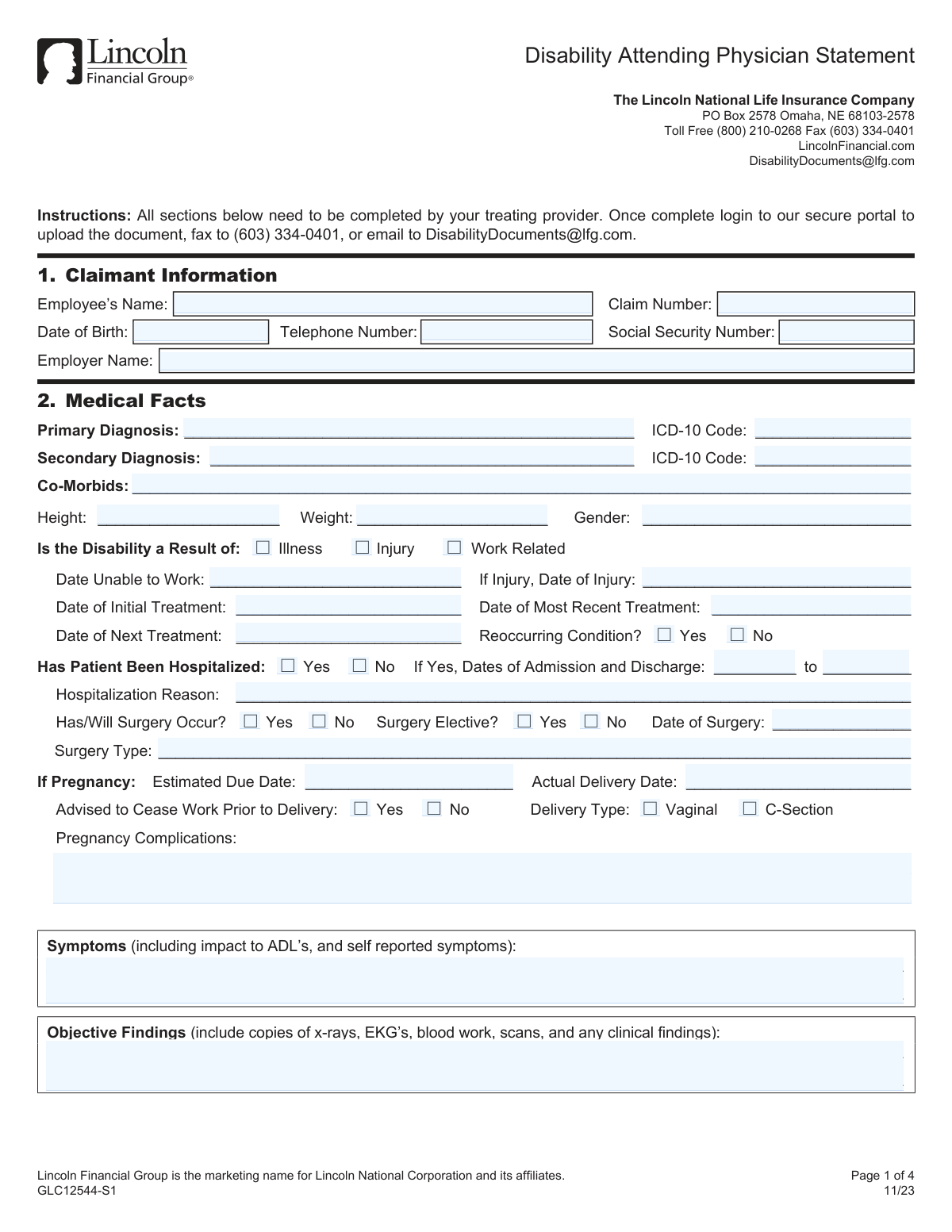
This form is a statement completed by a treating physician to provide Lincoln Financial Group with detailed medical information about a patient's disability. It documents diagnoses, treatments, physical and mental limitations, and the provider's professional opinion on the patient's ability to work, which is crucial for evaluating a disability insurance claim. Today, this form can be filled out quickly and accurately using AI-powered services like Instafill.ai, which can also convert non-fillable PDF versions into interactive fillable forms.
GLC12544-S1 has a moderate Form Complexity Index of 61/100 — 85 fillable fields across 2 pages. Instafill’s AI completes it accurately in under a minute.

Form specifications

Form name: Disability Attending Physician Statement
Number of fields: 85
Number of pages: 4
FCI: Moderate (61/100)
Language: English
Our AI automatically handles information lookup, data retrieval, formatting, and form filling.
It takes less than a minute to fill out GLC12544-S1 using our AI form filling.
Securely upload your data. Information is encrypted in transit and deleted immediately after the form is filled out.
Preview of Disability Attending Physician Statement

Instafill Demo: How to fill out PDF forms in seconds with AI

How to Fill Out GLC12544-S1 Online for Free in 2026

Are you looking to fill out a GLC12544-S1 form online quickly and accurately? Instafill.ai offers the #1 AI-powered PDF filling software of 2026, allowing you to complete your GLC12544-S1 form in just 37 seconds or less.
Follow these steps to fill out your GLC12544-S1 form online using Instafill.ai:
  1. 1 Navigate to Instafill.ai and upload or select the Disability Attending Physician Statement form.
  2. 2 Use the AI assistant to accurately input the claimant's personal and claim information in Section 1.
  3. 3 Complete the 'Medical Facts' section by providing details on diagnoses, treatment dates, symptoms, and objective findings.
  4. 4 Detail the patient's physical and mental restrictions and limitations using the provided scales and fields.
  5. 5 Provide information on the patient's return-to-work status, including any necessary job modifications or a modified schedule.
  6. 6 The treating provider must review all entered information for accuracy, then provide their printed name, signature, date, and practice details in the signature section.
  7. 7 Download the completed form and submit it to Lincoln Financial Group via their secure portal, fax, or email as instructed.

Our AI-powered system ensures each field is filled out correctly, reducing errors and saving you time.

Why Choose Instafill.ai for Your Fillable GLC12544-S1 Form?

Speed

Complete your GLC12544-S1 in as little as 37 seconds.

Up-to-Date

Always use the latest 2026 GLC12544-S1 form version.

Cost-effective

No need to hire expensive lawyers.

Accuracy

Our AI performs 10 compliance checks to ensure your form is error-free.

Security

Your personal information is protected with bank-level encryption.

Frequently Asked Questions About GLC12544-S1

GLC12544-S1 has a Form Complexity Index of 61 out of 100, placing it in the moderate complexity tier. This score is calculated deterministically from the form’s own structure using Instafill’s published Form Complexity Index methodology, so it can be reproduced and independently verified — it is not a subjective estimate.

For GLC12544-S1 specifically, the score reflects 85 fillable fields across 2 pages, grouped into 28 sections, and 9 conditional fields that only apply depending on earlier answers, plus 2 pages of printed instructions. The number of fields is the largest factor in the base score (weighted 36%), followed by how difficult those fields are to complete based on their type, where free-text and signature fields count for more than simple checkboxes (26%). The number of pages that actually contain fields (15%), the amount of conditional “fill-only-if” logic (16%), and how many sections the form is divided into (7%) account for the rest of the base. On top of that base, the index adds points for tables and repeating lists, bundled instruction pages, and dense page layouts — capturing difficulty the base alone can miss.

In practical terms, a moderate score means the form takes real effort: there are enough fields, pages and rules that errors are easy to make by hand. Instafill removes that effort entirely: our AI reads your information, maps each value to the correct field — including the conditional ones — and completes GLC12544-S1 accurately in under a minute, with every field available for you to review before you download. See exactly how the Form Complexity Index is calculated.

This is a Disability Attending Physician Statement used by Lincoln Financial Group to gather medical information for a disability claim. The form must be completed entirely by your treating medical provider, not by you, the claimant.

Once your provider completes the form, it can be submitted by uploading it to the secure portal, faxing it to (603) 334-0401, or emailing it to [email protected].

Your provider's office may charge a fee for form completion. The form states that the patient is responsible for any associated charges, not Lincoln Financial Group.

Your provider should include copies of objective medical findings, such as x-rays, EKGs, blood work, scans, and other clinical results to support the information provided on the form.

Although it is your personal information, the form instructions state that all sections must be completed by the treating provider. You should give this information to your provider's office to ensure they can fill it in accurately.

Your provider must specify your physical work limitations (e.g., how many pounds you can lift and for how long) and rate your mental functional abilities using the provided 1-4 scale. This is critical for assessing your work capacity.

Your provider should use their best medical judgment to estimate a return-to-work date. If the date is uncertain, they can note that or provide a timeframe for when your condition will be re-evaluated.

For pregnancy-related claims, your provider must complete the section detailing your estimated due date, delivery type, and any complications. They also need to state if they medically advised you to stop working prior to delivery.

Yes, services like Instafill.ai use AI to help auto-fill form fields accurately, which can save your provider's office time. However, your provider must always review the information for accuracy and sign the completed form.

Your provider can use a service like Instafill.ai to upload the PDF and fill it out digitally. This allows them to type information directly into the fields and add a digital signature before submitting it.

If you have a non-fillable or 'flat' PDF, you can use a tool like Instafill.ai to convert it into an interactive, fillable form. This makes it much easier for your provider to complete it on a computer.

The Primary Diagnosis is the main medical condition causing your disability. A Secondary Diagnosis is an additional condition that may contribute to your inability to work but is not the principal cause.

The scale assesses your ability to perform certain tasks: 1 means 'Unable to Perform,' 2 is 'Markedly Limited,' 3 is 'Somewhat Limited,' and 4 is 'Unlimited.' Your provider uses this to evaluate your cognitive and emotional capacities for work.

These notices are legally required in many states to inform all parties about the penalties for submitting false or fraudulent information on an insurance claim. They are a standard and important part of the claims process.

Compliance GLC12544-S1
Validation Checks by Instafill.ai

1
Validates Social Security Number Format
This check ensures the Social Security Number field contains a valid 9-digit number, formatted as either XXXXXXXXX or XXX-XX-XXXX. This is critical for correctly identifying the claimant in internal and external systems. If the format is incorrect, the form submission will be rejected, requiring manual correction to prevent record-matching failures.
2
Ensures Chronological Order of Treatment Dates
This validation verifies that the treatment dates are in a logical sequence: 'Date of Initial Treatment' must be on or before 'Date of Most Recent Treatment', which in turn must be on or before 'Date of Next Treatment'. This check is important for understanding the timeline and progression of the medical condition. A failure would indicate a data entry error that could misrepresent the treatment history.
3
Conditional Requirement for Date of Injury
This check ensures that the 'Date of Injury' field is populated if and only if the 'Disability a Result of: Injury' box is checked. This maintains logical consistency on the form and prevents ambiguity about the cause of disability. If the 'Injury' box is checked but the date is missing, the form is incomplete; if the date is present without the box being checked, it signals a contradiction.
4
Conditional Requirement for Hospitalization Details
This validation confirms that if 'Has Patient Been Hospitalized' is marked 'Yes', then the 'Admission Date', 'Discharge Date', and 'Hospitalization Reason' fields are all completed. These details are essential for verifying the severity and timeline of the medical event. A failure to provide these details when hospitalization is indicated will result in an incomplete claim requiring follow-up with the provider.
5
Validates Hospitalization Admission and Discharge Date Sequence
This check ensures that the 'Admission Date' is on or before the 'Discharge Date' for any reported hospitalization. This is a fundamental logic check to ensure the data is accurate and makes chronological sense. An invalid sequence would indicate a significant data entry error that must be corrected to process the claim accurately.
6
Conditional Requirement for Surgery Details
This validation ensures that if 'Has/Will Surgery Occur?' is marked 'Yes', then the 'Date of Surgery' and 'Surgery Type' fields are populated. This information is critical for assessing the medical intervention and its impact on the disability period. If surgery is indicated but details are missing, the form will be considered incomplete.
7
Ensures Diagnosis and ICD-10 Code are Paired
This check verifies that if a 'Primary Diagnosis' text is provided, a corresponding 'Primary Diagnosis ICD-10 Code' is also present, and vice versa. This ensures that the medical condition is both described and properly coded for claims processing and reporting. A mismatch or missing counterpart would halt processing until the provider clarifies the information.
8
Validates Mental Functional Ability Rating Scale
This check ensures that all fields under the 'Mental Diagnosis' section contain a valid integer from 1 to 4. These ratings are crucial for assessing the claimant's cognitive and emotional capacity for work. Any value outside this range is invalid and would require correction, as it would prevent a proper functional assessment.
9
Plausibility Check for Physical Activity Hours
This validation checks that the sum of hours entered for 'Sitting', 'Standing', and 'Walking' does not exceed a reasonable total for a standard workday (e.g., 8-10 hours). This serves as a sanity check to catch potential data entry errors or misunderstandings by the provider. An unusually high total would trigger a review to clarify the patient's actual physical limitations.
10
Conditional Requirement for Part-Time Work Details
This check ensures that if the 'Return to Work Schedule – Part Time' box is checked, the 'Part Time Days/Hours' field is filled out. This detail is essential for managing a gradual return to work and calculating benefits correctly. If the box is checked but the details are missing, the return-to-work plan is ambiguous and requires clarification.
11
Verifies Presence of Provider Signature and Date
This validation confirms that the 'Provider Signature' and the signature 'Date' fields are both completed. The provider's signature and date are legally required to attest to the accuracy of the medical information provided on the form. A missing signature or date renders the entire document invalid and will cause an immediate rejection of the submission.
12
Validates Date of Birth is Before Treatment Dates
This is a basic sanity check to ensure the claimant's 'Date of Birth' is chronologically before all other dates on the form, such as 'Date Unable to Work' and 'Date of Initial Treatment'. This helps catch significant data entry errors at a fundamental level. A failure would indicate a critical error in the claimant's identifying information or the event timeline.
13
Ensures Chronological Order of Restriction Dates
This check verifies that the 'Restrictions Start Date' is on or before the 'Restrictions End Date'. This ensures the period of medical restrictions is logically sound and can be used to determine the duration of modified duties or disability. An illogical sequence would create confusion and prevent accurate benefits administration.
14
Validates Pregnancy-Related Dates
This check validates the logic of pregnancy-related dates if they are provided. It ensures the 'Actual Delivery Date' is not in the future and is reasonably close to the 'Estimated Due Date'. This helps verify the timeline of a maternity-related disability claim and flags potential data entry errors for correction.

Common Mistakes in Completing GLC12544-S1

Missing or Incorrect Claim Number

Providers often overlook the Claim Number field or enter it incorrectly, as it's provided by the patient. This is the primary identifier linking the form to the patient's case, and an error can cause the document to be lost or misfiled, leading to significant claim delays. To avoid this, always confirm the claim number with the patient and double-check it for accuracy before submission.

Mismatched Diagnosis and ICD-10 Code

A frequent error is a discrepancy between the written medical diagnosis and the corresponding ICD-10 code. This can happen due to typos or using a less specific code than required, which forces the insurance processor to seek clarification and delays the claim. It is crucial to verify that the ICD-10 code entered is the most accurate and specific match for the written primary and secondary diagnoses.

Vague Symptom and Finding Descriptions

The free-text fields for 'Symptoms' and 'Objective Findings' are often filled with vague statements like 'patient is tired' or 'has back pain.' Insurers require specific, objective, and measurable information, such as the impact on Activities of Daily Living (ADLs) or specific measurements from clinical tests. Lack of detail weakens the claim's medical evidence; always provide quantifiable data and attach all supporting reports as requested.

Incomplete Physical Restriction Details

The 'Restrictions and Limitations' section for physical abilities requires multiple data points, such as both pounds and hours per day for lifting. It is common for providers to fill in only one part, leaving the information incomplete. This ambiguity prevents the insurer from accurately assessing work capacity and will result in a request for more information, delaying the claim.

Using Words Instead of Numeric Ratings

For the 'Mental Diagnosis' section, providers are asked to use a 1-4 numeric scale but often write descriptive words like 'Limited' or 'Fair' instead. This non-standard input requires manual interpretation and slows down automated processing systems. To ensure clarity and prevent delays, always use the specified numeric codes (1=Unable to Perform, 2=Markedly Limited, 3=Somewhat Limited, 4=Unlimited).

Conflicting Dates for Disability and Treatment

Confusion between the 'Date Unable to Work' and the 'Date of Initial Treatment' is common, but these dates serve different purposes for determining eligibility. Entering the wrong date in either field can affect the calculation of the benefit period and lead to processing delays. Carefully distinguish between the date the disability began and the date medical care was first sought for the condition.

Leaving Return-to-Work Date Blank

Providers may be hesitant to specify a 'Date Able to Return to Work' and leave it blank or write 'Unknown.' While the future may be uncertain, failing to provide a best medical estimate stalls the claim review process, as the insurer needs this to project the claim duration. It is better to provide an estimated date, even if it needs to be updated later, to keep the claim moving forward.

Forgetting to Attach Supporting Medical Records

The form explicitly asks for copies of x-rays, scans, and other objective findings to be included with the submission. Forgetting to attach these crucial documents is a primary cause of delays, as the claims adjuster must then request them from the provider's office. To create a strong and complete claim file, always gather and attach all relevant medical reports before sending the form.

Missing Provider Signature, Date, or Credentials

A missing signature or date is a critical error that automatically invalidates the form, requiring it to be sent back for completion. Similarly, omitting professional credentials (e.g., MD, DO, NP) after the printed name can delay the verification process. If the form is a non-fillable PDF, tools like Instafill.ai can convert it into an interactive version, making it easier to complete cleanly and sign digitally to prevent these simple but costly mistakes.

Illegible or Incomplete Provider Contact Information

Handwritten contact information in the signature section is often illegible, or fields like the fax number or email are left blank. If the insurer has a clarifying question, unreadable contact details make it difficult to reach the provider, creating unnecessary delays. Using an AI-powered form-filling tool like Instafill.ai can help by auto-filling this information clearly and correctly every time.
Saved over 80 hours a year

“I was never sure if my IRS forms like W-9 were filled correctly. Now, I can complete the forms accurately without any external help.”

Kevin Martin Green

Your data stays secure with advanced protection from Instafill and our subprocessors

Robust compliance program

Transparent business model

You’re not the product. You always know where your data is and what it is processed for.

ISO 27001, HIPAA, and GDPR

Our subprocesses adhere to multiple compliance standards, including but not limited to ISO 27001, HIPAA, and GDPR.

Security & privacy by design

We consider security and privacy from the initial design phase of any new service or functionality. It’s not an afterthought, it’s built-in, including support for two-factor authentication (2FA) to further protect your account.

Fill out GLC12544-S1 with Instafill.ai

Worried about filling PDFs wrong? Instafill securely fills disability-attending-physician-statement forms, ensuring each field is accurate.