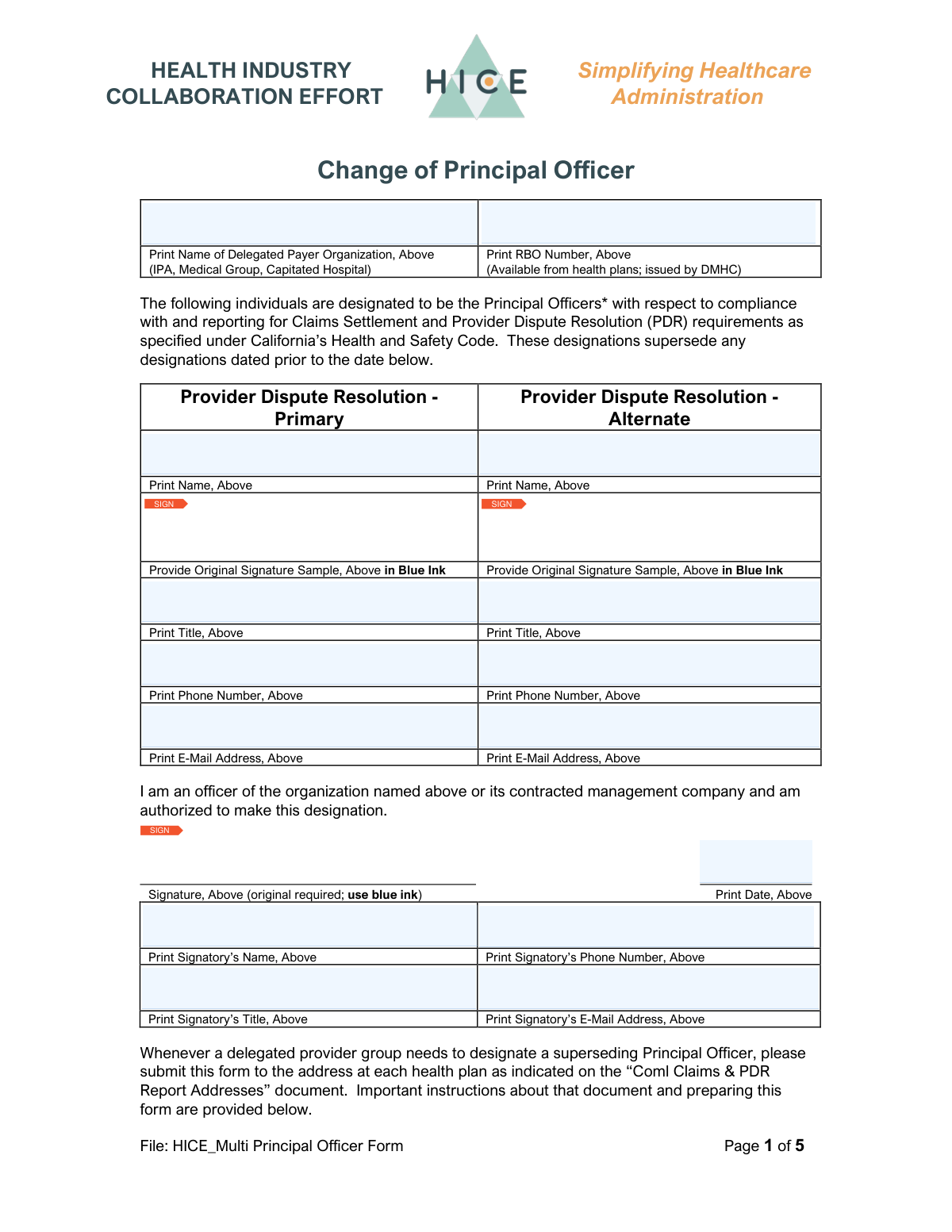
Yes! You can use AI to fill out DMHC Provider Dispute Resolution (PDR) Contact Form
The DMHC Provider Dispute Resolution (PDR) Contact Form is a regulatory document required by the California Department of Managed Health Care (DMHC). It is used by delegated payer organizations, such as IPAs and medical groups, to officially designate primary and alternate contacts responsible for handling provider disputes, ensuring a clear point of contact. Today, this form can be filled out quickly and accurately using AI-powered services like Instafill.ai, which can also convert non-fillable PDF versions into interactive fillable forms.
Our AI automatically handles information lookup, data retrieval, formatting, and form filling.
It takes less than a minute to fill out DMHC PDR Contact Form using our AI form filling.
Securely upload your data. Information is encrypted in transit and deleted immediately after the form is filled out.
Form specifications
| Form name: | DMHC Provider Dispute Resolution (PDR) Contact Form |
| Number of fields: | 18 |
| Number of pages: | 5 |
| Language: | English |
Instafill Demo: How to fill out PDF forms in seconds with AI
How to Fill Out DMHC PDR Contact Form Online for Free in 2026
Are you looking to fill out a DMHC PDR CONTACT FORM form online quickly and accurately? Instafill.ai offers the #1 AI-powered PDF filling software of 2026, allowing you to complete your DMHC PDR CONTACT FORM form in just 37 seconds or less.
Follow these steps to fill out your DMHC PDR CONTACT FORM form online using Instafill.ai:
- 1 Navigate to Instafill.ai and upload or select the DMHC Provider Dispute Resolution Contact Form.
- 2 Use the AI assistant to populate information for the Delegated Payer Organization, including its name and RBO number.
- 3 Enter the details for the Primary Provider Dispute Resolution Contact, including their name, title, phone number, and email address.
- 4 Provide the same contact information for the Alternate Provider Dispute Resolution Contact in the designated section.
- 5 Review the Signatory Information section, ensuring the signatory's name, title, and contact details are correct.
- 6 Digitally sign the form in the appropriate signature fields and enter the current date.
- 7 Download, print, or securely submit the completed form directly from the platform.
Our AI-powered system ensures each field is filled out correctly, reducing errors and saving you time.
Why Choose Instafill.ai for Your Fillable DMHC PDR Contact Form Form?
Speed
Complete your DMHC PDR Contact Form in as little as 37 seconds.
Up-to-Date
Always use the latest 2026 DMHC PDR Contact Form form version.
Cost-effective
No need to hire expensive lawyers.
Accuracy
Our AI performs 10 compliance checks to ensure your form is error-free.
Security
Your personal information is protected with bank-level encryption.
Frequently Asked Questions About Form DMHC PDR Contact Form
This form is used to officially designate the primary and alternate contacts within your organization who are responsible for handling provider dispute resolutions.
This form must be completed by delegated payer organizations, such as Independent Practice Associations (IPAs), Medical Groups, or Capitated Hospitals that manage provider disputes.
The RBO (Risk-Bearing Organization) number is a unique identifier provided by health plans and issued by the DMHC. You can typically find this number in your contracts or official correspondence from the health plans you work with.
Yes, it is highly recommended to provide an alternate contact. This ensures that dispute resolution matters can be addressed promptly even if the primary contact is unavailable.
The contacts should be individuals directly involved in and responsible for the dispute resolution process within your organization. They will be the main point of communication for these issues.
The signatory must be an individual with the authority to legally represent your organization, such as a CEO, President, or another designated executive officer.
The Primary Contact is the operational point person for disputes, while the Signatory is the executive who is officially certifying the information and authorizing the contact designation on behalf of the organization.
If any of the designated contact information changes, you must submit a new, updated form to the relevant parties to ensure communication is not disrupted.
Submission instructions are typically provided by the health plan or regulatory agency that requires this form. Please refer to their specific guidelines for submission details.
Yes, services like Instafill.ai use AI to accurately auto-fill form fields with your information, which saves time and helps prevent errors.
You can use a service like Instafill.ai to upload the PDF and fill it out online. The platform allows you to type directly into the fields and add a digital signature before downloading.
Tools like Instafill.ai can convert non-fillable or 'flat' PDFs into interactive, fillable forms. Simply upload your document to make it easy to complete on your computer.
Compliance DMHC PDR Contact Form
Validation Checks by Instafill.ai
1
Primary Contact Name Presence
Checks that the 'Primary Contact Name' field is not empty. This is critical as it identifies the main point of contact for any dispute resolutions. A failed validation would prevent form submission and prompt the user to enter the required name.
2
Primary Contact Method Completeness
Validates that at least one of 'Primary Contact Phone Number' or 'Primary Contact Email Address' is filled out. It is essential to have a method to reach the primary contact for follow-up. If both fields are empty, the form submission will be blocked until at least one is provided.
3
Phone Number Format Validation
Ensures that all phone number fields (Primary, Alternate, Signatory) adhere to a standard North American format, such as (XXX) XXX-XXXX or XXX-XXX-XXXX. This standardization is crucial for system compatibility and successful communication attempts. An invalid format will trigger an error message requesting the user to correct the entry.
4
Email Address Format Validation
Verifies that all email address fields (Primary, Alternate, Signatory) contain a valid email structure, including an '@' symbol and a domain. This check prevents typos and ensures that automated communications will be delivered successfully. An invalid email will result in a validation error, requiring the user to fix the address before proceeding.
5
Signatory Date Logicality
Validates that the 'Signatory Date' is a valid calendar date and is not set in the future. This ensures the attestation date is accurate and reflects when the document was actually signed. A future date would be illogical and would cause the submission to fail, prompting the user to enter a current or past date.
6
Signatory Information Completeness
Checks that the 'Signatory Name', 'Signatory Title', and 'Signatory Date' fields are all completed. This information is legally significant as it confirms the identity and authority of the person signing on behalf of the organization. Missing any of this information would halt the submission process until all required signatory details are provided.
7
Delegated Payer Organization Name Presence
Ensures the 'Delegated Payer Organization Name' field is not left blank. This field identifies the entity the form is being submitted for, which is fundamental to the entire process. Without this information, the form has no context and submission will be blocked.
8
RBO Number Format and Presence
Validates that the 'RBO Number' field is filled in and conforms to the expected format issued by the DMHC. This number is a unique identifier crucial for regulatory tracking and correct processing by health plans. An empty or incorrectly formatted field will trigger an error, as it's a key data point for identification.
9
Distinct Primary and Alternate Contacts
Verifies that the information for the Primary Contact (e.g., Name, Email) is not identical to the Alternate Contact's information. The purpose of an alternate is to provide a backup point of contact, which is defeated if they are the same person. If the details match, a warning or error will be displayed to encourage providing a different contact.
10
Full Name Structure Validation
Checks that name fields ('Primary Contact Name', 'Alternate Contact Name', 'Signatory Name') likely represent a full name by containing at least one space. This simple check helps prevent users from entering a single name or an initial, ensuring more complete data for identification. A validation failure would prompt the user to provide a full first and last name.
11
Signature Field Completion
Confirms that at least one of the signature fields ('Signature1', 'Signature2', 'Signature3') contains data. This is a critical check to ensure the form has been formally signed, which is often a legal or procedural requirement. If all signature fields are empty, the form cannot be submitted.
12
Alternate Contact Information Consistency
This validation ensures that if the 'Alternate Contact Name' field is filled out, then either the 'Alternate Contact Phone Number' or 'Alternate Contact Email Address' must also be provided. An alternate contact is useless without a method to contact them. If the name is present but contact details are missing, the user will be prompted to add them or clear the alternate name field.
13
Signatory Title Presence
This check ensures the 'Signatory Title' field is not empty. The title is essential for verifying that the person signing the document has the authority to do so on behalf of the organization. A missing title can bring the validity of the entire submission into question and will block the submission until provided.
Common Mistakes in Completing DMHC PDR Contact Form
The RBO number is a specific identifier issued by the DMHC, and many users may not know it or may enter a different internal ID by mistake. Leaving this field blank or entering an incorrect number can lead to significant processing delays or rejection of the form, as it's crucial for regulatory tracking. To avoid this, verify the RBO number with your organization's compliance department or by checking documentation from health plans before filling out the form.
The form specifically requests the 'full name of the delegated payer organization,' but users often enter a common acronym or abbreviation (e.g., 'IPA' instead of 'Independent Physician Association of California'). This can cause ambiguity and lead to misidentification of the legal entity, potentially invalidating the submission. Always write out the complete, official legal name of the organization as it appears on official documents.
A frequent error is when the printed 'Signatory Name' does not legally match the handwritten or digital signature provided. This can happen when using a nickname for the printed name but a full legal name for the signature, or vice-versa. Such a discrepancy can call the document's validity into question, so ensure the printed name is the full legal name that corresponds exactly to the signature.
People often perceive fields labeled 'Alternate' as optional and leave them blank to save time. However, for critical functions like dispute resolution, not providing an alternate contact can halt communication if the primary contact is unavailable. This leads to missed deadlines and unresolved issues, so always provide a designated backup contact unless explicitly stated as optional.
The 'Signatory Title' field is crucial as it establishes the individual's authority to bind the organization, yet it is commonly overlooked. Submitting a form without the signatory's official job title can lead to its rejection on the grounds of unverified authority. Always double-check that the signatory's complete and correct title is included to ensure the document is legally sound.
Users enter phone numbers in various formats (e.g., with/without dashes, with/without country code, including extensions). This inconsistency can cause errors in automated data processing systems and make it difficult to contact the person. To prevent this, use a standard format like (XXX) XXX-XXXX and verify the number is correct. AI-powered tools like Instafill.ai can help by automatically formatting phone numbers correctly upon entry.
A simple typo in an email address (e.g., '[email protected]' instead of 'gmail.com') is one of the most common and consequential mistakes. This error ensures that all electronic communication, including confirmations and dispute updates, will fail to be delivered. Carefully proofread all email addresses before submission. Using a form-filling tool like Instafill.ai can reduce these errors by autocompleting previously validated contact information.
Fields requesting a 'full name' for contacts or the signatory are often mistakenly filled with initials, nicknames, or partial names. This can create issues with identity verification and official record-keeping, potentially leading to rejection. Always provide the person's complete first and last name as it appears on legal or official documents.
When a form is a non-fillable PDF, users struggle with how to sign it, often resorting to typing their name in a cursive font or inserting a low-quality image of their signature. These methods may not be legally binding and can cause the form to be rejected. To avoid this, use a proper digital signature tool. Services like Instafill.ai can convert flat PDFs into fillable forms, making it easy to apply a valid and secure digital signature directly.
The 'Signatory Date' can be a source of confusion, with users entering dates in ambiguous formats (e.g., 01/02/2024 could be Jan 2nd or Feb 1st) or accidentally post-dating the document. This can create legal and processing issues regarding the document's effective date. It is best practice to use a clear, unambiguous format like YYYY-MM-DD or to write out the month (e.g., January 2, 2024) to prevent any confusion.
Saved over 80 hours a year
“I was never sure if my IRS forms like W-9 were filled correctly. Now, I can complete the forms accurately without any external help.”
Kevin Martin Green
Your data stays secure with advanced protection from Instafill and our subprocessors

Robust compliance program
Transparent business model
You’re not the product. You always know where your data is and what it is processed for.
ISO 27001, HIPAA, and GDPR
Our subprocesses adhere to multiple compliance standards, including but not limited to ISO 27001, HIPAA, and GDPR.
Security & privacy by design
We consider security and privacy from the initial design phase of any new service or functionality. It’s not an afterthought, it’s built-in, including support for two-factor authentication (2FA) to further protect your account.
Fill out DMHC PDR Contact Form with Instafill.ai
Worried about filling PDFs wrong? Instafill securely fills dmhc-provider-dispute-resolution-pdr-contact-form forms, ensuring each field is accurate.