Yes! You can use AI to fill out DSS Form 27156, Financial Declaration
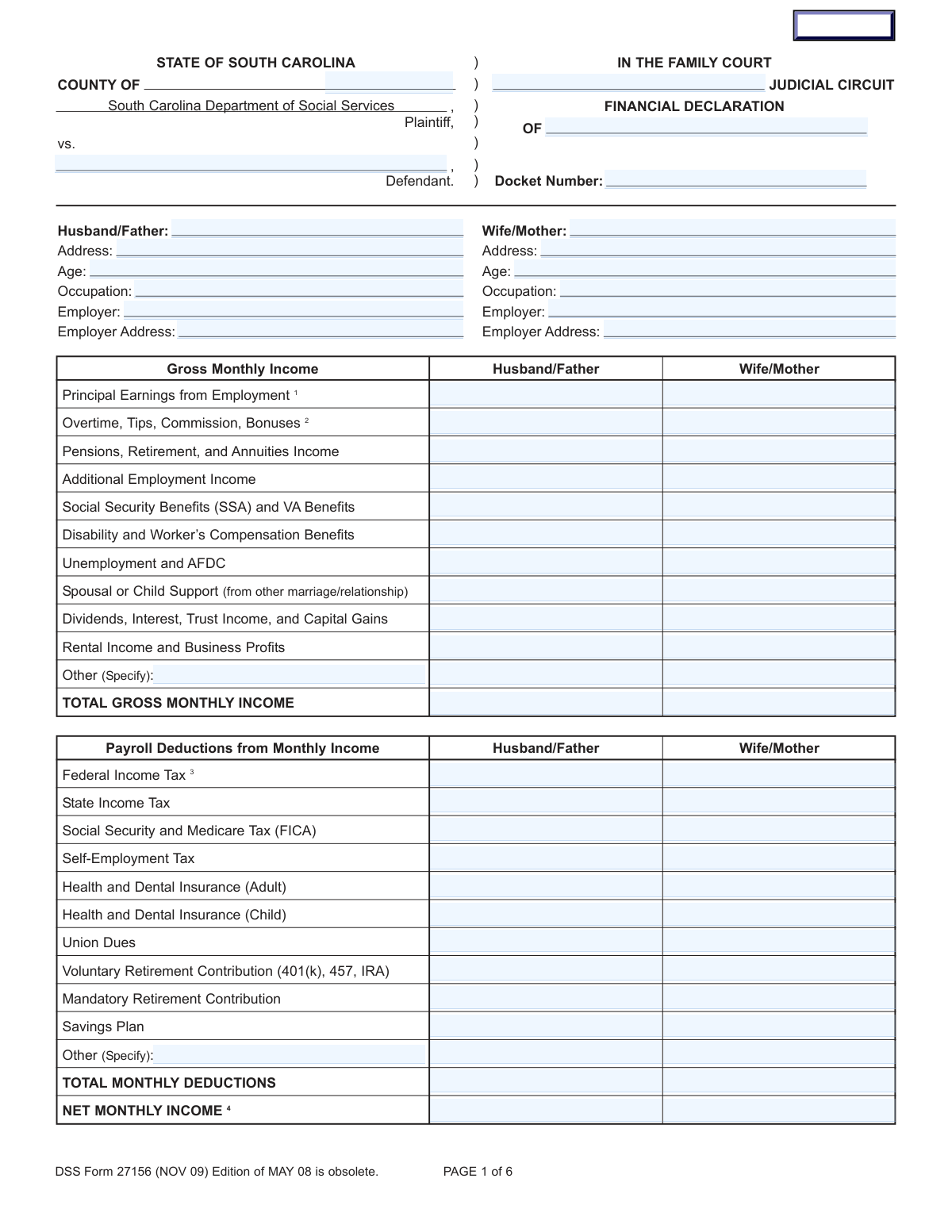
DSS Form 27156 is a Financial Declaration required by the South Carolina Family Court for proceedings such as divorce, separation, or child support cases. It mandates a comprehensive disclosure of each party's financial status, including all income, expenses, assets, and liabilities, to ensure fair and equitable court decisions. This detailed document is crucial for determining alimony, child support, and the division of property. Today, this form can be filled out quickly and accurately using AI-powered services like Instafill.ai, which can also convert non-fillable PDF versions into interactive fillable forms.
Our AI automatically handles information lookup, data retrieval, formatting, and form filling.
It takes less than a minute to fill out DSS Form 27156 using our AI form filling.
Securely upload your data. Information is encrypted in transit and deleted immediately after the form is filled out.
Form specifications
| Form name: | DSS Form 27156, Financial Declaration |
| Number of fields: | 344 |
| Number of pages: | 6 |
| Language: | English |
Instafill Demo: How to fill out PDF forms in seconds with AI
How to Fill Out DSS Form 27156 Online for Free in 2026
Are you looking to fill out a DSS FORM 27156 form online quickly and accurately? Instafill.ai offers the #1 AI-powered PDF filling software of 2026, allowing you to complete your DSS FORM 27156 form in just 37 seconds or less.
Follow these steps to fill out your DSS FORM 27156 form online using Instafill.ai:
- 1 Navigate to Instafill.ai and upload or select the South Carolina Financial Declaration, DSS Form 27156.
- 2 Enter the case information, including the county, judicial circuit, docket number, and the names of the plaintiff and defendant.
- 3 Complete the personal information sections for both parties, then meticulously list all sources of gross monthly income.
- 4 Detail all monthly payroll deductions such as taxes, insurance, and retirement contributions to calculate the net monthly income.
- 5 Itemize all monthly expenses, including housing, utilities, food, transportation, and child-related costs.
- 6 Disclose all assets (cash, real estate, retirement accounts) and liabilities (installment loans, debts), providing values and balances.
- 7 Carefully review all entered information for accuracy, then sign the declaration before a notary public as required before filing with the court.
Our AI-powered system ensures each field is filled out correctly, reducing errors and saving you time.
Why Choose Instafill.ai for Your Fillable DSS Form 27156 Form?
Speed
Complete your DSS Form 27156 in as little as 37 seconds.
Up-to-Date
Always use the latest 2026 DSS Form 27156 form version.
Cost-effective
No need to hire expensive lawyers.
Accuracy
Our AI performs 10 compliance checks to ensure your form is error-free.
Security
Your personal information is protected with bank-level encryption.
Frequently Asked Questions About Form DSS Form 27156
This form is used in South Carolina Family Court cases, such as divorce or child support proceedings, to provide a detailed summary of each party's income, expenses, assets, and debts to the court.
Both parties (the Plaintiff and the Defendant) in a family court case are typically required to complete and file their own Financial Declaration. This ensures the court has a complete financial picture from everyone involved.
You should have recent pay stubs, tax returns, bank and retirement account statements, and bills for regular expenses like your mortgage, car payments, and utilities. The form specifically notes that a recent pay stub should be attached.
The form's instructions state that if you are paid biweekly, you should multiply your gross paycheck amount by 26 and then divide that total by 12. This calculation gives you your average gross monthly income.
Payroll Deductions are funds taken from your paycheck before you receive it, like taxes and 401(k) contributions. Monthly Expenses are bills you pay from your net income, such as rent, groceries, and utilities.
You should list credit card debt in the 'Installment Loan Payments Section' on page 3. List the credit card company as the 'Creditor' and provide the monthly payment, total balance, and indicate who is responsible for the debt.
Marital property generally includes all assets and debts acquired during the marriage, regardless of whose name they are in. Non-marital property is typically anything owned before the marriage or received as a personal gift or inheritance by one spouse.
After completing the form, you must sign it in the presence of a Notary Public. The notarized document must then be filed with the Clerk of Court for the county where your case is being heard.
Yes. If your total assets are greater than $300,000, you must itemize them by completing the detailed asset sections on pages 4 and 5. If your assets are less than this amount, you only need to complete the main asset summary on page 4.
Yes, services like Instafill.ai use AI to help you accurately auto-fill form fields, perform calculations, and guide you through complex sections, which can save you significant time and reduce errors.
Simply upload the DSS Form 27156 PDF to the Instafill.ai platform. The service will make the document interactive, allowing you to easily type in your information and use AI-powered assistance to complete it.
You can use a service like Instafill.ai to convert the non-fillable PDF into an interactive, fillable form. Just upload your 'flat' PDF, and the platform will make it easy to complete on your computer.
This category includes costs such as a child's allowance, summer camp, nursery school, babysitters, lessons, activities, and participatory sports fees, as detailed in the form's endnotes.
Mandatory contributions are required as a condition of your employment, often seen in government or union jobs. Voluntary contributions are optional amounts you choose to contribute to plans like a 401(k) or IRA.
Compliance DSS Form 27156
Validation Checks by Instafill.ai
1
Gross Income Summation Accuracy
This validation verifies that the 'TOTAL GROSS MONTHLY INCOME' field for each party correctly equals the sum of all preceding income sources (Principal Earnings, Overtime, Social Security, etc.). This is crucial for ensuring the foundational income figure is accurate, as all subsequent calculations depend on it. If the sum is incorrect, the system should flag the discrepancy and require the user to correct the individual entries or the total before proceeding.
2
Payroll Deductions Summation Accuracy
This check ensures that the 'TOTAL MONTHLY DEDUCTIONS' field for each party is the correct sum of all individual payroll deduction items listed (e.g., Federal Tax, State Tax, FICA, Insurance). An accurate total deduction amount is essential for calculating the correct net income. A mismatch would trigger an error, prompting the user to review and amend the deduction figures to ensure consistency.
3
Net Monthly Income Calculation Verification
This validation confirms that the 'NET MONTHLY INCOME' is correctly calculated by subtracting 'TOTAL MONTHLY DEDUCTIONS' from 'TOTAL GROSS MONTHLY INCOME' for each party. This is a critical logical check to ensure the final take-home pay figure is arithmetically sound. If the calculation is incorrect, the form submission will be rejected, and the user will be instructed to correct the gross income or deduction totals.
4
Total Monthly Expenses Summation Check
This validation verifies that the 'TOTAL MONTHLY EXPENSES' field for each party accurately reflects the sum of all itemized monthly expenses. This total is fundamental to understanding a party's financial obligations and needs. If the calculated sum of individual expenses does not match the entered total, the system will highlight the error, preventing submission until the figures are reconciled.
5
Conditional Requirement for 'Other' Descriptions
This check ensures that if a monetary value is entered into an 'Other' category (like 'Other Income' or 'Other Payroll Deduction'), the corresponding description field must also be filled out. This is important for clarity and to prevent ambiguity in financial disclosures, ensuring the court understands the nature of all listed finances. A failure to provide a description for a specified 'Other' amount will result in a validation error, requiring the user to provide the necessary context.
6
Conditional Arrears Explanation
This validation rule checks if the user has selected 'Yes' for the question 'Are any obligations... in arrears?'. If 'Yes' is selected, the corresponding text field for listing the obligations in arrears must be populated. This is critical for the court to understand the extent of financial distress or delinquency, so if the explanation is missing, the user will be prompted to provide details.
7
Exclusive Housing Payment Validation
This check verifies that a single party does not have entries for both 'Residential Rent Payment' and 'Note or Mortgage Payment on Residence(s)'. It is highly unlikely for an individual to be paying both rent and a mortgage for their primary residence simultaneously. This validation prevents potential data entry errors, and if both fields are filled, it will prompt the user to clarify or correct their housing expense.
8
Real Estate Equity Calculation Accuracy
This validation ensures that for each property listed in the 'Real Estate Section', the 'Mortgage Equity' field is correctly calculated as the 'Value' minus the 'Mortgage Balance'. This provides an accurate representation of the actual asset value held by the parties. If the equity calculation is incorrect, the system will flag the row, requiring the user to correct the value, mortgage balance, or equity amount.
9
Case Identification Completeness Check
This validation ensures that critical case identification fields, including 'County of Filing', 'Docket Number', 'Plaintiff', and 'Defendant' names, are not left blank. These details are essential for correctly filing and associating the document with the proper court case. Without this information, the document is legally insufficient, so submission will be blocked until all required identification fields are completed.
10
Valid Age Entry
This check validates that the 'Age' entered for both the Husband/Father and Wife/Mother is a realistic positive integer (e.g., between 16 and 120). It prevents non-numeric characters, decimals, or improbable ages. This ensures data quality and is necessary for legal context, as age can be a factor in court considerations.
11
Valid South Carolina County
This validation ensures that the value entered in the 'County of Filing' field corresponds to an actual county in the state of South Carolina. This is crucial for routing the legal document to the correct judicial jurisdiction. The system should check the entry against a predefined list of South Carolina counties, and if a match is not found, it will display an error and require the user to select a valid county.
12
Installment Loan Payment Consistency
This check cross-references the 'Installment Loan Payments Section' with the 'Monthly Expenses' section. It verifies that the sum of all individual 'Monthly Payment' amounts listed for a party in the loan table equals the 'All Installment Payments' total entered in the expenses list. This ensures consistency across different sections of the form and prevents double-counting or omission of debts.
13
Total Assets Summation Accuracy
This validation verifies that the 'TOTAL ASSETS' field correctly sums all individual asset values listed, including cash, savings, retirement accounts, and property equity. An accurate total asset figure is critical for the court's assessment of the overall marital estate. If the user-entered total does not match the calculated sum of the components, an error will be raised, forcing a review of the asset entries.
14
Mandatory Response for Bankruptcy and Arrears
This validation ensures that the user provides a 'Yes' or 'No' answer to the questions regarding bankruptcy and arrears. These questions are critical for assessing the financial stability and legal status of the parties. Leaving them unanswered creates significant ambiguity, so the form submission should be blocked until both questions are explicitly answered.
Common Mistakes in Completing DSS Form 27156
Individuals often miscalculate their gross monthly income by using incorrect formulas, such as multiplying weekly pay by four. The form's instructions (Endnote 1) require specific calculations for weekly, biweekly, and semi-monthly pay schedules. This error leads to an inaccurate income declaration, which can significantly skew child support and alimony calculations. To avoid this, carefully follow the formula provided or use a tool that automates these calculations based on your pay frequency.
A frequent error is listing an expense in both the 'Payroll Deductions' and 'Monthly Expenses' sections, as warned against in Endnote 5. For example, a health insurance premium deducted from a paycheck might also be listed as a monthly medical expense. This mistake artificially inflates total expenses and understates the net income available for support. To prevent this, review both sections to ensure no expense is counted twice.
When reporting income from overtime, tips, commissions, or bonuses, people often use a recent, single-month figure instead of the required long-term average (Endnote 2). This can misrepresent their actual earning capacity, either by chance or intentionally, leading to disputes and challenges to the declaration's accuracy. To avoid this, calculate the monthly average based on the last three years of income data from tax returns or employment records.
Many filers mistakenly enter their net, or take-home, pay in the 'Gross Monthly Income' section. The form requires the gross income, which is the total earnings before any taxes or deductions are taken out. This error drastically underreports income and leads to flawed financial analysis by the court. Always refer to the 'gross pay' amount on your pay stub to ensure accuracy.
For assets like real estate, vehicles, or other property with associated debt, individuals often list the full market value instead of the net equity. The form requires the value after subtracting any loan balances (e.g., Endnotes 17 and 20). This mistake significantly inflates a person's apparent net worth, which can negatively impact negotiations on property division and debt allocation. Always calculate and report the equity for each asset.
Instead of listing each debt or asset individually in the provided sections, users may lump them together under a single entry, such as 'Credit Cards' or 'Bank Accounts'. This lack of detail makes it impossible for the court to get a clear financial picture and will likely lead to the form being rejected or requiring a detailed amendment. To avoid delays, gather all statements and list each creditor, account, and property on a separate line as instructed.
People frequently overlook or underestimate the numerous small, irregular costs that the form allows, such as pet care, bank fees, gifts (Endnote 14), or minor household repairs (Endnote 8). While individually small, these expenses add up and are a legitimate part of a monthly budget. Omitting them presents an incomplete picture of financial need, potentially reducing the funds available for these costs post-judgment. Reviewing several months of bank and credit card statements can help capture these forgotten expenses.
Leaving the header section on page one incomplete is a common and critical error. Fields like 'Docket Number', 'County of Filing', and 'Judicial Circuit' are essential for the court clerk to process and file the document correctly. Submitting a form with missing or inaccurate header information can lead to the filing being rejected or lost, causing significant delays in the legal proceedings.
The financial declaration is a sworn statement that must be signed in the presence of a Notary Public, as stated on page 5. Many people sign the form at home and submit it without the required notarization, rendering it invalid. An unnotarized form will be rejected by the court, halting the case until a properly executed version is filed. Always wait to sign the document until you are with a notary.
The form's header explicitly states that the 'Edition of MAY 08 is obsolete,' yet people may inadvertently download an outdated version from an unofficial source. Courts require the most current version of a form to ensure all necessary information is collected uniformly. Submitting an obsolete form will result in an automatic rejection, forcing the filer to redo all their work on the correct document. AI-powered tools like Instafill.ai can help by providing access to the latest versions of official forms and converting non-fillable PDFs into interactive documents.
Saved over 80 hours a year
“I was never sure if my IRS forms like W-9 were filled correctly. Now, I can complete the forms accurately without any external help.”
Kevin Martin Green
Your data stays secure with advanced protection from Instafill and our subprocessors

Robust compliance program
Transparent business model
You’re not the product. You always know where your data is and what it is processed for.
ISO 27001, HIPAA, and GDPR
Our subprocesses adhere to multiple compliance standards, including but not limited to ISO 27001, HIPAA, and GDPR.
Security & privacy by design
We consider security and privacy from the initial design phase of any new service or functionality. It’s not an afterthought, it’s built-in, including support for two-factor authentication (2FA) to further protect your account.
Fill out DSS Form 27156 with Instafill.ai
Worried about filling PDFs wrong? Instafill securely fills dss-form-27156-financial-declaration forms, ensuring each field is accurate.