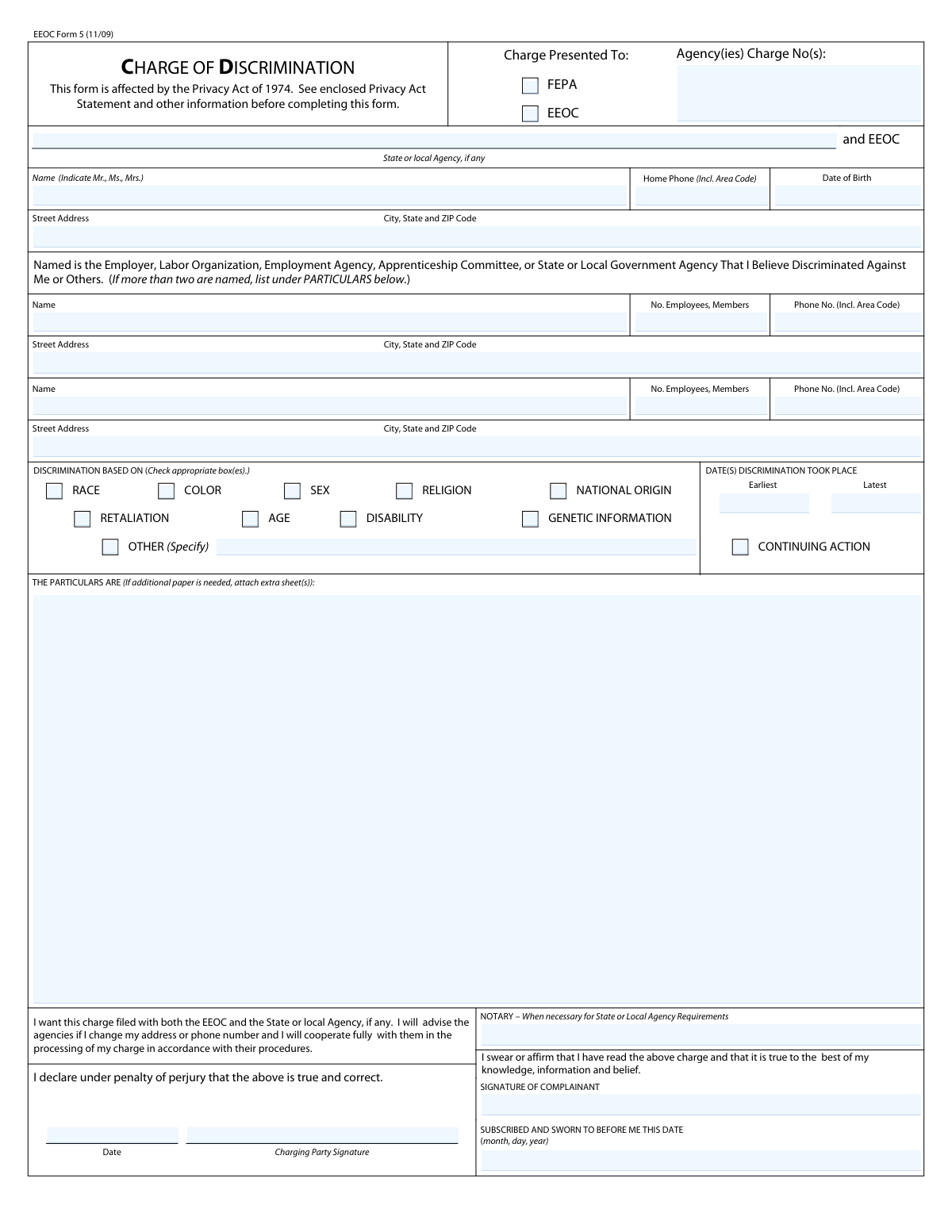
Yes! You can use AI to fill out EEOC Form 5, Charge of Discrimination
EEOC Form 5, officially titled the Charge of Discrimination, is the legal document an individual files with the U.S. Equal Employment Opportunity Commission (EEOC) to report workplace discrimination. Filing this form is the crucial first step to initiate an investigation into alleged discrimination based on race, color, sex, religion, national origin, age, disability, or other protected characteristics, and it preserves the filer's right to sue. Today, this form can be filled out quickly and accurately using AI-powered services like Instafill.ai, which can also convert non-fillable PDF versions into interactive fillable forms.
Our AI automatically handles information lookup, data retrieval, formatting, and form filling.
It takes less than a minute to fill out EEOC Form 5 using our AI form filling.
Securely upload your data. Information is encrypted in transit and deleted immediately after the form is filled out.
Form specifications
| Form name: | EEOC Form 5, Charge of Discrimination |
| Number of fields: | 42 |
| Number of pages: | 3 |
| Language: | English |
Instafill Demo: How to fill out PDF forms in seconds with AI
How to Fill Out EEOC Form 5 Online for Free in 2026
Are you looking to fill out a EEOC FORM 5 form online quickly and accurately? Instafill.ai offers the #1 AI-powered PDF filling software of 2026, allowing you to complete your EEOC FORM 5 form in just 37 seconds or less.
Follow these steps to fill out your EEOC FORM 5 form online using Instafill.ai:
- 1 Navigate to Instafill.ai and upload or select the EEOC Form 5, Charge of Discrimination.
- 2 Provide your personal details, such as your full name, address, contact information, and date of birth.
- 3 Enter the full details of the employer or organization you are filing the charge against, including their name, address, and number of employees.
- 4 Select the basis for your discrimination claim by checking the appropriate boxes (e.g., race, age, disability) and specify the dates the discrimination occurred.
- 5 In the 'Particulars' section, provide a detailed narrative of the discriminatory events, including what happened, when it happened, and who was involved.
- 6 Carefully review all the information populated by the AI for accuracy, then electronically sign and date the form to affirm that the statements are true to the best of your knowledge.
- 7 Download the completed form and submit it to the appropriate EEOC or state/local agency as instructed, noting any requirements for notarization.
Our AI-powered system ensures each field is filled out correctly, reducing errors and saving you time.
Why Choose Instafill.ai for Your Fillable EEOC Form 5 Form?
Speed
Complete your EEOC Form 5 in as little as 37 seconds.
Up-to-Date
Always use the latest 2026 EEOC Form 5 form version.
Cost-effective
No need to hire expensive lawyers.
Accuracy
Our AI performs 10 compliance checks to ensure your form is error-free.
Security
Your personal information is protected with bank-level encryption.
Frequently Asked Questions About Form EEOC Form 5
This form is used to file a formal complaint of employment discrimination with the Equal Employment Opportunity Commission (EEOC) and/or a state or local agency. Filing this form is the first step to start an investigation into your claim and preserve your right to sue.
You should fill out this form if you believe you have been discriminated against by an employer, union, or employment agency based on your race, color, sex, religion, national origin, age, disability, genetic information, or in retaliation for a protected activity.
In this section, you must provide a detailed description of the alleged discriminatory acts. Include specific dates, the names of individuals involved, what happened, and where it occurred to support your claim.
If the discriminatory actions are still happening, you should check the 'CONTINUING ACTION' box. For the dates of discrimination, enter the date the discrimination began as the 'Earliest' date and the most recent incident as the 'Latest' date.
This is called 'dual-filing' and it allows your charge to be processed by both the federal EEOC and your local Fair Employment Practices Agency (FEPA). This is a common practice under work-sharing agreements, and you will be notified which agency will handle your charge first.
Retaliation is when an employer takes adverse action against you for opposing discrimination, filing a charge, or participating in an investigation. Check the 'RETALIATION' box if you were fired, demoted, harassed, or otherwise punished for engaging in these protected activities.
A notary is only necessary if required by your specific state or local agency. The form includes a declaration under penalty of perjury, which is often sufficient for federal EEOC purposes.
After you file, the EEOC or the designated local agency will notify the employer and may begin an investigation or offer mediation to resolve the issue. You will be expected to cooperate with the agency throughout the process.
The form provides space for two respondents. If your charge involves more than two, list the additional parties and their contact information in 'THE PARTICULARS ARE' section or on a separate, attached sheet.
The Privacy Act Statement informs you that the government has the authority to collect your personal data to investigate your claim. It also explains that your information will be used in the investigation and that a copy of the charge will be sent to the organization you are filing against.
Yes, services like Instafill.ai use AI to help you fill out forms accurately and quickly. These tools can auto-fill fields with your information, saving time and helping to prevent common mistakes.
To fill out the form online, you can upload the PDF to Instafill.ai. The platform will make the document interactive, allowing you to type your information directly into the fields before downloading the completed form.
If you have a non-fillable or 'flat' PDF, you can use a service like Instafill.ai to make it interactive. Simply upload the file, and the tool will convert it into a fillable form that you can complete on your computer.
Compliance EEOC Form 5
Validation Checks by Instafill.ai
1
Basis of Discrimination Completeness
This check ensures that at least one checkbox under 'DISCRIMINATION BASED ON' (e.g., Race, Sex, Age) has been selected. This is a critical required field as it defines the fundamental nature of the charge. If no basis is selected, the form submission should be blocked with an error message prompting the user to select the reason for their claim.
2
Discrimination Date Chronology
Validates that the 'Earliest Date of Discrimination' is on or before the 'Latest Date of Discrimination'. This ensures logical consistency in the timeline of events provided by the charging party. A failure in this check would indicate a data entry error and should prompt the user to review and correct the dates before proceeding.
3
Respondent Identification Requirement
This validation confirms that the name and address of the first respondent (the entity being charged) are provided. A charge cannot be processed without identifying who it is against. If this information is missing, the submission must be halted until the required respondent details are entered.
4
Narrative of Particulars Presence
Ensures that the 'THE PARTICULARS ARE' text area is not empty. This section contains the detailed description of the alleged discriminatory acts and is the core substance of the charge. An empty narrative would make the charge impossible to investigate, so the form cannot be submitted without this detailed explanation.
5
Conditional 'Other Basis' Specification
This check verifies that if the 'OTHER (Specify)' checkbox is selected as a basis for discrimination, the corresponding text field for specifying the basis is not left blank. This ensures that selecting 'Other' is paired with a necessary explanation. If the box is checked and the field is empty, an error should be displayed requiring the user to provide the specific basis.
6
Future Date Prohibition
This validation scans key date fields, such as 'Latest Date of Discrimination', 'Date of Birth', and 'Certification Date', to ensure none of them are set to a future date. This prevents logical impossibilities and simple data entry mistakes. If a future date is detected, the system should flag the specific field and require the user to enter a valid, non-future date.
7
Age Discrimination and Date of Birth Consistency
If the 'Age' checkbox is selected as a basis for discrimination, this check validates that the 'Charging Party Date of Birth' indicates the person is 40 years of age or older, as stipulated by the Age Discrimination in Employment Act (ADEA). This cross-field validation helps ensure the claim has a valid basis under the relevant statute. If the age is under 40, a warning or informational message should be displayed.
8
Signature and Certification Date Requirement
Verifies that the 'Charging Party Signature' and the 'Date' of certification are both present before final submission. The signature and date affirm the truthfulness of the charge under penalty of perjury and are legally required for the document to be valid. The submission should be blocked if either the signature or the date is missing.
9
Respondent Employee Count Format
This check ensures that the 'No. Employees, Members' field for each respondent is a positive integer. This number is critical for determining whether the EEOC has jurisdiction (e.g., Title VII applies to employers with 15 or more employees). The validation prevents non-numeric or negative values, ensuring the data is usable for jurisdictional assessment.
10
Charging Party Contact Information Completeness
Ensures that the charging party's full address (Street, City, State, ZIP Code) and at least one phone number are provided. This information is essential for the agency to communicate with the charging party throughout the investigation process. A failure to provide this information should trigger a warning or block submission until the fields are completed.
11
Phone Number Format Validation
This validation checks that all phone number fields ('Charging Party Home Phone', 'First Respondent Phone Number', etc.) adhere to a standard format, such as a 10-digit number. This ensures the data is clean and that the phone numbers are usable for communication. An incorrectly formatted number should trigger an error message with an example of the expected format.
12
Agency Selection Check
This validation ensures that at least one of the 'Charge Presented To' checkboxes (EEOC or FEPA) is selected at the top of the form. This indicates which agency or agencies are intended to receive and process the charge. If neither box is checked, the system should prompt the user to make a selection before the form can be considered complete.
Common Mistakes in Completing EEOC Form 5
People often use a store name, a 'doing business as' (DBA) name, or an abbreviation instead of the full legal corporate entity name. This is a critical error because the charge must be served to the correct legal entity, and a mistake can lead to significant delays, service issues, or even the dismissal of the charge. To avoid this, use a recent pay stub, W-2 form, or official company document to find the precise legal name of the employer.
The 'THE PARTICULARS ARE' section is frequently filled with emotional language rather than a clear, chronological account of the facts. This weakens the charge because investigators need specific details (who, what, when, where, and why) to properly assess the claim. A vague narrative can result in the agency being unable to determine if a violation occurred. To prevent this, write a factual, detailed timeline of events, identify individuals by their full name and title, and attach extra sheets if necessary.
Filers may forget the exact dates, use an improper format, or misunderstand the 'Continuing Action' box. Since there are strict deadlines (statutes of limitations) for filing a charge, typically 180 or 300 days, incorrect dates can lead to the claim being dismissed as untimely. Always provide the specific date for the earliest and most recent acts of harm, and check 'Continuing Action' if the discriminatory behavior is ongoing to protect your rights.
An unsigned charge is not legally valid and will not be processed by the EEOC or a state agency. This simple oversight is a common reason for rejection, causing significant delays and potentially causing you to miss the strict filing deadline. Always double-check that you have signed and dated the form in the 'Charging Party Signature' and 'Date' fields under the penalty of perjury statement before submission.
An individual might experience discrimination based on multiple protected characteristics (e.g., being an older woman with a disability) but only check one box like 'Age'. This can improperly narrow the scope of the investigation and limit any potential remedies. Carefully review all the checkbox options and select every one that you believe was a factor in the discriminatory actions you experienced.
People often don't realize that being punished for complaining about discrimination, opposing a discriminatory practice, or participating in an investigation is a separate, illegal act called retaliation. They may describe retaliatory acts in their narrative but fail to check the 'Retaliation' box, which can cause the agency to overlook this critical aspect of the claim. If you faced negative action after engaging in protected activity, you must check this box in addition to any other bases.
Entering the wrong street address, city, or ZIP code for the employer can prevent the agency from properly serving the charge, halting the entire process. This often happens when a person provides the address of their physical worksite instead of the company's official corporate or registered agent address. This information should be verified from official sources to ensure the charge is delivered to the correct legal representative without delay.
The number of employees is a critical data point, as it determines whether an employer is covered by federal anti-discrimination laws (e.g., Title VII applies to employers with 15 or more employees). Guessing or leaving this field blank creates jurisdictional questions that delay the investigation. While it can be difficult to know the exact number, you should provide your best estimate and note it as such, rather than leaving it blank.
While the EEOC allows for a declaration under penalty of perjury in lieu of a sworn oath, some state or local agencies (FEPAs) require the charge to be sworn before a notary public. If the form is dual-filed with a FEPA that has this requirement, failing to get it notarized will render the charge incomplete and cause it to be returned. It is crucial to check the specific requirements of the local agency where the charge may be filed. AI-powered tools like Instafill.ai can help by flagging such field-specific requirements.
Many people print the form, fill it out by hand, and then scan or fax it, often resulting in illegible handwriting that can lead to data entry errors by the agency. This can cause mistakes in names, addresses, or the details of the charge itself. Using a fillable version of the form ensures clarity and reduces errors. If a form is only available as a non-fillable PDF, tools like Instafill.ai can convert it into an interactive, fillable format to prevent these issues.
Saved over 80 hours a year
“I was never sure if my IRS forms like W-9 were filled correctly. Now, I can complete the forms accurately without any external help.”
Kevin Martin Green
Your data stays secure with advanced protection from Instafill and our subprocessors

Robust compliance program
Transparent business model
You’re not the product. You always know where your data is and what it is processed for.
ISO 27001, HIPAA, and GDPR
Our subprocesses adhere to multiple compliance standards, including but not limited to ISO 27001, HIPAA, and GDPR.
Security & privacy by design
We consider security and privacy from the initial design phase of any new service or functionality. It’s not an afterthought, it’s built-in, including support for two-factor authentication (2FA) to further protect your account.
Fill out EEOC Form 5 with Instafill.ai
Worried about filling PDFs wrong? Instafill securely fills eeoc-form-5-charge-of-discrimination-1 forms, ensuring each field is accurate.