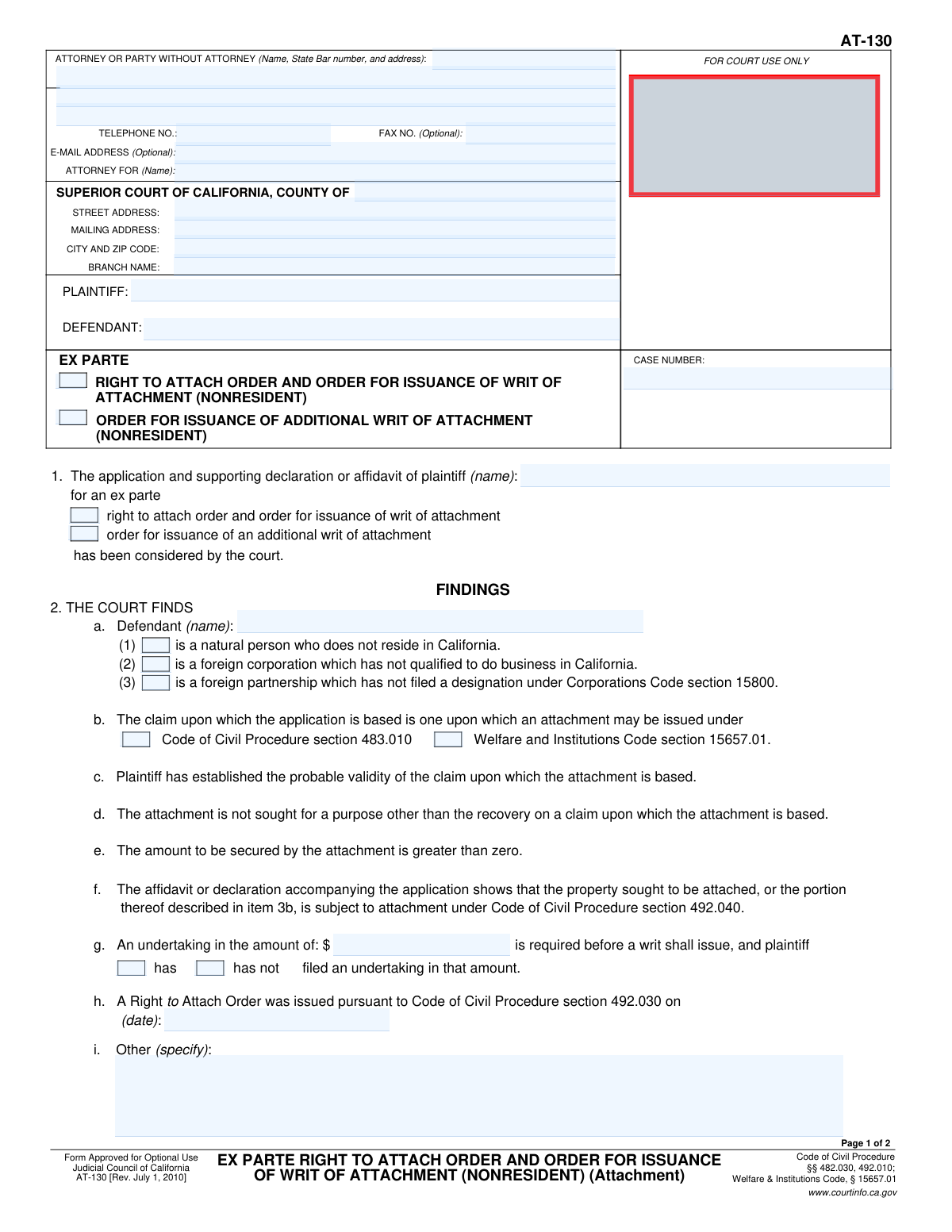
Yes! You can use AI to fill out Ex Parte Right to Attach Order and Order for Issuance of Writ of Attachment (Nonresident)

Form AT-130, the Ex Parte Right to Attach Order and Order for Issuance of Writ of Attachment (Nonresident), is a legal document used in the California Superior Court. It is an order granted by a judge that allows a plaintiff to seize a nonresident defendant's property to secure a potential judgment, without giving the defendant prior notice. This is a critical tool for plaintiffs when the defendant resides outside of California and there's a risk they might move assets to avoid a court ruling. Today, this form can be filled out quickly and accurately using AI-powered services like Instafill.ai, which can also convert non-fillable PDF versions into interactive fillable forms.
Our AI automatically handles information lookup, data retrieval, formatting, and form filling.
It takes less than a minute to fill out AT-130 using our AI form filling.
Securely upload your data. Information is encrypted in transit and deleted immediately after the form is filled out.

Form specifications

Form name: Ex Parte Right to Attach Order and Order for Issuance of Writ of Attachment (Nonresident)
Number of fields: 56
Number of pages: 2
Language: English
main-image

Instafill Demo: How to fill out PDF forms in seconds with AI

How to Fill Out AT-130 Online for Free in 2026

Are you looking to fill out a AT-130 form online quickly and accurately? Instafill.ai offers the #1 AI-powered PDF filling software of 2026, allowing you to complete your AT-130 form in just 37 seconds or less.
Follow these steps to fill out your AT-130 form online using Instafill.ai:
  1. 1 Navigate to Instafill.ai and upload your Form AT-130 or select it from their template library.
  2. 2 Provide the court and case information, including the county, branch name, plaintiff and defendant details, and the case number.
  3. 3 Use the AI assistant to accurately fill in the 'Findings' section, checking the correct boxes regarding the nonresident defendant's status and the basis for the attachment.
  4. 4 Specify the amount to be secured by the attachment and the details of the required undertaking (bond) as determined by the court.
  5. 5 In the 'Order' section, describe the specific property of the defendant that is to be attached as authorized by the court.
  6. 6 Carefully review all the auto-filled information for accuracy, then e-sign and download the completed Form AT-130, ready for filing with the court.

Our AI-powered system ensures each field is filled out correctly, reducing errors and saving you time.

Why Choose Instafill.ai for Your Fillable AT-130 Form?

Speed

Complete your AT-130 in as little as 37 seconds.

Up-to-Date

Always use the latest 2026 AT-130 form version.

Cost-effective

No need to hire expensive lawyers.

Accuracy

Our AI performs 10 compliance checks to ensure your form is error-free.

Security

Your personal information is protected with bank-level encryption.

Frequently Asked Questions About Form AT-130

Form AT-130 is a court order signed by a judge that grants a plaintiff the right to attach property belonging to a nonresident defendant. It is issued after the court considers the plaintiff's application and finds that the claim is probably valid.

This form is an order, not an application. The plaintiff's attorney typically prepares it for the judge to review and sign after approving the plaintiff's request for an attachment.

An 'ex parte' order is one that is granted based on the application of one party (the plaintiff) without prior notice to or participation from the other party (the defendant). This is permitted in specific circumstances, such as when the defendant is a nonresident.

A nonresident is a defendant who is a natural person not residing in California, a foreign corporation not qualified to do business in California, or a foreign partnership that has not filed a designation under the Corporations Code.

An undertaking is a financial guarantee, similar to a bond, that the plaintiff must provide. It is used to cover potential damages the defendant might incur if the court later finds the attachment was wrongful.

A 'writ of attachment' is the initial court document authorizing the seizure of property. An 'additional writ' can be requested later if the plaintiff needs to attach more of the defendant's property than was covered by the original writ.

The form contains a clear warning that failure to comply with the court's order, such as refusing to turn over property or documents, can subject you to arrest and punishment for contempt of court.

The court must find that the defendant is a nonresident, the plaintiff has established the 'probable validity' of their claim, the attachment is for a proper purpose, and the plaintiff has filed the required undertaking.

After the judge signs the order and you have filed the required undertaking, the court clerk will issue the writ of attachment. You then provide the writ to a levying officer, such as the county sheriff, to seize the specified property.

Because it is an ex parte proceeding, the order can be granted relatively quickly after the application is filed and reviewed by a judge. The exact timing will depend on the specific court's schedule and procedures.

Yes, services like Instafill.ai use AI to accurately auto-fill form fields with your case information. This can save time and help reduce errors when preparing the order for the judge's signature.

You can use a platform like Instafill.ai to upload the form and fill it out in an interactive online environment. The service helps ensure all necessary fields are completed before you print the form for filing.

If you have a flat, non-fillable PDF, you can use a service like Instafill.ai to convert it into an interactive form. This allows you to easily type your information directly into the correct fields online.

Compliance AT-130
Validation Checks by Instafill.ai

1
Core Case Identifiers Presence
Ensures the 'PLAINTIFF', 'DEFENDANT', and 'CASE NUMBER' fields in the header are not empty. These fields are fundamental for identifying the legal proceeding and the involved parties. A submission without this information is invalid and cannot be processed by the court.
2
Case Number Consistency
Validates that the 'CASE NUMBER' in the header section matches the 'CASE NUMBER' in the footer's short title section. This check ensures document integrity and prevents confusion if pages are separated. A mismatch indicates a potential clerical error that must be corrected before filing.
3
Plaintiff Name Consistency
Verifies that the plaintiff's name entered in section 1 matches the 'PLAINTIFF' name in the header. This cross-reference confirms the identity of the applicant throughout the document. Inconsistent names could lead to legal challenges regarding the identity of the party seeking the order.
4
Defendant Name Consistency
Checks that the defendant's name specified in the 'FINDINGS' section (2a) is identical to the 'DEFENDANT' name in the main header. This is critical for ensuring the court's findings and subsequent orders apply to the correct legal entity. A discrepancy could render the attachment order unenforceable against the intended defendant.
5
Exclusive Defendant Status Selection
Ensures that exactly one checkbox is selected in section 2a to define the defendant's status (natural person, foreign corporation, or foreign partnership). The legal requirements for attachment differ based on the defendant's status, so a single, unambiguous selection is mandatory. The form is invalid if zero or more than one option is checked.
6
Required Application Type Selection
Validates that at least one of the two primary application purpose checkboxes in section 1 is selected ('right to attach order' or 'order for issuance of an additional writ'). This selection defines the core request being made to the court. Failure to select an option makes the form's purpose unclear and will result in rejection.
7
Required Claim Basis Selection
Verifies that one of the two checkboxes in section 2b is selected, indicating the statutory basis for the claim (either Code of Civil Procedure or Welfare and Institutions Code). This is a required finding by the court to issue the order. The form is incomplete without this legal justification being specified.
8
Conditional Date for Additional Writ
If the application is for an 'additional writ of attachment' (checkbox in section 1 is checked), this validation ensures a date is entered in section 2h. This date, representing when the original Right to Attach Order was issued, must be a valid date in the past. This logic is crucial for establishing the context for an additional writ.
9
Undertaking Amount Format and Consistency
Checks that any monetary value entered for an undertaking in section 2g or 3b is a valid, positive number. If amounts are entered in both fields, it validates that they are identical. This ensures financial requirements are clear, consistent, and correctly formatted for legal and clerical processing.
10
Attachment Amount Validation
Validates that the attachment amount specified in section 3a is a positive numeric value greater than zero. This aligns with the required finding in section 2e ('The amount to be secured by the attachment is greater than zero'). An amount of zero or less would be illogical and legally invalid.
11
Order Type Consistency
Ensures the type of writ being ordered in section 3b ('a writ of attachment' or 'an additional writ') is consistent with the application type selected in section 1. For example, if the application is for an 'additional writ', the order should also be for an 'additional writ'. This logical check prevents internal contradictions within the final order.
12
Total Checkbox Count Validation
Verifies that the number entered in section 3e ('Total number of boxes checked in item 3') accurately reflects the sum of all checkboxes selected within section 3. This serves as an integrity check to ensure the judicial officer's intended orders are fully and correctly captured. A mismatch suggests an error in completing the form and could invalidate the specified orders.

Common Mistakes in Completing AT-130

Confusing Attorney Address with Court Address

Filers often mistakenly enter their own or their firm's address in the court address section (Street Address, City and Zip Code, Branch Name). This section is reserved for the specific courthouse branch where the form is being filed. This error can lead to the document being misrouted or rejected by the clerk's office, causing significant delays. To avoid this, always verify the correct address and branch name for the specific court department handling your case before filling out the form.

Using Inconsistent Party Names

The names of the Plaintiff and Defendant must be written exactly the same way throughout the form, including the header, Item 1, and Item 2a, and must match the case caption on all other legal documents. Minor variations, misspellings, or using abbreviations can create ambiguity and lead to the form's rejection or future enforcement problems. Use the full, correct legal names as stated in the complaint. AI-powered tools like Instafill.ai can help ensure consistency by auto-populating names across all relevant fields.

Selecting the Incorrect Order Type in Item 1

Item 1 requires choosing between an initial 'right to attach order' and an 'order for issuance of an additional writ.' Filers who are not careful about the procedural stage of their case may select the wrong option. Requesting an additional writ when an initial order has not yet been granted is a legal error that will cause the application to be denied. Always confirm if a Right to Attach Order has already been issued in the case before selecting the 'additional writ' option.

Incorrectly Identifying Defendant's Nonresident Status

The checkboxes in Item 2a require the filer to specify why the defendant is a nonresident (e.g., natural person, foreign corporation). This is a jurisdictional prerequisite for this specific form. Selecting the wrong status or failing to provide supporting evidence in the declaration can lead to the court denying the order for lack of jurisdiction. Before filing, ensure you have concrete evidence to support the selected nonresident status of the defendant.

Incomplete Undertaking Information in Item 2g

Item 2g requires both the dollar amount of the undertaking and checking whether it 'has' or 'has not' been filed. A common mistake is to fill in the amount but forget to check one of the boxes, leaving the court unsure of the undertaking's status. This ambiguity will halt the issuance of the writ until clarified, delaying the attachment process. Always complete both parts of this item to provide a clear picture to the court.

Providing a Vague Property Description in Item 3b

Item 3b requires a specific description of the property to be attached. Filers often use overly broad terms like 'defendant's bank accounts' or 'all real property.' Such descriptions are legally insufficient and will be rejected, as the levying officer needs precise information to identify and seize the asset. You must provide specific details like account numbers, bank branch addresses, or the legal description and APN for real property.

Mismatched Undertaking Amounts

If an undertaking is required, its amount must be specified in Item 2g and again in Item 3b. A frequent error is entering different amounts in these two fields. This inconsistency creates confusion and will cause the clerk to reject the form or refuse to issue the writ. Double-check that the dollar amount for the undertaking is identical in both Item 2g and Item 3b.

Omitting Footer Information on Page 2

Legal forms with multiple pages often have a footer on each page requiring the 'SHORT TITLE' and 'CASE NUMBER.' Filers frequently focus on the main body of the form and forget to complete this information on the second page. This can lead to the page being misplaced or the document being rejected by the court clerk for being incomplete. Always review every page of the form, including headers and footers, before submission.

Incorrectly Stating the Attachment Amount in Item 3a

The amount to be secured by the attachment, entered in Item 3a, must be based on the 'probable validity of the claim' and supported by evidence in the application's declaration. Filers may inflate this number or miscalculate it, which can lead to the court reducing the amount or denying the application. Ensure this figure is calculated precisely and is fully justified by the facts and evidence presented to the court.

Submitting an Illegible Hand-Written Form

While this form is available as a PDF, some may print and fill it out by hand. Illegible handwriting can cause the court clerk to misinterpret names, amounts, or case numbers, leading to filing errors or rejection. It is always best to fill out the form electronically for clarity. If you only have a flat, non-fillable PDF, tools like Instafill.ai can convert it into a fillable version to ensure a clean, professional, and accurate submission.
Saved over 80 hours a year

“I was never sure if my IRS forms like W-9 were filled correctly. Now, I can complete the forms accurately without any external help.”

Kevin Martin Green

Your data stays secure with advanced protection from Instafill and our subprocessors

Robust compliance program

Transparent business model

You’re not the product. You always know where your data is and what it is processed for.

ISO 27001, HIPAA, and GDPR

Our subprocesses adhere to multiple compliance standards, including but not limited to ISO 27001, HIPAA, and GDPR.

Security & privacy by design

We consider security and privacy from the initial design phase of any new service or functionality. It’s not an afterthought, it’s built-in, including support for two-factor authentication (2FA) to further protect your account.

Fill out AT-130 with Instafill.ai

Worried about filling PDFs wrong? Instafill securely fills ex-parte-right-to-attach-order-and-order-for-issuance-of-writ-of-attachment-nonresident forms, ensuring each field is accurate.