Yes! You can use AI to fill out Facility Credentialing Application
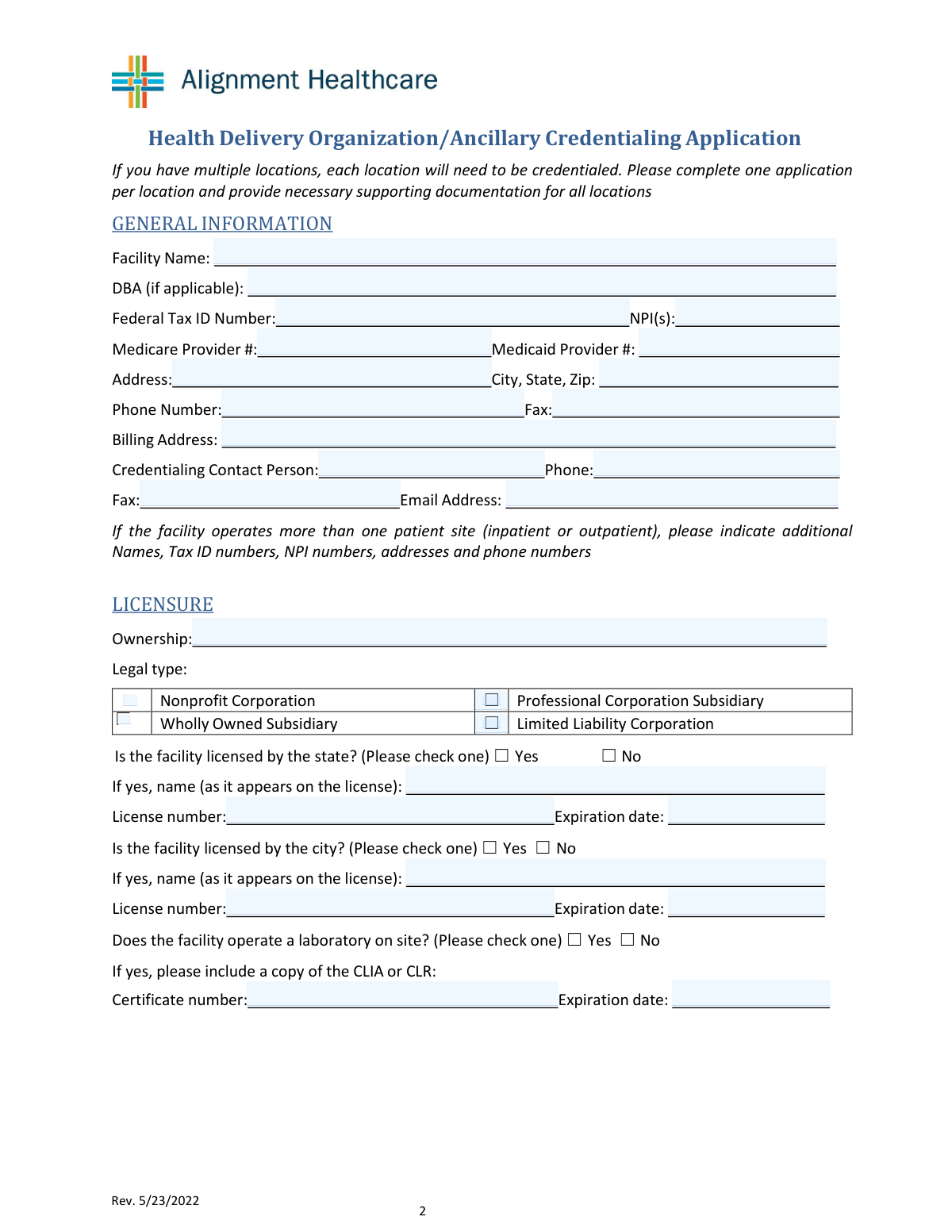
The Facility Credentialing Application is a standardized document used by healthcare organizations, such as insurance companies and managed care organizations, to collect and verify the qualifications of a healthcare facility. This process, known as credentialing, is essential for ensuring that facilities meet specific standards for quality of care, safety, and financial stability before they can be included in a provider network. Today, this form can be filled out quickly and accurately using AI-powered services like Instafill.ai, which can also convert non-fillable PDF versions into interactive fillable forms.
Our AI automatically handles information lookup, data retrieval, formatting, and form filling.
It takes less than a minute to fill out Facility Credentialing Application using our AI form filling.
Securely upload your data. Information is encrypted in transit and deleted immediately after the form is filled out.
Form specifications
| Form name: | Facility Credentialing Application |
| Number of fields: | 97 |
| Number of pages: | 3 |
| Language: | English |
Instafill Demo: How to fill out PDF forms in seconds with AI
How to Fill Out Facility Credentialing Application Online for Free in 2026
Are you looking to fill out a FACILITY CREDENTIALING APPLICATION form online quickly and accurately? Instafill.ai offers the #1 AI-powered PDF filling software of 2026, allowing you to complete your FACILITY CREDENTIALING APPLICATION form in just 37 seconds or less.
Follow these steps to fill out your FACILITY CREDENTIALING APPLICATION form online using Instafill.ai:
- 1 Navigate to Instafill.ai and upload or select the Facility Credentialing Application form.
- 2 Use the AI assistant to automatically populate facility identification details, including legal name, DBA, Tax ID, and NPI numbers.
- 3 Review and confirm the AI-filled sections for addresses, contact information, and ownership details, making any necessary adjustments.
- 4 Provide information on licensing, accreditation, and insurance policies, allowing the AI to guide you through required fields like policy numbers and expiration dates.
- 5 Answer the disclosure questions regarding sanctions and license history, and select the appropriate facility type from the provided list.
- 6 Complete the attestation section by providing the authorized person's name, digitally signing, and dating the form before submission.
Our AI-powered system ensures each field is filled out correctly, reducing errors and saving you time.
Why Choose Instafill.ai for Your Fillable Facility Credentialing Application Form?
Speed
Complete your Facility Credentialing Application in as little as 37 seconds.
Up-to-Date
Always use the latest 2026 Facility Credentialing Application form version.
Cost-effective
No need to hire expensive lawyers.
Accuracy
Our AI performs 10 compliance checks to ensure your form is error-free.
Security
Your personal information is protected with bank-level encryption.
Frequently Asked Questions About Form Facility Credentialing Application
This form is a facility credentialing application used to collect and verify essential information about a healthcare facility, including its licenses, identifiers, insurance, and operational details, for participation in a health network or program.
An authorized representative of the facility, such as a credentialing contact or administrator who has the authority to attest to the accuracy of the information provided, should complete and sign the form.
The 'Facility Name' is the legal, registered name of your organization. The 'DBA Name' (Doing Business As) is the name your facility uses publicly, if it's different from the legal name.
It is helpful to have your Federal Tax ID (EIN), NPI number(s), state and city licenses, CLIA certificate (if applicable), accreditation details, and your professional and general liability insurance policy documents readily available.
If your facility is not licensed, simply check the 'No' box in the 'State License Information' and/or 'City License Information' sections. You can then leave the corresponding license detail fields blank.
In the 'On-site Laboratory & CLIA/CLR Certificate' section, check the box for 'No'. You are not required to fill in the CLIA/CLR certificate number or expiration date if you do not operate an on-site lab.
In the 'Facility Type Selection' section, check the box for 'Other'. Then, write your facility's specific type on the line provided for 'Other Facility Type'.
The 'Single Occurrence Amount' is the maximum amount the policy will pay for a single claim. The 'Aggregate Amount' is the total maximum amount the policy will pay for all claims during the policy period.
You must check 'Yes' in the 'Medicare/Medicaid Sanctions and IDs' section. Be prepared to provide additional details about the sanctions as the credentialing body will likely request them.
If tracking patient admissions is not applicable to your facility type, such as for a durable medical equipment provider, you can check the 'Not Applicable' box in that section.
Yes, you can use AI-powered services like Instafill.ai to help fill out this form. These tools can auto-fill fields with your saved information, which saves time and helps ensure accuracy.
If you have a non-fillable PDF, you can use a tool like Instafill.ai to convert it into an interactive, fillable form. This allows you to type your answers directly into the fields and sign it electronically.
To fill this form using Instafill.ai, upload the document to the platform. It will automatically detect the fields, allowing you to fill them in quickly or use AI to populate them from your profile, then download the completed form.
The 'Credentialing Contact Person' is the individual at your facility who should be contacted with any questions regarding this application and the credentialing process. This is often someone in an administrative or credentialing-specific role.
Compliance Facility Credentialing Application
Validation Checks by Instafill.ai
1
Federal Tax ID Number Format
This check validates that the Federal Tax ID Number (EIN) is entered in the correct 9-digit format, XX-XXXXXXX. The EIN is a critical unique identifier for the business entity for tax and regulatory purposes. If the format is incorrect, the submission should be rejected, as it can cause failures in downstream verification systems and payment processing.
2
NPI Number Format and Validity
This validation ensures the National Provider Identifier (NPI) is a 10-digit number. The NPI is a standard, unique identifier for health care providers and is essential for billing and administrative functions. An invalid NPI will prevent claims processing and proper identification in national healthcare databases, so the form should not be accepted without a correctly formatted NPI.
3
Conditional Requirement for State License Details
This check ensures that if 'State licensed - Yes' is selected, the 'State License Name', 'State License Number', and 'State License Expiration Date' fields are all completed. This is important for verifying the facility's legal authority to operate. A failure in this validation indicates an incomplete application, which must be returned to the user for completion before processing.
4
State License Expiration Date is in the Future
This validation confirms that the 'State License Expiration Date' is a valid date that has not already passed. A facility cannot be credentialed with an expired license, as this poses a significant legal and compliance risk. If the date is in the past, the system should flag the entry and prevent submission until a valid, current license date is provided.
5
Conditional Requirement for CLIA/CLR Certificate
This check verifies that if 'On-site laboratory: Yes' is selected, the 'CLIA/CLR Certificate Number' and 'CLIA/CLR Certificate Expiration Date' fields are filled out. Operating a lab without a valid CLIA/CLR certificate is a major regulatory violation. An incomplete entry here would halt the credentialing process until the required certificate information is supplied.
6
Insurance Policy Date Consistency
This validation ensures that for both Professional and General Liability policies, the 'Policy End Date' is on or after the 'Policy Beginning Date'. This is a logical check to prevent data entry errors that would render the policy information nonsensical. An invalid date range would require correction before the application can be considered valid.
7
Insurance Coverage Amount Logic
This check validates that the 'Aggregate Amount' for liability insurance is greater than or equal to the 'Single Occurrence Amount'. This reflects the standard structure of insurance policies where the total payout limit is at least as large as the limit for any single event. An illogical entry suggests a data entry mistake that needs to be corrected to accurately reflect the facility's coverage.
8
Facility Type Selection Completeness
This validation ensures that at least one checkbox is selected under the 'Facility Type Selection' section. The facility type is a fundamental piece of information that dictates which credentialing standards and regulations apply. Without this information, the application cannot be properly categorized or evaluated, so a submission with no selection must be blocked.
9
Conditional Requirement for 'Other' Facility Type
This check ensures that if the 'Other' checkbox is selected under 'Facility Type Selection', the corresponding 'Other Facility Type' text field is not empty. This prevents incomplete data where the user indicates a non-standard facility type but fails to specify what it is. The validation failure should prompt the user to provide the specific facility type.
10
Credentialing Contact Email Format
This validation verifies that the 'Credentialing Contact Email Address' is in a standard email format (e.g., [email protected]). This is crucial for ensuring that the credentialing team can communicate with the correct contact person regarding questions or the status of the application. An invalid email format would block submission and prompt the user for a correction to prevent communication breakdowns.
11
Attestation Date Logical Validity
This check ensures the 'Date Signed' in the attestation section is not a future date. The signature date legally confirms the accuracy of the provided information as of that day. A future date is logically impossible and would invalidate the attestation, so the system should reject it and require a current or past date.
12
Mutually Exclusive Yes/No Selections
This validation ensures that for any paired Yes/No checkbox or radio button group (e.g., 'State licensed - Yes/No', 'Facility accredited - Yes/No'), only one option is selected. Selecting both 'Yes' and 'No' for the same question creates a contradiction that makes the data unusable. The form interface should ideally use radio buttons to prevent this, but a backend validation is still necessary to catch any errors.
13
Conditional Requirement for Accreditation Details
This check verifies that if 'Facility accredited - Yes' is selected, the 'Accrediting Body' and 'Date of Last Accreditation' fields are completed. A claim of accreditation is meaningless without the details of who provided it and when. Failure to provide this information should result in a validation error, requiring the user to supply the necessary proof of their accreditation status.
14
Phone and Fax Number Format
This validation checks that all phone and fax number fields are entered in a consistent, valid format (e.g., 10 digits, optionally with parentheses, spaces, or hyphens). Standardizing the format improves data quality and ensures the numbers are usable for automated dialers or other communication systems. An invalid format should trigger a warning and suggest the correct format to the user.
Common Mistakes in Completing Facility Credentialing Application
Applicants often enter a common DBA name in the 'Facility Name' field, which requires the legal entity name. The name provided must exactly match what is on legal documents like tax records and state licenses. This discrepancy causes validation failures and significant processing delays as credentialing staff must contact the facility to clarify the correct legal name. To avoid this, always use the official legal name and place the 'Doing Business As' name only in its designated field.
This form requires the facility's organizational NPI (Type 2), but applicants frequently enter an individual provider's NPI (Type 1) by mistake. This error leads to incorrect provider data, claim rejections, and delays while the correct identifier is tracked down. Before filling out the form, confirm you have the facility's Type 2 NPI, which can be verified on the NPPES NPI Registry. Using an AI form-filler like Instafill.ai can also help by validating identifier formats.
The form contains many sections that are conditional; for example, license or accreditation details are only required if you check 'Yes'. A common mistake is checking 'Yes' but then failing to fill out the required details like the license number, accrediting body, or expiration date. This omission renders the section incomplete and requires follow-up, halting the application process. Always double-check that you have provided all necessary information for any 'Yes' answers you have given.
People sometimes enter the same address for both the physical facility and billing locations, even when they are different, or they use a P.O. Box for the physical street address. The physical address is crucial for site verification and must be a street address, while the billing address is used for financial correspondence. This error can lead to returned mail and delays in credentialing and payment. Carefully enter the correct, complete address in each respective field.
Applicants often confuse the 'Single Occurrence Amount' with the 'Aggregate Amount' on their liability insurance policies. Entering these values in the wrong fields misrepresents the facility's coverage and can lead to rejection if the amounts do not meet minimum requirements. Review your policy's declaration page carefully to distinguish between the per-claim limit (occurrence) and the total limit for the policy period (aggregate) before entering the data.
Entering a general facility phone number or a generic 'info@' email address for the 'Credentialing Contact' is a frequent error. Credentialing is a detailed process that often requires quick clarification, and generic contact info leads to messages getting lost or delayed. This slows down the entire application. Always provide the direct phone number and email address of the specific person responsible for handling credentialing questions to ensure efficient communication.
Forgetting to sign and date the attestation section is one of the most common and easily avoidable mistakes. An unsigned or undated application is legally invalid and will be immediately returned for completion, stopping all progress. Before submitting, perform a final review to ensure the authorized agent has printed their name, signed, and dated the form. If the form is a non-fillable PDF, a tool like Instafill.ai can convert it to a fillable version to easily add a digital signature and date.
Applicants may incorrectly check 'No' for questions about sanctions or license restrictions, either by mistake or in hopes of avoiding scrutiny. Credentialing bodies verify this information through background checks, and discovering an undisclosed sanction can lead to immediate denial of the application and damage the facility's reputation. It is critical to answer these questions truthfully and provide any required explanations, as transparency is valued over a clean but inaccurate record.
Fields like the Federal Tax ID, NPI, and Medicare/Medicaid numbers are long and prone to data entry errors, such as transposing digits. A single incorrect digit will cause the number to fail validation against federal and state databases, bringing the credentialing process to a halt. To prevent this, carefully proofread each number after entering it, comparing it directly against your source document. AI-powered tools like Instafill.ai can help prevent these errors by auto-filling and validating data from saved profiles.
When a facility's specific service type is not listed, applicants may check the 'Other' box but then forget to write in the facility type on the line provided. This leaves the credentialing body with no information about the services offered, making it impossible to process the application correctly. If you select 'Other', always ensure you clearly and accurately describe the facility type in the corresponding text field to avoid delays and requests for information.
Saved over 80 hours a year
“I was never sure if my IRS forms like W-9 were filled correctly. Now, I can complete the forms accurately without any external help.”
Kevin Martin Green
Your data stays secure with advanced protection from Instafill and our subprocessors

Robust compliance program
Transparent business model
You’re not the product. You always know where your data is and what it is processed for.
ISO 27001, HIPAA, and GDPR
Our subprocesses adhere to multiple compliance standards, including but not limited to ISO 27001, HIPAA, and GDPR.
Security & privacy by design
We consider security and privacy from the initial design phase of any new service or functionality. It’s not an afterthought, it’s built-in, including support for two-factor authentication (2FA) to further protect your account.
Fill out Facility Credentialing Application with Instafill.ai
Worried about filling PDFs wrong? Instafill securely fills facility-credentialing-application forms, ensuring each field is accurate.