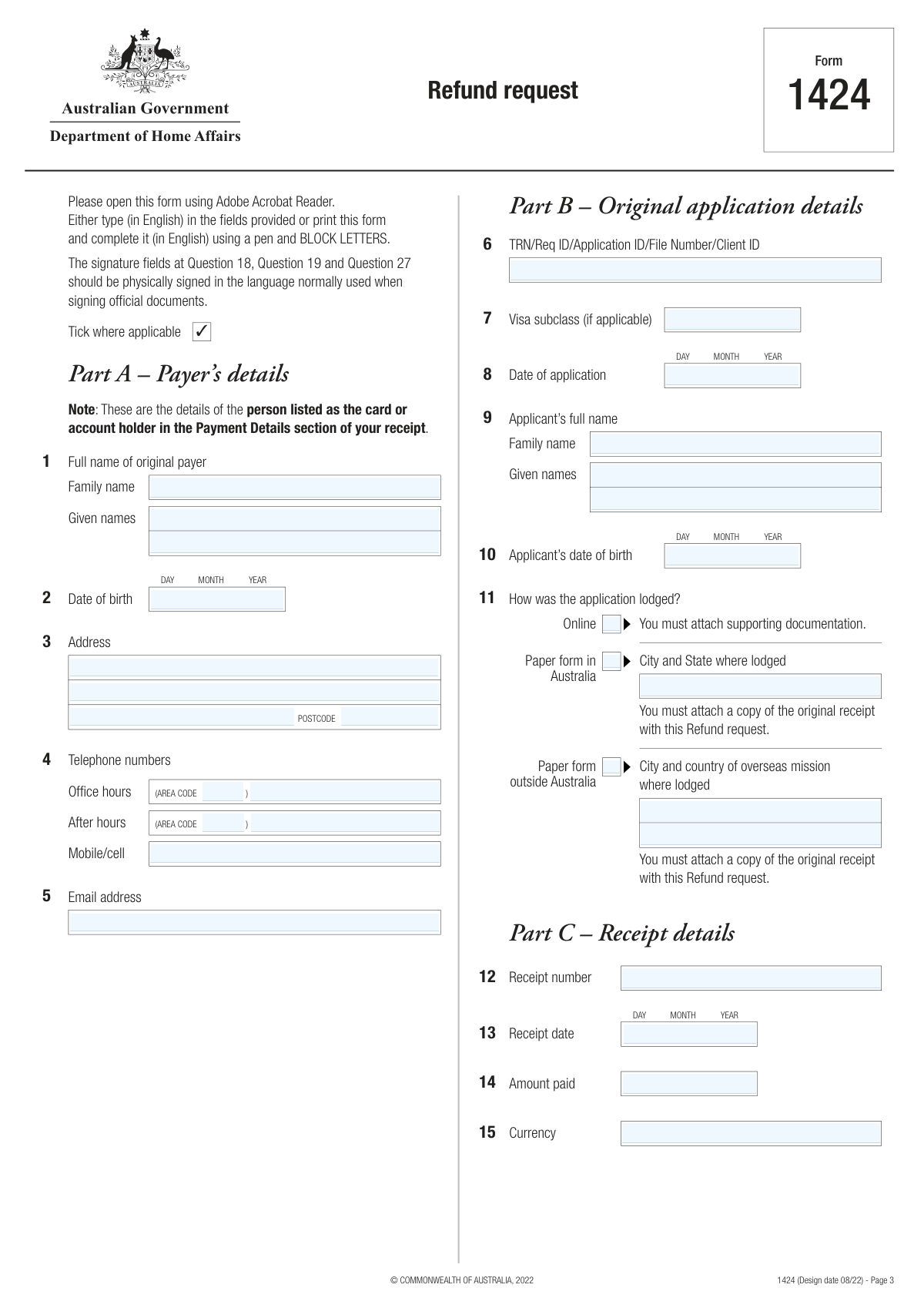
Yes! You can use AI to fill out Form 1424, Refund request

Form 1424 is an official document from the Australian Department of Home Affairs used to request a refund for various charges, such as visa application charges, sponsorship fees, or citizenship fees. It outlines the limited circumstances under which a refund is possible and requires detailed information about the original payment, the applicant, and the reason for the request, along with supporting documentation. Today, this form can be filled out quickly and accurately using AI-powered services like Instafill.ai, which can also convert non-fillable PDF versions into interactive fillable forms.
Our AI automatically handles information lookup, data retrieval, formatting, and form filling.
It takes less than a minute to fill out Form 1424 using our AI form filling.
Securely upload your data. Information is encrypted in transit and deleted immediately after the form is filled out.

Form specifications

Form name: Form 1424, Refund request
Number of fields: 111
Number of pages: 7
Language: English
main-image

Instafill Demo: How to fill out PDF forms in seconds with AI

How to Fill Out Form 1424 Online for Free in 2026

Are you looking to fill out a FORM 1424 form online quickly and accurately? Instafill.ai offers the #1 AI-powered PDF filling software of 2026, allowing you to complete your FORM 1424 form in just 37 seconds or less.
Follow these steps to fill out your FORM 1424 form online using Instafill.ai:
  1. 1 Navigate to Instafill.ai and upload your Form 1424 or select it from the platform's library.
  2. 2 Use the AI assistant to accurately fill in Part A with the original payer's details and Part B with the original application information.
  3. 3 Complete Part C by providing the receipt number, date, and amount paid for the original application.
  4. 4 Fill out Part D and E, specifying who will receive the refund and providing the necessary Australian or overseas bank account details for the transfer.
  5. 5 In Part F, select the appropriate reason for your refund request from the provided options and write a detailed explanation in Part G.
  6. 6 Review all the information you've entered for accuracy, then use the platform to complete the declaration in Part I, and download the finalized form with all necessary attachments for submission.

Our AI-powered system ensures each field is filled out correctly, reducing errors and saving you time.

Why Choose Instafill.ai for Your Fillable Form 1424 Form?

Speed

Complete your Form 1424 in as little as 37 seconds.

Up-to-Date

Always use the latest 2026 Form 1424 form version.

Cost-effective

No need to hire expensive lawyers.

Accuracy

Our AI performs 10 compliance checks to ensure your form is error-free.

Security

Your personal information is protected with bank-level encryption.

Frequently Asked Questions About Form Form 1424

Form 1424 is used to request a refund for a fee or charge paid to the Australian Department of Home Affairs, such as a visa application charge (VAC), citizenship charge, or other related fees.

Generally, the person who paid the fee, as listed on the receipt (e.g., Card Holder, BPay, or PayPal account holder), is the one who should request the refund. Refunds are only granted in limited circumstances outlined on the form.

There is no standard processing time for refund requests. Each claim is assessed individually, so the time it takes to receive a decision and any approved funds will vary.

You must provide the original receipt (or a Statutory Declaration if lost), a bank statement if you paid online, and documents supporting your reason for the refund. A full checklist is provided in Part H of the form.

Yes, if you lodged by mail or at a counter and lost the receipt, you must attach a Statutory Declaration. In it, you must declare that you have lost the receipt and have not used it to lodge another application.

The original payer must complete and sign the form to authorize the refund. If they want you to receive the money, they must fill out Questions 1–5, 16–18, and 27 to authorize you as the recipient in Question 19.

If the original card has expired or the payment was made more than 350 days ago, the refund will be paid via electronic funds transfer to a bank account. You must provide a bank statement for the account you nominate to receive the payment.

You should refer to the Department of Home Affairs website for the current address to send the completed form and supporting documents. The link provided on the form is immi.homeaffairs.gov.au/change-in-situation/get-a-refund.

According to the form, there is no right of merits review for a refund assessment. This means you cannot appeal the decision if your application for a refund is declined.

The declaration must be physically signed by the person applying for the refund. This is either the original payer (from Question 1) or the authorized person (from Question 19) if the original payer is deceased.

Yes, services like Instafill.ai use AI to accurately auto-fill form fields from your saved data, which can save you time and help prevent common errors.

You can upload the PDF of Form 1424 to Instafill.ai. The platform will make the form fillable online, allowing you to type in your information and then download the completed document for printing and signing.

If you have a non-fillable or 'flat' PDF, you can use a service like Instafill.ai. It can convert the static PDF into an interactive, fillable form that you can complete easily on your computer.

Compliance Form 1424
Validation Checks by Instafill.ai

1
Conditional Requirement for Authorised Person Details
This check ensures that if the original payer is not claiming the refund personally (Question 17 is 'No'), then all details for the authorised person in Question 19 are mandatory and fully completed. This is critical for ensuring the refund is legally directed to the correct third party. If validation fails, the form cannot be submitted until the authorised person's name, date of birth, address, and signature date are provided.
2
Conditional Requirement for Bank Account Details
This validation verifies that if the payer intends to claim the refund personally (Question 17 is 'Yes'), then the bank account details in Question 20 are fully completed. This information is essential for processing the payment via Electronic Funds Transfer (EFT). A failure in this check would prevent form submission, prompting the user to provide all required banking information to avoid payment delays.
3
Mutually Exclusive Lodgement Method Selection
This check validates that in Question 11, only one of the three application lodgement methods ('Online', 'Paper form in Australia', 'Paper form outside Australia') is selected. An application can only be lodged in one way, and selecting multiple options creates ambiguity. If more than one option is selected, the user will be prompted to choose only the single, correct method used for the original application.
4
Conditional Lodgement Location Entry
This check ensures that if a paper-based lodgement method is selected in Question 11, the corresponding location field is filled. Specifically, if 'Paper form in Australia' is ticked, 'City and state where lodged' must be completed. This is necessary for cross-referencing and locating the original paper application. Failure to provide the location will result in a validation error and block submission.
5
Australian BSB Number Format Validation
This validation confirms that if 'Australian account' is selected in Question 20, the BSB number provided is in the correct format, which is exactly six digits. An incorrect BSB number will cause the electronic funds transfer to fail. If the entry does not match the 6-digit format, the system will display an error message and require correction before proceeding.
6
Date Logic and Plausibility Check
This check validates that all date fields (e.g., Date of Birth, Date of Application, Receipt Date) are in a valid DD/MM/YYYY format and are logically sound. For instance, the 'Date of application' cannot be after the 'Receipt date', and no date can be in the future. This prevents data entry errors and ensures the timeline of events is accurate for assessment, rejecting any illogical or incorrectly formatted dates.
7
Payer Deceased Documentation Requirement
This is a logical check that triggers if 'Yes' is selected for Question 16 ('Is the payer named at Question 1 deceased?'). The system will require confirmation that mandatory supporting documents, such as a death certificate and proof of legal representation, have been attached. This is a critical legal requirement to prevent fraud and ensure the refund is paid to the correct heir or estate representative.
8
Mandatory Reason for Refund Selection
This check ensures that the user has selected at least one reason for the refund from the options provided in Part F (Questions 21-24). A refund request cannot be assessed without a specified reason. If no reason is selected, the form submission will be blocked, and the user will be directed to Part F to make a selection.
9
Mandatory Supporting Information for Specific Refund Reasons
This validation ensures that if a user selects a refund reason in Question 24 that explicitly requires further explanation (e.g., for TSS, ENS, or RSMS applications), then the text field in Question 25 ('Supporting information') must not be empty. This detailed reason is required for the department to assess eligibility under specific legislative provisions. Failure to provide this information will halt submission.
10
Application Identifier Presence
This check verifies that the 'TRN/Req ID/Application ID/File Number/Client ID' field (Question 6) is not empty. This unique identifier is the primary key used to locate the original application and payment in the department's systems. Without it, processing the refund is impossible, so the form cannot be submitted until a valid identifier is entered.
11
Currency Code Format Validation
This check ensures the 'Currency' field (Question 15) contains a valid 3-letter ISO 4217 currency code (e.g., AUD, USD, EUR). Using a standard code is essential for accurately identifying the payment amount and processing the refund correctly, especially for overseas transactions. An invalid entry will trigger an error, requiring the user to input a recognized code.
12
Declaration Signature Date Validation
This check validates that the signature date in the declaration (Question 27) is present, is a valid date, and is not in the future. The signature date legally attests to the truthfulness of the information on the day of signing. An invalid or future date would invalidate the declaration, so the system will reject it and require a valid date.
13
Consistency of Account Holder Name
This validation cross-references the 'Account holder’s name' in Question 20 with the person designated to receive the refund. If the payer is claiming personally (Q17 is 'Yes'), the account holder name must match the payer's name (Q1). If an authorised person is receiving the refund (Q17 is 'No'), it must match the authorised person's name (Q19). This prevents payment to an unintended or incorrect third party.

Common Mistakes in Completing Form 1424

Confusing Payer and Applicant Details

A frequent error is entering the visa applicant's details in Part A (Payer's details) instead of the person who actually paid the fee. The form clearly distinguishes between the payer (whose name is on the receipt) and the applicant. This mistake leads to a mismatch with payment records, causing significant delays or outright rejection of the refund request. To avoid this, carefully check the original payment receipt and enter the exact name of the card or account holder in Part A.

Entering Inaccurate Bank Account Details

Mistakes in Part E, such as typos in the BSB, account number, SWIFT, or IBAN codes, are extremely common and will directly result in a failed payment transfer. An incorrect digit can send the refund to the wrong account or cause the transaction to be rejected by the bank, delaying the process by weeks. Always double-check these numbers against an official bank statement. AI-powered tools like Instafill.ai can help by validating the format of these codes to catch errors before submission.

Failing to Provide Required Supporting Documents

The form has a detailed checklist in Part H for a reason; many applications are delayed because required documents are missing. Common omissions include the original receipt (or a Statutory Declaration if lost), a bank statement for online payments, or certified copies of death certificates. Each unchecked box on this list is a potential reason for the department to halt processing. To prevent this, use Part H as a final checklist to ensure every required document is attached before sending the form.

Ignoring Conditional Logic for Refund Recipient

The form contains critical conditional questions (Q16 and Q17) that direct the user to different sections, but people often miss these instructions. For example, if the payer is authorizing someone else to receive the refund, they must complete Q18 and the authorized person must complete Q19. Failing to fill out these required sections, or filling out the wrong ones, will render the application incomplete. Carefully follow the 'Go to...' instructions next to the checkboxes to ensure you complete the correct path.

Providing a Vague or Unsupported Refund Justification

Simply ticking a box in Part F is insufficient; Question 25 requires a 'clear and well-supported reason' for the refund. Many applicants provide vague statements like 'application withdrawn' without explaining the circumstances or attaching evidence. This lack of detail gives the assessor no basis to approve the request, often leading to a denial. To avoid this, write a detailed explanation in Question 25 and attach any relevant documents, such as withdrawal confirmation emails or medical certificates, that support your claim.

Missing or Invalid Signatures

The form explicitly requires physical signatures in Q18, Q19, and Q27, but applicants may type their name, use an unaccepted digital signature, or forget to sign altogether. An unsigned or improperly signed form is considered invalid and will be returned. Furthermore, if an authorized person is receiving the refund, both the original payer's and the authorized person's signatures are required. To avoid this, print the completed form, physically sign in the correct fields with a pen, and then scan the signed pages.

Mismatching Application and Receipt Information

Discrepancies between the details entered on the form and the information in the department's system are a common cause for rejection. Errors in the Application ID/TRN (Q6), receipt number (Q12), or amount paid (Q14) can prevent the original transaction from being located. These details must be copied exactly from the source documents. Using a tool like Instafill.ai can help reduce transcription errors by accurately capturing and placing this data into the correct fields.

Failing to Submit a Statutory Declaration for a Lost Receipt

For applications lodged by paper, the original receipt is mandatory. If it is lost, the form requires a formal Statutory Declaration explaining the loss. Many people mistakenly believe that simply noting the receipt is lost in the supporting information section is sufficient, but it is not. The absence of either the original receipt or a valid Statutory Declaration will halt the assessment of the request. If your receipt is lost, you must obtain and complete this legal document.

Submitting Uncertified Copies of Official Documents

When the form requires documents like a death certificate, will, or grant of probate (Q16), it specifies they must be 'certified copies'. Applicants often submit standard photocopies, which are not legally valid for verification purposes and will be rejected. This requires the applicant to resubmit the correct documents, causing significant delays. To avoid this, you must take the original document and a photocopy to an authorized person (e.g., a Justice of the Peace) to have the copy officially certified.

Incorrectly Filling Out Paper-Based PDF Forms

This form is often available as a non-fillable PDF, leading to handwriting that is difficult to read, especially when BLOCK LETTERS are required. Illegible names, numbers, or addresses can be misinterpreted, causing data entry errors on the department's end and delaying the refund. To ensure clarity, it is best to type directly into the fields. If the form is a flat PDF, services like Instafill.ai can convert it into an interactive, fillable version, preventing issues with legibility and ensuring all data is clear.
Saved over 80 hours a year

“I was never sure if my IRS forms like W-9 were filled correctly. Now, I can complete the forms accurately without any external help.”

Kevin Martin Green

Your data stays secure with advanced protection from Instafill and our subprocessors

Robust compliance program

Transparent business model

You’re not the product. You always know where your data is and what it is processed for.

ISO 27001, HIPAA, and GDPR

Our subprocesses adhere to multiple compliance standards, including but not limited to ISO 27001, HIPAA, and GDPR.

Security & privacy by design

We consider security and privacy from the initial design phase of any new service or functionality. It’s not an afterthought, it’s built-in, including support for two-factor authentication (2FA) to further protect your account.

Fill out Form 1424 with Instafill.ai

Worried about filling PDFs wrong? Instafill securely fills form-1424-refund-request forms, ensuring each field is accurate.