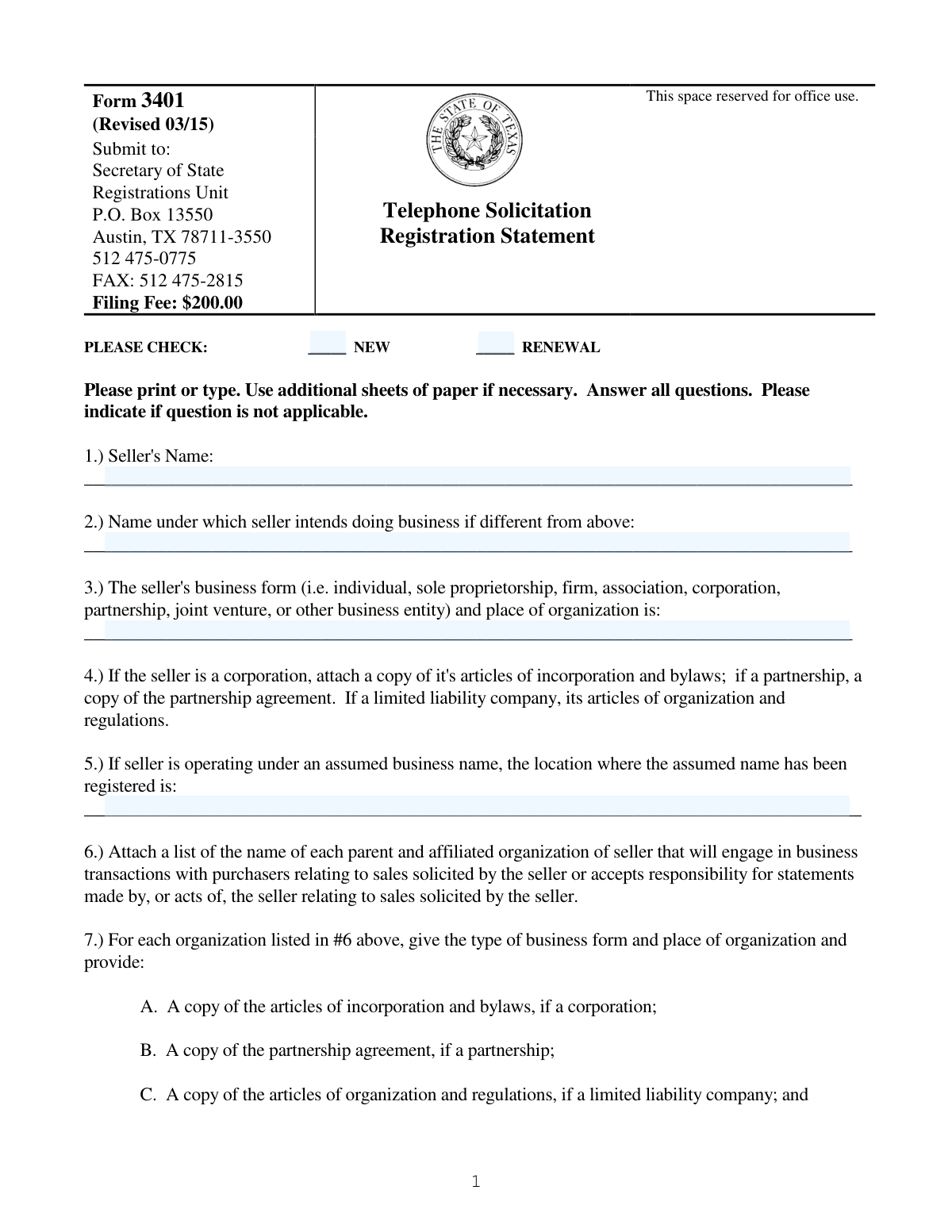
Yes! You can use AI to fill out Form 3401, Telephone Solicitation Registration Statement

Form 3401 is the Telephone Solicitation Registration Statement required by the Texas Secretary of State for any business intending to solicit sales via telephone within Texas. It collects comprehensive details about the seller's business structure, principals, sales practices, and financial information to ensure transparency and protect consumers from fraudulent activities. Today, this form can be filled out quickly and accurately using AI-powered services like Instafill.ai, which can also convert non-fillable PDF versions into interactive fillable forms.
Our AI automatically handles information lookup, data retrieval, formatting, and form filling.
It takes less than a minute to fill out Form 3401 using our AI form filling.
Securely upload your data. Information is encrypted in transit and deleted immediately after the form is filled out.

Form specifications

Form name: Form 3401, Telephone Solicitation Registration Statement
Number of fields: 39
Number of pages: 7
Language: English
main-image

Instafill Demo: How to fill out PDF forms in seconds with AI

How to Fill Out Form 3401 Online for Free in 2026

Are you looking to fill out a FORM 3401 form online quickly and accurately? Instafill.ai offers the #1 AI-powered PDF filling software of 2026, allowing you to complete your FORM 3401 form in just 37 seconds or less.
Follow these steps to fill out your FORM 3401 form online using Instafill.ai:
  1. 1 Navigate to Instafill.ai and upload or select the Texas Form 3401.
  2. 2 Use the AI assistant to provide your business's legal and DBA names, organizational structure, and registration details.
  3. 3 Enter the required information for all principals, officers, and managers, including addresses, dates of birth, and any relevant legal history.
  4. 4 List all business locations, telephone numbers used for solicitation, and details for your agent of service in Texas.
  5. 5 Follow the AI's guidance to gather and attach all necessary supporting documents, such as articles of incorporation, sales scripts, and product information.
  6. 6 Carefully review all auto-filled information for accuracy, then have all principals sign the document before a notary public.
  7. 7 Download the completed and notarized registration statement to mail with the filing fee and security deposit to the Texas Secretary of State.

Our AI-powered system ensures each field is filled out correctly, reducing errors and saving you time.

Why Choose Instafill.ai for Your Fillable Form 3401 Form?

Speed

Complete your Form 3401 in as little as 37 seconds.

Up-to-Date

Always use the latest 2026 Form 3401 form version.

Cost-effective

No need to hire expensive lawyers.

Accuracy

Our AI performs 10 compliance checks to ensure your form is error-free.

Security

Your personal information is protected with bank-level encryption.

Frequently Asked Questions About Form Form 3401

This form is used to register businesses that engage in telephone solicitation with the Texas Secretary of State, as required by state law.

Any individual or business entity, referred to as a 'seller,' that conducts telephone solicitations to consumers in Texas must complete and file this registration statement.

The filing fee is $200. You must also submit a separate $10,000 security deposit along with the completed form.

Mail the completed form, filing fee, and security deposit to the Secretary of State, Registrations Unit, P.O. Box 13550, Austin, TX 78711-3550.

You must attach several documents, including your company's organizational papers (like articles of incorporation), lists of officers and managers, sales scripts, and information on any prizes or premiums offered.

A 'principal' is an owner, an executive officer of a corporation, a general partner, a sole proprietor, or another individual with similar supervisory authority. Each principal must sign the notarized verification statement.

If your principal business location is outside of Texas, you must still designate and provide the complete street address of your main business location within Texas in question 9.

Yes, you are required to file a quarterly update addendum with information on all salespersons. You must also file an update if any other material information on your registration changes.

This is a separate, required document that you must complete and submit with your registration. It appoints the Texas Secretary of State to accept legal notices on your business's behalf.

For each officer, director, owner, and manager, you must provide their name, title, principal residence address, date of birth, and driver's license number and state of issuance.

Yes, you must disclose if any principal has been convicted of certain crimes, had civil judgments related to fraud, is subject to a restrictive court order, or has been involved in a bankruptcy.

Yes, services like Instafill.ai use AI to accurately auto-fill form fields, which can save you significant time and help prevent errors.

You can use a service like Instafill.ai to upload the PDF. This allows you to fill out all the required fields digitally and securely on any device before printing for submission.

If you have a non-fillable PDF, you can use a platform like Instafill.ai to convert it into an interactive, fillable form, making it easy to complete electronically.

Compliance Form 3401
Validation Checks by Instafill.ai

1
Exclusive Registration Type Selection
This check ensures that the user has selected either 'NEW' or 'RENEWAL', but not both. It is critical to properly categorize the submission for processing, fee calculation, and historical tracking. If neither or both are selected, the form cannot be processed correctly, and the user must be prompted to make a single, valid selection.
2
Conditional Business Document Attachment
Validates that if the seller's business form (Question 3) is a 'corporation', 'partnership', or 'limited liability company', a corresponding organizational document has been attached as required by Question 4. This is crucial for legal verification of the entity's existence and structure. Failure to provide the required attachment will result in an incomplete application and rejection.
3
Conditional In-State Location Requirement
This check enforces the rule from Question 9. If the principal business location listed in the attachment for Question 8 is outside of Texas, then the 'main location in this state' field must be completed with a full Texas address. This ensures there is a physical, addressable location within the state for regulatory and legal purposes. If the condition is met and the field is empty, the submission is considered incomplete.
4
Agent for Service of Process Exclusivity
Verifies that the agent listed in Question 15 is not the 'secretary of state'. The form explicitly requires the name of an agent 'other than the secretary of state'. This ensures the business has designated a specific, private agent for legal notices, which is a key statutory requirement. Submitting 'secretary of state' or leaving it blank would fail this validation.
5
Principal Information Completeness
This validation inspects the attachment for Question 11 to ensure each listed principal includes a complete residence address, a date of birth, and a driver's license number with its state of issuance. This information is required for background checks and identity verification as mandated by the statute. Missing any of these data points for any listed principal will render the application incomplete.
6
Telephone Number and Location Association
For each telephone number provided in Question 10, this check ensures that a corresponding physical address where the telephone is located is also provided. This links solicitation activity to a verifiable physical location, which is essential for investigation and compliance monitoring. An entry with a phone number but no address, or vice-versa, would be flagged as an error.
7
Execution and Notary Date Consistency
This validation compares the 'Executed' date with the notary's date. The execution date must be on or before the date the document is notarized. A document cannot be legally notarized before it has been signed and dated by the principal. This check prevents logically impossible or potentially fraudulent date entries.
8
Notary Commission Expiration Date
Ensures that the notary's commission expiration date is a valid future date. A notary cannot perform an official act with an expired commission. This check confirms the validity of the notarization itself, which is required to attest to the truthfulness of the statements in the document. An expired or past date will invalidate the notarization.
9
Filing Fee Payment Verification
This check confirms that the $200 filing fee has been included with the submission. As this is a transactional filing, the registration cannot be processed without the required fee. The system should look for a payment confirmation number or an indication that payment is being submitted concurrently. Failure to include payment will lead to immediate rejection of the filing.
10
Principal Signature Presence
Validates that at least one principal's signature, printed name, and title are provided in the 'Executed' section of the form. The form requires verification by each principal, but at a minimum, one must sign for the document to be considered executed. An unsigned form has no legal standing and must be rejected.
11
Conditional Assumed Name Location
This check ensures that if a seller provides an assumed business name (DBA) in Question 2, they must also specify the location where that name has been registered in Question 5. This cross-references the use of a DBA with its legal registration, ensuring transparency and compliance with state business name laws. If Question 2 is filled and Question 5 is empty, the user will be prompted to provide the registration location.
12
Financial Institution Data Completeness
Verifies that the entry for Question 16 contains at least one full set of financial institution data, including the institution's name, address, and an account identification number. This information is critical for regulatory oversight and potential asset tracing. An incomplete entry, such as a bank name without an account number, would fail this validation and require correction.
13
Criminal/Civil History Disclosure Completeness
This validation checks that if any person is identified under Question 13 as having a relevant conviction, judgment, or bankruptcy, all required supplementary details are provided. This includes the court, docket number, date, and governmental agency involved. A simple 'yes' without the required explanatory details is insufficient for regulatory review and would be flagged as an incomplete disclosure.
14
Sales Information Attachment Check
Verifies that the attachments required under Question 17, such as sales scripts, literature, and product descriptions (17.A and 17.B), are included with the submission. These materials are fundamental to understanding the nature of the telemarketing business and are mandatory for review. The absence of these core attachments would make a compliance review impossible and result in rejection.

Common Mistakes in Completing Form 3401

Forgetting Required Attachments

This form acts as a cover sheet for a large number of required documents, such as articles of incorporation, lists of principals, and sales scripts. Applicants often overlook one or more of these attachments because they are listed across multiple sections. Submitting an incomplete package is one of the most common reasons for immediate rejection, causing significant delays in the registration process. To avoid this, create a separate checklist based on questions 4, 6, 7, 8, 11, 12, 14, and 17, and gather all documents before mailing.

Providing Incomplete Information for Principals

Sections 11 and 12 require extensive personal details for every principal, officer, director, and owner, including their full residence address, date of birth, and driver's license number. Filers often provide incomplete data, such as missing a date of birth or only listing a few key executives. This leads to an incomplete application and follow-up requests from the state. To prevent this, collect all required data points for every single person who meets the definition of a principal before you begin filling out the form.

Improper or Incomplete Notarization

The form requires the signature of each principal to be individually verified by a notary public. Common mistakes include having only one principal sign, forgetting the notary seal, or using a notary with an expired commission. An improperly executed document is legally invalid and will be rejected outright, forcing the applicant to restart the signature and notarization process. Ensure all principals sign in the presence of a valid notary and that the notary completes their section fully and correctly.

Overlooking the Separate 'Agent for Service' Form

A note under Section 15 explicitly states that a separate 'Appointment of the Secretary of State as Agent of Service' form must be completed and returned with the registration statement. This is easily missed as it's a separate document not included in the main form's page count. Failure to include this form will render the entire submission incomplete and halt the registration process. Always read all instructions, especially those marked with asterisks or in bold, to identify requirements for additional forms.

Submitting Incorrect Business Formation Documents

Section 4 requires specific legal documents based on the seller's business structure (e.g., articles of incorporation and bylaws for a corporation, a partnership agreement for a partnership). A frequent error is submitting the wrong type of document or only a certificate of formation instead of the full articles. This mismatch leads to rejection because the state cannot verify the business's legal standing. Double-check your entity type and ensure you attach the exact documents specified for that structure.

Failing to Disclose Full Legal and Financial History

Section 13 demands detailed disclosure of any past criminal convictions, civil judgments, or bankruptcies for all principals. People may misunderstand the scope, forget past events, or intentionally omit information, which can be considered perjury. Incomplete or false disclosures will lead to application denial and potential legal penalties. To avoid this, carefully review the criteria with each principal and conduct internal due diligence to ensure all reportable events are accurately listed.

Submitting an Incorrect Filing Fee or Security Deposit

The final page specifies a $200 filing fee and a separate $10,000 security deposit. Applicants may forget to include one of the payments, combine them improperly, or send an incorrect amount. The processing office will not process any application without the correct, separate payments. Before mailing, confirm the current fee and security deposit amounts and include a check or money order for each as specified.

Using a P.O. Box Instead of a Physical Street Address

Several sections, such as 8, 9, and 12, require a 'complete street address' or the physical location of business operations. A common data entry error is providing a P.O. Box, which is not acceptable for verifying a physical presence. This will result in the form being returned for correction, delaying registration. Always provide a full physical street address where required. AI-powered tools like Instafill.ai can help validate addresses to ensure they are physical locations and not P.O. Boxes.

Leaving Fields Blank Instead of Marking 'Not Applicable'

The instructions state to 'Please indicate if question is not applicable.' Many filers leave fields blank if they don't apply, but this creates ambiguity for the reviewer, who cannot be sure if the information was forgotten or is truly not applicable. This can cause the form to be flagged for clarification. To ensure smooth processing, write 'N/A' in any field or section that does not apply to your business. Since this form is a non-fillable PDF, a tool like Instafill.ai can convert it to a fillable version and help ensure no fields are unintentionally left blank.

Failing to Check the 'NEW' or 'RENEWAL' Box

At the very top of the form, the applicant must check whether the submission is for a new registration or a renewal. This simple checkbox is surprisingly easy to miss. Forgetting to make this selection causes processing delays as the agency must manually determine the application's status, which may involve searching past records or contacting the applicant. Always start at the top of the form and complete every field in order to avoid simple but costly oversights.
Saved over 80 hours a year

“I was never sure if my IRS forms like W-9 were filled correctly. Now, I can complete the forms accurately without any external help.”

Kevin Martin Green

Your data stays secure with advanced protection from Instafill and our subprocessors

Robust compliance program

Transparent business model

You’re not the product. You always know where your data is and what it is processed for.

ISO 27001, HIPAA, and GDPR

Our subprocesses adhere to multiple compliance standards, including but not limited to ISO 27001, HIPAA, and GDPR.

Security & privacy by design

We consider security and privacy from the initial design phase of any new service or functionality. It’s not an afterthought, it’s built-in, including support for two-factor authentication (2FA) to further protect your account.

Fill out Form 3401 with Instafill.ai

Worried about filling PDFs wrong? Instafill securely fills form-3401-telephone-solicitation-registration-statement forms, ensuring each field is accurate.