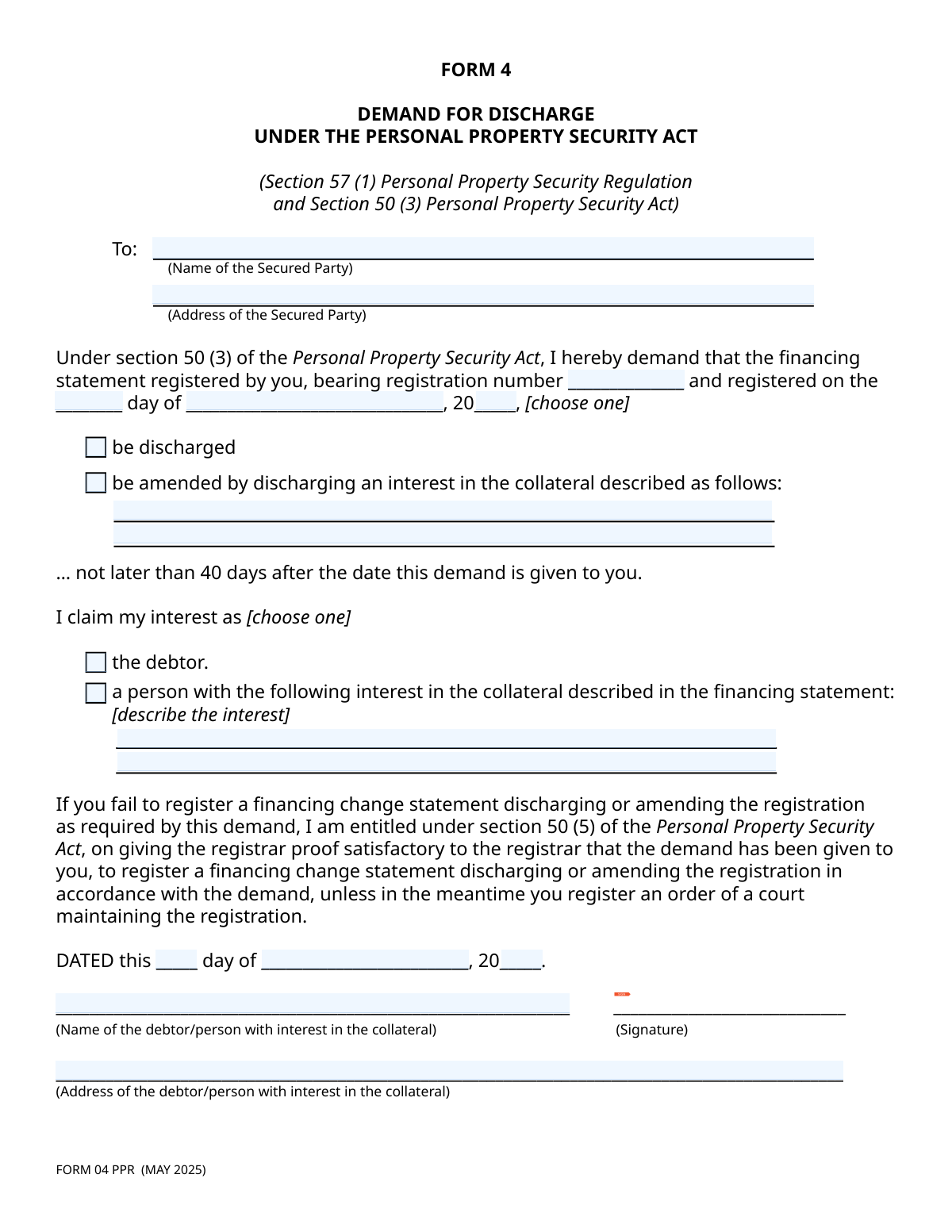
Yes! You can use AI to fill out Form 4, Demand for Discharge Under the Personal Property Security Act

Form 4, Demand for Discharge, is a legal document used by a debtor or a person with an interest in collateral to formally demand that a secured party either discharge a financing statement entirely or amend it to release specific collateral. This is typically done when an obligation has been fulfilled or the security interest is no longer valid, and it is a critical step in clearing title to property. Today, this form can be filled out quickly and accurately using AI-powered services like Instafill.ai, which can also convert non-fillable PDF versions into interactive fillable forms.
Form 4 / FORM 04 PPR has a basic Form Complexity Index of 34/100 — 22 fillable fields across 1 page. Instafill’s AI completes it accurately in under a minute.

Form specifications

Form name: Form 4, Demand for Discharge Under the Personal Property Security Act
Number of fields: 22
Number of pages: 1
FCI: Basic (34/100)
Language: English
Our AI automatically handles information lookup, data retrieval, formatting, and form filling.
It takes less than a minute to fill out Form 4 / FORM 04 PPR using our AI form filling.
Securely upload your data. Information is encrypted in transit and deleted immediately after the form is filled out.
main-image

Instafill Demo: How to fill out PDF forms in seconds with AI

How to Fill Out Form 4 / FORM 04 PPR Online for Free in 2026

Are you looking to fill out a FORM 4 / FORM 04 PPR form online quickly and accurately? Instafill.ai offers the #1 AI-powered PDF filling software of 2026, allowing you to complete your FORM 4 / FORM 04 PPR form in just 37 seconds or less.
Follow these steps to fill out your FORM 4 / FORM 04 PPR form online using Instafill.ai:
  1. 1 Navigate to Instafill.ai and upload or select the Form 4, Demand for Discharge.
  2. 2 Use the AI assistant to accurately input the full name and address of the secured party to whom the demand is being sent.
  3. 3 Enter the specific details of the financing statement, including its registration number and the date it was registered.
  4. 4 Choose the required action: either a full discharge of the financing statement or an amendment to discharge interest in specific collateral, providing a detailed description if you select the latter.
  5. 5 Clearly state your claim by indicating whether you are the debtor or another person with an interest in the collateral, and describe that interest if necessary.
  6. 6 Date the document and apply your digital signature in the designated field.
  7. 7 Review all entered information for accuracy, then download the completed form to be sent to the secured party.

Our AI-powered system ensures each field is filled out correctly, reducing errors and saving you time.

Why Choose Instafill.ai for Your Fillable Form 4 / FORM 04 PPR Form?

Speed

Complete your Form 4 / FORM 04 PPR in as little as 37 seconds.

Up-to-Date

Always use the latest 2026 Form 4 / FORM 04 PPR form version.

Cost-effective

No need to hire expensive lawyers.

Accuracy

Our AI performs 10 compliance checks to ensure your form is error-free.

Security

Your personal information is protected with bank-level encryption.

Frequently Asked Questions About Form 4 / FORM 04 PPR

Form 4 / FORM 04 PPR has a Form Complexity Index of 34 out of 100, placing it in the basic complexity tier. This score is calculated deterministically from the form’s own structure using Instafill’s published Form Complexity Index methodology, so it can be reproduced and independently verified — it is not a subjective estimate.

For Form 4 / FORM 04 PPR specifically, the score reflects 22 fillable fields across 1 page, grouped into 8 sections. The number of fields is the largest factor in the base score (weighted 36%), followed by how difficult those fields are to complete based on their type, where free-text and signature fields count for more than simple checkboxes (26%). The number of pages that actually contain fields (15%), the amount of conditional “fill-only-if” logic (16%), and how many sections the form is divided into (7%) account for the rest of the base. On top of that base, the index adds points for tables and repeating lists, bundled instruction pages, and dense page layouts — capturing difficulty the base alone can miss.

In practical terms, a basic score means the form is relatively light, but still needs careful, accurate entry. Instafill removes that effort entirely: our AI reads your information, maps each value to the correct field — including the conditional ones — and completes Form 4 / FORM 04 PPR accurately in under a minute, with every field available for you to review before you download. See exactly how the Form Complexity Index is calculated.

This form is used to formally demand that a secured party (a lender or creditor) remove (discharge) or change (amend) a security interest they have registered against your personal property under the Personal Property Security Act.

You should fill out this form if you are the debtor and have paid off your debt, or if you are a person with a legal interest in the property and believe the registration is no longer valid or needs to be updated.

The registration number is a unique ID assigned by the registry when the security interest was created. You can find this number on your original loan documents or by performing a search in the Personal Property Registry.

A 'discharge' requests the complete removal of the entire financing statement because the debt is fully paid. An 'amendment' is used to release only specific items of collateral while the rest of the security agreement remains active.

You must send the completed form directly to the secured party (the lender or creditor) at their official address. You do not file this form with the court or registry at this stage.

The secured party has 40 days from the date they receive your demand to register a financing change statement that discharges or amends the registration as you requested.

If the secured party fails to comply within 40 days, you are entitled to register the change statement yourself. You will need to provide the registrar with satisfactory proof that you gave the demand to the secured party.

You will need the secured party's name and address, the financing statement registration number and date, and your own name, address, and signature. You must also specify whether you are demanding a full discharge or a partial amendment for specific collateral.

This refers to anyone other than the original debtor who has a legal claim to the property, such as a new owner who purchased the asset, another creditor, or a trustee in bankruptcy. You must describe your specific interest in the form.

Yes, services like Instafill.ai use AI to accurately auto-fill form fields from your existing documents, which helps save time and reduce the risk of errors.

You can use a service like Instafill.ai to upload a scan or photo of the form. The platform can convert it into an interactive, fillable document that you can complete on your computer, then save or print.

Tools like Instafill.ai can convert flat, non-fillable PDFs into interactive forms. Simply upload the PDF, and the platform will make the fields fillable so you can type your information directly.

It is highly recommended to send this form via a method that provides tracking and proof of delivery, such as registered mail. This documentation is crucial if you later need to prove to the registrar that the demand was given to the secured party.

Compliance Form 4 / FORM 04 PPR
Validation Checks by Instafill.ai

1
Secured Party Information Completeness
This check ensures that both the 'Secured Party Name' and 'Secured Party Address' fields are filled. The demand must be addressed to a specific legal entity at a valid address to be legally effective. If this information is missing, the demand is invalid and cannot be processed or enforced by the registrar.
2
Exclusive Requested Action Selection
This validation ensures that the user has selected exactly one option from the 'Requested Action Selection' group: either 'be discharged' or 'be amended'. The form requires a single, unambiguous demand. Selecting both or neither would create legal ambiguity, making it impossible for the secured party to know how to comply.
3
Conditional Collateral Description Requirement
This check is triggered if the user selects 'be amended by discharging an interest...'. It verifies that the 'Collateral Description to be Discharged' field is not empty. A demand to amend a financing statement by discharging specific collateral is meaningless without a clear description of that collateral, rendering the demand vague and unenforceable.
4
Exclusive Interest Claim Selection
This validation ensures that the user has selected exactly one option to identify their standing: either 'the debtor' or 'a person with the following interest...'. The legal basis for making the demand depends on this status. Selecting both or neither would make the claim's basis unclear and legally deficient.
5
Conditional Interest Description Requirement
This check activates if the user identifies as 'a person with the following interest...'. It ensures the 'Interest description' field is completed. To have legal standing, a non-debtor must clearly articulate their specific interest in the collateral. Without this description, their right to make the demand cannot be verified.
6
Registration Number Presence
This check verifies that the 'Registration Number' field is not empty. This number is the primary key for identifying the specific financing statement in the registry. An incorrect or missing number means the demand cannot be linked to the correct legal filing, making it completely ineffective.
7
Valid Registration Date
This validation ensures that the combination of 'Registration Date – Day', 'Registration Date – Month', and 'Registration Date – Year' constitutes a real calendar date (e.g., not February 30th). An invalid date would call into question the accuracy of the entire filing reference. The system must prevent submission with impossible dates to maintain data integrity.
8
Registration Date Chronology
This check confirms that the provided 'Registration Date' is not in the future. A financing statement cannot be registered on a future date. This validation prevents logical errors and ensures the user is referencing a document that already exists in the registry.
9
Demand Date Logical Consistency
This check verifies two things: the 'Demand Date' is not in the future, and it occurs on or after the 'Registration Date'. A demand cannot be dated in the future, nor can it be made before the financing statement it references was registered. This check prevents logical impossibilities that would invalidate the legal standing of the demand.
10
Debtor/Person Information Completeness
This check verifies that the name and address of the debtor or person with interest are both provided. This information is essential for identifying the party making the demand and for any subsequent communication. A failure to provide this information makes the demand legally insufficient and un-actionable.
11
Signature Presence Verification
This validation confirms that the signature field has been completed, indicating the user has signed the form. A signature is a legal requirement to attest to the authenticity of the demand and the identity of the person making it. An unsigned demand has no legal weight and will be rejected.
12
Address Structure Validation
This check applies to both the 'Secured Party Address' and 'Debtor/Person Address' fields. It validates that the input appears to be a complete mailing address, containing elements like a street, city, province/state, and postal code. Proper delivery and contact are critical for legal notices, and an incomplete address could nullify the demand or subsequent correspondence.

Common Mistakes in Completing Form 4 / FORM 04 PPR

Entering an Incorrect Financing Statement Registration Number

Users often make typos or transpose digits when entering the registration number from the original financing statement. This is a critical error because the number is the unique identifier for the legal filing being challenged. An incorrect number will result in the demand being applied to the wrong record or rejected entirely, causing significant delays in discharging the security interest. To avoid this, carefully cross-reference the number with the original registration document before submission.

Using an Informal or Incorrect Secured Party Name

People frequently use a business's trade name or an abbreviated name instead of its full, legal registered name (e.g., "Bob's Cars" instead of "Bob's Auto Sales Inc."). This can invalidate the demand, as legal notices must be addressed to the correct legal entity. The secured party could legally ignore an improperly addressed demand, forcing you to restart the process. Always verify the full legal name of the secured party from the original financing statement or corporate registry.

Making a Conflicting or Ambiguous Action Request

The form requires the user to choose one action: a full discharge or a partial amendment. A common mistake is checking both boxes or neither, which makes the demand legally ambiguous and unenforceable. This happens due to haste or misunderstanding the options. A conflicting request will be rejected, so you must clearly select only one option that reflects your intent.

Providing a Vague Collateral Description for Partial Discharge

When requesting a partial discharge (amendment), users often provide a generic description like "the vehicle" or "equipment." This is insufficient, as the secured party cannot identify the specific asset to release from the security interest. The description must include unique identifiers like a Vehicle Identification Number (VIN), serial number, or account number. Failing to be specific will lead to rejection of the demand and require resubmission with proper details.

Forgetting to Sign the Form

An unsigned demand form is legally invalid and has no effect. This simple oversight is common but completely nullifies the document, meaning the 40-day period for the secured party to respond never begins. Always ensure the form is physically signed by the appropriate person (the debtor or person with interest) before it is sent. This is a final-check item that is crucial for the form's validity.

Failing to Specify the Claimant's Interest

The form requires you to establish your legal standing by selecting either "the debtor" or "a person with the following interest in the collateral." Leaving both boxes unchecked fails to establish your right to make the demand, rendering the form incomplete and invalid. This mistake can lead to an immediate rejection by the secured party or the registrar. You must select one of these options to clarify your relationship to the collateral.

Inconsistent or Incorrect Debtor Name

The name of the debtor or person with interest entered on this demand form must exactly match the name on the original financing statement. Using a different name, a nickname, or making a spelling error can create identity verification issues and cause the secured party to question the demand's authenticity. This can lead to delays or rejection. To prevent this, use the full legal name as it appears on the original security agreement.

Leaving the Interest Description Blank

If you identify yourself as "a person with the following interest in the collateral" but fail to describe that interest in the space provided, the form is incomplete. This omission prevents the secured party from understanding your claim's basis (e.g., as a subsequent purchaser or another creditor). The demand will likely be rejected for lack of information, so you must clearly articulate the nature of your interest in the collateral.

Providing an Incomplete or Outdated Address

Both the secured party's address and your own address must be complete and current for proper legal service and communication. Mistakes include missing postal codes, apartment numbers, or using an old address. An incorrect address for the secured party means the demand may never be received, while an incorrect address for yourself means you won't receive a response or further notices. AI-powered tools like Instafill.ai can help validate and auto-complete addresses to ensure accuracy.

Entering Incorrect Dates or Using the Wrong Format

The form requires both the original registration date and the date of the demand, often in separate fields for day, month, and year. Users may enter the wrong date, mix up the demand date with the registration date, or enter it in an incorrect format. The demand date is especially critical as it starts the 40-day compliance clock. Using a tool like Instafill.ai can help ensure dates are entered correctly and formatted as required, and can even make flat PDFs like this one fillable to reduce errors.
Saved over 80 hours a year

“I was never sure if my IRS forms like W-9 were filled correctly. Now, I can complete the forms accurately without any external help.”

Kevin Martin Green

Your data stays secure with advanced protection from Instafill and our subprocessors

Robust compliance program

Transparent business model

You’re not the product. You always know where your data is and what it is processed for.

ISO 27001, HIPAA, and GDPR

Our subprocesses adhere to multiple compliance standards, including but not limited to ISO 27001, HIPAA, and GDPR.

Security & privacy by design

We consider security and privacy from the initial design phase of any new service or functionality. It’s not an afterthought, it’s built-in, including support for two-factor authentication (2FA) to further protect your account.

Fill out Form 4 / FORM 04 PPR with Instafill.ai

Worried about filling PDFs wrong? Instafill securely fills form-4-demand-for-discharge-under-the-personal-property-security-act forms, ensuring each field is accurate.