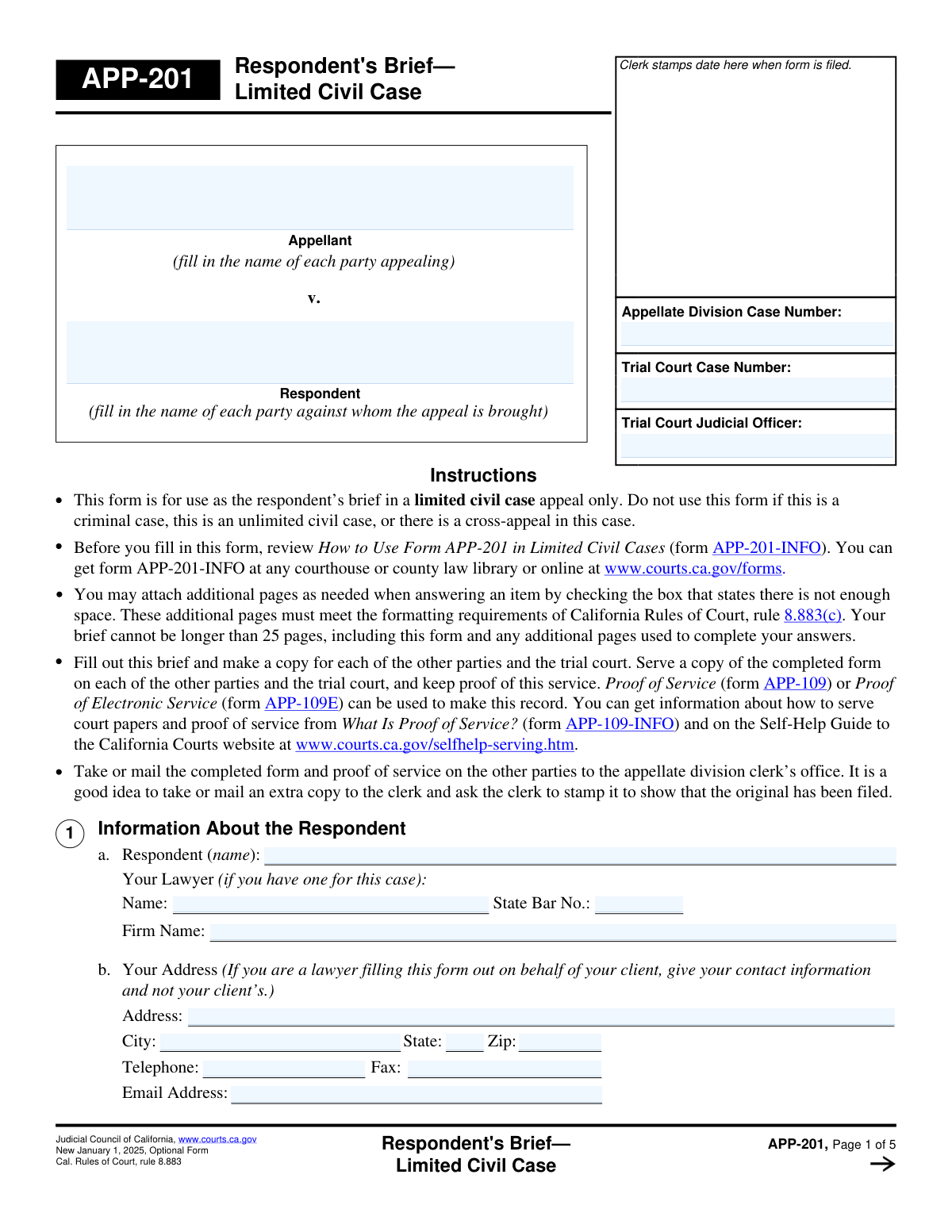
Yes! You can use AI to fill out Form APP-005, Optional Form Respondent's Brief (Limited Civil Case)
Form APP-005, the Optional Form Respondent's Brief, is a legal document filed in a California appellate court for a limited civil case. It provides a structured format for the respondent (the party against whom the appeal is filed) to present their arguments, counter the appellant's claims, and explain why the trial court's decision should be upheld. This brief is a critical opportunity for the respondent to present their side of the case to the appellate judges. Today, this form can be filled out quickly and accurately using AI-powered services like Instafill.ai, which can also convert non-fillable PDF versions into interactive fillable forms.
Our AI automatically handles information lookup, data retrieval, formatting, and form filling.
It takes less than a minute to fill out APP-005 using our AI form filling.
Securely upload your data. Information is encrypted in transit and deleted immediately after the form is filled out.
Form specifications
| Form name: | Form APP-005, Optional Form Respondent's Brief (Limited Civil Case) |
| Number of fields: | 40 |
| Number of pages: | 5 |
| Language: | English |
Instafill Demo: How to fill out PDF forms in seconds with AI
How to Fill Out APP-005 Online for Free in 2026
Are you looking to fill out a APP-005 form online quickly and accurately? Instafill.ai offers the #1 AI-powered PDF filling software of 2026, allowing you to complete your APP-005 form in just 37 seconds or less.
Follow these steps to fill out your APP-005 form online using Instafill.ai:
- 1 Navigate to Instafill.ai and upload your Form APP-005, or select it from their template library.
- 2 Use the AI assistant to accurately enter the Appellate Division and Trial Court case numbers, along with the name of the trial court judicial officer.
- 3 Clearly input the names of all appellants and respondents involved in the appeal, as well as your contact and lawyer information if applicable.
- 4 Present the relevant facts of the case as they were presented in the trial court, citing the record for each fact. Instafill.ai can help you format this section and manage attachments if more space is needed.
- 5 Address each argument from the Appellant's Opening Brief. Detail your counter-arguments, supported by law and facts, using the structured response sections.
- 6 State the action you are requesting from the appellate court, then review the entire document for accuracy before electronically signing and dating it through the platform.
Our AI-powered system ensures each field is filled out correctly, reducing errors and saving you time.
Why Choose Instafill.ai for Your Fillable APP-005 Form?
Speed
Complete your APP-005 in as little as 37 seconds.
Up-to-Date
Always use the latest 2026 APP-005 form version.
Cost-effective
No need to hire expensive lawyers.
Accuracy
Our AI performs 10 compliance checks to ensure your form is error-free.
Security
Your personal information is protected with bank-level encryption.
Frequently Asked Questions About Form APP-005
This form is used to create a Respondent's Brief in an appeal. It allows the respondent, the party against whom the appeal is brought, to formally respond to the arguments made by the appellant.
The respondent or their legal representative must complete this form. The respondent is the party defending the trial court's original decision against the appeal.
The 'Trial Court Case Number' is the number from the original case in the lower court. The 'Appellate Division Case Number' is the new number assigned specifically for the appeal process.
Describe the key facts presented in the trial court that are relevant to the appeal. You must cite the specific page numbers in the official record where each fact can be found.
The form provides checkboxes for when you need more space. Check the appropriate box and continue your writing on a separate sheet of paper, labeling it with the specified attachment number, such as 'Attachment 2'.
Check the box for 'Respond to Additional Arguments' and use the 'Other Arguments' section to address any further points. If you still need more space, you can use an attachment as indicated on the form.
In this section, you must clearly state what action you want the appellate court to take. Typically, a respondent asks the court to 'affirm' the trial court's decision, meaning you want the original judgment to stand.
This form must be filed with the Clerk of the Appellate Division and served on all other parties. You must follow the court's specific rules of procedure for filing and service.
Yes, services like Instafill.ai use AI to accurately auto-fill form fields with your information, which can save you time and reduce errors. This is especially helpful for repetitive information like case numbers and contact details.
Simply upload the form to the Instafill.ai platform. The AI will identify the fields, allowing you to type your information directly into an interactive version of the form online before downloading or printing it.
You can use a service like Instafill.ai to solve this problem. Upload the non-fillable PDF, and the tool will convert it into an interactive, fillable form that you can complete on your computer.
If you are representing yourself, you would typically leave the lawyer information blank and enter your own contact details where requested for the respondent. Always check the specific rules of the court where you are filing.
Citing the record directs the appellate court to the exact location in the trial court proceedings where evidence for your stated fact can be found. This is essential for verifying your claims and building a credible argument.
Compliance APP-005
Validation Checks by Instafill.ai
1
Appellate Division Case Number Consistency
This check ensures that all fields for 'Appellate Division Case Number' across the entire form contain the exact same value. It is critical for data integrity, as a mismatch could lead to the document being filed under the wrong case or rejected by the court clerk. If the numbers do not match, the user will be prompted to correct the discrepancy before submission.
2
State Bar Number Format and Validity
Validates that the 'State Bar Number' is entered in the correct format, which is typically a sequence of digits of a specific length. This check prevents simple data entry errors and confirms the lawyer's credentials are being recorded accurately. An invalid format would trigger an error, prompting the user to re-enter the number correctly, ensuring the lawyer can be properly identified.
3
Required Parties Identification
Ensures that at least one 'Appellant Name' and one 'Respondent Name' are provided in the 'Parties' section. An appeal is a legal action between at least two opposing parties, and their identification is fundamental to the document's validity. A failure to provide this information would render the form legally incomplete and result in a validation failure, blocking submission.
4
Zip Code and State Consistency
This validation cross-references the 'Zip Code' with the 'City' and 'State' fields to ensure they correspond to a valid geographical location. This is important for guaranteeing that physical mail and legal notices sent to the provided address are deliverable. If the zip code does not match the city/state, the system will flag the address as potentially incorrect, preventing communication delays.
5
Email Address Format Validation
Verifies that the value entered in the 'Email Address' field follows the standard '[email protected]' format. As legal proceedings increasingly rely on electronic communication and service, a valid email address is crucial for timely correspondence. An invalid format would prevent submission and require the user to correct the entry to ensure they can receive important case-related notifications.
6
Telephone Number Format
Checks that the 'Telephone Number' and 'Fax Number' fields adhere to a standard North American phone number format (e.g., NPA-NXX-XXXX). This ensures the contact numbers are syntactically correct and usable for communication by the court and other parties. An incorrectly formatted number would trigger an error, requiring the user to correct it to ensure contact can be made.
7
Signature Date Plausibility
This check validates that the 'Signature Date' is a real date and is not in the future or unreasonably far in the past. The signature date legally attests to when the document was executed, making its accuracy essential. A date in the future would be invalid, and the system would require the user to enter the current or a past date to proceed.
8
Required Printed Name at Signature
Ensures the 'Printed Name' field accompanying the signature is not left blank. This field is legally required to clearly identify the person signing the document, especially if the signature itself is not legible. A missing printed name would make the document incomplete and legally questionable, so submission is blocked until the field is filled.
9
Attachment Checkbox Logic for 'Facts of the Case'
This validation ensures that if the 'Insufficient Space for Facts' checkbox is checked, the main 'Facts of the Case' text area is not empty. The checkbox is intended to indicate a continuation, not a replacement, of the information on the form. This check prevents users from skipping the form's primary input field, ensuring the document is as complete as possible before referencing attachments.
10
Conditional Requirement for 'Other Arguments'
Verifies that the 'Other Arguments Details' text area is only filled if the 'Check here to respond to additional arguments' checkbox is selected. This maintains the form's logical flow and structure, preventing extraneous information from being entered in sections the user has not explicitly opted to complete. If the box is unchecked but the text area has content, a warning will prompt the user to either check the box or clear the text.
11
Required 'Request of the Appellate Division'
This check ensures that the 'Request of the Appellate Division' field is not empty. This section details the specific action the filer wants the court to take (e.g., affirm or reverse the trial court's decision) and is the primary purpose of the filing. A submission without this information is incomplete and lacks a clear legal objective, so the form cannot be submitted until this field is completed.
12
Argument Context Validation
Ensures that if a response to an argument is provided (e.g., 'Response to First Argument Details'), the corresponding description field ('First Argument Description') is also filled out. This provides necessary context for the response, making the document clear and understandable for the court. A response without a description of what is being responded to would be confusing and would trigger a validation error.
13
Respondent Name Consistency Check
This validation compares the 'Respondent Name' entered under the 'Parties' section with the 'Respondent Name' entered in the separate 'Respondent Name' section. Although the fields appear redundant, this check ensures the same party is identified consistently throughout the document. A mismatch could cause confusion and would require correction to ensure data integrity.
14
Appellate Case Number Format
Validates that the 'Appellate Division Case Number' conforms to the expected format for the jurisdiction (e.g., a specific combination of letters, numbers, and hyphens). This initial check helps catch typos and ensures the case number is syntactically valid before it is used for filing. An invalid format will trigger an error, prompting the user to correct the number.
Common Mistakes in Completing APP-005
Filers often enter the Trial Court Case Number in the field for the Appellate Division Case Number, or vice-versa. Since the 'Appellate Division Case Number' is requested multiple times, it's also common to introduce a typo in one instance, creating an inconsistency. These errors are critical as they can lead to the document being misfiled or rejected, causing significant delays. To avoid this, carefully double-check each number against official court documents. AI-powered tools like Instafill.ai can prevent this by auto-populating repeated fields, ensuring perfect consistency.
The form explicitly requires citing the page number(s) from the court record for each fact presented. Many filers either forget this step or provide facts without any supporting citation, often because they are rushed or don't have the record organized. A court may disregard any uncited facts, which severely weakens the foundation of your arguments. Always prepare a list of facts with their corresponding page citations from the record before you begin filling out this section.
The form has numerous checkboxes for indicating that an answer is continued on an attachment. Common errors include checking the box but forgetting to include the attachment, or attaching a document but failing to check the corresponding box. Furthermore, filers often mislabel attachments (e.g., 'Attachment 3' instead of the required 'Attachment 3a(2)'), creating confusion for the court clerk. This can result in the court not considering your full argument, so it's vital to create a checklist to ensure every attachment is present, correctly labeled, and properly referenced on the form.
The lawyer's State Bar Number is a unique and mandatory identifier. Filers, especially non-lawyers or assistants, may guess, transpose digits, or leave the field blank if the number isn't readily available. An incorrect number can delay the verification of the attorney's credentials and good standing, potentially leading to the rejection of the entire filing. Always verify the number using the official State Bar website before entering it.
Several fields on the form are conditional, meaning they should only be completed if a related checkbox is marked (e.g., 'Fill only if 'Other Arguments Details' there is not enough space...'). People often miss these subtle instructions, leading them to either fill out fields they shouldn't or, more critically, fail to provide required information on an attachment. This creates a confusing or incomplete submission that may require correction and refiling. Carefully read all instructions surrounding each field and checkbox.
The form has a distinct section for 'Facts of the Case' and separate sections for legal arguments. A frequent mistake is to insert arguments, conclusions, or subjective interpretations into the facts section, which should only contain neutral statements supported by the record. This undermines the credibility of your factual summary and is procedurally improper, potentially irritating the court. Keep the 'Facts' section strictly objective and save your advocacy for the 'Response to Argument' sections.
In the sections for responding to the appellant's arguments, a common pitfall is to provide a generalized defense of the trial court's decision without directly addressing the specific points of error raised by the appellant. An effective response must precisely identify the argument being countered and then provide the specific law and facts that refute it. Failing to do so makes your filing less persuasive and may be interpreted as a concession of the appellant's point.
Filers may accidentally enter an old address, a mistyped email, or an incorrect phone number. Since this information is how the court and opposing counsel will provide crucial notices and communications, even a small error can lead to missed deadlines or lost documents. It is essential to proofread every character in the address, email, and phone number fields to ensure accuracy. Using a tool like Instafill.ai can help by storing and accurately populating your verified contact information.
An unsigned or improperly dated form is invalid and will be rejected, forcing a refiling. Filers sometimes print the form and forget to sign it, or they overlook the 'Printed Name' and 'Signature Date' fields on a digital submission. This simple but critical oversight can completely derail the timeline of an appeal. Always perform a final review of the form with a specific focus on the signature block before submission.
Often, legal forms are only available online as flat, non-fillable PDFs, forcing users to print and handwrite the information. This frequently leads to illegible entries, which can cause court clerks to make data entry errors regarding names, case numbers, or addresses. To ensure clarity and prevent downstream errors, these forms should be made fillable. Services like Instafill.ai can convert a non-fillable PDF into an interactive, fillable form, guaranteeing every entry is legible and professional.
Saved over 80 hours a year
“I was never sure if my IRS forms like W-9 were filled correctly. Now, I can complete the forms accurately without any external help.”
Kevin Martin Green
Your data stays secure with advanced protection from Instafill and our subprocessors

Robust compliance program
Transparent business model
You’re not the product. You always know where your data is and what it is processed for.
ISO 27001, HIPAA, and GDPR
Our subprocesses adhere to multiple compliance standards, including but not limited to ISO 27001, HIPAA, and GDPR.
Security & privacy by design
We consider security and privacy from the initial design phase of any new service or functionality. It’s not an afterthought, it’s built-in, including support for two-factor authentication (2FA) to further protect your account.
Fill out APP-005 with Instafill.ai
Worried about filling PDFs wrong? Instafill securely fills form-app-005-optional-form-respondents-brief-limited-civil-case forms, ensuring each field is accurate.