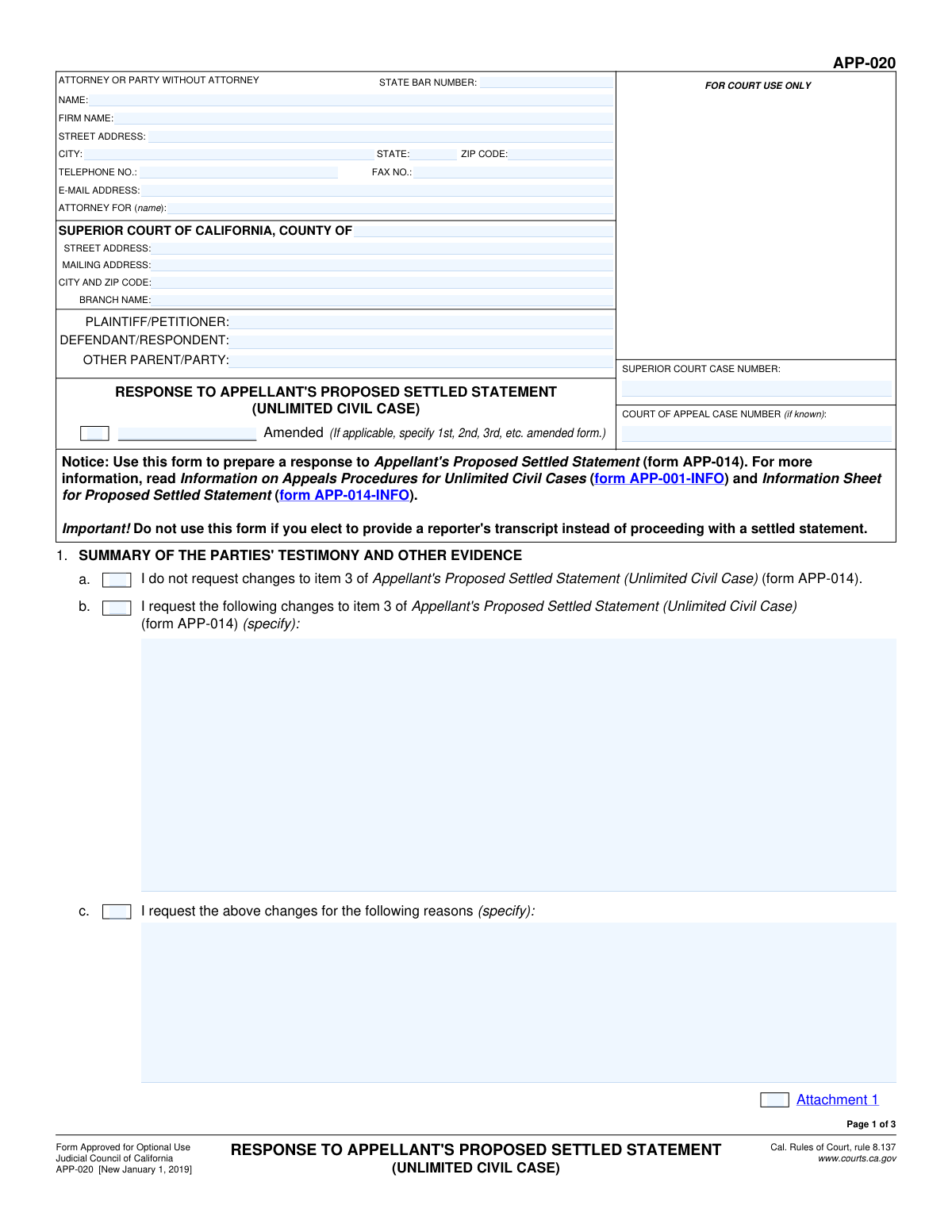
Yes! You can use AI to fill out Form APP-020, Response to Appellant's Proposed Settled Statement (Unlimited Civil Case)

Form APP-020, Response to Appellant's Proposed Settled Statement, is a legal document filed in California Superior Court by the respondent in an unlimited civil appeal. It is used to either agree with or propose corrections to the appellant's version of the trial record (the settled statement) when a court reporter's transcript is not being used. This ensures the appellate court has an accurate summary of the evidence and proceedings to review. Today, this form can be filled out quickly and accurately using AI-powered services like Instafill.ai, which can also convert non-fillable PDF versions into interactive fillable forms.
Our AI automatically handles information lookup, data retrieval, formatting, and form filling.
It takes less than a minute to fill out APP-020 using our AI form filling.
Securely upload your data. Information is encrypted in transit and deleted immediately after the form is filled out.

Form specifications

Form name: Form APP-020, Response to Appellant's Proposed Settled Statement (Unlimited Civil Case)
Number of fields: 68
Number of pages: 3
Language: English
main-image

Instafill Demo: How to fill out PDF forms in seconds with AI

How to Fill Out APP-020 Online for Free in 2026

Are you looking to fill out a APP-020 form online quickly and accurately? Instafill.ai offers the #1 AI-powered PDF filling software of 2026, allowing you to complete your APP-020 form in just 37 seconds or less.
Follow these steps to fill out your APP-020 form online using Instafill.ai:
  1. 1 Navigate to Instafill.ai and upload or select Form APP-020.
  2. 2 Allow the AI to populate case details such as court name, party information, and case numbers, then review for accuracy.
  3. 3 Carefully review the appellant's proposed settled statement (Form APP-014) to which you are responding.
  4. 4 For each section (e.g., Summary of Testimony, Trial Court's Findings), check the appropriate box to either accept the appellant's summary or request changes.
  5. 5 If you request changes, type your proposed corrections and the reasons for them in the corresponding text fields.
  6. 6 Date and provide your signature in the final section of the form.
  7. 7 Download the completed form to print and file with the Superior Court according to the California Rules of Court.

Our AI-powered system ensures each field is filled out correctly, reducing errors and saving you time.

Why Choose Instafill.ai for Your Fillable APP-020 Form?

Speed

Complete your APP-020 in as little as 37 seconds.

Up-to-Date

Always use the latest 2026 APP-020 form version.

Cost-effective

No need to hire expensive lawyers.

Accuracy

Our AI performs 10 compliance checks to ensure your form is error-free.

Security

Your personal information is protected with bank-level encryption.

Frequently Asked Questions About Form APP-020

This form is used by a respondent in an unlimited civil appeal to respond to the appellant's proposed summary of the trial court proceedings (Form APP-014). It allows you to either agree with the appellant's summary or propose specific changes.

This form should be completed by the respondent (or their attorney) in an unlimited civil case appeal after receiving the 'Appellant's Proposed Settled Statement' (Form APP-014).

You should not use this form if you choose to provide a reporter's transcript of the court proceedings instead of proceeding with a settled statement for the appeal.

Form APP-014 is used by the appellant (the party who started the appeal) to propose a summary of the case facts and proceedings. Form APP-020 is used by the respondent (the other party) to reply to that proposal.

You will need your case numbers, personal or attorney contact information, and a copy of the Appellant's Proposed Settled Statement (Form APP-014) that you are responding to.

If you agree with the appellant's summary, you can simply check the box in each section (1a, 2a, 3a, 4a, 5a) that says 'I do not request changes' to the corresponding item on Form APP-014.

In the relevant section, check the box to request changes, specify the exact changes you are proposing in the space provided, and then explain the reasons for your requested changes.

The form allows for attachments. You can check the 'Attachment' box in the relevant section and attach a separate page with your detailed changes or reasons, making sure to label it clearly.

The Court of Appeal case number is assigned by the appellate court and will be on any notices you receive from them. If you have not been assigned one yet, you may leave this field blank.

After you file your response, the trial court will review both proposals to 'settle' the statement, which may involve a court hearing to resolve disagreements. The final, settled statement becomes part of the official record for the appeal.

Yes, services like Instafill.ai use AI to auto-fill form fields accurately, helping you complete repetitive information like your name, address, and case details quickly and efficiently.

You can use a service like Instafill.ai to fill out your form online. Simply upload the PDF, and the platform will make it an interactive form you can type into, save, and print.

If you have a non-fillable or 'flat' PDF, you can upload it to a service like Instafill.ai. It uses AI to convert the document into an interactive, fillable form that you can complete on your computer.

Compliance APP-020
Validation Checks by Instafill.ai

1
Superior Court Case Number Presence
This check ensures that the 'SUPERIOR COURT CASE NUMBER' field is not empty. This number is the primary identifier for the case at the trial court level and is essential for correctly filing and associating the document with the proper court record. A missing case number will result in the form being rejected by the court clerk.
2
Party Identification Completeness
Validates that both the 'PLAINTIFF/PETITIONER' and 'DEFENDANT/RESPONDENT' fields are filled in. These fields identify the primary parties to the lawsuit, which is fundamental for legal document validity. Failure to identify the parties makes the document ambiguous and legally insufficient.
3
Attorney/Filer Contact Information
Ensures that the name, street address, city, state, and ZIP code for the filing attorney or party are all provided. This information is legally required for official communication, service of documents, and maintaining an accurate court record. Incomplete contact information can delay the case and lead to missed deadlines.
4
Attorney-Client Relationship Declaration
This performs a logical check to ensure that if a 'STATE BAR NUMBER' is entered, the 'ATTORNEY FOR (name)' field is also completed. This clarifies which party the attorney represents, which is a critical piece of information for the court and opposing counsel. An attorney cannot appear in a case without specifying their client.
5
State Bar Number Format
Verifies that the value entered in the 'STATE BAR NUMBER' field is a valid number. State Bar numbers are unique numerical identifiers for licensed attorneys. An invalid format suggests a data entry error and could prevent the court from verifying the attorney's credentials and good standing.
6
Email Address Format Validation
Checks that the entry in the 'E-MAIL ADDRESS' field conforms to a standard email format (e.g., [email protected]). As courts increasingly rely on electronic service and communication, a valid email address is crucial for timely receipt of notices and documents. An invalid email address will cause communication failures.
7
Phone Number Format
Validates that the 'TELEPHONE NO.' field contains a number in a recognizable U.S. phone number format. This ensures the court and other parties have a reliable way to make direct contact if needed. An improperly formatted number could be unusable, hindering communication.
8
Cross-Page Case Information Consistency
This check verifies that the 'SUPERIOR COURT CASE NUMBER', 'PLAINTIFF/PETITIONER', and 'DEFENDANT/RESPONDENT' fields are identical on all pages of the form. Consistency is vital for multi-page legal documents to ensure they are treated as a single, coherent filing. Mismatched information can lead to confusion or rejection of the document.
9
Mutually Exclusive Section Choices
For each numbered section (1 through 5), this validation ensures that the user has selected either checkbox 'a' (I do not request changes) or checkbox 'b' (I request the following changes), but not both. Selecting both options for the same item is a logical contradiction that makes the filer's intent unclear. The form must be corrected to reflect a single, clear choice for each section.
10
Conditional Requirement for Change Details
If a user checks box 'b' in any section (1-5) to request changes, this validation ensures the corresponding text field to specify those changes is not left empty. Simply indicating a desire for changes without specifying them is insufficient and provides no value to the court. The submission would be considered incomplete and non-responsive.
11
Conditional Requirement for Change Reasons
This check ensures that if a user requests changes in any section (by checking box 'b' and specifying the changes), they must also provide a reason in the corresponding field 'c'. The court needs to understand the justification for the proposed changes to make an informed decision. Failing to provide a reason weakens the request and may lead to its denial.
12
Attachment Checkbox Logic
Verifies that if an 'Attachment' checkbox is ticked for any section, there is a corresponding document uploaded or associated with the submission. This prevents a situation where the form references an attachment that was forgotten or not included. The system should flag this to ensure all referenced materials are present before final submission.
13
Signature Date Presence and Validity
This check ensures the 'Date' field in the signature block is filled with a valid date. The signature date attests to when the document was executed and is a critical element for legal validity and timeliness. The validation should also prevent the entry of a future date.
14
Signatory Name Requirement
Ensures the '(TYPE OR PRINT NAME)' field adjacent to the signature line is completed. A signature on a legal document must be attributable to a specific person. A missing printed name makes the signature difficult or impossible to verify, potentially invalidating the document.

Common Mistakes in Completing APP-020

Confusing Superior Court and Court of Appeal Case Numbers

Filers often transpose the 'SUPERIOR COURT CASE NUMBER' with the 'COURT OF APPEAL CASE NUMBER' or leave one blank when it is required. The Superior Court number is from the original trial, while the appellate number is assigned for the appeal and may not be known initially. This error can cause the document to be rejected by the clerk or misfiled, leading to significant delays and potentially jeopardizing filing deadlines.

Omitting Header Information on Subsequent Pages

The form requires the party names and case numbers to be filled in at the top of all three pages. Many people only fill this out on the first page, assuming it carries over. If the pages are separated during court processing, the unlabeled pages (2 and 3) can be lost or misfiled, rendering the response incomplete and potentially invalidating the filer's proposed changes.

Providing Legal Argument Instead of Factual Corrections

In sections 1-5, the form asks for proposed factual changes to the record of what occurred at trial, not legal arguments. A common mistake is to use these sections to argue why the filer should have won or why the evidence is weak. The court will disregard such arguments at this stage, as the purpose is solely to establish an accurate factual record for the appeal. Corrections should be specific and objective, such as correcting a misquoted testimony.

Making Contradictory Checkbox Selections

Each numbered section has a checkbox 'a' ('I do not request changes') and a checkbox 'b' ('I request the following changes'). Filers sometimes check box 'a' but then also write proposed changes in the text field for 'b', or vice-versa. This ambiguity forces the court to guess the filer's intent and may result in their proposed changes being ignored entirely. It is crucial to select only one of the two options for each section.

Forgetting to Attach or Reference Attachments

The form's text boxes are small, often requiring filers to use attachments for detailed changes. People frequently write 'See Attachment' but then fail to check the corresponding 'Attachment' box or, more critically, forget to include the physical attachment with their filing. An incomplete submission without the referenced documents makes the proposed changes unsupported and likely to be disregarded by the court.

Incorrectly Filling Out the Attorney/Party Section

Parties representing themselves (in pro per) often get confused by the 'ATTORNEY OR PARTY WITHOUT ATTORNEY' section. They might leave the 'STATE BAR NUMBER' field blank but fail to specify 'Self-Represented' in the 'ATTORNEY FOR (name):' field. This can cause administrative confusion. To avoid this, a self-represented party should enter their own name and contact information and write 'Self-Represented' in the 'ATTORNEY FOR' field.

Failing to Sign or Date the Form

An unsigned or undated legal document is invalid and will be rejected upon submission. This is a simple but very common oversight that can have severe consequences, such as missing a critical filing deadline and forfeiting the right to respond. Always perform a final check to ensure the form is dated and properly signed in the designated area on page 3.

Using the Form When a Reporter's Transcript is Being Prepared

The form explicitly states it should not be used if a party elects to provide a reporter's transcript. A settled statement is an alternative to a transcript, used when a transcript is unavailable or not used. Filing this form when a transcript is the designated record for appeal is a procedural error that wastes time and court resources and will be rejected. Confirm which type of record is being used for the appeal before proceeding.

Submitting an Illegible Handwritten Form

This form is often available as a non-fillable PDF, leading many to print and complete it by hand. If the handwriting is illegible, court clerks and judges cannot decipher the proposed changes or reasons, rendering the entire response ineffective. To prevent this, it is best to type the responses. AI-powered tools like Instafill.ai can convert such flat PDFs into fillable versions, allowing for a clean, typed, and professional submission.

Incorrectly Identifying the Court Branch and Address

Filers must provide the exact county, street address, and branch name for the Superior Court where the trial occurred. A common error is to list the address of the appellate court or a different, incorrect branch. This mistake can cause the document to be misrouted, leading to filing delays that could cause deadlines to be missed. This information should be copied exactly from prior court documents in the case.
Saved over 80 hours a year

“I was never sure if my IRS forms like W-9 were filled correctly. Now, I can complete the forms accurately without any external help.”

Kevin Martin Green

Your data stays secure with advanced protection from Instafill and our subprocessors

Robust compliance program

Transparent business model

You’re not the product. You always know where your data is and what it is processed for.

ISO 27001, HIPAA, and GDPR

Our subprocesses adhere to multiple compliance standards, including but not limited to ISO 27001, HIPAA, and GDPR.

Security & privacy by design

We consider security and privacy from the initial design phase of any new service or functionality. It’s not an afterthought, it’s built-in, including support for two-factor authentication (2FA) to further protect your account.

Fill out APP-020 with Instafill.ai

Worried about filling PDFs wrong? Instafill securely fills form-app-020-response-to-appellants-proposed-settled-statement-unlimited-civil-case forms, ensuring each field is accurate.