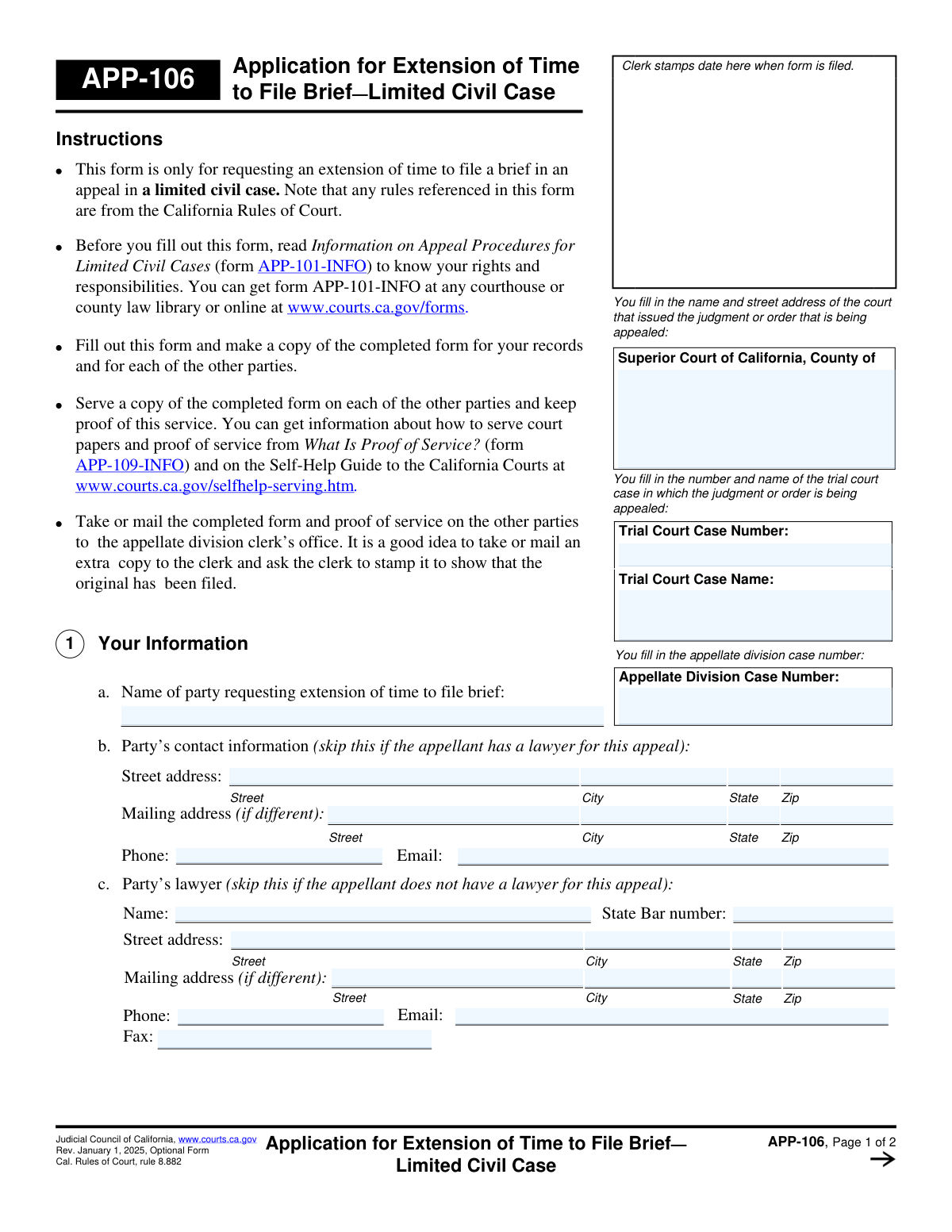
Yes! You can use AI to fill out Form APP-106, Application for Extension of Time to File Brief—Limited Civil Case
Form APP-106, Application for Extension of Time to File Brief—Limited Civil Case, is a legal document used in California courts to formally ask for a deadline extension for filing a brief in an appeal. It is crucial for parties who need more time to prepare their legal arguments to avoid potential dismissal of their case for missing a filing deadline. Today, this form can be filled out quickly and accurately using AI-powered services like Instafill.ai, which can also convert non-fillable PDF versions into interactive fillable forms.
Our AI automatically handles information lookup, data retrieval, formatting, and form filling.
It takes less than a minute to fill out APP-106 using our AI form filling.
Securely upload your data. Information is encrypted in transit and deleted immediately after the form is filled out.
Form specifications
| Form name: | Form APP-106, Application for Extension of Time to File Brief—Limited Civil Case |
| Number of fields: | 74 |
| Number of pages: | 2 |
| Language: | English |
Instafill Demo: How to fill out PDF forms in seconds with AI
How to Fill Out APP-106 Online for Free in 2026
Are you looking to fill out a APP-106 form online quickly and accurately? Instafill.ai offers the #1 AI-powered PDF filling software of 2026, allowing you to complete your APP-106 form in just 37 seconds or less.
Follow these steps to fill out your APP-106 form online using Instafill.ai:
- 1 Navigate to Instafill.ai and upload the APP-106 form or select it from the template library.
- 2 Enter the court, trial case, and appellate division case information in the header section.
- 3 Provide your personal information (or your lawyer's) in Section 1, including name and contact details.
- 4 In Sections 2 and 3, specify which brief needs an extension, its current due date, and the new requested deadline.
- 5 Complete Sections 4 through 9, detailing any prior extensions, reasons for the request, and the status of other briefs in the case.
- 6 Carefully explain the reason for needing the extension in Section 8, addressing the factors required by the court rules.
- 7 Review the entire form for accuracy, then use the platform to date, sign, and download the completed APP-106 for service and filing with the court.
Our AI-powered system ensures each field is filled out correctly, reducing errors and saving you time.
Why Choose Instafill.ai for Your Fillable APP-106 Form?
Speed
Complete your APP-106 in as little as 37 seconds.
Up-to-Date
Always use the latest 2026 APP-106 form version.
Cost-effective
No need to hire expensive lawyers.
Accuracy
Our AI performs 10 compliance checks to ensure your form is error-free.
Security
Your personal information is protected with bank-level encryption.
Frequently Asked Questions About Form APP-106
Form APP-106 is used to formally request an extension of time to file a brief in an appeal for a limited civil case in the state of California.
Any party in a limited civil case appeal, whether they are the appellant or the respondent, who needs more time to submit their legal brief must fill out this form.
You will need the trial court and appellate division case numbers, the case name, your contact information (or your lawyer's), the current due date of the brief, and the new date you are requesting.
You must file the completed form and proof of service with the appellate division clerk’s office, either by taking it there in person or by mailing it.
Yes, you are required to serve a copy of the completed application on each of the other parties in the case and keep proof of this service to file with the court.
You must provide a specific and clear reason for your request. The form advises you to address the factors in rule 8.811(b), including any potential prejudice to the other parties.
In Section 5, you must disclose all previous extensions, specifying whether they were by agreement of the parties (stipulation) or by a court order, and the total number of days granted.
A stipulation is a formal agreement between the parties. If the other party does not agree to give you more time, you must check the appropriate box in Section 6 and file this application with the court to request an order.
Yes, the instructions strongly recommend reading 'Information on Appeal Procedures for Limited Civil Cases' (form APP-101-INFO) before you fill out this form to understand your rights and responsibilities.
Yes, if a lawyer is requesting the extension on your behalf, they must complete Section 10 to certify that they have delivered a copy of the application to you as their client.
Yes, services like Instafill.ai use AI to auto-fill form fields accurately and save time, helping you complete the form more efficiently.
Simply upload the APP-106 PDF to the Instafill.ai platform. Its AI will make the form interactive, allowing you to fill in the fields easily from any device before downloading it for submission.
If you have a non-fillable PDF, you can use a service like Instafill.ai. It is designed to convert flat PDFs into interactive, fillable forms that you can complete online.
Compliance APP-106
Validation Checks by Instafill.ai
1
Appellate Case Number Consistency
This check ensures that the 'Appellate Division Case Number' entered on page 1 is identical to the 'Appellate Division Case Number' entered in the header of page 2. This is critical for document integrity and correct case file association. A mismatch could lead to the application being rejected or misfiled.
2
Mutually Exclusive Representation Information
Validates that either the party's contact information (Section 1b) or the party's lawyer's information (Section 1c) is provided, but not both. The form instructs the user to skip one section based on representation status. If both or neither are filled, the form is incomplete or ambiguous, and processing will be halted until the filer clarifies their representation.
3
State Bar Number Format
If lawyer information is provided in Section 1c, this check verifies that the 'State Bar number' field contains only numeric characters. This ensures the number is valid and can be used to verify the attorney's standing with the State Bar. An invalid format would prevent verification and may lead to rejection of the form.
4
Exclusive Brief Selection
Verifies that exactly one checkbox is selected in Section 2, which identifies the brief for which an extension is requested. Selecting more than one or none at all makes the request ambiguous. A failure in this validation would require the clerk to return the form for clarification, delaying the extension request.
5
Conditional Due Date Entry
This check ensures that the date field corresponding to the selected brief in Section 2 is filled out. It also validates that the entry is a valid date format. Without the original due date, the court cannot determine the length of the requested extension or if the request is timely.
6
Prospective Extension Date
Ensures the requested new due date in Section 3 is a valid date that occurs after the original due date provided in Section 2. Requesting an extension to a date that has already passed is a logical error. This validation prevents illogical requests from being submitted for court review.
7
Extension Days Calculation
Validates that the 'total number of days sought' in Section 3 is a positive integer. It can also perform a soft validation to check if the number of days roughly corresponds to the difference between the original due date (Section 2) and the requested new date (Section 3). This ensures the filer's request is internally consistent and clearly stated.
8
Conditional Previous Extension Details
If the filer checks 'Has been extended before by the stipulation of the parties' or 'Has been extended before by the court' in Section 5, this check ensures the corresponding 'number of extensions' and 'totaling number of days' fields are filled with positive integers. This information is required by the court to evaluate the current request in the context of the case's history.
9
Required Explanation for 'Other' Reason
In Section 6, if the 'Other reason' checkbox is selected to explain why a stipulation was not possible, this validation ensures the accompanying text field is not empty. The court requires a specific reason to be provided in this scenario. An empty field would render the application incomplete and likely result in denial or a request for more information.
10
Mandatory Extension Justification
Confirms that the text field in Section 8, which explains the reason for needing an extension, is not left blank. This justification is the core of the application and is required for the court to make a decision. Failure to provide a reason will result in an automatic denial of the request.
11
Past Date for Last Filed Brief
Validates that any date entered in Section 9 for a previously filed brief is a valid date that occurs on or before the current submission date. A future date for a past event is a logical impossibility. This check maintains the chronological accuracy of the case record presented in the application.
12
Conditional Lawyer Certification
This check verifies that the lawyer certification checkbox in Section 10 is checked if the lawyer information section (1c) has been completed. Per rule 8.810(e), the lawyer must certify they have provided a copy to their client. Failure to check this box when represented by counsel would make the application non-compliant with court rules.
13
Signature Name Verification
Cross-references the name typed in the signature block ('Type or print your name') against the party's name (Section 1a) and the lawyer's name (Section 1c). The signature name must match the name of the individual filing the form (either the party themselves or their attorney). A mismatch could indicate an unauthorized filing and lead to rejection.
Common Mistakes in Completing APP-106
Filers often mistakenly enter the Trial Court Case Number in the field for the Appellate Division Case Number, or vice versa. This happens because they are not aware that a new case number is assigned when a case is appealed. This error can lead to filing delays, misdirection of the document, or outright rejection by the clerk's office. To avoid this, carefully check the notice of appeal and other documents issued by the appellate division court for the correct number.
A frequent error is for self-represented parties to fill out the lawyer's information in section 1(c), or for parties with a lawyer to fill out their personal contact details in section 1(b). The form explicitly says to skip the section that doesn't apply, but people often overlook these instructions in their haste. This causes confusion for the court and opposing parties about who to contact regarding the case. Always read the instructions for each section carefully before entering information.
In Section 8, many applicants provide vague or weak justifications like 'I need more time' or 'I have been busy with work.' The court requires a specific, compelling reason that addresses the factors in rule 8.811(b), such as the complexity of the issues, counsel's engagement in other cases, or personal emergencies. A weak justification is the most common reason for the court to deny the extension, forcing the brief to be filed by the original deadline or risk default. Be detailed and honest about why the extension is necessary.
Applicants often complete the case information on the first page but forget to repeat the Appellate Division Case Name and Number in the header of the second page. This is a simple oversight but can cause significant processing problems if the pages become separated at the courthouse. To prevent this, make it a habit to review every page of the form for completeness before filing. AI-powered form fillers like Instafill.ai can help by automatically populating repeated information across all pages of a document.
In Section 5, filers may forget or misstate the number and length of previous extensions, whether granted by the court or by agreement (stipulation) of the parties. This can be seen as an attempt to mislead the court, even if unintentional, and may result in the denial of the current request. Before filling out this section, thoroughly review all prior correspondence and court orders in the case to ensure the information is completely accurate.
A critical mistake is filing the application with the court but failing to 'serve' a copy on all other parties in the case. The court will not consider an application until it has confirmation that the other parties have been properly notified. Forgetting this step or failing to file a separate Proof of Service form (like APP-109-INFO) will lead to the application being rejected, wasting valuable time. Always follow the instructions for service detailed on the form.
Forgetting to sign and date the application in the signature block at the end of page 2 is a simple but fatal error. An unsigned legal document is invalid and will be immediately rejected by the court clerk, as if it were never filed at all. This can cause you to miss your filing deadline entirely. Always perform a final review of the completed form, paying special attention to the signature and date fields before you print or file.
In Section 3, applicants must state the new date they want the brief to be due and the total number of days for the extension. It is common for there to be a mismatch between the date provided and the number of days calculated. This clerical error creates ambiguity and may lead the court to grant a shorter extension than intended. To avoid this, use a calendar to carefully count the days and double-check that your math is correct.
Section 4 asks whether the filer has received a default notice from the clerk under rule 8.882(c), which is a warning that the brief is late. Many filers, especially those without legal training, may not understand what this notice is or may not remember receiving one, leading them to check the wrong box. Misrepresenting this critical fact can have serious consequences for the appeal, so it is vital to review all notices from the court before answering.
For applications filed by a lawyer, Section 10 contains a mandatory certification that the lawyer has provided a copy of the application to their client. Attorneys, in their rush, sometimes forget to check this box, which is a violation of court rules (rule 8.810(e)). This can result in the form's rejection or sanctions from the court. Attorneys should use a filing checklist to ensure this and all other requirements are met. Using a tool like Instafill.ai, which can convert flat PDFs into fillable forms, can help ensure all checkboxes and fields are addressed.
Saved over 80 hours a year
“I was never sure if my IRS forms like W-9 were filled correctly. Now, I can complete the forms accurately without any external help.”
Kevin Martin Green
Your data stays secure with advanced protection from Instafill and our subprocessors
Robust compliance program
Transparent business model
You’re not the product. You always know where your data is and what it is processed for.
ISO 27001, HIPAA, and GDPR
Our subprocesses adhere to multiple compliance standards, including but not limited to ISO 27001, HIPAA, and GDPR.
Security & privacy by design
We consider security and privacy from the initial design phase of any new service or functionality. It’s not an afterthought, it’s built-in, including support for two-factor authentication (2FA) to further protect your account.
Fill out APP-106 with Instafill.ai
Worried about filling PDFs wrong? Instafill securely fills form-app-106-application-for-extension-of-time-to-file-brieflimited-civil-case forms, ensuring each field is accurate.