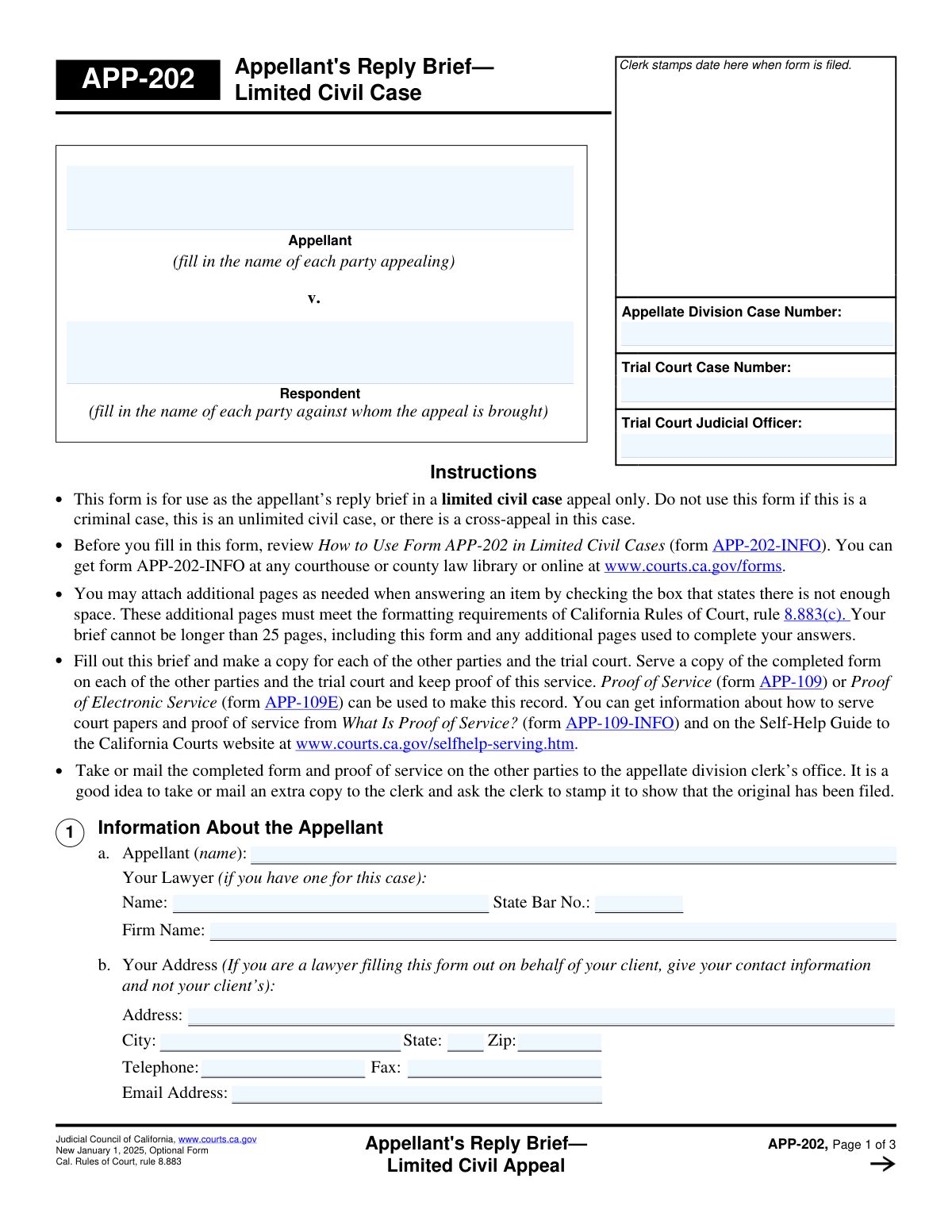
Yes! You can use AI to fill out Form APP-202, Appellant's Reply Brief—Limited Civil Appeal
Form APP-202, Appellant's Reply Brief—Limited Civil Appeal, is a legal document for use in the California court system. It allows the party who initiated an appeal (the appellant) in a limited civil case to respond to the arguments presented in the respondent's brief. This form is crucial for addressing the respondent's points and reinforcing the appellant's original arguments without introducing new ones. Today, this form can be filled out quickly and accurately using AI-powered services like Instafill.ai, which can also convert non-fillable PDF versions into interactive fillable forms.
Our AI automatically handles information lookup, data retrieval, formatting, and form filling.
It takes less than a minute to fill out APP-202 using our AI form filling.
Securely upload your data. Information is encrypted in transit and deleted immediately after the form is filled out.
Form specifications
| Form name: | Form APP-202, Appellant's Reply Brief—Limited Civil Appeal |
| Number of fields: | 33 |
| Number of pages: | 3 |
| Language: | English |
Instafill Demo: How to fill out PDF forms in seconds with AI
How to Fill Out APP-202 Online for Free in 2026
Are you looking to fill out a APP-202 form online quickly and accurately? Instafill.ai offers the #1 AI-powered PDF filling software of 2026, allowing you to complete your APP-202 form in just 37 seconds or less.
Follow these steps to fill out your APP-202 form online using Instafill.ai:
- 1 Navigate to Instafill.ai and upload or select Form APP-202, Appellant's Reply Brief—Limited Civil Appeal.
- 2 Use the AI assistant to input essential case details, such as the Appellate Division and Trial Court case numbers, and the names of the appellant and respondent.
- 3 Provide the appellant's contact information, or the attorney's information if represented.
- 4 In the 'Replying to Respondent's Arguments' section, clearly state each argument from the respondent's brief you are addressing and write your detailed reply, citing relevant laws and facts.
- 5 Review the entire form for accuracy and completeness, ensuring it adheres to the 25-page limit, including any attachments.
- 6 Date and electronically sign the form.
- 7 Download the completed brief and the necessary Proof of Service form (APP-109 or APP-109E) to serve the other parties and file with the court clerk.
Our AI-powered system ensures each field is filled out correctly, reducing errors and saving you time.
Why Choose Instafill.ai for Your Fillable APP-202 Form?
Speed
Complete your APP-202 in as little as 37 seconds.
Up-to-Date
Always use the latest 2026 APP-202 form version.
Cost-effective
No need to hire expensive lawyers.
Accuracy
Our AI performs 10 compliance checks to ensure your form is error-free.
Security
Your personal information is protected with bank-level encryption.
Frequently Asked Questions About Form APP-202
This form is used by the appellant (the party who filed the appeal) to respond to the arguments made by the respondent in their brief. It is your opportunity to reply to the points the other side raised in a limited civil case appeal.
No, this form is specifically for appellants in a limited civil case appeal. It should not be used for criminal cases, unlimited civil cases, or in cases where there is a cross-appeal.
In this section, you must identify each argument from the respondent's brief that you are replying to, and then explain your reply. Do not repeat arguments from your opening brief or introduce new arguments not previously raised.
Yes, your entire brief, which includes the APP-202 form itself and any additional attached pages, cannot be longer than 25 pages in total.
If you need more space, check the box indicating you are attaching an extra sheet of paper. Be sure to label the attachment clearly as instructed on the form (e.g., 'Attachment 2a(2)') and follow court formatting rules.
You must serve a copy on each of the other parties and the trial court, then file the original form with the appellate division clerk's office. You must also file a Proof of Service form, such as APP-109 or APP-109E.
You must provide both the Appellate Division Case Number and the original Trial Court Case Number. These numbers should be written at the top of each page of the form.
No, the reply brief is strictly for responding to the arguments made in the respondent's brief. You cannot use it to raise new arguments or issues for the first time in the appeal.
You should review the information sheet 'How to Use Form APP-202 in Limited Civil Cases' (form APP-202-INFO). It is available at any California courthouse, county law library, or online at www.courts.ca.gov/forms.
Serving means formally delivering a copy of the completed brief to the other parties and the trial court. You prove this by filling out and filing a 'Proof of Service' form (like APP-109 or APP-109E) with the court.
Yes, services like Instafill.ai use AI to help you accurately auto-fill form fields, which can save time and reduce errors. However, AI cannot provide legal advice for the substance of your arguments.
You can use a service like Instafill.ai to complete this form online. Simply upload the form, and the AI will make the fields interactive, allowing you to type your information directly before downloading the completed document.
If you have a non-fillable PDF, you can use a tool like Instafill.ai. It can convert flat, non-interactive PDFs into fillable forms that you can easily complete on your computer.
Compliance APP-202
Validation Checks by Instafill.ai
1
Ensures Case Numbers are Provided
Checks that both the 'Appellate Division Case Number' and 'Trial Court Case Number' fields are filled. These numbers are essential for the court clerk to correctly identify the case and file the document in the proper record. A submission without these numbers would be rejected as it cannot be associated with a specific appeal.
2
Verifies Case Number Consistency Across Pages
Validates that the 'Appellate Division Case Number' entered on page 1 matches the same number entered on pages 2 and 3. This consistency is crucial for ensuring that all pages of the document are correctly associated, especially if they become separated during processing. Mismatched numbers could lead to an incomplete filing and rejection by the clerk.
3
Requires Identification of All Parties
This check ensures that the names of both the 'Appellant' and the 'Respondent' are filled in the case caption area. Identifying all parties to the appeal is a fundamental requirement for any legal filing. Failure to name the parties would render the document legally deficient and result in its rejection.
4
Conditional Requirement for State Bar Number
This validation ensures that if an attorney's name is entered in the 'Your Lawyer' field, the corresponding 'State Bar No.' field must also be completed. An attorney cannot be identified for court purposes without their bar number. Submitting a form with a lawyer's name but no bar number would be considered an incomplete and invalid filing.
5
Validates State Bar Number Format
This check verifies that the 'State Bar No.' field, if filled, contains a valid number format, typically a sequence of digits. This is important for verifying the attorney's credentials and their standing with the State Bar. An incorrectly formatted number could prevent verification and may lead to questions about the filer's authority to represent the appellant.
6
Validates Email Address Format
Checks that any entry in the 'Email Address' field conforms to the standard email format, such as '[email protected]'. This is critical for ensuring that electronic communications and service from the court and other parties are deliverable. An invalid email address could cause the filer to miss important deadlines and notices.
7
Validates ZIP Code Format
This check ensures the 'Zip' code field contains a valid 5-digit or 9-digit (ZIP+4) numeric format. An accurate ZIP code is essential for the reliable delivery of physical mail from the court and opposing parties. An invalid format could lead to returned mail and missed communications.
8
Ensures At Least One Reply Argument is Present
This validation confirms that the form is not submitted empty by checking that at least the first reply section (fields 2a(1) and 2a(2)) is filled out. The entire purpose of a reply brief is to respond to the respondent's arguments. A submission without any reply content serves no legal purpose and would be rejected as a deficient filing.
9
Logical Check for Attachment Indicators
Verifies that if a checkbox indicating 'not enough space' is checked, there is a corresponding attachment file submitted with the form. This prevents a situation where the filer indicates additional information exists on an attachment, but no attachment is provided. This discrepancy would result in an incomplete filing and likely rejection.
10
Verifies Signature Date is Valid and Present
This check ensures the 'Date' field in the signature block is filled with a valid calendar date that is not in the future. The signature date attests to when the document was executed and is a critical component of a valid legal document. A missing, invalid, or future date would invalidate the signature and cause the document to be rejected.
11
Ensures Signatory Name is Provided
This validation requires the 'Type or print your name' field below the signature line to be completed. This field clarifies the identity of the person who signed the document, which is essential for accountability and verification. A missing signatory name would render the signature incomplete and the filing invalid.
12
Logical Check for Signatory Identity
This check verifies that the printed name in the signature block ('SigName') matches either the appellant's name ('AppFullName') or the lawyer's name ('AppLawyerName'). This ensures the person signing the brief is a party to the case or their authorized legal representative. A mismatch could indicate an unauthorized filing and lead to rejection or a motion to strike.
13
Total Page Count Limitation
This validation checks that the total number of pages, including the 3-page form itself and all attached pages, does not exceed 25. This rule (Cal. Rules of Court, rule 8.883) is a strict requirement to ensure brevity and fairness in appellate proceedings. Submitting a brief that exceeds the page limit will result in its rejection by the court clerk.
Common Mistakes in Completing APP-202
Users often incorrectly enter the Trial Court Case Number in the field for the Appellate Division Case Number, or vice versa. This happens because they are dealing with two related but distinct cases. This error can cause significant filing delays, rejection of the document by the clerk, and confusion in routing the brief to the correct judicial panel. To avoid this, carefully double-check both numbers against official court correspondence; the Appellate Division number is assigned when the appeal is initiated.
The instructions explicitly state this form is only for 'limited civil case' appeals and not for criminal, unlimited civil, or cases with a cross-appeal. Litigants, especially those without legal counsel, may not understand these distinctions and use the form incorrectly. Using the wrong form will lead to its rejection by the court, wasting time and potentially causing the appellant to miss strict filing deadlines for their appeal.
A reply brief's purpose is to respond to the respondent's arguments, not to introduce new issues for the first time. Appellants may be tempted to add a point they forgot to include in their opening brief, but this is procedurally improper. The appellate court will not consider new arguments raised in a reply brief, rendering that portion of the filing completely ineffective and weakening the appellant's case.
A frequent and critical error is filing the brief with the appellate court but forgetting to formally serve copies on the other parties and the trial court. An equally common mistake is failing to file a completed Proof of Service (form APP-109 or APP-109E) with the brief. Without proper service and proof, the court may strike the brief or even dismiss the appeal for failure to follow procedural rules.
The form clearly states the entire brief, including the form itself and all attachments, cannot exceed 25 pages. People often miscalculate this by not counting the three pages of the form itself or by adding lengthy attachments. Submitting a brief that exceeds the page limit can result in the court clerk refusing to file it, forcing a last-minute, stressful revision to meet the deadline.
When more space is needed, users must attach additional pages that conform to specific court rules (Cal. Rules of Court, rule 8.883(c)) and label them as instructed (e.g., 'Attachment 2a(1)'). Many filers simply attach handwritten notes or pages that don't meet formatting requirements for font, spacing, and margins. This can lead to the court striking the non-compliant attachments, meaning the arguments on those pages will be ignored.
In Section 2, appellants sometimes restate or rephrase the same arguments they made in their opening brief instead of directly addressing the points raised by the respondent. This mistake makes the reply brief redundant and unpersuasive. A reply brief should be a focused rebuttal that explains why the respondent's arguments are incorrect, not a simple repetition of one's own initial points.
The instructions in Section 1b specify that if a lawyer is filling out the form, they must provide their own contact information, not the client's. A lawyer or their staff might mistakenly enter the appellant's personal address and phone number. This can cause crucial court notices and communications to be sent to the wrong person, leading to missed deadlines and procedural missteps.
Forgetting to date and sign the form on page 3 is a simple but surprisingly common oversight, often happening when a filer is rushed. An unsigned legal document is invalid and will be rejected by the court clerk, which can be a critical problem if the filing deadline is the same day. Always perform a final check for a signature and the correct date before filing. AI-powered tools like Instafill.ai can help by highlighting required signature fields to prevent such omissions.
The form includes checkboxes (e.g., next to item 2a(1)) that must be checked if an answer is continued on an attached sheet. Filers often attach extra pages but forget to check the corresponding box on the form itself. This can cause confusion for the court clerk and judges, who may overlook the attached information because it was not properly indicated on the main form.
Saved over 80 hours a year
“I was never sure if my IRS forms like W-9 were filled correctly. Now, I can complete the forms accurately without any external help.”
Kevin Martin Green
Your data stays secure with advanced protection from Instafill and our subprocessors
Robust compliance program
Transparent business model
You’re not the product. You always know where your data is and what it is processed for.
ISO 27001, HIPAA, and GDPR
Our subprocesses adhere to multiple compliance standards, including but not limited to ISO 27001, HIPAA, and GDPR.
Security & privacy by design
We consider security and privacy from the initial design phase of any new service or functionality. It’s not an afterthought, it’s built-in, including support for two-factor authentication (2FA) to further protect your account.
Fill out APP-202 with Instafill.ai
Worried about filling PDFs wrong? Instafill securely fills form-app-202-appellants-reply-brieflimited-civil-appeal forms, ensuring each field is accurate.