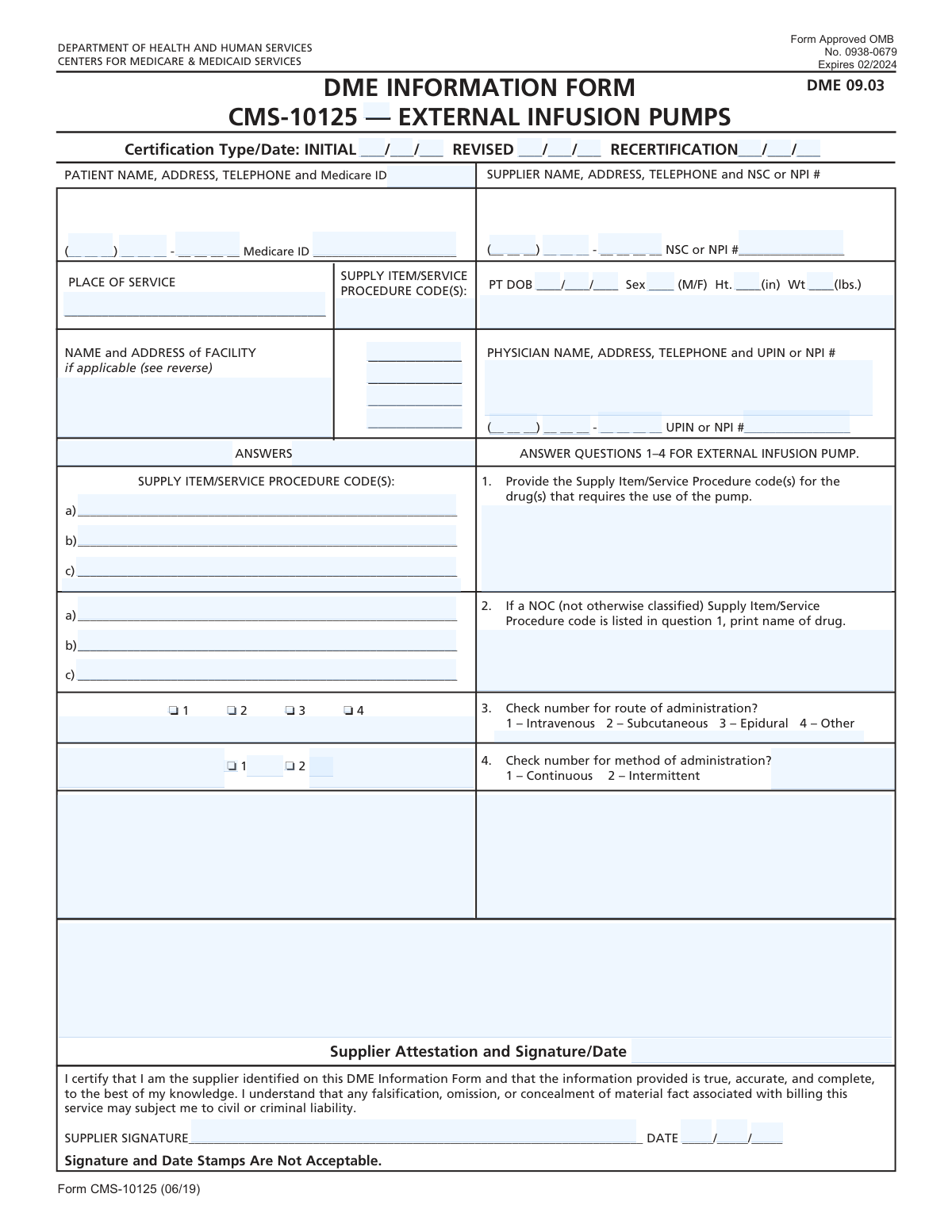
Yes! You can use AI to fill out Form CMS-10125, DME Information Form for External Infusion Pumps

Form CMS-10125 is a document from the Centers for Medicare & Medicaid Services (CMS) required for claims involving external infusion pumps. Suppliers must complete this form to provide essential patient, physician, and equipment information, certifying the medical necessity for the durable medical equipment (DME). Today, this form can be filled out quickly and accurately using AI-powered services like Instafill.ai, which can also convert non-fillable PDF versions into interactive fillable forms.
CMS-10125 has a basic Form Complexity Index of 42/100 — 71 fillable fields across 2 pages. Instafill’s AI completes it accurately in under a minute.

Form specifications

Form name: Form CMS-10125, DME Information Form for External Infusion Pumps
Number of fields: 71
Number of pages: 2
FCI: Basic (42/100)
Language: English
Our AI automatically handles information lookup, data retrieval, formatting, and form filling.
It takes less than a minute to fill out CMS-10125 using our AI form filling.
Securely upload your data. Information is encrypted in transit and deleted immediately after the form is filled out.
Preview of Form CMS-10125, DME Information Form for External Infusion Pumps

Instafill Demo: How to fill out PDF forms in seconds with AI

How to Fill Out CMS-10125 Online for Free in 2026

Are you looking to fill out a CMS-10125 form online quickly and accurately? Instafill.ai offers the #1 AI-powered PDF filling software of 2026, allowing you to complete your CMS-10125 form in just 37 seconds or less.
Follow these steps to fill out your CMS-10125 form online using Instafill.ai:
  1. 1 Navigate to Instafill.ai and upload or select the CMS-10125 form.
  2. 2 Use the AI assistant to automatically populate supplier information, including name, address, and NSC or NPI number.
  3. 3 Enter the patient's details, such as name, address, Medicare ID, and date of birth.
  4. 4 Input the physician's information, including their name, address, and UPIN or NPI number.
  5. 5 Answer the specific questions regarding the infusion pump, providing supply codes, drug names, and administration details.
  6. 6 Review all entered information for accuracy, then digitally sign and date the supplier attestation section.
  7. 7 Securely download, print, or share the completed form for submission.

Our AI-powered system ensures each field is filled out correctly, reducing errors and saving you time.

Why Choose Instafill.ai for Your Fillable CMS-10125 Form?

Speed

Complete your CMS-10125 in as little as 37 seconds.

Up-to-Date

Always use the latest 2026 CMS-10125 form version.

Cost-effective

No need to hire expensive lawyers.

Accuracy

Our AI performs 10 compliance checks to ensure your form is error-free.

Security

Your personal information is protected with bank-level encryption.

Frequently Asked Questions About CMS-10125

CMS-10125 has a Form Complexity Index of 42 out of 100, placing it in the basic complexity tier. This score is calculated deterministically from the form’s own structure using Instafill’s published Form Complexity Index methodology, so it can be reproduced and independently verified — it is not a subjective estimate.

For CMS-10125 specifically, the score reflects 71 fillable fields across 2 pages. The number of fields is the largest factor in the base score (weighted 36%), followed by how difficult those fields are to complete based on their type, where free-text and signature fields count for more than simple checkboxes (26%). The number of pages that actually contain fields (15%), the amount of conditional “fill-only-if” logic (16%), and how many sections the form is divided into (7%) account for the rest of the base. On top of that base, the index adds points for tables and repeating lists, bundled instruction pages, and dense page layouts — capturing difficulty the base alone can miss.

In practical terms, a basic score means the form is relatively light, but still needs careful, accurate entry. Instafill removes that effort entirely: our AI reads your information, maps each value to the correct field — including the conditional ones — and completes CMS-10125 accurately in under a minute, with every field available for you to review before you download. See exactly how the Form Complexity Index is calculated.

This form, the DME Information Form for External Infusion Pumps, is used by medical equipment suppliers to certify the need for an external infusion pump and its related drugs for a Medicare patient.

The Durable Medical Equipment (DME) supplier is responsible for gathering the required information, completing the form, and signing the supplier attestation section.

Use 'Initial' for the first certification. Use 'Revised' if the physician changes the order, and 'Recertification' for renewals. For Revised or Recertification, you must always include the original 'Initial' date as well.

You must obtain the treating physician's National Provider Identifier (NPI) or Unique Physician Identification Number (UPIN) from the physician's office. The form requires this for proper identification.

It's a standard code that indicates where the patient is using the equipment, such as '12' for the patient's home. You can find a complete list of codes in the DMERC supplier manual.

If you enter a NOC procedure code in question 1, you must also write the specific name of the drug in the space provided for question 2.

No, you should only list the HCPCS procedure codes for the items that specifically require this DME Information Form (DIF) for certification.

No, the form instructions explicitly state that signature and date stamps are not acceptable. An original, handwritten signature is required.

This form should be submitted along with your claim to the appropriate Medicare contractor. Do not send it to the address listed in the Paperwork Reduction Act notice at the bottom of the form.

Yes, services like Instafill.ai use AI to accurately auto-fill form fields using your existing data, which can save time and help prevent errors.

You can use a service like Instafill.ai to upload the PDF and complete it in an interactive online format. This allows for easy data entry, checkbox selection, and digital signing.

If you have a non-fillable or 'flat' PDF, you can use a tool like Instafill.ai. It can convert the document into an interactive, fillable form automatically.

You will need the patient's full name, address, phone number, Medicare ID, date of birth, sex, height, and weight.

Compliance CMS-10125
Validation Checks by Instafill.ai

1
Certification Date Logic
Checks that if a REVISED or RECERTIFICATION date is provided, the INITIAL date field is also filled. This is required by the form instructions to maintain a complete history of the certification. A failure would result in an incomplete submission, as the initial service date is a mandatory data point for all but the very first certification.
2
Medicare Beneficiary Identifier (MBI) Format
Validates that the Medicare ID field follows the 11-character MBI format. This check is critical for correctly identifying the patient and linking the form to the correct Medicare record. An invalid MBI will cause claim rejection and processing delays.
3
Provider Identifier Format and Qualifier
Verifies that the Supplier's NSC/NPI and Physician's UPIN/NPI numbers are preceded by the correct qualifier (e.g., 'XX', '1C', '1G') and have the correct number of digits. This ensures the provider can be unambiguously identified within the Medicare system. Incorrectly formatted identifiers lead to claim processing failures.
4
Conditional Facility Information Requirement
Ensures that if the 'Place of Service' code indicates a facility (e.g., 31 for SNF, 65 for ESRD), the 'NAME and ADDRESS of FACILITY' section is completed. This logic is crucial for determining the correct billing and payment context. Failure to provide facility details when required can lead to claim denial or incorrect payment.
5
Patient Date of Birth Validity
Confirms the patient's Date of Birth is a valid, full date in MM/DD/YY format and represents a date in the past. It also checks that the resulting age is within a reasonable human lifespan. This prevents data entry errors and ensures the patient's identity and eligibility can be verified.
6
Supplier Signature Date Logic
Validates that the Supplier Signature Date is present and is on or after the latest Certification Date (Initial, Revised, or Recertification). A supplier cannot attest to the accuracy of information dated in the future. This check prevents logical inconsistencies and potential fraud, ensuring the attestation is valid.
7
NOC Code and Drug Name Dependency
This check enforces a conditional rule: if a 'Not Otherwise Classified' (NOC) procedure code is listed in Question 1, then Question 2 (drug name) must be filled out. Conversely, if Question 2 is filled, a NOC code must be present in Question 1. This ensures that claims with non-specific codes are properly documented for review and payment.
8
Exclusive Selection for Administration Route
Verifies that for Question 3, 'route of administration,' exactly one of the four available options is selected. Allowing multiple or no selections would create ambiguity about the medical service provided. This check ensures the data is clear and sufficient for medical review and accurate claim processing.
9
Exclusive Selection for Administration Method
Verifies that for Question 4, 'method of administration,' exactly one of the two available options (Continuous or Intermittent) is selected. This information is critical for determining the correct billing codes and medical necessity. An invalid selection would require clarification and delay claim processing.
10
Completeness of Patient Identification Block
Ensures that all fields in the patient information block (Name, Address, Telephone, Medicare ID) are fully completed. This information is fundamental to the entire form, as it identifies the beneficiary receiving the service. Incomplete information will result in an immediate rejection of the form as it cannot be processed.
11
Phone Number Structure Validation
This validation checks that all telephone number fields (Patient, Supplier, Physician) conform to the specified (XXX) XXX-XXXX format. Enforcing a standard format improves data quality, ensures the numbers are machine-readable, and simplifies communication if follow-up is needed. Non-standard formats can cause integration issues with other systems.
12
Patient Sex Field Validation
Ensures the 'Sex' field contains only 'M' or 'F' as specified on the form. This prevents invalid data entry and ensures compliance with the form's defined options. Any other value would be considered a data quality error and require correction.

Common Mistakes in Completing CMS-10125

Incorrect Certification Date Combination

The form requires that for any 'REVISED' or 'RECERTIFICATION' submission, the 'INITIAL' certification date must also be provided. A common error is to only fill in the recertification or revision date, leaving the initial date blank. This omission can lead to processing delays or rejection, as it fails to provide the complete history required for review. To avoid this, always ensure both the initial date and the relevant revised/recertification date are entered correctly.

Improper NPI/UPIN/NSC Formatting

The instructions specify that Supplier NSC/NPI and Physician UPIN/NPI numbers must be preceded by a specific qualifier (e.g., '1C' for NSC, 'XX' for NPI, '1G' for UPIN). Many users simply enter the 10-digit number without the required prefix, leading to data validation failures and claim denials. Double-checking the instructions and ensuring the correct two-character qualifier is included is crucial for proper identification and processing. AI-powered tools can automatically format these numbers correctly.

Using a Signature Stamp

The form explicitly states, 'Signature and Date Stamps Are Not Acceptable.' Despite this clear instruction, suppliers sometimes use a stamp for convenience, which automatically invalidates the form. This requirement exists to ensure personal attestation. The consequence is an immediate rejection of the form, requiring a new submission with a handwritten signature, thereby delaying the entire process.

Incorrect Height Measurement Unit

The patient information section asks for height specifically in inches (Ht. ____(in)). A frequent mistake is entering the height in feet and inches (e.g., 5' 10"), which is an incorrect format and can cause data entry errors in the system. This can affect clinical calculations or lead to rejection. To prevent this, always convert the patient's height into total inches before filling out the form.

Using Text for Place of Service

The 'PLACE OF SERVICE' field requires a specific numerical code (e.g., '12' for patient's home, '31' for a skilled nursing facility) as defined in the DMERC supplier manual. People often write out the location name, such as 'Home,' instead of entering the code. This non-standard entry will fail automated processing and requires manual correction, causing significant delays. Always refer to the official code list to find and enter the correct number.

Incomplete NOC Code Information

When a 'Not Otherwise Classified' (NOC) supply code is used in question 1, the form requires the specific name of the drug to be written out in question 2. Forgetting to provide the drug name makes it impossible for reviewers to determine what is being supplied, leading to claim denial. It is essential to complete question 2 whenever a NOC code is listed to ensure the claim is specific and verifiable.

Patient ID Mismatch

Entering a patient's name or Medicare ID that does not perfectly match the information on their Medicare card is a very common and critical error. Typos, using a nickname instead of a legal name, or transposing numbers in the ID will cause an immediate mismatch in the system. This results in claim rejection and requires resubmission, delaying patient care and payment. Carefully transcribing this information directly from the card is essential.

Missing Supplier Signature or Date

The supplier's signature and date certify that all information on the form is true and accurate. Submitting the form without a handwritten signature or the corresponding date renders the entire document invalid. This is often a simple oversight but has serious consequences, as the form will be rejected outright. Creating a final review checklist can help ensure these critical fields are never missed before submission.

Listing Non-Required Procedure Codes

The 'SUPPLY ITEM/SERVICE PROCEDURE CODES' section is intended only for HCPCS codes for items that specifically require a DIF. A common mistake is to list all items being supplied to the patient, including those that do not require this certification. This clutters the form and can create confusion for the processor, potentially slowing down the review. Only list the procedure codes for the items that necessitate the completion of this CMS-10125 form.

Incorrect Date Formatting

The form consistently requires dates in the MM/DD/YY format, as indicated by the field placeholders. Users may accidentally enter dates in other formats, such as MM/DD/YYYY or DD/MM/YY, which can cause data entry errors and system rejections. To avoid this, consistently use the two-digit month, two-digit day, and two-digit year format across all date fields on the form. AI-powered form-filling tools like Instafill.ai can help by automatically validating and formatting dates correctly.
Saved over 80 hours a year

“I was never sure if my IRS forms like W-9 were filled correctly. Now, I can complete the forms accurately without any external help.”

Kevin Martin Green

Your data stays secure with advanced protection from Instafill and our subprocessors

Robust compliance program

Transparent business model

You’re not the product. You always know where your data is and what it is processed for.

ISO 27001, HIPAA, and GDPR

Our subprocesses adhere to multiple compliance standards, including but not limited to ISO 27001, HIPAA, and GDPR.

Security & privacy by design

We consider security and privacy from the initial design phase of any new service or functionality. It’s not an afterthought, it’s built-in, including support for two-factor authentication (2FA) to further protect your account.

Fill out CMS-10125 with Instafill.ai

Worried about filling PDFs wrong? Instafill securely fills form-cms-10125-dme-information-form-for-external-infusion-pumps forms, ensuring each field is accurate.