
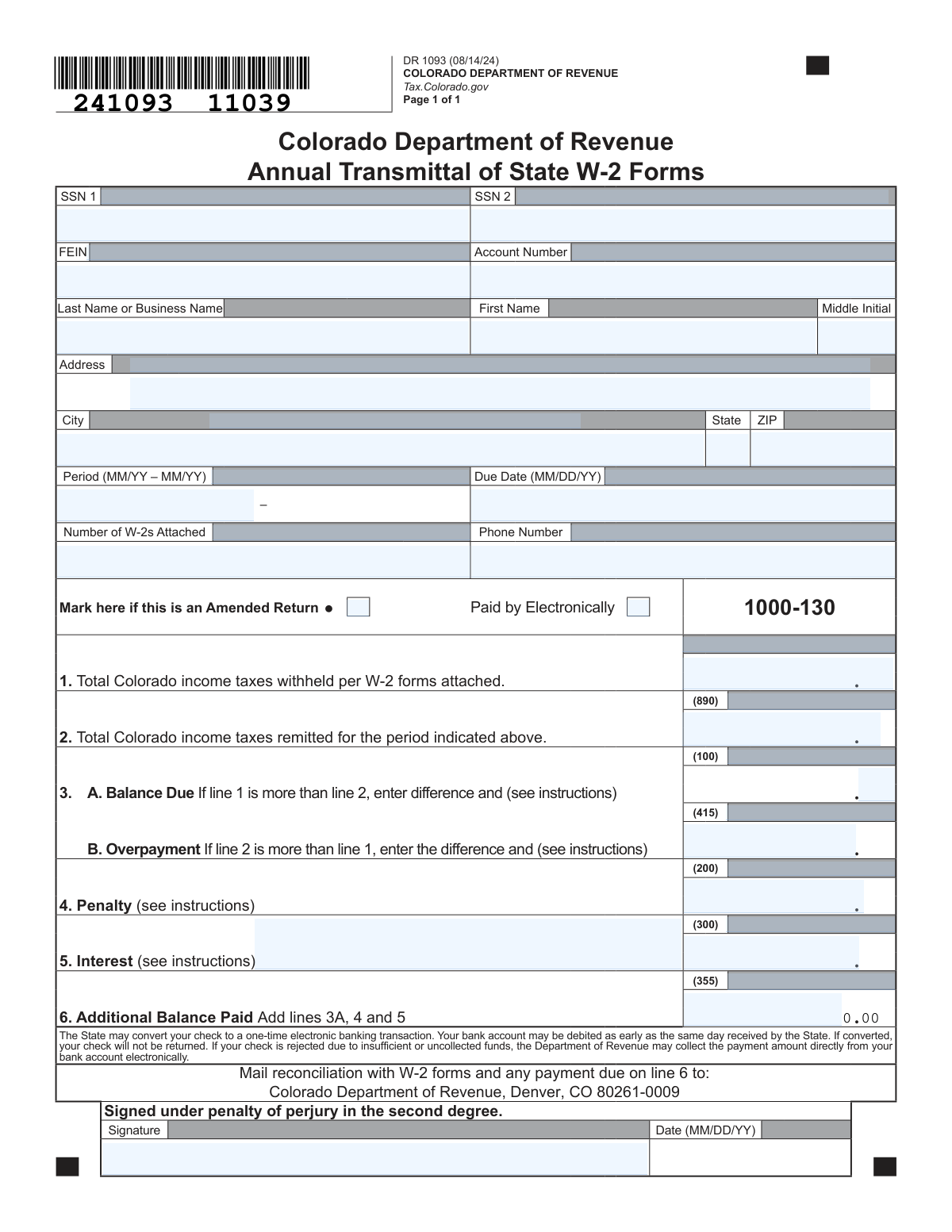
Yes! You can use AI to fill out Form DR 1093, Annual Transmittal of State W-2 Forms
Don't type 26 fields by hand. Tell our AI about yourself, or upload your W-2 or last year's return, and it fills every field in seconds. You check it, then download, print or sign.
The AI does the filling. You just check it.
No typing into boxes, nothing to install.
What this form asks for
The AI fills all of it, from your answers or your documents.
The AI checks your answers before you download
12 checks built for this form, so a wrong date or a missing answer is caught before anyone else sees it.
Ensures that at least one primary identifier (FEIN, SSN, or Account Number) is provided on the form. This is critical for the Department of Revenue to correctly associate the transmittal form with the corresponding taxpayer account. A submission without a valid identifier cannot be processed and will be rejected for being unidentifiable.
Validates that if a Federal Employer Identification Number (FEIN) is entered, it follows the standard 9-digit format (XX-XXXXXXX). Correct formatting is essential for automated processing and matching against federal and state databases. An incorrectly formatted FEIN will cause record-matching failures and processing delays.
Verifies that any Social Security Number (SSN) entered is in the correct XXX-XX-XXXX format. This check ensures data integrity and proper identification of individual filers. Submissions with malformed SSNs can lead to processing errors, security risks, and require manual correction.
Ensures the 'Period' field is a valid date range in MM/YY – MM/YY format, with the start date occurring before or at the same time as the end date. This validation confirms that the tax period being reported is logical and correctly defined. An invalid period, such as an end date before a start date, would make the entire filing ambiguous and unprocessable.
Checks that the 'Date' next to the signature is a valid date in MM/DD/YY format and is not a date in the future. The signature date attests to the accuracy of the information on that day and must be historically accurate. A future date is logically impossible and would invalidate the perjury statement, leading to form rejection.
Performs a critical logical check on Lines 1, 2, and 3. It verifies that if Line 1 (withheld) is greater than Line 2 (remitted), Line 3A (Balance Due) must be populated and Line 3B (Overpayment) must be zero. Conversely, if Line 2 is greater than Line 1, it ensures Line 3B is populated and Line 3A is zero. This prevents fundamental mathematical errors in determining the filer's financial status.
And 6 more checks
- Mutually Exclusive Balance/Overpayment Fields
- Line 6 Total Balance Calculation
- W-2 Count Validation
- Required Filer Address Information
- ZIP Code Format
- Signature and Date Presence
Let AI fill out your DR 1093
No typing. Every field filled in seconds, checked, ready to sign.
How to Fill Out DR 1093 Online for Free in 2026
What the AI walks you through.
- Navigate to Instafill.ai and upload your DR 1093 form or select it from the template library.
- Provide your business identification details, including your FEIN or SSN, account number, and business name and address.
- Enter the reporting period, due date, and the total number of W-2 forms you are attaching with this transmittal.
- Use the AI assistant to accurately fill in the financial details, including the total Colorado income taxes withheld (Line 1) and the total taxes remitted (Line 2).
- The system will automatically calculate any balance due (Line 3A) or overpayment (Line 3B), as well as any applicable penalties (Line 4) and interest (Line 5).
- Review all the information for accuracy, then digitally sign and date the form to certify its contents under penalty of perjury.
- Download the completed form, ready to be mailed with the physical W-2s and any payment due to the Colorado Department of Revenue.
Common Mistakes in Completing DR 1093
The ones the AI is built to catch.
Mismatched W-2 Count and Withholding Total
Incorrectly Reporting Balance Due vs. Overpayment
Using an Incorrect Business Name or Identifier
Forgetting to Sign and Date the Form
Estimating Penalty and Interest Amounts
Inaccurate Total Remitted on Line 2
Failing to Mark as an Amended Return
Incorrect Reporting Period Format
Omitting Suite or Secondary Address Information
Submitting an Illegible or Poorly Scanned Form
Frequently Asked Questions About DR 1093
Is it really free for 7 days?
Can I fill other forms too?
How do I cancel?
How does the AI fill out DR 1093?
What happens to my information?
How complex is DR 1093 to fill out?
What is the purpose of Form DR 1093?
Who is required to file Form DR 1093?
What documents do I need to submit with this form?
What is the difference between the amounts on Line 1 and Line 2?
What should I do if I have a balance due on Line 3A?
What happens if I have an overpayment on Line 3B?
When should I check the 'Amended Return' box?
Where do I mail the completed Form DR 1093?
How do I calculate the penalty and interest for lines 4 and 5?
Can AI tools help me fill out Form DR 1093?
How can I fill out this form online using Instafill.ai?
The PDF of Form DR 1093 I found is not fillable. What can I do?
What information do I need to have ready to complete this form?
Get your DR 1093 filled out by AI
$0 today. Cancel before Nov 4 and you pay nothing.
Other forms like this one
PA state forms: Form 1095-A, Health Insurance Marketplace Statement, Form W-2, Wage and Tax Statement, Form 593, Real Estate Withholding, Form 8938, Statement of Specified Foreign Financial Assets, Form CMS-2567, Statement of Deficiencies, Form 1098, Mortgage Interest Statement, Form 1098-T, Tuition Statement, Form 1099-S, Proceeds From Real Estate Transactions, Form 1098-E, Student Loan Interest Statement, Form DS-3053, Statement of Consent, Form DS-86, Statement of Non-Receipt of a U.S. Passport, Form DS-86, Statement of Non-Receipt of a U.S. Passport, Form 108, Statement of Intention, Form 107, Statement of Financial Affairs, Form 121, Statement About Your SSNs, Form 122A-1, Chapter 7 Statement of Current Monthly Income, Center for Infertility & Reproductive Surgery – New Patient Questionnaire and Patient/Guarantor Statement (Brigham and Women’s Hospital, Department of Obstetrics and Gynecology), Adult Travel Document Application for Stateless and Protected Persons in Canada (16 years of age or over) (PPTC 190), Form W-8IMY (Rev. October 2021), Certificate of Foreign Intermediary, Foreign Flow-Through Entity, or Certain U.S. Branches for United States Tax Withholding and Reporting, Form W-2, Wage and Tax Statement (2025)
NJ state forms: Form 1095-A, Health Insurance Marketplace Statement, Form W-2, Wage and Tax Statement, Form 593, Real Estate Withholding, Form 8938, Statement of Specified Foreign Financial Assets, Form CMS-2567, Statement of Deficiencies, Form 1098, Mortgage Interest Statement, Form 1098-T, Tuition Statement, Form 1099-S, Proceeds From Real Estate Transactions, Form 1098-E, Student Loan Interest Statement, Form DS-3053, Statement of Consent, Form DS-86, Statement of Non-Receipt of a U.S. Passport, Form DS-86, Statement of Non-Receipt of a U.S. Passport, Form 108, Statement of Intention, Form 107, Statement of Financial Affairs, Form 121, Statement About Your SSNs, Form 122A-1, Chapter 7 Statement of Current Monthly Income, Center for Infertility & Reproductive Surgery – New Patient Questionnaire and Patient/Guarantor Statement (Brigham and Women’s Hospital, Department of Obstetrics and Gynecology), Adult Travel Document Application for Stateless and Protected Persons in Canada (16 years of age or over) (PPTC 190), Form W-8IMY (Rev. October 2021), Certificate of Foreign Intermediary, Foreign Flow-Through Entity, or Certain U.S. Branches for United States Tax Withholding and Reporting, Form W-2, Wage and Tax Statement (2025)
state ID forms: Application for Renewal or Duplicate of Alabama Driver License or ID card, Form 1095-A, Health Insurance Marketplace Statement, Form W-2, Wage and Tax Statement, Form 593, Real Estate Withholding, Form 8938, Statement of Specified Foreign Financial Assets, Form CMS-2567, Statement of Deficiencies, Form 1098, Mortgage Interest Statement, Form 1098-T, Tuition Statement, Form 1099-S, Proceeds From Real Estate Transactions, Form 1098-E, Student Loan Interest Statement, Form DS-3053, Statement of Consent, Form DS-86, Statement of Non-Receipt of a U.S. Passport, Form 108, Statement of Intention, Form 107, Statement of Financial Affairs, Form 121, Statement About Your SSNs, Form 122A-1, Chapter 7 Statement of Current Monthly Income, Center for Infertility & Reproductive Surgery – New Patient Questionnaire and Patient/Guarantor Statement (Brigham and Women’s Hospital, Department of Obstetrics and Gynecology), Adult Travel Document Application for Stateless and Protected Persons in Canada (16 years of age or over) (PPTC 190), Form W-8IMY (Rev. October 2021), Certificate of Foreign Intermediary, Foreign Flow-Through Entity, or Certain U.S. Branches for United States Tax Withholding and Reporting, Form W-2, Wage and Tax Statement (2025)
Let AI fill out your DR 1093
Your trial starts once a card is added. You pay nothing before Nov 4.
Our AI already knows this form, all 26 fields of it. Skip the typing: tell it about yourself, or upload what you have, and it fills the whole form in seconds.
- AI fills every field on the form, checkboxes included
- No typing into boxes: answer a few questions, or upload your W-2 or last year's return, an old copy of this form, a photo of a document
- The AI checks the answers; you review and change anything before you download
- Download the finished PDF, print it, or sign it online
- Encrypted, and never used to train AI
Cancel before Nov 4 and you pay nothing.
A card is needed to start the trial. Cancel in two clicks from your account.
Terms · Privacy