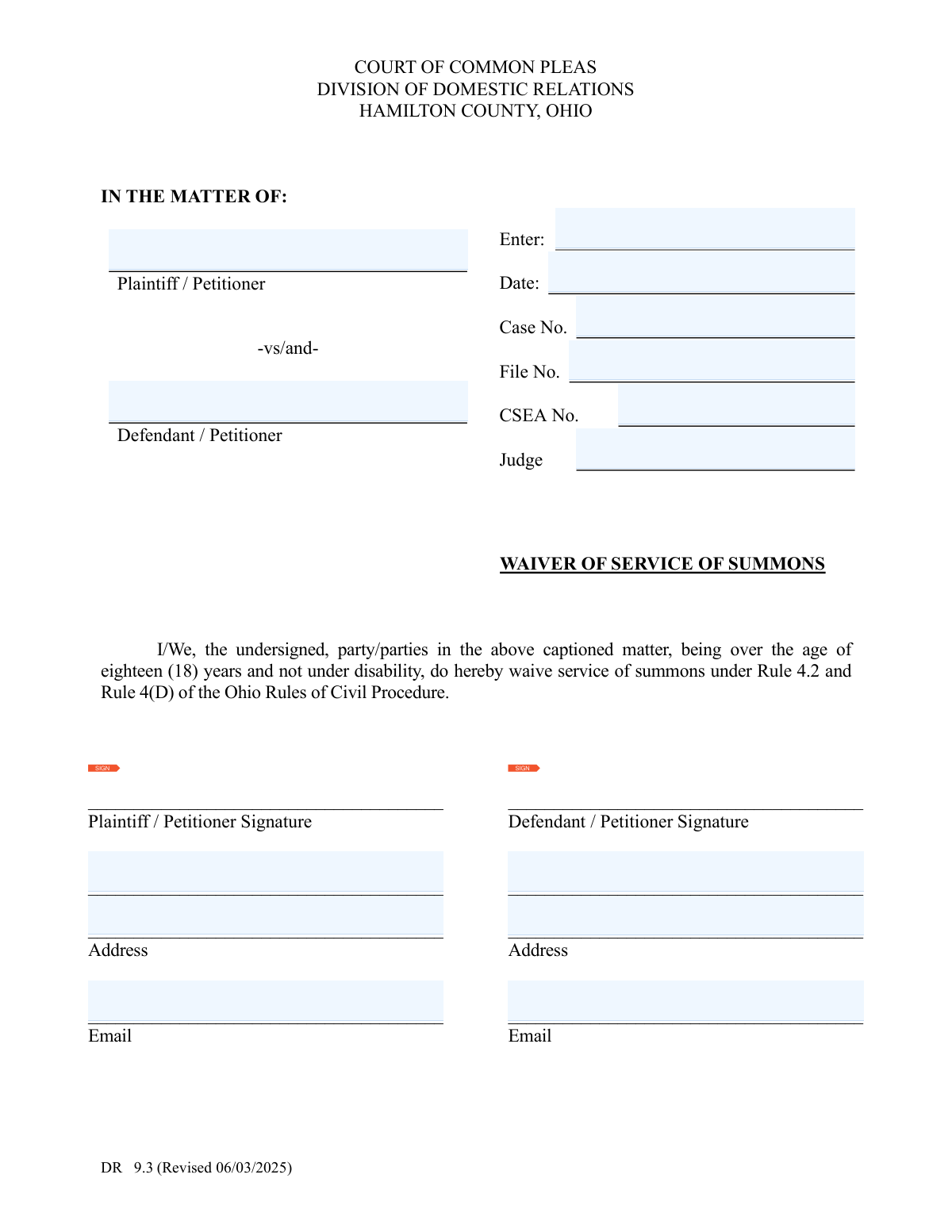
Yes! You can use AI to fill out Form DR 9.3, Waiver of Service of Summons

Form DR 9.3 is a legal document used in domestic relations cases in Hamilton County, Ohio, where parties voluntarily agree to waive the formal legal requirement of being served a summons by a process server. By signing this form, individuals acknowledge they have received notice of the legal action, which can expedite court proceedings and reduce costs. Today, this form can be filled out quickly and accurately using AI-powered services like Instafill.ai, which can also convert non-fillable PDF versions into interactive fillable forms.
Our AI automatically handles information lookup, data retrieval, formatting, and form filling.
It takes less than a minute to fill out DR 9.3 using our AI form filling.
Securely upload your data. Information is encrypted in transit and deleted immediately after the form is filled out.

Form specifications

Form name: Form DR 9.3, Waiver of Service of Summons
Number of fields: 16
Number of pages: 1
Language: English
main-image

Instafill Demo: How to fill out PDF forms in seconds with AI

How to Fill Out DR 9.3 Online for Free in 2026

Are you looking to fill out a DR 9.3 form online quickly and accurately? Instafill.ai offers the #1 AI-powered PDF filling software of 2026, allowing you to complete your DR 9.3 form in just 37 seconds or less.
Follow these steps to fill out your DR 9.3 form online using Instafill.ai:
  1. 1 Navigate to Instafill.ai and upload the DR 9.3 Waiver of Service of Summons form or select it from their template library.
  2. 2 Use the AI assistant to provide essential case details, including the case number, file number, CSEA number, and the names of the plaintiff and defendant.
  3. 3 Enter your full name, address, and email address in the designated fields for the first party (Plaintiff/Petitioner or Defendant/Petitioner).
  4. 4 Provide the contact information for the other party involved in the case.
  5. 5 Carefully review all the information auto-populated by the AI to ensure its accuracy and completeness.
  6. 6 Digitally sign the document in the appropriate signature field to certify your waiver.
  7. 7 Download the completed form to print and file with the Hamilton County Court of Common Pleas, Division of Domestic Relations.

Our AI-powered system ensures each field is filled out correctly, reducing errors and saving you time.

Why Choose Instafill.ai for Your Fillable DR 9.3 Form?

Speed

Complete your DR 9.3 in as little as 37 seconds.

Up-to-Date

Always use the latest 2026 DR 9.3 form version.

Cost-effective

No need to hire expensive lawyers.

Accuracy

Our AI performs 10 compliance checks to ensure your form is error-free.

Security

Your personal information is protected with bank-level encryption.

Frequently Asked Questions About Form DR 9.3

This form allows you to officially acknowledge that you have received a copy of a legal complaint or petition. By signing it, you waive the need for formal, in-person delivery of court documents by a sheriff or process server, which can speed up the legal process.

The parties involved in a Hamilton County domestic relations case (like a divorce or dissolution) who agree to proceed without formal service should sign this form. It is often used in uncontested cases where both parties are cooperating.

No, signing this form only acknowledges that you have received the initial court documents and waives formal service. It does not mean you agree with the claims in the lawsuit or give up your right to respond and participate in the case.

You will need the full names of both parties, the court-assigned Case Number, the CSEA number if applicable, and the name of the presiding judge. You will also need to provide your current address and email.

The Case Number is assigned by the court when the initial complaint or petition is filed and should be on all court documents. The CSEA (Child Support Enforcement Agency) Number is only required if there is a child support aspect to your case; otherwise, you can leave it blank.

In a contested divorce, the person who files the lawsuit is the Plaintiff, and the other party is the Defendant. In an uncontested dissolution where both parties file together, both are referred to as Petitioners.

After all required parties have signed the form, it must be filed with the Hamilton County Clerk of Courts for the Division of Domestic Relations. This officially enters the waiver into the court record for your case.

If you choose not to sign the waiver, the other party must arrange for formal service of the court documents. This usually means a sheriff's deputy or a private process server will deliver the papers to you in person, which can take more time and may involve additional costs.

Yes, you can use AI-powered services like Instafill.ai to help fill out this form. These tools can auto-fill fields from your saved information, reducing data entry time and helping to ensure accuracy.

To fill out this form online, you can upload the PDF to a platform like Instafill.ai. The service will make the document interactive, allowing you to type your information directly into the fields before printing it for signature and filing.

If you have a non-fillable or 'flat' PDF, you can use a service like Instafill.ai to convert it into an interactive, fillable form. Simply upload the document, and the tool will automatically detect the fields for you to complete on your computer.

Yes, providing your email address is requested on the form. The court and other parties may use it for communication and to send electronic notices related to your case.

Compliance DR 9.3
Validation Checks by Instafill.ai

1
Ensures Case Number is Present and in Valid Format
This check verifies that the Case Number field is not empty and conforms to the Hamilton County court's specific format, likely starting with 'DR' followed by digits. The Case Number is the primary identifier for the legal action, and an incorrect or missing number will prevent the document from being filed correctly. Failure to provide a valid Case Number will result in the form's rejection by the court clerk.
2
Validates Filing Date Format and Plausibility
This validation ensures the 'Filing Date' is entered in a recognized date format (e.g., MM/DD/YYYY) and is not a future date. A valid date is legally crucial for establishing when the waiver of service became effective. An invalid or future date could compromise the legal standing of the document and cause processing delays or rejection.
3
Confirms Plaintiff/Petitioner Signature is Provided
This check verifies that the Plaintiff/Petitioner signature field is not blank. The signature is a legal attestation that the party understands and agrees to waive service of summons, making it a non-negotiable requirement for the form's validity. Without a signature, the waiver is legally meaningless and will be rejected by the court.
4
Confirms Defendant/Petitioner Signature is Provided
This check verifies that the Defendant/Petitioner signature field is not blank. The signature signifies the party's voluntary waiver of their right to be formally served, which is the entire purpose of this document. A missing signature from either party invalidates the waiver and prevents the case from moving forward as intended.
5
Verifies Consistency Between Plaintiff's Case Name and Printed Name
This validation compares the Plaintiff/Petitioner name entered in the 'In The Matter Of' section with the printed name provided below the signature line. These names must match to ensure the person signing the waiver is the same individual named in the case caption. Discrepancies can lead to legal challenges regarding the identity of the party and the validity of the waiver.
6
Verifies Consistency Between Defendant's Case Name and Printed Name
This validation compares the Defendant/Petitioner name entered in the 'In The Matter Of' section with the printed name provided below their signature line. Consistency is critical to confirm that the correct party is waiving service of summons. Mismatched names could invalidate the waiver and require the formal service process to be initiated, causing delays.
7
Validates Plaintiff/Petitioner Email Address Format
This check ensures that if an email address is provided for the Plaintiff/Petitioner, it follows the standard '[email protected]' format. While potentially optional for filing, a valid email is crucial for modern court communications and notifications. An invalid format could lead to missed communications, so the system should flag it to be corrected.
8
Validates Defendant/Petitioner Email Address Format
This check ensures that if an email address is provided for the Defendant/Petitioner, it conforms to the standard '[email protected]' format. Correct email addresses are vital for ensuring all parties receive electronic notices and updates from the court. An incorrectly formatted email will cause communication failures and potential procedural issues.
9
Ensures Plaintiff/Petitioner Address is Complete
This validation checks that the Plaintiff/Petitioner's address field contains essential components like a street, city, state, and ZIP code. A complete mailing address is a legal requirement for the court record, ensuring official documents can be sent via mail if necessary. An incomplete address can lead to the form's rejection or future service of process issues.
10
Ensures Defendant/Petitioner Address is Complete
This validation verifies that the Defendant/Petitioner's address is fully entered, including a street, city, state, and ZIP code. This information is required for the official court file and for any future correspondence that may need to be mailed. Failure to provide a complete address can result in the document being deemed incomplete by the court clerk.
11
Ensures Plaintiff and Defendant are Different Parties
This check compares the name of the Plaintiff/Petitioner against the name of the Defendant/Petitioner to ensure they are not identical. A domestic relations case requires at least two distinct parties. Entering the same name for both roles is a logical error that would invalidate the entire case filing and must be corrected.
12
Validates CSEA Number Format if Provided
This check validates the format of the Child Support Enforcement Agency (CSEA) number if a value is entered. While the field may be optional, if a number is present, it should conform to the expected structure to ensure it links correctly to the CSEA case file. An incorrectly formatted number could cause issues with child support-related matters in the case.
13
Verifies Signature Fields are Actual Signatures
This validation ensures that the signature fields contain a valid digital signature image or stroke data, not just typed text matching the printed name. A typed name in a signature box does not carry the same legal weight as a signature and would invalidate the waiver. The system must differentiate between a typed name and a legally acceptable electronic or scanned signature.
14
Requires Plaintiff/Petitioner Printed Name
This check ensures the printed name of the Plaintiff/Petitioner is filled out below their signature. The printed name is necessary to clearly identify the signatory, as signatures can often be illegible. A missing printed name can create ambiguity and may lead to the court rejecting the document for being incomplete.

Common Mistakes in Completing DR 9.3

Entering an Incorrect or Incomplete Case Number

This error occurs when filers guess the case number, transcribe it incorrectly from another document, or leave it blank. An incorrect case number will cause the court clerk to reject the filing or, worse, file the waiver in the wrong case, leading to significant legal delays and complications. Always double-check the case number against the initial complaint or petition to ensure it is exact and complete.

Using Inconsistent or Misspelled Party Names

Parties often use nicknames, forget middle initials, or misspell names, causing a mismatch with the official court record. The names in the caption and signature blocks must exactly match the full legal names used in the original petition or complaint. Discrepancies can force the court to question the identity of the signers and reject the document, requiring a corrected re-filing.

Printing a Name on the Signature Line

A frequent mistake is printing a name where a cursive signature is required, often due to misunderstanding the legal distinction. A signature is a unique mark of attestation, and a printed name does not meet the legal requirement for executing a court document. This will invalidate the waiver, leading to its rejection by the court and delaying the case proceedings.

Signing in the Wrong Party's Section

In a rush, a Plaintiff might accidentally sign in the Defendant's designated signature block, or vice-versa. This error completely invalidates the form, as it appears one party is attempting to sign for the other. The court will reject the document, and a new waiver with signatures in the correct places will need to be completed and filed, causing unnecessary delays.

Omitting the CSEA Number When Applicable

If the domestic relations case involves child support, a Child Support Enforcement Agency (CSEA) number is often required. Parties may forget to include it or not realize its importance, especially if they are self-represented. Omitting this number can delay the processing of child support orders and create administrative problems with the agency, affecting the timely establishment of support.

Providing an Incomplete or Invalid Mailing Address

Filers may provide a partial address, forget an apartment number, or list a P.O. Box when a physical address is preferred for service. The court and opposing parties use this address for official notices, and an error means you could miss crucial deadlines, hearing dates, or court orders. Using an AI form-filling tool like Instafill.ai can help prevent this by validating addresses for completeness and proper formatting.

Submitting the Form with Illegible Handwriting

Filling out the form by hand with poor penmanship can make critical information like names, case numbers, and addresses unreadable. This can lead to the court clerk entering incorrect data into the system, resulting in misdirected mail and flawed court records. To avoid this, print clearly in block letters; if the form is a non-fillable PDF, a tool like Instafill.ai can convert it to a fillable version so you can type the information.

Forgetting One or Both Required Signatures

It is surprisingly common for a form to be filed with a missing signature, especially when parties are coordinating separately. An unsigned or partially signed waiver is legally void and will be immediately rejected by the court clerk. This failure means the waiver of service is not in effect, forcing the plaintiff to pursue formal (and costly) service of process on the other party.

Using an Incorrect Date of Signature

People may mistakenly write the wrong date, or intentionally post-date the form thinking it will be filed later. The date must reflect the actual day the document was signed, as it establishes a legal timeline for the case. An incorrect or future date can invalidate the waiver and create confusion, potentially requiring the form to be re-signed and re-filed.

Confusing the Roles of 'Plaintiff' and 'Petitioner'

This form uses 'Plaintiff / Petitioner' and 'Defendant / Petitioner', which can be confusing. In a contested action like a divorce, the roles are Plaintiff and Defendant; in an uncontested action like a dissolution, both parties are co-Petitioners. Using the wrong term, while a minor error, shows a misunderstanding of the legal proceeding and may be flagged for correction by the court.
Saved over 80 hours a year

“I was never sure if my IRS forms like W-9 were filled correctly. Now, I can complete the forms accurately without any external help.”

Kevin Martin Green

Your data stays secure with advanced protection from Instafill and our subprocessors

Robust compliance program

Transparent business model

You’re not the product. You always know where your data is and what it is processed for.

ISO 27001, HIPAA, and GDPR

Our subprocesses adhere to multiple compliance standards, including but not limited to ISO 27001, HIPAA, and GDPR.

Security & privacy by design

We consider security and privacy from the initial design phase of any new service or functionality. It’s not an afterthought, it’s built-in, including support for two-factor authentication (2FA) to further protect your account.

Fill out DR 9.3 with Instafill.ai

Worried about filling PDFs wrong? Instafill securely fills form-dr-93-waiver-of-service-of-summons forms, ensuring each field is accurate.