Yes! You can use AI to fill out Form FL-300, Request for Order
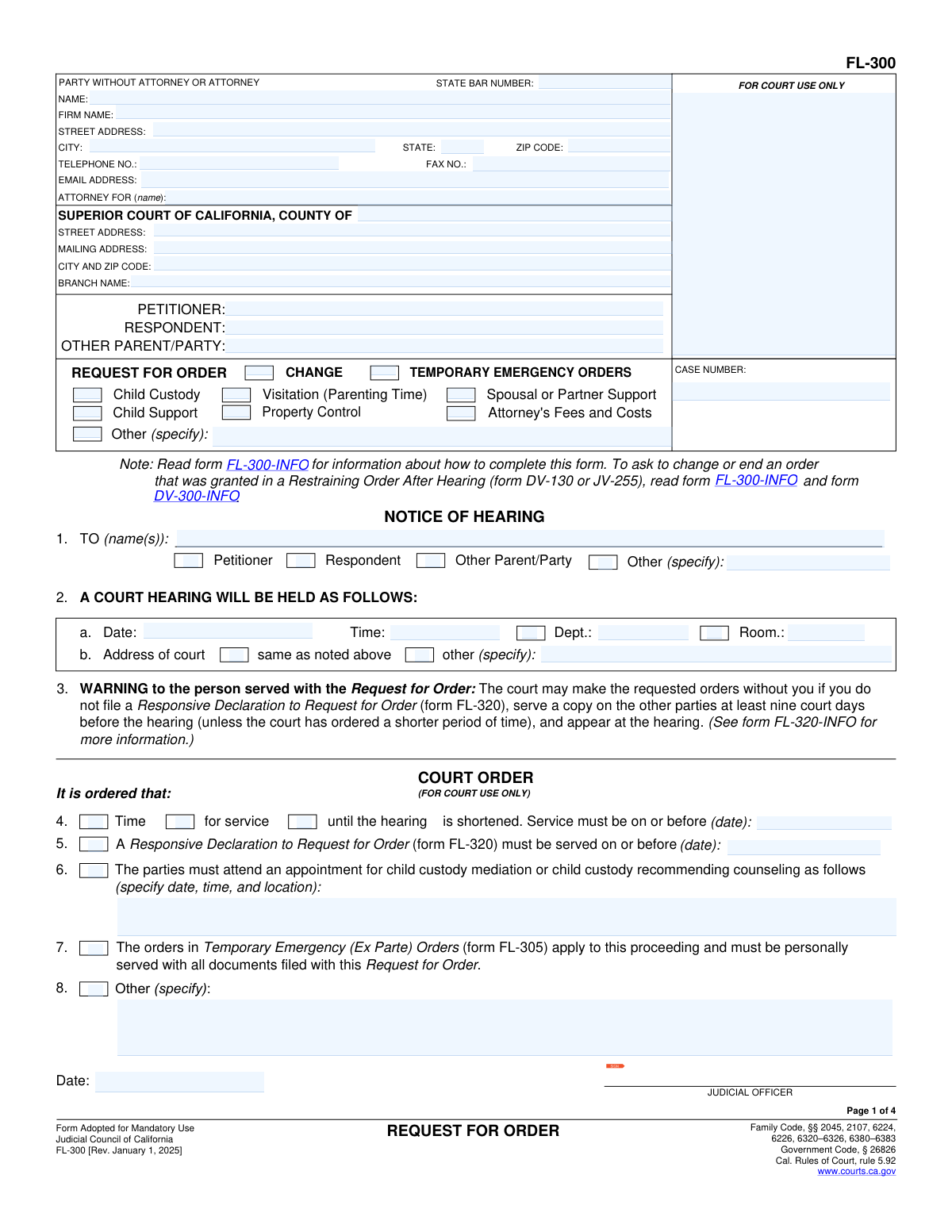
Form FL-300, Request for Order, is a crucial legal document used in California family law proceedings to formally ask a judge to make or change orders regarding child custody, visitation, child support, spousal support, or property control. Filing this form initiates a court hearing where both parties can present their cases before a decision is made, making it the primary method for seeking temporary or modified court intervention. Today, this form can be filled out quickly and accurately using AI-powered services like Instafill.ai, which can also convert non-fillable PDF versions into interactive fillable forms.
Our AI automatically handles information lookup, data retrieval, formatting, and form filling.
It takes less than a minute to fill out FL-300 using our AI form filling.
Securely upload your data. Information is encrypted in transit and deleted immediately after the form is filled out.
Form specifications
| Form name: | Form FL-300, Request for Order |
| Number of fields: | 213 |
| Number of pages: | 4 |
| Field instructions: | FL-300 Instructions |
| Filled form examples: | Form FL-300 Examples |
| Language: | English |
Instafill Demo: How to fill out PDF forms in seconds with AI
How to Fill Out FL-300 Online for Free in 2026
Are you looking to fill out a FL-300 form online quickly and accurately? Instafill.ai offers the #1 AI-powered PDF filling software of 2026, allowing you to complete your FL-300 form in just 37 seconds or less.
Follow these steps to fill out your FL-300 form online using Instafill.ai:
- 1 Navigate to Instafill.ai and upload the FL-300 form or select it from the platform's template library.
- 2 Provide your personal details, the other party's information, and the court case number in the designated fields.
- 3 Check the boxes corresponding to the specific orders you are requesting, such as child custody, child support, spousal support, or property control.
- 4 Follow the prompts to provide detailed facts and reasons supporting your request for each order. The AI can help you attach necessary supplemental forms like the Income and Expense Declaration (FL-150).
- 5 Carefully review all the information you've entered across the entire form. Use the AI's validation checks to ensure all required sections are complete and accurate.
- 6 Electronically sign and date the declaration under penalty of perjury. Download the completed FL-300, ready for filing with the court and serving on the other party.
Our AI-powered system ensures each field is filled out correctly, reducing errors and saving you time.
Why Choose Instafill.ai for Your Fillable FL-300 Form?
Speed
Complete your FL-300 in as little as 37 seconds.
Up-to-Date
Always use the latest 2026 FL-300 form version.
Cost-effective
No need to hire expensive lawyers.
Accuracy
Our AI performs 10 compliance checks to ensure your form is error-free.
Security
Your personal information is protected with bank-level encryption.
Frequently Asked Questions About Form FL-300
Form FL-300 is a California court form used in family law cases to ask a judge to make new temporary orders or change existing ones. It covers issues like child custody, support, property control, and attorney's fees.
Any party in a family law case (such as a Petitioner or Respondent) who wants the court to intervene and make or modify orders must file this form to schedule a court hearing.
After filing, the court will set a hearing date, which is listed in Section 2 of the form. You must then legally notify the other party by having them served with the papers, and they will have a chance to file a response before the hearing.
Temporary Emergency Orders are urgent court orders made to address an immediate risk of harm or loss before a regularly scheduled hearing can occur. You must provide specific facts to the court to justify the emergency request.
Yes, most requests require additional forms. For example, any request involving money, like child support or attorney's fees, requires an Income and Expense Declaration (Form FL-150).
This is where you explain to the judge why you are asking for the orders. State the facts clearly and concisely, as this section, including attachments, cannot be longer than 10 pages without court permission.
The form includes a warning that if the other party is properly served and fails to file a response (Form FL-320) or appear at the hearing, the court can make the requested orders without their input.
On the form, you will check the box indicating you want to change a current order. You must provide the date the original order was filed and specify what the order was, as well as explain why a change is now necessary.
No, this is not the correct form for that purpose. The form itself states that to change or end an order from a Restraining Order After Hearing (form DV-130), you must read and use different forms.
Yes, services like Instafill.ai use AI to accurately auto-fill form fields, which can save time and help prevent common errors. However, AI cannot provide legal advice for your specific situation.
You can use a service like Instafill.ai to easily fill out the FL-300 form online. The platform guides you through the fields, making the process simpler than working with a standard PDF.
If you have a non-fillable or 'flat' PDF, you can upload it to a service like Instafill.ai. The tool can convert the document into an interactive, fillable form that you can complete and save online.
Compliance FL-300
Validation Checks by Instafill.ai
1
Mandatory Request Type Selection
Ensures that at least one checkbox is selected under the main 'REQUEST FOR ORDER' section on page 1 (e.g., Child Custody, Child Support, etc.). This is critical because the form's purpose is to request a specific court order, and without a selection, the court does not know what action is being requested. A failure would prevent submission and prompt the user to specify the nature of their request.
2
Case Number Consistency Across Pages
Verifies that the 'CASE NUMBER' entered in the header of pages 1, 2, 3, and 4 is identical. Inconsistent case numbers can lead to misfiling of documents and significant delays in legal proceedings. If the numbers do not match, the system should flag the discrepancy and require the user to correct it before submission.
3
Child's Date of Birth Validity
Checks that any date entered in the 'Date of Birth' column in Section 2a is a valid calendar date and occurs in the past. This prevents data entry errors like typos or future dates, which are logically impossible for a person's birth date. An invalid entry would be rejected, ensuring the integrity of the child's identifying information for custody and support calculations.
4
Conditional Requirement for Financial Declaration (Child Support)
If any part of Section 3 'CHILD SUPPORT' is filled out, this validates that the checkbox in 3c is marked, confirming the filing of a financial declaration (form FL-150 or FL-155). This declaration is mandatory for the court to assess financial standing and calculate support. Failure to confirm this would render the child support request incomplete and legally insufficient.
5
Conditional Requirement for Financial Declaration (Spousal Support)
If a request is made in Section 4 'SPOUSAL OR DOMESTIC PARTNER SUPPORT', this check ensures the box in 4d is checked, confirming an 'Income and Expense Declaration' (form FL-150) has been filed. The court cannot rule on spousal support without this financial disclosure. An un-checked box would halt the submission of the spousal support request until the user confirms the declaration is filed.
6
Logical Link for 'Other' Orders
Validates that if the 'Other (specify)' checkbox is selected under the main 'REQUEST FOR ORDER' section on page 1, the corresponding text box in Section 7 'OTHER ORDERS REQUESTED' is not empty. This ensures that a general request is properly detailed for the court's consideration. If the checkbox is marked but the description is missing, the user will be prompted to provide the specific details of their request.
7
Completeness of Debt Payment Information
In Section 5b, if a user begins to enter details for a debt payment, this check ensures all associated fields ('Pay to', 'For', 'Amount', and 'Due date') for that specific entry are completed. Incomplete information makes the request unenforceable and unclear. The validation prevents the submission of partial debt information, requiring the user to provide all necessary details for the court to issue a clear order.
8
Conditional Requirement for Change of Order Date
In sections 2d, 3b, 4b, or 5c, if the user indicates they are requesting a change to a current order, this validates that the 'filed on (date)' field is filled with a valid past date. This date is essential for the court to locate and review the specific order being modified. If the date is missing or invalid, the request to change the order cannot be processed correctly.
9
Justification for Child Custody Request
Ensures that if a user requests child custody or visitation orders in Section 2, the text field in 2c ('The orders that I request are in the best interest of the children because...') is filled out. The 'best interest of the child' is the legal standard for custody, and this justification is a required part of the argument. A submission with an empty justification would be considered incomplete and likely rejected by the court.
10
Signature Date Presence and Validity
Verifies that the 'Date' field next to the applicant's signature on page 4 is completed with a valid calendar date that is not in the future. The signature date attests to when the declaration was made under penalty of perjury and is a fundamental requirement for a legal document's validity. An empty or future-dated field would invalidate the declaration and prevent the form from being accepted for filing.
11
Core Party Information Completeness
Checks that the 'PETITIONER' and 'RESPONDENT' name fields in the header on page 1 are filled out. These names are the primary identifiers for the parties involved in the case and are essential for the court to process the request. Submitting the form without this core information would lead to immediate rejection as the case cannot be correctly identified or docketed.
12
Attorney's Fees Amount Validation
If a request for attorney's fees is made in Section 6, this check ensures that the specified amount is a valid, positive numeric value. This prevents non-numeric text or negative numbers from being entered, ensuring the data is in the correct format for the court's consideration. An invalid entry would trigger an error, requiring the user to input a proper monetary figure.
Common Mistakes in Completing FL-300
Forgetting to sign and date the form on page 4 is a simple but critical error. This happens due to oversight, especially when rushing to file. An unsigned declaration is not made 'under penalty of perjury' and is therefore legally invalid, leading to immediate rejection by the court clerk and causing significant delays. Always perform a final check of the signature block before filing.
Filers often check the box for child support, spousal support, or attorney's fees but fail to complete and attach the required Income and Expense Declaration (form FL-150). The court cannot legally make financial orders without this detailed financial disclosure from both parties. This omission will result in the court being unable to rule on the financial requests, leading to denial or a lengthy continuance.
Entering the wrong case number or mixing up the 'Petitioner' and 'Respondent' on the header of each page is a frequent data entry mistake. This can cause the document to be filed in the wrong case, rejected by the clerk, or create severe confusion for the judge. To avoid this, carefully cross-reference the case number and party names with existing court documents. AI-powered tools like Instafill.ai can help by storing and auto-populating this information consistently across all pages.
In Section 9, filers often submit a long, emotional narrative rather than a concise, factual statement. Judges need clear, legally relevant facts (who, what, when, where, and why) to make a ruling, and an unfocused story can obscure the key points. To be effective, structure your declaration with numbered paragraphs containing specific factual information, and avoid including opinions, speculation, or hearsay.
The FL-300 often acts as a cover sheet for other required forms, such as the Child Custody and Visitation Application Attachment (FL-311) or copies of existing restraining orders. A common mistake is checking a box indicating an attachment but forgetting to physically include the document with the filing. This leaves the court without the necessary details to grant the request. Create a checklist of all required attachments before heading to the courthouse.
On page 1, a filer might forget to check the main boxes (e.g., 'Child Custody', 'Property Control') that specify the subject of their request. Similarly, in sections like 2b for custody, they may write a vague paragraph instead of using the proper attachment forms for a detailed proposal. This lack of clarity forces the judge to guess what is being asked for, which can lead to an unfavorable ruling or denial. Be explicit and use the designated forms for detailed requests.
Self-represented parties, unfamiliar with legal forms, sometimes mistakenly write in sections clearly marked 'FOR COURT USE ONLY,' such as the hearing notice box on page 1. This can disrupt the clerk's workflow and may cause the filing to be rejected for correction. Always read all instructions and labels carefully, leaving any area designated for court or judicial use completely blank.
Section 9 clearly limits the supporting declaration to 10 pages unless the court grants permission for a longer filing. Filers may ignore this rule, believing more detail is always better. However, submitting an overly long document can result in the court refusing to consider the excess pages or rejecting the filing outright. Focus on being concise and impactful within the page limit.
When requesting to change a prior order (e.g., in sections 2d, 3b, 4b), people often fail to specify the date the original order was filed and what it said. This information is crucial context for the judge to understand what is being modified and why. Always locate the previous order and accurately transcribe the filing date and its key terms into your new request to provide a clear baseline for the court.
Many people find this form online as a flat, non-fillable PDF, leading them to print it and fill it out by hand, which can result in illegible handwriting and data entry errors. This can cause the clerk to reject the form or lead to misinterpretation by the court. To prevent this, use a tool like Instafill.ai, which can convert any non-fillable court form into an interactive, fillable version, ensuring clarity and professionalism.
Saved over 80 hours a year
“I was never sure if my IRS forms like W-9 were filled correctly. Now, I can complete the forms accurately without any external help.”
Kevin Martin Green
Your data stays secure with advanced protection from Instafill and our subprocessors

Robust compliance program
Transparent business model
You’re not the product. You always know where your data is and what it is processed for.
ISO 27001, HIPAA, and GDPR
Our subprocesses adhere to multiple compliance standards, including but not limited to ISO 27001, HIPAA, and GDPR.
Security & privacy by design
We consider security and privacy from the initial design phase of any new service or functionality. It’s not an afterthought, it’s built-in, including support for two-factor authentication (2FA) to further protect your account.
Fill out FL-300 with Instafill.ai
Worried about filling PDFs wrong? Instafill securely fills form-fl-300-request-for-order forms, ensuring each field is accurate.



