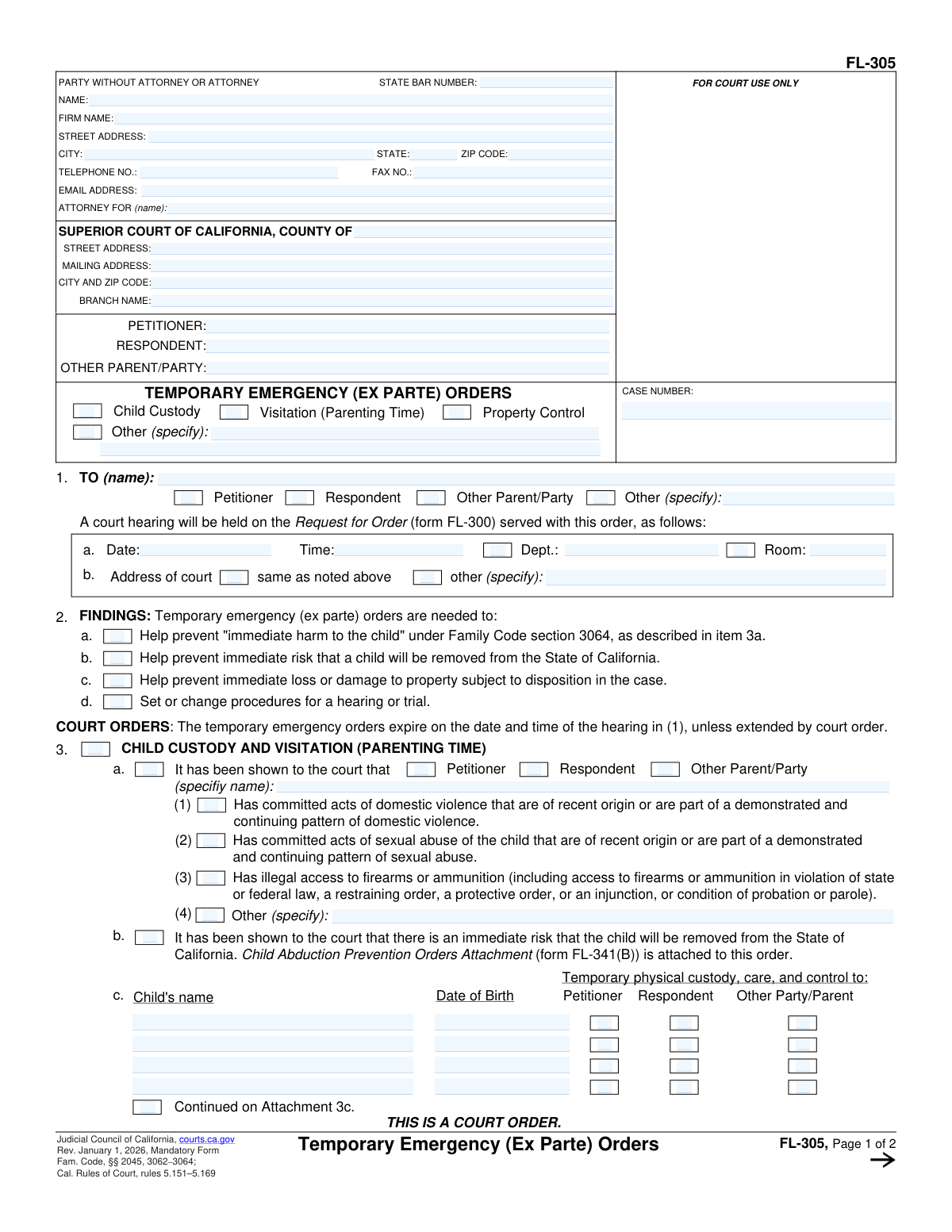
Yes! You can use AI to fill out Form FL-305, Temporary Emergency (Ex Parte) Orders (Rev. July 1, 2016)

Form FL-305, Temporary Emergency (Ex Parte) Orders, is a crucial California court document used in family law cases to request immediate court intervention on an emergency basis. These 'ex parte' orders are granted without a full hearing to prevent immediate harm to a child, a party, or to protect property from being lost or damaged, with the orders remaining in effect until a scheduled court hearing. Today, this form can be filled out quickly and accurately using AI-powered services like Instafill.ai, which can also convert non-fillable PDF versions into interactive fillable forms.
FL-305 has a complex Form Complexity Index of 77/100 — 122 fillable fields across 2 pages. Instafill’s AI completes it accurately in under a minute.

Form specifications

Form name: Form FL-305, Temporary Emergency (Ex Parte) Orders (Rev. July 1, 2016)
Number of fields: 122
Number of pages: 2
FCI: Complex (77/100)
Language: English
Our AI automatically handles information lookup, data retrieval, formatting, and form filling.
It takes less than a minute to fill out FL-305 using our AI form filling.
Securely upload your data. Information is encrypted in transit and deleted immediately after the form is filled out.
Preview of Form FL-305, Temporary Emergency (Ex Parte) Orders (Rev. July 1, 2016)

Instafill Demo: How to fill out PDF forms in seconds with AI

How to Fill Out FL-305 Online for Free in 2026

Are you looking to fill out a FL-305 form online quickly and accurately? Instafill.ai offers the #1 AI-powered PDF filling software of 2026, allowing you to complete your FL-305 form in just 37 seconds or less.
Follow these steps to fill out your FL-305 form online using Instafill.ai:
  1. 1 Navigate to Instafill.ai and upload or select Form FL-305, Temporary Emergency (Ex Parte) Orders.
  2. 2 Enter the attorney/party information, court details, and case number in the header section of the form.
  3. 3 Clearly identify the Petitioner, Respondent, and any other parties involved in the case.
  4. 4 Check the boxes for the specific temporary orders you are requesting, such as Child Custody, Visitation (Parenting Time), or Property Control.
  5. 5 If requesting child custody, provide the full name and date of birth for each child and specify the proposed temporary custody and visitation arrangements.
  6. 6 If requesting property control, describe the property, who should have temporary use, and detail any payments that need to be made on liens or encumbrances.
  7. 7 Review all entered information for accuracy, then save, print, and file the completed form with the court as required for an ex parte hearing.

Our AI-powered system ensures each field is filled out correctly, reducing errors and saving you time.

Why Choose Instafill.ai for Your Fillable FL-305 Form?

Speed

Complete your FL-305 in as little as 37 seconds.

Up-to-Date

Always use the latest 2026 FL-305 form version.

Cost-effective

No need to hire expensive lawyers.

Accuracy

Our AI performs 10 compliance checks to ensure your form is error-free.

Security

Your personal information is protected with bank-level encryption.

Frequently Asked Questions About FL-305

FL-305 has a Form Complexity Index of 77 out of 100, placing it in the complex complexity tier. This score is calculated deterministically from the form’s own structure using Instafill’s published Form Complexity Index methodology, so it can be reproduced and independently verified — it is not a subjective estimate.

For FL-305 specifically, the score reflects 122 fillable fields across 2 pages, grouped into 30 sections, and 70 conditional fields that only apply depending on earlier answers, 2 tables or repeating lists. The number of fields is the largest factor in the base score (weighted 36%), followed by how difficult those fields are to complete based on their type, where free-text and signature fields count for more than simple checkboxes (26%). The number of pages that actually contain fields (15%), the amount of conditional “fill-only-if” logic (16%), and how many sections the form is divided into (7%) account for the rest of the base. On top of that base, the index adds points for tables and repeating lists, bundled instruction pages, and dense page layouts — capturing difficulty the base alone can miss.

In practical terms, a complex score means the form is demanding, with many fields, multiple pages and branching rules that are easy to get wrong. Instafill removes that effort entirely: our AI reads your information, maps each value to the correct field — including the conditional ones — and completes FL-305 accurately in under a minute, with every field available for you to review before you download. See exactly how the Form Complexity Index is calculated.

Form FL-305, Temporary Emergency (Ex Parte) Orders, is a court order issued by a judge to address urgent issues in a family law case. It provides temporary rulings on matters like child custody, property control, and visitation to prevent immediate harm or loss before a scheduled court hearing.

A judge fills out and signs Form FL-305 to make it an official court order. It is issued in response to a party's request for emergency orders, which is typically made using Form FL-300, Request for Order.

These are temporary orders that are effective immediately but typically expire on the date of the court hearing specified in section 1 of the form. At the hearing, the judge may extend them or issue new orders.

This is a legally binding court order, and violating it can result in serious consequences. You may face civil or criminal penalties, including fines, jail time, or being found in contempt of court.

To request an emergency custody order, you must provide the children's full names and dates of birth. You will also need to explain why the emergency order is necessary to prevent immediate harm to the children.

The 'Property Control' section allows a judge to grant one party temporary exclusive use of property, such as a house or car. It can also order a party to make payments on debts like a mortgage or car loan while the order is in effect.

Yes, section 3(c) of the form allows the judge to impose travel restrictions. This can legally prevent a parent from removing the minor children from California, or even from specific counties, without the court's permission.

Form FL-300 is the 'Request for Order,' which you fill out to ask the court for orders. Form FL-305 is the actual 'Temporary Emergency Order' that the judge signs to grant your request on an emergency basis.

You must comply with the orders until the court hearing date listed on the form. You should prepare to present your side of the story at that hearing and it is strongly recommended to consult with an attorney.

Yes, services like Instafill.ai use AI to help you accurately fill out the necessary request forms, such as the FL-300. This can save time and help prevent errors by auto-filling case information and other details.

You can upload the required form, such as the FL-300 Request for Order, to the Instafill.ai platform. The AI will identify all the form fields, allowing you to easily and accurately enter your information online.

You can use a service like Instafill.ai, which can convert flat, non-fillable PDFs into interactive, fillable forms. This allows you to type your information directly into the form online before printing it for submission.

Ex parte means 'from one party' and refers to court proceedings conducted for the benefit of one party, sometimes without the other party being present. These emergency orders are granted on an ex parte basis to address an immediate threat of harm or loss.

Compliance FL-305
Validation Checks by Instafill.ai

1
Consistent Case Number
Ensures the 'CASE NUMBER' field is populated and is identical on both page 1 and page 2 of the form. This is critical for correct court filing and linking the order to the proper case record. If the numbers are missing or mismatched, the form could be rejected by the court clerk or misfiled.
2
Conditional State Bar Number Requirement
Validates that if an attorney's name is entered in the 'ATTORNEY OR PARTY WITHOUT ATTORNEY' section, the 'State Bar Number' field is also filled with a valid number format. The State Bar Number is essential for verifying the attorney's credentials and active status with the state bar. A failure would prompt the user to either provide the number or confirm they are a party without an attorney.
3
Attorney Representation Linkage
Ensures that the name entered in the 'ATTORNEY FOR (name)' field matches one of the primary parties listed (e.g., Petitioner, Respondent). This validation prevents ambiguity and confirms which party the legal counsel represents. An invalid entry would trigger an error, requiring the user to select a valid party from the case.
4
Future Hearing Date Validation
This check ensures that the 'Hearing Date' entered in Section 1 is a valid date format and is set in the future. Court hearings cannot be scheduled for a past date. This prevents data entry errors and ensures the order reflects a valid upcoming legal event.
5
Exclusive Hearing Location Selection
In Section 1, this validates that the user selects either 'same as noted above' or 'other (specify)' for the court address, but not both. If 'other (specify)' is chosen, the corresponding address field must be populated. This logic prevents contradictory or incomplete information about the hearing location.
6
Child's Age Verification from Date of Birth
Validates that the 'Date of Birth' for each child listed in Section 3 is a valid date and corresponds to an age under 18. Since this form deals with child custody, ensuring the subjects are legally minors is a fundamental requirement. An invalid or future date, or a date indicating an adult, would be flagged as an error.
7
Single Custody Designee Per Child
For each child listed in Section 3(a), this check ensures that only one party (Petitioner, Respondent, or Other Party/Parent) is selected for temporary physical custody. Assigning custody to multiple parties simultaneously for the same child is legally contradictory and invalid. The system should enforce a radio-button-like behavior for these checkboxes within each child's section.
8
Conditional Child Custody Section Activation
This validation ensures that the fields within Section 3 (Child's Name, Date of Birth, Custody assignment) are only enabled if the main 'Child Custody' checkbox at the top of the form is selected. This prevents users from entering child data for an order that does not pertain to custody. If the main checkbox is unchecked, these fields should be disabled or hidden.
9
Conditional Habitual Residence Specification
In Section 3(e), this check verifies that if the 'Other (specify)' checkbox for 'Country of habitual residence' is selected, the corresponding text field is not empty. It also ensures that 'The United States of America' and 'Other' are not selected simultaneously. This guarantees complete and unambiguous information about the child's primary residence for jurisdictional purposes.
10
Travel Restriction Detail Requirement
In Section 3(c)(2), if the checkbox for 'from the following counties' or 'other (specify)' is selected, this validation requires the corresponding text field to be filled. This ensures that a travel restriction order is specific and enforceable. An order with an undefined location is vague and cannot be followed.
11
Conditional Property Control Section Activation
This validation ensures that the fields within Section 4, such as 'Property Description' and payment details, are only active if the 'Property Control' checkbox at the top of the form is selected. This guides the user and prevents the entry of irrelevant property information. If the main checkbox is not selected, this section should be disabled.
12
Complete Property Payment Row
For each payment row in Section 4b, this check validates that if any field in that row (Pay to, For, Amount, Due date) is filled, all other fields in the same row must also be filled. This prevents incomplete and unenforceable payment orders. A partially filled row would trigger an error prompting the user to complete the information.
13
Valid Payment Amount Format
Verifies that the 'Amount' fields in Section 4b contain a valid numerical or currency value (e.g., 1234.56). This check prevents non-numeric characters from being entered, ensuring the data is clean and can be processed correctly as a monetary value. An invalid entry would prompt for a correction.
14
Mandatory Order Recipient Selection
Validates that in Section 2, at least one recipient of the order (Petitioner, Respondent, Other Parent/Party, or Other) is checked. An order must be directed to a specific person or party to be legally valid and enforceable. If no recipient is selected, the form submission would fail, requiring the user to specify who the order applies to.
15
Exclusive Property Ownership Status
In Section 4a, this check ensures that if a party is given control of property, either 'own or are buying' or 'lease or rent' is selected, but not both. This clarifies the legal status of the property in question. An error would be raised if neither or both options are selected for a specified property.

Common Mistakes in Completing FL-305

Forgetting to Complete Header Information on Page 2

The form requires the Petitioner, Respondent, and Case Number to be listed at the top of both page 1 and page 2. Filers often meticulously complete the first page but forget to carry over this identical information to the second. This mistake can lead to pages being separated or cause confusion during filing and processing, potentially delaying the order. Always double-check that the header information is completely and accurately filled out on every page of the form.

Using Inconsistent or Incomplete Party Names

People sometimes use nicknames, initials, or slight variations of legal names for the Petitioner and Respondent throughout the document. For an order to be legally binding and enforceable, the full legal names must be used consistently in every field where they are required. Inconsistency can create ambiguity and lead to challenges in enforcing the court's orders. Always use the exact full legal names as they appear on other official case documents.

Omitting Full Names or Dates of Birth for Children

In Section 3, filers must list each child's full name and date of birth. It's common for a parent, in a rush or out of habit, to use a nickname or forget to include the full date of birth for each child. This omission can render the custody order for that child unclear or invalid, as the court needs to unequivocally identify the minor. To avoid this, carefully enter the complete legal name and full date of birth (MM/DD/YYYY) for every child subject to the order.

Providing Ambiguous Visitation (Parenting Time) Details

When detailing visitation in Section 3(a), parties often write vague terms like 'reasonable visitation' or 'as agreed upon.' While flexible, these terms are not specific enough for a court to enforce if a disagreement arises, which can lead to future conflict and require returning to court for clarification. For an enforceable order, specify the exact days, start and end times, and locations for exchanges (e.g., 'Every other weekend from Friday at 6:00 PM to Sunday at 6:00 PM').

Incorrectly Referencing or Forgetting Attachments

The form frequently allows for extra details on attachments (e.g., 'Continued on Attachment 3(a)'). A common error is checking the box for an attachment but then failing to attach the document, or attaching a document without labeling it correctly with the corresponding attachment number. This can result in the court disregarding the additional information, leading to an incomplete order. Ensure every referenced attachment is correctly labeled and securely attached to the form before filing.

Using Vague Descriptions for Property Control

In Section 4, when requesting control of property, people may write generic descriptions like 'the house' or 'the car.' This lack of specificity can make the order impossible to enforce, especially if the parties own multiple properties or vehicles. To prevent this, provide a detailed description, including the full property address, vehicle make, model, and VIN, or account numbers for financial assets.

Omitting Key Information in Payment Orders

Section 4(b) allows the court to order a party to make payments on debts, but it requires four key pieces of information: who to pay, what the payment is for, the exact amount, and the due date. Filers often neglect to fill out all of these fields for each payment. Leaving any of these blank makes the order vague and unenforceable, defeating its purpose of ensuring bills are paid on time.

Failing to Clearly Define Travel Restrictions

In Section 3(c)(2), when requesting travel restrictions, a party might check 'from the following counties' but then fail to list the specific counties, or check 'other' without a clear description. The court and law enforcement cannot enforce an ambiguous boundary like 'cannot leave the area.' To create a valid order, you must explicitly state the geographic limits, such as a list of counties, a mileage radius from a specific address, or 'outside the state of California'.

Incorrectly Filling the Attorney Information Box as a Pro Se Litigant

Individuals representing themselves are often confused by the top-left box intended for attorney or party information. They may incorrectly fill in the 'Firm Name' or 'State Bar Number' fields with 'N/A' or leave the entire section blank, which can cause processing delays. If you are representing yourself, you should enter your own name, address, and contact information in the appropriate fields and leave the attorney-specific fields blank.

Entering Incomplete or Incorrect Court Address Information

The form requires the specific county, branch name, and address of the Superior Court. People often only know the county and may use a generic address for the main county courthouse, which might not be where their case is heard. This can lead to documents being misfiled or sent to the wrong location, causing significant delays. It is crucial to verify the exact and complete address and branch name for the specific court handling the case before filling out this section. AI-powered form filling tools like Instafill.ai can help prevent many of these errors by auto-populating consistent information and validating data formats. If the form is a non-fillable PDF, Instafill.ai can also convert it into an interactive, fillable version.
Saved over 80 hours a year

“I was never sure if my IRS forms like W-9 were filled correctly. Now, I can complete the forms accurately without any external help.”

Kevin Martin Green

Your data stays secure with advanced protection from Instafill and our subprocessors

Robust compliance program

Transparent business model

You’re not the product. You always know where your data is and what it is processed for.

ISO 27001, HIPAA, and GDPR

Our subprocesses adhere to multiple compliance standards, including but not limited to ISO 27001, HIPAA, and GDPR.

Security & privacy by design

We consider security and privacy from the initial design phase of any new service or functionality. It’s not an afterthought, it’s built-in, including support for two-factor authentication (2FA) to further protect your account.

Fill out FL-305 with Instafill.ai

Worried about filling PDFs wrong? Instafill securely fills form-fl-305-temporary-emergency-ex-parte-orders-rev-july-1-2016 forms, ensuring each field is accurate.