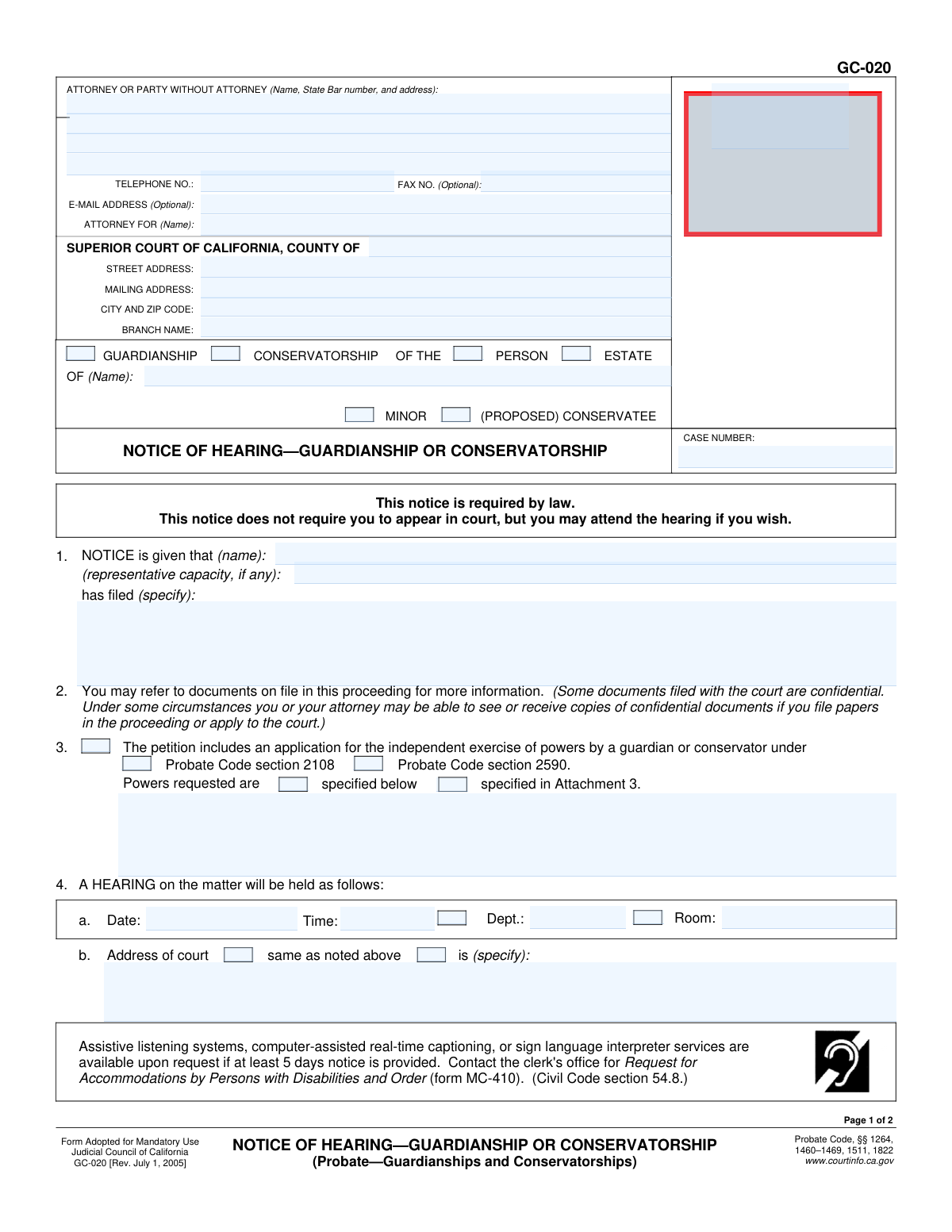
Yes! You can use AI to fill out Form GC-020, Notice of Hearing—Guardianship or Conservatorship
Form GC-020, Notice of Hearing—Guardianship or Conservatorship, is a mandatory legal document in California used to inform all relevant parties about a scheduled court hearing concerning the appointment of a guardian for a minor or a conservator for an adult. This notice ensures that family members and other interested individuals are aware of the proceedings and have an opportunity to be present, upholding legal due process. Today, this form can be filled out quickly and accurately using AI-powered services like Instafill.ai, which can also convert non-fillable PDF versions into interactive fillable forms.
Our AI automatically handles information lookup, data retrieval, formatting, and form filling.
It takes less than a minute to fill out GC-020 using our AI form filling.
Securely upload your data. Information is encrypted in transit and deleted immediately after the form is filled out.
Form specifications
| Form name: | Form GC-020, Notice of Hearing—Guardianship or Conservatorship |
| Number of fields: | 63 |
| Number of pages: | 2 |
| Language: | English |
Instafill Demo: How to fill out PDF forms in seconds with AI
How to Fill Out GC-020 Online for Free in 2026
Are you looking to fill out a GC-020 form online quickly and accurately? Instafill.ai offers the #1 AI-powered PDF filling software of 2026, allowing you to complete your GC-020 form in just 37 seconds or less.
Follow these steps to fill out your GC-020 form online using Instafill.ai:
- 1 Navigate to Instafill.ai, then upload your GC-020 form or select it from the platform's template library.
- 2 Provide the court and case information, including the Superior Court county, branch name, and the specific case number.
- 3 Enter the details of the person filing the notice and specify the petition or document that has been filed with the court.
- 4 Input the scheduled hearing details, including the date, time, department, and room number.
- 5 Complete the 'Proof of Service by Mail' section by listing the name and address of each person served with the notice, along with the date and place of mailing.
- 6 Review all the AI-populated fields for accuracy, then securely download, print, or e-file your completed Form GC-020.
Our AI-powered system ensures each field is filled out correctly, reducing errors and saving you time.
Why Choose Instafill.ai for Your Fillable GC-020 Form?
Speed
Complete your GC-020 in as little as 37 seconds.
Up-to-Date
Always use the latest 2026 GC-020 form version.
Cost-effective
No need to hire expensive lawyers.
Accuracy
Our AI performs 10 compliance checks to ensure your form is error-free.
Security
Your personal information is protected with bank-level encryption.
Frequently Asked Questions About Form GC-020
Form GC-020 is a legal document used to notify all interested parties of the specific date, time, and location of a court hearing regarding a guardianship or conservatorship petition.
The petitioner (the person who filed the request for guardianship or conservatorship) or their attorney is responsible for completing this form, ensuring it is served, and filing it with the court.
No, the notice explicitly states that you are not required to appear in court. However, you have the right to attend the hearing if you wish.
This section must be completed by the person who mails the notice, confirming under penalty of perjury that they sent a copy to each required individual. It serves as evidence to the court that proper notification was given.
No, the law requires that service be performed by someone who is over the age of 18 and not a party to the case. The petitioner cannot serve their own legal documents.
You will need the court case number, the full name of the proposed conservatee or minor, the scheduled hearing date, time, and department, and a list of names and addresses for everyone who must be notified.
This is a request for the court to grant the proposed guardian or conservator the authority to make certain decisions on behalf of the person or estate without needing to seek court approval for each action.
Service by mail uses the postal service, and this form includes the proof for that method. Personal service involves hand-delivering the notice, which requires a different proof of service form, GC-020(P).
Once the Proof of Service section is completed and signed by the person who mailed the notices, the original GC-020 form must be filed with the court clerk before the hearing date.
Yes, services like Instafill.ai use AI to auto-fill form fields accurately and save time. This can help reduce errors and streamline the process of preparing court documents.
You can upload the GC-020 PDF to Instafill.ai, and its AI technology will identify all the fields. You can then type your information directly into the interactive form on your computer and print the completed version.
If you have a flat, non-fillable PDF, you can upload it to a service like Instafill.ai. It can convert the document into an interactive, fillable form that you can complete easily online.
If your list of people to be served is longer than the space provided, check the box for 'Continued on an attachment.' You can then use form DE-120(MA)/GC-020(MA) to list the additional persons served.
Compliance GC-020
Validation Checks by Instafill.ai
1
Case Number Consistency Check
This validation ensures that the 'Case Number' entered on the first page of the form exactly matches the 'Case Number' entered on the second page. This is critical for maintaining document integrity and ensuring that all pages are correctly associated with the same legal proceeding. A mismatch could lead to filing errors, delays, or the rejection of the document by the court clerk.
2
Future Hearing Date Requirement
This check verifies that the 'Hearing Date' is a valid calendar date and is set in the future. A hearing cannot be scheduled for a past date, as this would be a logical and legal impossibility. This validation prevents simple data entry errors that would render the notice invalid and require correction and re-filing, causing delays in the legal process.
3
Case Type Completeness
This validation ensures that the filer has selected at least one option from the 'Guardianship'/'Conservatorship' pair and at least one option from the 'Person'/'Estate' pair. These selections define the fundamental nature of the legal action being taken. Failure to specify the case type would make the notice ambiguous and legally insufficient, leading to its rejection by the court.
4
Ward/Conservatee Status Consistency
This check enforces a logical link between the type of proceeding and the status of the individual involved. If 'Guardianship' is selected, the 'Minor' box must also be checked, as guardianships apply to minors. Conversely, if 'Conservatorship' is selected, the 'Proposed Conservatee' box must be checked, as conservatorships apply to adults, preventing contradictory filings.
5
Attorney Information Completeness
This validation rule checks that if a 'State Bar Number' is entered, the 'Attorney For (Name)' field is also filled out. The State Bar number identifies the filer as an attorney, and it is legally required to specify which party the attorney is representing in the proceeding. Omitting the client's name would make the representation unclear and could lead to the document being rejected.
6
Independent Powers Conditional Logic
This check validates the selections related to the request for independent powers. If the box 'Include application for independent exercise of powers' is checked, the form is not valid unless at least one Probate Code section (2108 or 2590) and one power specification method ('specified below' or 'in Attachment 3') are also selected. This ensures that a request for special powers is complete and specific, as required by the court.
7
Hearing Address Specification
This validation ensures that the location of the hearing is clearly and unambiguously defined. The user must select either 'same as noted above' or 'is (specify)', but not both. If 'is (specify)' is chosen, the corresponding 'Hearing Court Address' text field must be completed to prevent an incomplete notice.
8
Proof of Service Server Address Requirement
This check verifies that the 'My residence or business address is (specify)' field on the Proof of Service section is completed with a full address. The identity and location of the person serving the notice are legally required for the proof of service to be valid. An incomplete address would invalidate the proof of service, potentially jeopardizing the entire hearing.
9
Proof of Service Mailing Method Selection
This validation requires that one of the two mailing method checkboxes on the Proof of Service page is selected. The filer must declare the specific method used for mailing, whether it was deposited directly with the USPS or placed for collection in the ordinary course of business. Failure to specify the method makes the declaration of service incomplete and legally deficient.
10
Proof of Service Date Coherency
This check ensures the dates on the Proof of Service are logical by verifying the 'Date mailed' is on or before the declaration 'Date'. It is impossible to declare under penalty of perjury that a mailing occurred on a future date. This validation prevents clerical errors that would invalidate the proof of service.
11
Minimum Service Requirement
This validation ensures that the Proof of Service is not blank by requiring at least the 'First Person Served Name' and 'First Person Served Address' fields to be completed. A notice of hearing is meaningless without proof that it was served to the required parties. Failing this check means the form is legally insufficient as proof of service.
12
Mandatory Filer and Document Specification
This check confirms that the 'NOTICE is given that (name)' field and the 'has filed (specify)' field are both completed. It is essential to identify who is giving the notice (the filer) and what specific petition or document this hearing notice pertains to. Omitting this information would make the notice critically deficient and unintelligible to the recipients and the court.
13
State Bar Number Format Validation
This validation ensures that the value entered in the 'State Bar Number' field, if provided, consists only of numeric digits. State Bar numbers are numerical identifiers, and entering non-numeric characters would indicate a data entry error. This check maintains data quality and ensures the attorney can be correctly identified in the State Bar's records.
14
Contact Information Format Validation
This check verifies that the 'Telephone Number' and 'E-Mail Address' fields, if filled, conform to standard formats. The telephone number should match a recognizable pattern (e.g., including an area code), and the email address must contain an '@' symbol and a domain. This ensures that the contact information is usable for communication by the court and other parties.
Common Mistakes in Completing GC-020
A frequent and critical error is when the petitioner, who is a party to the case, mails the notice and signs the Proof of Service on page 2. The form explicitly states the server must be over 18 and 'not a party to this cause.' This mistake happens because filers often handle all paperwork themselves and overlook this legal requirement for a neutral third party. A defective service can invalidate the notice, forcing the court to postpone the hearing, which wastes time and money as the entire notice process must be redone.
Filers often submit the form with the hearing date, time, department, or room number left blank. This typically occurs when the filer has not yet obtained a hearing date from the court clerk before preparing the notice. A notice without complete hearing details is useless, as it fails to inform recipients when and where to appear. To avoid this, always file the initial petition first, obtain a hearing date from the court clerk, and then fill in this information on Form GC-020 before serving it on any parties.
Users incorrectly check the 'Guardianship' box for an adult or the 'Conservatorship' box for a minor. This mistake stems from a misunderstanding of legal terminology, as 'Guardianship' in California is for minors, while 'Conservatorship' is for adults who cannot manage their own affairs. This error can lead to confusion and rejection by the court clerk, delaying the entire legal process. It is crucial to select the correct proceeding type based on the age of the person in question.
Filers often neglect to check the boxes for 'PERSON' or 'ESTATE' in the case caption. A guardianship or conservatorship can be over the individual's personal and medical decisions (Person), their financial matters (Estate), or both. Failing to specify the scope of the petition makes the notice ambiguous and may not align with the relief requested in the petition, potentially leading to court delays or orders that don't cover the necessary areas. Always check the appropriate box to clearly define the purpose of the hearing.
Leaving the 'CASE NUMBER' field blank on both pages is a common oversight. The case number is the unique identifier that links the notice to the correct court file. Without it, the court clerk cannot easily file the document, and it may get lost or misfiled, meaning the court has no record that notice was properly given. To prevent this, ensure the court-assigned case number is clearly written on both page 1 and page 2 before filing or serving.
The Proof of Service is often submitted without a signature, without a date, or with inconsistent dates (e.g., the declaration is dated before the mailing date). An unsigned or undated declaration is legally invalid and fails to prove that service was completed. This mistake nullifies the notice, requiring the hearing to be rescheduled. The person who mailed the documents must personally sign and date the declaration on the same day or after the mailing occurred. Using a tool like Instafill.ai can help by flagging unsigned fields before submission.
The filer fails to list all individuals who are legally required to receive notice, such as the proposed conservatee, their spouse, relatives, and relevant agencies. This happens due to ignorance of the specific notice requirements in the Probate Code. If even one required person is not served, the court cannot proceed with the hearing, as it violates due process rights. This results in mandatory continuances until all parties are properly notified.
In section 1, where the form asks the filer to specify what has been filed, users often write a generic term like 'Petition.' This is insufficient. The notice must clearly state the exact title of the petition or document being heard, for example, 'Petition for Appointment of Probate Conservator.' An ambiguous notice does not properly inform recipients of the nature of the proceeding, which can be grounds for an objection or a court-ordered continuance. Always use the full, exact title of the document filed with the court.
When an attorney is involved, they may forget to include their State Bar number, or a self-represented (pro per) filer might mistakenly fill in the 'Attorney For' field. These errors can cause administrative delays and communication problems. A missing State Bar number can lead to rejection by the filing clerk, while incorrect party identification confuses the court record. AI-powered form fillers like Instafill.ai can help prevent this by using conditional logic to show or require fields based on whether the filer is an attorney.
The form allows for attachments, such as a list of requested powers (Attachment 3) or additional parties served. A common mistake is checking a box indicating an attachment exists but then failing to physically include it with the notice served on the parties and filed with the court. This leaves recipients and the court with incomplete information, which can delay the proceedings until the missing documents are provided. Always double-check that all referenced attachments are included before mailing and filing.
Saved over 80 hours a year
“I was never sure if my IRS forms like W-9 were filled correctly. Now, I can complete the forms accurately without any external help.”
Kevin Martin Green
Your data stays secure with advanced protection from Instafill and our subprocessors

Robust compliance program
Transparent business model
You’re not the product. You always know where your data is and what it is processed for.
ISO 27001, HIPAA, and GDPR
Our subprocesses adhere to multiple compliance standards, including but not limited to ISO 27001, HIPAA, and GDPR.
Security & privacy by design
We consider security and privacy from the initial design phase of any new service or functionality. It’s not an afterthought, it’s built-in, including support for two-factor authentication (2FA) to further protect your account.
Fill out GC-020 with Instafill.ai
Worried about filling PDFs wrong? Instafill securely fills form-gc-020-notice-of-hearingguardianship-or-conservatorship forms, ensuring each field is accurate.