
Instafill.ai
7 days free
AI form filling · 236 fields · 5 pages · done in seconds

Yes! You can use AI to fill out Form IMM 5444, Application for a Permanent Resident Card

Don't type 236 fields by hand. Tell our AI about yourself, or upload a document you already have, and it fills every field in seconds. You check it, then download, print or sign.
7 days free, then $19.99/month · Cancel anytime
AI fills it, no typingEncrypted, never used to train AICancel in two clicks
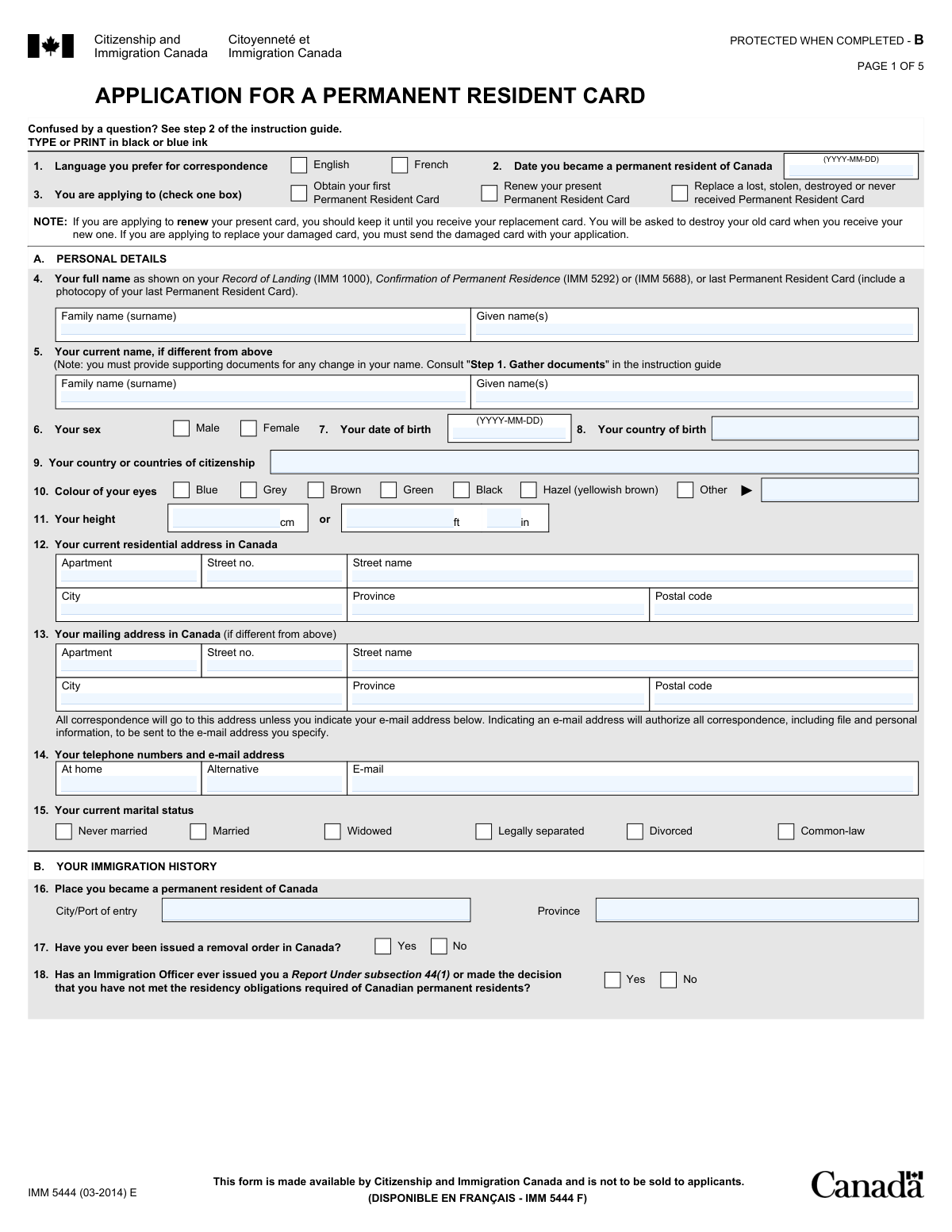
Form IMM 5444, Application for a Permanent Resident Card, page 1
Complex · 73/100Form Complexity Index

The AI does the filling. You just check it.

No typing into boxes, nothing to install.

Tell the AI about youAnswer a few questions in plain words, or upload a document you already have. That is all the typing there is.
AI fills every field in secondsIt puts each answer in the right box on every page, checkboxes included.
Check it and downloadReview every field, change anything, then download, print or sign the PDF.

What this form asks for

The AI fills all of it, from your answers or your documents.

Form IMM 5444 is the official application from Citizenship and Immigration Canada for permanent residents to apply for their initial card, renew an expiring one, or replace a lost, stolen, or destroyed card. It is a critical application as the PR card is the official proof of status required for re-entry into Canada, and the form gathers extensive personal, address, and travel history to verify the applicant meets their residency obligations. Today, this form can be filled out quickly and accurately using AI-powered services like Instafill.ai, which can also convert non-fillable PDF versions into interactive fillable forms.
Fillable fields236
Pages5
Sections41
Questions that depend on earlier answers33
Form Complexity IndexComplex, 73/100

The AI checks your answers before you download

14 checks built for this form, so a wrong date or a missing answer is caught before anyone else sees it.

Ensures a Single Application Type is Selected

This validation verifies that only one box is checked in question 3, which specifies the reason for the application (first card, renewal, or replacement). It is crucial because the required documentation and processing steps differ for each application type. If zero or multiple boxes are checked, the application's purpose is ambiguous and it will be returned as incomplete.

Verifies Date of Birth Precedes Permanent Resident Date

This logical check confirms that the 'Date of birth' provided in question 7 is chronologically earlier than the 'Date you became a permanent resident' in question 2. It is impossible for a person to become a permanent resident before they are born. An error here indicates a significant data entry mistake that would invalidate the application's timeline and require correction.

Validates All Dates are in YYYY-MM-DD Format and Logical

This check ensures that all date fields throughout the form adhere strictly to the YYYY-MM-DD format and represent valid calendar dates (e.g., no '2023-02-30'). Consistent and accurate date formatting is essential for system processing and establishing correct timelines for residency and history. An invalid format or date will cause data rejection and lead to application delays.

Requires Proof for Legal Name Change

If an applicant enters a 'current name' in question 5 that differs from their name on record in question 4, this validation flags the need for supporting legal documentation. The form instructions mandate this proof for identity verification. Without the required documents, the name change cannot be processed, and the application will be considered incomplete.

Ensures Solemn Declaration (Section G) is Completed for Replacement Applications

This rule enforces that if an applicant selects 'Replace a lost, stolen, destroyed or never received...' in question 3, they must fully complete Section G. Section G is a legally binding declaration detailing the circumstances of the card's loss, which is mandatory for issuing a replacement. An application for a replacement card without a completed Section G is invalid and will be returned.

Triggers Residency Obligation (Section D) for Absences of 1095+ Days

This validation checks if the 'Total number of days' absent from Canada in Section 21 is 1095 or greater. If so, it confirms that Section D ('Residency Obligation') has been completed. This section is mandatory for applicants with significant absences to justify how they still meet residency requirements, and failure to complete it when required will result in the application being returned.

And 8 more checks
  • Validates Address History for Continuity and Completeness
  • Verifies Accuracy of Total Days Absent Calculation
  • Ensures History Dates Do Not Precede Permanent Residency Date
  • Validates Canadian Postal Code Format
  • Mandatory Applicant Signature and Date in Declaration
  • Requires Guardian Signature for Minor Applicants
  • Requires Specification for 'Other' Eye Colour
  • Ensures Exclusive Entry for Height Measurement

Let AI fill out your IMM 5444

No typing. Every field filled in seconds, checked, ready to sign.

7 days free, then $19.99/month · Cancel anytime

How to Fill Out IMM 5444 Online for Free in 2026

What the AI walks you through.

  1. Navigate to Instafill.ai and upload or select the IMM 5444 form.
  2. Provide your personal details, including your name as it appears on your immigration documents, date of birth, and physical attributes like eye color and height.
  3. Enter your immigration history, including the date and place you became a permanent resident, and provide a complete five-year history of your addresses, work, and education.
  4. Carefully document all travel outside of Canada in the last five years, calculating the total number of days absent to determine if you meet the residency obligation.
  5. If you have been outside Canada for 1095 days or more, complete the 'Residency Obligation' section with details of your absences.
  6. Complete the consent for the CBSA to disclose your entry history and sign the declaration, confirming the accuracy of all provided information.
  7. Download the completed form, gather all required documents from the checklist (like photos and ID photocopies), and mail the application package to the designated Case Processing Centre.

Common Mistakes in Completing IMM 5444

The ones the AI is built to catch.

Incomplete or Gapped Personal History
Sections 19, 20, and 21 require a continuous history for the last five years without any time gaps. Applicants often miscalculate dates or forget short periods of unemployment, resulting in gaps between the 'To' date of one entry and the 'From' date of the next. This forces processing officers to request clarification, causing significant delays. To avoid this, meticulously map out your last five years on a separate timeline before filling out the form, ensuring every single day is accounted for.
Miscalculating Days Absent from Canada
In the Travel History section (21), accurately calculating the total number of days spent outside Canada is critical, as it determines if you meet the residency obligation. People often miscount days, forget to include travel days, or omit short trips to the U.S., leading to an incorrect total. If your calculation is wrong and you should have completed Section D but didn't, your application will be returned. Use a spreadsheet to list every trip and calculate the days carefully to ensure accuracy.
Forgetting to Sign or Signing the Wrong Section
The form has two key signature areas: Section F (Declaration of Applicant) and Section G (Solemn Declaration for a lost/stolen card). A primary mistake is forgetting to sign and date Section F, which makes the entire application invalid. Another critical error is signing Section G when simply renewing a card, which is a false declaration. Always sign Section F, and only sign Section G if you are replacing a card under the circumstances listed.
Incorrect Name on Record
Question 4 requires your name exactly as it appears on your official immigration document (e.g., Record of Landing, previous PR Card), not your current name if it has changed. Applicants often enter their current legal name or a common-use name in this field by mistake. This mismatch causes identity verification failures and delays. Your current name, if different, must be entered in Question 5 and supported by legal name change documents.
Submitting Non-Compliant Photographs
PR Card photos have very strict specifications for size, background, lighting, date taken, and information on the back, which differ from standard passport photos. Submitting photos that fail to meet any of these criteria is a leading cause for an application to be returned as incomplete. This forces the applicant to get new photos and resubmit, restarting the processing time. Carefully read the photo specification guide before having your pictures taken.
Missing Required Forms or Documents
The application package requires multiple components listed on the Document Checklist, including the main IMM 5444 form, the Supplementary Identification Form (IMM 5455), ID photocopies, and the fee receipt. Applicants frequently forget to include one or more of these items, especially the separate IMM 5455 form. An incomplete package is not processed and is returned to the sender, leading to major delays. Use the checklist provided to physically tick off each item as you place it in the mailing envelope.
Using Incorrect Date Formats
The form strictly requires the YYYY-MM-DD format for all dates, but applicants often default to other conventions like DD/MM/YYYY or MM/DD/YYYY. This inconsistency can lead to data entry errors by immigration staff and may require them to seek clarification, slowing down the process. To prevent this, double-check every single date field before signing. AI-powered form filling tools like Instafill.ai can help by automatically validating and formatting dates correctly.
Incomplete or Inaccurate Travel History
Section 21 requires a complete list of all absences from Canada, no matter how short. Applicants often forget or choose to omit brief cross-border shopping trips or short vacations, believing they are insignificant. However, CIC can verify entries with the CBSA, and discrepancies can lead to accusations of misrepresentation and a refusal. It is crucial to be meticulous and list every single trip outside the country.
Using Abbreviations for Employers or Institutions
In Section 20, the instructions explicitly state 'do not use abbreviations' for the names of employers or educational institutions. Despite this, applicants often use common acronyms like 'U of T' for 'University of Toronto' or 'IBM' for 'International Business Machines Corporation'. This creates ambiguity and may force the processing officer to pause the application to verify the information. Always write out the full, official name to ensure clarity and avoid unnecessary delays.
Failing to Complete Section D When Required
Section D (Residency Obligation) must be completed if your total days outside Canada in Section 21 equals 1095 or more. Applicants who meet this threshold sometimes fail to notice this requirement or misunderstand it, and submit the application without completing Section D. This is considered a major omission and will result in the application being returned. If your total absences are 1095 days or more, you must fill out Section D and provide the required supporting evidence.
Providing a Non-Canadian Mailing Address
The form specifies that the residential and mailing addresses (Sections 12 and 13) must be in Canada. Applicants sometimes provide a foreign address, especially if they are temporarily abroad, which is not permitted. All correspondence, including the PR card itself, can only be sent to a Canadian address. Providing a foreign address will result in the application being returned. If this form is only available as a non-fillable PDF, a tool like Instafill.ai can convert it into a fillable version to make entering complex Canadian addresses easier.

Frequently Asked Questions About IMM 5444


Is it really free for 7 days?
Yes. You pay $0 today. Cancel before Nov 12 and you are never charged. Keep it, and it is $19.99 a month for 5 fills of your IMM 5444.
Can I fill other forms too?
This plan is for your IMM 5444: your own AI agent fills it as often as 5 times a month. To fill other forms and upload your own, choose a Professional plan from your account.
How do I cancel?
From your account, in two clicks, any time. No email, no call.
How does the AI fill out IMM 5444?
You answer a few questions in plain words, or upload a document you already have. The AI reads what you give it and puts each answer into the right field of IMM 5444, on every page, in seconds. It checks the answers against the form's own rules, and you review and change anything before you download, print or sign.
What happens to my information?
It is encrypted in transit and at rest, and it is never used to train AI.
How complex is IMM 5444 to fill out?
IMM 5444 has a Form Complexity Index of 73 out of 100, in the complex tier: 236 fillable fields across 5 pages. Instafill.ai's AI fills it in under a minute, with every field there for you to review before you download.
What is the purpose of Form IMM 5444?
This form is the official application for a Permanent Resident (PR) Card in Canada. It is used to obtain your first card, renew an expiring card, or replace a card that was lost, stolen, or destroyed.
Who needs to fill out this application?
Any permanent resident of Canada who needs to get, renew, or replace their PR Card must complete this form. You must be physically present in Canada when you apply.
I'm renewing my card. What should I do with my current PR card?
You should keep your current PR card until you receive your new one. After you receive the replacement, you will be asked to destroy the old card.
My name has legally changed since I got my last PR card. How do I update it?
Enter your name as it appears on your last card in Section A, question 4, and your new name in question 5. You must also include a photocopy of the legal document proving your name change with your application.
What information is required for the 'Travel History' section?
You must list all your trips outside of Canada in the last five years, or since you became a permanent resident if that was less than five years ago. This includes vacations, work trips, and even short trips to the United States.
When do I need to complete Section D regarding the 'Residency Obligation'?
You only need to complete Section D if you have been outside of Canada for a total of 1095 days or more in the past five years. This section is for providing details that may allow you to meet the residency obligation despite your absences.
What should I do if my PR card was lost or stolen?
You must complete Section G, 'Solemn Declaration,' detailing the circumstances of how the card was lost, stolen, or destroyed. If you filed a police report, you should attach a copy or provide the report number.
What are the key documents I need to submit with my application?
You must include the completed IMM 5444 form, the Supplementary Identification Form (IMM 5455), photocopies of a primary and secondary ID, two compliant photos, and the payment receipt. Always use the checklist on the form to ensure your package is complete.
Where do I mail my completed application package?
You must mail your application to the Case Processing Centre in Sydney, Nova Scotia. The form provides two different addresses, one for regular mail and one for courier services.
What does consenting in Section E, 'Consent to Disclose Information,' mean?
By checking 'Yes,' you allow Citizenship and Immigration Canada (CIC) to get your entry history directly from the Canada Border Services Agency (CBSA). This can help speed up processing by making it easier for them to verify your residency.
Can I use an AI tool to help me fill out this form?
Yes, services like Instafill.ai use AI to help you accurately auto-fill form fields, which saves time and helps prevent common errors on your application.
How can I fill out the IMM 5444 form online?
You can use a service like Instafill.ai to complete your form digitally. Simply upload the form to their platform to make it an interactive, fillable document you can complete on your computer.
The PDF form I downloaded is not fillable. What can I do?
If your PDF is not interactive, you can use a tool like Instafill.ai to convert it into a fillable form. This allows you to easily type your information into the fields instead of printing and writing by hand.
Encrypted in transit and at restNever used to train AIDelete your forms any time

Get your IMM 5444 filled out by AI

$0 today. Cancel before Nov 12 and you pay nothing.

7 days free, then $19.99/month · Cancel anytime