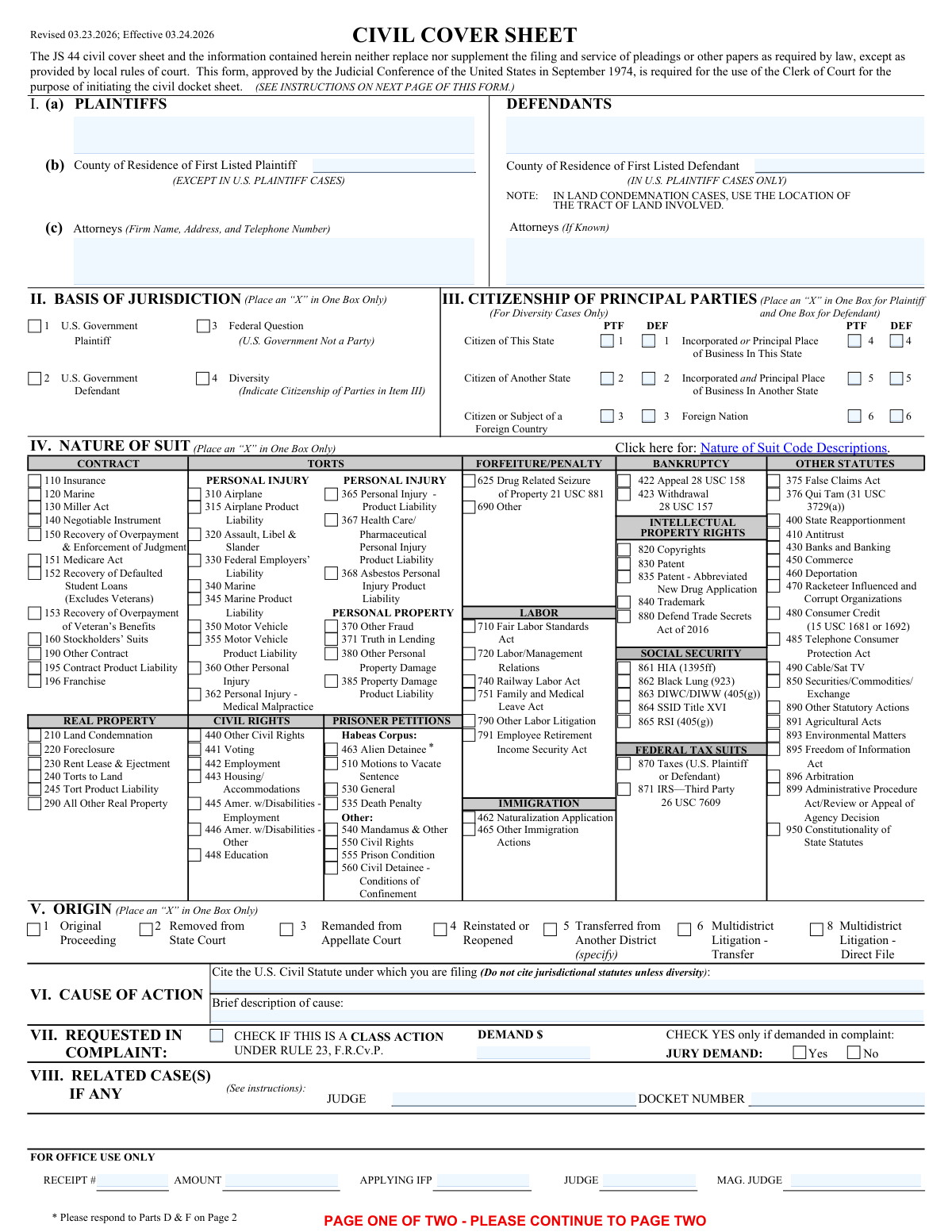
Yes! You can use AI to fill out Form JS 44, Civil Cover Sheet
The Form JS 44, Civil Cover Sheet, is a mandatory document filed in United States District Courts at the commencement of any civil action. Its primary purpose is to provide the court clerk with a summary of the case, including information about the parties, the basis for federal jurisdiction, the nature of the suit, and the relief sought. This data is crucial for the court's administrative and statistical tracking, helping to manage case assignments and dockets efficiently. Today, this form can be filled out quickly and accurately using AI-powered services like Instafill.ai, which can also convert non-fillable PDF versions into interactive fillable forms.
Our AI automatically handles information lookup, data retrieval, formatting, and form filling.
It takes less than a minute to fill out JS 44 using our AI form filling.
Securely upload your data. Information is encrypted in transit and deleted immediately after the form is filled out.
Form specifications
| Form name: | Form JS 44, Civil Cover Sheet |
| Number of fields: | 158 |
| Number of pages: | 3 |
| Language: | English |
Instafill Demo: How to fill out PDF forms in seconds with AI
How to Fill Out JS 44 Online for Free in 2026
Are you looking to fill out a JS 44 form online quickly and accurately? Instafill.ai offers the #1 AI-powered PDF filling software of 2026, allowing you to complete your JS 44 form in just 37 seconds or less.
Follow these steps to fill out your JS 44 form online using Instafill.ai:
- 1 Navigate to Instafill.ai and upload your JS 44 Civil Cover Sheet, or select it from their template library.
- 2 Provide the full names, residences, and attorney information for all plaintiffs and defendants in the designated sections.
- 3 Specify the basis for the court's jurisdiction by selecting Federal Question, Diversity of Citizenship, or U.S. Government as a party.
- 4 Select the appropriate code from the 'Nature of Suit' list that best describes the primary cause of action in your lawsuit.
- 5 Detail the cause of action, indicate if it's a class action, state whether a jury is demanded, and enter the monetary demand from the complaint.
- 6 Complete any required disclosures and certifications, such as the FRCP 7.1 disclosure statement and any local district-specific questions.
- 7 Review all the information auto-filled by the AI for accuracy, then electronically sign and date the form to finalize it for filing with the court.
Our AI-powered system ensures each field is filled out correctly, reducing errors and saving you time.
Why Choose Instafill.ai for Your Fillable JS 44 Form?
Speed
Complete your JS 44 in as little as 37 seconds.
Up-to-Date
Always use the latest 2026 JS 44 form version.
Cost-effective
No need to hire expensive lawyers.
Accuracy
Our AI performs 10 compliance checks to ensure your form is error-free.
Security
Your personal information is protected with bank-level encryption.
Frequently Asked Questions About Form JS 44
This form, a Civil Cover Sheet, is used to provide the court with a summary of a new civil lawsuit being filed. It helps the clerk's office with case management, statistical reporting, and assigning the case to the correct judge.
The plaintiff or their attorney must complete and file this form when initiating a new civil case in federal court. It is submitted along with the complaint.
Select 'Federal Question' if your case is based on a U.S. law, treaty, or the Constitution. Select 'Diversity' if the plaintiff and defendant are citizens of different states and the amount in controversy meets the legal requirement.
Review the extensive list of options and select the one that most accurately describes the primary legal claim in your complaint. If your case involves multiple claims, choose the code that represents the main cause of action.
You must indicate the citizenship for both the plaintiff and the defendant by checking the appropriate boxes for individuals or corporations. This information is required to establish diversity jurisdiction.
The form indicates that the defendant's attorney information should be provided 'If Known.' If you do not have this information at the time of filing, you can leave that section blank.
These questions are specific to the Eastern District of New York and help determine the proper courthouse division for your case. Your answers will be based on where the parties reside, where the events occurred, or where property is located.
No, this section is reserved for the court clerk's office to enter information like the assigned judge, receipt number, and filing fee amount. You should leave these fields blank.
This section is used to certify why your case is not eligible for the court's compulsory arbitration program. Common reasons include the amount of damages sought exceeding $150,000 or the request for non-monetary relief.
In this section, you must disclose any other cases filed in the same court that are related to the one you are filing. This helps the court determine if the cases should be assigned to the same judge for efficiency.
Yes, services like Instafill.ai use AI to accurately auto-fill form fields from your existing case documents. This can save significant time and help reduce errors.
You can use a service like Instafill.ai to upload the form and fill it out interactively online. The platform helps you navigate the fields and ensures all necessary information is completed correctly.
If you have a flat, non-fillable PDF, you can use a tool like Instafill.ai. It can convert the static PDF into an interactive, fillable form that you can complete, sign, and save online.
A class action is a lawsuit brought by one or more individuals on behalf of a larger group with similar claims. You should check the 'Class action' box only if the complaint is being filed as a class action under Rule 23 of the Federal Rules of Civil Procedure.
Select 'Original Proceeding' if you are filing a brand new case directly in this federal court. Select 'Removed from State Court' if the case was initially filed in a state court and is now being moved to this federal court.
Compliance JS 44
Validation Checks by Instafill.ai
1
Exclusive Basis of Jurisdiction Selection
This check ensures that only one option is selected from the 'Basis of Jurisdiction' section: 'U.S. Government Plaintiff', 'U.S. Government Defendant', 'Federal Question', or 'Diversity'. The basis of jurisdiction is a fundamental legal requirement for the court to hear a case, and selecting more than one creates ambiguity. A validation failure would require the filer to clarify the single, correct grounds for federal jurisdiction before the case can be docketed.
2
Mandatory Citizenship Information for Diversity Cases
This validation verifies that if 'Diversity' is selected as the basis of jurisdiction, the 'Citizenship of Principal Parties' sections for both the plaintiff and defendant are completed. This information is legally required to establish diversity jurisdiction under 28 U.S.C. § 1332. Failure to provide this information when claiming diversity will result in the rejection of the filing, as the court cannot confirm its authority to hear the case.
3
Logical Consistency for Diversity Jurisdiction
This check performs a logical comparison to ensure the citizenship of the plaintiff and defendant are different when 'Diversity' is the basis of jurisdiction. For example, if the plaintiff is marked as 'Citizen of This State,' the defendant cannot also be 'Citizen of This State.' This is vital because diversity jurisdiction requires complete diversity between opposing parties; a failure indicates a potential lack of jurisdiction and will require correction.
4
Exclusive Nature of Suit Selection
This validation ensures that exactly one checkbox is selected in the extensive 'Nature of Suit' section. The court uses this single code to categorize the case for statistical reporting, judicial assignment, and case management purposes. Selecting multiple or no options will cause a validation failure, and the form will be returned for correction to ensure proper docketing.
5
Mutually Exclusive Jury Demand
This check validates that either 'Jury demand: Yes' or 'Jury demand: No' is selected, but not both. A clear indication of whether a jury is requested is fundamental for scheduling, trial planning, and calculating fees. An ambiguous or contradictory selection will halt processing until the filer provides a definitive choice.
6
Completeness of Party Names
This validation ensures that the 'Plaintiff Name(s)' and 'First Listed Defendant Name' fields are not empty. These fields are the most basic identifiers for the parties involved in the lawsuit and are absolutely essential for creating a case record. A submission with missing party names is fundamentally incomplete and will be immediately rejected.
7
Exclusive Origin Selection
This check confirms that only one option is selected from the 'Origin' section (e.g., 'Original Proceeding,' 'Removed from State Court'). This information is crucial for the Clerk's Office to understand the procedural posture of the case and apply the correct docketing procedures. Selecting multiple origins creates a logical conflict that must be resolved before the case can be processed.
8
Mandatory Arbitration Ineligibility Reason
This check verifies that if 'Eligible for Arbitration (Yes/No)' is answered 'No', then at least one of the reason checkboxes ('Monetary damages exceed $150,000,' 'Complaint seeks injunctive relief,' or 'Other reason') is selected. The court requires a specific justification for bypassing compulsory arbitration. If no reason is provided, the certification is incomplete and the filing will be flagged for correction.
9
Conditional 'Other Reason' for Arbitration Ineligibility
This validation ensures the 'Other Reason for Arbitration Ineligibility' text field is filled if and only if the 'Other reason case is ineligible' checkbox is selected. This prevents orphaned data and ensures that when a user indicates an 'other' reason, they provide the necessary explanation. A failure would prompt the user to either provide the text or uncheck the box.
10
Conditional Disciplinary Action Explanation
This check ensures that the 'Disciplinary Action Explanation' field contains text if the 'Subject to Disciplinary Action' field is answered 'Yes'. This ensures that any affirmative disclosure of disciplinary action is properly explained for the court's review as part of the attorney's bar admission status. If the field is empty despite a 'Yes' answer, the form will be considered incomplete and require correction.
11
Valid Certification Date Format and Presence
This validation ensures the 'Certification Date' field is not empty and contains a value in a valid date format (e.g., MM/DD/YYYY). The date of signature is a legal requirement that attests to the accuracy of the information on that specific day. An invalid or missing date can render the entire certification invalid, leading to rejection of the document.
12
Conditional Venue Question Logic
This check validates that questions 3a, 3b, and 3c in 'Part D' are only answered if the responses to both Question 1 and Question 2 are 'No'. This enforces the designed skip logic of the form, ensuring filers only provide information relevant to their specific circumstances regarding venue. Answering these questions out of sequence would trigger a validation error to correct the logical flow.
13
Completeness of Cause of Action
This validation verifies that both the 'U.S. Civil Statute Citation' and 'Brief Description of Cause' fields are filled out. These fields explain the legal and factual basis for the lawsuit. Leaving them blank makes it impossible for the court and the defendant to understand the claim, and the filing will be rejected as insufficient.
14
Conditional Plaintiff County of Residence
This check ensures that the 'County of Residence (First Listed Plaintiff)' field is filled only when the 'U.S. Government Plaintiff' box is not checked. This rule ensures data is collected only when relevant for venue and statistical purposes in non-government cases. A validation failure would prompt the user to either remove the county information or correct the 'U.S. Government Plaintiff' status.
Common Mistakes in Completing JS 44
Filers often incorrectly select the basis for jurisdiction or fail to complete the required follow-up sections. For example, they might check 'Diversity' but then neglect to fill out the 'Citizenship of Principal Parties' section, which is essential for establishing diversity jurisdiction. This error can lead to the court questioning its jurisdiction over the case, causing significant delays or even dismissal. To avoid this, carefully determine the correct basis and complete all dependent fields; AI-powered tools like Instafill.ai can automatically highlight and enforce these conditional requirements.
With over 80 options, filers frequently choose a generic 'Nature of Suit' code (e.g., '190 Other Contract') when a more specific one exists (e.g., '196 Franchise'). This happens due to haste or uncertainty about the legal classifications. An incorrect code can lead to improper case assignment, skewed judicial statistics, and delays in routing the case to the appropriate magistrate or specialized docket. Always review the entire list to find the most precise category that describes the primary cause of action.
When asserting diversity jurisdiction, filers often confuse the citizenship rules for individuals versus corporations. They might incorrectly use the 'Incorporated or Principal Place of Business' option for an individual plaintiff or defendant. For diversity purposes, an individual's citizenship is their state of domicile, while a corporation's citizenship is both its state of incorporation and its principal place of business. This distinction is critical, and getting it wrong can defeat diversity jurisdiction and lead to the case being dismissed.
Attorneys representing non-governmental corporate parties frequently leave the 'Disclosure Statement' blank, especially when there are no parent companies to report. Federal Rule of Civil Procedure 7.1 requires parties to either name parent corporations and publicly held corporations owning 10% or more of its stock, or to affirmatively state that none exist. Leaving this section blank is a compliance failure that can result in an order from the court to correct the filing. Always complete this field by providing the required information or explicitly writing 'None'.
Filers often make mistakes when certifying a case is ineligible for arbitration, such as checking 'No' for eligibility but then failing to select a reason. Another common error is checking 'Other reason' but not providing the required written explanation. These omissions make the certification incomplete and can lead to the clerk's office rejecting the filing or the court deeming the certification invalid. Ensure that if you claim ineligibility, you also provide the specific, required justification on the form.
The form has specific instructions for entering the 'County of Residence' for the plaintiff and defendant, which depend on whether the U.S. Government is a party. Many filers ignore this conditional logic and fill in both fields regardless of the case type. This creates unnecessary and incorrect data on the cover sheet, which may need to be corrected later. Reading the instructions carefully or using a smart form-filling tool like Instafill.ai can prevent this by only showing the relevant fields based on your prior answers.
In the 'Cause of Action' section, filers sometimes provide an overly simplistic or vague description, such as 'Personal Injury' or 'Contract Dispute.' While the description should be brief, it must be sufficient for the clerk's office to understand the core legal claim and verify the 'Nature of Suit' selection. A better description would be 'Personal injury claim from motor vehicle accident' or 'Breach of contract for failure to deliver goods.' Providing a clear, concise narrative helps ensure proper case processing from the outset.
Even when a jury trial is properly demanded in the complaint document, filers sometimes forget to check the corresponding 'Jury demand: Yes' box on the civil cover sheet. While the complaint is the controlling document, this oversight can cause administrative confusion and may lead to the case being incorrectly flagged as a non-jury matter in the court's case management system. To avoid any ambiguity or potential waiver arguments, ensure all related documents, including the cover sheet, consistently reflect the jury demand.
This form contains questions (Part D) specific to case assignment within a particular federal district (e.g., regarding Nassau or Suffolk County for the EDNY). Filers, especially those from outside the district, may not understand the purpose of these questions and answer them incorrectly. This can result in the case being assigned to the wrong courthouse or division, causing logistical issues and delays. It is crucial to carefully read and accurately answer these local questions to ensure proper venue and case assignment.
Inexperienced filers or pro se litigants sometimes mistakenly write information in the sections clearly marked 'For Office Use Only,' such as 'Receipt Number,' 'Judge,' or 'Magistrate Judge.' This happens when filers try to fill every single box on the form without reading the labels. This creates confusion for the clerk's office and makes the form look unprofessional, requiring court staff to disregard or correct the extraneous information. If a form is only available as a flat PDF, tools like Instafill.ai can convert it to a smart, fillable version that can lock or hide these sections to prevent such errors.
Saved over 80 hours a year
“I was never sure if my IRS forms like W-9 were filled correctly. Now, I can complete the forms accurately without any external help.”
Kevin Martin Green
Your data stays secure with advanced protection from Instafill and our subprocessors

Robust compliance program
Transparent business model
You’re not the product. You always know where your data is and what it is processed for.
ISO 27001, HIPAA, and GDPR
Our subprocesses adhere to multiple compliance standards, including but not limited to ISO 27001, HIPAA, and GDPR.
Security & privacy by design
We consider security and privacy from the initial design phase of any new service or functionality. It’s not an afterthought, it’s built-in, including support for two-factor authentication (2FA) to further protect your account.
Fill out JS 44 with Instafill.ai
Worried about filling PDFs wrong? Instafill securely fills form-js-44-civil-cover-sheet forms, ensuring each field is accurate.