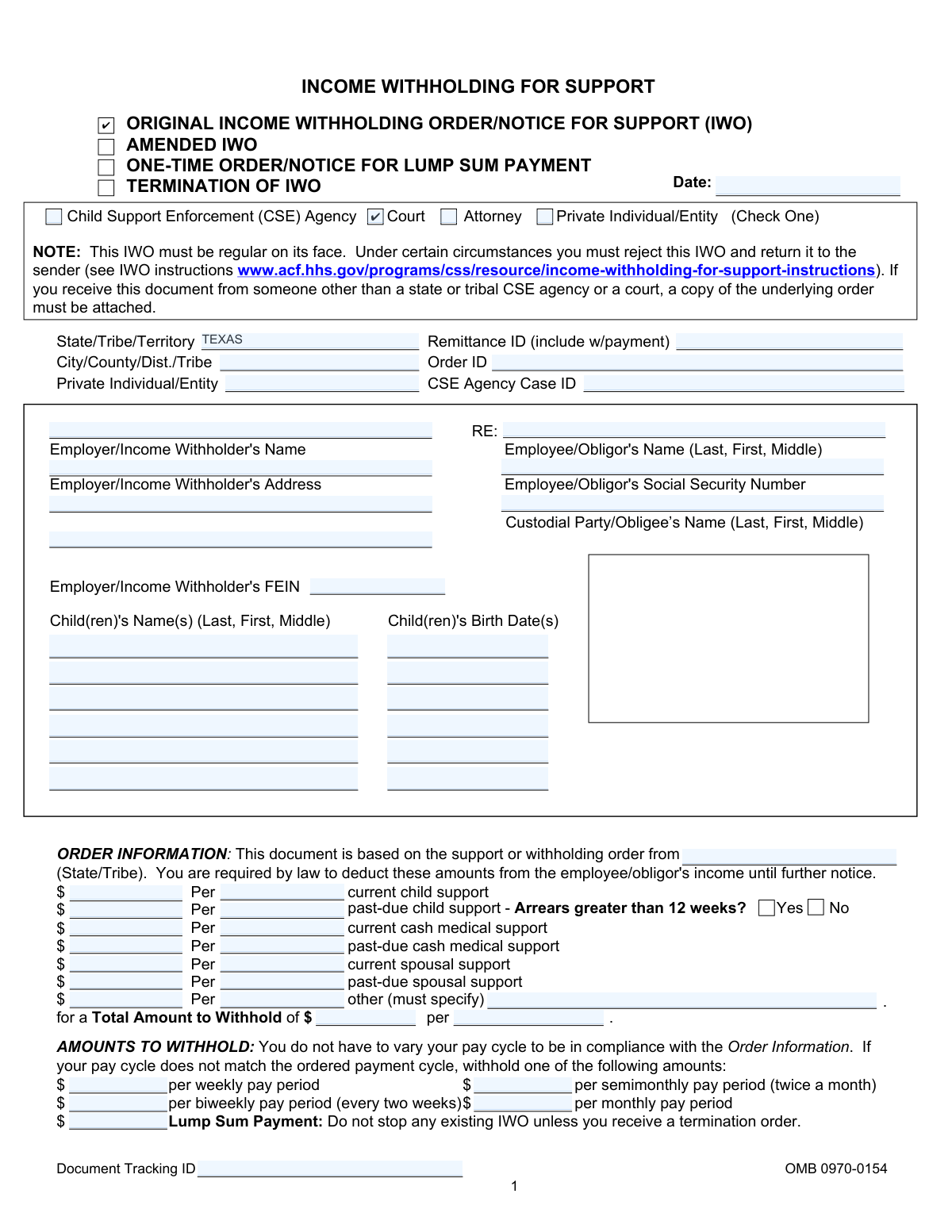
Yes! You can use AI to fill out Form OMB 0970-0154, Income Withholding for Support (IWO)

The Income Withholding for Support (IWO) is a legal order sent to an employer, requiring them to deduct child support payments directly from an employee's wages. This standardized form is used by courts and child support agencies nationwide to ensure consistent and timely payment of support obligations. It specifies the exact amounts to be withheld for current support, past-due amounts, and other related costs. Today, this form can be filled out quickly and accurately using AI-powered services like Instafill.ai, which can also convert non-fillable PDF versions into interactive fillable forms.
Our AI automatically handles information lookup, data retrieval, formatting, and form filling.
It takes less than a minute to fill out IWO / OMB 0970-0154 using our AI form filling.
Securely upload your data. Information is encrypted in transit and deleted immediately after the form is filled out.

Form specifications

Form name: Form OMB 0970-0154, Income Withholding for Support (IWO)
Number of fields: 117
Number of pages: 1
Language: English
main-image

Instafill Demo: How to fill out PDF forms in seconds with AI

How to Fill Out IWO / OMB 0970-0154 Online for Free in 2026

Are you looking to fill out a IWO / OMB 0970-0154 form online quickly and accurately? Instafill.ai offers the #1 AI-powered PDF filling software of 2026, allowing you to complete your IWO / OMB 0970-0154 form in just 37 seconds or less.
Follow these steps to fill out your IWO / OMB 0970-0154 form online using Instafill.ai:
  1. 1 Navigate to Instafill.ai and upload or select the Income Withholding for Support (IWO) form.
  2. 2 Use the AI assistant to automatically populate key details such as the issuing state/tribe, case identifiers, and court order information.
  3. 3 Enter the employer's information (name, address, FEIN) and the employee/obligor's details (name, SSN).
  4. 4 Specify the precise amounts to be withheld for current child support, past-due support, medical support, and spousal support as detailed in the order.
  5. 5 Review the calculated total withholding amount and the corresponding amounts for various pay periods (weekly, biweekly, monthly).
  6. 6 Input the remittance information, including the address for the State Disbursement Unit (SDU) where payments must be sent.
  7. 7 Carefully review all entered data for accuracy before securely downloading, printing, or electronically submitting the completed IWO form.

Our AI-powered system ensures each field is filled out correctly, reducing errors and saving you time.

Why Choose Instafill.ai for Your Fillable IWO / OMB 0970-0154 Form?

Speed

Complete your IWO / OMB 0970-0154 in as little as 37 seconds.

Up-to-Date

Always use the latest 2026 IWO / OMB 0970-0154 form version.

Cost-effective

No need to hire expensive lawyers.

Accuracy

Our AI performs 10 compliance checks to ensure your form is error-free.

Security

Your personal information is protected with bank-level encryption.

Frequently Asked Questions About Form IWO / OMB 0970-0154

This is a mandatory legal notice sent to an employer or income withholder. It requires them to deduct support payments, such as child or spousal support, directly from an employee's income.

You must begin withholding the specified amount from the employee's income no later than the first pay period after the date indicated. You must then send the payment to the designated State Disbursement Unit (SDU) or tribal payee within the specified timeframe.

The form provides pre-calculated amounts for weekly, biweekly, semimonthly, and monthly pay periods. You should use the amount that corresponds to your company's pay cycle to remain in compliance.

Yes, you cannot withhold more than the limit set by the Consumer Credit Protection Act (CCPA), which is typically 50-65% of disposable income. The specific limit depends on whether the employee is supporting another family and if arrears are over 12 weeks.

You must promptly complete the 'Notification of Employment Termination or Income Status' section on the form and return it to the sender. If possible, provide the employee's termination date and last known contact information.

You must honor all IWOs to the greatest extent possible within the legal withholding limits. Priority must be given to current support payments before past-due support, and you should follow your state's law for allocating payments.

If you fail to withhold income as the IWO directs, your company is liable for the accumulated amount you should have withheld. You may also face penalties set by state or tribal law.

Payments must be sent to the State Disbursement Unit (SDU) or tribal payee listed in the 'Remittance Information' section. If the form directs payment to an entity other than an SDU, you may need to return the notice to the sender.

Yes, you are subject to a fine under state or tribal law for discharging, refusing to employ, or taking disciplinary action against an employee because of an IWO.

A lump sum payment refers to income like bonuses, commissions, or severance pay. You should contact the sender of the IWO to determine if you are required to report and/or withhold from these payments.

Yes, services like Instafill.ai use AI to help you accurately auto-fill form fields, which can save time and reduce errors when preparing an IWO to send to an employer.

Simply upload the IWO form to the Instafill.ai platform. The service will make the document interactive, and its AI can help you fill in the required information like names, case identifiers, and withholding amounts.

You can use a service like Instafill.ai, which can convert flat, non-fillable PDFs into interactive, fillable forms. This allows you to easily type your information directly into the fields before printing or sending.

Compliance IWO / OMB 0970-0154
Validation Checks by Instafill.ai

1
Validate Employee Social Security Number Format
This check ensures the 'Employee/Obligor's Social Security Number' (EmployeeSSN) is entered in a valid XXX-XX-XXXX format. Proper formatting is crucial for uniquely identifying the employee and correctly applying the withholding order against their payroll records. If the SSN is malformed, the submission should be rejected to prevent misapplication of funds or privacy violations.
2
Validate Employer Federal Employer Identification Number (FEIN) Format
This check verifies that the 'Employer/Income Withholder's FEIN' (EINTextA) follows the standard XX-XXXXXXX format. The FEIN is a unique identifier for the business entity, and its accuracy is essential for legal and tax reporting purposes related to income withholding. An invalid format would cause the form to be rejected by processing systems and require correction by the sender.
3
Exclusive Issuer Type Selection
This validation ensures that exactly one issuer checkbox (Child Support Enforcement Agency, Court, Attorney, or Private Individual/Entity) is selected at the top of the form. The issuer type determines the legal authority and processing rules for the withholding order. Selecting zero or more than one issuer creates ambiguity and would render the order invalid, requiring it to be returned to the sender for clarification.
4
Verify Total Withholding Amount Calculation
This check confirms that the 'Total Amount to Withhold' (ObligationTotalAmount) is the correct sum of all individual support obligation amounts listed (current child, past-due child, medical, spousal, and other). This is a critical cross-field validation to ensure the employer withholds the correct total amount from the employee's income. A mismatch would lead to incorrect payments and potential legal liability for the employer.
5
Conditional Requirement for 'Other' Obligation Description
This validation rule checks that if an amount is entered in the 'other' support field (ObligationOtherAmount), the corresponding description field (ObligationOtherDescriptionText) must not be empty. This description is necessary for the employer and employee to understand the nature of the additional deduction. Failure to provide a description for an 'other' amount will result in an incomplete and ambiguous order, which should be flagged for correction.
6
Paired Child Name and Birth Date
This check ensures that for every child's name entered (e.g., Child1Name), a corresponding birth date (e.g., Child1BirthDate) is also provided. Child birth dates are often used to determine the duration of a child support obligation. Missing birth dates can create administrative burdens and complications in managing the case lifecycle, so forms with this missing information should be considered incomplete.
7
Consistent Header Information Across Pages
This validation verifies that key identifying information (Employer Name, FEIN, Employee Name, SSN, Case ID, Order ID) is identical across all pages where it is repeated. Consistency is vital to ensure that pages of the document are not mixed up with other cases during processing, scanning, or data entry. Any discrepancy should halt processing until the inconsistency is resolved to prevent a serious data mix-up.
8
Logical Requirement for Termination Date
This check is triggered on page 4 and ensures that if either of the 'Notification of Employment Termination' checkboxes is marked, the 'Termination date' field must be filled out. This date is the most critical piece of information on a termination notice, informing the support agency when the income source ceased. A termination notice without a termination date is incomplete and fails its primary purpose.
9
Validate CCPA Withholding Percentage
This check validates that the withholding limit percentage (IncomeWithholdingCCPARate) is a valid number, typically within the range specified by the Consumer Credit Protection Act (e.g., 50%, 55%, 60%, 65%). This rate is legally mandated and protects the employee from excessive garnishment. An invalid or out-of-range percentage would make the order legally non-compliant and must be rejected.
10
Remittance Payee and Address Completeness
This validation ensures that the 'Remit payment to' payee name (PayeeName) and address (PayeeAddressLine1Text) fields are populated. This information is absolutely essential as it dictates where the withheld funds must be sent. If these fields are blank, the employer has no instruction on where to send the money, making the order unenforceable and requiring its return.
11
Logical Signature Date
This check verifies that the 'Date of Signature' (DateofSigniture) is a valid date and is not earlier than the main 'Date' at the top of the form. The signature date authenticates the order as of a specific point in time and should logically follow or be the same as the document's issuance date. A future date or a date preceding the document's creation would be invalid and suggest an error.
12
Mandatory Document Action Selection
This validation ensures that one of the primary action checkboxes at the top of the form (ORIGINAL, AMENDED, ONE-TIME, TERMINATION) is selected. This selection defines the purpose of the entire document and how it should be processed by the employer. Without this information, the employer does not know whether to start, change, or stop a withholding, making the form unusable.
13
Paired Amount and Frequency for Obligations
This check ensures that for every support amount entered (e.g., SupportCurrentChildAmount), a corresponding payment frequency (e.g., SupportCurrentChildFrequencyCode) is also specified. An amount without a frequency (e.g., '$500 per ___') is ambiguous and cannot be acted upon by the employer. The form must be rejected if any amount is missing its corresponding frequency.
14
Validate All Date Field Formats
This is a comprehensive check across all date fields on the form, including DocumentDate, Child Birth Dates, and TerminationDate, to ensure they are in a valid and parseable format (e.g., MM/DD/YYYY). Consistent and valid date formats are essential for system processing, calculating timelines, and determining eligibility. Any field with an invalid date format, such as 'Feb 30, 2023', should cause the form to fail validation.

Common Mistakes in Completing IWO / OMB 0970-0154

Incorrectly Calculating Total Withholding Amount

This error occurs when the issuer incorrectly adds the individual support amounts (current child, past-due, medical, spousal) to arrive at the 'Total Amount to Withhold'. This is often due to manual calculation errors or misinterpreting the underlying court order. An incorrect total leads to the employer withholding the wrong amount, resulting in either underpayment or overpayment of support and requiring a corrected IWO to be issued, delaying proper payment.

Failing to Specify Payment Frequency

Each monetary amount on the form, from current child support to the total amount, must have a corresponding frequency (e.g., 'per month', 'per week'). Issuers sometimes leave these fields blank, creating ambiguity for the employer. This forces the employer to guess the intended withholding cycle, which can lead to incorrect payment amounts and schedules, and may even result in the form being rejected and returned to the sender for clarification.

Omitting or Misstating Identifier Numbers

The 'CSE Agency Case ID', 'Order ID', and 'Employer FEIN' are critical for tracking and processing payments correctly. These numbers are often long and complex, leading to typos or transpositions during data entry. An incorrect identifier can cause payments to be misapplied, delay processing, or lead to the form's rejection, as the employer or SDU cannot match the IWO to the correct case or employee.

Ignoring the 'Arrears Greater than 12 Weeks' Checkbox

This checkbox is crucial because it determines which federal withholding limit (CCPA) applies—50/60% or 55/65% of disposable income. Issuers may forget to check 'Yes' or 'No', leaving the employer to guess. This can lead to the employer applying the lower limit when the higher one is appropriate, resulting in insufficient withholding for past-due support and prolonging the time it takes to pay off arrears.

Incorrect Pay Cycle Conversion Calculations

The form requires the issuer to convert the total ordered amount into weekly, biweekly, semimonthly, and monthly figures. Mistakes in this section are common due to complex conversion math (e.g., converting a monthly amount to biweekly). If these pre-calculated amounts are wrong, the employer will withhold an incorrect sum, even if they match their pay cycle to the form perfectly, causing payment discrepancies.

Employer Sending Payment to the Wrong Recipient

The form explicitly states that payments must be sent to the State Disbursement Unit (SDU), not the custodial party, court, or attorney. However, employers unfamiliar with the process may follow outdated instructions or send the payment to the address of the issuing attorney. This causes significant delays as the payment must be rerouted and can lead to the employer being found non-compliant.

Employer Failing to Report Employment Termination

When an employee/obligor is terminated or quits, the employer is required to complete the 'Notification of Employment Termination' section and return the form to the sender. Employers often neglect this step, assuming their responsibility ends with the final paycheck. This failure prevents the child support agency from quickly locating the obligor's new income source, causing a lapse in support payments for the child.

Private Individual Forgetting to Attach the Underlying Order

The form instructions state that if the IWO is sent by a private individual or entity (not a court or CSE agency), a copy of the underlying support order must be attached. Forgetting this attachment makes the IWO invalid on its face. The employer is required to reject the IWO and return it to the sender, causing significant delays in the enforcement of the support order.

Incomplete Child Information

The section for children's names and birth dates is sometimes left incomplete or filled with inaccurate information. This data is vital for case identification and for determining when a support obligation for a specific child legally ends (e.g., upon reaching the age of majority). Missing or incorrect information can create confusion and may require future legal clarification to terminate the withholding order at the appropriate time.

Misinterpreting 'Disposable Income' for Withholding Limits

Employers must withhold up to a certain percentage of an employee's 'disposable income'. Employers sometimes miscalculate this by including pre-tax deductions that are not mandatory (like 401k contributions) or by failing to apply the correct state-specific rules. This can result in withholding too much or too little, potentially violating the law and creating liability for the employer. AI-powered tools like Instafill.ai can help prevent many of these data entry and calculation errors by validating information and performing calculations automatically. If the form is a non-fillable PDF, Instafill.ai can also convert it into an interactive, fillable version to ensure all fields are completed correctly.
Saved over 80 hours a year

“I was never sure if my IRS forms like W-9 were filled correctly. Now, I can complete the forms accurately without any external help.”

Kevin Martin Green

Your data stays secure with advanced protection from Instafill and our subprocessors

Robust compliance program

Transparent business model

You’re not the product. You always know where your data is and what it is processed for.

ISO 27001, HIPAA, and GDPR

Our subprocesses adhere to multiple compliance standards, including but not limited to ISO 27001, HIPAA, and GDPR.

Security & privacy by design

We consider security and privacy from the initial design phase of any new service or functionality. It’s not an afterthought, it’s built-in, including support for two-factor authentication (2FA) to further protect your account.

Fill out IWO / OMB 0970-0154 with Instafill.ai

Worried about filling PDFs wrong? Instafill securely fills form-omb-0970-0154-income-withholding-for-support-iwo forms, ensuring each field is accurate.