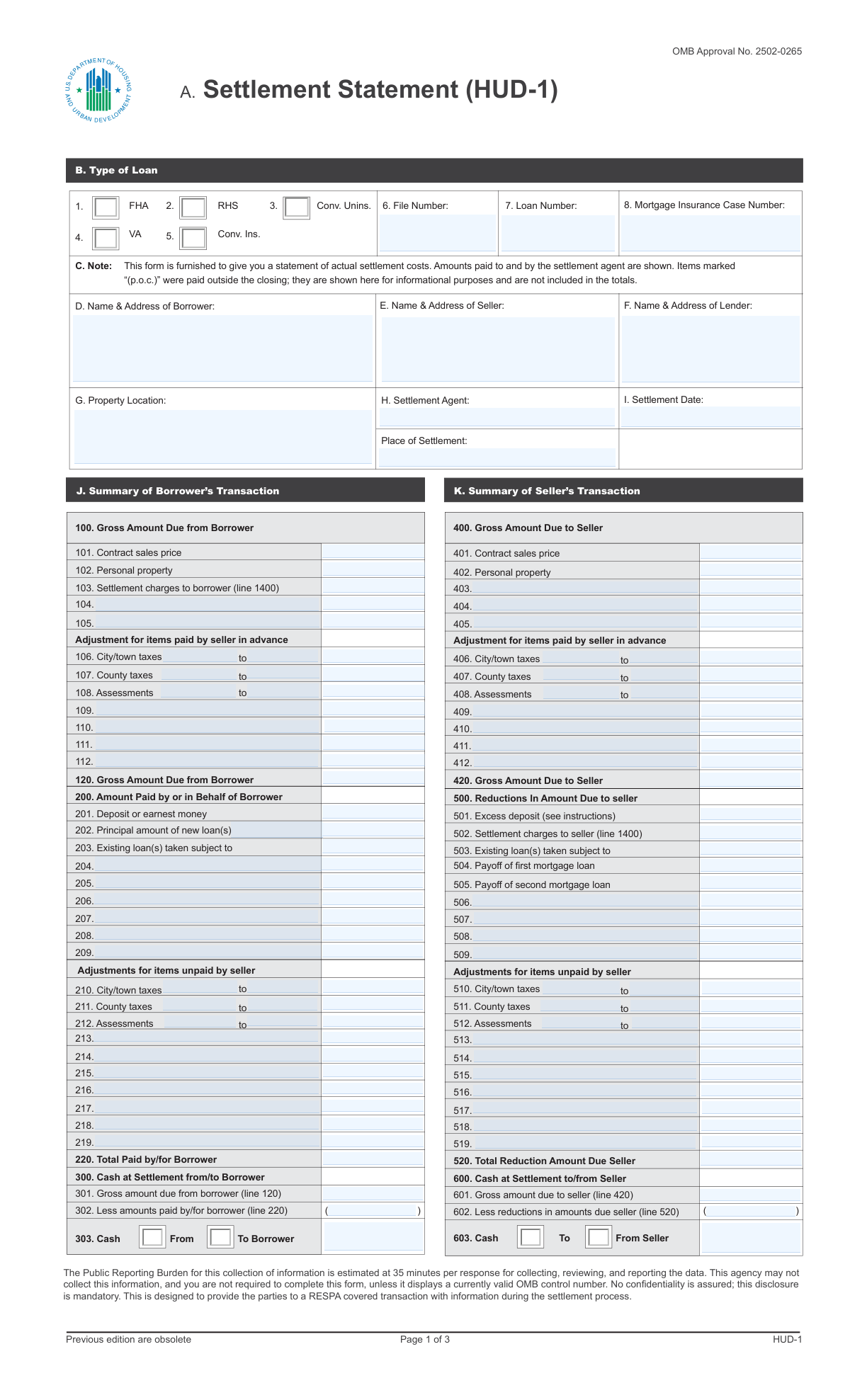
Yes! You can use AI to fill out HUD-1 Settlement Statement

The HUD-1 Settlement Statement, created by the U.S. Department of Housing and Urban Development (HUD), provides a detailed, line-by-line list of all costs, credits, and financial adjustments between the buyer and seller in a mortgage closing. It is crucial for ensuring transparency and a clear understanding of the final financial figures for all parties involved in the transaction. Today, this form can be filled out quickly and accurately using AI-powered services like Instafill.ai, which can also convert non-fillable PDF versions into interactive fillable forms.
Our AI automatically handles information lookup, data retrieval, formatting, and form filling.
It takes less than a minute to fill out HUD-1 using our AI form filling.
Securely upload your data. Information is encrypted in transit and deleted immediately after the form is filled out.

Form specifications

Form name: HUD-1 Settlement Statement
Number of fields: 378
Number of pages: 3
Language: English
Categories: HUD forms, NJ state forms, PA state forms
main-image

Instafill Demo: How to fill out PDF forms in seconds with AI

How to Fill Out HUD-1 Online for Free in 2026

Are you looking to fill out a HUD-1 form online quickly and accurately? Instafill.ai offers the #1 AI-powered PDF filling software of 2026, allowing you to complete your HUD-1 form in just 37 seconds or less.
Follow these steps to fill out your HUD-1 form online using Instafill.ai:
  1. 1 Navigate to Instafill.ai and upload or select the HUD-1 Settlement Statement form.
  2. 2 Allow the AI to process the document and identify all fields, including borrower/seller information, property details, and the numerous financial line items.
  3. 3 Enter the primary transaction details in Section A-I, such as the names and addresses of the borrower, seller, and lender, along with the property location and settlement date.
  4. 4 Input the specific financial figures into the borrower's and seller's columns, including the contract price, loan amounts, settlement charges, tax prorations, and other adjustments as prompted by the AI.
  5. 5 Use the AI's guidance to accurately calculate the totals for each section, such as 'Gross Amount Due from Borrower' (Line 120), 'Total Reduction Amount Due Seller' (Line 520), and the final 'Cash At Settlement' figures (Lines 303 and 603).
  6. 6 Review the completed statement, verifying that all calculations are correct and that the borrower's and seller's sides of the transaction are fully balanced.
  7. 7 Securely download, print, or share the finalized HUD-1 Settlement Statement for review and signature by all relevant parties at the closing.

Our AI-powered system ensures each field is filled out correctly, reducing errors and saving you time.

Why Choose Instafill.ai for Your Fillable HUD-1 Form?

Speed

Complete your HUD-1 in as little as 37 seconds.

Up-to-Date

Always use the latest 2026 HUD-1 form version.

Cost-effective

No need to hire expensive lawyers.

Accuracy

Our AI performs 10 compliance checks to ensure your form is error-free.

Security

Your personal information is protected with bank-level encryption.

Frequently Asked Questions About Form HUD-1

This form is a settlement statement, likely a HUD-1, which itemizes all charges and credits for both the buyer and seller in a real estate transaction. It shows the final amount of money you need to bring to closing or the net proceeds you will receive.

The settlement agent, such as a title company, escrow officer, or attorney, is responsible for preparing this form. They gather all the necessary financial details from the lender, real estate agents, and other parties involved in the transaction.

The final amount you must bring to closing is located in the section '300 Cash at Settlement from/to Borrower', specifically on the line for 'Net cash at settlement to/from borrower'. This is the bottom-line figure you will need to pay.

You can find your net proceeds in the section '600 Cash at Settlement to/from Seller'. The line item 'Net cash at settlement to/from seller' shows the final amount you will receive after all costs and loan payoffs are deducted.

The 'Gross Amount Due' is the total of the sales price plus all your closing costs. The 'Cash at Settlement' is that gross amount minus credits you've already paid or are receiving, such as your earnest money deposit and the loan amount.

These lines represent prorated property taxes and assessments. They ensure that the seller and buyer each pay for the portion of the tax year that they owned the property, ensuring a fair split of these expenses.

This is the upfront amount you pay at closing to establish an escrow account with your lender. The lender will use this account to make future payments for your property taxes and homeowner's insurance on your behalf.

Lender's title insurance (line 1104) is required by the lender to protect their financial interest in the property. Owner's title insurance (line 1103) is optional but highly recommended to protect your equity from potential title defects or claims from the past.

This number is provided by the mortgage insurer for government-backed loans like FHA or VA loans. Your lender or settlement agent will obtain this number and enter it on the form.

Origination charges (line 801) are fees from the lender for processing your loan application. Points (line 802) are an optional fee you can pay to lower your interest rate over the life of the loan.

Line 1400, 'Total Settlement Charges,' shows the total closing costs for both the borrower and the seller. The detailed breakdown of these charges is listed in sections 700 through 1300.

Yes, services like Instafill.ai use AI to accurately auto-fill form fields from your source documents. This can save significant time and help prevent manual entry errors for settlement agents or their staff who prepare these forms.

You can use a platform like Instafill.ai to upload the form and fill it out interactively online. The service allows you to easily enter data into each field, save your work, and download the completed document.

If you have a non-fillable or 'flat' PDF, you can use a service like Instafill.ai to make it interactive. Simply upload the document, and its AI will automatically detect the form fields and convert them into a fillable format.

Compliance HUD-1
Validation Checks by Instafill.ai

1
Exclusive Loan Type Selection
This check ensures that only one loan type checkbox (FHA, RHS, Conv. Unins., VA, Conv. Ins.) is selected. Selecting multiple loan types creates ambiguity and can lead to incorrect processing, underwriting, and compliance reporting. If more than one box is checked, the form submission should be rejected with an error prompting the user to select a single, appropriate loan type.
2
Conditional Mortgage Insurance Case Number
Validates that the 'Mortgage Insurance Case Number' field is populated if the loan type is FHA, VA, or 'Conv. Ins.'. This number is a critical identifier for government-backed or privately insured loans and is required for tracking and compliance. A failure to provide this number for the specified loan types would halt the loan closing process until the correct information is supplied.
3
Settlement Date Logical Validity
Ensures the 'Settlement Date' is a valid, correctly formatted date that is not in the distant past or unreasonably far in the future. The settlement date is the cornerstone of the entire transaction, dictating prorations and deadlines. An invalid or illogical date would make financial calculations impossible and render the document legally unsound, requiring immediate correction.
4
Tax and Assessment Period Chronology
This validation verifies that for any tax or assessment period (lines 106, 107, 108, 210, 211, 212), the 'Period End' date is on or after the 'Period Start' date. An end date preceding a start date is a logical impossibility that indicates a data entry error. This error would lead to incorrect prorated tax calculations, so the submission must be flagged for review and correction.
5
Gross Amount Due from Borrower Calculation (Line 120)
This check confirms that the value entered in 'Gross Amount Due from Borrower (Line 120)' is the correct sum of all charges listed in lines 101 through 112. This is a fundamental calculation that establishes the borrower's total obligation before credits are applied. A mismatch indicates a calculation error on the form, which would cause the entire settlement statement to be unbalanced and must be corrected.
6
Total Paid by Borrower Calculation (Line 220)
Verifies that the 'Total Paid by/for Borrower (Line 220)' correctly sums all credits and payments listed in lines 201 through 219. This total represents all funds the borrower has already contributed or is being credited for. An incorrect total would lead to an inaccurate calculation of the final cash required from the borrower at settlement.
7
Borrower's Cash at Settlement Calculation
Ensures the 'Net cash at settlement to/from borrower (line 300)' is precisely equal to the 'Gross amount due from borrower (line 120)' minus the 'Less amounts paid by/for borrower (line 220)'. This is the final, critical calculation determining the cash the borrower must bring to, or will receive from, closing. If this calculation fails, the entire financial summary is incorrect and the closing cannot proceed.
8
Borrower's Cash Flow Direction
This check validates that if the 'Net cash at settlement to/from borrower' is a positive number, the 'Cash at Settlement — From Borrower' box is checked, and if negative, the 'To Borrower' box is checked. This indicates the direction of funds, which is a critical piece of information for the settlement agent and all parties. An incorrect selection would create confusion and could lead to errors in disbursing funds.
9
Sales Price Consistency Across Sections
This validation confirms that the 'Contract Sales Price (Line 101)' in the borrower's section is identical to the '401 Contract Sales Price' in the seller's section. The sales price is the foundational value of the entire transaction, and any discrepancy between the two sections indicates a severe error. The form cannot be processed until both values match perfectly.
10
Gross Amount Due to Seller Calculation (Line 420)
This check confirms that the 'Gross Amount Due to Seller (Line 420)' is the correct sum of the sales price and other credits listed in lines 401 through 412. This figure represents the total amount credited to the seller before any deductions are made. A failure in this calculation would result in an incorrect statement of the seller's proceeds.
11
Total Reduction for Seller Calculation (Line 520)
Verifies that the 'Total Reduction Amount Due Seller (Line 520)' correctly sums all deductions from the seller's proceeds, including payoffs and charges, as listed in lines 501 through 519. This total is essential for determining the seller's net proceeds from the sale. An incorrect total would lead to an inaccurate final payout to the seller.
12
Seller's Net Cash Calculation
Ensures the 'Net cash at settlement to/from seller (line 600/603)' is equal to the 'Gross amount due to seller (line 420)' minus the 'Less reductions in amount due seller (line 520)'. This is the final calculation determining the seller's net proceeds from the sale. If this check fails, the seller's payout will be incorrect, invalidating the settlement.
13
Settlement Charges Cross-Reference
This check validates that the 'Settlement Charges to Borrower (Line 103)' matches the 'Total Settlement Charges — Paid from Borrower (1400)' and that 'Settlement charges to seller (line 502)' matches 'Total Settlement Charges — Paid from Seller (1400)'. This ensures the summary figures on the first page of the HUD-1 match the detailed totals from the subsequent pages. A mismatch indicates an error in summarizing or transferring totals, making the statement inconsistent.
14
Escrow Reserve Calculation Logic
For each escrow reserve line (1002-1006), this check verifies that the 'total deposit' amount equals the 'number of months' multiplied by the 'monthly amount'. This ensures the funds being collected for the escrow account are calculated correctly based on the lender's requirements. An error here could lead to a shortage or surplus in the escrow account, causing future payment issues for the borrower.
15
Address Field Completeness and Structure
Validates that the Borrower, Seller, Lender, and Property address fields contain distinct components for a street address, city, state, and ZIP code. These addresses are used for legal notices, tax records, and title documents, so their accuracy and completeness are paramount. An incomplete or malformed address will be flagged for correction to prevent legal and logistical complications post-closing.
16
Title Insurance Premium Allocation
This check ensures that the sum of the 'Agent's portion of premium' (line 1107) and the 'Underwriter's premium amount' (line 1108) equals the total title insurance premiums paid by the borrower and seller (lines 1103 and 1104). This confirms that the total premium collected is properly allocated between the agent and the underwriter. A mismatch would indicate a financial discrepancy in the disbursement of title fees.

Common Mistakes in Completing HUD-1

Incorrect Proration of Taxes and Assessments

This error occurs when calculating the shared cost of property taxes or HOA assessments between the buyer and seller for lines 106-108 and 210-212. Mistakes in the proration period dates or daily rate calculations often lead to one party overpaying. This can cause disputes at the closing table or require complicated post-closing financial corrections. To avoid this, double-check all dates and calculations against the purchase agreement and tax records, or use software that automates prorations based on the settlement date.

Transposing Loan or File Identification Numbers

Manually entering long strings of numbers for the 'Loan Number,' 'File Number,' or 'Mortgage Insurance Case Number' frequently leads to transposed digits or typos. This seemingly small error can cause significant delays, as the settlement documents will not match the lender's or insurer's records, potentially holding up loan funding. To prevent this, carefully proofread all numbers entered. AI-powered form filling tools like Instafill.ai can also eliminate this risk by accurately auto-populating these fields from source documents.

Miscalculating Final Cash to/from Borrower and Seller

The final 'Cash at Settlement' figures on lines 303 and 603 are the result of subtracting total credits from total debits, a process highly susceptible to simple arithmetic errors. An incorrect total is a critical failure that can derail a closing, as parties arrive with the wrong amount of funds. Always use a calculator to verify the totals on lines 120, 220, 420, and 520 before calculating the final cash figures, or rely on a system that performs these summary calculations automatically.

Using Nicknames or Incomplete Legal Names

Applicants often enter a common nickname or an incomplete version of their name in the 'Borrower Name' or 'Seller Name' fields instead of their full legal name. Settlement and title documents are legal instruments that require the full name as it appears on government-issued ID to be valid. A name mismatch can force a last-minute re-drafting of all documents, delaying the closing and the legal recording of the property transfer.

Forgetting Unit Numbers in the Property Address

When the property is a condominium, co-op, or part of a multi-unit building, omitting the specific unit or apartment number from the 'Property Location' field is a frequent oversight. This creates an ambiguous legal description of the property being transferred. Such an error can cause the deed and mortgage documents to be rejected by the county recorder's office, creating title issues that must be corrected at additional expense.

Incorrectly Allocating Fees Between Parties

Many settlement charges, such as title fees (1100 series) or transfer taxes (1200 series), are often split between the borrower and seller. It is easy to accidentally enter a fee in the 'Paid from Borrower’s Funds' column when it should have been in the 'Paid from Seller’s Funds' column. This error directly impacts the final cash-to-close figures for both parties and can lead to confusion and disputes. Carefully review the purchase contract to confirm who is responsible for each fee before entering it.

Errors in Calculating Initial Escrow Deposits

The 'Reserves Deposited with Lender' section (1000 series) requires calculating the initial escrow payment by multiplying a monthly amount by a specified number of months for taxes and insurance. Mistakes in this multi-step calculation are common and result in an incorrect amount being collected for the escrow account. This can lead to future shortages or overages in the account, causing unexpected payment adjustments for the borrower down the line.

Vague Descriptions for 'Other' Charges

Fields for additional charges (e.g., Lines 808, 1109, 1302) are often filled with generic terms like 'Processing Fee' or 'Service.' This lack of specificity makes it difficult for auditors, lenders, and consumers to understand the purpose of the charge, potentially hiding non-allowable fees. Always provide a clear, concise description that includes the service and payee, such as 'Pest Inspection Fee to ABC Pest Control,' for full transparency.

Confusing Loan Type and Insurance Status

Users may incorrectly check the 'Type of Loan' boxes at the top of the form, for example, marking a loan as 'Conv. Unins.' (Conventional Uninsured) when it actually has private mortgage insurance and should be 'Conv. Ins.'. This mistake affects which subsequent fields are required, such as the 'Mortgage Insurance Case Number,' and can lead to compliance issues or incomplete paperwork. Always verify the exact loan program and insurance requirements with the lender's final approval.

Mis-transcribing Figures from the Good Faith Estimate (GFE)

Several lines on the HUD-1, such as origination charges (800 series) and required services (1300 series), are directly transferred from the GFE. Manually copying this data can introduce typos or place figures on the wrong line, creating discrepancies that may violate RESPA tolerance rules. If the form is a non-fillable PDF, tools like Instafill.ai can convert it to a fillable version and help automate data transfer to ensure consistency and compliance.

Omitting Payee Information for Service Fees

Many fields, such as 'Settlement/Closing Fee Payee' (Line 1102) or 'Appraisal fee' (Line 804), require not just an amount but also the name of the company or individual being paid. People often leave the payee name blank, which makes the settlement statement incomplete for auditing and record-keeping purposes. Always specify who is receiving the funds for each service to ensure a complete and transparent record of all disbursements in the transaction.

Incorrectly Documenting Real Estate Commission Splits

The division of commission in the 700 series can be complex, and errors in documenting the amounts paid to different brokers (Lines 701-702) are common. This can lead to payment disputes and delays in brokers receiving their correct compensation after the closing. It is crucial to confirm the commission split agreement with all parties and ensure the figures on the settlement statement accurately reflect it before finalizing the document.
Saved over 80 hours a year

“I was never sure if my IRS forms like W-9 were filled correctly. Now, I can complete the forms accurately without any external help.”

Kevin Martin Green

Your data stays secure with advanced protection from Instafill and our subprocessors

Robust compliance program

Transparent business model

You’re not the product. You always know where your data is and what it is processed for.

ISO 27001, HIPAA, and GDPR

Our subprocesses adhere to multiple compliance standards, including but not limited to ISO 27001, HIPAA, and GDPR.

Security & privacy by design

We consider security and privacy from the initial design phase of any new service or functionality. It’s not an afterthought, it’s built-in, including support for two-factor authentication (2FA) to further protect your account.

Fill out HUD-1 with Instafill.ai

Worried about filling PDFs wrong? Instafill securely fills hud-1-settlement-statement forms, ensuring each field is accurate.