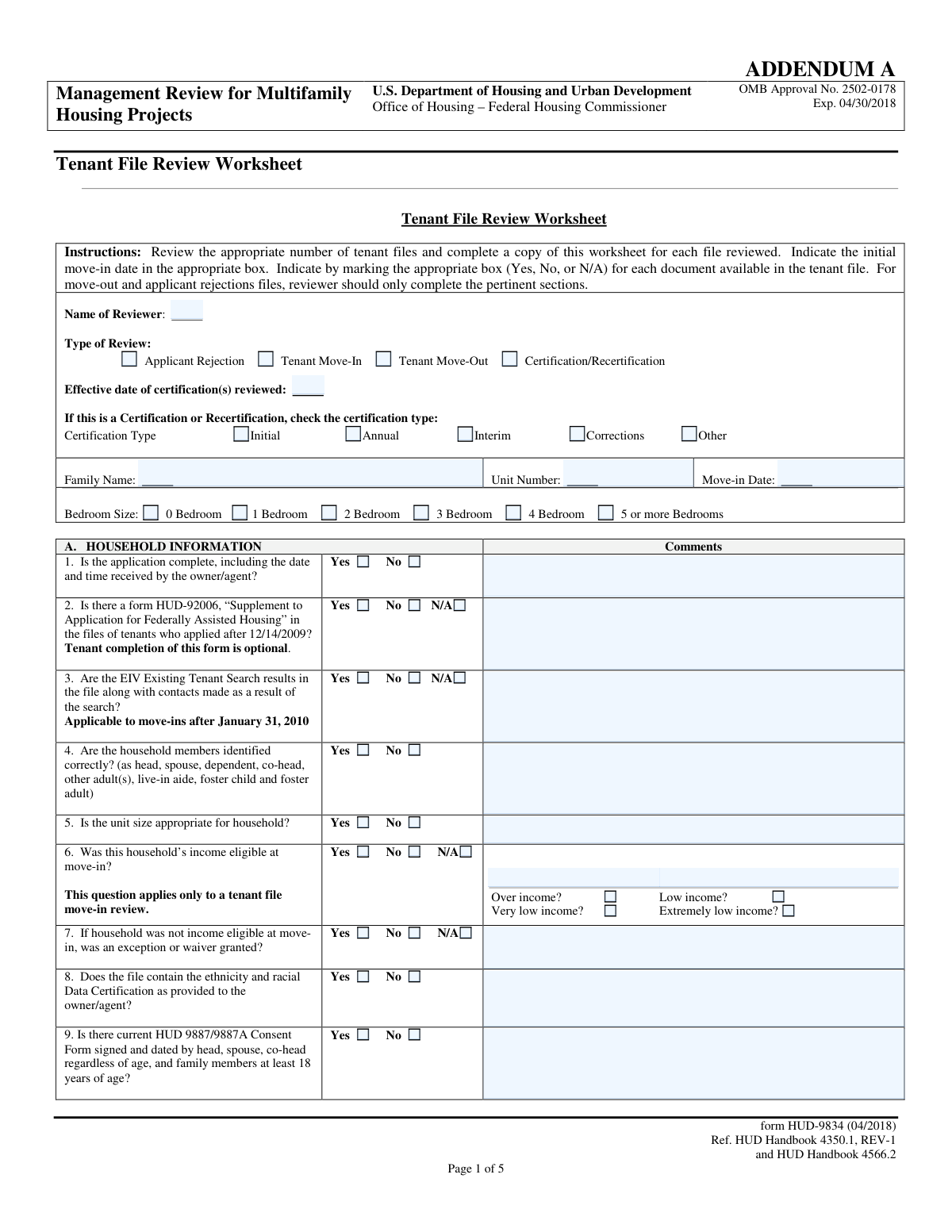
Yes! You can use AI to fill out Form HUD-9834, Tenant File Review Worksheet

Form HUD-9834 is a detailed worksheet from the U.S. Department of Housing and Urban Development (HUD) used during management reviews of multifamily housing projects. Its purpose is to ensure that property owners and agents are maintaining tenant files in compliance with HUD regulations, covering aspects like application processing, income verification, lease agreements, and recertification activities. Today, this form can be filled out quickly and accurately using AI-powered services like Instafill.ai, which can also convert non-fillable PDF versions into interactive fillable forms.
HUD-9834 is part of the HUD forms and tenant forms categories on Instafill.
Our AI automatically handles information lookup, data retrieval, formatting, and form filling.
It takes less than a minute to fill out HUD-9834 using our AI form filling.
Securely upload your data. Information is encrypted in transit and deleted immediately after the form is filled out.

Form specifications

Form name: Form HUD-9834, Tenant File Review Worksheet
Number of fields: 322
Number of pages: 5
Filled form examples: Form HUD-9834 Examples
Language: English
main-image

Instafill Demo: How to fill out PDF forms in seconds with AI

How to Fill Out HUD-9834 Online for Free in 2026

Are you looking to fill out a HUD-9834 form online quickly and accurately? Instafill.ai offers the #1 AI-powered PDF filling software of 2026, allowing you to complete your HUD-9834 form in just 37 seconds or less.
Follow these steps to fill out your HUD-9834 form online using Instafill.ai:
  1. 1 Navigate to Instafill.ai and upload or select the Form HUD-9834, Tenant File Review Worksheet.
  2. 2 Enter the reviewer's name, select the type of review (e.g., Move-In, Certification), and provide the tenant's basic details like family name and unit number.
  3. 3 Systematically go through Section A (Household Information), using the AI-assisted interface to check 'Yes', 'No', or 'N/A' for each compliance item, such as application completeness and required documentation.
  4. 4 Complete Section B (Verification) and Section C (Lease) by confirming that all required verifications (SSN, immigration, screening) and lease components are properly documented in the tenant's file.
  5. 5 In Section D (Certification/Recertification Activities), input and verify all income, asset, and allowance details, allowing the AI to help ensure calculations are correct.
  6. 6 If applicable, complete the specialized sections for Move-Out File Review (Section F) or Applicant Rejection Review (Section G).
  7. 7 Thoroughly review all entered information and comments for accuracy, then securely download, print, or share the completed HUD-9834 worksheet.

Our AI-powered system ensures each field is filled out correctly, reducing errors and saving you time.

Why Choose Instafill.ai for Your Fillable HUD-9834 Form?

Speed

Complete your HUD-9834 in as little as 37 seconds.

Up-to-Date

Always use the latest 2026 HUD-9834 form version.

Cost-effective

No need to hire expensive lawyers.

Accuracy

Our AI performs 10 compliance checks to ensure your form is error-free.

Security

Your personal information is protected with bank-level encryption.

Frequently Asked Questions About Form HUD-9834

This form is a worksheet used by property owners, management agents, or HUD reviewers to conduct a detailed review of tenant files for multifamily housing projects. It ensures that all required documentation is present and that calculations for rent and assistance are correct according to HUD guidelines.

A reviewer, typically a management agent, property owner, or a representative from HUD, completes this form. It is used as part of a Management Review to audit tenant files for compliance with federal housing regulations.

EIV stands for Enterprise Income Verification, a web-based system used by HUD to provide property owners with employment and income information on tenants. The worksheet verifies that EIV reports have been used correctly to verify tenant income and resolve discrepancies.

No, you only need to complete the sections relevant to the type of review you are conducting. For example, if reviewing a move-out file, you would focus on the general information and Section F, 'Move-Out File Review Only'.

You will need the tenant's application, lease agreement and addenda, income and asset verifications (including EIV reports), citizenship/immigration status documentation, and signed consent forms like the HUD-9887/9887A.

In Section D, you must compare the income amounts reported on Form HUD-50059 with the verified information in the tenant's file, such as EIV reports or third-party verifications. You will note any discrepancies and confirm that all calculations for allowances, expenses, and rent are correct.

No, this form is only required in the files of tenants who applied for housing after December 14, 2009. Furthermore, tenant completion of this specific form is optional.

You need to verify that the correct HUD model lease was used, that it is signed and dated by all adult household members and the owner/agent, and that all required attachments like house rules or inspection reports are included.

A common mistake is failing to properly document the resolution of discrepancies found in EIV reports, such as multiple subsidies or unreported income. Ensure the tenant file contains clear evidence of how any issues were investigated and resolved.

This section is used to verify that when an applicant was denied housing, the rejection was done in accordance with the property's Tenant Selection Plan. It checks that the applicant was notified in writing and informed of their right to appeal the decision.

An Initial certification review is for a new move-in, an Annual review is the required yearly recertification of the household's income, and an Interim review is conducted when a tenant reports a change in income or family composition between annual reviews.

Yes, AI-powered services like Instafill.ai can help you complete this form more efficiently. These tools can auto-fill fields by extracting information from tenant files, which saves time and helps ensure accuracy.

Simply upload the HUD-9834 form to the Instafill.ai platform. The AI will make the form fillable and can automatically populate fields based on your existing tenant data, which you can then review and finalize.

You can use a service like Instafill.ai to solve this problem. Instafill.ai can convert any flat, non-fillable PDF into an interactive, fillable form that you can easily complete online.

Compliance HUD-9834
Validation Checks by Instafill.ai

1
Exclusive Review Type Selection
This validation ensures that only one 'Type of Review' checkbox (Applicant Rejection, Tenant Move-In, Tenant Move-Out, or Certification/Recertification) can be selected at a time. This is crucial for maintaining data integrity and preventing the submission of a logically inconsistent form. If a user attempts to select more than one, an error message should prompt them to choose only the single most appropriate review type.
2
Conditional Certification Date Requirement
This check verifies that the 'Effective date of certification(s) reviewed' field is populated with a valid date if the 'Certification/Recertification' review type is selected. This date is essential for the context of a certification review. If the review type is not 'Certification/Recertification', this field should be disabled; if it is selected and the date is left blank, the form submission should be blocked.
3
Move-in Date Chronology
This validation ensures the 'Move-in Date' is a valid date and is not in the future. This is a fundamental data point that anchors the timeline for many other questions on the form. Allowing a future date would lead to incorrect applicability of rules, so the system should reject any date later than the current day.
4
HUD-92006 Applicability Logic
This check enforces the rule for question A2 regarding the HUD-92006 form. If the tenant's 'Move-in Date' is after December 14, 2009, the 'N/A' option for this question is invalid and should be disallowed. This ensures the reviewer correctly assesses the file against requirements that changed on a specific date, preventing inaccurate compliance reporting.
5
EIV Search Applicability Logic
This validation enforces the rule for question A3 regarding EIV Existing Tenant Search results. If the 'Move-in Date' is after January 31, 2010, the 'N/A' option is not a valid response. This check is important for ensuring that mandatory EIV procedures for newer tenants are properly reviewed and documented.
6
Income Eligibility Consistency Check
This validation ensures logical consistency within question A6. If the household was not income eligible ('No'), the 'Over income?' checkbox must be checked. Conversely, if the household was eligible ('Yes'), one of the lower income categories must be selected. This prevents contradictory or incomplete data entry regarding a critical eligibility determination.
7
Conditional Waiver Question
This check ensures that question A7, 'If household was not income eligible at move-in, was an exception or waiver granted?', is only enabled and answerable if the response to question A6 is 'No'. This prevents users from providing irrelevant information and maintains the logical flow of the form. If A6 is 'Yes' or 'N/A', question A7 should be disabled.
8
Section Visibility by Review Type
This validation controls the visibility and accessibility of form sections based on the 'Type of Review' selected. For example, Section F ('MOVE-OUT FILE REVIEW ONLY') should only be active and required if 'Tenant Move-Out' is chosen. This simplifies the user interface by hiding irrelevant sections and prevents data entry errors.
9
Gross Rent Calculation
This check automatically verifies the calculation in question D15. It ensures that the value entered for 'Gross Rent' is exactly equal to the sum of the 'Contract Rent' and 'Utility Allowance' values. This is a critical arithmetic check to guarantee the foundational rent amount is correct before subsidy calculations are performed.
10
Assistance Payment Calculation
This validation confirms the accuracy of the assistance payment calculation in question D15. It checks that the 'Assistance Payment' amount equals the 'Gross Rent' minus the 'Total Tenant Payment'. This is a vital check to ensure the correct subsidy amount is being requested from HUD, preventing billing errors.
11
Required Comment for Discrepancies
For all income and asset items in Section D, this validation requires the reviewer to enter a comment if they indicate a discrepancy exists between the form 50059 and verified file information. This ensures that all identified issues are explained and documented for follow-up. A submission would be blocked if a discrepancy is noted but the corresponding comment field is empty.
12
Imputed Income Trigger Logic
This check enforces the rule for question D10, 'Imputed income when assets are greater than $5,000'. The system should calculate the total cash value of assets from question D9 and only enable the 'Imputed income' fields if this total exceeds $5,000. This guides the reviewer to correctly apply HUD rules for asset income calculation.
13
Move-Out Date Sequence Validation
In Section F, this validation ensures the dates are chronologically correct. The 'Move-out date' must be on or after the 'Date of Notice' and must also occur after the main 'Move-in Date' from the top of the form. This prevents logical impossibilities, such as a tenant moving out before they moved in or before giving notice.
14
Conditional Hardship Exception Question
This validation links the two parts of question D16. The sub-question 'was a hardship exception granted?' should only be enabled and available for an answer if the primary question 'Is the tenant paying minimum rent?' is answered 'Yes'. This maintains the logical dependency between the questions and prevents irrelevant data entry.
15
Security Deposit Amount Requirement
This check validates the security deposit information in question C4. If the reviewer answers 'Yes' to indicate the deposit is in the correct amount, the corresponding amount field must be populated with a valid, positive number. If the answer is 'N/A', the amount field should be disabled, ensuring data consistency.

Common Mistakes in Completing HUD-9834

Incomplete Signature Verification on Leases and Consents

Reviewers may see the head of household's signature on forms like the HUD-9887/9887A or the lease and incorrectly mark the verification as complete. However, regulations require signatures from all adult members, including spouses, co-heads, and other adults 18 or older. This oversight can lead to non-compliance with HUD regulations and jeopardize the validity of the documents. To avoid this, reviewers must meticulously cross-reference the list of adult household members with the signatures on every required form.

Failure to Independently Verify Income and Rent Calculations

In Section D, reviewers are asked to compare verified information with the Form HUD-50059. A common mistake is to simply copy the amounts from the 50059 into the verification column without independently recalculating or cross-referencing with source documents like EIV reports and pay stubs. This fails to catch critical errors in subsidy calculation, which can result in significant financial discrepancies and audit findings. Reviewers must perform their own calculations based on the verified evidence in the file.

Missing Explanatory Comments for Negative Findings

The form has numerous 'Comments' sections, but reviewers often check 'No' to a question without providing the required explanation for the discrepancy. For example, marking 'No' for 'Are re-certifications completed on time?' without explaining why it was late makes the finding unactionable for management. This lack of detail prevents the identification of root causes and the implementation of corrective actions. A complete review requires a clear, concise comment for every negative finding.

Inadequate Verification of Statewide Background Checks

Question B.4 requires verifying a sex offender registry check 'in each state where household members reported they have resided.' Reviewers frequently make the mistake of confirming a check was done for the current state only, without verifying it for all past states of residence mentioned in the application. This creates a serious compliance and safety liability. To avoid this, reviewers must check the application for all listed prior addresses and ensure a background check was run for every applicable state.

Incorrectly Marking Items as Not Applicable (N/A)

Reviewers sometimes overuse the 'N/A' option for items that are required for the specific review type. For example, marking the EIV Existing Tenant Search (A.3) as 'N/A' for a move-in that occurred after the applicability date of January 31, 2010, is a critical error. This mistake indicates a misunderstanding of HUD requirements and timelines, leading to an incomplete and non-compliant file review. Since the original form is a non-fillable PDF, using a tool like Instafill.ai to convert it to a smart, fillable version can help by building in rules that prevent marking a required item as 'N/A' based on the review type and date.

Contradictory Selections on Conditional Questions

The form contains many conditional questions, which can lead to contradictory answers if not filled carefully. For instance, a reviewer might check 'No' for 'Was this household’s income eligible at move-in?' but then fail to answer the mandatory follow-up question about whether a waiver was granted. These inconsistencies make the review results ambiguous and suggest a lack of attention to detail. An intelligent form-filling tool like Instafill.ai can enforce conditional logic, hiding or requiring certain fields based on previous answers to prevent contradictory entries.

Omitting Required Dates and Monetary Amounts

Several questions require the reviewer to not only check a box but also enter specific data, such as the 'Move-in Date', 'Certification Effective Date', or security deposit amount. Reviewers often check 'Yes' that the security deposit is correct but forget to write the actual amount in the designated field. This omission makes it impossible to verify the review's accuracy without re-examining the tenant file. AI-powered form fillers can validate that if a 'Yes' box is checked, the corresponding data field is not left empty.

Overlooking Incorrect Household Member Classification

A reviewer's job is to catch errors in the tenant file, such as misclassifying an 18-year-old as a 'dependent' instead of an 'other adult'. A reviewer mistake occurs when they fail to spot this error and incorrectly mark 'Yes' to question A.4 ('Are the household members identified correctly?'). This error can affect income calculations, unit size eligibility, and signature requirements for the lease and consent forms. Reviewers must carefully check the age and relationship of each member against their classification.

Incomplete Verification of Tenant Acknowledgement Documents

Question A.10 lists several documents the tenant must acknowledge receiving, such as the Lead-Based Paint notice and the EIV & You Brochure. A common error is for a reviewer to see one signed form and incorrectly check 'Yes' for all of them without individual verification. This fails to ensure the tenant has been provided all legally required notices, creating a compliance risk for the property. The correct procedure is to individually verify the presence of a signed acknowledgement for each specific document listed.

Failing to Cross-Reference EIV Discrepancy Reports

Question D.17 asks if EIV income discrepancies were investigated and resolved. A reviewer might see the EIV report in the file and mark 'N/A' or 'Yes' without confirming that any discrepancies noted on the report were actually investigated, resolved, and documented. The presence of the report is not enough; the key is documenting the resolution of any issues it raises. This oversight can lead to unresolved income discrepancies and incorrect subsidy payments.
Saved over 80 hours a year

“I was never sure if my IRS forms like W-9 were filled correctly. Now, I can complete the forms accurately without any external help.”

Kevin Martin Green

Your data stays secure with advanced protection from Instafill and our subprocessors

Robust compliance program

Transparent business model

You’re not the product. You always know where your data is and what it is processed for.

ISO 27001, HIPAA, and GDPR

Our subprocesses adhere to multiple compliance standards, including but not limited to ISO 27001, HIPAA, and GDPR.

Security & privacy by design

We consider security and privacy from the initial design phase of any new service or functionality. It’s not an afterthought, it’s built-in, including support for two-factor authentication (2FA) to further protect your account.

Fill out HUD-9834 with Instafill.ai

Worried about filling PDFs wrong? Instafill securely fills form-hud-9834-tenant-file-review-worksheet forms, ensuring each field is accurate.