Yes! You can use AI to fill out Judicial Council of California Form POS-050(D)/EFS-050(D), Attachment to Proof of Electronic Service (Documents Served)
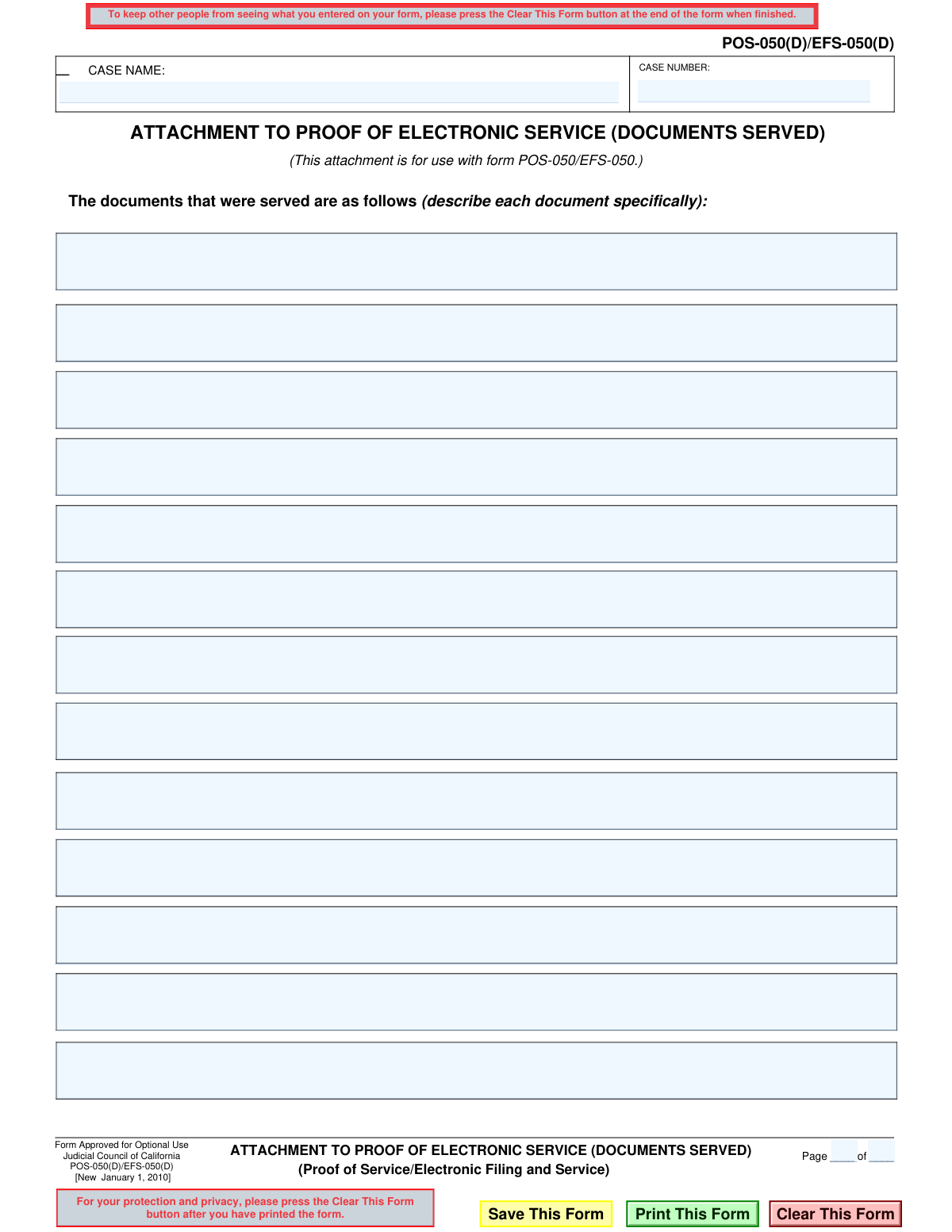
Form POS-050(D)/EFS-050(D), Attachment to Proof of Electronic Service, is a supplemental document used in California courts. It is filed alongside the main Proof of Electronic Service form (POS-050/EFS-050) to provide a specific, itemized list of every document that was served electronically to the other parties in a legal matter. This creates a clear and official record for the court. Today, this form can be filled out quickly and accurately using AI-powered services like Instafill.ai, which can also convert non-fillable PDF versions into interactive fillable forms.
POS-050(D)/EFS-050(D) is part of the
California court forms, California judicial forms, Judicial Council forms and proof of service forms categories on Instafill.
Our AI automatically handles information lookup, data retrieval, formatting, and form filling.
It takes less than a minute to fill out POS-050(D)/EFS-050(D) using our AI form filling.
Securely upload your data. Information is encrypted in transit and deleted immediately after the form is filled out.
Form specifications
| Form name: | Judicial Council of California Form POS-050(D)/EFS-050(D), Attachment to Proof of Electronic Service (Documents Served) |
| Number of fields: | 22 |
| Number of pages: | 1 |
| Language: | English |
Instafill Demo: How to fill out PDF forms in seconds with AI
How to Fill Out POS-050(D)/EFS-050(D) Online for Free in 2026
Are you looking to fill out a POS-050(D)/EFS-050(D) form online quickly and accurately? Instafill.ai offers the #1 AI-powered PDF filling software of 2026, allowing you to complete your POS-050(D)/EFS-050(D) form in just 37 seconds or less.
Follow these steps to fill out your POS-050(D)/EFS-050(D) form online using Instafill.ai:
- 1 Navigate to Instafill.ai and upload or select the Form POS-050(D)/EFS-050(D) template.
- 2 Use the AI assistant to automatically enter the Case Name and Case Number at the top of the form.
- 3 In the main section, provide a specific description for each document that was electronically served, using a new line for each item.
- 4 Enter the current page number and the total number of pages for the attachment in the designated fields.
- 5 Carefully review all the listed documents and case information to ensure complete accuracy.
- 6 Securely download the completed form to attach it to your main Proof of Service (POS-050/EFS-050) for filing with the court.
Our AI-powered system ensures each field is filled out correctly, reducing errors and saving you time.
Why Choose Instafill.ai for Your Fillable POS-050(D)/EFS-050(D) Form?
Speed
Complete your POS-050(D)/EFS-050(D) in as little as 37 seconds.
Up-to-Date
Always use the latest 2026 POS-050(D)/EFS-050(D) form version.
Cost-effective
No need to hire expensive lawyers.
Accuracy
Our AI performs 10 compliance checks to ensure your form is error-free.
Security
Your personal information is protected with bank-level encryption.
Frequently Asked Questions About Form POS-050(D)/EFS-050(D)
This form is an attachment used to list all the specific documents you served electronically in a California court case. It is used when you do not have enough space on the main Proof of Electronic Service form (POS-050/EFS-050).
Anyone electronically serving legal documents in a California case who needs more space to list the documents than is provided on the main Proof of Service form should use this attachment.
No, this form is optional. You only need to use it if you run out of room on the primary Proof of Electronic Service form (POS-050/EFS-050) to list all the documents you served.
This form must be attached to and filed with the main Proof of Electronic Service form, POS-050/EFS-050. It should not be filed by itself.
You will need the exact Case Name and Case Number from your lawsuit, and a complete list of the full, specific titles of every document that was served electronically.
You must list the full, official title of each document exactly as it appears on the document itself. For example, write 'Notice of Motion and Motion to Compel Further Responses' instead of just 'motion'.
If you need more space than one page provides, you can use additional copies of this attachment form. Make sure to number the pages correctly in the 'Page ____ of ____' section at the top.
The Case Name and Case Number are found at the top of all documents filed with the court for your specific case. You must copy this information exactly onto the form.
POS-050 is the main Proof of Electronic Service form. POS-050(D) is the optional attachment used only when you need extra space to list the documents that were served.
Yes, services like Instafill.ai use AI to help you fill out legal forms accurately. They can auto-fill repetitive information like case details, saving you time and helping to prevent errors.
You can upload the POS-050(D) PDF to the Instafill.ai platform. The service will make the form fillable online, allowing you to easily type in the case information and the list of served documents.
If you have a non-fillable or 'flat' PDF, you can use a tool like Instafill.ai. Simply upload the form, and the platform will automatically convert it into an interactive, fillable version you can complete on your computer.
Compliance POS-050(D)/EFS-050(D)
Validation Checks by Instafill.ai
1
Case Name Presence
Ensures the 'CASE NAME' field (FillText1) is not empty. The case name is a mandatory identifier required to associate the attachment with the correct legal case. A submission without a case name would be unfileable, leading to rejection by the court clerk and delays in the legal process.
2
Case Number Format and Presence
Validates that the 'CASE NUMBER' field (FillText3.0) is filled and adheres to a standard court case number format. A valid case number is essential for the court's electronic filing system to route the document to the correct case file. An incorrect or missing case number will result in filing rejection and could cause the party to miss critical deadlines.
3
Pagination Logical Consistency
Verifies that the 'Page' number (FillText2) and 'of' pages number (FillText4) are both positive integers, and that the current page number is not greater than the total number of pages. This check prevents nonsensical pagination like 'Page 5 of 3'. Incorrect pagination can lead to the document being rejected by the court as it suggests pages may be missing or the document is improperly assembled.
4
Minimum One Document Listed
Confirms that at least one of the document description fields (FillText3.1-FillText3.12) has been filled out. The purpose of this attachment is to list the documents served electronically, so submitting a blank list makes the form meaningless. A submission without any listed documents would be rejected as it fails to provide the necessary information for the Proof of Service.
5
Document Description Content Quality
Scans each filled document description field to ensure it contains meaningful text beyond just whitespace or a few random characters. Vague or non-descriptive entries do not meet the legal requirement to 'describe each document specifically'. This could lead to challenges from the opposing party or rejection by the court for being insufficient.
6
Sequential Document Listing
Checks that the document list is filled sequentially without gaps (e.g., if item 3 is filled, items 1 and 2 must also be filled). While not always a cause for rejection, non-sequential entries can look unprofessional and may suggest an error or omission in the form preparation. This check helps ensure the final document is clean, readable, and appears correctly prepared.
7
Attachment Association with Parent Form
Performs a system-level check to verify that this attachment (POS-050(D)/EFS-050(D)) is being submitted in conjunction with its parent form, POS-050/EFS-050. This attachment is not a standalone document and is meaningless without the main Proof of Service form. Submitting it alone would result in an incomplete and invalid filing that would be rejected by the court system.
8
Case Identifier Consistency Across Documents
Ensures the 'CASE NAME' and 'CASE NUMBER' on this attachment match the corresponding information on the main POS-050/EFS-050 form and other documents in the same submission. Mismatched case identifiers are a common reason for filing rejection, as the clerk cannot be certain all documents belong to the same case. This check prevents administrative errors that delay case progress.
9
Total Pages Field vs. Actual Page Count
Compares the number entered in the 'of ____ pages' field (FillText4) against the actual number of pages in the generated attachment document. For example, if the user enters '1' but the list of documents is long enough to require two pages, this validation would flag the discrepancy. This ensures the pagination accurately reflects the document's length, preventing confusion and potential rejection.
10
Field Character Limit Enforcement
Ensures that the content entered into each text field does not exceed a predefined maximum character length. This technical validation prevents data truncation in the court's filing system and ensures the submitted information is complete and readable. Exceeding the limit could result in an error during submission or a filed document with incomplete information.
11
Prohibition of Sensitive PII in Descriptions
Scans the document description fields for patterns matching sensitive personally identifiable information (PII), such as Social Security Numbers or full bank account numbers. Court rules require such information to be redacted or omitted from public filings to protect privacy. Including sensitive PII could violate court rules and lead to the document being stricken from the record.
12
Reset Form Action Confirmation
Validates that a confirmation dialog is presented to the user before the 'ResetForm' action is executed. This prevents the accidental erasure of all entered data with a single misclick. Losing data on a legal form is frustrating and can lead to errors upon re-entry, so this check is crucial for a good user experience.
Common Mistakes in Completing POS-050(D)/EFS-050(D)
This occurs when the Case Name or Number on the attachment does not exactly match the main Proof of Service form (POS-050/EFS-050). This error can lead to the filing being rejected by the court clerk or filed in the wrong case, causing significant delays and potentially invalidating the service. To avoid this, meticulously cross-reference case details with the primary court documents. AI-powered tools like Instafill.ai can help prevent this by auto-filling consistent case information across all related documents in a filing.
Filers often use generic terms like 'Pleadings' or 'Discovery' instead of the required specific titles, such as 'Defendant Jane Doe's Answer to Plaintiff's First Amended Complaint'. This ambiguity can lead to legal disputes where the opposing party claims they were not properly served with a specific document, jeopardizing case deadlines. Always use the complete and exact title as it appears on the document being served to ensure clarity and enforceability.
This form is an attachment and is useless on its own; it must be filed with the main POS-050/EFS-050 form. People sometimes forget to combine them into a single submission, rendering the Proof of Service incomplete and invalid. This critical error can lead to motions to strike and missed deadlines. Always ensure this attachment is electronically combined or physically stapled to the main Proof of Service form it supplements.
The 'Page ____ of ____' fields are frequently left blank, especially for a single-page attachment, because they seem trivial. This creates uncertainty for the court and other parties about whether the entire document list has been received, potentially inviting challenges to the filing's completeness. To avoid any doubt, always fill this in, even if it is just 'Page 1 of 1,' to clearly mark the filing as complete.
To save time, filers may use common legal acronyms like 'MSJ' for 'Motion for Summary Judgment' or 'D&I' for 'Demurrer and Interrogatories'. However, these are not official titles and can cause confusion for court staff or opposing counsel, who may not understand the reference. This lack of clarity could be used to challenge the sufficiency of the service, so always write out the full, formal title of every document.
When a form is printed and filled out by hand, poor penmanship can make document titles or the case number unreadable. This can result in the clerk rejecting the document or creating ambiguity that could be exploited by the opposing party. Since many court forms are distributed as non-fillable PDFs, using a tool like Instafill.ai to convert the document into a fillable version ensures perfect legibility and a professional appearance.
Court case numbers often have a specific format, including letters, numbers, and dashes (e.g., 23STCV12345). Users may omit dashes, transpose numbers, or forget letter prefixes, which can cause an electronic filing system to reject the document or a clerk to misfile it. This error can delay the case and require a corrected filing. AI form-filling tools like Instafill.ai can help by validating data formats against common court standards, reducing the chance of rejection.
A user might accidentally list a document on the attachment that was not included in the actual electronic service packet, often due to copy-paste errors or confusion. This misrepresentation, even if accidental, can lead to sanctions or damage one's credibility with the court and opposing counsel. It is crucial to meticulously verify that the list on the attachment perfectly matches the documents being served in that specific transaction.
Users sometimes skip lines between entries in the list of served documents, perhaps for visual separation. However, this can create the appearance that the form is incomplete or has been altered after signing, raising questions about its integrity and validity. To maintain a clear and unambiguous record, enter each document title on the next available line without any gaps.
This form is specifically for when the list of served documents is too long for the main POS-050/EFS-050 form. Some filers use it out of habit even for one or two documents, creating unnecessary paperwork and complicating the filing. While a minor error, it is inefficient and clutters the court record. Only use this attachment when you have exhausted the space on the primary Proof of Service form.
Saved over 80 hours a year
“I was never sure if my IRS forms like W-9 were filled correctly. Now, I can complete the forms accurately without any external help.”
Kevin Martin Green
Your data stays secure with advanced protection from Instafill and our subprocessors

Robust compliance program
Transparent business model
You’re not the product. You always know where your data is and what it is processed for.
ISO 27001, HIPAA, and GDPR
Our subprocesses adhere to multiple compliance standards, including but not limited to ISO 27001, HIPAA, and GDPR.
Security & privacy by design
We consider security and privacy from the initial design phase of any new service or functionality. It’s not an afterthought, it’s built-in, including support for two-factor authentication (2FA) to further protect your account.
Fill out POS-050(D)/EFS-050(D) with Instafill.ai
Worried about filling PDFs wrong? Instafill securely fills judicial-council-of-california-form-pos-050defs-050d-attachment-to-proof-of-electronic-service-documents-served forms, ensuring each field is accurate.