Yes! You can use AI to fill out LADWP Service Planning Information

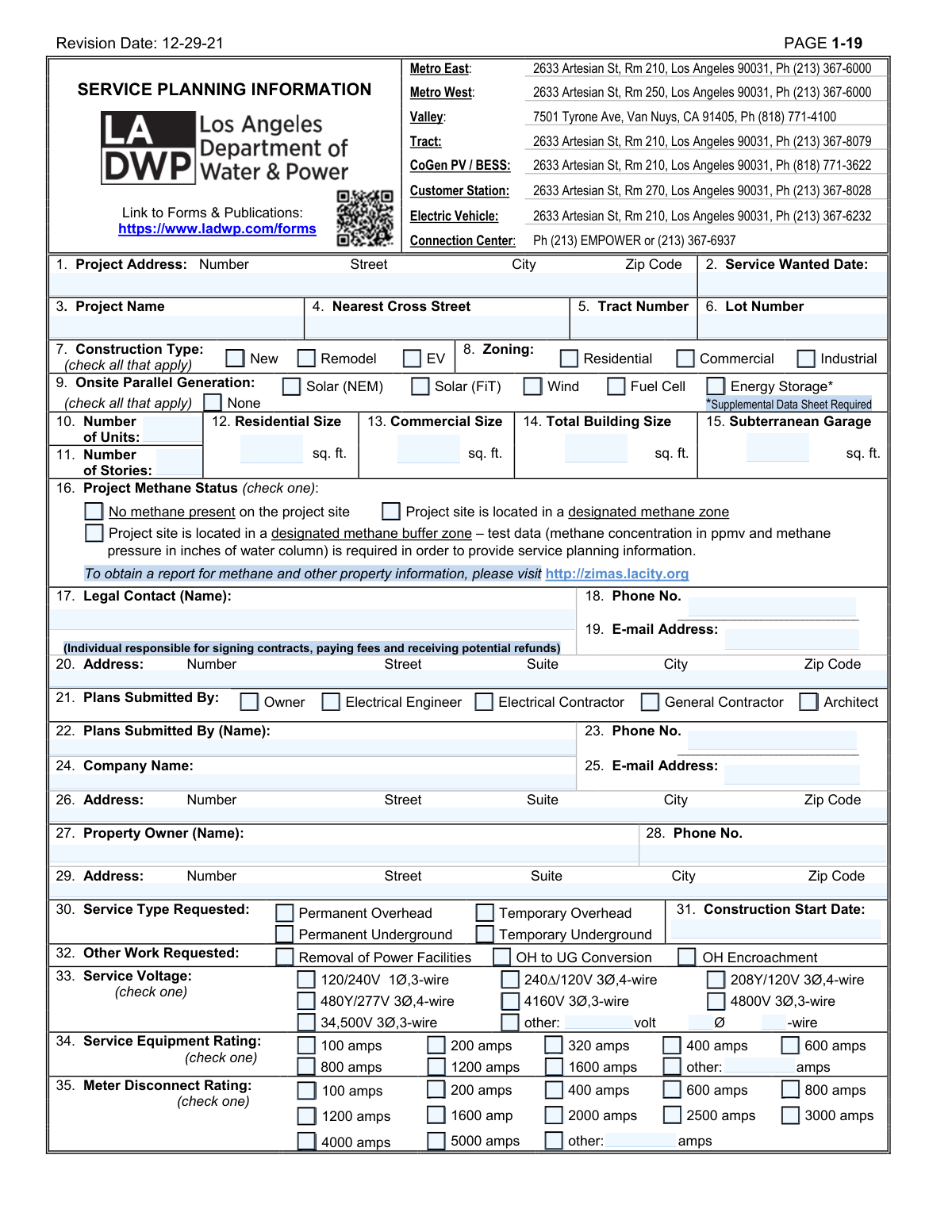
The LADWP Service Planning Information form is a comprehensive document required by the Los Angeles Department of Water and Power for planning electrical service for construction projects. It collects crucial data including project location, building specifications, contact information, and a detailed summary of electrical loads like HVAC, lighting, and EV chargers. Submitting this form is a critical step for developers and contractors to ensure LADWP can adequately design and provide the necessary power infrastructure for their project. Today, this form can be filled out quickly and accurately using AI-powered services like Instafill.ai, which can also convert non-fillable PDF versions into interactive fillable forms.
Our AI automatically handles information lookup, data retrieval, formatting, and form filling.
It takes less than a minute to fill out LADWP Service Planning Information using our AI form filling.
Securely upload your data. Information is encrypted in transit and deleted immediately after the form is filled out.

Form specifications

Form name: LADWP Service Planning Information
Number of fields: 189
Number of pages: 2
Language: English
main-image

Instafill Demo: How to fill out PDF forms in seconds with AI

How to Fill Out LADWP Service Planning Information Online for Free in 2026

Are you looking to fill out a LADWP SERVICE PLANNING INFORMATION form online quickly and accurately? Instafill.ai offers the #1 AI-powered PDF filling software of 2026, allowing you to complete your LADWP SERVICE PLANNING INFORMATION form in just 37 seconds or less.
Follow these steps to fill out your LADWP SERVICE PLANNING INFORMATION form online using Instafill.ai:
  1. 1 Navigate to Instafill.ai and upload or select the LADWP Service Planning Information form.
  2. 2 Use the AI assistant to automatically fill in project identification details such as the project address, name, and service wanted date.
  3. 3 Provide project specifics by checking boxes for construction type, zoning, and onsite generation, and enter building size data.
  4. 4 Enter the contact information for the legal contact, the person submitting the plans, and the property owner.
  5. 5 Specify the technical requirements, including the requested service type, voltage, equipment ratings, and any backup power systems.
  6. 6 Complete the detailed load summary, inputting data for all electrical loads like air conditioning, motors, lighting, and EV chargers.
  7. 7 Review all entered information for accuracy, electronically sign and date the form, then download the completed document for submission to LADWP.

Our AI-powered system ensures each field is filled out correctly, reducing errors and saving you time.

Why Choose Instafill.ai for Your Fillable LADWP Service Planning Information Form?

Speed

Complete your LADWP Service Planning Information in as little as 37 seconds.

Up-to-Date

Always use the latest 2026 LADWP Service Planning Information form version.

Cost-effective

No need to hire expensive lawyers.

Accuracy

Our AI performs 10 compliance checks to ensure your form is error-free.

Security

Your personal information is protected with bank-level encryption.

Frequently Asked Questions About Form LADWP Service Planning Information

This form is used to gather essential project details for the Los Angeles Department of Water and Power (LADWP) to plan for new or modified electrical service. It helps LADWP understand the scope, location, and electrical load requirements of your construction or remodel project.

This form should be completed by the project owner, architect, electrical engineer, or contractor responsible for a new construction, remodel, or electrical service upgrade project within the LADWP service area.

The 'Legal Contact' is the individual authorized to sign contracts and handle financial matters like fees and refunds. The 'Plans Submitted By' section identifies the technical professional, such as an architect or engineer, who is submitting the plans and can answer technical questions.

The Load Summary requires a detailed breakdown of all electrical loads for your project, such as A/C, lighting, and motors. You must separate loads for common areas ('House/Non-Tenant') from individual tenant spaces and specify if they are single-phase (1Ø) or three-phase (3Ø).

If your project is in a designated methane zone or buffer zone, you must indicate this in Section 16. For buffer zones, you are required to provide test data on methane concentration and pressure, which can be found by generating a property report at http://zimas.lacity.org.

If you check 'Energy Storage' in Section 9 for Onsite Parallel Generation, you must also submit a Supplemental Data Sheet. This additional form provides LADWP with the specific technical details of your energy storage system.

Submit the completed form to the appropriate LADWP Service Planning office based on your project's location and type (e.g., Metro East/West, Valley, Tract). Contact information for each office is provided at the top of the first page.

The required service voltage depends on your project's electrical design and equipment. This information should be provided by your electrical engineer or contractor based on the project's specific power requirements.

Temporary service is used to power construction activities on-site and is removed once the project is complete. Permanent service is the final, long-term electrical connection for the finished building.

You will need to submit detailed project plans along with this form. Additionally, if you have energy storage or certain types of generator switches, supplemental data sheets or certificates may be required as noted on the form.

Yes, AI-powered services like Instafill.ai can help you fill out this form quickly and accurately. These tools can auto-fill fields based on your project data, reducing manual entry and saving time.

You can use a service like Instafill.ai to complete this form digitally. Simply upload the PDF, and the platform will make it an interactive, fillable form that you can complete, sign, and download from your browser.

If you have a non-fillable or 'flat' PDF, you can use Instafill.ai to convert it into an interactive, fillable form. The service's AI automatically detects the form fields, allowing you to type your information directly into them.

Compliance LADWP Service Planning Information
Validation Checks by Instafill.ai

1
Ensures Project Address is Complete and Valid
This check verifies that the street number, street name, city, and a valid 5-digit zip code are all provided for the project address. This information is critical for locating the project site and determining service availability. Failure to provide a complete and accurate address will prevent the service planning request from being processed.
2
Validates Date Format and Chronological Order
This check ensures that both the 'Service Wanted Date' and 'Construction Start Date' are entered in a valid MM/DD/YYYY format and are not dates in the past. It also verifies that the 'Construction Start Date' is not earlier than the 'Service Wanted Date'. This logic prevents scheduling conflicts and ensures the timeline is feasible for planning purposes.
3
Verifies Format of Phone Numbers and Email Addresses
This validation confirms that all phone number fields contain a valid 10-digit number and all email address fields follow the standard '[email protected]' format. Correct contact information is crucial for all communication regarding the project, including sending contracts, fee notices, and updates. An invalid format will block submission until corrected.
4
Cross-Validates Building Square Footage Totals
This check verifies that the 'Total Building Size' (Field 14) is greater than or equal to the sum of the 'Residential Size' (Field 12) and 'Commercial Size' (Field 13). This ensures the provided dimensions are logically consistent and provides an accurate basis for load calculations. If the total is less than the sum of its parts, the form will prompt the user to review and correct the square footage values.
5
Ensures Consistency Between Zoning and Building Use
This validation checks for logical consistency between the selected 'Zoning' (Field 8) and the entered building sizes. For example, if 'Residential' zoning is selected, the 'Residential Size' (Field 12) should be greater than zero. This helps catch data entry errors and ensures the project description aligns with its intended use, which is vital for applying correct service standards.
6
Requires Specification for 'Other' Selections
This check ensures that if the 'other' checkbox is selected for 'Service Voltage' (33), 'Service Equipment Rating' (34), or 'Meter Disconnect Rating' (35), the corresponding text field for specifying the value is not empty. This prevents incomplete submissions where a custom value is intended but not provided. Failure to specify the 'other' value will result in an error message requiring the user to input the necessary details.
7
Validates Onsite Parallel Generation Selections
This check ensures that if 'None' is selected in the 'Onsite Parallel Generation' section (Field 9), no other generation types (like Solar, Wind, etc.) are also selected. This prevents contradictory information about the project's power generation capabilities. If a conflict is detected, the user will be asked to clarify whether onsite generation exists or not.
8
Enforces Single Selection for Methane Status
This validation ensures that only one option is checked for 'Project Methane Status' (Field 16), as the options are mutually exclusive. A project site cannot simultaneously have no methane and be in a methane zone. This check guarantees the submission provides a clear and unambiguous statement on the project's methane status, which is critical for safety and infrastructure requirements.
9
Correlates EV Load Data with EV Charger Count
This check verifies that if a value greater than zero is entered for 'EV Chargers' in the 'Load Summary' (Field 36), then the total number of EV chargers in Field 37 must also be greater than zero. This ensures consistency between the detailed load calculation and the summary count of EV chargers. A mismatch would indicate a data entry error that needs correction for accurate service planning.
10
Verifies Load Summary Column Totals
This validation automatically calculates the sum of all individual load items (Air Conditioning, Lighting, etc.) within each of the four columns in the 'Load Summary' (Field 36). It then compares this calculated sum to the value entered in the 'Total' row for each column. If the user-entered total does not match the calculated sum, an error is flagged to ensure the load data is accurate for engineering review.
11
Mandates Manufacturer/Model for Selected Generator Switch
This validation ensures that if any generator switch type ('Open-Transition', 'Closed Transition', or 'Programmable') is checked in Field 45, the corresponding 'Manufacturer & Model number' field is filled out. This information is required to understand the equipment being connected to the grid and to determine if further agreements are necessary. A submission with a selected switch but no model number will be rejected.
12
Ensures Legal Contact Information is Complete
This check verifies that the name, phone number, email, and full address for the 'Legal Contact' (Fields 17-20) are all provided. This person is the primary point of contact for contracts and payments, making their complete and accurate information non-negotiable for proceeding with the service request. The form cannot be submitted if any of these fields are left blank.
13
Flags Requirement for Energy Storage Supplemental Data
This validation checks if the 'Energy Storage*' option is selected in the 'Onsite Parallel Generation' section (Field 9). If it is, the system flags that a 'Supplemental Data Sheet' is required for the submission to be considered complete. This is a critical process check to inform the user of an additional documentation requirement to prevent processing delays.
14
Requires Details for Large Motors (40 HP and Above)
This check ensures that if the 'Number of Motors 40 HP and Above' (Field 41) is greater than zero, then the corresponding details in Fields 42-44 (Rated HP, Locked-Rotor Current, Motor Use) are provided. This information is essential for assessing inrush current and its impact on the electrical system. The form will be considered incomplete if this critical motor data is missing.
15
Validates At Least One Service Type is Requested
This check ensures that at least one service type (e.g., 'Permanent Overhead', 'Temporary Underground') is selected in Field 30. The entire purpose of the form is to plan for a service, so this selection is fundamental to the request. The form will not be submittable without at least one service type being chosen.

Common Mistakes in Completing LADWP Service Planning Information

Incomplete or Inaccurate Load Summary Grid (Box 36)

The Load Summary is the most complex section and is frequently filled out incorrectly. Mistakes include entering values in the wrong units (e.g., Amps instead of kW, or tons of AC instead of kW), misallocating loads between single-phase (1Ø) and three-phase (3Ø) columns, or confusing 'House (Non-Tenant)' loads with 'Tenant' loads. These errors lead to incorrect service design, significant project delays, and potential rejection of the application. To avoid this, consult the project's electrical engineer for the precise load calculations and carefully review each entry before submission. AI-powered tools like Instafill.ai can help by providing validation checks to ensure data consistency and proper unit entry.

Misinterpreting the Methane Status (Box 16)

Applicants often guess or select 'No methane present' without consulting the required resource. The form explicitly directs users to http://zimas.lacity.org to determine the property's methane status. Incorrectly stating the methane status can cause severe delays when the utility company's records conflict with the form, and it poses a significant safety risk. If the site is in a buffer zone, failing to provide the required test data will result in an incomplete application. Always use the ZIMAS portal to verify the status and attach all required documentation.

Inconsistent Contact Information (Boxes 17-29)

The form requests information for three distinct roles: Legal Contact, Plans Submitter, and Property Owner. A common error is to list the same person for all three, even when different parties are involved, or to leave sections blank. The 'Legal Contact' is specifically defined as the person responsible for contracts and payments, which may not be the owner or architect. This confusion can lead to legal documents and refund checks being sent to the wrong person, causing financial and administrative delays. Carefully identify the correct individual for each role.

Incorrect Building Size Calculations (Boxes 12-15)

Applicants frequently make simple arithmetic errors when providing building dimensions. A typical mistake is when the sum of the 'Residential Size' (Box 13) and 'Commercial Size' (Box 14) does not equal the 'Total Building Size' (Box 15). This discrepancy flags the form for review and can halt the planning process until the figures are clarified and corrected. To prevent this, double-check all calculations and ensure the individual components add up to the stated total. AI form-filling tools can be configured to perform these calculations automatically, preventing such errors.

Neglecting to Provide Required Supplemental Data

Several fields, such as 'Energy Storage*' (Box 9) and 'Closed Transition Switch' (Box 45), have notes indicating that supplemental data sheets or specific certificates are required. Applicants often check these boxes but fail to attach the necessary documentation. This results in an incomplete submission that will be rejected or placed on hold. Always read the fine print and notes associated with each field to ensure all required attachments are included with the submission.

Guessing Technical Specifications (Boxes 33-35)

Property owners or architects without a deep electrical background may guess the 'Service Voltage', 'Service Equipment Rating', or 'Meter Disconnect Rating'. Selecting an incorrect voltage or amperage can lead to the design of a completely inappropriate electrical service, requiring costly and time-consuming redesigns. This information should be provided by the project's electrical engineer. If you are not the electrical engineer, leave these fields for them to complete.

Inconsistent EV Charger Information (Boxes 36 & 37)

The form asks for EV charger information in two places: the total load in kW in the Load Summary (Box 36) and the total number of chargers by level (Box 37). A frequent mistake is a mismatch between these two sections, where the specified load does not correspond to the number and type of chargers listed. This inconsistency requires clarification and delays the review process. Ensure the total kW load in Box 36 accurately reflects the count and voltage of chargers detailed in Box 37.

Using a Mailing Address for the Project Address (Box 1)

Applicants sometimes enter their company's mailing address or a P.O. Box in the 'Project Address' field instead of the physical location of the construction site. The project address is used to identify the specific service location, so an incorrect entry can lead to planners assessing the wrong property or being unable to locate the project at all. Always use the exact street number, street name, city, and zip code of the site where the service is needed.

Failing to Sign and Date the Form

Forgetting to physically sign and date the form is one of the most common and easily avoidable mistakes. An unsigned application is not legally valid and will be immediately rejected, forcing the applicant to resubmit and lose their place in the queue. Since this is a non-fillable PDF, it must be printed for a wet signature. Always perform a final check for a signature and date before submitting the document. Tools like Instafill.ai can convert flat PDFs into fillable versions that support digital signatures, reducing the chance of this error.

Selecting Mutually Exclusive Options

In sections with checkboxes, applicants sometimes select multiple options that are mutually exclusive, such as checking both 'Permanent Overhead' and 'Permanent Underground' in Box 30. This indicates confusion and makes it impossible for the service planner to know the project's actual requirements, leading to processing delays while they seek clarification. Carefully read the options in each section and select only one choice where indicated, such as in the 'Methane Status' (Box 16) or 'Service Voltage' (Box 33) sections.
Saved over 80 hours a year

“I was never sure if my IRS forms like W-9 were filled correctly. Now, I can complete the forms accurately without any external help.”

Kevin Martin Green

Your data stays secure with advanced protection from Instafill and our subprocessors

Robust compliance program

Transparent business model

You’re not the product. You always know where your data is and what it is processed for.

ISO 27001, HIPAA, and GDPR

Our subprocesses adhere to multiple compliance standards, including but not limited to ISO 27001, HIPAA, and GDPR.

Security & privacy by design

We consider security and privacy from the initial design phase of any new service or functionality. It’s not an afterthought, it’s built-in, including support for two-factor authentication (2FA) to further protect your account.

Fill out LADWP Service Planning Information with Instafill.ai

Worried about filling PDFs wrong? Instafill securely fills ladwp-service-planning-information forms, ensuring each field is accurate.