Yes! You can use AI to fill out Medical Certificate – Form B (To be completed by ONA members hired prior to January 1, 2006) – 1980 HOODIP

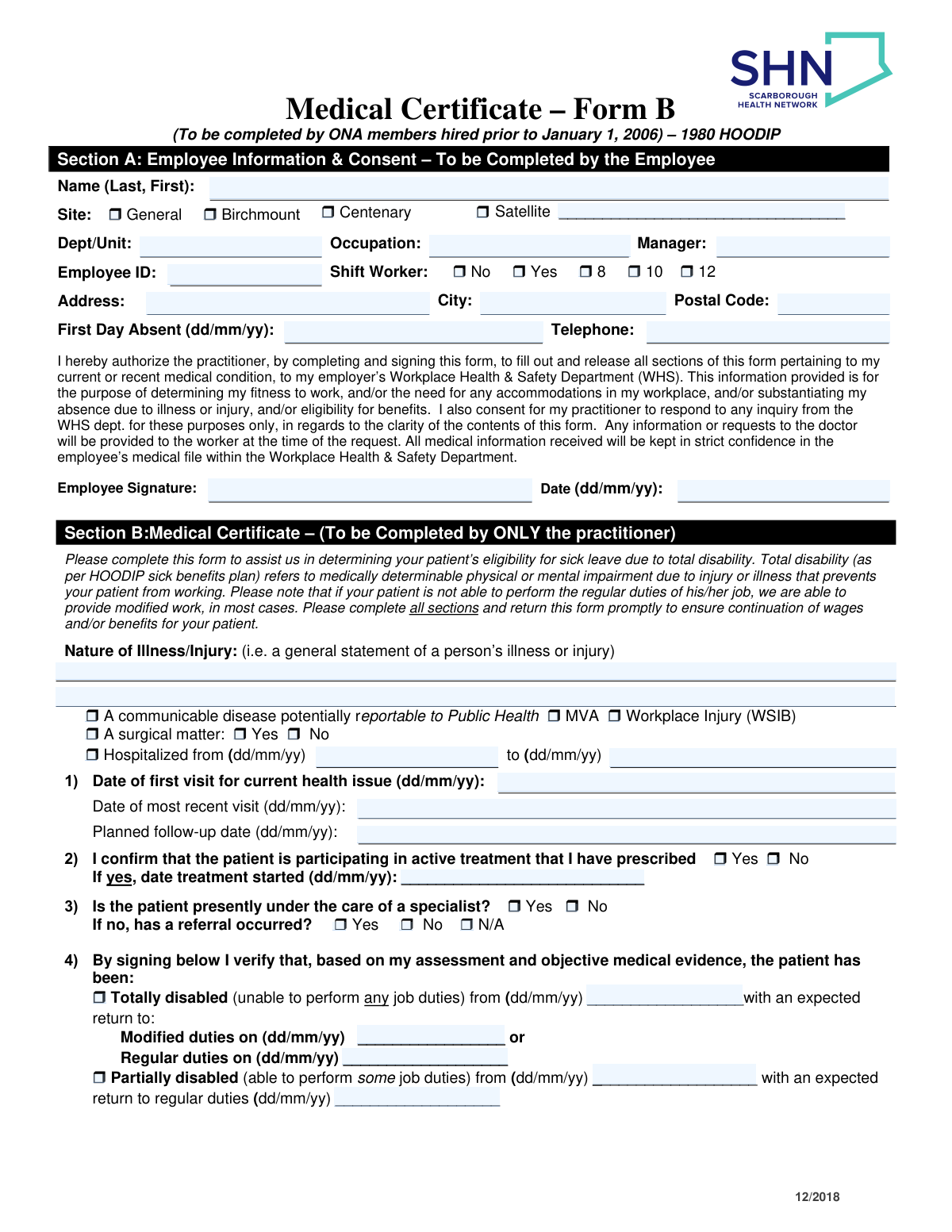
This form, also known as the Medical Certificate – Form B, is a document for Ontario Nurses' Association (ONA) members at Scarborough Health Network (SHN) hired before January 1, 2006. It is completed by a medical practitioner to provide details about an employee's illness or injury, their functional abilities, and to determine their eligibility for sick leave benefits under the HOODIP plan. Today, this form can be filled out quickly and accurately using AI-powered services like Instafill.ai, which can also convert non-fillable PDF versions into interactive fillable forms.
Medical Certificate – Form B has a moderate Form Complexity Index of 51/100 — 118 fillable fields across 2 pages. Instafill’s AI completes it accurately in under a minute.

Form specifications

Form name: Medical Certificate – Form B (To be completed by ONA members hired prior to January 1, 2006) – 1980 HOODIP
Number of fields: 118
Number of pages: 3
FCI: Moderate (51/100)
Language: English
Our AI automatically handles information lookup, data retrieval, formatting, and form filling.
It takes less than a minute to fill out Medical Certificate – Form B using our AI form filling.
Securely upload your data. Information is encrypted in transit and deleted immediately after the form is filled out.
Preview of Medical Certificate – Form B (To be completed by ONA members hired prior to January 1, 2006) – 1980 HOODIP

Instafill Demo: How to fill out PDF forms in seconds with AI

How to Fill Out Medical Certificate – Form B Online for Free in 2026

Are you looking to fill out a MEDICAL CERTIFICATE – FORM B form online quickly and accurately? Instafill.ai offers the #1 AI-powered PDF filling software of 2026, allowing you to complete your MEDICAL CERTIFICATE – FORM B form in just 37 seconds or less.
Follow these steps to fill out your MEDICAL CERTIFICATE – FORM B form online using Instafill.ai:
  1. 1 Navigate to Instafill.ai and upload or select the Medical Certificate Form B.
  2. 2 The employee completes Section A, providing personal details, employment information, and signing the consent for the release of medical information.
  3. 3 The form is then given to the attending medical practitioner for completion of the remaining sections.
  4. 4 The practitioner fills out Section B with medical details, Section C with the patient's physical and cognitive capabilities, and Section D with their contact information.
  5. 5 The employee pays any fees for the form's completion and obtains a receipt for reimbursement from the hospital.
  6. 6 Review the entire completed form for accuracy and ensure the practitioner has signed and stamped it.
  7. 7 Submit the completed and signed form to the appropriate Workplace Health & Safety Department at Scarborough Health Network via fax or email.

Our AI-powered system ensures each field is filled out correctly, reducing errors and saving you time.

Why Choose Instafill.ai for Your Fillable Medical Certificate – Form B Form?

Speed

Complete your Medical Certificate – Form B in as little as 37 seconds.

Up-to-Date

Always use the latest 2026 Medical Certificate – Form B form version.

Cost-effective

No need to hire expensive lawyers.

Accuracy

Our AI performs 10 compliance checks to ensure your form is error-free.

Security

Your personal information is protected with bank-level encryption.

Frequently Asked Questions About Medical Certificate – Form B

Medical Certificate – Form B has a Form Complexity Index of 51 out of 100, placing it in the moderate complexity tier. This score is calculated deterministically from the form’s own structure using Instafill’s published Form Complexity Index methodology, so it can be reproduced and independently verified — it is not a subjective estimate.

For Medical Certificate – Form B specifically, the score reflects 118 fillable fields across 2 pages, plus 1 page of printed instructions. The number of fields is the largest factor in the base score (weighted 36%), followed by how difficult those fields are to complete based on their type, where free-text and signature fields count for more than simple checkboxes (26%). The number of pages that actually contain fields (15%), the amount of conditional “fill-only-if” logic (16%), and how many sections the form is divided into (7%) account for the rest of the base. On top of that base, the index adds points for tables and repeating lists, bundled instruction pages, and dense page layouts — capturing difficulty the base alone can miss.

In practical terms, a moderate score means the form takes real effort: there are enough fields, pages and rules that errors are easy to make by hand. Instafill removes that effort entirely: our AI reads your information, maps each value to the correct field — including the conditional ones — and completes Medical Certificate – Form B accurately in under a minute, with every field available for you to review before you download. See exactly how the Form Complexity Index is calculated.

This form is used to substantiate your absence due to illness or injury and to determine your eligibility for sick leave benefits under the 1980 HOODIP plan. It also helps your employer assess your fitness to return to work and identify any necessary accommodations.

This form is specifically for Ontario Nurses' Association (ONA) members who were hired by Scarborough Health Network (SHN) prior to January 1, 2006. The employee completes Section A, and their medical practitioner completes the remaining sections.

As the employee, you are only responsible for completing Section A. This includes your personal information, work details, and your signature authorizing your practitioner to release the required medical information.

You are responsible for paying any fees your practitioner charges for completing the form. Be sure to get an original receipt and proof of payment, as you can submit it to the hospital for reimbursement within 90 days.

The completed form should be returned to the Workplace Health & Safety Department. It can be faxed to 416-431-8265, emailed to [email protected], or mailed to the address of the Birchmount, General, or Centenary hospital.

Yes, all medical information received is sent to the Workplace Health & Safety Department and is kept in strict confidence within your employee medical file. It is used only for managing your sick leave and return to work.

As defined by the HOODIP sick benefits plan, 'total disability' refers to a medically determinable physical or mental impairment that prevents you from performing any of your regular job duties.

If you can perform some duties, your practitioner can indicate you are 'partially disabled' in Section B. Your employer can provide modified work or a gradual return-to-work plan based on the functional abilities outlined by your doctor in Section C.

Your practitioner only needs to complete Section C if you are able to return to work but with medical restrictions or limitations. This information helps your employer arrange for suitable modified duties.

The form must be returned promptly to substantiate your absence. Delays in submission could affect the continuation of your wages and/or eligibility for sick leave benefits.

Yes, services like Instafill.ai use AI to help you accurately auto-fill your personal information in Section A, which can save time. However, Sections B, C, and D must be completed and signed by your medical practitioner.

You can use a service like Instafill.ai to upload the PDF and easily fill out your portion (Section A) online. You can then download the partially completed form to give to your doctor.

If you have a non-fillable or 'flat' PDF, tools like Instafill.ai can convert it into an interactive, fillable form. This allows you to type your information directly into the fields before printing it for your doctor.

To complete Section A, you will need your personal contact details, your Employee ID, your department/unit and manager's name, and the first day you were absent from work.

Compliance Medical Certificate – Form B
Validation Checks by Instafill.ai

1
Employee Signature Presence
This check verifies that the 'Employee Signature' field in Section A is not empty. The signature is a legal requirement for consent, authorizing the practitioner to release medical information to the employer. If the signature is missing, the form is invalid and cannot be processed, as the consent is not legally granted.
2
Date Chronology: Absence vs. Employee Signature
This validation ensures the employee's signature 'Date' in Section A is on or after the 'First Day Absent' date. It is logically impossible for an employee to sign a form certifying an absence before the absence has begun. A failure indicates a data entry error that must be corrected for the form's timeline to be valid.
3
Practitioner Signature and Date Completeness
Verifies that the practitioner's signature and the corresponding date in Section D are both present. The practitioner's signature attests to the medical validity of the information provided. Without a signature and date, the form is considered incomplete and cannot be used to substantiate sick leave or workplace accommodations.
4
Date Chronology: Practitioner Signature vs. Last Visit
Ensures the practitioner's signature 'Date' in Section D is on or after the 'Date of most recent visit' in Section B. The practitioner should be signing the form after their most recent assessment of the patient. A signature date prior to the last visit would call the validity of the assessment into question.
5
Exclusive Disability Status Selection
This check confirms that only one of the two main disability statuses in Section B ('Totally disabled' or 'Partially disabled') is selected. An employee cannot be both totally and partially disabled at the same time. If both are checked, the form is ambiguous and must be returned for clarification.
6
Conditional Requirement for Physical Capabilities (Section C)
Validates that Section C, 'Recommended Physical Capabilities', is filled out if and only if the practitioner has indicated the employee will return to 'Modified duties' in Section B. This section is crucial for planning a safe return to work with restrictions but is irrelevant if the employee is returning to regular duties or not yet cleared to return. This check ensures necessary information is provided without creating unnecessary work.
7
Disability Start Date Consistency
This check verifies that the disability 'from' date in Section B (for either total or partial disability) is on or after the employee's 'First Day Absent' date in Section A. The medically certified disability period cannot begin before the employee actually stopped working. This ensures alignment between the employee's reported absence and the medical justification.
8
Return to Work Date Logic
Ensures that any specified 'return to duties' date in Section B is chronologically after the corresponding disability 'from' date. A return date cannot be earlier than or the same as the start of the disability period. This validation prevents logical errors in the disability timeline.
9
Hospitalization Period Validation
If the 'Hospitalized' checkbox is selected in Section B, this check ensures that both the 'from' and 'to' date fields are completed. It also validates that the 'to' date is on or after the 'from' date, ensuring a logical and valid period of hospitalization is recorded.
10
Active Treatment Date Requirement
If the practitioner checks 'Yes' for 'patient is participating in active treatment' in Section B, this validation ensures the 'date treatment started' field is filled. This provides essential context and substantiates the claim of active treatment. A 'Yes' without a date is incomplete information.
11
Shift Worker Selection Logic
This validation enforces the rule that if 'Yes' is selected for 'Shift Worker' in Section A, then one of the hour options (8, 10, or 12) must also be selected. Conversely, if 'No' is selected, none of the hour options should be checked. This ensures complete and non-contradictory information about the employee's work schedule.
12
Universal Date Format (dd/mm/yy)
This check is applied to all date fields across the form to ensure they conform to the specified 'dd/mm/yy' format and represent a valid calendar date. Incorrectly formatted or non-existent dates (e.g., 32/13/2023) would cause data processing errors and make chronological checks impossible. This maintains data integrity and consistency.
13
Employee ID Completeness
Ensures the 'Employee ID' field in Section A is not empty and, if possible, matches a valid format (e.g., numeric, specific length). The Employee ID is a unique identifier crucial for linking the form to the correct employee file in the HR system. A missing or incorrect ID could lead to the form being misfiled or rejected.
14
Practitioner Information Completeness
Verifies that the 'Practitioner’s Name' and 'Professional Designation/Specialty' fields in Section D are filled out. This information is essential for verifying the credentials of the person completing the medical certificate and for any necessary follow-up by the Workplace Health & Safety Department. An anonymous or unidentifiable practitioner invalidates the form.
15
Logical Visit Date Sequence
This validation confirms that the 'Date of most recent visit' in Section B is on or after the 'Date of first visit for current health issue'. This ensures a logical progression of medical care is documented. A failure would indicate a significant data entry error regarding the patient's treatment timeline.

Common Mistakes in Completing Medical Certificate – Form B

Using an Incorrect Date Format

The form explicitly requires the (dd/mm/yy) format for all dates, but users often default to their regional standard, such as MM/DD/YY. This inconsistency can lead to confusion, especially for dates where the day is 12 or less, causing significant delays in processing sick leave and benefit eligibility. To avoid this, carefully double-check the format for each date field before signing; AI-powered tools like Instafill.ai can automatically format dates correctly to match form requirements.

Missing Employee Signature or Date in Section A

Employees sometimes overlook the signature and date fields in the consent section after filling out their personal information. Without a signature, the consent is invalid, meaning the practitioner is not authorized to release medical information to the employer. This will halt the entire process, as the Workplace Health & Safety department cannot legally accept or review the form, leading to a denial or delay of sick pay and accommodations.

Incomplete Disability Status in Section B

Practitioners may check 'Totally disabled' or 'Partially disabled' but fail to fill in the corresponding start dates and expected return-to-work dates. This is the most critical information for the employer, and its absence makes it impossible to process sick leave benefits or plan for the employee's return. Practitioners must complete all date fields associated with the disability status to provide a clear timeline for the employer.

Omitting Section C When Recommending Modified Duties

A common error occurs when a practitioner indicates in Section B that a patient can return to 'Modified duties' but then leaves Section C (Recommended Physical Capabilities) blank. This leaves the employer with no information on what specific restrictions are needed, preventing them from arranging a safe and appropriate return-to-work plan. If modified duties are selected, Section C must be completed with detailed functional abilities.

Forgetting the Practitioner's Stamp in Section D

Practitioners often complete all fields but forget to apply their official stamp, which is explicitly requested in Section D. The stamp serves as a key verification of the practitioner's identity and credentials, and its absence can cause the employer's health department to question the form's authenticity. This oversight may require the employee to return to the practitioner's office just for the stamp, delaying the submission.

Reversing the Name Format

In Section A, the form specifies 'Name (Last, First)', but employees frequently write their name in 'First, Last' order out of habit. This simple data entry error can cause filing mistakes and difficulty in matching the form to the correct employee record in the HR system. To prevent this, employees should read field labels carefully. Using a tool like Instafill.ai can help by parsing and populating fields in the correct order based on profile information.

Providing a Vague 'Nature of Illness'

In Section B, practitioners sometimes provide an overly generic or cryptic description for the 'Nature of Illness/Injury', such as 'medical issue' or 'under care'. This does not give the employer enough information to understand the context of the absence (e.g., if it's a communicable disease or surgical matter), often triggering a follow-up request for clarification. A clear, concise, non-technical statement is needed to substantiate the absence without violating patient privacy.

Illegible Practitioner Contact Information

The practitioner's contact details in Section D are often handwritten and can be difficult to read. If the Workplace Health & Safety department needs to contact the practitioner for clarification, illegible handwriting on the name, phone number, or specialty makes this impossible. This can stall the approval process indefinitely. Practitioners should write clearly or use their official stamp to ensure all contact information is legible.

Failing to Specify Work Site or Shift Details

Employees may forget to check the boxes for their specific work 'Site' (e.g., General, Birchmount, Centenary) or 'Shift Worker' status in Section A. This information is crucial for the HR and WHS departments to understand the context of the employee's role and physical work location when planning accommodations. Missing this data can slow down the administrative processing of the form.

Inconsistent or Incomplete Functional Abilities in Section C

When filling out Section C, a practitioner might select 'Limited ability' for a function like 'Carry' but then neglect to specify the maximum weight, leaving the restriction undefined. Another common error is providing contradictory information, such as stating the patient 'Cannot perform' Bending but has 'Full Abilities' for Crouching. These ambiguities prevent the employer from creating a safe and effective modified work plan and will require further clarification. Since this form is a non-fillable PDF, a tool like Instafill.ai can convert it into an interactive version, making it easier to fill out completely and accurately.
Saved over 80 hours a year

“I was never sure if my IRS forms like W-9 were filled correctly. Now, I can complete the forms accurately without any external help.”

Kevin Martin Green

Your data stays secure with advanced protection from Instafill and our subprocessors

Robust compliance program

Transparent business model

You’re not the product. You always know where your data is and what it is processed for.

ISO 27001, HIPAA, and GDPR

Our subprocesses adhere to multiple compliance standards, including but not limited to ISO 27001, HIPAA, and GDPR.

Security & privacy by design

We consider security and privacy from the initial design phase of any new service or functionality. It’s not an afterthought, it’s built-in, including support for two-factor authentication (2FA) to further protect your account.

Fill out Medical Certificate – Form B with Instafill.ai

Worried about filling PDFs wrong? Instafill securely fills medical-certificate-form-b-to-be-completed-by-ona-members-hired-prior-to-january-1-2006-1980-hoodip forms, ensuring each field is accurate.