Yes! You can use AI to fill out MOD Y - Unreasonable to Live at Home

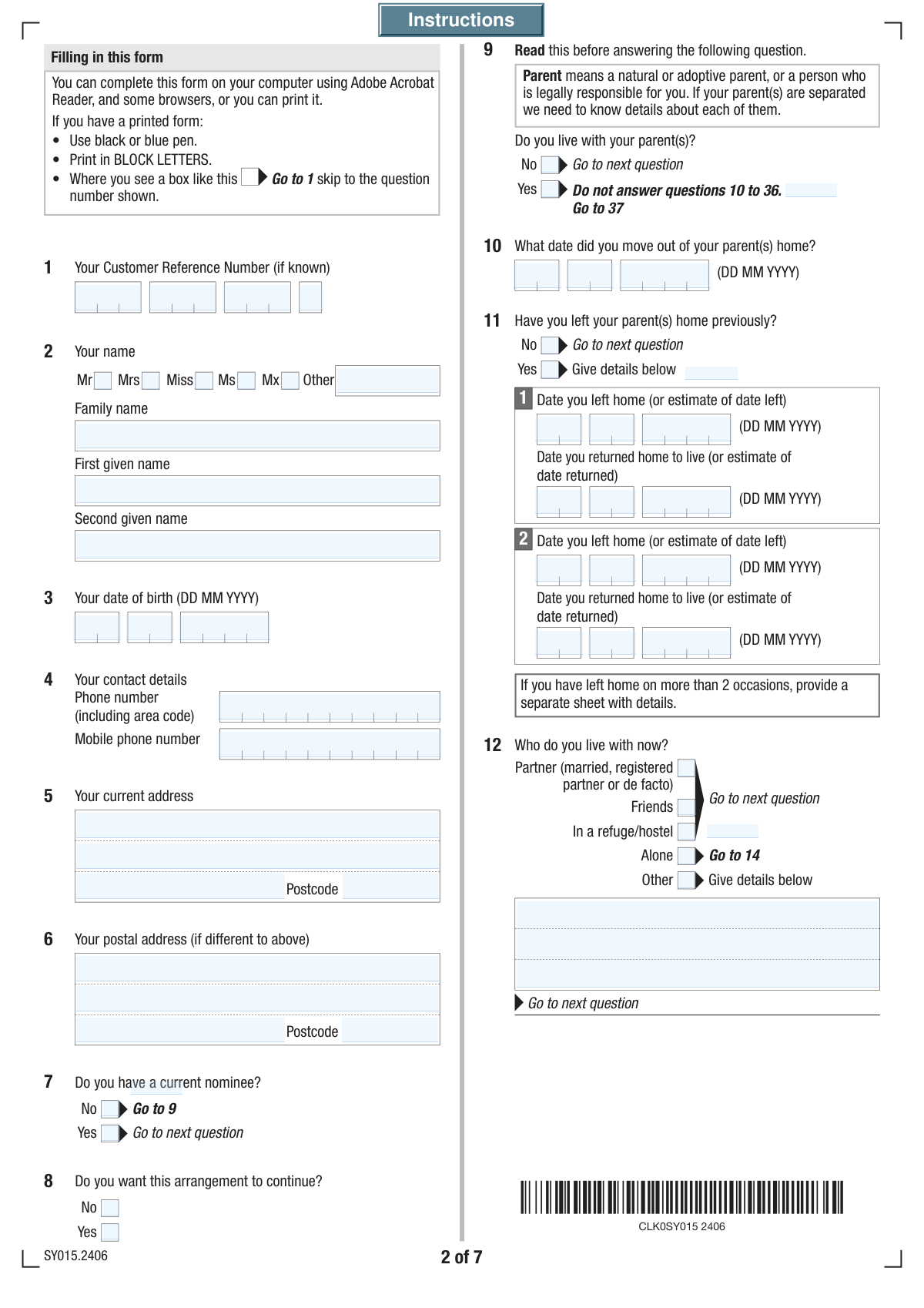
The MOD Y form is a detailed questionnaire required by Services Australia for young people who are claiming they cannot live with their parents due to exceptional circumstances. It gathers sensitive information about family relationships, living arrangements, and reasons for leaving the parental home to determine if it is 'unreasonable' for the applicant to live there, which is a key factor in assessing eligibility for independent rates of payments like Youth Allowance. Today, this form can be filled out quickly and accurately using AI-powered services like Instafill.ai, which can also convert non-fillable PDF versions into interactive fillable forms.
Our AI automatically handles information lookup, data retrieval, formatting, and form filling.
It takes less than a minute to fill out MOD Y using our AI form filling.
Securely upload your data. Information is encrypted in transit and deleted immediately after the form is filled out.

Form specifications

Form name: MOD Y - Unreasonable to Live at Home
Number of fields: 182
Number of pages: 7
Language: English
main-image

Instafill Demo: How to fill out PDF forms in seconds with AI

How to Fill Out MOD Y Online for Free in 2026

Are you looking to fill out a MOD Y form online quickly and accurately? Instafill.ai offers the #1 AI-powered PDF filling software of 2026, allowing you to complete your MOD Y form in just 37 seconds or less.
Follow these steps to fill out your MOD Y form online using Instafill.ai:
  1. 1 Navigate to Instafill.ai and upload your MOD Y form or select it from the document library.
  2. 2 Allow the AI to process the form and identify all the required fields for personal details, family circumstances, and living arrangements.
  3. 3 Follow the guided prompts to provide your personal information, contact details, and information about your parents or guardians.
  4. 4 Carefully answer the detailed questions about your living situation, why you cannot live at home, and any attempts made to resolve family issues.
  5. 5 Provide details for any third-party contacts who can verify your circumstances and indicate whether you grant permission for Services Australia to contact them.
  6. 6 Review all the information you've entered for accuracy and completeness, ensuring all narrative sections are clear and comprehensive.
  7. 7 Complete the declaration section by electronically signing and dating the form before downloading the final document for submission to Services Australia.

Our AI-powered system ensures each field is filled out correctly, reducing errors and saving you time.

Why Choose Instafill.ai for Your Fillable MOD Y Form?

Speed

Complete your MOD Y in as little as 37 seconds.

Up-to-Date

Always use the latest 2026 MOD Y form version.

Cost-effective

No need to hire expensive lawyers.

Accuracy

Our AI performs 10 compliance checks to ensure your form is error-free.

Security

Your personal information is protected with bank-level encryption.

Frequently Asked Questions About Form MOD Y

This form is used to gather information about your living situation to determine if it is unreasonable for you to live at home with your parents. It is typically used to assess eligibility for youth or independence-related financial support.

Your Customer Reference Number is a unique ID provided by the agency you are dealing with. You can typically find it on letters, emails, or in your online account with that agency.

Even if you don't live with your parents, the form requires their details to assess your family circumstances and verify the reasons you cannot live at home. This information is essential for processing your claim.

The form asks for details of the first two times you left and returned home. If you have moved more than twice, fill in the details for the first two occasions and use the 'Other Information' section at the end to provide more context if needed.

The agency needs to verify the information you provide to make a fair and accurate decision. Granting permission allows them to confirm the details of your living situation and family circumstances.

You should declare any form of regular assistance you receive, including financial help like cash or bill payments, and non-financial support like food, use of a car, or payment of school fees.

Provide a clear and honest explanation of the problems that led to you leaving home, such as serious family conflict or safety concerns. Describe how these incidents affected you to help the agency understand your situation.

You can strengthen your application by attaching supporting documents like letters from social workers, counselors, or doctors, or any reports that verify your circumstances. The form has a section to list any additional information or documents you are providing.

Submission instructions are usually provided on the agency's website or with the form itself. Processing times vary, so it is best to check the official website or contact the agency directly for current estimates.

Your 'Current Address' is the physical location where you are living now. Your 'Postal Address' is where you want your mail sent, which can be different, such as a P.O. Box or a friend's house if your current residence is temporary.

Yes, services like Instafill.ai use AI to help you fill out forms accurately and efficiently. These tools can auto-populate your personal information, saving time and reducing the risk of errors.

To fill out the form online, upload the PDF to the Instafill.ai platform. The AI will make the form interactive, allowing you to type your answers directly or use the autofill feature to complete it with your saved information.

If you have a non-fillable or 'flat' PDF, you can use a service like Instafill.ai to make it interactive. Simply upload the file, and the platform will convert it into a fillable form that you can complete on your computer.

Compliance MOD Y
Validation Checks by Instafill.ai

1
Exclusive Title Selection
This validation ensures that only one title (Mr, Mrs, Miss, Ms, Mx) is selected from the available checkboxes. It is important for data integrity and to avoid ambiguity in the customer's profile. If a user selects more than one title, the form should display an error message prompting them to choose only one.
2
Date of Birth Validity and Plausibility
This check verifies that the entered Day, Month, and Year of Birth constitute a valid calendar date that is in the past. It also checks if the resulting age is plausible (e.g., older than 16 and younger than 120). This prevents data entry errors and ensures the applicant meets potential age-related eligibility criteria. If the date is invalid, in the future, or results in an unrealistic age, an error should be triggered.
3
Postcode Format Validation
This validation ensures that the 'Postcode' and 'Postal Postcode' fields adhere to the standard format for the relevant country's postal codes. Correctly formatted postcodes are essential for address verification and successful mail delivery. A failure in this validation would prompt the user to correct the postcode format before submission.
4
Conditional 'Other Title' Field Logic
This check ensures the 'Other Title' text field is only populated if the 'Mx' title checkbox is selected, as per the field instructions. This maintains logical consistency within the name section and prevents extraneous data from being collected. If 'Other Title' is filled but 'Mx' is not checked, the submission should be flagged for correction.
5
Conditional Nominee Arrangement Logic
This validation enforces the rule that the 'Nominee Arrangement Continuation' questions can only be answered if the user has indicated they have a 'current nominee' by checking 'Yes'. This prevents a logical contradiction in the user's responses. If the user has no current nominee, these subsequent fields should be disabled or an error should be shown if they are filled.
6
Conditional 'Date Moved Out' Requirement
This check verifies that the 'Date Moved from Parents Home' is provided if and only if the user selects 'No, I do not live with my parents'. This ensures that all necessary information is collected based on the user's living situation. If the condition is not met, the form should prompt the user to either provide the date or correct their living status selection.
7
Chronological Date Consistency: Moved Out vs. Birth Date
This validation checks that the 'Date Moved from Parents Home' is a date that occurs after the user's 'Date of Birth'. It also ensures a reasonable amount of time has passed, for example, that the user was at least 13 years old. This check prevents logical impossibilities in the data and ensures the timeline of events is coherent. An error will be raised if the move-out date precedes the birth date.
8
Chronological Date Order for Leaving and Returning Home
This validation ensures that the sequence of dates for leaving and returning to the parental home is logical. Specifically, the 'First Occasion Returned Home' date must be after the 'First Occasion Left Home' date, and the 'Second Occasion Left Home' date must be after the first return date. This maintains the integrity of the event timeline. If any date is out of sequence, an error message should guide the user to correct the timeline.
9
Guardian Details Conditional Population
This check ensures that the guardian's name, address, and phone number fields are only populated if the user has first checked 'Yes' to the question 'if someone other than your parent(s) is responsible for looking after you'. This prevents the collection of incomplete or irrelevant guardian information. If 'No' is selected, these dependent fields must be empty.
10
Mandatory Declaration Agreement
This validation confirms that the 'I have read, understood and agree to the above' checkbox is checked before submission. This is a critical step to ensure the user has legally attested to the accuracy of the provided information and understands the privacy notice. The form cannot be submitted unless this box is checked.
11
Declaration Date Validity
This check ensures the 'Declaration Date' is a valid calendar date and is not a date in the future. It confirms that the declaration was signed on a specific, valid day. A declaration with a future date or an invalid date (e.g., February 30) would be rejected, prompting the user to enter the current date.
12
Mutually Exclusive Binary Choices
This validation rule applies to all pairs of 'Yes'/'No' checkboxes, such as 'Current Nominee Status' and 'Living with Parents Status'. It ensures that for each pair, only one option can be selected, not both or neither. This is fundamental for clear, unambiguous data and prevents logical conflicts in the form's branching logic. If both are selected, an error should prompt the user to choose only one.
13
Customer Reference Number Completeness
This validation verifies that all four parts of the 'Customer Reference Number' are filled in. Since the number is a key identifier and is split into four fields, it is crucial that all components are provided to reconstruct the full number. If any of the four fields are left empty, the form should display an error message indicating that the complete reference number is required.
14
Conditional Parent Details Requirement
This check ensures that sections like 'Details of Parent Last Lived With' and 'Reason for Leaving Home' are only filled out if the user has indicated 'No, I do not live with my parents'. This enforces the form's branching logic across multiple sections. If a user states they live with their parents, these sections should be empty, and an error should be shown if they contain data.

Common Mistakes in Completing MOD Y

Ignoring Conditional Logic and Answering Skippable Questions

This form contains many questions that are conditional on previous answers, indicated by instructions like 'Fill only if Yes is Yes'. A common mistake is to ignore these instructions and fill out sections that should be skipped. For example, an applicant who lives with their parents might still fill out the 'Date Moved from Parents Home' section, creating contradictory and confusing data that can delay processing or lead to rejection. To avoid this, applicants must read every instruction carefully and only answer questions relevant to their situation. AI-powered tools like Instafill.ai can prevent this by dynamically showing or hiding fields based on user input, ensuring a clean and accurate submission.

Missing Information in Conditionally Required Fields

The opposite of the previous mistake, applicants often select an option like 'Yes' but then fail to provide the mandatory follow-up information. For instance, checking 'Yes (Previously Left Parents Home Status)' requires the applicant to then provide the number of departures and the specific dates. Overlooking these dependent fields results in an incomplete application that cannot be processed. This often happens when rushing or when the follow-up fields are on a different part of the page. Using a guided form-filling tool can help by highlighting required fields as they become relevant.

Incorrectly Splitting the Customer Reference Number

The form requires the Customer Reference Number to be entered across four separate fields. Applicants frequently make errors here by entering the entire number into the first field, incorrectly dividing the segments, or transposing digits between the boxes. This mistake can prevent the system from identifying the applicant's file, causing an immediate processing failure. To avoid this, one should carefully match each segment of their reference number to the corresponding box. AI form fillers like Instafill.ai can be programmed to parse and correctly distribute such numbers into their respective fields.

Providing Inconsistent or Illogical Date Sequences

The form asks for multiple date ranges, such as the dates for leaving and returning to a parent's home. A frequent error is entering dates that are not in chronological order, for example, listing a 'Date Returned Home' that is earlier than the 'Date Left Home'. These logical inconsistencies raise red flags and require manual follow-up, significantly delaying the assessment. Applicants should double-check all dates to ensure they form a coherent timeline. If the form is a non-fillable PDF, tools like Instafill.ai can convert it into a smart, fillable version with built-in validation rules to catch such logical errors.

Vague or Insufficient Narrative Explanations

Fields like 'Reason for Leaving Home' or 'Support Details Description' require detailed, factual explanations. A common mistake is to provide vague, emotional, or overly brief answers (e.g., 'things were bad') that lack the specific information needed for an assessment. This forces the case officer to request more information, delaying the outcome. To avoid this, provide clear, objective details, focusing on facts, events, and timelines. Think about what information someone would need to understand your situation without any prior context.

Mismatched Third-Party Information and Contact Permissions

The form asks for the names and addresses of parents, guardians, or other contacts, and then separately asks for permission to speak with them. Applicants often provide detailed contact information but then forget to check the 'Yes' box in the corresponding permission question (e.g., Q23, Q24). This creates a roadblock, as the agency cannot legally proceed with verification without explicit consent. It is crucial to ensure that for every person listed as a contact, the corresponding permission question is answered correctly to allow the verification process to proceed smoothly.

Incorrectly Formatting Phone Numbers

While some phone number fields are generic, others have specific instructions like 'Enter 10 digit number with no spaces'. People often miss these specific formatting requirements and enter numbers with spaces, hyphens, or country codes, which can be rejected by automated data processing systems. This can lead to failed submissions or prevent the agency from being able to contact the applicant or their listed contacts. Using a tool like Instafill.ai helps by automatically formatting phone numbers according to the field's specific requirements, ensuring data compatibility.

Failing to Distinguish Between Current and Postal Address

The form provides separate sections for 'Current Address' and 'Postal Address'. Many applicants who have a separate postal address (like a P.O. Box) forget to fill out the postal section, assuming all mail will be sent to their current residential address. This can lead to important documents being lost or returned as undeliverable. It is vital to complete the 'Postal Address' section if your mailing address is different from where you live.

Forgetting the Final Declaration, Signature, and Date

The final declaration is a legally binding statement confirming the accuracy of the information provided. A surprisingly common and critical error is forgetting to sign or date the form, or to check the 'I agree' box on a digital version. An unsigned or undated application is invalid and will be rejected outright, forcing the applicant to start the process over. Always perform a final review of the form before submitting, paying special attention to the declaration section to ensure it is fully completed.

Answering Ambiguously or Contradictorily about Living Arrangements

The core of the form revolves around the applicant's living situation. Mistakes here can completely undermine the application. An example would be stating 'No, I do not live with my parents' but then providing a 'Current Address' that is the same as the 'Parent's Address' listed later. Such contradictions require clarification and suggest the applicant may have misunderstood the questions. It is essential to provide a clear and consistent account of the living situation throughout the entire form.
Saved over 80 hours a year

“I was never sure if my IRS forms like W-9 were filled correctly. Now, I can complete the forms accurately without any external help.”

Kevin Martin Green

Your data stays secure with advanced protection from Instafill and our subprocessors

Robust compliance program

Transparent business model

You’re not the product. You always know where your data is and what it is processed for.

ISO 27001, HIPAA, and GDPR

Our subprocesses adhere to multiple compliance standards, including but not limited to ISO 27001, HIPAA, and GDPR.

Security & privacy by design

We consider security and privacy from the initial design phase of any new service or functionality. It’s not an afterthought, it’s built-in, including support for two-factor authentication (2FA) to further protect your account.

Fill out MOD Y with Instafill.ai

Worried about filling PDFs wrong? Instafill securely fills mod-y-unreasonable-to-live-at-home forms, ensuring each field is accurate.