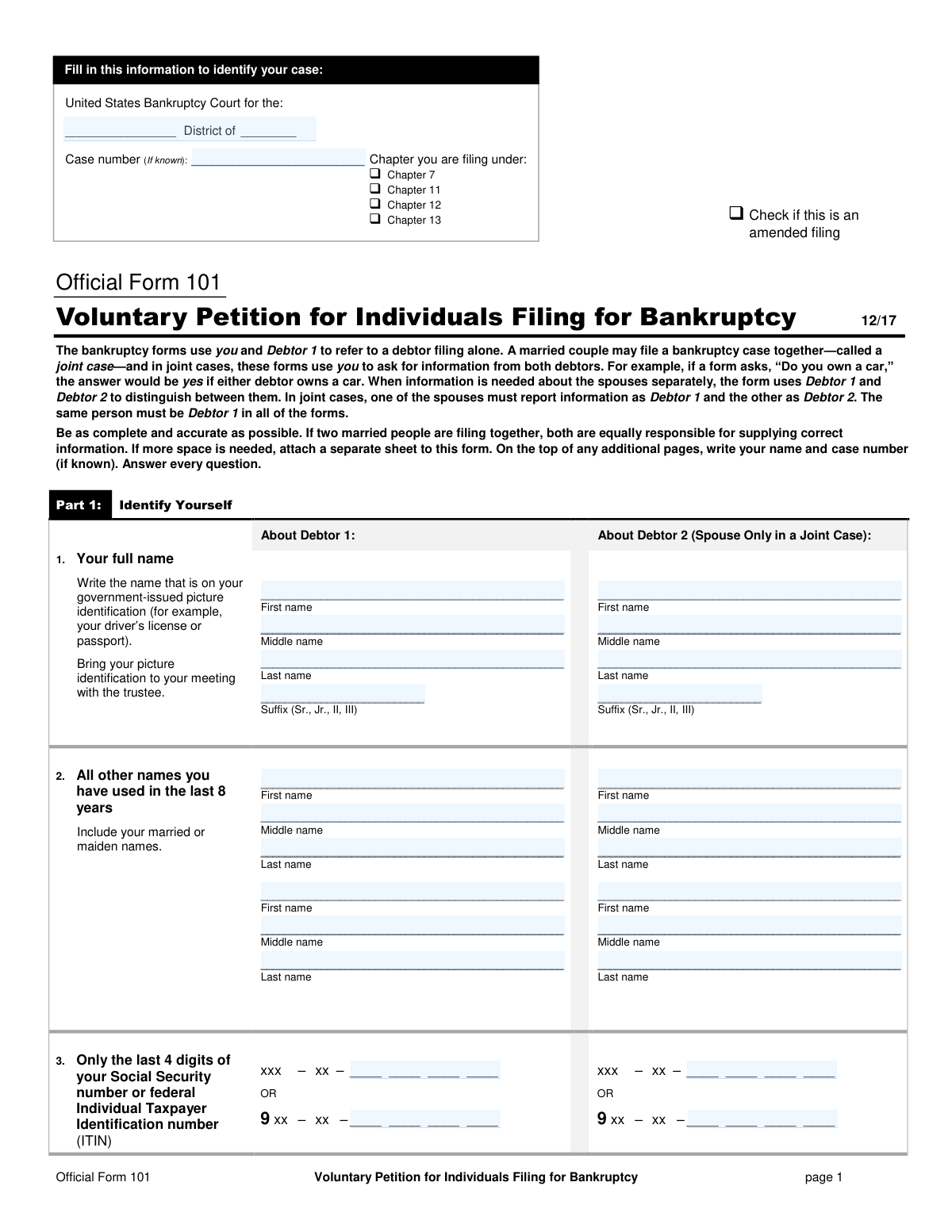
Yes! You can use AI to fill out Official Form 101, Voluntary Petition for Individuals Filing for Bankruptcy

Official Form 101, the Voluntary Petition for Individuals Filing for Bankruptcy, is the primary document submitted to a U.S. Bankruptcy Court to initiate a personal bankruptcy case. It provides the court with essential information about the debtor's identity, the chapter of bankruptcy being filed (e.g., Chapter 7 or 13), and other key details required to start the legal process for debt relief. This form, along with numerous required schedules detailing assets, liabilities, income, and expenses, is critical for obtaining protection from creditors and seeking a fresh financial start. Today, this comprehensive packet can be filled out quickly and accurately using AI-powered services like Instafill.ai, which can also convert non-fillable PDF versions into interactive fillable forms.
Our AI automatically handles information lookup, data retrieval, formatting, and form filling.
It takes less than a minute to fill out Official Form 101 using our AI form filling.
Securely upload your data. Information is encrypted in transit and deleted immediately after the form is filled out.

Form specifications

Form name: Official Form 101, Voluntary Petition for Individuals Filing for Bankruptcy
Number of fields: 2115
Number of pages: 56
Language: English
main-image

Instafill Demo: How to fill out PDF forms in seconds with AI

How to Fill Out Official Form 101 Online for Free in 2026

Are you looking to fill out a OFFICIAL FORM 101 form online quickly and accurately? Instafill.ai offers the #1 AI-powered PDF filling software of 2026, allowing you to complete your OFFICIAL FORM 101 form in just 37 seconds or less.
Follow these steps to fill out your OFFICIAL FORM 101 form online using Instafill.ai:
  1. 1 Navigate to Instafill.ai and upload or select the Voluntary Petition for Individuals Filing for Bankruptcy package (Official Form 101 and its associated schedules).
  2. 2 Use the AI assistant to provide personal identification for Debtor 1 and Debtor 2 (if applicable), including full names, addresses, and the last four digits of Social Security numbers.
  3. 3 Answer the guided questions in Part 2 to specify the bankruptcy chapter you are filing under (e.g., Chapter 7, 13), how you will pay the filing fee, and details of any prior bankruptcies.
  4. 4 Systematically complete the required schedules, such as Schedule A/B for property and assets, and Schedules D and E/F for secured and unsecured debts, by following the AI-powered prompts.
  5. 5 Fill out the Statement of Financial Affairs (Form 107) by providing information about your income, recent payments to creditors, legal actions, and other financial history as requested by the AI tool.
  6. 6 Review all the information auto-populated across the entire bankruptcy petition package to ensure accuracy and completeness before finalizing.
  7. 7 Electronically sign the petition and declaration forms, then download the completed, ready-to-file documents.

Our AI-powered system ensures each field is filled out correctly, reducing errors and saving you time.

Why Choose Instafill.ai for Your Fillable Official Form 101 Form?

Speed

Complete your Official Form 101 in as little as 37 seconds.

Up-to-Date

Always use the latest 2026 Official Form 101 form version.

Cost-effective

No need to hire expensive lawyers.

Accuracy

Our AI performs 10 compliance checks to ensure your form is error-free.

Security

Your personal information is protected with bank-level encryption.

Frequently Asked Questions About Form Official Form 101

This set of forms is used by individuals to officially begin a bankruptcy case in federal court. It provides the court, creditors, and a trustee with a complete picture of your financial situation, including your assets, debts, income, and expenses.

Any individual or married couple wishing to file for personal bankruptcy under Chapter 7, 11, 12, or 13 of the U.S. Bankruptcy Code must complete these forms. If a married couple files together in a joint case, both spouses are responsible for providing complete and accurate information.

For a joint case, you must decide who will be 'Debtor 1' and who will be 'Debtor 2,' and use these designations consistently across all forms. The forms use 'you' to ask for information from both spouses, so if either of you owns an asset, the answer is 'yes'.

Before you can file for bankruptcy, you are required by law to receive a credit counseling briefing from an agency approved by the U.S. Trustee. You must attach the certificate of completion to your petition or file it within 14 days of filing.

Schedule D is for debts that are backed by collateral, such as a mortgage on your house or a loan on your car. Schedule E/F is for debts that are not backed by collateral, like credit card debt, medical bills, and personal loans.

Schedule C is where you list property from Schedule A/B that you believe is protected from being taken by the bankruptcy trustee to pay your creditors. These protections are based on specific federal or state laws called 'exemptions'.

This form tells the court and your secured creditors what you plan to do with the property that serves as collateral for a debt. Your options are typically to surrender the property, redeem it by paying its value in a lump sum, or reaffirm the debt by agreeing to continue payments.

You have a few options for the filing fee, which you select on Form 101. You can pay the fee in full, apply to pay it in installments using Form 103A, or, if filing for Chapter 7 with very low income, apply to have the fee waived entirely using Form 103B.

You must file the completed and signed forms with the clerk's office of the U.S. Bankruptcy Court for your district. Note that Form 121, which contains your full Social Security Number, must be submitted separately and is not part of the public record.

It is extremely important to be complete and accurate, as you must sign the forms under penalty of perjury. Intentionally making false statements or concealing property can lead to severe penalties, including fines, imprisonment, and denial of your bankruptcy discharge.

The look-back period varies by question; for example, it asks about income for the last two years, payments to insiders within one year, and gifts within two years. It is crucial to answer every question accurately for the specified time frame to avoid issues in your case.

Yes, services like Instafill.ai use AI to help auto-fill form fields accurately and save a significant amount of time. This can reduce errors and make the process of preparing your bankruptcy petition much more manageable.

If you have a non-fillable or 'flat' PDF, you can use a tool like Instafill.ai to convert it into an interactive, fillable form. This allows you to type your information directly into the fields, save your progress, and ensure the final document is neat and legible.

To fill your forms online, you can upload the bankruptcy PDF package to the Instafill.ai platform. The service will make the documents interactive, allowing you to easily enter, edit, and save your information before printing for submission.

Compliance Official Form 101
Validation Checks by Instafill.ai

1
Debtor 1 Name and Address Completeness
This check verifies that the First Name, Last Name, Street, City, State, and ZIP Code for Debtor 1 are all provided. This information is fundamental for identifying the debtor and ensuring the court can send legally required notices to the correct address. If this information is missing, the filing may be rejected for being incomplete, delaying the bankruptcy process.
2
SSN or ITIN Last 4 Digits Format
This validation ensures that the field for the last 4 digits of the Social Security Number or Individual Taxpayer Identification Number contains exactly four numeric digits. This unique identifier is critical for credit reporting and matching the case with the correct individual while protecting their privacy. An invalid format will prevent the case from being processed correctly and may lead to rejection of the petition.
3
Bankruptcy Chapter Selection Consistency
This check confirms that the same bankruptcy chapter (e.g., Chapter 7, 13) is selected on both page 1 of the petition and in the response to Question 7. Consistent selection is crucial as the chapter determines the legal framework, procedures, and relief available to the debtor. A mismatch can cause legal confusion and requires an amendment to clarify the debtor's intent, potentially delaying the case.
4
Joint Filer Data Integrity
This validation ensures that if a name is entered for Debtor 2 (Spouse), then Debtor 2's SSN/ITIN last 4 digits and signature are also provided where required. In a joint case, both spouses are equally responsible for the information provided, and the court requires complete identification and attestation from both parties. Failure to provide this information for Debtor 2 will result in an incomplete joint petition.
5
Conditional Field Requirement for 'Yes' Answers
This check applies to numerous questions, such as Question 9 ('Have you filed for bankruptcy within the last 8 years?'). If the user checks 'Yes,' the subsequent fields requiring details (e.g., District, Date, Case Number) become mandatory. This ensures that affirmative answers are properly substantiated with required data for the court's review. If the detail fields are left blank after a 'Yes' response, the form is considered incomplete.
6
Fee Waiver Eligibility for Chapter 7
This validation checks that if the debtor requests a fee waiver (Question 8 on Form 101), they have also selected Chapter 7 as the filing chapter. The form explicitly states that the fee waiver option is only available for Chapter 7 filings. Attempting to request a waiver under another chapter would be legally impermissible and would result in the request being denied and the fee becoming due.
7
Schedule A/B Asset Summary Calculation
This check verifies the arithmetic on Schedule A/B, Part 8. It ensures that the 'Total of all property' (line 63) correctly equals the sum of 'Total real estate' (line 55) and 'Total personal property' (line 62). Accurate asset totals are essential for the trustee and creditors to understand the scope of the bankruptcy estate. A miscalculation can lead to incorrect summaries and require amendments.
8
Schedule C Exemption Amount Limit
This validation ensures that for each property listed on Schedule C, the 'Amount of the exemption you claim' does not exceed the 'Current value of the portion you own'. A debtor cannot exempt more value than they actually own in a piece of property. Claiming an excessive exemption is legally invalid and will be challenged by the trustee, potentially leading to the loss of the exemption.
9
Schedule D Unsecured Portion Calculation
This check validates the calculation for each secured claim on Schedule D. It confirms that the 'Unsecured portion' (Column C) is correctly calculated as the 'Amount of claim' (Column A) minus the 'Value of collateral' (Column B), if the result is greater than zero. This calculation is critical for determining how much of a secured creditor's debt will be treated as unsecured, which affects their rights and potential payout in the bankruptcy. An incorrect value would misrepresent the debtor's liabilities.
10
Form 106Sum Cross-Schedule Verification
This is a critical cross-form validation that ensures the totals reported on the Summary form (106Sum) exactly match the calculated totals from their respective schedules (A/B, D, E/F). The summary provides a high-level overview for the court and trustee, and its accuracy is paramount. Discrepancies between the summary and the detailed schedules will cause the filing to be flagged for review and require correction.
11
Prior Bankruptcy Date Validation
For any prior bankruptcies listed in Question 9, this check validates that the 'When' field is a valid date in MM/DD/YYYY format and falls within the last 8 years from the current filing date. This information is used to determine eligibility for a discharge, as there are time limits between filings. An invalid or out-of-range date would prevent a proper eligibility assessment.
12
Employer Identification Number (EIN) Format
This validation ensures that any Employer Identification Number (EIN) entered on the form, such as in Question 4, follows the correct XX-XXXXXXX format and contains exactly 9 digits. The EIN is a unique identifier for business entities, and a valid number is necessary for the court and trustee to correctly identify any associated businesses. An incorrectly formatted EIN would be invalid and could hinder the administration of the case.
13
Credit Counseling Declaration Completeness
This check verifies that for Debtor 1 (and Debtor 2 in a joint case), one of the mandatory options in Question 15 regarding credit counseling has been selected. The law requires debtors to address the pre-bankruptcy credit counseling requirement to be eligible to file. Failure to select an option and provide any required attachments makes the petition deficient and can be grounds for dismissal of the case.
14
Consistency of Debtor Name Across Forms
This validation ensures that the name entered for Debtor 1 (and Debtor 2, if applicable) is identical across all submitted forms and schedules in the header sections. Consistent identification is crucial for maintaining a clear and accurate case record for the court, trustee, and creditors. Any variation in the name could lead to confusion, misfiling of documents, and potential legal issues regarding notice and identity.

Common Mistakes in Completing Official Form 101

Failure to Disclose All Assets

A frequent and serious error is failing to list every single asset on Schedule A/B. People often forget items like security deposits for utilities or rent, expected tax refunds, the cash surrender value of life insurance policies, or potential lawsuits. Omitting assets, intentionally or not, is considered perjury and can lead to the dismissal of the case, denial of discharge, and even criminal charges. To avoid this, thoroughly review all financial records and think broadly about anything of value you own or have an interest in.

Using Incorrect Property Valuations

Debtors often list the purchase price or a rough guess for the value of their property on Schedule A/B, instead of the required current fair market value. For example, a car's value should be its current resale value, not what was paid for it years ago. Incorrect valuation can lead to losing property you might have otherwise kept, as it directly impacts how exemptions are applied. To avoid this, use objective resources like Kelley Blue Book for vehicles and consult real estate appraisals or market analyses for homes.

Incomplete or Misclassified Creditor Information

It is common to forget to list all creditors, such as medical providers, personal loans from family, or old utility bills on Schedules D and E/F. If a creditor is not listed with a correct address, they will not receive notice of the bankruptcy, and the debt may not be discharged. Always pull a credit report and review all personal records to ensure every single debt is listed and classified correctly. AI-powered tools like Instafill.ai can help validate creditor addresses to ensure notices are sent correctly.

Missing Pre-Filing Credit Counseling Requirement

The law requires individuals to complete a credit counseling course from an approved agency *before* filing for bankruptcy, as stated on Form 101, Question 15. Many filers are unaware of this or complete it too late, which is a primary reason for case dismissal. The certificate of completion must be filed with the petition or shortly thereafter. To prevent this, ensure you receive the briefing within the 180-day window before filing and have the certificate ready to submit.

Omitting Pre-Bankruptcy Payments and Transfers

On the Statement of Financial Affairs (Form 107), filers often forget to disclose payments to creditors within 90 days of filing or payments to 'insiders' like relatives within one year. They also frequently omit transfers of property, such as selling a car to a friend for a low price. The trustee can legally recover these payments and transfers, and failure to disclose them can result in denial of discharge. Carefully review your bank statements for the required periods to ensure full disclosure.

Providing Inconsistent Information Across Schedules

A debtor might list a car's value as $5,000 on Schedule A/B (Property) but then claim an exemption for it on Schedule C using a different value. Such inconsistencies raise red flags for the trustee, leading to scrutiny, objections, and delays. To avoid this, double-check that all names, values, and descriptions are identical across all submitted documents. Using a form-filling tool like Instafill.ai can help maintain consistency by auto-populating repeated information across the entire bankruptcy package.

Miscalculating Income for the Means Test

On Form 122A-1, filers must calculate their average monthly income over the specific 6-month period prior to filing. Common errors include using net (take-home) pay instead of gross wages or using income from the wrong time frame. These mistakes can lead to an incorrect Means Test result, potentially causing a Chapter 7 case to be dismissed or converted to Chapter 13. It is vital to use gross income figures from the correct six-month period for an accurate calculation.

Mismatching Name on Petition with Government ID

Debtors often enter a nickname or fail to list their full legal name on Form 101 exactly as it appears on their government-issued ID. They also frequently forget to list all other names used in the last 8 years, such as maiden names. These errors can cause identification issues with the trustee and may prevent creditors from properly identifying the debtor, potentially jeopardizing the discharge of certain debts. To avoid this, carefully cross-reference your name with your driver's license or passport.

Illegible Handwriting on Non-Fillable Forms

Many court forms are only available as flat, non-fillable PDFs, forcing filers to fill them out by hand. This often results in illegible handwriting, which can cause data entry errors by the court clerk and lead to notices being sent to wrong addresses or creditors not being properly listed. This can jeopardize the discharge of a debt. To avoid this, it's best to use a tool like Instafill.ai, which can make any PDF form fillable, ensuring all entries are clear, legible, and accurate.

Forgetting to Sign and Date All Required Documents

A bankruptcy petition is a large package of documents, and nearly every form requires a signature and date. It's easy to miss one, especially when filing without an attorney. An unsigned document is legally invalid and can lead to the court rejecting the filing or dismissing the case. Before filing, create a checklist and review every page to ensure all signature blocks are properly completed by the correct debtor.
Saved over 80 hours a year

“I was never sure if my IRS forms like W-9 were filled correctly. Now, I can complete the forms accurately without any external help.”

Kevin Martin Green

Your data stays secure with advanced protection from Instafill and our subprocessors

Robust compliance program

Transparent business model

You’re not the product. You always know where your data is and what it is processed for.

ISO 27001, HIPAA, and GDPR

Our subprocesses adhere to multiple compliance standards, including but not limited to ISO 27001, HIPAA, and GDPR.

Security & privacy by design

We consider security and privacy from the initial design phase of any new service or functionality. It’s not an afterthought, it’s built-in, including support for two-factor authentication (2FA) to further protect your account.

Fill out Official Form 101 with Instafill.ai

Worried about filling PDFs wrong? Instafill securely fills official-form-101-voluntary-petition-for-individuals-filing-for-bankruptcy-2 forms, ensuring each field is accurate.