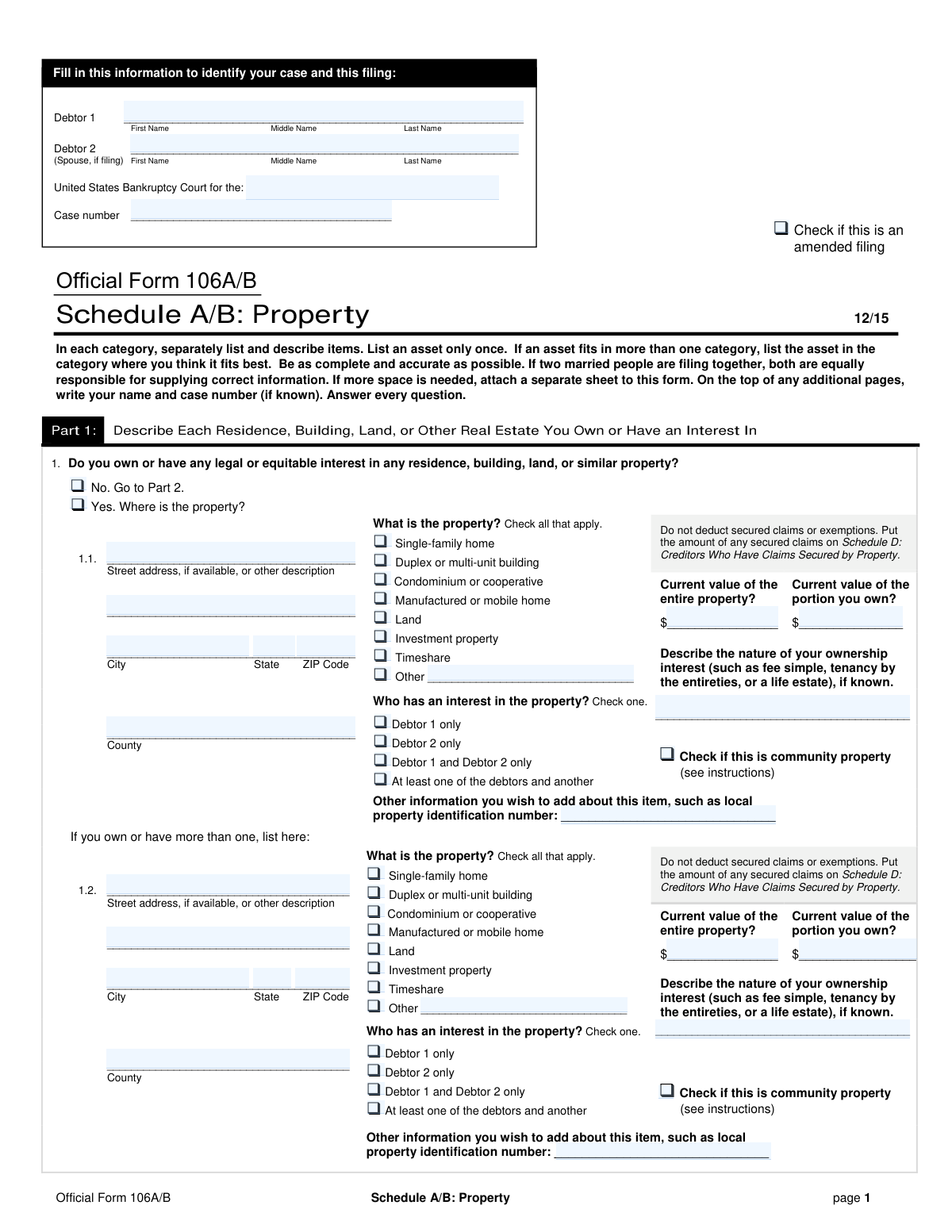
Yes! You can use AI to fill out Official Form 106A/B, Schedule A/B: Property

Official Form 106A/B, Schedule A/B: Property, is a United States Bankruptcy Court form used by debtors to disclose all of their real and personal property. This includes everything from real estate and vehicles to financial accounts, household goods, and business-related assets. The form is critical for the bankruptcy trustee and creditors to understand the debtor's financial estate and determine which assets are exempt or available for distribution. Today, this form can be filled out quickly and accurately using AI-powered services like Instafill.ai, which can also convert non-fillable PDF versions into interactive fillable forms.
Our AI automatically handles information lookup, data retrieval, formatting, and form filling.
It takes less than a minute to fill out Official Form 106A/B using our AI form filling.
Securely upload your data. Information is encrypted in transit and deleted immediately after the form is filled out.

Form specifications

Form name: Official Form 106A/B, Schedule A/B: Property
Number of fields: 443
Number of pages: 10
Language: English
main-image

Instafill Demo: How to fill out PDF forms in seconds with AI

How to Fill Out Official Form 106A/B Online for Free in 2026

Are you looking to fill out a OFFICIAL FORM 106A/B form online quickly and accurately? Instafill.ai offers the #1 AI-powered PDF filling software of 2026, allowing you to complete your OFFICIAL FORM 106A/B form in just 37 seconds or less.
Follow these steps to fill out your OFFICIAL FORM 106A/B form online using Instafill.ai:
  1. 1 Navigate to Instafill.ai and upload or select the Official Form 106A/B, Schedule A/B: Property.
  2. 2 Provide your personal and case identification information, such as debtor names and case number, in the header section.
  3. 3 Proceed through each part of the schedule, starting with Part 1 for real estate, Part 2 for vehicles, and so on, detailing all your assets.
  4. 4 For each asset listed, accurately describe the item, specify ownership interest, and provide the current market value without deducting for secured claims or exemptions.
  5. 5 Use the AI-powered tool to automatically calculate the total values for each section and the grand total of all property in Part 8.
  6. 6 Carefully review all the information entered across the form's 10 pages to ensure accuracy and completeness.
  7. 7 Once reviewed, save, download, or print your completed Schedule A/B, ready for filing with the bankruptcy court.

Our AI-powered system ensures each field is filled out correctly, reducing errors and saving you time.

Why Choose Instafill.ai for Your Fillable Official Form 106A/B Form?

Speed

Complete your Official Form 106A/B in as little as 37 seconds.

Up-to-Date

Always use the latest 2026 Official Form 106A/B form version.

Cost-effective

No need to hire expensive lawyers.

Accuracy

Our AI performs 10 compliance checks to ensure your form is error-free.

Security

Your personal information is protected with bank-level encryption.

Frequently Asked Questions About Form Official Form 106A/B

This form is a required part of a bankruptcy filing used to list all of your property and assets. You must disclose everything you own or have a legal interest in, including real estate, vehicles, financial accounts, and personal belongings.

Any individual or married couple filing for bankruptcy must complete and submit this form. It provides the court and the bankruptcy trustee with a complete picture of your assets.

You must list the full current market value of the asset, not just the equity you have in it. For example, if your home is worth $300,000 and you owe $250,000, you list $300,000 as the value on this form; the mortgage is listed separately on Schedule D.

Use the fair market value, which is what a willing buyer would pay for the item today. You can use recent appraisals, online valuation tools (like Kelley Blue Book for cars), or prices for similar items for sale to estimate the value.

List the total market value of the asset first, then list the value of your specific ownership share. For example, if you and a sibling co-own a property worth $100,000 on a 50/50 basis, you would list $100,000 as the entire value and $50,000 as the value of your portion.

You must be thorough, but you can group low-value items into general categories like 'Household goods and furnishings' or 'Clothing'. Provide a reasonable, good-faith estimate of the total resale value for each category.

Yes, the form requires you to list any vehicles you lease or have an interest in. You should also report the details of the lease on Schedule G: Executory Contracts and Unexpired Leases.

To ensure accuracy, collect documents like property deeds, vehicle titles, recent bank and investment account statements, retirement plan statements, and insurance policies. These will help you provide correct values and details for your assets.

You must immediately file an amended Schedule A/B with the court to correct the omission. Intentionally hiding assets is a serious crime, and even accidental omissions can jeopardize your bankruptcy case.

No, you will complete a single Schedule A/B for a joint filing. The form has checkboxes to indicate whether an asset is owned by Debtor 1, Debtor 2, both, or with another person.

Yes, you must disclose any interests in insurance policies, as well as any property you expect to receive from someone who has died. This information should be listed in Part 4 of the form.

Yes, services like Instafill.ai use AI to help you accurately auto-fill form fields, which can save time and help prevent errors. Remember that you are ultimately responsible for verifying that all information is correct before you file.

You can upload the Schedule A/B PDF to the Instafill.ai platform. Their AI will make the form interactive, allowing you to type your information directly into the fields, save your progress, and download the completed document.

Services like Instafill.ai can convert flat, non-fillable PDFs into interactive forms you can complete on your computer. This saves you the hassle of printing the form and filling it out by hand.

Compliance Official Form 106A/B
Validation Checks by Instafill.ai

1
Conditional Requirement for Real Property Details
This check ensures that if a debtor indicates they own real estate by selecting 'Yes' in Part 1, they must provide the complete details for at least one property (entry 1.1, 1.2, or 1.3). This is crucial for accurately cataloging all assets for the bankruptcy estate. Failure to provide these details will result in an incomplete filing, requiring the user to go back and fill in the required property information before submission.
2
Ownership Portion Value Consistency
This validation verifies that for any asset, the 'Current value of the portion you own' is not greater than the 'Current value of the entire property'. This is a critical logical check to prevent data entry errors and ensure the debtor's equity is stated correctly. An error would indicate a misunderstanding of the question or a typo, and the form would prompt the user to correct the values before proceeding.
3
Requires Description for 'Other' Selections
This validation ensures that whenever a user selects an 'Other' checkbox in any section (such as property type in Part 1), the corresponding text field for describing that 'Other' item is not left empty. This is important for clarity and to ensure all assets are properly identified and categorized. If the description is missing, the form submission will be blocked until the user provides the necessary details.
4
Vehicle Model Year Validation
This check ensures that the 'Year' entered for any vehicle in Part 2 is a valid four-digit number within a logical historical range (e.g., 1900 to the current year + 1). This prevents typos like entering a 2-digit year or an impossible value, which could affect the vehicle's valuation. If an invalid year is entered, the user will receive an error message and must correct the field.
5
Part-Level Total Calculation Accuracy
This check verifies that the summary total at the end of each part (e.g., Line 2 for Part 1, Line 5 for Part 2) is the accurate sum of all 'Current value of the portion you own' fields within that part. This ensures that summary values are correctly calculated before being carried over to the final summary in Part 8. A mismatch would indicate a calculation error, and the user would be prompted to correct the individual values or the total.
6
Conditional Asset Detail Requirement
This check ensures that if a debtor answers 'Yes' to owning a category of assets (e.g., 'Yes' for Electronics in Part 3, Line 7), they must provide both a description and a corresponding value for that category. Leaving these fields blank after affirming ownership would result in an incomplete declaration. The system should prevent submission until the required details are filled in for every 'Yes' answer.
7
Business Ownership Percentage Range
This check validates that the '% of ownership' entered for business interests in Line 19 and Line 42 is a numerical value between 0 and 100, inclusive. This is crucial for accurately assessing the debtor's stake in a business. Any value outside this range is illogical and would be flagged as an error, requiring the user to input a valid percentage.
8
Debtor 2 Ownership Consistency
This validation checks for logical consistency related to Debtor 2. If no information for 'Debtor 2 Name' is provided at the top of the form, then no asset should be designated as belonging to 'Debtor 2 only'. This prevents contradictory information and ensures asset ownership is correctly attributed based on the filing status. Selecting 'Debtor 2 only' in a single-debtor filing would prompt an error.
9
Enforces Section Skip Logic
This validation enforces the form's navigational instructions. For example, if a user selects 'No' for owning business-related property in Part 5, the system should prevent or clear any data entry in the rest of Part 5 and guide them to Part 6. This simplifies the user experience and prevents the entry of contradictory information. Failure to follow this logic would result in a warning or automatic clearing of the irrelevant section.
10
Part 8 Summary Total Consistency
This validation ensures that the summary totals listed in Part 8 (Lines 55-61) exactly match the calculated totals from their respective parts (e.g., Line 55 must match Line 2, Line 56 must match Line 5). This serves as a crucial cross-check to ensure that values were not mistyped or mis-transferred to the final summary section. A mismatch will halt submission and highlight the inconsistent totals for correction.
11
Total Personal Property Calculation
This validation ensures that the total personal property value on Line 62 is the correct sum of the subtotals from Parts 2 through 7 (Lines 56-61). Accurate summation is essential for a correct overall asset declaration. An incorrect total could lead to misrepresentation of the debtor's assets, so the system must prevent submission until the calculation is corrected.
12
Schedule A/B Grand Total Calculation
This check validates that the grand total of all property listed on Schedule A/B (Line 63) is the correct sum of the total real estate (Line 55) and total personal property (Line 62). This ensures mathematical accuracy across the entire schedule, which is fundamental for the legal and financial integrity of the bankruptcy filing. If the totals do not add up, the system will flag the discrepancy and require the user to review and correct the summary figures.
13
Valid Currency Format for Asset Values
This check ensures that all fields requiring a monetary value are populated with non-negative numeric data only. It prevents the entry of text, special characters, or negative numbers where an asset value is expected. This maintains data integrity and ensures that all subsequent calculations based on these values are accurate. An invalid entry would trigger an immediate error message, requiring the user to input a valid number.
14
Header Information Completeness
This validation ensures that critical case identification information, such as the Debtor's name and case number, is present in the header of every page. This is vital for proper document management and association with the correct legal case, especially if pages are separated. The system should flag the form as incomplete if this header information is missing on any page.

Common Mistakes in Completing Official Form 106A/B

Incorrectly Valuing Real Estate and Vehicles

Filers often confuse an asset's fair market value with its equity. They incorrectly subtract the loan balance from the value, despite instructions to 'not deduct secured claims.' This happens because they think in terms of what they would 'get' if they sold it. This mistake leads to inaccurate schedules, which must be amended, and can draw scrutiny from the trustee, potentially jeopardizing the case. To avoid this, list the full current market value and list the corresponding loan on Schedule D, as instructed.

Underestimating the Value of Personal and Household Items

In Part 3, many people assign a 'garage sale value' to their belongings, resulting in an unrealistically low total. This is often done out of a desire to protect assets, but it can be viewed as concealment. A trustee may question a very low valuation, leading to inspections or loss of credibility. Filers should use a 'fair market value' or 'replacement value' standard, which is what a willing buyer would pay a willing seller, and be prepared to justify their figures.

Omitting 'Forgotten' Financial Assets

It is very common to forget to list certain financial assets in Part 4, such as security deposits with landlords or utility companies, expected tax refunds, or old bank accounts with small balances. People overlook these because they are not readily accessible cash. Omitting any asset, regardless of value, is a failure to provide a complete and truthful declaration, which can lead to the denial of the bankruptcy discharge. Reviewing rental agreements, utility bills, and past tax returns can help identify and list these forgotten assets.

Failing to Disclose All Retirement Accounts

Debtors often believe that because retirement accounts like 401(k)s, 403(b)s, and IRAs are typically protected (exempt), they do not need to be listed in Part 4, line 21. However, the law requires the disclosure of all assets, regardless of their exempt status. Failing to list a retirement account can be considered a false oath, a serious offense that could lead to the dismissal of the case or denial of discharge. Always list all accounts and then claim the appropriate exemption on Schedule C.

Using Vague or Incomplete Asset Descriptions

Filers may use generic descriptions like 'furniture' in Part 3 or 'tools' in Part 5 instead of providing specific details. This lack of specificity forces the trustee to ask for more information, causing delays and raising suspicion about what might be hidden. For example, 'Household goods' is insufficient; a better description would be 'Living room set, dining table, 2 beds, kitchenware.' For vehicles, include the make, model, year, and approximate mileage as requested to provide a clear picture of the asset.

Confusing Ownership Status for Joint Filers

When filling out details for property or vehicles, joint filers often get confused about whether to check 'Debtor 1 only,' 'Debtor 2 only,' or 'Debtor 1 and Debtor 2 only.' This mistake can occur when an asset is titled in one spouse's name but is considered marital or community property. Incorrectly designating ownership can impact which exemptions can be applied and how the asset is treated by the court. It is crucial to check deeds and titles to accurately report who legally owns each asset.

Forgetting to List Claims Against Third Parties

In Part 4, lines 33 and 34, debtors must list any potential or pending claims they have against others, such as a personal injury claim from an accident, a potential employment lawsuit, or an inheritance from someone who has recently died. Many people don't consider these 'property' and fail to list them, especially if a lawsuit hasn't been filed yet. Failure to disclose such a claim can result in forfeiting the proceeds to the bankruptcy estate, even after the case is closed.

Mathematical and Transcription Errors in the Summary

Part 8 requires filers to add up the totals from the seven preceding parts of the schedule. Simple arithmetic mistakes or errors in transcribing the totals from previous pages are extremely common. These errors create inconsistencies in the bankruptcy petition, requiring amendments and potentially delaying the case. Using a calculator and double-checking each entry is critical to ensure the final totals are accurate and match the detailed listings.

Inconsistent Case Information Across Pages

The form requires the Debtor's name and case number to be filled in at the top or bottom of every single page. People often fill this out on the first page but forget the subsequent ones, or they make a typo on one page. This can cause documents to be misfiled by the court clerk, especially in paper-filed cases or when submitting amendments. This creates administrative problems and can lead to important notices or deadlines being missed.

Struggling with Non-Fillable PDF Forms

Many official forms are only available as flat, non-fillable PDFs, forcing users to print them and fill them out by hand. This leads to illegible handwriting, calculation errors, and difficulty making corrections, which can result in the court rejecting the filing. The process is tedious and prone to the very mistakes this list describes. To avoid this, AI-powered tools like Instafill.ai can convert any non-fillable PDF into an interactive, fillable form, making the process cleaner, more accurate, and less stressful.
Saved over 80 hours a year

“I was never sure if my IRS forms like W-9 were filled correctly. Now, I can complete the forms accurately without any external help.”

Kevin Martin Green

Your data stays secure with advanced protection from Instafill and our subprocessors

Robust compliance program

Transparent business model

You’re not the product. You always know where your data is and what it is processed for.

ISO 27001, HIPAA, and GDPR

Our subprocesses adhere to multiple compliance standards, including but not limited to ISO 27001, HIPAA, and GDPR.

Security & privacy by design

We consider security and privacy from the initial design phase of any new service or functionality. It’s not an afterthought, it’s built-in, including support for two-factor authentication (2FA) to further protect your account.

Fill out Official Form 106A/B with Instafill.ai

Worried about filling PDFs wrong? Instafill securely fills official-form-106ab-schedule-ab-property-1 forms, ensuring each field is accurate.