Yes! You can use AI to fill out Original Petition for Divorce (Texas)
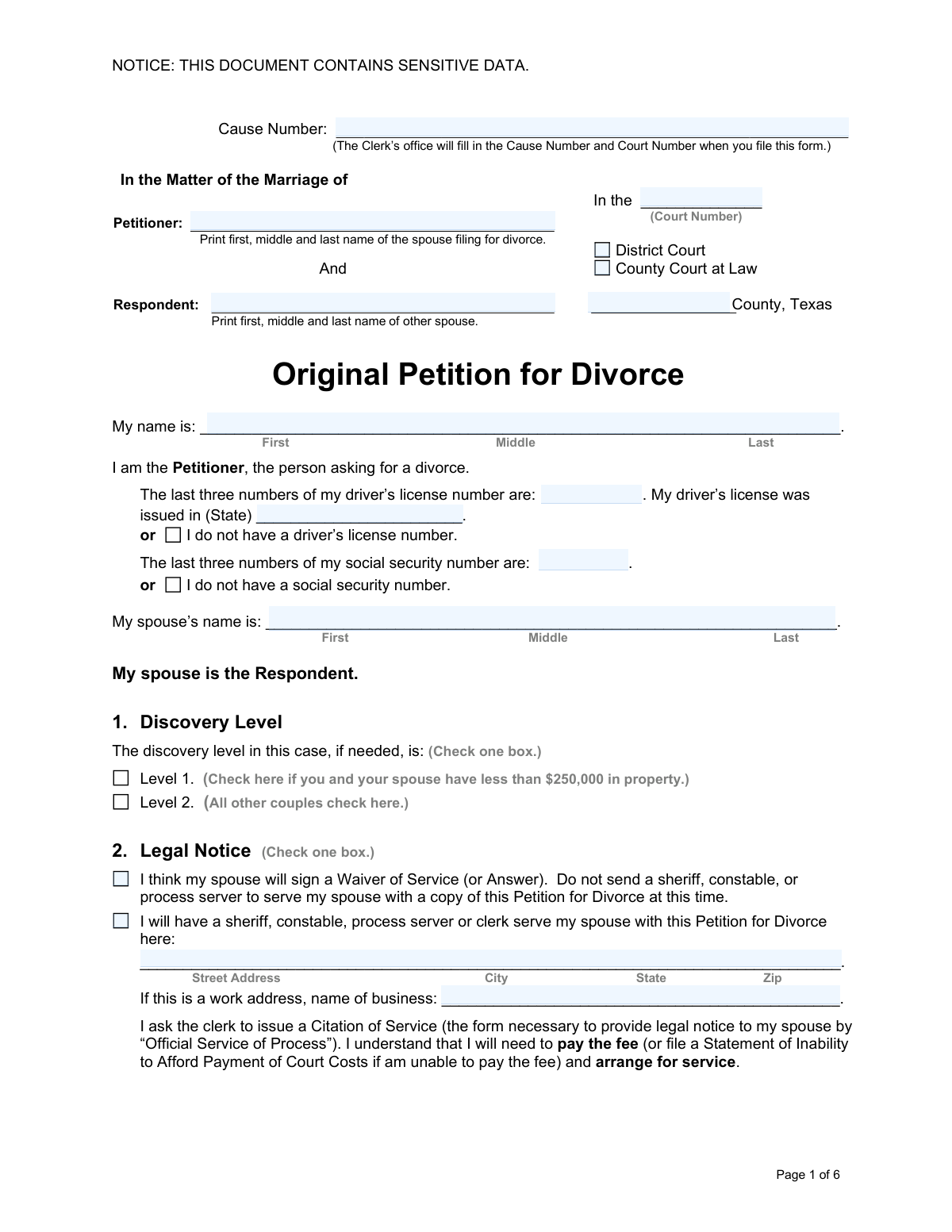
The Original Petition for Divorce is the foundational legal document filed with a Texas court to formally request the termination of a marriage. It establishes the court's jurisdiction, states the grounds for the divorce, and provides essential information about the spouses, dates of marriage and separation, property, and other key details. Properly completing this petition is a critical first step, setting the stage for all subsequent proceedings. Today, this form can be filled out quickly and accurately using AI-powered services like Instafill.ai, which can also convert non-fillable PDF versions into interactive fillable forms.
Our AI automatically handles information lookup, data retrieval, formatting, and form filling.
It takes less than a minute to fill out Original Petition for Divorce using our AI form filling.
Securely upload your data. Information is encrypted in transit and deleted immediately after the form is filled out.
Form specifications
| Form name: | Original Petition for Divorce (Texas) |
| Number of fields: | 112 |
| Number of pages: | 6 |
| Language: | English |
Instafill Demo: How to fill out PDF forms in seconds with AI
How to Fill Out Original Petition for Divorce Online for Free in 2026
Are you looking to fill out a ORIGINAL PETITION FOR DIVORCE form online quickly and accurately? Instafill.ai offers the #1 AI-powered PDF filling software of 2026, allowing you to complete your ORIGINAL PETITION FOR DIVORCE form in just 37 seconds or less.
Follow these steps to fill out your ORIGINAL PETITION FOR DIVORCE form online using Instafill.ai:
- 1 Navigate to Instafill.ai and upload your Original Petition for Divorce form or select it from their library of templates.
- 2 Use the AI assistant to automatically fill in your personal details as the Petitioner, including your name, contact information, and identification numbers.
- 3 Provide information about your spouse (the Respondent), the date of marriage, and the date of separation as prompted by the smart fields.
- 4 Answer the guided questions regarding jurisdiction, property discovery level, service of process, and whether children or pregnancy are factors.
- 5 Detail any separate property you wish to claim, disclose any protective orders, and specify if you are requesting a name change.
- 6 Carefully review all the information populated by the AI for accuracy, make any necessary corrections, and then securely sign and date the document.
- 7 Download the completed petition, ready for filing with the appropriate Texas county court clerk.
Our AI-powered system ensures each field is filled out correctly, reducing errors and saving you time.
Why Choose Instafill.ai for Your Fillable Original Petition for Divorce Form?
Speed
Complete your Original Petition for Divorce in as little as 37 seconds.
Up-to-Date
Always use the latest 2026 Original Petition for Divorce form version.
Cost-effective
No need to hire expensive lawyers.
Accuracy
Our AI performs 10 compliance checks to ensure your form is error-free.
Security
Your personal information is protected with bank-level encryption.
Frequently Asked Questions About Form Original Petition for Divorce
This form is used to officially begin the legal process for a divorce in Texas. The person who fills it out and files it with the court is known as the Petitioner.
The Discovery Level sets the rules for how you and your spouse will exchange information. Choose Level 1 if your shared marital property is valued at less than $250,000; all other couples should select Level 2.
Section 2 gives you options: you can indicate that your spouse will sign a 'Waiver of Service' if they agree, or you can arrange for official service by a sheriff or process server. If you cannot find your spouse, you can request service by posting, which has additional requirements.
To file for divorce, either you or your spouse must have lived in Texas for the last six months and in the specific county of filing for the last 90 days. You must confirm you meet these requirements in Section 3.
If the wife is pregnant, the divorce cannot be finalized until after the child is born. The form requires you to state whether the husband is the father, as this affects future orders for custody and support.
In Section 11, you can ask the court to approve a property division agreement you've made with your spouse or ask the court to divide it for you. You must also list any 'separate property' (like inheritances or items owned before marriage) that you want confirmed as yours alone.
A QDRO (Qualified Domestic Relations Order) is a separate, specialized court order required to divide certain retirement accounts, like a 401(k) or pension. This form is not included in the divorce petition packet and must be drafted separately.
Yes, Section 9 requires you to disclose any past or present protective orders involving you and your spouse. You must attach a copy of any existing protective order to your petition when you file it.
Yes, in Section 12, you can ask the court to change your name back to a name you used before the marriage. You cannot use this form to change your name to a completely new one.
Texas law requires a 60-day waiting period after filing before a divorce can be finalized. This waiting period can only be waived in specific cases of family violence where there is a conviction or an active protective order, as outlined in Section 10.
Yes, services like Instafill.ai use AI to help you accurately auto-fill form fields, which saves time and helps avoid errors. While AI can assist with filling out the form, it does not provide legal advice.
You can upload the PDF of the Original Petition for Divorce to the Instafill.ai platform. The AI will identify all the form fields, allowing you to answer simple questions to have your information placed correctly and automatically throughout the document.
If you have a flat or non-fillable PDF, you can use a tool like Instafill.ai to convert it into an interactive, fillable form. This allows you to easily type your information into the fields online before printing for submission.
Compliance Original Petition for Divorce
Validation Checks by Instafill.ai
1
Ensures Separation Date is After Marriage Date
This validation checks that the 'Date of Separation' is on or after the 'Date of Marriage'. A separation cannot logically occur before a marriage begins. This check is crucial for establishing a correct timeline of the marriage for legal purposes, such as determining community property. If this validation fails, the user will be prompted to correct the dates, as the petition would be logically invalid and likely rejected by the court clerk.
2
Validates Jurisdictional Requirements are Met
This check ensures that at least one option is selected in both Section 3A (County Residence) and Section 3B (Texas Residence). The court cannot legally grant a divorce unless these minimum residency requirements are met and affirmed in the petition. Failure to select an option in both sections would mean the petitioner has not established the court's jurisdiction, leading to the dismissal of the case.
3
Conditional Requirement for Service Address
This validation ensures that if the petitioner selects the option to have their spouse served by a sheriff or process server, the corresponding 'Process Service Address' fields (Street, City, State, Zip) are completely filled out. This information is essential for legally notifying the respondent about the divorce filing. If the address is missing, the service cannot be completed, and the case cannot proceed.
4
Exclusive Selection for Identification Numbers
This check validates that if a user checks a box for 'I do not have a driver’s license number' or 'I do not have a social security number', the corresponding field for entering the last three digits is left blank. Conversely, if a number is entered, the 'do not have' box must be unchecked. This prevents contradictory information and ensures data integrity for petitioner identification. A failure would require the user to resolve the conflicting entries.
5
Validates Paternity Declaration if Wife is Pregnant
This check is triggered if the petitioner indicates 'The wife in this marriage is pregnant.' It ensures that one of the two subsequent options ('The husband is the father' or 'The husband is not the father') is also selected. A divorce cannot be finalized in Texas until after a child of the marriage is born and paternity is established, so this information is critical. An incomplete selection would halt the divorce proceedings.
6
Completeness of Child Information Table
This validation applies to the table in Section 8 for children born during the marriage to another man. If a 'Child's name' is entered in any row, all other fields in that same row (Age, Date of Birth, Sex) must also be completed. Incomplete records for a child create legal ambiguity regarding paternity and support obligations that must be resolved before the divorce can be finalized. The form would be rejected until all required information for the listed child is provided.
7
Consistency Check for Child's Age and Date of Birth
This validation cross-references the 'Age' and 'Date of Birth' fields for any child listed in the table in Section 8. It calculates the age based on the date of birth and verifies that it matches the age provided. This check ensures the accuracy of the child's identifying information, which is vital for legal orders concerning the child. A mismatch would require correction to prevent errors in the final decree.
8
Conditional Requirement for Protective Order Details
This check ensures that if any box is checked in Section 9 indicating a protective order has been filed or is in place, the corresponding detail fields (Date, County, State, Case Number) are filled. This information is mandatory for the court to verify the order's existence and terms, which can significantly impact divorce proceedings, especially regarding safety and child custody. Failure to provide these details will result in an incomplete filing.
9
Logical Selection for Waiting Period Waiver
This validation ensures that if the petitioner requests to waive the 60-day waiting period for family violence, they must select exactly one of the two supporting reasons (either a conviction/deferred adjudication or an active protective order). Selecting none of the reasons would invalidate the request, while selecting both could indicate a data entry error. The court requires a specific, legally recognized justification to grant the waiver.
10
Completeness of Name Change Request
This check validates that if the petitioner selects 'I ask the Court to change my name,' the fields for the requested new name (First, Middle, Last) are filled out. The court cannot grant a name change without knowing the specific name being requested. If the name field is left blank after the request is made, the user will be prompted to either provide the name or uncheck the request box.
11
Format and Length Validation for Vehicle VIN
This validation applies to the 'Separate Property' section for vehicles. It checks that any entered Vehicle Identification Number (VIN) is exactly 17 characters long and contains only valid alphanumeric characters (letters A-Z, numbers 0-9, excluding I, O, and Q). The VIN is a unique legal identifier for a vehicle, and an incorrect or incomplete VIN would prevent the court from properly identifying and confirming the asset as separate property.
12
Ensures Row Integrity for Separate Property Vehicles
This check ensures that if any information is entered into a vehicle row in the 'Separate Property' section (e.g., Year, Make, or Model), then all other fields in that same row, including the VIN, must also be completed. A partial entry does not provide enough information for the court to legally identify the asset. This validation prevents incomplete asset declarations, which could lead to property disputes later.
13
Exclusive Selection for Discovery Level
This validation ensures that the petitioner selects exactly one option in Section 1, 'Discovery Level' (either Level 1 or Level 2). The discovery level dictates the rules for exchanging information and is a required declaration. Selecting neither or both options would be a filing error, and the system would require the user to make a single, valid choice before submission.
14
Validates Jurisdiction for Out-of-State Spouse
This check is triggered if the petitioner selects 'My spouse does not live in Texas.' It ensures that at least one of the subsequent conditions for establishing personal jurisdiction is also checked (e.g., spouse agrees to Texas jurisdiction or Texas was the last marital residence). Without establishing jurisdiction over the out-of-state respondent, a Texas court cannot legally divide property or make certain orders. Failure to meet this condition would likely lead to the case being dismissed for lack of jurisdiction.
Common Mistakes in Completing Original Petition for Divorce
Petitioners often misunderstand the options for legal notice in Section 2, choosing formal service by a sheriff when their spouse would have willingly signed a Waiver of Service. This mistake leads to unnecessary costs, delays, and can start the divorce on an adversarial footing. To avoid this, discuss the options with your spouse beforehand if possible, or consult legal aid to understand the most appropriate method for your situation.
A frequent error is incorrectly affirming the residency requirements in Section 3 without having lived in the state for 6 months and the county for 90 days prior to filing. This happens when people move frequently or don't understand the legal standard. An incorrect assertion can lead to the case being dismissed, forcing the petitioner to refile and restart the process, wasting time and filing fees.
In Section 11B, many people mistakenly list assets acquired during the marriage as 'separate property' or fail to list legitimate separate property (like an inheritance). This confusion over legal definitions can lead to property disputes, extended litigation, and incorrect division of assets. It is crucial to understand that most property acquired after marriage is community property, regardless of whose name is on the title.
When filling out Section 9, petitioners with a protective order often forget to include the case number, county, and date, or they fail to attach a copy of the order as explicitly required. This omission forces the court to delay proceedings until the information is provided and verified, as the judge cannot proceed without understanding the existing safety orders. Always have the order documents handy when filling out this section.
The questions about pregnancy (Section 7) and children from another father (Section 8) are legally critical and often mishandled. A petitioner might not realize a divorce cannot be finalized in Texas while the wife is pregnant, or they may fail to address the complex issue of paternity for a child born during the marriage. These errors can bring the divorce to a complete halt until the child is born and/or paternity is legally established, causing significant delays and legal complications.
Petitioners sometimes enter nicknames, omit middle names, or misspell their own or their spouse's full legal name in the caption and opening statements. Legal documents require precise, full legal names for identification and for the final decree to be valid and enforceable. This mistake can cause rejection of the filing or problems when trying to use the divorce decree to update other legal documents.
It is a surprisingly common mistake to leave the signature or date line on the final page blank. An unsigned or undated petition is not legally valid and will be rejected by the court clerk upon filing. This simple oversight requires the petitioner to correct the document and refile, delaying the official start of the divorce proceedings.
When listing a vehicle as separate property in Section 11B, filers often provide incomplete details, such as omitting the Vehicle Identification Number (VIN). The form requires the year, make, model, and VIN to uniquely identify the asset. Without the complete VIN, the court cannot definitively identify the vehicle, which can lead to disputes over ownership and prevent the court from confirming it as separate property.
In Section 12, a petitioner may request to change their name to a completely new name, not realizing the form explicitly limits the change to a former name (e.g., a maiden name). This happens due to a misunderstanding of the law's scope within a divorce proceeding. The court will deny an invalid request, forcing the petitioner to file a separate, more complex legal action for an adult name change if they still wish to pursue it.
Throughout the form, particularly in the Separate Property section (11B), instructions state to write 'none' if a category does not apply. Many people leave these fields blank instead, creating ambiguity as to whether the information was forgotten or is truly not applicable. This can lead to the court returning the form for clarification, causing delays in the divorce process.
Saved over 80 hours a year
“I was never sure if my IRS forms like W-9 were filled correctly. Now, I can complete the forms accurately without any external help.”
Kevin Martin Green
Your data stays secure with advanced protection from Instafill and our subprocessors

Robust compliance program
Transparent business model
You’re not the product. You always know where your data is and what it is processed for.
ISO 27001, HIPAA, and GDPR
Our subprocesses adhere to multiple compliance standards, including but not limited to ISO 27001, HIPAA, and GDPR.
Security & privacy by design
We consider security and privacy from the initial design phase of any new service or functionality. It’s not an afterthought, it’s built-in, including support for two-factor authentication (2FA) to further protect your account.
Fill out Original Petition for Divorce with Instafill.ai
Worried about filling PDFs wrong? Instafill securely fills original-petition-for-divorce-texas forms, ensuring each field is accurate.