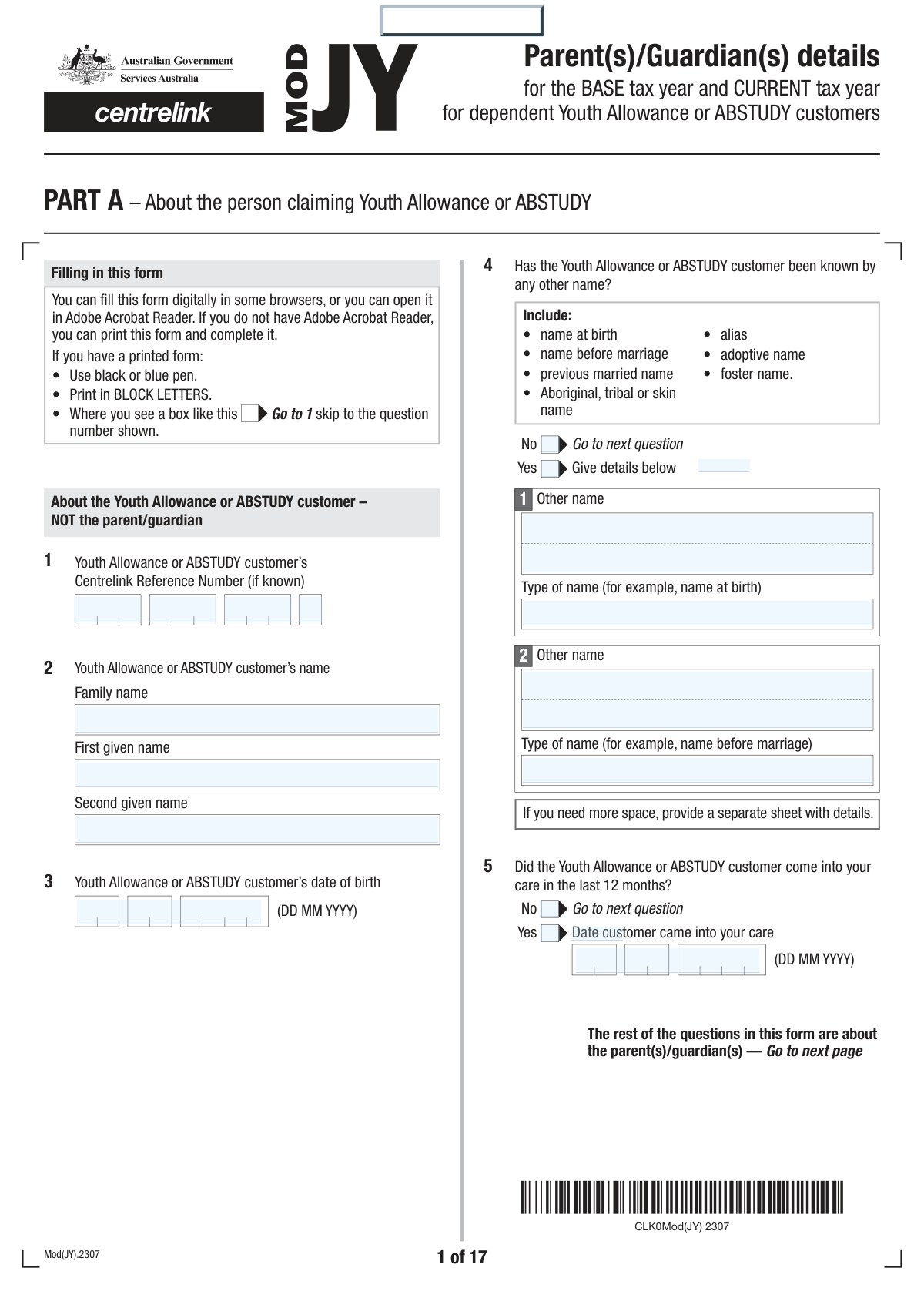
Yes! You can use AI to fill out Parent(s)/Guardian(s) details for the BASE tax year and CURRENT tax year for dependent Youth Allowance or ABSTUDY customers
This form, officially titled 'Parent(s)/Guardian(s) details for the BASE tax year and CURRENT tax year', is required by Services Australia to assess a dependent's eligibility and payment rate for Youth Allowance or ABSTUDY. Parents or guardians must declare their income and other financial details, which are used in the Parental Means Test. Today, this form can be filled out quickly and accurately using AI-powered services like Instafill.ai, which can also convert non-fillable PDF versions into interactive fillable forms.
Our AI automatically handles information lookup, data retrieval, formatting, and form filling.
It takes less than a minute to fill out Mod(JY).2307 using our AI form filling.
Securely upload your data. Information is encrypted in transit and deleted immediately after the form is filled out.
Form specifications
| Form name: | Parent(s)/Guardian(s) details for the BASE tax year and CURRENT tax year for dependent Youth Allowance or ABSTUDY customers |
| Number of fields: | 470 |
| Number of pages: | 21 |
| Language: | English |
Instafill Demo: How to fill out PDF forms in seconds with AI
How to Fill Out Mod(JY).2307 Online for Free in 2026
Are you looking to fill out a MOD(JY).2307 form online quickly and accurately? Instafill.ai offers the #1 AI-powered PDF filling software of 2026, allowing you to complete your MOD(JY).2307 form in just 37 seconds or less.
Follow these steps to fill out your MOD(JY).2307 form online using Instafill.ai:
- 1 Navigate to Instafill.ai and upload or select the Mod(JY).2307 form.
- 2 Complete Part A with the personal details of the Youth Allowance or ABSTUDY customer (your child).
- 3 Fill out Part B with your (and your partner's) personal details, relationship status, and contact information.
- 4 Provide detailed financial information for the required BASE and/or CURRENT tax year, including taxable income, fringe benefits, investments, and superannuation contributions.
- 5 Declare any maintenance you pay or receive and provide details of any other dependent children in your care.
- 6 Enter bank account details for payment destination and provide your Tax File Number(s).
- 7 Carefully review all the information provided, sign the declaration, and submit the form along with all required supporting documents.
Our AI-powered system ensures each field is filled out correctly, reducing errors and saving you time.
Why Choose Instafill.ai for Your Fillable Mod(JY).2307 Form?
Speed
Complete your Mod(JY).2307 in as little as 37 seconds.
Up-to-Date
Always use the latest 2026 Mod(JY).2307 form version.
Cost-effective
No need to hire expensive lawyers.
Accuracy
Our AI performs 10 compliance checks to ensure your form is error-free.
Security
Your personal information is protected with bank-level encryption.
Frequently Asked Questions About Form Mod(JY).2307
This form is used to collect your and your partner's income details to assess your dependent child's eligibility and payment rate for Youth Allowance or ABSTUDY. The information is used for the Parental Means Test.
The parent(s) or guardian(s) of a dependent person under 22 who is claiming or receiving Youth Allowance or ABSTUDY must complete this form when requested. If you have a partner you live with, their details are also required.
The BASE tax year is the financial year an assessment is normally based on, which is the financial year ending before January 1st of the payment year. You only need to provide CURRENT tax year details if your income has significantly changed or if you are filling out the form between September and December.
If your income has had a substantial decrease that is likely to continue for at least two years, you can request a CURRENT tax year assessment. You must provide income details for both the BASE and CURRENT tax years and attach documents that support the income drop.
You must provide a copy of your Notice of Assessment (NOA) from the Australian Taxation Office (ATO). If you don't have it, you can provide your full income tax return, income statements from the ATO, or payment summaries from your employer.
Yes, if your child is considered dependent and only lives away temporarily for study, they are still considered to 'normally' live with you. Your income details are therefore required for their payment assessment.
Yes, a step-parent's income is included if they are your partner, live with you, and your child's permanent home is with both of you.
Information about your other dependent children is used in the Parental Income Test to ensure the effect of the test is fairly divided across all eligible children in the family. This can affect the payment rate for the Youth Allowance or ABSTUDY customer.
These are non-cash benefits from your employer, such as a company car, help with rent, or payment of school fees, which are counted as income. The value of these benefits can be found on your income statement or payment summary and must be declared on the form.
While not legally compulsory, your child's payment may not be processed if you do not provide your and your partner's TFNs. Providing your TFN allows Services Australia to verify your income with the Australian Taxation Office.
You can submit the form and supporting documents online via your child's Centrelink account, by post to the address on the form, or in person at a Services Australia service centre.
Yes, services like Instafill.ai use AI to accurately auto-fill form fields, which can save you time and help reduce errors.
Simply upload the Mod(JY).2307 PDF to the Instafill.ai platform. The AI will identify the fields, allowing you to provide your information once to have it automatically and accurately filled across the form.
If you have a non-fillable or 'flat' PDF, you can use a service like Instafill.ai to convert it into an interactive, fillable form. This allows you to easily type your information directly into the fields before printing.
Compliance Mod(JY).2307
Validation Checks by Instafill.ai
1
Customer Age Eligibility Check
Validates that the Youth Allowance/ABSTUDY customer's date of birth (Q3) results in an age that is generally eligible for dependent status, which is under 22 according to the form notes. This check prevents submissions for individuals who are clearly outside the age criteria for this assessment. If the calculated age is 22 or over, the form should prompt the user to confirm the details or check if the customer meets independence criteria instead.
2
Conditional Income Year Reporting Logic
Ensures that if a CURRENT tax year assessment is required, all relevant fields are completed. Based on the logic in Q16-Q19, if the form is filled between September and December OR if income has had a substantial and ongoing decrease (Q18), then income details for BOTH the BASE and CURRENT tax years (Q20, Q22, Q23) must be provided. Failure to provide CURRENT tax year data when required will result in an incomplete assessment and processing delays.
3
Parental Relationship Status Consistency
Verifies that if a relationship status of 'Married', 'Registered relationship', or 'De facto' is selected in Q6, then the 'Parent/Guardian Partner' sections are completed throughout the form. Conversely, if a single status ('Separated', 'Divorced', 'Widowed', 'Never married') is chosen, the partner sections should be disabled or flagged as invalid if filled. This ensures data integrity and that income from a partner is correctly included or excluded from the Parental Means Test.
4
Date of Care Commencement Validation
Checks the date provided in Q5 ('Date customer came into your care'). If the user indicates the customer came into their care in the last 12 months, this date field must be completed. The validation ensures the date is in a valid DD MM YYYY format and falls within the 12 months prior to the form submission date, preventing logical errors or future dates.
5
Income Proof Requirement Logic
Validates the responses in Q21 regarding the Notice of Assessment (NOA). If 'Yes' is selected (NOA received), the system should flag that a document upload is mandatory. If 'I am not required to lodge...' is selected, the corresponding 'Give a reason why' text field must be filled. This ensures that all income declarations are substantiated with either official documentation or a valid reason for its absence.
6
Dependent Child Age and Education Consistency
Cross-references the dependent child's date of birth (Q31) with the answer to 'Is this child aged from 15 to 19 years?' (Q33). The system will calculate the child's age and flag a discrepancy if it does not match the 'Yes'/'No' response in Q33. This logical check prevents data entry errors that could lead to incorrect application of the family pool rules for the Parental Income Test.
7
Tax File Number (TFN) Format Validation
Checks that the Tax File Numbers provided for the parent and partner in Q47 adhere to the standard Australian TFN format (typically 8 or 9 digits). This is a crucial format validation to reduce data entry errors for a critical piece of information used for income verification with the Australian Taxation Office. An invalid TFN format would prevent automated checks and cause significant processing delays.
8
Shared Care Percentage Range
Ensures the value entered for the percentage of care for a dependent child (Q42) is a number between 0 and 100, inclusive. This prevents invalid data like negative numbers, values over 100, or non-numeric characters. Correctly capturing this percentage is essential for accurately assessing shared care arrangements and their impact on the family pool calculation.
9
Income Decrease Justification Completeness
Verifies that if a parent answers 'Yes' to Q18, indicating an ongoing income decrease, the 'Date decrease occurred' and 'Estimate the time the decrease will last' fields are mandatory. This information is critical for the agency to approve a CURRENT tax year assessment. If these details are missing, the application for a current year assessment cannot be processed and the BASE tax year will be used by default.
10
Parental Responsibility Path Validation
This check enforces the skip logic from Q8. If a parent/guardian answers 'No' to 'Does the Youth Allowance or ABSTUDY customer ‘normally’ live with you?', the system must validate that no subsequent financial or personal details (Q9-Q48) for that individual are provided. This is a critical check to ensure that only the data of the financially responsible parent(s) is collected and assessed, respecting privacy and streamlining the application.
11
Bank Account Details Format (BSB and Account No.)
Validates the format of the bank details in Q45. The Branch number (BSB) must be exactly 6 digits, and the Account number must be numeric and within the standard length for Australian bank accounts. This check is vital to prevent payment rejections and ensure the allowance can be paid correctly and on time. An error here would lead to payment failure.
12
Relationship and Event Date Logic
Ensures that all dates entered for life events (e.g., marriage/reconciliation in Q6, date of birth in Q10, date of care in Q5) are logically valid. This includes checking that the date is not in the future and that it is chronologically plausible (e.g., a marriage date must be after the person's date of birth). This prevents nonsensical data that would require manual correction.
13
Maintenance Income Declaration Completeness
If a user answers 'Yes' to receiving maintenance (Q25), this validation ensures that all fields in Q26 (Amount, Per, and Date this started) are completed. An incomplete entry in Q26 would prevent the correct calculation for the Maintenance Income Test. The validation ensures all necessary components of the maintenance income are captured for an accurate assessment.
14
Declaration and Signature Requirement
Confirms that the declaration in Q50 has been signed and dated by the parent/guardian (and partner, if applicable) before the form can be successfully submitted. As the form states, payments cannot start until the declaration is signed. This validation acts as a final gatekeeper to ensure the applicant has legally attested to the accuracy of the information provided.
Common Mistakes in Completing Mod(JY).2307
This form requires income details for specific tax years, which depend on when the form is completed and if income has changed. Applicants often misunderstand the definitions on page 2, providing data for the wrong financial year or failing to provide details for both years when required (e.g., for applications between September and December). This error leads to incorrect payment assessments and significant processing delays as the agency must request the correct information. To avoid this, carefully read the table and definitions on page 2 to identify the correct tax years before entering any financial data.
Many parents only report their 'taxable income' from their tax return (Question 20) and neglect to include other assessable income types listed in Question 22. These include reportable fringe benefits, foreign income, net investment losses, and reportable superannuation contributions, which must be added to the total. This omission leads to an inaccurate income assessment, which can result in an overpayment of benefits to the student and a subsequent debt that must be repaid to the government. Always review Question 22 carefully and gather all relevant financial documents before starting the form.
The form requires various supporting documents, such as an ATO Notice of Assessment (NOA), evidence of income decrease, or statements for DVA payments. Applicants often overlook these requirements or forget to attach the documents when submitting the form. An application submitted without all necessary proof is considered incomplete and will not be processed, causing major delays for the student's allowance. To prevent this, use the checklist in Question 48 to ensure all required documents are gathered and attached before submission.
The form uses the social security law definition of a partner, which includes married, registered, and de facto relationships, even if the couple lives apart for work. Applicants may incorrectly report themselves as single if they are not married, failing to include their partner's details and income. This is a critical error that results in an incorrect means test, leading to potential benefit overpayments and debt. Carefully read the 'Definition of a partner' on page 1 and declare your partner if your relationship fits the criteria.
Parents whose income has recently dropped may try to use a CURRENT tax year assessment but fail to meet the strict criteria, such as the decrease being 'substantial' and 'likely to continue for at least 2 years' (Question 18). They may also forget to provide the required documentation to prove the income change. This results in the application for a new assessment being denied, and the higher BASE tax year income is used, potentially reducing or nullifying the student's payment. Only request this assessment if you meet all criteria and have the evidence to support it.
The section for other dependent children (Questions 31-44) is used to calculate the 'family pool' and adjust the parental income test. Parents often rush this complex section, providing incomplete school details, incorrect study status, or guessing shared care percentages. These inaccuracies can affect the student's payment rate and, if care arrangements are unclear, may trigger a separate and lengthy shared care assessment, delaying the entire process. Have all details for other children's education and care arrangements ready before filling out this section.
Applicants sometimes enter their take-home (net) pay instead of the required gross or 'taxable income' figures. The form specifically asks for figures that align with Australian Taxation Office (ATO) documents, which are based on pre-tax income. Reporting lower net income figures understates the family's financial capacity, leading to an incorrect assessment and a high risk of future debt when data is matched with the ATO. Always use the 'taxable income' figure from your ATO Notice of Assessment or gross income from payment summaries.
The declaration in Question 50 must be physically signed and dated by the parent(s)/guardian(s) after printing the form. It is common for one or both parents to forget to sign, or to assume a digital signature is acceptable when a handwritten one is required. An unsigned or improperly signed form is legally invalid and will be rejected, halting the entire claim until a correctly signed version is received. Always double-check that all required signatures are present before returning the form.
Simple data entry errors in the bank account details section (Question 45), such as transposing digits in the BSB or account number, are common. Some applicants also mistakenly provide a credit card number instead of the bank account number. These errors cause payment processing to fail, delaying the student's receipt of funds until the agency can contact the parent and obtain the correct information. AI-powered form-filling tools like Instafill.ai can help prevent these errors by validating data formats and ensuring all required fields are completed.
This form is a non-fillable PDF, meaning it must be printed and completed by hand, often leading to illegible handwriting, missed questions, or errors from manual calculations. This can cause processing delays or incorrect data entry by the agency. To avoid this, tools like Instafill.ai can convert the non-fillable PDF into an interactive, fillable version. This ensures all entries are clear, reduces the chance of skipping questions, and allows for easy review before printing for the final signature.
Saved over 80 hours a year
“I was never sure if my IRS forms like W-9 were filled correctly. Now, I can complete the forms accurately without any external help.”
Kevin Martin Green
Your data stays secure with advanced protection from Instafill and our subprocessors

Robust compliance program
Transparent business model
You’re not the product. You always know where your data is and what it is processed for.
ISO 27001, HIPAA, and GDPR
Our subprocesses adhere to multiple compliance standards, including but not limited to ISO 27001, HIPAA, and GDPR.
Security & privacy by design
We consider security and privacy from the initial design phase of any new service or functionality. It’s not an afterthought, it’s built-in, including support for two-factor authentication (2FA) to further protect your account.
Fill out Mod(JY).2307 with Instafill.ai
Worried about filling PDFs wrong? Instafill securely fills parentsguardians-details-for-the-base-tax-year-and-current-tax-year-for-dependent-youth-allowance-or-abstudy-customers forms, ensuring each field is accurate.