Yes! You can use AI to fill out Petition to Modify the Parent-Child Relationship
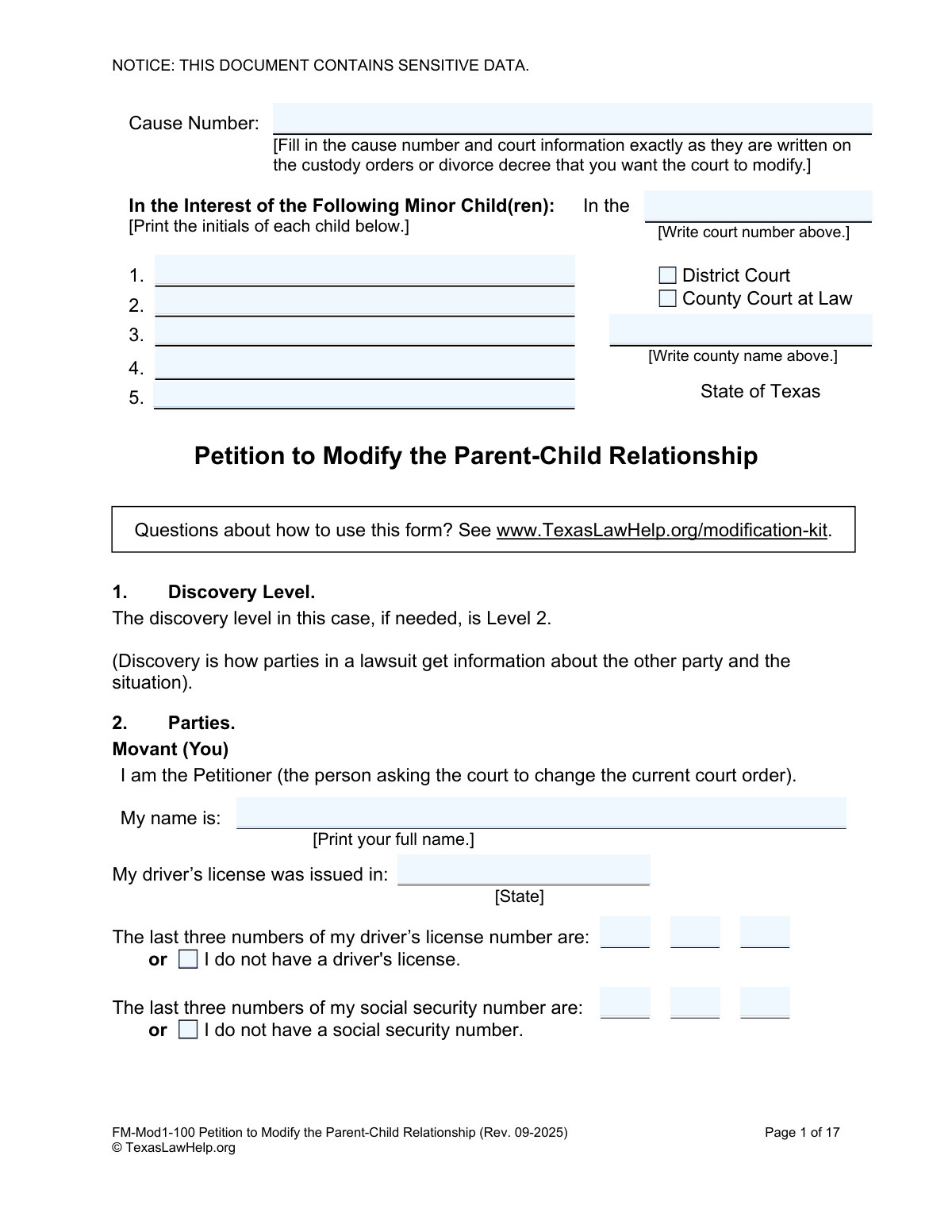
This form, officially titled 'Petition to Modify the Parent-Child Relationship' (FM-Mod1-100), is a legal document filed in a Texas court to request a change to a final order regarding children, such as a divorce decree or custody order. It is used when a parent or conservator believes there has been a material and substantial change in circumstances, making the current orders no longer in the child's best interest. Today, this form can be filled out quickly and accurately using AI-powered services like Instafill.ai, which can also convert non-fillable PDF versions into interactive fillable forms.
Our AI automatically handles information lookup, data retrieval, formatting, and form filling.
It takes less than a minute to fill out FM-Mod1-100 using our AI form filling.
Securely upload your data. Information is encrypted in transit and deleted immediately after the form is filled out.
Form specifications
| Form name: | Petition to Modify the Parent-Child Relationship |
| Number of fields: | 296 |
| Number of pages: | 1 |
| Language: | English |
Instafill Demo: How to fill out PDF forms in seconds with AI
How to Fill Out FM-Mod1-100 Online for Free in 2026
Are you looking to fill out a FM-MOD1-100 form online quickly and accurately? Instafill.ai offers the #1 AI-powered PDF filling software of 2026, allowing you to complete your FM-MOD1-100 form in just 37 seconds or less.
Follow these steps to fill out your FM-MOD1-100 form online using Instafill.ai:
- 1 Navigate to Instafill.ai and upload or select the 'Petition to Modify the Parent-Child Relationship' form.
- 2 Use the AI assistant to input the court and cause number from the original order, along with the initials of the children involved.
- 3 Provide your personal information as the Petitioner and the information for all other parties (Respondents), including names, addresses, and relationship to the children.
- 4 Clearly state the legal reasons for the modification, such as a material change in circumstances, and indicate your standing to file the case.
- 5 Specify the exact changes you are requesting for conservatorship (custody), possession and access (visitation), child support, and medical/dental support by checking the appropriate boxes.
- 6 Disclose any information regarding protective orders and provide details about the children's health insurance and property.
- 7 Review the entire document for accuracy, then digitally sign it and follow the platform's guidance for downloading, printing, and filing with the appropriate Texas court.
Our AI-powered system ensures each field is filled out correctly, reducing errors and saving you time.
Why Choose Instafill.ai for Your Fillable FM-Mod1-100 Form?
Speed
Complete your FM-Mod1-100 in as little as 37 seconds.
Up-to-Date
Always use the latest 2026 FM-Mod1-100 form version.
Cost-effective
No need to hire expensive lawyers.
Accuracy
Our AI performs 10 compliance checks to ensure your form is error-free.
Security
Your personal information is protected with bank-level encryption.
Frequently Asked Questions About Form FM-Mod1-100
This form is used to ask a Texas court to change an existing court order regarding child custody (conservatorship), visitation (possession and access), child support, or medical support. You file this when circumstances have materially and substantially changed since your last order was made.
The 'Petitioner' is you—the person filing the form to request changes to the court order. The 'Respondent' is the other parent or any other person who is a party to the current order and must be given legal notice of the case.
You will need a copy of the current court order you want to change to get the exact cause number, court information, and date it was signed. You also need personal details for yourself, the other parent(s), and the child(ren), such as full names, addresses, and dates of birth.
Serving the Respondent means giving them official legal notice that you have filed this case, typically by having a constable deliver the papers. If you cannot locate a Respondent, you can ask the court for permission to serve them by 'publication,' which involves posting a public notice.
'Standing' is your legal right to file a lawsuit. You must check the box that shows the court you have a valid connection to the case, for example, by being the child's parent, a party to the current order, or someone who has had primary care of the child.
This is the legal reason required to modify an order, meaning a significant event has occurred since the last order was signed that affects the child or a party. Examples include a parent moving far away, a change in lifestyle that impacts the child, or a major change in income affecting child support.
Yes, but it is more difficult and requires specific circumstances, such as the other parent agreeing, or if the child's current environment is dangerous. You must check the appropriate box in Section 7 and attach a 'Declaration in Support of Changing Primary Custody within One Year' form.
If your child has received these public benefits, you are required by law to send a copy of this filed petition to the Office of the Attorney General's Child Support Division. You must then sign the 'Certificate of Service' on page 17 to confirm you have done so.
Section 22, 'Family Information,' allows you to ask the court to keep your address and other personal information confidential if you fear harassment or abuse. The form also advises calling the Texas Family Violence Legal Line for help before filing.
'Joint Managing Conservators' means both parents share the rights and responsibilities of making decisions for the child, though one parent is often given the exclusive right to decide where the child lives. A 'Sole Managing Conservator' has the exclusive right to make most decisions about the child's life.
You must file this petition with the District Clerk or County Clerk in the same court that issued your last custody order. The cause number and court information on this form must exactly match your previous order.
Yes, AI-powered services like Instafill.ai can help you complete this form accurately and efficiently. These tools can auto-fill fields with your information, which saves time and helps prevent common errors.
Simply upload the PDF form to the Instafill.ai platform. The AI will make the form fillable, allowing you to type your answers directly into the fields or use the AI assistant to help you fill in the information based on your saved profile.
If you have a non-fillable or 'flat' PDF, you can use a service like Instafill.ai to convert it into an interactive, fillable form. Just upload the document, and the platform will automatically detect the fields for you to complete online.
Compliance FM-Mod1-100
Validation Checks by Instafill.ai
1
Cause Number and Court Information Completeness
This check verifies that the 'Cause Number', 'Court Number', and 'County Name' fields are all filled out. These fields are critical for identifying the original court order that the petitioner seeks to modify. If this information is missing or incomplete, the petition cannot be correctly filed and associated with the existing case, leading to rejection by the court clerk.
2
Child's Date of Birth Validity
This validation ensures that the 'Child's Date of Birth' entered in Section 4 is a valid, past date and that the calculated age is under 18. This is crucial because the petition concerns minor children, and an invalid date or an age over 18 would invalidate the petition's standing for that individual. The system should flag any future dates, improperly formatted dates, or dates indicating the person is a legal adult.
3
Petitioner Identification Logic
This check validates the petitioner's identification section. The user must either provide the last three digits of their driver's license number and state of issuance, OR check the 'I do not have a driver's license' box. The same logic applies to the social security number. A validation failure occurs if both the numbers are provided and the checkbox is ticked, or if neither option is chosen for each ID type.
4
Conditional Respondent Information
This validation ensures that if the petitioner checks 'There is a Respondent B' (or C, or D), they must also provide the respondent's full name and home address. It prevents the user from indicating the existence of a party without providing the necessary identification and contact information for legal notice. If the box is checked but the details are missing, the form submission should be blocked until the information is provided.
5
Respondent Relationship 'Other' Explanation
This check validates the 'Relationship to the Child(ren)' section for each respondent. If the 'Other' checkbox is selected, the corresponding 'Please explain' text field becomes a required field. This ensures that the court has a clear understanding of the legal relationship of all parties to the children in the case. An error should be triggered if 'Other' is selected without an accompanying explanation.
6
Standing to File Requirement
This validation confirms that at least one checkbox is selected in Section 6, 'Standing'. A petitioner must have a legal basis (standing) to file a lawsuit. This check ensures the petitioner has affirmed their legal right to bring this action before the court. The form cannot be submitted if no option in this section is selected.
7
Custody Change Within One Year Conditional Logic
This check validates the logic in Section 7. If the petitioner selects 'I am asking to change primary custody and it has been less than one year...', they must then select one of the four subsequent checkboxes that provide the legal justification. This prevents an incomplete or legally insufficient claim from being submitted. The system should prompt the user to select a justification if the parent checkbox is ticked but no sub-option is chosen.
8
Out-of-State Party Affidavit Attachment
This validation is triggered if the user checks 'Someone involved in this case... does not live in Texas' in Section 8. The system should then require the user to confirm that the 'Out-of-State Party Affidavit' has been attached to the submission. This ensures compliance with jurisdictional rules (UCCJEA) that apply when parties reside in different states. A warning or a hard stop should prevent submission without the required attachment.
9
Joint Managing Conservator Selection Integrity
This check validates the complex logic in Section 10a. If 'Mother and Father should be Joint Managing Conservators' is selected, the user must then select exactly one option from the residence designation group (a-1, a-2, a-3) AND exactly one option from the school designation group (a-4, a-5, a-6). This prevents contradictory or incomplete requests regarding parental rights and ensures the petition presents a clear, viable proposal to the court.
10
Support Modification Specificity
This validation applies to Sections 14 (Child Support), 15 (Medical Support), and 16 (Dental Support). If the user checks the box to 'change' the support order, they must then complete the subsequent fields specifying who should pay and what the change should be (e.g., 'Father should be ordered to pay more child support'). This prevents vague requests and ensures the petition clearly states the relief being sought. An error is shown if a change is requested without specifying the details.
11
Public Benefits and Attorney General Service Certificate
This check links Section 19, 'Public Benefits', to the 'Certificate of Service on the Attorney General' on the final page. If the petitioner indicates the child(ren) have ever received 'Medicaid' or 'TANF', the signature and date on the Certificate of Service become mandatory. This is a critical legal step, as the Attorney General's office has a statutory interest in any case involving public assistance. Failure to notify them can delay or invalidate the proceedings.
12
Protective Order Details Requirement
This check validates Section 21, 'Protective Order Statement'. If any box indicating a 'Pending Protective Order' or 'Protective Order in Place' is checked, the corresponding fields for the party's name, date, county, state, and cause number become mandatory. This ensures the court is fully informed of any existing family violence issues, which is paramount for the safety of the parties and children. The submission should be blocked if these details are missing.
13
At Least One Child Listed
This is a fundamental completeness check for Section 4, 'Child(ren)'. The system must verify that the name, sex, and date of birth for at least one child have been entered. Since the entire petition is 'In the Interest of' a child, a submission with no child listed is invalid and nonsensical. The form should not be submittable without at least one complete child entry.
14
Service Method Selection for Each Respondent
This validation ensures that for every respondent declared to exist (A, B, C, or D), one method of legal notice has been selected from the provided options (e.g., 'Waiver of Service', 'can be served at', 'cannot find this Respondent'). Proper legal notice is a cornerstone of due process. This check prevents the petition from being filed without a clear plan for notifying each required party of the lawsuit.
Common Mistakes in Completing FM-Mod1-100
Petitioners often make transcription errors when entering the Cause Number, Court Number, and the exact title and date of the prior order being modified. This information must be copied precisely from the existing court decree. Any discrepancy can lead to the court clerk rejecting the filing or the petition being dismissed for failing to identify the correct case, causing significant delays.
A common error is failing to list every required party as a Respondent, such as the other parent, other conservators, or the Attorney General if public benefits are involved. Furthermore, petitioners often misunderstand the legal requirements for service, selecting an inappropriate method like 'Waiver of Service' for an uncooperative party. These mistakes can invalidate the service of process, halting the case until all parties are properly notified.
The form contains complex, multi-part sections like Section 10 (Conservatorship) where users must make a primary choice and then select from required sub-options. People frequently check a main box but forget to complete the dependent choices, or they make contradictory selections. This creates an ambiguous and legally unenforceable request, forcing the court to deny the petition or require an amendment.
If a child has ever received Medicaid or TANF benefits, the petitioner is required to notify the Office of the Attorney General (OAG). Many people miss the instruction in Section 19 and fail to sign and execute the 'Certificate of Service on the Attorney General' on page 17. This is a critical error that can bring the case to a standstill, as the OAG is a necessary party in cases involving state-provided support.
The petition has sections with strict legal prerequisites, such as Section 7, which requires a separate declaration if changing custody within one year of the last order. People often check boxes without understanding the legal burden or forget to attach the mandatory supporting documents. This oversight can cause the petition to be deemed legally insufficient and dismissed by the judge at the first hearing.
In sections concerning medical, dental, and child support (14-18), petitioners often leave critical details blank, such as insurance policy numbers, premium costs, or the availability of coverage. This information is not optional; it is essential for the court to make informed financial rulings. Submitting a petition with vague or missing financial data prevents the court from properly calculating support and may require additional hearings to resolve.
The form asks for only the last three digits of a driver's license and social security number, but many people mistakenly provide the full numbers, increasing their risk of identity theft. Additionally, petitioners with safety concerns often list their home address on page 16 without realizing they can ask the court to keep it confidential by completing Section 22. This can dangerously expose their location to an abusive party.
Section 21 requires the disclosure of any past or present protective orders involving the parties. Common mistakes include forgetting about an expired order, failing to disclose a pending application, or not attaching a copy of the order to the petition as required. Misrepresenting this information, even unintentionally, can result in court sanctions and damage the petitioner's credibility.
When presented with an 'Other' or 'Describe' field, such as in the visitation or custody sections, individuals often write legally vague requests like 'fair visitation' or 'split custody'. These statements are not specific enough for a court to enforce. A petition must request clear, specific, and detailed terms for the judge to be able to turn it into a binding order.
Throughout the form, particularly in the insurance sections (17 & 18), there are choices that require circling one option, such as 'is / is not' available. Many filers skip these, leaving the court to guess at the facts of the case. A petition is a sworn statement of facts, and failing to make these definitive assertions renders the document incomplete and can lead to its rejection by the clerk's office. AI-powered tools like Instafill.ai can help prevent this by flagging unanswered fields and ensuring all required choices are made before finalizing the document.
Saved over 80 hours a year
“I was never sure if my IRS forms like W-9 were filled correctly. Now, I can complete the forms accurately without any external help.”
Kevin Martin Green
Your data stays secure with advanced protection from Instafill and our subprocessors

Robust compliance program
Transparent business model
You’re not the product. You always know where your data is and what it is processed for.
ISO 27001, HIPAA, and GDPR
Our subprocesses adhere to multiple compliance standards, including but not limited to ISO 27001, HIPAA, and GDPR.
Security & privacy by design
We consider security and privacy from the initial design phase of any new service or functionality. It’s not an afterthought, it’s built-in, including support for two-factor authentication (2FA) to further protect your account.
Fill out FM-Mod1-100 with Instafill.ai
Worried about filling PDFs wrong? Instafill securely fills petition-to-modify-the-parent-child-relationship forms, ensuring each field is accurate.