
Instafill.ai
7 days free
AI form filling · 14 fields · 1 page · done in seconds

Yes! You can use AI to fill out Professoriate Checklist for Referee Grid, Trainee Grid, and Comparison Peers

Don't type 14 fields by hand. Tell our AI about yourself, or upload a document you already have, and it fills every field in seconds. You check it, then download, print or sign.
7 days free, then $19.99/month · Cancel anytime
AI fills it, no typingEncrypted, never used to train AICancel in two clicks
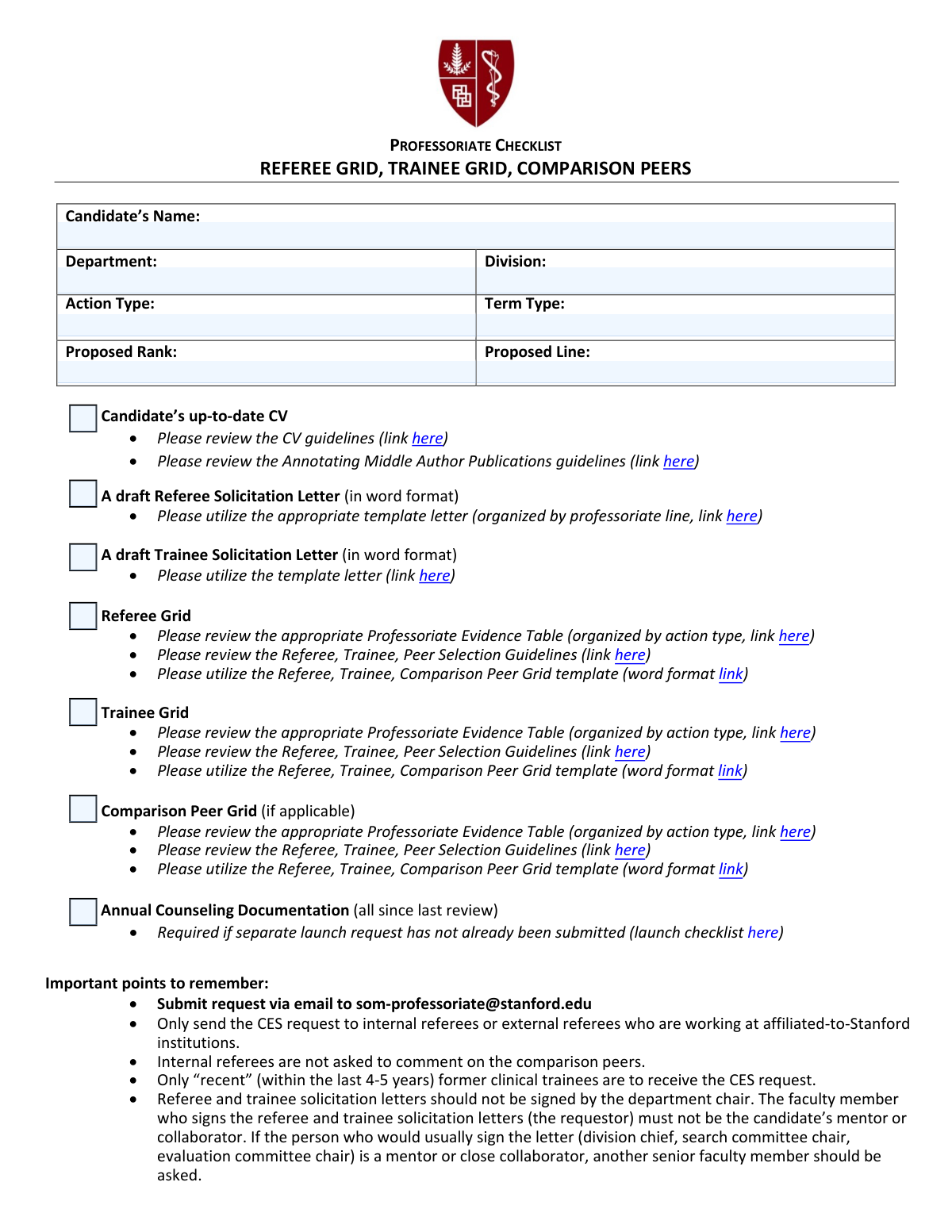
Professoriate Checklist for Referee Grid, Trainee Grid, and Comparison Peers, page 1
Simple · 22/100Form Complexity Index

The AI does the filling. You just check it.

No typing into boxes, nothing to install.

Tell the AI about youAnswer a few questions in plain words, or upload a document you already have. That is all the typing there is.
AI fills every field in secondsIt puts each answer in the right box on every page, checkboxes included.
Check it and downloadReview every field, change anything, then download, print or sign the PDF.

What this form asks for

The AI fills all of it, from your answers or your documents.

This form is an internal checklist used by academic departments, such as the Stanford School of Medicine, to ensure all necessary documentation is compiled for a faculty candidate's review, promotion, or appointment. It guides administrators in preparing essential items like the candidate's CV, draft solicitation letters for referees and trainees, and various evaluation grids. Today, this form can be filled out quickly and accurately using AI-powered services like Instafill.ai, which can also convert non-fillable PDF versions into interactive fillable forms.
Fillable fields14
Pages1
Sections2
Form Complexity IndexSimple, 22/100

The AI checks your answers before you download

15 checks built for this form, so a wrong date or a missing answer is caught before anyone else sees it.

Ensures Candidate's Name is Provided

This check verifies that the 'Candidate's Name' field is not empty. The candidate's name is a fundamental identifier for the entire professoriate action and is required for all documentation and communication. If this field is left blank, the form submission will be rejected, as the request cannot be processed without knowing who the candidate is.

Validates Candidate's Name Format

This validation ensures the candidate's name appears to be a full name, typically containing at least a first and last name separated by a space. Using a full, formal name is crucial for official records and correspondence with referees. A submission with a single name or initials may be flagged for manual review to ensure accuracy.

Requires Department Selection

This check confirms that a department has been selected from the available options. The department is the primary organizational unit responsible for the candidate's review, and this information is essential for routing the request to the correct administrative staff and committees. Failure to select a department will block the submission.

Requires Division Selection

This validation ensures that a division within the selected department has been chosen. The division provides a more specific context for the candidate's academic and clinical work, which is important for selecting appropriate referees and evaluating the case. If a department has divisions, this field is mandatory and the form cannot be submitted without it.

Verifies Department and Division Consistency

This check validates that the selected 'Division' is a valid and recognized unit within the chosen 'Department'. This prevents data entry errors and ensures the professoriate action is associated with the correct administrative structure. An invalid combination would trigger an error, requiring the user to correct the selection before proceeding.

Ensures Action Type is Selected

This validation confirms that an 'Action Type' (e.g., Appointment, Promotion, Reappointment) has been selected. The action type dictates the specific evidence, criteria, and review process required for the candidate's file. Without this information, the checklist items cannot be properly evaluated, so the submission will be blocked until a selection is made.

And 9 more checks
  • Ensures Proposed Rank is Selected
  • Ensures Proposed Line is Selected
  • Validates Consistency between Proposed Rank and Line
  • Confirms CV Checklist Completion
  • Confirms Referee Solicitation Letter Checklist Completion
  • Confirms Referee Grid Checklist Completion
  • Confirms Trainee Grid Checklist Completion
  • Conditional Validation for Comparison Peer Grid
  • Confirms Annual Counseling Documentation Checklist Completion

Let AI fill out your Professoriate Checklist

No typing. Every field filled in seconds, checked, ready to sign.

7 days free, then $19.99/month · Cancel anytime

How to Fill Out Professoriate Checklist Online for Free in 2026

What the AI walks you through.

  1. Navigate to Instafill.ai and upload or select the Professoriate Checklist form.
  2. Use the AI tool to automatically populate the candidate's details, such as name, department, division, and proposed rank, from a source document like their CV.
  3. Review the auto-filled information for accuracy and make any necessary corrections.
  4. Proceed through the checklist items, using the AI assistant to help locate and verify that each required document (e.g., CV, solicitation letters, grids) has been prepared according to the linked guidelines.
  5. Mark the checkboxes for each completed task, such as drafting letters and preparing the referee and trainee grids.
  6. Complete the final sections, including the Annual Counseling Documentation status.
  7. Once the entire checklist is filled out, download the completed form to be submitted via email as instructed.

Common Mistakes in Completing Professoriate Checklist

The ones the AI is built to catch.

Improper Signatory on Solicitation Letters
A frequent and critical error is having the department chair, the candidate’s mentor, or a close collaborator sign the referee and trainee solicitation letters. This mistake, caused by overlooking the specific instructions in the 'Important points' section, creates a conflict of interest that invalidates the letters. Consequently, the entire solicitation process must be redone with a neutral senior faculty member as the signatory, causing significant delays.
Using an Incorrect or Outdated Letter Template
Submitters often fail to use the correct, line-specific template for the Referee and Trainee Solicitation Letters, instead reusing an old file or downloading the wrong version. This results in letters containing improper language or criteria, which leads to the rejection of the submission packet. To prevent this, one must always download the latest version of the appropriate template directly from the links provided in the checklist for each new submission.
Submitting a Non-Compliant CV
A common oversight is submitting a standard CV without adhering to the specific formatting rules linked in the form, such as the requirement to annotate middle-author publications. This happens when the preparer assumes a generic CV is sufficient and doesn't review the detailed guidelines. A non-compliant CV will be returned for correction, halting the entire review process until a properly formatted version is provided.
Disregarding Referee and Peer Selection Guidelines
Applicants often populate the Referee and Peer Grids without consulting the mandatory 'Professoriate Evidence Table' and 'Selection Guidelines'. This leads to the selection of individuals who may not meet the strict criteria for independence, rank, or relationship to the candidate. Such an error can undermine the integrity of the external review and may force the department to identify and solicit a new set of reviewers.
Incorrect Trainee Selection for Solicitation
The form specifies that only 'recent' former trainees, from within the last 4-5 years, should be solicited for feedback. A frequent mistake is including highly regarded trainees from outside this timeframe, which violates the protocol. This leads to the trainee grid being rejected, forcing the department to identify and vet new, eligible trainees, thereby delaying the process.
Improperly Sending External CES Requests
Users often misinterpret the instructions and send the CES (Candidate Evaluation System) request to all external referees. The form explicitly states this should only be sent to referees at Stanford-affiliated institutions. This procedural error causes confusion for non-affiliated referees and requires administrative cleanup, delaying the official solicitation process.
Using Inconsistent or Abbreviated Department Names
Entering unofficial abbreviations or slight variations for the 'Department' and 'Division' fields is a common data entry error. This happens due to habit or haste and can cause significant administrative problems, including misrouting the packet or creating duplicate records in the system. To avoid this, always use the full, official names as recognized by the institution. AI-powered form fillers like Instafill.ai can prevent this by using standardized, pre-validated data.
Failing to Use the Official Grid Templates
Departments sometimes use their own locally saved, and often outdated, versions of the Referee, Trainee, and Peer Grids instead of the official templates linked in the checklist. This results in submissions with missing fields or incorrect formatting, which are immediately rejected. The preparer must then transfer all the information to the correct, current template, wasting time and effort.
Incorrect 'Action Type' or 'Proposed Line' Entry
The 'Action Type' and 'Proposed Line' fields are critical for initiating the correct review pathway, but users sometimes enter ambiguous or non-standard terms. This can result in the candidate being evaluated against the wrong standards, a major error that could require the entire process to be restarted. It is vital to use the precise, official terminology for the academic action. Since this form is a non-fillable PDF, a tool like Instafill.ai could convert it to a fillable version with dropdowns to ensure accurate selections.
Prematurely Checking Off Checklist Items
In a rush to complete the form, individuals may check boxes for tasks like 'Referee Grid' or 'Draft Trainee Solicitation Letter' before the documents are truly finalized and compliant. This 'pencil-whipping' leads to an incomplete or incorrect submission that is promptly returned by the review office. Each box should only be checked after the corresponding document has been created, thoroughly reviewed against all guidelines, and finalized.

Frequently Asked Questions About Professoriate Checklist


Is it really free for 7 days?
Yes. You pay $0 today. Cancel before Nov 8 and you are never charged. Keep it, and it is $19.99 a month for 5 fills of your Professoriate Checklist.
Can I fill other forms too?
This plan is for your Professoriate Checklist: your own AI agent fills it as often as 5 times a month. To fill other forms and upload your own, choose a Professional plan from your account.
How do I cancel?
From your account, in two clicks, any time. No email, no call.
How does the AI fill out Professoriate Checklist?
You answer a few questions in plain words, or upload a document you already have. The AI reads what you give it and puts each answer into the right field of Professoriate Checklist, on every page, in seconds. It checks the answers against the form's own rules, and you review and change anything before you download, print or sign.
What happens to my information?
It is encrypted in transit and at rest, and it is never used to train AI.
How complex is Professoriate Checklist to fill out?
Professoriate Checklist has a Form Complexity Index of 22 out of 100, in the simple tier: 14 fillable fields across 1 page. Instafill.ai's AI fills it in under a minute, with every field there for you to review before you download.
What is the purpose of this Professoriate Checklist form?
This form is a checklist to ensure all required documents, such as the candidate's CV, solicitation letters, and evaluation grids, are correctly prepared for a faculty member's professoriate review action.
Who is responsible for completing and submitting this checklist?
This checklist is typically completed by a department administrator or staff member who is managing the faculty appointment or promotion process on behalf of the candidate and department.
What documents do I need to have ready to complete this checklist?
You need the candidate's up-to-date CV, draft solicitation letters for referees and trainees, and the completed Referee, Trainee, and (if applicable) Comparison Peer Grids. Ensure you use the templates linked in the form.
Where can I find the templates for the solicitation letters and grids?
The form provides direct links to the required Word document templates for the solicitation letters and the Referee, Trainee, and Comparison Peer Grids. You must use these official templates.
Who is supposed to sign the referee and trainee solicitation letters?
The letters must be signed by a senior faculty member who is not the candidate's mentor or close collaborator. The department chair should not sign these letters.
Is the Comparison Peer Grid always required?
No, the form states this grid is only needed 'if applicable'. You should consult the 'Professoriate Evidence Table' linked in the form to determine if it's required for your specific action type.
How do I submit the completed checklist and all the required documents?
You must submit the request by sending the completed checklist and all associated documents via email to [email protected].
Which trainees should I solicit feedback from?
You should only solicit feedback from 'recent' former clinical trainees, which the form defines as those who trained with the candidate within the last 4-5 years.
Are there specific formatting requirements for the candidate's CV?
Yes, you must review the 'CV guidelines' and the 'Annotating Middle Author Publications guidelines' linked in the form to ensure the CV is formatted correctly.
When do I need to provide the Annual Counseling Documentation?
This documentation is required if a separate launch request has not already been submitted for the candidate's review. You must include all counseling documents since the last review.
Can I use an AI tool to help me fill out this form?
Yes, services like Instafill.ai use AI to accurately auto-fill form fields, which can save you time and help prevent errors when preparing the review packet.
How can I fill out this Professoriate Checklist online?
You can use a service like Instafill.ai to fill out the form online. Simply upload the PDF, and the platform will make the fields interactive for you to complete in your browser.
What can I do if my PDF copy of this form is not fillable?
If you have a non-fillable or 'flat' PDF, you can upload it to a service like Instafill.ai. It will automatically convert the document into an interactive, fillable form that you can complete and download.
Encrypted in transit and at restNever used to train AIDelete your forms any time

Get your Professoriate Checklist filled out by AI

$0 today. Cancel before Nov 8 and you pay nothing.

7 days free, then $19.99/month · Cancel anytime